Author Archives: Robins

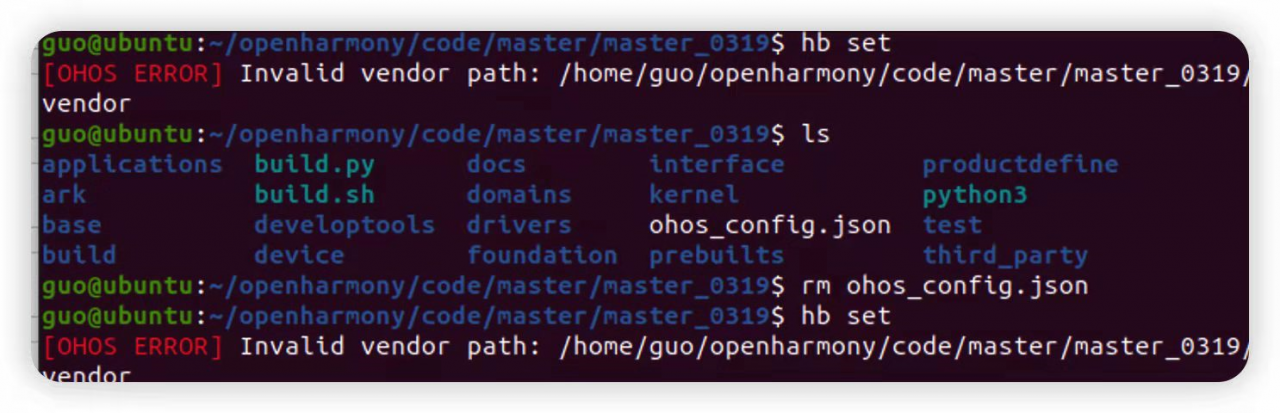
hb set Error: OHOS ERROR] Invalid vendor path: /home/openharmony/vendor (openharmony Compile ubuntu20.04 official document)

ubuntu20.04 hb set error: OHOS ERROR] Invalid vendor path: /home/openharmony/vendor

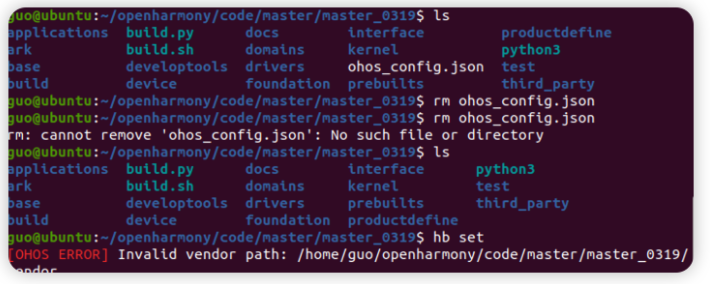
Compilation error

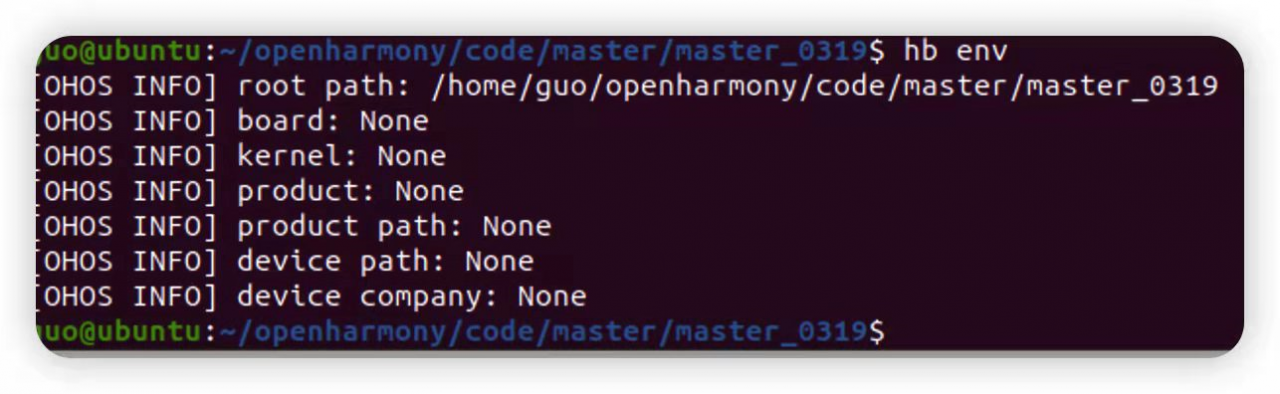
View environment

View version

Try to delete the ohos_config.json file in the project root directory, and then execute the “hb set” command, it still reports an error

Solution:

Uninstall this one: pip3 uninstall ohos-build
and then execute three lines of code in the source code path

 pythom3 -m  pip install build/lite

 pythom3 -m  pip install ohos-build 

pip3 install build/lite

ArcGIS error 999999: error executing function, table not found.

The python script is used to complete the identification work in ArcGIS, but it always prompts that the output table does not exist or there is a problem with the path

Personal solutions:

If you define a workspace to a file database or a non database file, for some unknown reason, you may not be able to create a new feature class file in the personal database, resulting in an error; It may be because of authority and time, and there is no in-depth study.

[Solved] RuntimeError: Input type (torch.FloatTensor) and weight type (torch.cuda.FloatTensor) should be the

1. Problems

When I was practicing using pytorch today, I prepared to use GPU, and the following errors occurred:

RuntimeError: Input type (torch.FloatTensor) and weight type (torch.cuda.FloatTensor) should be the same


2. Code (adjusted and can run correctly)

import torch.optim
import torchvision.datasets

# Preparing the data set
from torch import nn
from torch.utils.data import DataLoader
from torch.utils.tensorboard import SummaryWriter
from time import time

print(torch.cuda.is_available())

train_data = torchvision.datasets.CIFAR10(root="./dataset",
                                          train=True,
                                          transform=torchvision.transforms.ToTensor(),
                                          download=True)

test_data = torchvision.datasets.CIFAR10(root="./dataset",
                                         train=False,
                                         transform=torchvision.transforms.ToTensor(),
                                         download=True)
print("training_set_data_length: %d" % len(train_data))
print("Test set data length: %d" % len(test_data))

# Load data using DataLoader
train_data_loader = DataLoader(train_data, batch_size=64)
test_data_loader = DataLoader(test_data, batch_size=64)


# Build the neural network (in a separate .py file)
class Net(nn.Module):
    def __init__(self) -> None:
        super(Net, self).__init__()
        self.model = nn.Sequential(
            nn.Conv2d(3, 32, 5, 1, 2),
            nn.MaxPool2d(2, 2),
            nn.Conv2d(32, 32, 5, 1, 2),
            nn.MaxPool2d(2, 2),
            nn.Conv2d(32, 64, 5, 1, 2),
            nn.MaxPool2d(2, 2),
            nn.Flatten(),
            nn.Linear(1024, 64),
            nn.Linear(64, 10)

        )

    def forward(self, x):
        x = self.model(x)
        return x


# Create a network model
net = Net()
# Only the model, data, and loss function can run on the GPU
# if torch.cuda.is_available():
#     net = net.cuda()
device = torch.device("cuda:0" if torch.cuda.is_available() else "cpu")
net.to(device)


# Loss function
loss_fn = nn.CrossEntropyLoss()
# if torch.cuda.is_available():
#     loss_fn = loss_fn.cuda()
loss_fn.to(device)

# Optimizer
learning_rate = 1e-2 # 0.01
optimizer = torch.optim.SGD(net.parameters(), lr=learning_rate)

# Set the parameters of the training network
# Record the number of training sessions
total_train_step = 0
# Record the number of training sessions
total_test_step = 0
# Number of training rounds
epoch = 10

start_time = time()
writer = SummaryWriter("./logs/train")
for i in range(epoch):
    print("------Round %d of training ------" % (i + 1))

    # Training steps
    for data in train_data_loader:
        imgs, targets = data
        if torch.cuda.is_available():
            imgs, targets = imgs.cuda(), targets.cuda()
        # imgs.to(device)
        # targets.to(device)
        outputs = net(imgs)
        loss = loss_fn(outputs, targets)

        # Optimizer optimization model
        optimizer.zero_grad()
        loss.backward()
        optimizer.step()

        total_train_step += 1
        if total_train_step % 100 == 0:
            end_time = time()
            print(end_time - start_time)
            print("training_step: {}, loss: {}".format(total_train_step, loss.item())) # .item() can convert the tensor type to a number
            writer.add_scalar("train_loss", loss.item(), total_train_step)

    # Test Steps
    total_test_loss = 0
    total_accuracy = 0
    with torch.no_grad(): # Zero out the gradient when testing. No need to adjust the gradient for optimization
        for data in test_data_loader:
            imgs, targets = data
            if torch.cuda.is_available():
                imgs, targets = imgs.cuda(), targets.cuda()
            # imgs.to(device)
            # targets.to(device)
            outputs = net(imgs)
            loss = loss_fn(outputs, targets)

            total_test_loss += loss.item()
            accuracy = (outputs.argmax(1) == targets).sum()
            total_accuracy += accuracy
    print("loss on the overall test set: {}".format(total_test_loss))
    print("Percent correct on the overall test set: {}".format(total_accuracy/len(test_data)))

    writer.add_scalar("test_loss", total_test_loss, total_test_step)
    writer.add_scalar("test_accuracy", total_accuracy/len(test_data), total_test_step)
    total_test_step += 1

    # Save the model
    # torch.save(net.state_dict(), "model_{}.pth".format(i))
    # print("Round {} training model saved".format(i))

writer.close()

3. Solutions

device = torch.device("cuda:0" if torch.cuda.is_available() else "cpu")
for data in train_data_loader:
   imgs, targets = data
    if torch.cuda.is_available():
        imgs, targets = imgs.cuda(), targets.cuda()
    # imgs.to(device)
    # targets.to(device)
    outputs = net(imgs)

In the above code, IMGs and targets cannot use .to(device), so the input type (torch.Floattensor) will appear after use. If it is not GPU type, it can only be used in another way:

if torch.cuda.is_available():
    imgs, targets = imgs.cuda(), targets.cuda()

This can solve the problem that the input and weight types do not match.

4. Reference

https://stackoverflow.com/questions/59013109/runtimeerror-input-type-torch-floattensor-and-weight-type-torch-cuda-floatte
[Solved] Centos error: collect2: fatal error: cannot find ‘ld‘

When executing a compiled file in Linux (. /configure) with collect2: fatal error: cannot find ‘ld’, which is also preceded by gcc: error: unrecognized command line option -V and configure: error: C compiler cannot create executables. When you find that your gcc and the corresponding dependency packages are installed, you still get the error. At this point you look under /usr/bin/ to see if there is an ld. which ld is not found, but you find a file called ld.gold under /usr/bin by running ls -l |grep ld.

Solution:

Copy ld.gold under /usr/bin/ (do not delete the original file) and rename it to ld. You can also create a soft connection.

Re-execute the compilation

Problem found solved!

Brief description.

gcc compiles the source code to .o, then linker links the .o to .so or executable, linker can use ld.bfd, ld.gold or lld.

Linux Error: CMake Error in CMakeLists.txt: No CMAKE_CXX_COMPILER could be found.

– The C compiler identification is GNU 7.5.0
– The CXX compiler identification is unknown
– Check for working C compiler: /usr/bin/cc
– Check for working C compiler: /usr/bin/cc – works
– Detecting C compiler ABI info
– Detecting C compiler ABI info – done
– Detecting C compile features
– Detecting C compile features – done
CMake Error in CMakeLists.txt:
No CMAKE_CXX_COMPILER could be found.
Tell CMake where to find the compiler by setting either the environment
variable “CXX” or the CMake cache entry CMAKE_CXX_COMPILER to the full path
to the compiler, or to the compiler name if it is in the PATH.
– Configuring incomplete, errors occurred!
See also “/home/dragon/Desktop/v1.0.3/onboard-api/build/CMakeFiles/CMakeOutput.log”.
See also “/home/dragon/Desktop/v1.0.3/onboard-api/build/CMakeFiles/CMakeError.log”.

Solution:

sudo apt install -y build-essential

[Solved] ClickHouse Error: Code: 62. DB::Exception: Syntax error (Multi-statements are not allowed): fai

1. Preparation

First, I need to create a table and write the corresponding fields in it:

create table t_order_mt(
 id UInt32,
 sku_id String,
 total_amount Decimal(16,2),
 create_time Datetime
) engine =MergeTree
 partition by toYYYYMMDD(create_time)
 primary key (id)
 order by (id,sku_id);

Next, you need to insert the corresponding data into it:

insert into t_order_mt values
(101,'sku_001',1000.00,'2020-06-01 12:00:00') ,
(102,'sku_002',2000.00,'2020-06-01 11:00:00'),
(102,'sku_004',2500.00,'2020-06-01 12:00:00'),
(102,'sku_002',2000.00,'2020-06-01 13:00:00'),
(102,'sku_002',12000.00,'2020-06-01 13:00:00'),
(102,'sku_002',600.00,'2020-06-02 12:00:00');

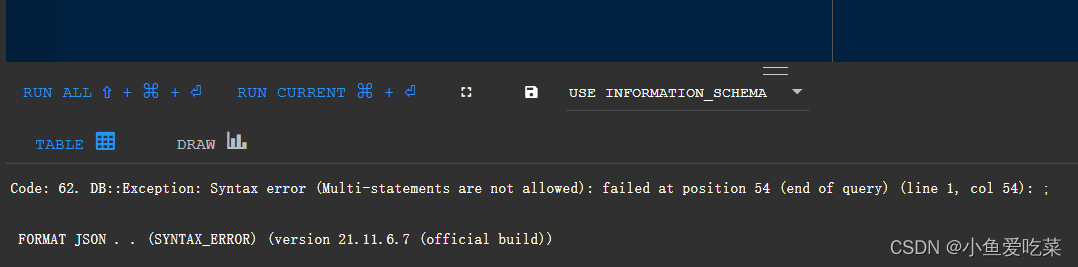
2. Error display

When I execute select * from table_name, the following problems may occur:

Code: 62. DB::Exception: Syntax error (Multi-statements are not allowed): failed at position 54 (end of query) (line 1, col 54): ;


 FORMAT JSON . . (SYNTAX_ERROR) (version 21.11.6.7 (official build))

3. Solution

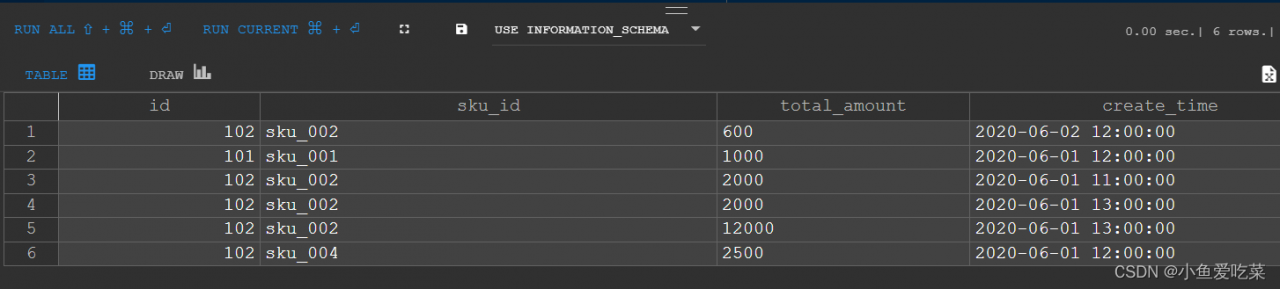
You only need to end the sentence after the corresponding sentence; Change to:

select * from t_order_mt;;

Results


JAVA Error: Error attempting to get column ‘XXX’ from result set. Cause java.sql.

The entity class in Java uses the LocalDateTime type
Convert error: Error attempting to get column ‘XXX’ from result set. Cause: java.sql.

The solution is the simplest:
Switch the version number of com.alibaba to 1.1.22

   <dependency>
         <groupId>com.alibaba</groupId>
         <artifactId>druid-spring-boot-starter</artifactId>
         <version>1.1.22</version>
   </dependency>

[Solved] Nacos Cluster startup error: error=‘Cannot allocate memory‘ (errno=12)

Problem discovery

1. Start one of the Nacos clusters

2. Query the number of starts through the number of starts in the cluster command

ps -ef|grep nacos|grep -v grep|wc -l

This is the second startup. One has been started before, so the problem comes. Why is it still one after the second startup

3. Use the tail-f command to read the contents of the file loop, monitor the growth of the file and find out the reason

tail -f 文件路径   #The file path is given after the start command

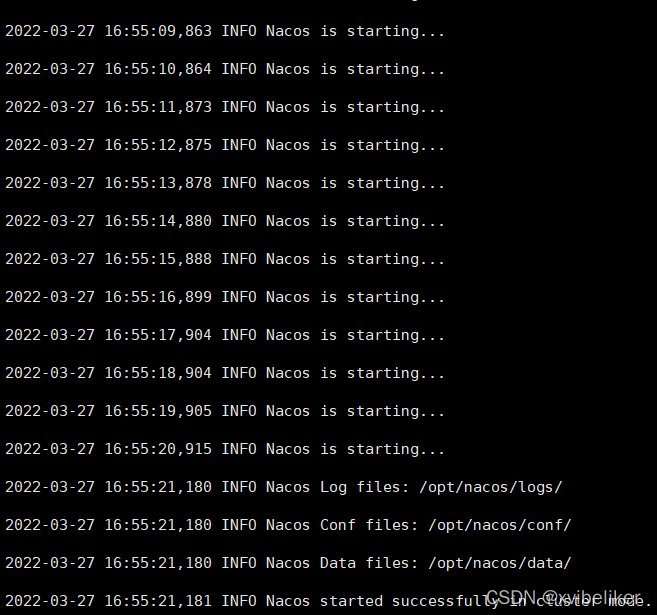
Normal start

Second startup error

From the Nacos startup log information, we can see that the memory is insufficient

4. Check the memory usage through the free -h command

There is only 70m of available memory left

5. By viewing startup.sh file to view the JVM startup command

– xms2g represents 2G of initially allocated memory
– xmx2g represents the maximum value of JVM memory
– xmn1g represents 1g of Cenozoic memory;

Solution:

1. Increase system memory

2. Modify the startup parameters of the JVM in the startup script and reduce the memory allocated to the JVM

Allocate according to your current usage mode and the memory of your virtual machine

After modification, it is started successfully

SQL Server Error: Arithmetic overflow error converting expression to data type int.

1. Problem description

SQL Server (SQL DW) queries the number of data in a table and reports an error using count

select count(*)  from test.test_t;

Then an error is reported:

SQL ERROR [8115] [S0002]: Arithmetic overflow error converting expression to data type int.

2. Cause of the problem

The amount of data is relatively large. The query result directly with count is of type int, which exceeds the range of int.

tinyint: integer from 0 to 255
smallint: integer from – 2 15 (-32768) to 2 15 (32767)
int: integer from – 2 31 (-2147483648) to 2 31 (2147483647)
bigint: integer data (all numbers) from -2 63 (-9223372036854775808) to 2 63 -1 (9223372036854775807) decimal: numeric data with fixed precision and range
from -10 38 -1 to 10 38 -1


3. Solution

Microsoft sql provides count_big method to count

select count_big(*)  from test.test_t;

[Solved] Syntax Error: Error: Node Sass does not yet support your current environment: Windows 64-bit with

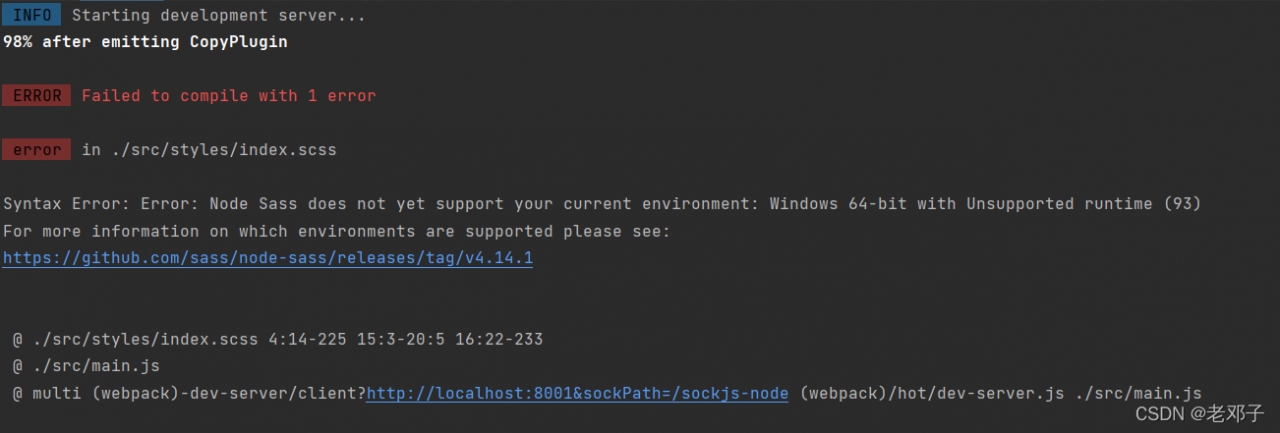
Syntax error: error: node sass does not yet support your current environment: Windows 64 bit with unsupported runtime (93)

Detailed error reporting is shown in the figure:

reason:

Node-sass does not support high versions of node.
my version is 16.14.2

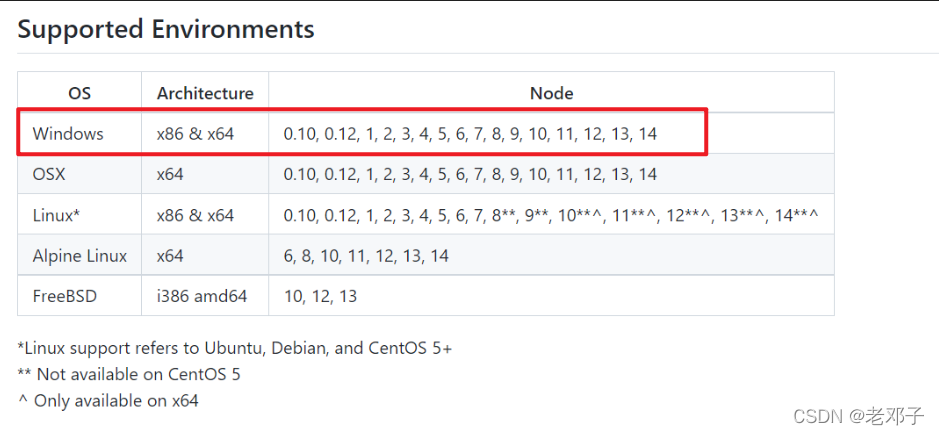
and the node-sass version supports as shown in the figure:

windows only supports 14 versions at most.

Solution:

    1. reinstall node version 14.
    1. Use NVM for node version management and change the node version to 14.

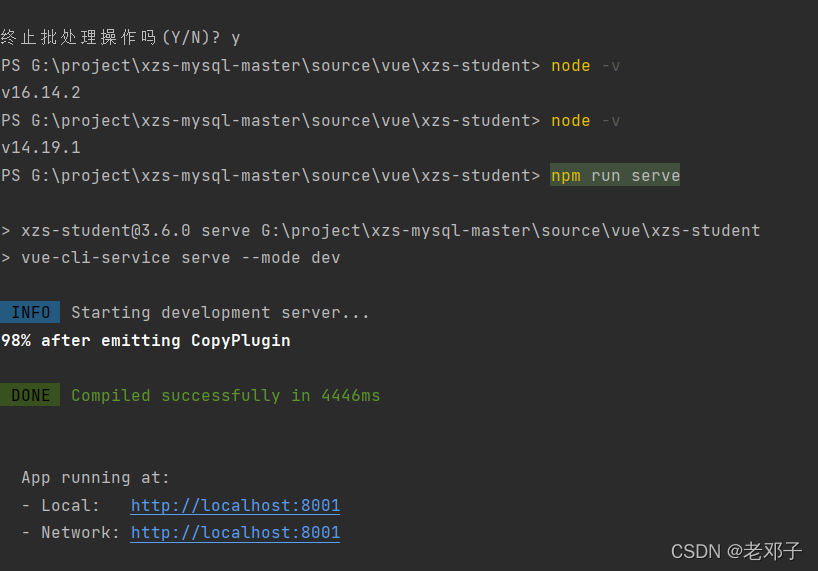
effect

As shown in the figure, after changing to version 14.19.1, it starts normally