Author Archives: Robins

[Solved] JMeter Server Command line pressure measurement: Error in NonGUIDriver java.lang.IllegalArgumentException

The whole environment has been built and operated before, and everything is normal.

After debugging the script locally, upload it to the server for pressure test, report an error and prompt:

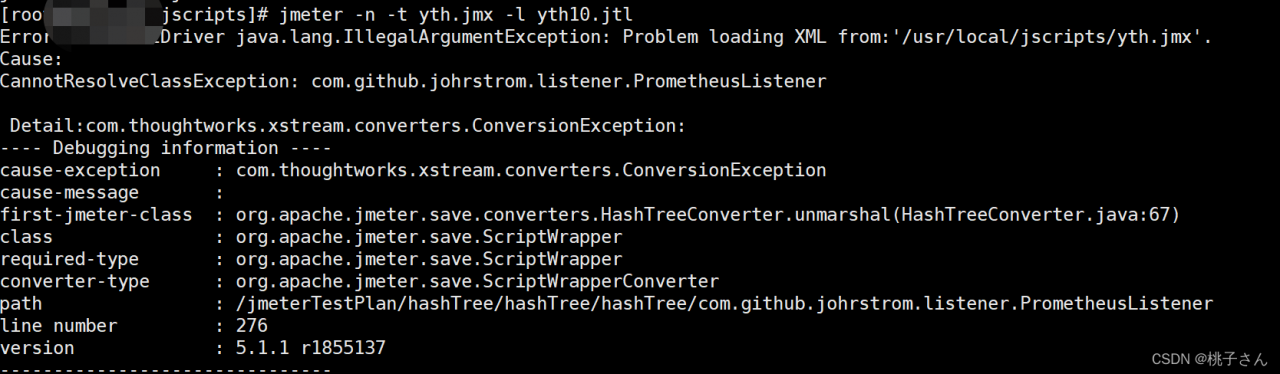
Error in NonGUIDriver java.lang.IllegalArgumentException: Problem loading XML from:'/usr/local/jscripts/yth.jmx'.
Cause:
CannotResolveClassException: com.github.johrstrom.listener.PrometheusListener……


According to the prompt, combine your own operation, because a prometheuslistener plug-in is added during local debugging, but it is not available on the server.

Solution:

1. Add this jar package under the plug-in package under the JMeter directory of the server

2. Re debug the script upload server in the state of no new plug-ins locally

I’ve tried both ways. It’s OK!.

But it’s usually the first one. After all, I want this jar

Mac: How to Solve ERROR launching ‘JD-GUI‘

Solution: the app displays the contents of the package, and find universalJavaApplicationStub.sh, then copy the following content and overwrite it

#!/bin/bash
##################################################################################
#                                                                                #
# universalJavaApplicationStub                                                   #
#                                                                                #
# A BASH based JavaApplicationStub for Java Apps on Mac OS X                     #
# that works with both Apple's and Oracle's plist format.                        #
#                                                                                #
# Inspired by Ian Roberts stackoverflow answer                                   #
# at http://stackoverflow.com/a/17546508/1128689                                 #
#                                                                                #
# @author    Tobias Fischer                                                      #
# @url       https://github.com/tofi86/universalJavaApplicationStub              #
# @date      2020-03-19                                                          #
# @version   3.0.6                                                               #
#                                                                                #
##################################################################################
#                                                                                #
# The MIT License (MIT)                                                          #
#                                                                                #
# Copyright (c) 2014-2020 Tobias Fischer                                         #
#                                                                                #
# Permission is hereby granted, free of charge, to any person obtaining a copy   #
# of this software and associated documentation files (the "Software"), to deal  #
# in the Software without restriction, including without limitation the rights   #
# to use, copy, modify, merge, publish, distribute, sublicense, and/or sell      #
# copies of the Software, and to permit persons to whom the Software is          #
# furnished to do so, subject to the following conditions:                       #
#                                                                                #
# The above copyright notice and this permission notice shall be included in all #
# copies or substantial portions of the Software.                                #
#                                                                                #
# THE SOFTWARE IS PROVIDED "AS IS", WITHOUT WARRANTY OF ANY KIND, EXPRESS OR     #
# IMPLIED, INCLUDING BUT NOT LIMITED TO THE WARRANTIES OF MERCHANTABILITY,       #
# FITNESS FOR A PARTICULAR PURPOSE AND NONINFRINGEMENT. IN NO EVENT SHALL THE    #
# AUTHORS OR COPYRIGHT HOLDERS BE LIABLE FOR ANY CLAIM, DAMAGES OR OTHER         #
# LIABILITY, WHETHER IN AN ACTION OF CONTRACT, TORT OR OTHERWISE, ARISING FROM,  #
# OUT OF OR IN CONNECTION WITH THE SOFTWARE OR THE USE OR OTHER DEALINGS IN THE  #
# SOFTWARE.                                                                      #
#                                                                                #
##################################################################################


# function 'stub_logger()'
#
# A logger which logs to the macOS Console.app using the 'syslog' command
#
# @param1  the log message
# @return  void
################################################################################
function stub_logger() {
	syslog -s -k \
		Facility com.apple.console \
		Level Notice \
		Sender "$(basename "$0")" \
		Message "[$$][${CFBundleName:-$(basename "$0")}] $1"
}


# set the directory abspath of the current
# shell script with symlinks being resolved
############################################
 
PRG=$0
while [ -h "$PRG" ]; do
	ls=$(ls -ld "$PRG")
	link=$(expr "$ls" : '^.*-> \(.*\)$' 2>/dev/null)
	if expr "$link" : '^/' 2> /dev/null >/dev/null; then
		PRG="$link"
	else
		PRG="$(dirname "$PRG")/$link"
	fi
done
PROGDIR=$(dirname "$PRG")
stub_logger "[StubDir] $PROGDIR"


# set files and folders
############################################
 
# the absolute path of the app package
cd "$PROGDIR"/../../ || exit 11
AppPackageFolder=$(pwd)
 
# the base path of the app package
cd .. || exit 12
AppPackageRoot=$(pwd)
 
# set Apple's Java folder
AppleJavaFolder="${AppPackageFolder}"/Contents/Resources/Java
 
# set Apple's Resources folder
AppleResourcesFolder="${AppPackageFolder}"/Contents/Resources
 
# set Oracle's Java folder
OracleJavaFolder="${AppPackageFolder}"/Contents/Java
 
# set Oracle's Resources folder
OracleResourcesFolder="${AppPackageFolder}"/Contents/Resources
 
# set path to Info.plist in bundle
InfoPlistFile="${AppPackageFolder}"/Contents/Info.plist
 
# set the default JVM Version to a null string
JVMVersion=""
JVMMaxVersion=""


# function 'plist_get()'
#
# read a specific Plist key with 'PlistBuddy' utility
#
# @param1  the Plist key with leading colon ':'
# @return  the value as String or Array
################################################################################
plist_get(){
	/usr/libexec/PlistBuddy -c "print $1" "${InfoPlistFile}" 2> /dev/null
}
 
# function 'plist_get_java()'
#
# read a specific Plist key with 'PlistBuddy' utility
# in the 'Java' or 'JavaX' dictionary (<dict>)
#
# @param1  the Plist :Java(X):Key with leading colon ':'
# @return  the value as String or Array
################################################################################
plist_get_java(){
	plist_get ${JavaKey:-":Java"}$1
}


# read Info.plist and extract JVM options
############################################
 
# read the program name from CFBundleName
CFBundleName=$(plist_get ':CFBundleName')
 
# read the icon file name
CFBundleIconFile=$(plist_get ':CFBundleIconFile')
 
 
# check Info.plist for Apple style Java keys -> if key :Java is present, parse in apple mode
/usr/libexec/PlistBuddy -c "print :Java" "${InfoPlistFile}" > /dev/null 2>&1
exitcode=$?
JavaKey=":Java"
 
# if no :Java key is present, check Info.plist for universalJavaApplication style JavaX keys -> if key :JavaX is present, parse in apple mode
if [ $exitcode -ne 0 ]; then
	/usr/libexec/PlistBuddy -c "print :JavaX" "${InfoPlistFile}" > /dev/null 2>&1
	exitcode=$?
	JavaKey=":JavaX"
fi
 
 
# read 'Info.plist' file in Apple style if exit code returns 0 (true, ':Java' key is present)
if [ $exitcode -eq 0 ]; then
	stub_logger "[PlistStyle] Apple"
 
	# set Java and Resources folder
	JavaFolder="${AppleJavaFolder}"
	ResourcesFolder="${AppleResourcesFolder}"
 
	APP_PACKAGE="${AppPackageFolder}"
	JAVAROOT="${AppleJavaFolder}"
	USER_HOME="$HOME"
 
 
	# read the Java WorkingDirectory
	JVMWorkDir=$(plist_get_java ':WorkingDirectory' | xargs)
	# set Working Directory based upon PList value
	if [[ ! -z ${JVMWorkDir} ]]; then
		WorkingDirectory="${JVMWorkDir}"
	else
		# AppPackageRoot is the standard WorkingDirectory when the script is started
		WorkingDirectory="${AppPackageRoot}"
	fi
	# expand variables $APP_PACKAGE, $JAVAROOT, $USER_HOME
	WorkingDirectory=$(eval echo "${WorkingDirectory}")
 
 
	# read the MainClass name
	JVMMainClass="$(plist_get_java ':MainClass')"
 
	# read the SplashFile name
	JVMSplashFile=$(plist_get_java ':SplashFile')
 
	# read the JVM Properties as an array and retain spaces
	IFS=$'\t\n'
	JVMOptions=($(xargs -n1 <<<$(plist_get_java ':Properties' | grep " =" | sed 's/^ */-D/g' | sed -E 's/ = (.*)$/="\1"/g')))
	unset IFS
	# post processing of the array follows further below...
 
	# read the ClassPath in either Array or String style
	JVMClassPath_RAW=$(plist_get_java ':ClassPath' | xargs)
	if [[ $JVMClassPath_RAW == *Array* ]] ; then
		JVMClassPath=.$(plist_get_java ':ClassPath' | grep "    " | sed 's/^ */:/g' | tr -d '\n' | xargs)
	else
		JVMClassPath=${JVMClassPath_RAW}
	fi
	# expand variables $APP_PACKAGE, $JAVAROOT, $USER_HOME
	JVMClassPath=$(eval echo "${JVMClassPath}")
 
	# read the JVM Options in either Array or String style
	JVMDefaultOptions_RAW=$(plist_get_java ':VMOptions' | xargs)
	if [[ $JVMDefaultOptions_RAW == *Array* ]] ; then
		JVMDefaultOptions=$(plist_get_java ':VMOptions' | grep "    " | sed 's/^ */ /g' | tr -d '\n' | xargs)
	else
		JVMDefaultOptions=${JVMDefaultOptions_RAW}
	fi
 
	# read StartOnMainThread and add as -XstartOnFirstThread
	JVMStartOnMainThread=$(plist_get_java ':StartOnMainThread')
	if [ "${JVMStartOnMainThread}" == "true" ]; then
		JVMDefaultOptions+=" -XstartOnFirstThread"
	fi
 
	# read the JVM Arguments in either Array or String style (#76) and retain spaces
	IFS=$'\t\n'
	MainArgs_RAW=$(plist_get_java ':Arguments' | xargs)
	if [[ $MainArgs_RAW == *Array* ]] ; then
		MainArgs=($(xargs -n1 <<<$(plist_get_java ':Arguments' | tr -d '\n' | sed -E 's/Array \{ *(.*) *\}/\1/g' | sed 's/  */ /g')))
	else
		MainArgs=($(xargs -n1 <<<$(plist_get_java ':Arguments')))
	fi
	unset IFS
	# post processing of the array follows further below...
 
	# read the Java version we want to find
	JVMVersion=$(plist_get_java ':JVMVersion' | xargs)
	# post processing of the version string follows below...
 
 
# read 'Info.plist' file in Oracle style
else
	stub_logger "[PlistStyle] Oracle"
 
	# set Working Directory and Java and Resources folder
	JavaFolder="${OracleJavaFolder}"
	ResourcesFolder="${OracleResourcesFolder}"
	WorkingDirectory="${OracleJavaFolder}"
 
	APP_ROOT="${AppPackageFolder}"
 
	# read the MainClass name
	JVMMainClass="$(plist_get ':JVMMainClassName')"
 
	# read the SplashFile name
	JVMSplashFile=$(plist_get ':JVMSplashFile')
 
	# read the JVM Options as an array and retain spaces
	IFS=$'\t\n'
	JVMOptions=($(plist_get ':JVMOptions' | grep "    " | sed 's/^ *//g'))
	unset IFS
	# post processing of the array follows further below...
 
	# read the ClassPath in either Array or String style
	JVMClassPath_RAW=$(plist_get ':JVMClassPath')
	if [[ $JVMClassPath_RAW == *Array* ]] ; then
		JVMClassPath=.$(plist_get ':JVMClassPath' | grep "    " | sed 's/^ */:/g' | tr -d '\n' | xargs)
		# expand variables $APP_PACKAGE, $JAVAROOT, $USER_HOME
		JVMClassPath=$(eval echo "${JVMClassPath}")
 
	elif [[ ! -z ${JVMClassPath_RAW} ]] ; then
		JVMClassPath=${JVMClassPath_RAW}
		# expand variables $APP_PACKAGE, $JAVAROOT, $USER_HOME
		JVMClassPath=$(eval echo "${JVMClassPath}")
 
	else
		#default: fallback to OracleJavaFolder
		JVMClassPath="${JavaFolder}/*"
		# Do NOT expand the default 'AppName.app/Contents/Java/*' classpath (#42)
	fi
 
	# read the JVM Default Options
	JVMDefaultOptions=$(plist_get ':JVMDefaultOptions' | grep -o " \-.*" | tr -d '\n' | xargs)
 
	# read the Main Arguments from JVMArguments key as an array and retain spaces (see #46 for naming details)
	IFS=$'\t\n'
	MainArgs=($(xargs -n1 <<<$(plist_get ':JVMArguments' | tr -d '\n' | sed -E 's/Array \{ *(.*) *\}/\1/g' | sed 's/  */ /g')))
	unset IFS
	# post processing of the array follows further below...
 
	# read the Java version we want to find
	JVMVersion=$(plist_get ':JVMVersion' | xargs)
	# post processing of the version string follows below...
fi
 
 
# (#75) check for undefined icons or icon names without .icns extension and prepare
# an osascript statement for those cases when the icon can be shown in the dialog
DialogWithIcon=""
if [ ! -z ${CFBundleIconFile} ]; then
	if [[ ${CFBundleIconFile} == *.icns ]] && [[ -f "${ResourcesFolder}/${CFBundleIconFile}" ]] ; then
		DialogWithIcon=" with icon path to resource \"${CFBundleIconFile}\" in bundle (path to me)"
	elif [[ ${CFBundleIconFile} != *.icns ]] && [[ -f "${ResourcesFolder}/${CFBundleIconFile}.icns" ]] ; then
		CFBundleIconFile+=".icns"
		DialogWithIcon=" with icon path to resource \"${CFBundleIconFile}\" in bundle (path to me)"
	fi
fi
 
 
# JVMVersion: post processing and optional splitting
if [[ ${JVMVersion} == *";"* ]]; then
	minMaxArray=(${JVMVersion//;/ })
	JVMVersion=${minMaxArray[0]//+}
	JVMMaxVersion=${minMaxArray[1]//+}
fi
stub_logger "[JavaRequirement] JVM minimum version: ${JVMVersion}"
stub_logger "[JavaRequirement] JVM maximum version: ${JVMMaxVersion}"
 
# MainArgs: replace occurences of $APP_ROOT with its content
MainArgsArr=()
for i in "${MainArgs[@]}"
do
	MainArgsArr+=("$(eval echo "$i")")
done
 
# JVMOptions: replace occurences of $APP_ROOT with its content
JVMOptionsArr=()
for i in "${JVMOptions[@]}"
do
	JVMOptionsArr+=("$(eval echo "$i")")
done
 
 
# internationalized messages
############################################
 
LANG=$(defaults read -g AppleLocale)
stub_logger "[Language] $LANG"
 
# French localization
if [[ $LANG == fr* ]] ; then
	MSG_ERROR_LAUNCHING="ERREUR au lancement de '${CFBundleName}'."
	MSG_MISSING_MAINCLASS="'MainClass' n'est pas spécifié.\nL'application Java ne peut pas être lancée."
	MSG_JVMVERSION_REQ_INVALID="La syntaxe de la version de Java demandée est invalide: %s\nVeuillez contacter le développeur de l'application."
	MSG_NO_SUITABLE_JAVA="La version de Java installée sur votre système ne convient pas.\nCe programme nécessite Java %s"
	MSG_JAVA_VERSION_OR_LATER="ou ultérieur"
	MSG_JAVA_VERSION_LATEST="(dernière mise à jour)"
	MSG_JAVA_VERSION_MAX="à %s"
	MSG_NO_SUITABLE_JAVA_CHECK="Merci de bien vouloir installer la version de Java requise."
	MSG_INSTALL_JAVA="Java doit être installé sur votre système.\nRendez-vous sur java.com et suivez les instructions d'installation..."
	MSG_LATER="Plus tard"
	MSG_VISIT_JAVA_DOT_COM="Java by Oracle"
	MSG_VISIT_ADOPTOPENJDK="Java by AdoptOpenJDK"
 
# German localization
elif [[ $LANG == de* ]] ; then
	MSG_ERROR_LAUNCHING="FEHLER beim Starten von '${CFBundleName}'."
	MSG_MISSING_MAINCLASS="Die 'MainClass' ist nicht spezifiziert!\nDie Java-Anwendung kann nicht gestartet werden!"
	MSG_JVMVERSION_REQ_INVALID="Die Syntax der angeforderten Java-Version ist ungültig: %s\nBitte kontaktieren Sie den Entwickler der App."
	MSG_NO_SUITABLE_JAVA="Es wurde keine passende Java-Version auf Ihrem System gefunden!\nDieses Programm benötigt Java %s"
	MSG_JAVA_VERSION_OR_LATER="oder neuer"
	MSG_JAVA_VERSION_LATEST="(neuste Unterversion)"
	MSG_JAVA_VERSION_MAX="bis %s"
	MSG_NO_SUITABLE_JAVA_CHECK="Stellen Sie sicher, dass die angeforderte Java-Version installiert ist."
	MSG_INSTALL_JAVA="Auf Ihrem System muss die 'Java'-Software installiert sein.\nBesuchen Sie java.com für weitere Installationshinweise."
	MSG_LATER="Später"
	MSG_VISIT_JAVA_DOT_COM="Java von Oracle"
	MSG_VISIT_ADOPTOPENJDK="Java von AdoptOpenJDK"
 
# Simplifyed Chinese localization
elif [[ $LANG == zh* ]] ; then
	MSG_ERROR_LAUNCHING="无法启动 '${CFBundleName}'."
	MSG_MISSING_MAINCLASS="没有指定 'MainClass'!\nJava程序无法启动!"
	MSG_JVMVERSION_REQ_INVALID="Java版本参数语法错误: %s\n请联系该应用的开发者。"
	MSG_NO_SUITABLE_JAVA="没有在系统中找到合适的Java版本!\n必须安装Java %s才能够使用该程序!"
	MSG_JAVA_VERSION_OR_LATER="及以上版本"
	MSG_JAVA_VERSION_LATEST="(最新版本)"
	MSG_JAVA_VERSION_MAX="最高为 %s"
	MSG_NO_SUITABLE_JAVA_CHECK="请确保系统中安装了所需的Java版本"
	MSG_INSTALL_JAVA="你需要在Mac中安装Java运行环境!\n访问 java.com 了解如何安装。"
	MSG_LATER="稍后"
	MSG_VISIT_JAVA_DOT_COM="Java by Oracle"
	MSG_VISIT_ADOPTOPENJDK="Java by AdoptOpenJDK"
 
# English default localization
else
	MSG_ERROR_LAUNCHING="ERROR launching '${CFBundleName}'."
	MSG_MISSING_MAINCLASS="'MainClass' isn't specified!\nJava application cannot be started!"
	MSG_JVMVERSION_REQ_INVALID="The syntax of the required Java version is invalid: %s\nPlease contact the App developer."
	MSG_NO_SUITABLE_JAVA="No suitable Java version found on your system!\nThis program requires Java %s"
	MSG_JAVA_VERSION_OR_LATER="or later"
	MSG_JAVA_VERSION_LATEST="(latest update)"
	MSG_JAVA_VERSION_MAX="up to %s"
	MSG_NO_SUITABLE_JAVA_CHECK="Make sure you install the required Java version."
	MSG_INSTALL_JAVA="You need to have JAVA installed on your Mac!\nVisit java.com for installation instructions..."
	MSG_LATER="Later"
	MSG_VISIT_JAVA_DOT_COM="Java by Oracle"
	MSG_VISIT_ADOPTOPENJDK="Java by AdoptOpenJDK"
fi


# function 'get_java_version_from_cmd()'
#
# returns Java version string from 'java -version' command
# works for both old (1.8) and new (9) version schema
#
# @param1  path to a java JVM executable
# @return  the Java version number as displayed in 'java -version' command
################################################################################
function get_java_version_from_cmd() {
	# second sed command strips " and -ea from the version string
	echo $("$1" -version 2>&1 | awk '/version/{print $3}' | sed -E 's/"//g;s/-ea//g')
}
 
 
# function 'extract_java_major_version()'
#
# extract Java major version from a version string
#
# @param1  a Java version number ('1.8.0_45') or requirement string ('1.8+')
# @return  the major version (e.g. '7', '8' or '9', etc.)
################################################################################
function extract_java_major_version() {
	echo $(echo "$1" | sed -E 's/^1\.//;s/^([0-9]+)(-ea|(\.[0-9_.]{1,7})?)(-b[0-9]+-[0-9]+)?[+*]?$/\1/')
}
 
 
# function 'get_comparable_java_version()'
#
# return comparable version for a Java version number or requirement string
#
# @param1  a Java version number ('1.8.0_45') or requirement string ('1.8+')
# @return  an 8 digit numeral ('1.8.0_45'->'08000045'; '9.1.13'->'09001013')
################################################################################
function get_comparable_java_version() {
	# cleaning: 1) remove leading '1.'; 2) remove build string (e.g. '-b14-468'); 3) remove 'a-Z' and '-*+' (e.g. '-ea'); 4) replace '_' with '.'
	local cleaned=$(echo "$1" | sed -E 's/^1\.//g;s/-b[0-9]+-[0-9]+$//g;s/[a-zA-Z+*\-]//g;s/_/./g')
	# splitting at '.' into an array
	local arr=( ${cleaned//./ } )
	# echo a string with left padded version numbers
	echo "$(printf '%02s' ${arr[0]})$(printf '%03s' ${arr[1]})$(printf '%03s' ${arr[2]})"
}
 
 
# function 'is_valid_requirement_pattern()'
#
# check whether the Java requirement is a valid requirement pattern
#
# supported requirements are for example:
# - 1.6       requires Java 6 (any update)      [1.6, 1.6.0_45, 1.6.0_88]
# - 1.6*      requires Java 6 (any update)      [1.6, 1.6.0_45, 1.6.0_88]
# - 1.6+      requires Java 6 or higher         [1.6, 1.6.0_45, 1.8, 9, etc.]
# - 1.6.0     requires Java 6 (any update)      [1.6, 1.6.0_45, 1.6.0_88]
# - 1.6.0_45  requires Java 6u45                [1.6.0_45]
# - 1.6.0_45+ requires Java 6u45 or higher      [1.6.0_45, 1.6.0_88, 1.8, etc.]
# - 9         requires Java 9 (any update)      [9.0.*, 9.1, 9.3, etc.]
# - 9*        requires Java 9 (any update)      [9.0.*, 9.1, 9.3, etc.]
# - 9+        requires Java 9 or higher         [9.0, 9.1, 10, etc.]
# - 9.1       requires Java 9.1 (any update)    [9.1.*, 9.1.2, 9.1.13, etc.]
# - 9.1*      requires Java 9.1 (any update)    [9.1.*, 9.1.2, 9.1.13, etc.]
# - 9.1+      requires Java 9.1 or higher       [9.1, 9.2, 10, etc.]
# - 9.1.3     requires Java 9.1.3               [9.1.3]
# - 9.1.3*    requires Java 9.1.3 (any update)  [9.1.3]
# - 9.1.3+    requires Java 9.1.3 or higher     [9.1.3, 9.1.4, 9.2.*, 10, etc.]
# - 10-ea     requires Java 10 (early access release)
#
# unsupported requirement patterns are for example:
# - 1.2, 1.3, 1.9       Java 2, 3 are not supported
# - 1.9                 Java 9 introduced a new versioning scheme
# - 6u45                known versioning syntax, but unsupported
# - 9-ea*, 9-ea+        early access releases paired with */+
# - 9., 9.*, 9.+        version ending with a .
# - 9.1., 9.1.*, 9.1.+  version ending with a .
# - 9.3.5.6             4 part version number is unsupported
#
# @param1  a Java requirement string ('1.8+')
# @return  boolean exit code: 0 (is valid), 1 (is not valid)
################################################################################
function is_valid_requirement_pattern() {
	local java_req=$1
	java8pattern='1\.[4-8](\.[0-9]+)?(\.0_[0-9]+)?[*+]?'
	java9pattern='(9|1[0-9])(-ea|[*+]|(\.[0-9]+){1,2}[*+]?)?'
	# test matches either old Java versioning scheme (up to 1.8) or new scheme (starting with 9)
	if [[ ${java_req} =~ ^(${java8pattern}|${java9pattern})$ ]]; then
		return 0
	else
		return 1
	fi
}


# determine which JVM to use
############################################
 
# default Apple JRE plugin path (< 1.6)
apple_jre_plugin="/Library/Java/Home/bin/java"
apple_jre_version=$(get_java_version_from_cmd "${apple_jre_plugin}")
# default Oracle JRE plugin path (>= 1.7)
oracle_jre_plugin="/Library/Internet Plug-Ins/JavaAppletPlugin.plugin/Contents/Home/bin/java"
oracle_jre_version=$(get_java_version_from_cmd "${oracle_jre_plugin}")
 
 
# first check system variable "$JAVA_HOME" -> has precedence over any other System JVM
stub_logger '[JavaSearch] Checking for $JAVA_HOME ...'
if [ -n "$JAVA_HOME" ] ; then
	stub_logger "[JavaSearch] ... found JAVA_HOME with value $JAVA_HOME"
 
	# PR 26: Allow specifying "$JAVA_HOME" relative to "$AppPackageFolder"
	# which allows for bundling a custom version of Java inside your app!
	if [[ $JAVA_HOME == /* ]] ; then
		# if "$JAVA_HOME" starts with a Slash it's an absolute path
		JAVACMD="$JAVA_HOME/bin/java"
	else
		# otherwise it's a relative path to "$AppPackageFolder"
		JAVACMD="$AppPackageFolder/$JAVA_HOME/bin/java"
	fi
	JAVACMD_version=$(get_comparable_java_version $(get_java_version_from_cmd "${JAVACMD}"))
else
	stub_logger "[JavaSearch] ... didn't found JAVA_HOME"
fi
 
 
# check for any other or a specific Java version
# also if $JAVA_HOME exists but isn't executable
if [ -z "${JAVACMD}" ] || [ ! -x "${JAVACMD}" ] ; then
	stub_logger "[JavaSearch] Checking for JavaVirtualMachines on the system ..."
	# reset variables
	JAVACMD=""
	JAVACMD_version=""
 
	# first check whether JVMVersion string is a valid requirement string
	if [ ! -z "${JVMVersion}" ] && ! is_valid_requirement_pattern ${JVMVersion} ; then
		MSG_JVMVERSION_REQ_INVALID_EXPANDED=$(printf "${MSG_JVMVERSION_REQ_INVALID}" "${JVMVersion}")
		# log exit cause
		stub_logger "[EXIT 4] ${MSG_JVMVERSION_REQ_INVALID_EXPANDED}"
		# display error message with AppleScript
		osascript -e "tell application \"System Events\" to display dialog \"${MSG_ERROR_LAUNCHING}\n\n${MSG_JVMVERSION_REQ_INVALID_EXPANDED}\" with title \"${CFBundleName}\" buttons {\" OK \"} default button 1${DialogWithIcon}"
		# exit with error
		exit 4
	fi
	# then check whether JVMMaxVersion string is a valid requirement string
	if [ ! -z "${JVMMaxVersion}" ] && ! is_valid_requirement_pattern ${JVMMaxVersion} ; then
		MSG_JVMVERSION_REQ_INVALID_EXPANDED=$(printf "${MSG_JVMVERSION_REQ_INVALID}" "${JVMMaxVersion}")
		# log exit cause
		stub_logger "[EXIT 5] ${MSG_JVMVERSION_REQ_INVALID_EXPANDED}"
		# display error message with AppleScript
		osascript -e "tell application \"System Events\" to display dialog \"${MSG_ERROR_LAUNCHING}\n\n${MSG_JVMVERSION_REQ_INVALID_EXPANDED}\" with title \"${CFBundleName}\" buttons {\" OK \"} default button 1${DialogWithIcon}"
		# exit with error
		exit 5
	fi
 
 
	# find installed JavaVirtualMachines (JDK + JRE)
	allJVMs=()
	# read JDK's from '/usr/libexec/java_home -V' command
	while read -r line; do
		version=$(echo $line | awk -F $',' '{print $1;}')
		path=$(echo $line | awk -F $'" ' '{print $2;}')
		path+="/bin/java"
		allJVMs+=("$version:$path")
	done < <(/usr/libexec/java_home -V 2>&1 | grep '^[[:space:]]')
	# unset while loop variables
	unset version path
 
	# add Apple JRE if available
	if [ -x "${apple_jre_plugin}" ] ; then
		allJVMs+=("$apple_jre_version:$apple_jre_plugin")
	fi
 
	# add Oracle JRE if available
	if [ -x "${oracle_jre_plugin}" ] ; then
		allJVMs+=("$oracle_jre_version:$oracle_jre_plugin")
	fi
 
	# debug output
	for i in "${allJVMs[@]}"
	do
		stub_logger "[JavaSearch] ... found JVM: $i"
	done
 
 
	# determine JVMs matching the min/max version requirement
	minC=$(get_comparable_java_version ${JVMVersion})
	maxC=$(get_comparable_java_version ${JVMMaxVersion})
	matchingJVMs=()
 
	for i in "${allJVMs[@]}"
	do
		# split JVM string at ':' delimiter to retain spaces in $path substring
		IFS=: arr=($i) ; unset IFS
		# [0] JVM version number
		ver=${arr[0]}
		# comparable JVM version number
		comp=$(get_comparable_java_version $ver)
		# [1] JVM path
		path="${arr[1]}"
		# construct string item for adding to the "matchingJVMs" array
		item="$comp:$ver:$path"
 
		# pre-requisite: current version number needs to be greater than min version number
		if [ "$comp" -ge "$minC" ] ; then
 
			# perform max version checks if max version requirement is present
			if [ ! -z ${JVMMaxVersion} ] ; then
 
				# max version requirement ends with '*' modifier
				if [[ ${JVMMaxVersion} == *\* ]] ; then
 
					# use the '*' modifier from the max version string as wildcard for a 'starts with' comparison
					# and check whether the current version number starts with the max version wildcard string
					if [[ ${ver} == ${JVMMaxVersion} ]]; then
						matchingJVMs+=("$item")
 
					# or whether the current comparable version is lower than the comparable max version
					elif [ "$comp" -le "$maxC" ] ; then
						matchingJVMs+=("$item")
					fi
 
				# max version requirement ends with '+' modifier -> always add this version if it's greater than $min
				# because a max requirement with + modifier doesn't make sense
				elif [[ ${JVMMaxVersion} == *+ ]] ; then
					matchingJVMs+=("$item")
 
				# matches 6 zeros at the end of the max version string (e.g. for 1.8, 9)
				# -> then the max version string should be treated like with a '*' modifier at the end
				#elif [[ ${maxC} =~ ^[0-9]{2}0{6}$ ]] && [ "$comp" -le $(( ${maxC#0} + 999 )) ] ; then
				#	matchingJVMs+=("$item")
 
				# matches 3 zeros at the end of the max version string (e.g. for 9.1, 10.3)
				# -> then the max version string should be treated like with a '*' modifier at the end
				#elif [[ ${maxC} =~ ^[0-9]{5}0{3}$ ]] && [ "$comp" -le "${maxC}" ] ; then
				#	matchingJVMs+=("$item")
 
				# matches standard requirements without modifier
				elif [ "$comp" -le "$maxC" ]; then
					matchingJVMs+=("$item")
				fi
 
			# no max version requirement:
 
			# min version requirement ends with '+' modifier
			# -> always add the current version because it's greater than $min
			elif [[ ${JVMVersion} == *+ ]] ; then
				matchingJVMs+=("$item")
 
			# min version requirement ends with '*' modifier
			# -> use the '*' modifier from the min version string as wildcard for a 'starts with' comparison
			#    and check whether the current version number starts with the min version wildcard string
			elif [[ ${JVMVersion} == *\* ]] ; then
				if [[ ${ver} == ${JVMVersion} ]] ; then
					matchingJVMs+=("$item")
				fi
 
			# compare the min version against the current version with an additional * wildcard for a 'starts with' comparison
			# -> e.g. add 1.8.0_44 when the requirement is 1.8
			elif [[ ${ver} == ${JVMVersion}* ]] ; then
					matchingJVMs+=("$item")
			fi
		fi
	done
	# unset for loop variables
	unset arr ver comp path item
 
	# debug output
	for i in "${matchingJVMs[@]}"
	do
		stub_logger "[JavaSearch] ... ... matches all requirements: $i"
	done
 
 
	# sort the matching JavaVirtualMachines by version number
	# https://stackoverflow.com/a/11789688/1128689
	IFS=$'\n' matchingJVMs=($(sort -nr <<<"${matchingJVMs[*]}"))
	unset IFS
 
 
	# get the highest matching JVM
	for ((i = 0; i < ${#matchingJVMs[@]}; i++));
	do
		# split JVM string at ':' delimiter to retain spaces in $path substring
		IFS=: arr=(${matchingJVMs[$i]}) ; unset IFS
		# [0] comparable JVM version number
		comp=${arr[0]}
		# [1] JVM version number
		ver=${arr[1]}
		# [2] JVM path
		path="${arr[2]}"
 
		# use current value as JAVACMD if it's executable
		if [ -x "$path" ] ; then
			JAVACMD="$path"
			JAVACMD_version=$comp
			break
		fi
	done
	# unset for loop variables
	unset arr comp ver path
fi
 
# log the Java Command and the extracted version number
stub_logger "[JavaCommand] '$JAVACMD'"
stub_logger "[JavaVersion] $(get_java_version_from_cmd "${JAVACMD}")${JAVACMD_version:+/$JAVACMD_version}"


if [ -z "${JAVACMD}" ] || [ ! -x "${JAVACMD}" ] ; then
 
	# different error messages when a specific JVM was required
	if [ ! -z "${JVMVersion}" ] ; then
		# display human readable java version (#28)
		java_version_hr=$(echo ${JVMVersion} | sed -E 's/^1\.([0-9+*]+)$/ \1/g' | sed "s/+/ ${MSG_JAVA_VERSION_OR_LATER}/;s/*/ ${MSG_JAVA_VERSION_LATEST}/")
		MSG_NO_SUITABLE_JAVA_EXPANDED=$(printf "${MSG_NO_SUITABLE_JAVA}" "${java_version_hr}").
 
		if [ ! -z "${JVMMaxVersion}" ] ; then
			java_version_hr=$(extract_java_major_version ${JVMVersion})
			java_version_max_hr=$(echo ${JVMMaxVersion} | sed -E 's/^1\.([0-9+*]+)$/ \1/g' | sed "s/+//;s/*/ ${MSG_JAVA_VERSION_LATEST}/")
			MSG_NO_SUITABLE_JAVA_EXPANDED="$(printf "${MSG_NO_SUITABLE_JAVA}" "${java_version_hr}") $(printf "${MSG_JAVA_VERSION_MAX}" "${java_version_max_hr}")"
		fi
 
		# log exit cause
		stub_logger "[EXIT 3] ${MSG_NO_SUITABLE_JAVA_EXPANDED}"
 
		# display error message with AppleScript
		osascript -e "tell application \"System Events\" to display dialog \"${MSG_ERROR_LAUNCHING}\n\n${MSG_NO_SUITABLE_JAVA_EXPANDED}\n${MSG_NO_SUITABLE_JAVA_CHECK}\" with title \"${CFBundleName}\"  buttons {\" OK \", \"${MSG_VISIT_JAVA_DOT_COM}\", \"${MSG_VISIT_ADOPTOPENJDK}\"} default button 1${DialogWithIcon}" \
				-e "set response to button returned of the result" \
				-e "if response is \"${MSG_VISIT_JAVA_DOT_COM}\" then open location \"https://www.java.com/download/\"" \
				-e "if response is \"${MSG_VISIT_ADOPTOPENJDK}\" then open location \"https://adoptopenjdk.net/releases.html\""
		# exit with error
		exit 3
 
	else
		# log exit cause
		stub_logger "[EXIT 1] ${MSG_ERROR_LAUNCHING}"
		# display error message with AppleScript
		osascript -e "tell application \"System Events\" to display dialog \"${MSG_ERROR_LAUNCHING}\n\n${MSG_INSTALL_JAVA}\" with title \"${CFBundleName}\" buttons {\"${MSG_LATER}\", \"${MSG_VISIT_JAVA_DOT_COM}\", \"${MSG_VISIT_ADOPTOPENJDK}\"} default button 1${DialogWithIcon}" \
					-e "set response to button returned of the result" \
					-e "if response is \"${MSG_VISIT_JAVA_DOT_COM}\" then open location \"https://www.java.com/download/\"" \
					-e "if response is \"${MSG_VISIT_ADOPTOPENJDK}\" then open location \"https://adoptopenjdk.net/releases.html\""
		# exit with error
		exit 1
	fi
fi


# MainClass check
############################################
 
if [ -z "${JVMMainClass}" ]; then
	# log exit cause
	stub_logger "[EXIT 2] ${MSG_MISSING_MAINCLASS}"
	# display error message with AppleScript
	osascript -e "tell application \"System Events\" to display dialog \"${MSG_ERROR_LAUNCHING}\n\n${MSG_MISSING_MAINCLASS}\" with title \"${CFBundleName}\" buttons {\" OK \"} default button 1${DialogWithIcon}"
	# exit with error
	exit 2
fi


# execute $JAVACMD and do some preparation
############################################
 
# enable drag&drop to the dock icon
export CFProcessPath="$0"
 
# remove Apples ProcessSerialNumber from passthru arguments (#39)
if [[ "$*" == -psn* ]] ; then
	ArgsPassthru=()
else
	ArgsPassthru=("$@")
fi
 
# change to Working Directory based upon Apple/Oracle Plist info
cd "${WorkingDirectory}" || exit 13
stub_logger "[WorkingDirectory] ${WorkingDirectory}"
 
# execute Java and set
# - classpath
# - splash image
# - dock icon
# - app name
# - JVM options/properties (-D)
# - JVM default options (-X)
# - main class
# - main class arguments
# - passthrough arguments from Terminal or Drag'n'Drop to Finder icon
stub_logger "[Exec] \"$JAVACMD\" -cp \"${JVMClassPath}\" -splash:\"${ResourcesFolder}/${JVMSplashFile}\" -Xdock:icon=\"${ResourcesFolder}/${CFBundleIconFile}\" -Xdock:name=\"${CFBundleName}\" ${JVMOptionsArr:+$(printf "'%s' " "${JVMOptionsArr[@]}") }${JVMDefaultOptions:+$JVMDefaultOptions }${JVMMainClass}${MainArgsArr:+ $(printf "'%s' " "${MainArgsArr[@]}")}${ArgsPassthru:+ $(printf "'%s' " "${ArgsPassthru[@]}")}"
exec "${JAVACMD}" \
		-cp "${JVMClassPath}" \
		-splash:"${ResourcesFolder}/${JVMSplashFile}" \
		-Xdock:icon="${ResourcesFolder}/${CFBundleIconFile}" \
		-Xdock:name="${CFBundleName}" \
		${JVMOptionsArr:+"${JVMOptionsArr[@]}" }\
		${JVMDefaultOptions:+$JVMDefaultOptions }\
		"${JVMMainClass}"\
		${MainArgsArr:+ "${MainArgsArr[@]}"}\
		${ArgsPassthru:+ "${ArgsPassthru[@]}"}

Tips: https://github.com/java-decompiler/jd-gui/issues/332

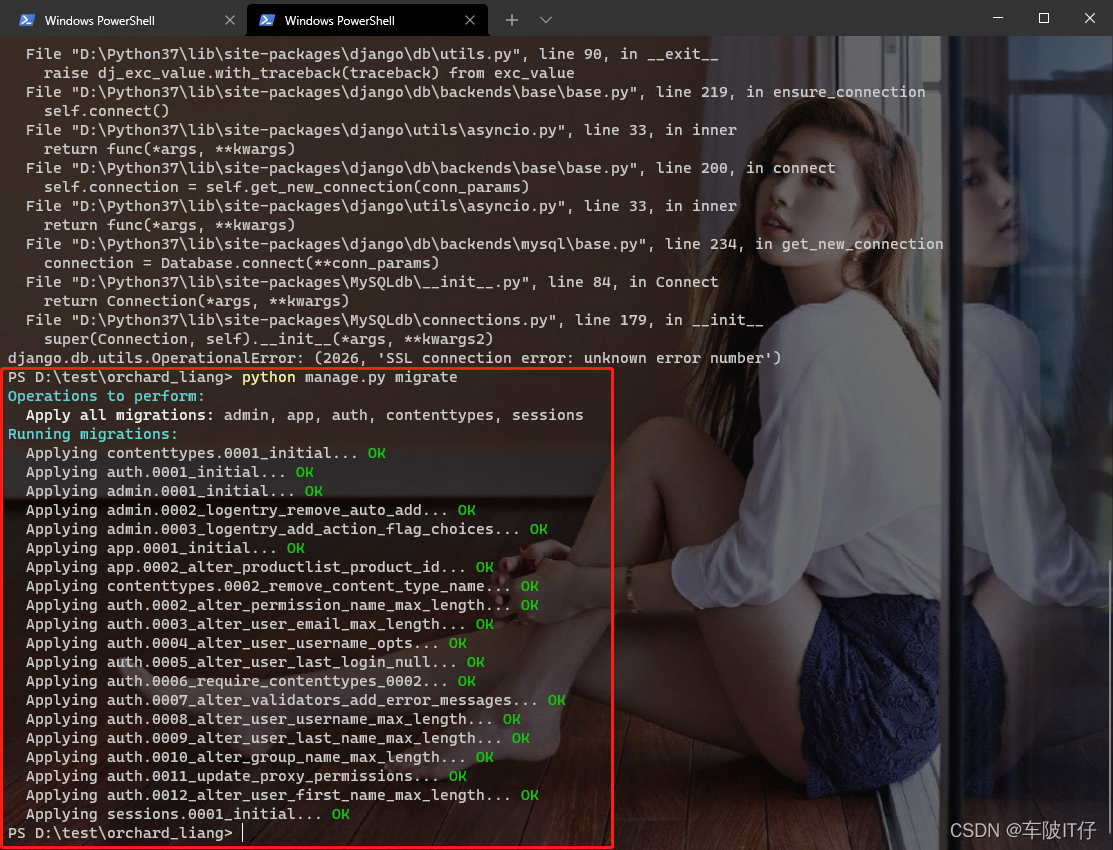
[Solved] Windows MYSQL Error: django.db.utils.OperationalError: (2026, ‘SSL connection error: unknown error number‘)

Error Messages:
PS D:\test\orchard_liang>python manage.py sqlmigrate app 0001
Traceback (most recent call last):
  File "D:\Python37\lib\site-packages\django\db\backends\base\base.py", line 219, in ensure_connection
    self.connect()
  File "D:\Python37\lib\site-packages\django\utils\asyncio.py", line 33, in inner
    return func(*args, **kwargs)
  File "D:\Python37\lib\site-packages\django\db\backends\base\base.py", line 200, in connect
    self.connection = self.get_new_connection(conn_params)
  File "D:\Python37\lib\site-packages\django\utils\asyncio.py", line 33, in inner
    return func(*args, **kwargs)
  File "D:\Python37\lib\site-packages\django\db\backends\mysql\base.py", line 234, in get_new_connection
    connection = Database.connect(**conn_params)
  File "D:\Python37\lib\site-packages\MySQLdb\__init__.py", line 84, in Connect
    return Connection(*args, **kwargs)
  File "D:\Python37\lib\site-packages\MySQLdb\connections.py", line 179, in __init__
    super(Connection, self).__init__(*args, **kwargs2)
MySQLdb._exceptions.OperationalError: (2026, 'SSL connection error: unknown error number')

The above exception was the direct cause of the following exception:

Traceback (most recent call last):
  File "manage.py", line 22, in <module>
    main()
  File "manage.py", line 18, in main
    execute_from_command_line(sys.argv)
  File "D:\Python37\lib\site-packages\django\core\management\__init__.py", line 419, in execute_from_command_line
    utility.execute()
  File "D:\Python37\lib\site-packages\django\core\management\__init__.py", line 413, in execute
    self.fetch_command(subcommand).run_from_argv(self.argv)
  File "D:\Python37\lib\site-packages\django\core\management\base.py", line 354, in run_from_argv
    self.execute(*args, **cmd_options)
  File "D:\Python37\lib\site-packages\django\core\management\commands\sqlmigrate.py", line 29, in execute
    return super().execute(*args, **options)
  File "D:\Python37\lib\site-packages\django\core\management\base.py", line 398, in execute
    output = self.handle(*args, **options)
  File "D:\Python37\lib\site-packages\django\core\management\commands\sqlmigrate.py", line 37, in handle
    loader = MigrationLoader(connection, replace_migrations=False)
  File "D:\Python37\lib\site-packages\django\db\migrations\loader.py", line 53, in __init__
    self.build_graph()
  File "D:\Python37\lib\site-packages\django\db\migrations\loader.py", line 220, in build_graph
    self.applied_migrations = recorder.applied_migrations()
  File "D:\Python37\lib\site-packages\django\db\migrations\recorder.py", line 77, in applied_migrations
    if self.has_table():
  File "D:\Python37\lib\site-packages\django\db\migrations\recorder.py", line 55, in has_table
    with self.connection.cursor() as cursor:
  File "D:\Python37\lib\site-packages\django\utils\asyncio.py", line 33, in inner
    return func(*args, **kwargs)
  File "D:\Python37\lib\site-packages\django\db\backends\base\base.py", line 259, in cursor
    return self._cursor()
  File "D:\Python37\lib\site-packages\django\db\backends\base\base.py", line 235, in _cursor
    self.ensure_connection()
  File "D:\Python37\lib\site-packages\django\utils\asyncio.py", line 33, in inner
    return func(*args, **kwargs)
  File "D:\Python37\lib\site-packages\django\db\backends\base\base.py", line 219, in ensure_connection
    self.connect()
  File "D:\Python37\lib\site-packages\django\db\utils.py", line 90, in __exit__
    raise dj_exc_value.with_traceback(traceback) from exc_value
  File "D:\Python37\lib\site-packages\django\db\backends\base\base.py", line 219, in ensure_connection
    self.connect()
  File "D:\Python37\lib\site-packages\django\utils\asyncio.py", line 33, in inner
    return func(*args, **kwargs)
  File "D:\Python37\lib\site-packages\django\db\backends\base\base.py", line 200, in connect
    self.connection = self.get_new_connection(conn_params)
  File "D:\Python37\lib\site-packages\django\utils\asyncio.py", line 33, in inner
    return func(*args, **kwargs)
  File "D:\Python37\lib\site-packages\django\db\backends\mysql\base.py", line 234, in get_new_connection
    connection = Database.connect(**conn_params)
  File "D:\Python37\lib\site-packages\MySQLdb\__init__.py", line 84, in Connect
    return Connection(*args, **kwargs)
  File "D:\Python37\lib\site-packages\MySQLdb\connections.py", line 179, in __init__
    super(Connection, self).__init__(*args, **kwargs2)
django.db.utils.OperationalError: (2026, 'SSL connection error: unknown error number')

Reason: SSL of the higher versions of MySQL is turned on by default
solution: turn off SSL

Step 1: check the SSL startup first

Login mysql and then enter the commands below:
mysql> SHOW VARIABLES LIKE '%ssl%';
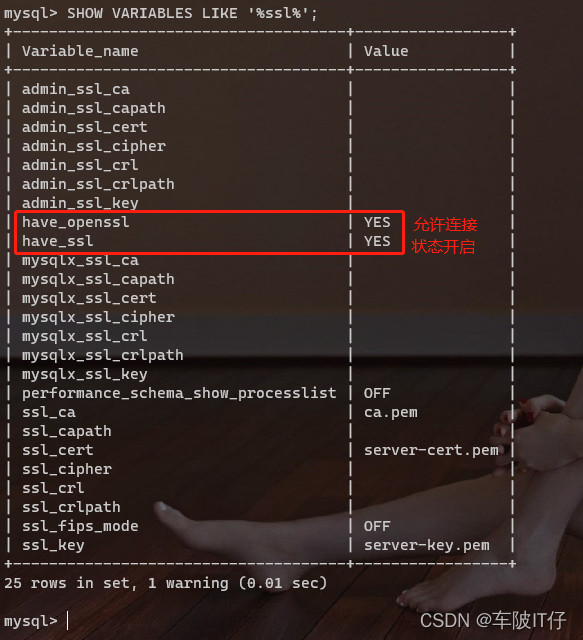
Step 2: Modify the configuration file my.ini

# PATH: C:\ProgramData\MySQL\MySQL Server 8.0
[mysqld]
skip_ssl  # ssl

Step 3: restart MySQL service

ctrl+shift+esc key to call up task manager -> services -> find mysql service -> right click and rerun
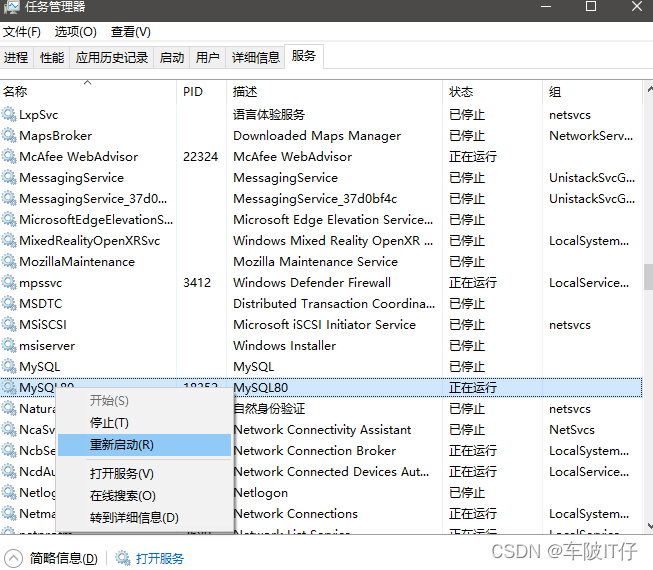
Step 4: re execute the command:

mysql> SHOW VARIABLES LIKE '%ssl%';
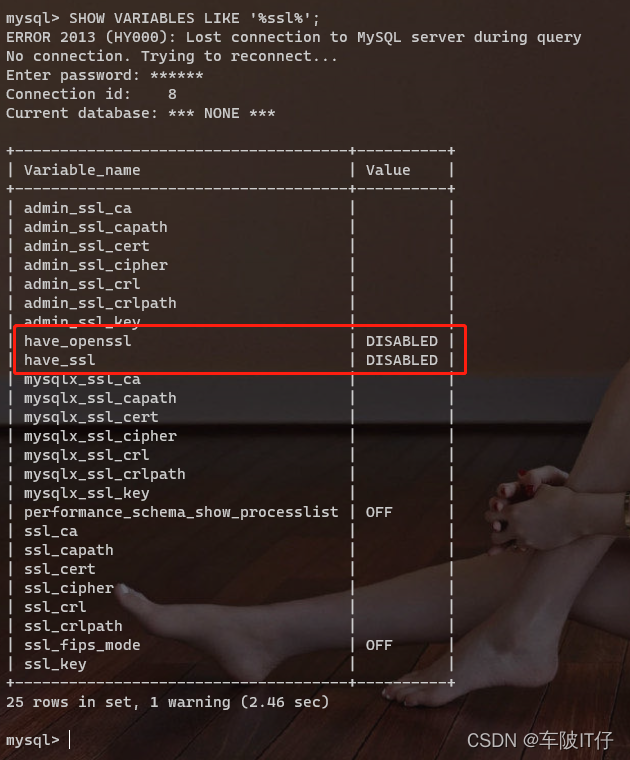

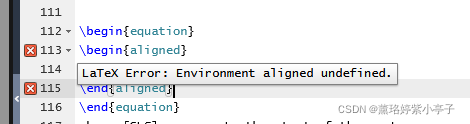
[Solved] Overleaf Compile the Paper Error: LaText Error:Environment aligned undefined.


Problem Description:

Use online overflow to compile the paper, and the errors in the formula part are as follows.

Problem solving:

This “environment XXX undefined” problem is mostly caused by the fact that packages are not introduced. The solution is to introduce corresponding packages

The solution to this error is to import the amspath package, that is, add this line where the package was imported first.

\usepackage{amsmath}

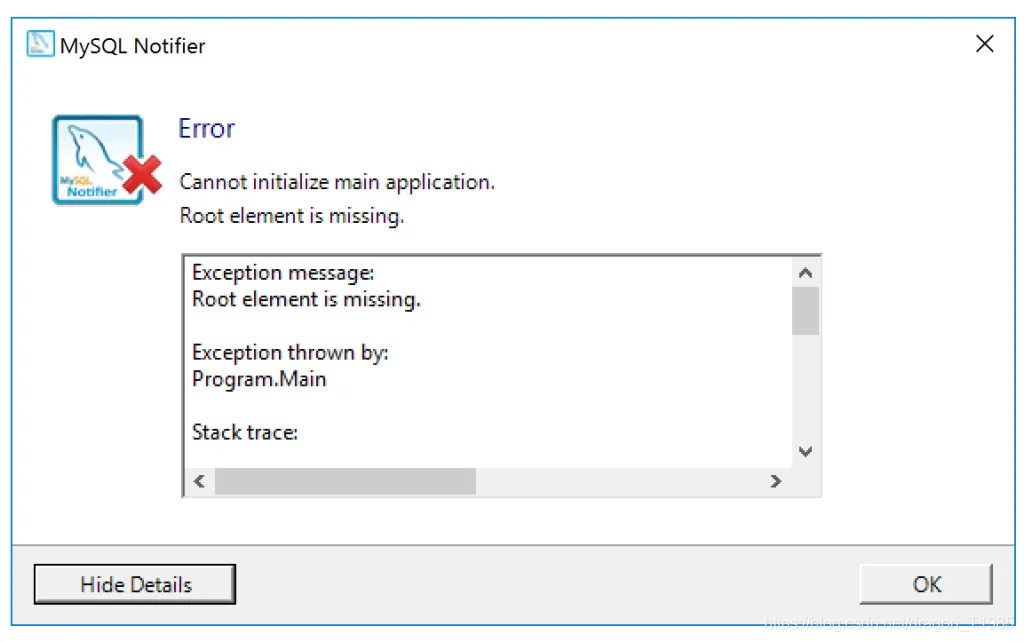
[Solved] MySQL Notifier Error Cannot Initialize Main Application

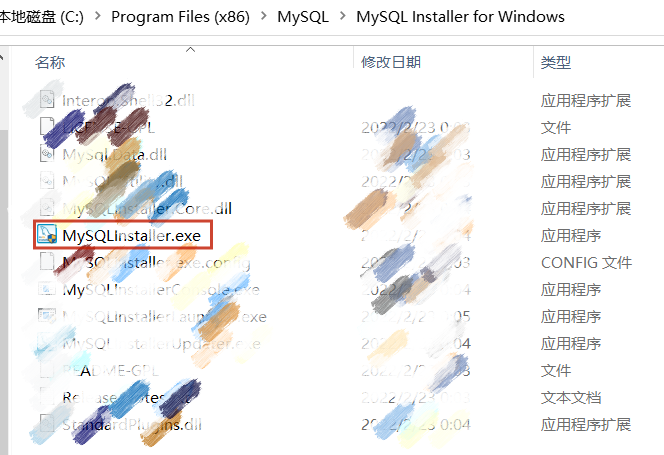
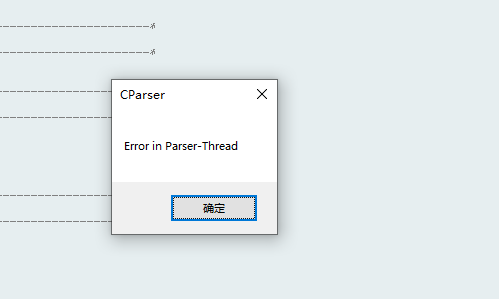
In response to this problem, you can search for MySQL Notifier in the C drive. My solution: Find MySQL Installer for Windows in the following path, click, follow the instructions, and reinstall. After the installation is successful, click the upward arrow in the lower right corner, and you should be able to see the third picture.

[How to Solve] error Parsing error: x-invalid-end-tag

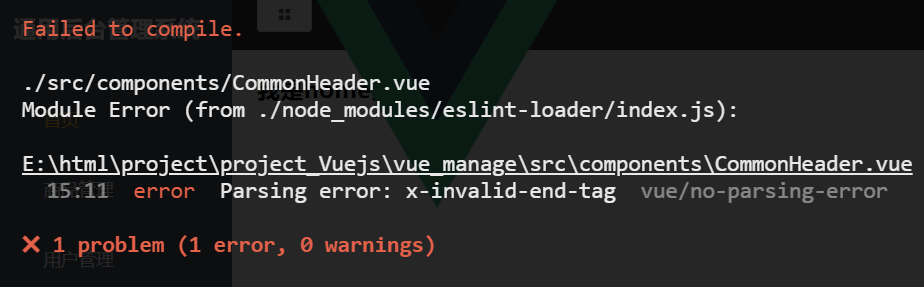
Error reporting result

error  Parsing error: x-invalid-end-tag

Error reporting analysis

When view renders tags as native HTML tags, because these tags are self-closing, an error will be reported if there is an end tag.

Solution:

The first method: remove the end mark and write it in the form of single label

The second method: turn off the reminder

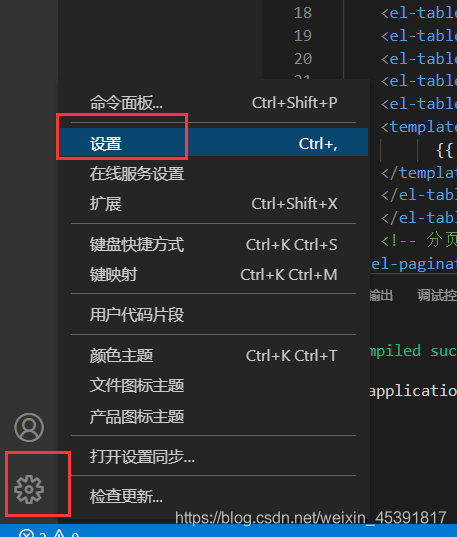
File/Preferences/Settings

Enter vetur. valid ation.tem pl ate in the search field and uncheck it as the screenshot below.

[Solved] fit function error: KeyError: ‘squared_error‘

critical code

param_grid_simple = {"criterion": ["squared_error","poisson"]
                     , 'n_estimators': [*range(20,100,5)]
                     , 'max_depth': [*range(10,25,2)]
                     , "max_features": ["log2","sqrt",16,32,64,"auto"]
                     , "min_impurity_decrease": [*np.arange(0,5,10)]
                    }
search = GridSearchCV(estimator=reg
                     ,param_grid=param_grid_simple
                     ,scoring = "neg_mean_squared_error"
                     ,verbose = True
                     ,cv = cv
                     ,n_jobs=-1)
search.fit(X,y)                  

Error reporting information

~/anaconda3/lib/python3.8/site-packages/sklearn/ensemble/_forest.py in _parallel_build_trees(tree, forest, X, y, sample_weight, tree_idx, n_trees, verbose, class_weight, n_samples_bootstrap)
    166                                                         indices=indices)
    167 
--> 168         tree.fit(X, y, sample_weight=curr_sample_weight, check_input=False)
    169     else:
    170         tree.fit(X, y, sample_weight=sample_weight, check_input=False)

~/anaconda3/lib/python3.8/site-packages/sklearn/tree/_classes.py in fit(self, X, y, sample_weight, check_input, X_idx_sorted)
   1240         """
   1241 
-> 1242         super().fit(
   1243             X, y,
   1244             sample_weight=sample_weight,

~/anaconda3/lib/python3.8/site-packages/sklearn/tree/_classes.py in fit(self, X, y, sample_weight, check_input, X_idx_sorted)
    334                                                          self.n_classes_)
    335             else:
--> 336                 criterion = CRITERIA_REG[self.criterion](self.n_outputs_,
    337                                                          n_samples)
    338 

KeyError: 'squared_error'

analysis

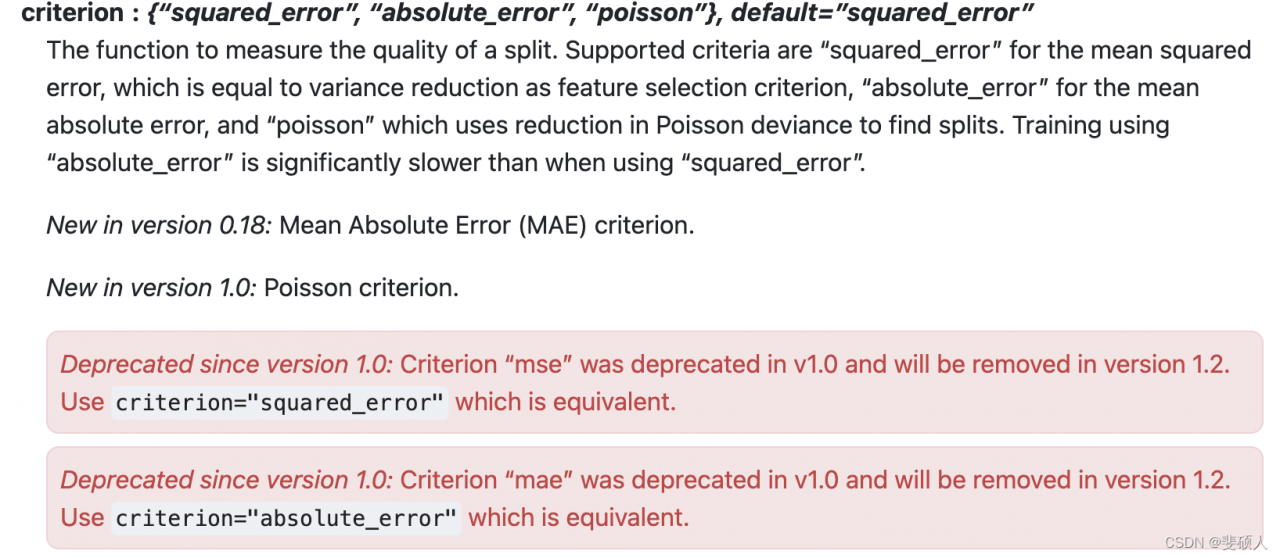
KeyError error will be caused when accessing a key that is not in dict, then the parameter of criterion is squared_error may not exist. Since the parameter value is known, it is speculated that there may be a problem with your own sklearn version. Check your version of sklearn is 0.23, while the official version has already been above 1.0.

Solution:

See the official document of sklearn

scikit-learn 1.1. dev0
scikit-learn 0.23.2

You can see that different versions of the criterion parameter have different values, which can be considered

1. Change the value to the value of the corresponding version, such as’ MSE ‘.

2. Change the version of sklearn directly.

Because the official document says, “MSE” is in V1.0 has been deprecated and will be removed in version 1.2. “Squared_error” is equivalent. Therefore, the method of upgrading sklearn is adopted.

pip install scikit-learn==1.0.1

[Solved] Redis Client On Error Error connect ECONNREFUSED 11.20.200.6379 Config right

preface

Error when docker installs redis and starts


Solution:

Modify profile

 vim redis.conf 

Comment out??Code

Restart redis:

docker start redis

If the connection using the local client is unsuccessful, you can only enter the redis shell to modify the configuration file:

root@iZ8vb4poq26tme4bwexb4lZ:/usr/local/docker/redis# ps -ef | grep redis
redis     2605     1  1  2020 ?       2-18:12:56 /usr/bin/redis-server *:20000
root      5834 24173  0 21:18 pts/0    00:00:00 grep --color=auto redis
999      20678 20643  0 20:52 ?       00:00:04 redis-server 127.0.0.1:6379

[Solved] MySQL Error: ERROR 1055 (42000)sql_mode=only_full_group_by

environment

mysql> select version();
+-----------+
| version() |
+-----------+
| 8.0.16    |
+-----------+

Execute query statement

mysql> select * from my_student;
+----+--------+----------+------+--------+
| id | name   | class_id | age  | gender |
+----+--------+----------+------+--------+
|  1 | 刘备   |        1 |   18 |      2 |
|  2 | 李四   |        1 |   19 |      1 |
|  3 | 王五   |        2 |   20 |      2 |
|  4 | 张飞   |        2 |   21 |      1 |
|  5 | 关羽   |        1 |   22 |      2 |
|  6 | 曹操   |        1 |   20 |   NULL |
+----+--------+----------+------+--------+
6 rows in set (0.00 sec)

-- Requirement: After sorting by age, take out the oldest students in each class
select * from (
    select * from my_student order by age desc
) as t group by t.class_id;

report errors

ERROR 1055 (42000): Expression #1 of SELECT list is not in GROUP BY clause 
and contains nonaggregated column 't.id' 
which is not functionally dependent on columns in GROUP BY clause; 
this is incompatible with sql_mode=only_full_group_by

reason:

MySQL 5.7.5 and above function dependency detection function

Solution:

-- View current configuration items
select @@global.sql_mode

-- remove ONLY_FULL_GROUP_BY
set @@global.sql_mode='STRICT_TRANS_TABLES,NO_ZERO_IN_DATE,NO_ZERO_DATE,ERROR_FOR_DIVISION_BY_ZERO,NO_ENGINE_SUBSTITUTION';

After setting, if it does not take effect, you can exit and log in again

[Solved] mybatis Error querying database. Cause: java.sql.SQLException: The server time zone value

The mybatis error message is

Exception in thread "main" org.apache.ibatis.exceptions.PersistenceException: 
### Error querying database.  Cause: java.sql.SQLException: The server time zone value '�й���׼ʱ��' is unrecognized or represents more than one time zone. You must configure either the server or JDBC driver (via the 'serverTimezone' configuration property) to use a more specific time zone value if you want to utilize time zone support.
### The error may exist in mappers/UserMapper.xml
### The error may involve ns1.deleteone
### The error occurred while executing a query
### Cause: java.sql.SQLException: The server time zone value '�й���׼ʱ��' is unrecognized or represents more than one time zone. You must configure either the server or JDBC driver (via the 'serverTimezone' configuration property) to use a more specific time zone value if you want to utilize time zone support.
	at org.apache.ibatis.exceptions.ExceptionFactory.wrapException(ExceptionFactory.java:30)
	at org.apache.ibatis.session.defaults.DefaultSqlSession.selectList(DefaultSqlSession.java:150)
	at org.apache.ibatis.session.defaults.DefaultSqlSession.selectList(DefaultSqlSession.java:141)
	at org.apache.ibatis.session.defaults.DefaultSqlSession.selectList(DefaultSqlSession.java:136)
	at com.zjc.mybatis.ops1.main(ops1.java:16)
Caused by: java.sql.SQLException: The server time zone value '�й���׼ʱ��' is unrecognized or represents more than one time zone. You must configure either the server or JDBC driver (via the 'serverTimezone' configuration property) to use a more specific time zone value if you want to utilize time zone support.
	at com.mysql.cj.jdbc.exceptions.SQLError.createSQLException(SQLError.java:129)
	at com.mysql.cj.jdbc.exceptions.SQLError.createSQLException(SQLError.java:97)
	at com.mysql.cj.jdbc.exceptions.SQLError.createSQLException(SQLError.java:89)
	at com.mysql.cj.jdbc.exceptions.SQLError.createSQLException(SQLError.java:63)
	at com.mysql.cj.jdbc.exceptions.SQLError.createSQLException(SQLError.java:73)
	at com.mysql.cj.jdbc.exceptions.SQLExceptionsMapping.translateException(SQLExceptionsMapping.java:76)
	at com.mysql.cj.jdbc.ConnectionImpl.createNewIO(ConnectionImpl.java:836)
	at com.mysql.cj.jdbc.ConnectionImpl.<init>(ConnectionImpl.java:456)
	at com.mysql.cj.jdbc.ConnectionImpl.getInstance(ConnectionImpl.java:246)
	at com.mysql.cj.jdbc.NonRegisteringDriver.connect(NonRegisteringDriver.java:198)
	at java.sql.DriverManager.getConnection(DriverManager.java:664)
	at java.sql.DriverManager.getConnection(DriverManager.java:208)
	at org.apache.ibatis.datasource.unpooled.UnpooledDataSource.doGetConnection(UnpooledDataSource.java:201)
	at org.apache.ibatis.datasource.unpooled.UnpooledDataSource.doGetConnection(UnpooledDataSource.java:196)
	at org.apache.ibatis.datasource.unpooled.UnpooledDataSource.getConnection(UnpooledDataSource.java:93)
	at org.apache.ibatis.datasource.pooled.PooledDataSource.popConnection(PooledDataSource.java:385)
	at org.apache.ibatis.datasource.pooled.PooledDataSource.getConnection(PooledDataSource.java:89)
	at org.apache.ibatis.transaction.jdbc.JdbcTransaction.openConnection(JdbcTransaction.java:138)
	at org.apache.ibatis.transaction.jdbc.JdbcTransaction.getConnection(JdbcTransaction.java:60)
	at org.apache.ibatis.executor.BaseExecutor.getConnection(BaseExecutor.java:336)
	at org.apache.ibatis.executor.SimpleExecutor.prepareStatement(SimpleExecutor.java:84)
	at org.apache.ibatis.executor.SimpleExecutor.doQuery(SimpleExecutor.java:62)
	at org.apache.ibatis.executor.BaseExecutor.queryFromDatabase(BaseExecutor.java:324)
	at org.apache.ibatis.executor.BaseExecutor.query(BaseExecutor.java:156)
	at org.apache.ibatis.executor.CachingExecutor.query(CachingExecutor.java:109)
	at org.apache.ibatis.executor.CachingExecutor.query(CachingExecutor.java:83)
	at org.apache.ibatis.session.defaults.DefaultSqlSession.selectList(DefaultSqlSession.java:148)
	... 3 more
Caused by: com.mysql.cj.exceptions.InvalidConnectionAttributeException: The server time zone value '�й���׼ʱ��' is unrecognized or represents more than one time zone. You must configure either the server or JDBC driver (via the 'serverTimezone' configuration property) to use a more specific time zone value if you want to utilize time zone support.
	at sun.reflect.NativeConstructorAccessorImpl.newInstance0(Native Method)
	at sun.reflect.NativeConstructorAccessorImpl.newInstance(NativeConstructorAccessorImpl.java:62)
	at sun.reflect.DelegatingConstructorAccessorImpl.newInstance(DelegatingConstructorAccessorImpl.java:45)
	at java.lang.reflect.Constructor.newInstance(Constructor.java:423)
	at com.mysql.cj.exceptions.ExceptionFactory.createException(ExceptionFactory.java:61)
	at com.mysql.cj.exceptions.ExceptionFactory.createException(ExceptionFactory.java:85)
	at com.mysql.cj.util.TimeUtil.getCanonicalTimezone(TimeUtil.java:134)
	at com.mysql.cj.protocol.a.NativeProtocol.configureTimezone(NativeProtocol.java:2186)
	at com.mysql.cj.protocol.a.NativeProtocol.initServerSession(NativeProtocol.java:2209)
	at com.mysql.cj.jdbc.ConnectionImpl.initializePropsFromServer(ConnectionImpl.java:1318)
	at com.mysql.cj.jdbc.ConnectionImpl.connectOneTryOnly(ConnectionImpl.java:967)
	at com.mysql.cj.jdbc.ConnectionImpl.createNewIO(ConnectionImpl.java:826)
	... 23 more

Process finished with exit code 1

Solution:

Add serverTimezone=UTC to the url configuration item in the SqlMapConfig.xml file

<?xml version="1.0" encoding="UTF-8" ?>
<!DOCTYPE configuration
        PUBLIC "-//mybatis.org//DTD Config 3.0//EN"
        "http://mybatis.org/dtd/mybatis-3-config.dtd">
<configuration>
    <environments default="dev">
        <environment id="dev">
            <transactionManager type="JDBC"></transactionManager>
            <dataSource type="POOLED">
                <property name="driver" value="com.mysql.cj.jdbc.Driver"/>
                <property name="url" value="jdbc:mysql://localhost:3306/db1?serverTimezone=UTC"/>
                <property name="username" value="root"/>
                <property name="password" value="root"/>
            </dataSource>
        </environment>
    </environments>
    <mappers>
        <mapper resource="mappers/UserMapper.xml"></mapper>
    </mappers>
</configuration>

[Solved] TortoiseGitPlink Fatal Error: No supported authentication methods available (server sent: publi

1. Press

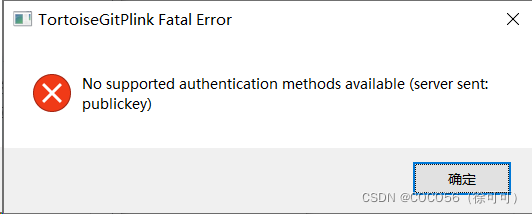
Today, you will be prompted when you upgrade tortoisegit and then use SSH to pull or push code from GitHub (you should also be prompted for each new installation):

TortoiseGitPlink Fatal Error:No supported authentication methods available (server sent: publickey)

2. Solution steps

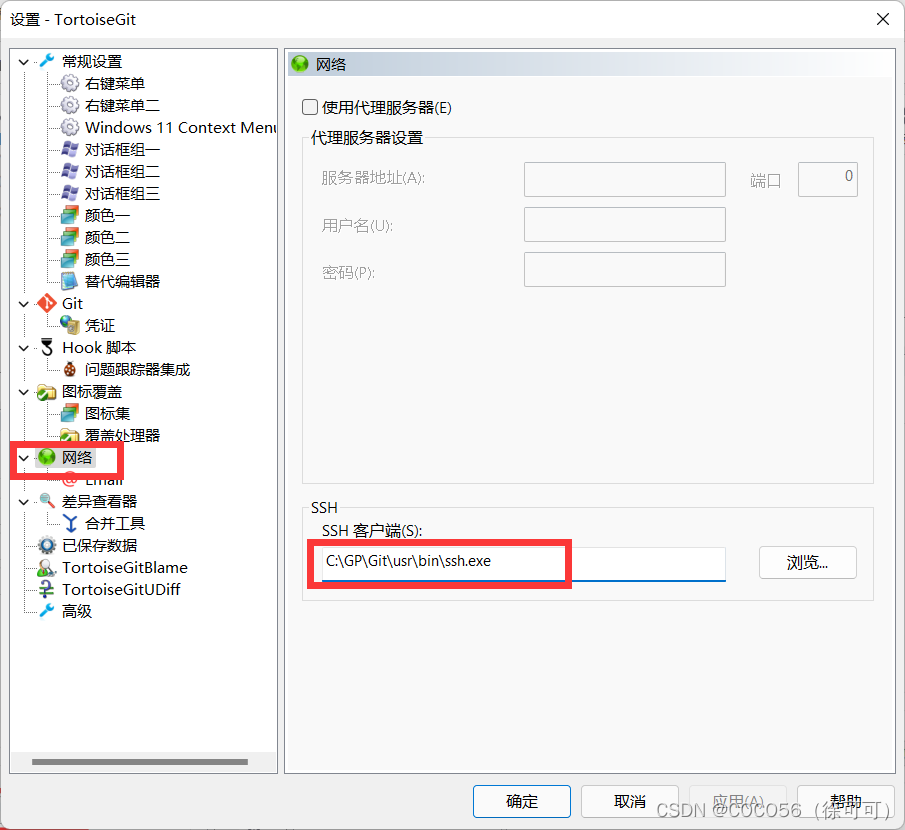
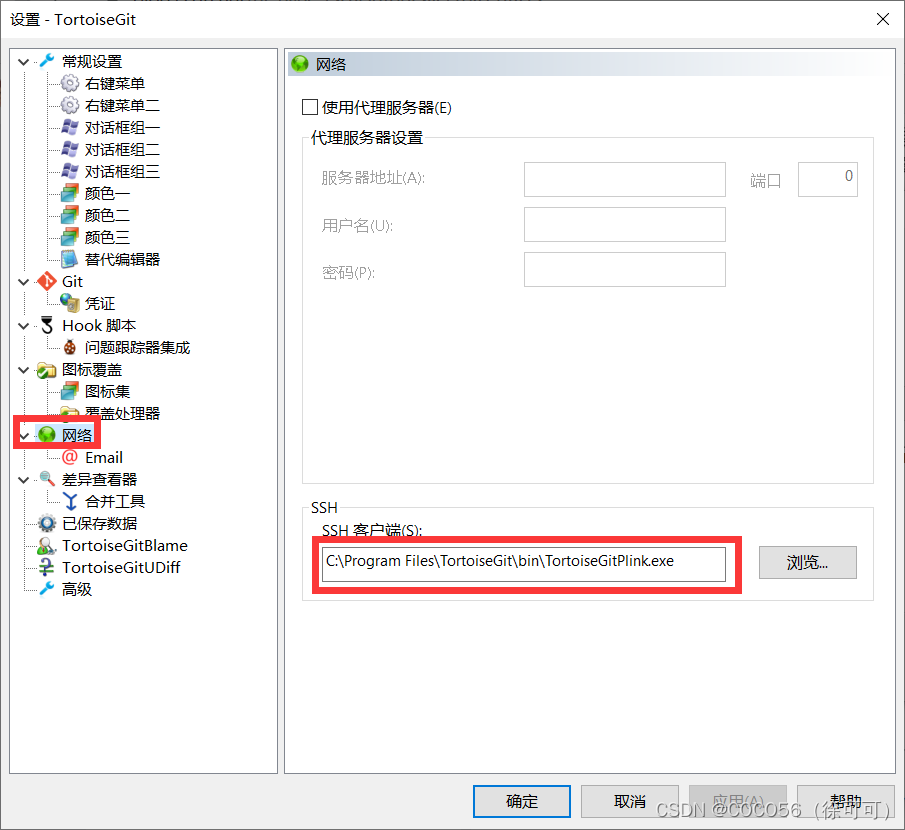
Open the settings of TortoiseGit, click Network, and then change the path of SSH client to git:

by default, TortoiseGitPlink is used for the SSH client of TortoiseGit, which seems to fail to work normally in many cases