Author Archives: Robins

Node.js Error: Cannot find module express [How to Solve]

1. Install the express framework globally, CMD open the command line, and enter the following command:

    npm install -g express

In the express 4.x version, the command tool is separated, a command tool is installed, and the command is executed:

    npm install -g express-generator

type express --version

2. If execute js file report error: Error: Cannot find module express

Solution:
execute it again under your own project directory:
npm install express

[Solved] error Component name “xxx“ should always be multi-word vue/multi-word-comp

Project issues

An error was encountered in the Vue project today. The console reported error Component name “xxx“ should always be multi-word vue/multi-word-comp, which is mainly the error reported by eslint standardization


Solution:

Turn off naming rule verification
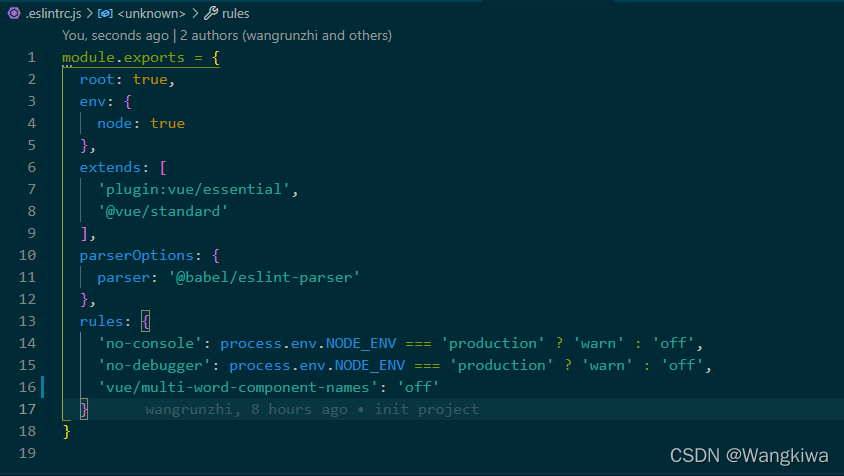
find it in the root directory eslintrc.js file, add the following code:

   "vue/multi-word-component-names":"off",

.eslintrc.js file content:

ROS Start Gazebo Error (First time): Err] [REST.cc:205] Error in REST request

Problems encountered during ROS learning:

Err] [REST.cc:205] Error in REST request

Gazebo has been installed when ROS is installed. Use the following command to check whether the installation is successful, and open the gazebo simulation environment.

roslaunch gazebo_ros empty_world.launch

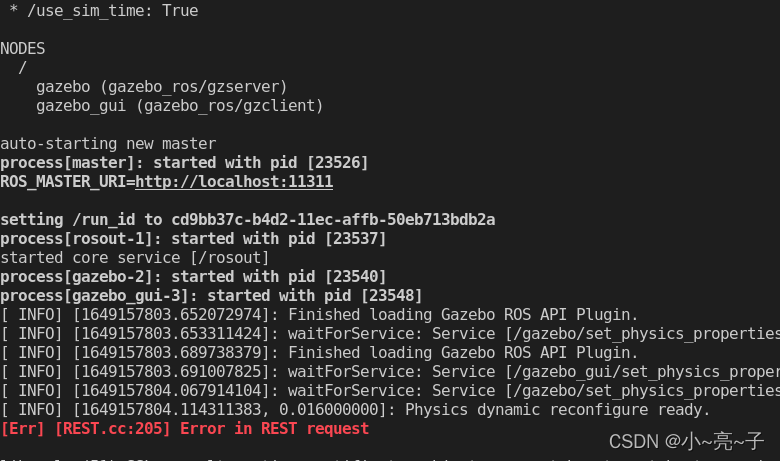
When opening gazebo in ROS for the first time, error will be report: Err] [REST.cc:205] Error in REST request

As shown in the figure below:

Solution:

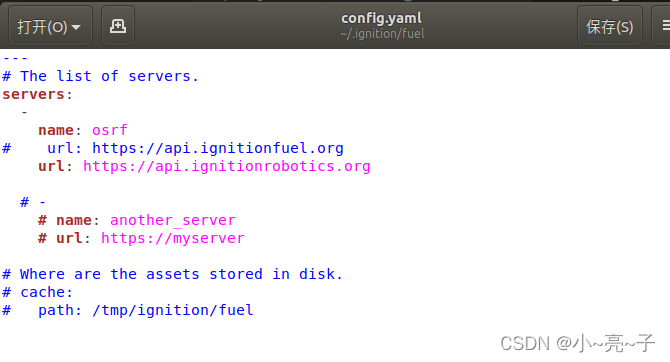
It needs to be modified .ignition/fuel/config.yaml file

Open yaml file command:

sudo gedit ~/.ignition/fuel/config.yaml

Use # to comment out this code: url: https://api.ignitionfuel.org

Then add

url: https://api.ignitionrobotics.org

As shown in the following figure:

run the launch command again, and you will not see the above error warning.

roslaunch gazebo_ros empty_world.launch

[Solved] gcc: error trying to exec ‘cc1‘: execvp: No such file or directory

An execution error occurred after installing GCC An error occurred while loading the C file

gcc: error trying to exec 'cc1': execvp: No such file or directory

After adding environment variables

whereis cc1

Find out where CC1 is

/usr/libexec/gcc/x86_64-redhat-linux/4.8.2/cc1

Position of CC1 in my centos7

If you can’t find it

locate cc1

Once found, copy

/usr/libexec/gcc/x86_64-redhat-linux/4.8.2

then

PATH="$PATH":/usr/libexec/gcc/x86_64-redhat-linux/4.8.2

Import environment variables

export PATH

That’s it

[Solved] std::max() error C2589: ‘(‘ : illegal token on right side of ‘::‘

int max =std::numeric_limits< int>: max();
:: Based on error indicating:

f:\code\cpp\webspider\main. cpp(47): warning C4003: not enough actual parameters for macro ‘max’

f:\code\cpp\webspider\main. cpp(47) : error C2589: ‘(‘ : illegal token on right side of ‘::’

f:\code\cpp\webspider\main. cpp(47) : error C2059: syntax error : ‘::’

Cause: STL’s numeric_limits::max() and VC6 min/max macro conflict.

The problem should be that the macro definitions of the above two header files conflict.

Solution: Use parentheses “()” to avoid precompiler errors. int max = (std::numeric_limits<std::streamsize>::max)(); That’s it.

[Solved] Error: A JNI error has occurred, please check your installation and try again Exception in thread

Problem description

When running code. The following error is reported:

"D:\Program Files\Java\jdk1.8.0_301\bin\java.exe" -agentlib:jdwp=transport=dt_socket,address=127.0.0.1:54797,suspend=y,server=n -javaagent:C:\Users\Administrator\AppData\Local\JetBrains\IntelliJIdea2020.3\captureAgent\debugger-agent.jar -Dfile.encoding=UTF-8 -classpath "D:\program files\Java\jdk1.8.0_301\jre\lib\charsets.jar;D:\program files\Java\jdk1.8.0_301\jre\lib\deploy.jar;D:\program files\Java\jdk1.8.0_301\jre\lib\ext\access-bridge-64.jar;D:\program files\Java\jdk1.8.0_301\jre\lib\ext\cldrdata.jar;D:\program files\Java\jdk1.8.0_301\jre\lib\ext\dnsns.jar;D:\program files\Java\jdk1.8.0_301\jre\lib\ext\jaccess.jar;D:\program files\Java\jdk1.8.0_301\jre\lib\ext\jfxrt.jar;D:\program files\Java\jdk1.8.0_301\jre\lib\ext\localedata.jar;D:\program files\Java\jdk1.8.0_301\jre\lib\ext\nashorn.jar;D:\program files\Java\jdk1.8.0_301\jre\lib\ext\sunec.jar;D:\program files\Java\jdk1.8.0_301\jre\lib\ext\sunjce_provider.jar;D:\program files\Java\jdk1.8.0_301\jre\lib\ext\sunmscapi.jar;D:\program files\Java\jdk1.8.0_301\jre\lib\ext\sunpkcs11.jar;D:\program files\Java\jdk1.8.0_301\jre\lib\ext\zipfs.jar;D:\program files\Java\jdk1.8.0_301\jre\lib\javaws.jar;D:\program files\Java\jdk1.8.0_301\jre\lib\jce.jar;D:\program files\Java\jdk1.8.0_301\jre\lib\jfr.jar;D:\program files\Java\jdk1.8.0_301\jre\lib\jfxswt.jar;D:\program files\Java\jdk1.8.0_301\jre\lib\jsse.jar;D:\program files\Java\jdk1.8.0_301\jre\lib\management-agent.jar;D:\program files\Java\jdk1.8.0_301\jre\lib\plugin.jar;D:\program files\Java\jdk1.8.0_301\jre\lib\resources.jar;D:\program files\Java\jdk1.8.0_301\jre\lib\rt.jar;E:\JetBrains\spring学习\spring-study\spring-study-01-ioc1\target\test-classes;E:\JetBrains\spring学习\spring-study\spring-study-01-ioc1\target\classes;D:\java\maven-3.8.1-bin\apache-maven-3.8.1\maven_repository\org\springframework\spring-webmvc\5.3.10\spring-webmvc-5.3.10.jar;D:\java\maven-3.8.1-bin\apache-maven-3.8.1\maven_repository\org\springframework\spring-aop\5.3.10\spring-aop-5.3.10.jar;D:\java\maven-3.8.1-bin\apache-maven-3.8.1\maven_repository\org\springframework\spring-beans\5.3.10\spring-beans-5.3.10.jar;D:\java\maven-3.8.1-bin\apache-maven-3.8.1\maven_repository\org\springframework\spring-context\5.3.10\spring-context-5.3.10.jar;D:\java\maven-3.8.1-bin\apache-maven-3.8.1\maven_repository\org\springframework\spring-core\5.3.10\spring-core-5.3.10.jar;D:\java\maven-3.8.1-bin\apache-maven-3.8.1\maven_repository\org\springframework\spring-jcl\5.3.10\spring-jcl-5.3.10.jar;D:\java\maven-3.8.1-bin\apache-maven-3.8.1\maven_repository\org\springframework\spring-expression\5.3.10\spring-expression-5.3.10.jar;D:\java\maven-3.8.1-bin\apache-maven-3.8.1\maven_repository\org\springframework\spring-web\5.3.10\spring-web-5.3.10.jar;D:\java\maven-3.8.1-bin\apache-maven-3.8.1\maven_repository\junit\junit\4.13\junit-4.13.jar;D:\java\maven-3.8.1-bin\apache-maven-3.8.1\maven_repository\org\hamcrest\hamcrest-core\1.3\hamcrest-core-1.3.jar;D:\program files\JetBrains\IntelliJ IDEA 2020.3.4\lib\idea_rt.jar" java.MyTest01
Connected to the target VM, address: '127.0.0.1:54797', transport: 'socket'
Error: A JNI error has occurred, please check your installation and try again
Exception in thread "main" java.lang.SecurityException: Prohibited package name: java
	at java.lang.ClassLoader.preDefineClass(ClassLoader.java:655)
	at java.lang.ClassLoader.defineClass(ClassLoader.java:754)
	at java.security.SecureClassLoader.defineClass(SecureClassLoader.java:142)
	at java.net.URLClassLoader.defineClass(URLClassLoader.java:468)
	at java.net.URLClassLoader.access$100(URLClassLoader.java:74)
	at java.net.URLClassLoader$1.run(URLClassLoader.java:369)
	at java.net.URLClassLoader$1.run(URLClassLoader.java:363)
	at java.security.AccessController.doPrivileged(Native Method)
	at java.net.URLClassLoader.findClass(URLClassLoader.java:362)
	at java.lang.ClassLoader.loadClass(ClassLoader.java:418)
	at sun.misc.Launcher$AppClassLoader.loadClass(Launcher.java:355)
	at java.lang.ClassLoader.loadClass(ClassLoader.java:351)
	at sun.launcher.LauncherHelper.checkAndLoadMain(LauncherHelper.java:601)
Disconnected from the target VM, address: '127.0.0.1:54797', transport: 'socket'

Process finished with exit code 1


Cause analysis:

Through the analysis of the error, I learned that I wrote that the use of java package’s name is prohibited in Java


Solution:

Delete and modify the name of java package to other

uniapp Use render Function Error: [Vue warn]: Error in beforeCreate hook: “TypeError: Cannot read property ‘_i‘ of

Demand

It is expected to dynamically render page components through array objects

method

Use the render method to create a component based on the type field of the object through $createElement and pass other parameters into the component

renderParent($h,parent) {
	const values = this.values
	const field = parent.options.field
	let value ;
	if(field){
		value = values[field]
	}
	return $h(parent.type,{
		props:{options:parent.options,value:value},on:{'change:value':(val) => {this.update(field,val)}}
		},parent.children ?parent.children
		.map(child => {
			if(typeof child === 'string') return child
			if(child.type){
				return this.renderParent($h,child)
			}
		}) : ""
	)
},

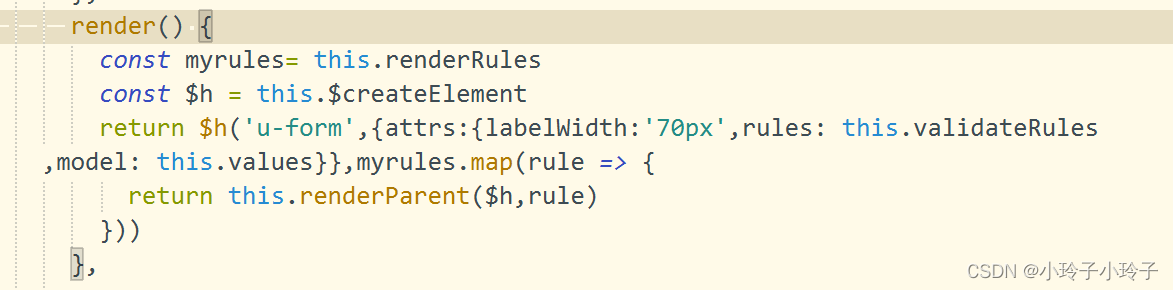
result

The following error is reported:

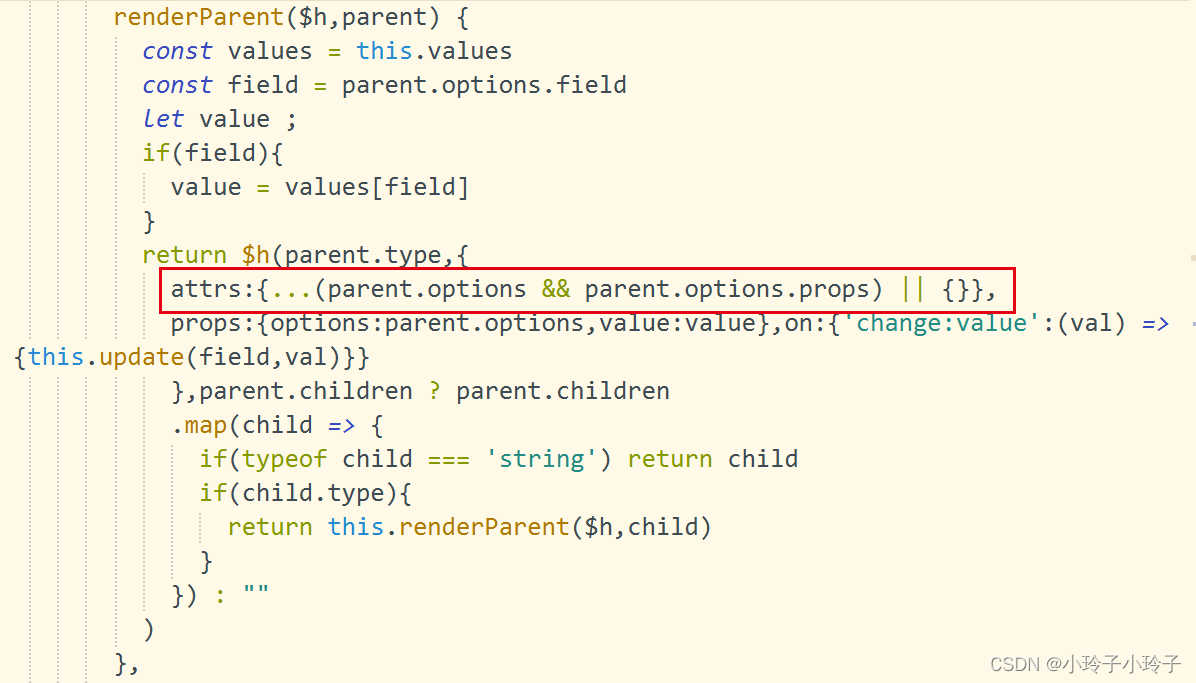
solve

When creating a component through ceateelement, add attrs attribute in the second parameter

[Solved] mysqldump: Got error: 1556: “You can‘t use locks with log tables.“ when using LOCK TABLES

Problem description

Recently, when backing up MySQL data, an error was found in dump database:

mysqldump: Got error: 1556: "You can't use locks with log tables." when using LOCK TABLES

Solution steps:

Checked because there are two table locks in the dump MySQL library.

Add --lock-tables =0 after mysqldump instruction.

Summary

Mysqldump backup will turn on the lock table by default – opt is turned on by default, which will affect the online business when backing up big data

To prevent this, we can use --skip-opt to cancel this default option in backup After adding this parameter, the above error report will not appear.

mysqldump  --skip-opt -h<host> -u<user> -p<password> -A  >> backup.sql    --Perform full backups

[Solved] R Language Error: Error in file(out, “wt“) : cannot open the connection

I recently processed some large files of biological data. After writing the code, I found that the code was a bit wrong and needed to be modified, so I terminated the operation. However, since this process should take a long time to run and suddenly terminated, R will clear the archive. the error will be report:

Error in file(out, “wt“) : cannot open the connection

Solution: use the following command to generate temporary Archive

dir.create(tempdir())

I tried to restart it, but it seems to restart will not work.

[Solved] PyQt: RuntimeError: wrapped C/C++ object has been deleted & has no attribute of flush in python

After redirecting the command line output to the UI interface in the previous article, an error will be reported when closing the UI interface

Has no attribute of flush in Python or

PyQt: RuntimeError: wrapped C/C++ object has been deleted

The solution is to add a function in the class to which the command line output is redirected:

class ButtonOne(QThread):
    _signalForText = pyqtSignal(str)
 
    def __init__(self):
        super(ButtonOne, self).__init__()
 
    def write(self, text):
        self.signalForText.emit(text)
 
    def run(self):
 
        for i in range(15):
            time.sleep(1)
            print(i)
        print('end')
 
    @property
    def signalForText(self):
        return self._signalForText
    
    def flush(self):
        pass

This can be solved.

The added functions are:

def flush(self):
    pass

[Solved] CMake Error Cannot specify link libraries for target “variational“ which is not built by this projec

For errors:

CMake Error at D:\VSA_paper\VSA\CMakeLists.txt:48 (target_link_libraries):
1> [CMake] Cannot specify link libraries for target “variational” which is not built by this project.


All the information found said target_link_libraries is not placed behind add_executable, but not mine
the following is the code segment where the error is located

add_executable(${PROJECT_NAME}_bin ${SRCFILES}  ${HEAD_FILES} ${RCC_FILES} ${WRAP_FILES}  "gauss.h" "developable_degree.h")
target_link_libraries(${PROJECT_NAME} Qt5::Widgets Qt5::Core Qt5::Gui)
target_link_libraries(${PROJECT_NAME}_bin igl::core igl::opengl_glfw)
target_link_libraries(${PROJECT_NAME}_bin OpenMesh)

From the error “Cannot specify link libraries for target “variational” which is not built by this project.” You can see that the project name “variant” is wrong and should be “variant_bin”.

The solution is to add the missing “_bin” after ${project_name} in the above code segment. The modified result is as follows:

add_executable(${PROJECT_NAME}_bin ${SRCFILES}  ${HEAD_FILES} ${RCC_FILES} ${WRAP_FILES}  "gauss.h" "developable_degree.h")
#add Qt5
target_link_libraries(${PROJECT_NAME}_bin Qt5::Widgets Qt5::Core Qt5::Gui)
target_link_libraries(${PROJECT_NAME}_bin igl::core igl::opengl_glfw)
target_link_libraries(${PROJECT_NAME}_bin OpenMesh)

[Solved] Sprintboot hikari initialize error: ERROR 27468 — [nio-8080-exec-1] com.zaxxer.hikari.pool.HikariPoolHikariPool

Problem description

The following error occurred while connecting Hikari. Initialization failed
ERROR 27468 — [nio-8080-exec-1] com.zaxxer.hikari.pool.HikariPool : HikariPool-1 – Exception during pool initialization.


Cause analysis:

It may be a driving problem

The MySQL version on this machine is higher than the driver version used. Unable to connect. You can check the version of MySQL and compare it with the driver used. Then look at dependency import.


Solution:

My solution is as follows: because my MySQL version is 8.0, then I use the connection package of 5. So the connection failed. So I first import the 8.0 connection package, and then modify the dependent version number. Note: if you use the 8.0 connection package, you need to change the class forname to: com.mysql.cj.jdbc.Driver. Then the problem was solved