Today met 1152: when installing the software Error extracting files to the temporary location Error. There are not too many relevant methods on Baidu. After solving the problem, I will sort out the methods to solve the problem. Hope to be of help to a friend who has the same problem. 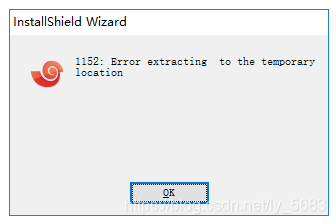
if some “bad” temporary files are extracted from previous failed installations, the error of extracting the files to a temporary location usually occurs. Clean that folder and try again is the right way. This means that if you unzip a file into the same folder over and over again, it could cause problems, or corrupted files in the Windows temporary folder could be the problem. What you can do is :
1. Clear Windows temporary folder
2. Clear extract folder or use other location
3. Check folder permissions
4. Clear failed boot of program installation.
First, clear the Windows temporary folder
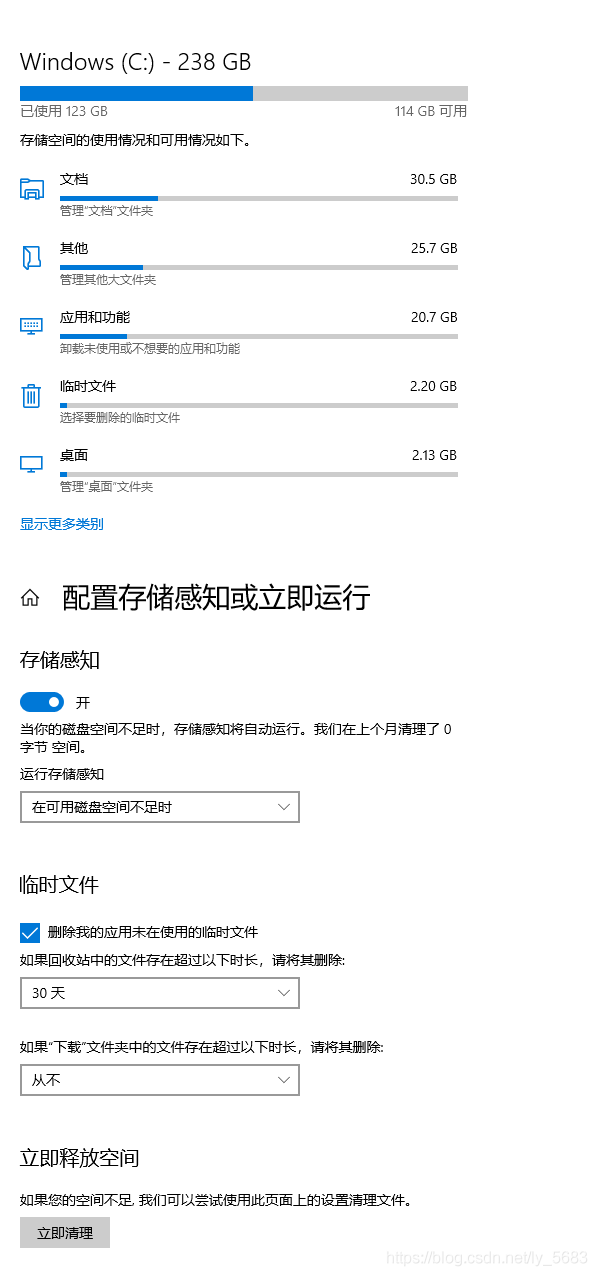
Windows provides a built-in tool to clean up temporary storage. You can use it to remove all bad or corrupted files that could have prevented the extraction of these files. Any installer can use the Windows temporary folder, so you’ll find lots of files in that location. Storage sense will clear other folders along with a temporary folder, but you can choose which one to clear last.
enter setting > System & gt; Storage & gt; Configure storage awareness or run immediately. If your storage space is low, this tool will also fix the problem.
can delete everything in the Windows temporary folder directly, but if any files are locked, they will not be deleted. Storage sense or disk cleanup tool or any other garbage file cleanup application will ensure that the problem is overridden.
Clear the extract folder or use another location
If you are unzipping the ZIP file into another folder and are receiving the same error, it is best to delete everything in it. Sometimes damage can result if the previous installation is not completed. You can also use different locations to extract the file and see if it works.
if it is possible that the temporary file location already has a bad copy from a previous installation, it is a good idea to redownload the program and try it.
Three, check the folder permissions
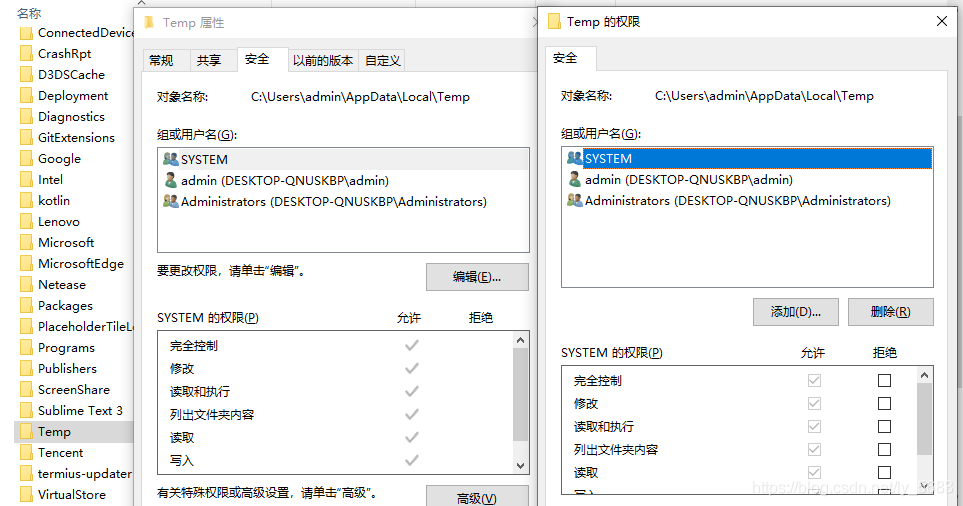
you will not be able to extract files into this folder when you temporarily lose access to it. If for some reason you lose access to the folder you are unzipping, it will fail. So here’s what you should do :
• right-click folder > Property
• switch to the Security TAB and check if you are listed under the user group. Select your username and check to see if you have read, write, and execute permissions.
• click the edit button, suggest removing all permissions, and then add again. It will make sure you get the right permissions in the end.
once completed, manually copy the file to the folder and delete the file to check if it is working.
Four, clear the program installation failed boot
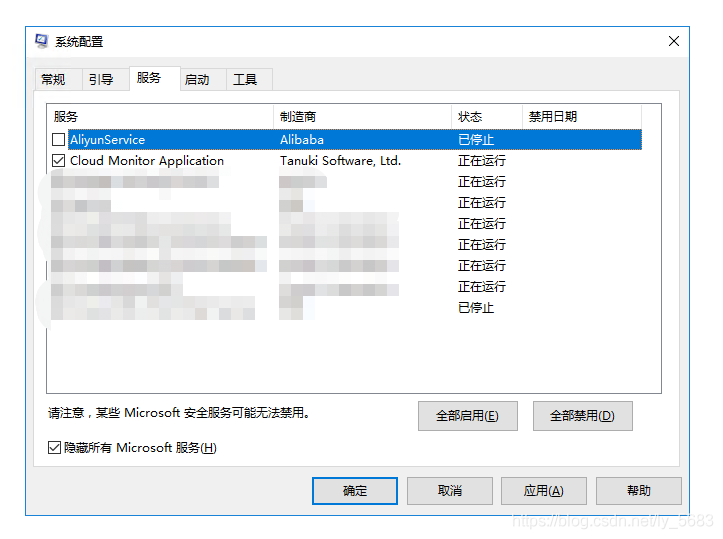
If all else fails, the last resort is to use a clean boat. If the problem is caused by something other than storage space or a corrupted temporary file, it will be fixed here.
Mount error (22): invalid argument refer to the mount.cifs (8) manual page (
View samba version is 4:
[root@redhat_192.168.0.12 16:08:07 ~]# rpm-qa samba
samb-4.9.1-6. El7.x86_64
For a long time, baidu has been mount command plus various parameters, confirmed that the user and password are no problem, directory permission is also given, finally is to use the following method to solve.
Add the parameter SEC = NTLMSSP to the mount configuration of /etc/fstab as follows:
//hahaha.com/devops/MNT /dev/cifs username=kenji,password=123456, SEC = NTLMSSP,rw,_netdev 0 0
Then save the configuration and rerun mount -a, and the mount succeeds
If you want to open more than one program “pdc140.xxx”, the CL.EXE To write to the same. Pdb file, please use
1. “C/C + +” — — & gt; “Routine” –& GT;” Debug information format set to C7 Compatible (/Z7)
2. “C/C + +” — — & gt; “Code Generation” –& GT; Enable String Pool “set to” Is (/GF)”
3. “Linker” –& GT; “Commissioning” –& GT; Set “yes (/DEBUG)”
to generate DEBUG information
And then you’re ready to compile.
ISLR reading notes (3) classification
Welcome to visit the personal homepage, the current traffic is too low, Baidu search can not say… Thank you for encouraging
reading notes. Instead of translating the full text, I plan to share the important knowledge points in the book with my own understanding, and attach the application of R language related functions at the end, as a summary of my recent learning in machine learning. If you don’t understand correctly, please correct me.
preface
ISLR, fully known as An Introduction to Statistical Learning with Applications in R, is a basic version of the Elements of Statistical Learning. The formula derivation in ISLR is not much, but mainly explains some commonly used methods in Statistical Learning and the application of relevant methods in R language. The ISLR doesn’t officially have the answers to the problem sets, but someone has created one, and you can learn from the ISLR answers
Chapter 4 Understanding
This chapter explains three methods of classification.
1. Logistic Regression(Logistic Regression)
2. Linear Discriminant Analysis
3. Quadratic Discriminant Analysis
The four categories are analyzed and compared one by one.
1.Logistic Regression
Formula:
The log (1 – p (x) p (x) = 0 + beta beta 1 x1 + beta 2 x2 +…
among them,
p(x)
Is the probability of belonging to a certain anomaly, is the final output,
Beta.
Is a parameter in Logistic Regression, and the optimal solution is generally obtained by the method of maximum likelihood. The general fitting curve is as follows:

Generally speaking, LOGICAL regression is suitable for the classification of two kinds of problems, and Discriminant Analysis is generally used for the classification of more than two kinds of problems.
2.Linear Discriminant Analysis
In fact, the discriminant method is to add the assumption that the model distribution follows the normal distribution on the basis of the original Bayesian theory. In the linear discriminant, it is assumed that the covariance of different variables is the same

The ellipse in the left figure is the normal distribution curve, and the boundary line intersected by two sides forms the classification boundary, while the real line in the right figure is the Bayesian estimation, which is the actual boundary line. It can be found that the accuracy of the linear discriminant method is still very good.
3.Quadratic Discriminant Analysis(Quadratic Discriminant)
The only difference between a quadratic discriminant and a linear discriminant is that you assume that the covariances of different variables are different, and that causes the dividing line to be curved on the graph, and you take the degrees of freedom from
p(p+1)/2
Increased to
Kp(p+1)/2
K is the number of variables. The effect of increased freedom can be seen in reading Notes (1).

The purple dotted line represents the actual boundary, the black dotted line represents the linear discriminant boundary, and the green solid line represents the quadratic discriminant boundary. It can be seen that the linear discriminant performs better when the boundary is linear; When the dividing line is nonlinear, the opposite is true.
4. To summarize
When the actual dividing line is linear, the linear discriminant performs better if the data is close to the normal distribution hypothesis, and the logistic regression performs better if the data is not close to the normal distribution hypothesis.
when the actual boundary line is nonlinear, the quadratic discriminant will be fitted. In other higher order or irregular cases, KNN performs well.
R language application
1. Import data and prepare
> library(ISLR)
> dim(Caravan)
[1] 5822   86
> attach(Caravan)
> summary(Purchase)
  No  Yes
5474  348
Since KNN is to be used later and distance is needed, the variables are normalized. The normalization program is just one sentence, and the normalization effect is shown in the following sentences.
> standardized.X = scale(Caravan[,-86])
> var(Caravan[,1])
[1] 165.0378
> var(Caravan[,2])
[1] 0.1647078
> var(standardized.X[,1])
[1] 1
> var(standardized.X[,2])
[1] 1
Establish test samples and training samples
> test = 1:1000
> train.X = standardized.X[-test,]
> test.X = standardized.X[test,]
> train.Y = Purchase[-test]
> test.Y = Purchase[test]
(c) Logistic Regression
> glm.fit = glm(Purchase~., data=Caravan, family = binomial, subset = -test)
Warning message:
glm.fit: fitted probabilities numerically 0 or 1 occurred
> glm.probs = predict(glm.fit, Caravan[test, ], type="response")
> glm.pred = rep("No", 1000)
> glm.pred[glm.probs>.5]="Yes"
> table(glm.pred, test.Y)
        test.Y
glm.pred  No Yes
     No  934  59
     Yes   7   0
> mean(glm.pred == test.Y)
[1] 0.934
3.Linear Discriminant Analysis
> library(MASS)
> lda.fit = lda(Purchase~.,data = Caravan, subset = -test)
> lda.pred = predict(lda.fit, Caravan[test,])
> lda.class = lda.pred$class
> table(lda.class, test.Y)
         test.Y
lda.class  No Yes
      No  933  55
      Yes   8   4
> mean(lda.class==test.Y)
[1] 0.937
4.Quadratic Discriminant Analysis(Quadratic Discriminant)
> qda.fit = qda(Purchase~.,data = Caravan, subset = -test)
Error in qda.default(x, grouping, ...) : rank deficiency in group Yes
> qda.fit = qda(Purchase~ABYSTAND+AINBOED,data = Caravan, subset = -test)
Found that direct training can cause errors… The two variables have been tried successfully. It seems that the dimension is too high, so far no solution has been found. Other applications are similar to LDA
5.KNN
parameter k can be selected by itself, and the input order of KNN function variables should be noted
> library(class)
> knn.pred = knn(train.X, test.X, train.Y,k=1)
> mean(test.Y==knn.pred)
[1] 0.882Oracle ORA-00984:column not allowed here
Database setting VARCHAR2 field default value is A:
Oracle ora-00984 :column not allowed here
Solution: Just put the single quotation mark ‘A’ in it
Mac installation tree command error solution
Android studio can input tree command in Terminal command line to view the directory structure of the current Android project, which is very convenient, but you need to install the tree command first.
Install tree command brew install tree, the error is reported as follows:
Error: /usr/local/Cellar is not writable. You should change the
ownership and permissions of /usr/local/Cellar back to your
user account:
  sudo chown -R $(whoami) /usr/local/Cellar
Error: Cannot write to /usr/local/Cellar
Follow the prompt sudo chow-r $(whoami) /usr/local/Cellar :
sudo chown -R $zhangsan /usr/local/Cellar
//zhangsan is your name.
Then execute brew install tree.
After the installation is complete, type tree-d in the Terminal command line of as to print out all directory names. In addition tree -a display directory and content.
Error: your local changes to the following files would be rewritten by merge solution
Other members of the team have modified a file and submitted it for storage. You modified the local file before pull. When you modify the code and pull again, the following error will be reported:
error: Your local changes to the following files would be overwritten by merge
Ii. Solutions
Depending on whether you want to save local changes, there are two solutions
2.1 Reserved modification
Execute the following three commands
git stash
git pull origin master
git stash pop
Note:
Git Stash: Back up the current workspace, read from the last commit, and make sure the workspace is the same as the last commit. At the same time, save the contents of the current workspace in Git stack. Git Pull: Pull the current branch code on the server. Git Stash pop: read the last saved contents from Git stack and restore relevant contents of the workspace. At the same time, users may perform stASH operations for many times, and need to ensure that the first stash is fetched after, so the stack (in and out) is used for management. Pop the top of the stack and restore the Git Stash List: Shows all the backups in the Git stack, and you can use this list to decide where to restore. Git Stash Clear: Clears the Git stack
2.2 Scrap modification
The core idea is to roll back the version, as follows
git reset --hard
git pull origin master
Note: The second type is not recommended. Unless you’re sure you don’t need a local change.
【PTA:】 Error: class X is public should be declared in a file named X.java
(?: can not come out on the PTA error without looking at the _ (: з) <) _)
I have been making this mistake in writing the topic on PTA today.
Error: class X is public should be declared in a file named X.java
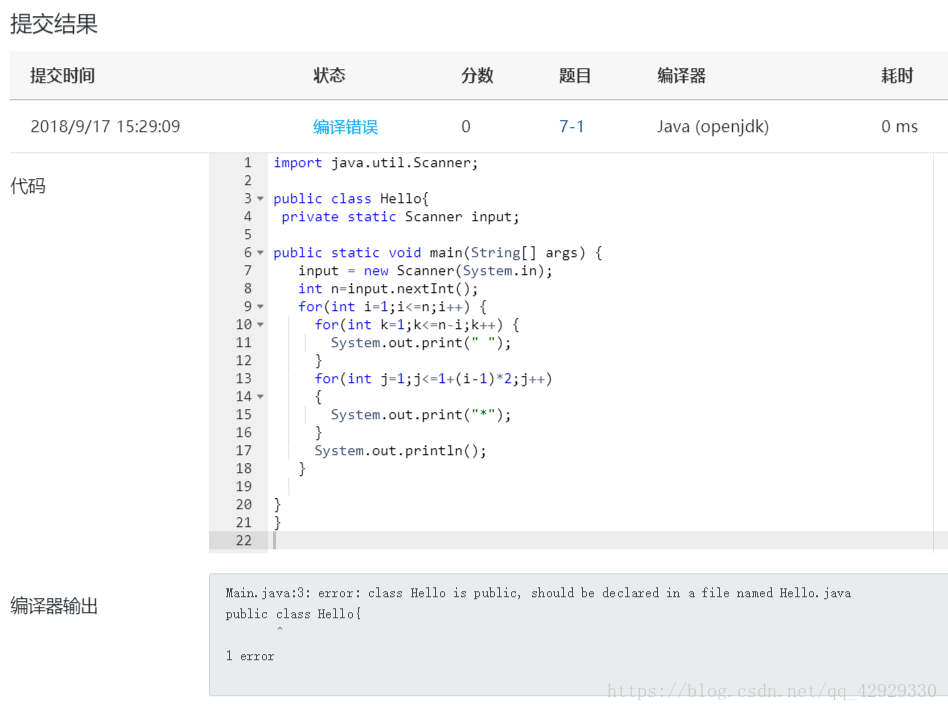
Searched a lot of solutions, it is said that the class name and file name to change the same, obviously I changed is really the same duck. I also asked the strong brother big sister, how to change is reported this wrong (; ‘⌒ `)
.
Later, a classmate told me that it was the problem of PTA platform:
http://www.cnblogs.com/zhrb/p/6347738.html
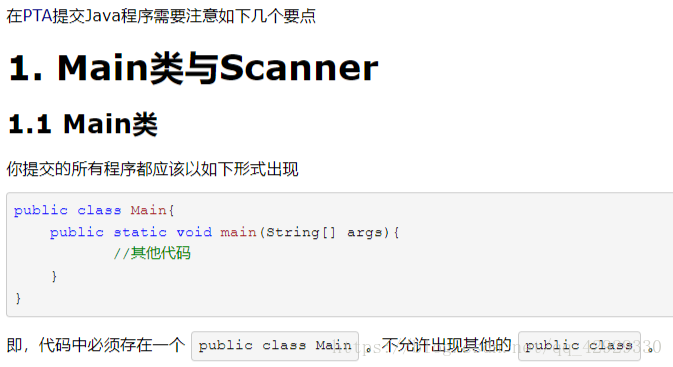
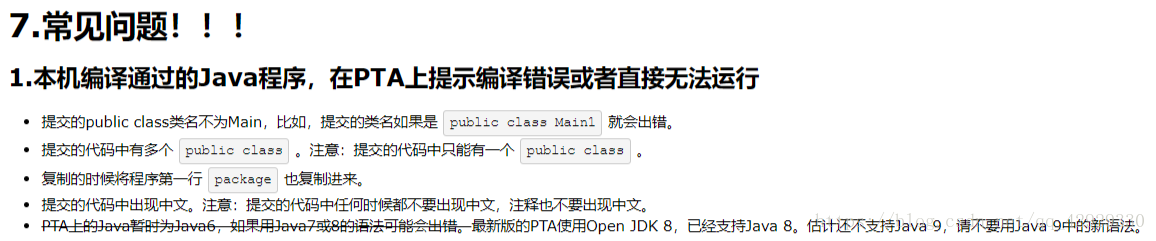
The name of the class is the Main file names, at last it redone success.
a simple grinding by me so long, all want to broken head didn’t expect to be the problem (; ´ д `) ゞ
it is a good habit to look at the instructions
cifs mount error(13): Permission denied
mount error(13): Permission denied
Refer to the mount.cifs(8) manual page (e.g. man mount.cifs)
According to the description of security mode in Man mount. Cifs, kernel 3.8 USES NTLMSSP by default, and the rest USES NTLM. Here I query kernel 3.10.0-327.el7.x86_64 (uname-a can be viewed), and NTLM is selected. The final statement is mount -t cifs //10.15.2.212/test/share-o username=test,password=Pass1234, SEC = NTLM, executed successfully.
SEC =
Security mode. Allowed values are:
· None-attempt to connection as a null user (no name)
· KRB5-use Kerberos Version 5 Authentication
· Krb5i-use Kerberos authentication and Establish enable Packet Signing
· NTLM-use NTLM password Hashing
· NTLMI-use NTLM password hashing and force packet Signing
· NTLMv2-use NTLMv2 password Hashing
· NTLMV2I-use NTLMv2 password hashing and force packet Signing
· NtlMSSP-use NTLMv2 password hashing Encapsulated in Raw NTLMSSP message
· NtlMSspi – Use NTLMv2 password hashing. Additionally, encapsulated in Raw NTLMSSP message, and Force packet Signing
The default in mainline kernel versions prior to V3.8 was SEC = ntlm.in v3.8, The default was changed to SEC = NTLMSSP.
If the server requires Signing during protocol negotiation, Then it may be enabled automatically. The Packet signing may also be enabled
automatically if it ‘s enabled in/proc/fs/cifs/SecurityFlags.
FDI server error
When installing ice3.5.1.msi file on Windows10, FDI server error is always prompted, and clicking ignore is not effective. You can only click cancel and then exit the installation, which is obviously not feasible.
baidu search, there are a lot of people in China have encountered similar problems, but it is of no use, they just put forward questions and no one answers them or make up eight gibberish, Google, find a question and answer, probably understand, also solved my problem.
specific operation is to put ice3.5.1.msi file in the root directory D disk, click to install, this is normal
, similar problems that cannot be installed should also be solved this way
rsync error: error starting client-server protocol (code 5) at main.c(1648) [Receiver=3.1.2]
Rsync error: error starting client-server Protocol (Code 5) at main.c(1648) [Receiver=3.1.2]
1. Try to close the firewall test
[root@sm ~]# systemctl stop firewalld
2. Check whether the confidential file attribute is 600
[root@sm ~]# ls -l /etc/rsyncd.secrets
-rw------- 1 root root 26 Nov 29 22:00 /etc/rsyncd.secrets
3, check the configuration file for formatting errors, including command comments cannot be peer
[share]
comment = user share
path = /share
ignore errors
#exclude = lost+found/
auth users = bob,maray
4, command syntax formatting error
rsync command syntax formatting error.
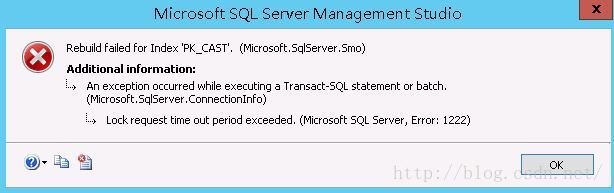
Lock request time out period exceeded. (Microsoft SQL Server, Error: 1222)
Problem: Normally, executing the Rebuild Index will be completed quickly, but today I encountered the Job of Rebuild Index Running all the time. Manually Rebuild, again failing, report “Lock Request Time out Period Exceeded. (Microsoft SQL Server, Error: 1222)”, as shown below:
Solution:
Look at the SPID and SQL Text of the current Running, especially for long-running ones, find the SPID associated with the tables that execute Rebuild Index, and KILL it. What I currently have is an SQL that has been running for hours, and after killing the SPID, it can Rebuild Index properly.
SELECT r.session_id, r.status, r.start_time, r.command, s.text, r.wait_time, r.cpu_time,
r.total_elapsed_time, r.reads, r.writes, r.logical_reads, r.transaction_isolation_level
FROM sys.dm_exec_requests r
CROSS APPLY sys.dm_exec_sql_text(r.sql_handle) s
WHERE R.STATUS='running'
In addition, you can check the information related to Lock:
select distinct object_name(a.rsc_objid), a.req_spid, b.loginame
from master.dbo.syslockinfo a (nolock) join
master.dbo.sysprocesses b (nolock) on a.req_spid=b.spid
where object_name(a.rsc_objid) is not null
View the specified SPID
USE master;
GO
EXEC sp_who '267' --process_id;
GO
For more detailed information:
DECLARE @SessionID INT=63
SELECT
     SPID                = er.session_id
     ,Status             = ses.status
     ,[Login]            = ses.login_name
     ,Host               = ses.host_name
     ,BlkBy              = er.blocking_session_id
     ,DBName             =DB_Name(er.database_id)
     ,CommandType        = er.command
     ,SQLStatement       = st.text
     ,ObjectName         =OBJECT_NAME(st.objectid)
     ,ElapsedMS          = er.total_elapsed_time
     ,CPUTime            = er.cpu_time
     ,IOReads            = er.logical_reads + er.reads
     ,IOWrites           = er.writes
     ,LastWaitType       = er.last_wait_type
     ,StartTime          = er.start_time
     ,Protocol           = con.net_transport
     ,ConnectionWrites   = con.num_writes
     ,ConnectionReads    = con.num_reads
     ,ClientAddress      = con.client_net_address
     ,Authentication     = con.auth_scheme
 FROM sys.dm_exec_requests er
 OUTER APPLY sys.dm_exec_sql_text(er.sql_handle) st
 LEFT JOIN sys.dm_exec_sessions ses
 ON ses.session_id = er.session_id
 LEFT JOIN sys.dm_exec_connections con
 ON con.session_id = ses.session_id
 WHERE er.session_id > 50
     AND @SessionID IS NULL OR er.session_id = @SessionID
 ORDER BY
     er.blocking_session_id DESC
     ,er.session_id