Author Archives: Robins

Error: 701 use DAC connection when out of memory

Some time ago, when I tested the MEMORY database of SQL Server 2014, I found that if the size of the database exceeded the set maximum memory, Error: 701 occurred in SQL Server.
 
Error message:
 
Error: 701, Severity: 17, State: 123.
There is insufficient system memory in resource pool ‘internal’ to runthis query.
 
At that time, I deleted the database and restarted it. In fact, I could still connect it with DAC when I was out of memory.
 
Here’s what I did:
Default connection failure:

The DAC connection is successful (you can also use SQLCMD DAC):

 
Since the server still had memory resources at that time, It was ok to directly modify the maximum memory:
 
sp_configure ‘show advanced options’, 1;
GO
RECONFIGURE;
GO
sp_configure ‘max server memory’, 4096;
GO
RECONFIGURE;
GO
 
If connected to THE DAC, you can check the status of the system, and the session found some problems can be processed, so there is no need to restart the SQL Server, and problems can be found in a timely manner.


Error: 7884, Severity: 20, State: 1

Background:

The program interrupted “TCPProvider, error: 0-an existing Connection was removed by the remotehost.” There was no problem with manually executing the query, but the execution time was tens of seconds. The execution of the Trace program was found to take tens of minutes, due to the fact that the SqlDataReader was used to read the data and a series of data processing was carried out during the reading process, which made the complete process take a long time. Therefore, it is suspected that some factors such as network instability caused the connection break in the processing process. After coordination, the data was changed to DataTable for one-time data loading. After program adjustment, the frequency of failures was greatly reduced, but it cannot be completely eliminated.

Upon further inspection, the following errors were found in the SQLServer log:

Error: 7884, Severity: 20, State: 1. (Params:). The Error is printed in terse mode because there waserror during formatting. Tracing, ETW, notifications etc are skipped.

This error differs from the standard description in sys.messages and a web search did not find a suitable solution.

Screen:

I directed the table of the query to a server for testing, and finally found that it was related to an NVARCHar (Max) column. Then I remembered that some time ago, I changed the data column of the problem from NTEXT to NVarchar (Max) because of a problem with Logreader, so I specifically tested this change and finally determined that the problem was caused by this change.

(The text/ntext column may cause problems with the logreaderagent, which has been encountered many times, but there is no clear way to reproduce the failure, so we will not discuss this.)

Failure recurrence:

Use the following T-SQL to create the test table, data, and modify the Ntext column NVARCHAR (Max)

– = = = = = = = = = = = = = = = = = = = = = = = = = = = = = = = = = = = = = = = = = = = = = = = = = = = = = =

— Create test tables

– = = = = = = = = = = = = = = = = = = = = = = = = = = = = = = = = = = = = = = = = = = = = = = = = = = = = = =

USE tempdb;

GO

IF OBJECT_ID(N’dbo.tb_test’, ‘U’) IS NOT NULL

DROPTABLE dbo. Tb_test;

GO

CREATE TABLEdbo.tb_test(

Id intIDENTITY PRIMARYKEY,

Code varchar (50),

Datedatetime,

The Value ntext

);

GO

INSERT dbo.tb_test

SELECT TOP(10000)

Code =RIGHT(10000000000 +ABS(CHECKSUM(NEWID())) % (1000 * 2), 20),

Date= DATEADD(DAY, CHECKSUM(NEWID()) % 100, GETDATE()),

Value = the CONVERT (char (36), NEWID ())

FROM sys.all_columns A WITH(NOLOCK)

, sys. All_columns WITH B (NOLOCK)

;

GO


– = = = = = = = = = = = = = = = = = = = = = = = = = = = = = = = = = = = = = = = = = = = = = = = = = = = = = =

— Change the ntext field type to NVARCHAR (Max)

– = = = = = = = = = = = = = = = = = = = = = = = = = = = = = = = = = = = = = = = = = = = = = = = = = = = = = =

ALTER TABLEdbo.tb_test ALTERCOLUMN Value nvarchar(max);

GO


Write the program, query the data, and change the data before the query is completed, which is tested with the PowherShell

# connection string

$ConnectionString = “Data Source = 127.0.0.1; InitialCatalog=tempdb; Integrated Security=SSPI”


# Open connection

$SqlCnnectionQuery = New-Object System.Data.SqlClient.SqlConnection -ArgumentList $ConnectionString

$SqlCnnectionQuery.Open()


# Query data

$SqlCommandQuery = New-Object System.Data.SQLClient.SQLCommand

$SqlCommandQuery.Connection = $SqlCnnectionQuery

$SqlCommandQuery.CommandText = “SELECT * FROM( SELECT value, row_id = ROW_NUMBER()OVER( PARTITION BY Code ORDER BY date DESC) FROM dbo.tb_test WITH(NOLOCK) )DATAWHERE row_id = 1”

$SqlReader = $SqlCommandQuery.ExecuteReader()


# Modify data

$SqlCnnectionUpdate = New-Object System.Data.SqlClient.SqlConnection -ArgumentList $ConnectionString

$SqlCnnectionUpdate.Open()

$SqlCommandUpdate = New-Object System.Data.SQLClient.SQLCommand

$SqlCommandUpdate.Connection = $SqlCnnectionUpdate

$SqlCommandUpdate.CommandText = “UPDATE top(1000) dbo.tb_test SET Value =CONVERT(char(36), NEWID() ) WHERE id IN( SELECT TOP 1000 id FROM dbo.tb_testORDER BY id DESC )”

$UpdateRows = $SqlCommandUpdate.ExecuteNonQuery()

$SqlCnnectionUpdate.Close()

“Update $UpdateRows rows.”


# Read query data

An error occurred during the reading process

# (SQL 2008 R2 SP2) : TCP Provider, error: 0-anexisting Connection was removed by the remote host.

# (SQL 2008 R2 SP3) : TCP Provider, Error: 0 – The SpecifiedNetwork Name is no longer available.

At line:1 char:22

“Read query data….”

$ReadRows=0

While($SqlReader.Read()) {$ReadRows+=1}

“Read $ReadRows rows.”


# Close connection

$SqlReader.Close()

$SqlCnnectionQuery.Close()


Fault handling:

For columns with modified data types, the problem can be solved by reupdating the data (UPDATE table SET modified columns = modified columns)

This problem has been tested from SQL Server2008 to 2014, there are problems. In the test of SQL Server 2008 R2 SP3, error information in THE SQL Server log is different, as follows:

Error: 7886, Severity: 20, State: 2.

A read operation on a large object failedwhile sending data to the client. A common cause for this is if the applicationis running in READ UNCOMMITTED isolation level. This connection will beterminated.


Perfectly solve the 1366 error of saving Chinese in MySQL

Most recently when using SQLAlchemy to store Chinese in a table in a mysql database:
Warning Code: 1366 penstring value: ‘\xE5\x9C\xA8’ for column ‘content’ at row 1
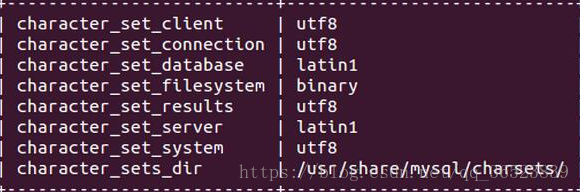
This is because we store Chinese, and our table does not support Chinese character set. We use show variables like ‘character%’. View mysql’s current encoding:

It can be seen that the character set of database and Server USES latin1, and latin1 does not support Chinese, which leads to the error of storing Chinese.
I tried two ways to avoid the Chinese storage error problem:
1: Set server and Database to UTF8 type
Use the following command to set input on the command line:
Show variables like ‘% char %’;
set character_set_server = utf8;
set character_set_database = utf8;
Use the command above. If not, show Create table. To see if the specific column has the wrong character set.
2: Set the default character set when building the table
When I build tables, I usually set the default character set to UTF8 in the SQL statement to avoid some problems:

sql='''create table analysis(city varchar(20),companySize varchar(20),education varchar(20))default charset=utf8'''

The default Charset = UTf8 is added at the end of the statement to set the default charset= UTf8, or at the end of the SQL statement if additional parameters need to be set.
 
★★★★★ ★★ warm tips:
This is a people encounter a problem, here said once: when using SQL statements, some of the words, letters is a class of special characters similar to python, import, etc., so if you want to use the key words, need to add the quotes ` to it, such as ` index `, the index is the key word, if used directly, will be an error. Therefore, I need to pay special attention to the fact that I always make mistakes when using it. I just can’t find the problem and think of other mistakes. Fortunately, I suddenly remember this problem mentioned by the database teacher accidentally.
 

To solve the problem that fastcgi process often fails recently, an unknown fastcgi error occurs

The questions are as follows:

Solutions:
Application pool -& GT; Advanced Setting -& GT; Identity: Change the default ApplicationPoolIdentify to LocalSystem.
Reference: https://github.com/Microsoft/PTVS/issues/2024


Quirky error 18: transfer closed with outstanding read data rem

Background: The laravel framework used by the company’s new project has no special operation and maintenance at the beginning. It USES guzzle encapsulated get/ POST external request method. When requesting an interface, if the number of pages per page per_page exceeds a certain number, an error will be reported
GuzzleHttp\Exception\RequestException: cURL error 18: transfer closed with outstanding read data remaining (see http://curl.haxx.se/libcurl/c/libcurl-errors.html)
A direct request from Postman sent back data, but it didn’t automatically beautify the format, and a request from curl sent back data plus an error message.
 
Solutions:
(Only for the solution of the problem encountered this time, the same error may be caused by different reasons)
Both server Nginx and FPM are run by WWW users. Set Nginx users as WWW and unify the permission configuration of LNMP system:

chown -R www.www /var/lib/nginx/

 
Solution process:
Error message prompt
http://curl.haxx.se/libcurl/c/libcurl-errors.html

CURLE_PARTIAL_FILE (18)
A file transfer was shorter or larger than expected. This happens when the server first reports an expected transfer size, and then delivers data that doesn't match the previously given size.

The data transmitted is not consistent with the expected data size.
At first, we used postman to ask for an error in the package method in our project, and there was data sent back. Therefore, we thought there was something wrong with the guzzle method and sent the wrong request header. We spent a lot of time testing the keep-alive, content-Length, Transfer-Encoding: Chunked and other attributes of HTTP header HTTP1.1, but it didn’t work.
Careful use of the curl command to request the interface also found the error message, so I focused on the configuration of the server side. First, I estimated that the maximum amount of data transferred by Nginx or FPM was too small, but the maximum amount of data returned was not more than 100K, which should not exceed the configuration size.
Then search “PHP Nginx HTTP interface returns the maximum content” on Baidu.
https://blog.csdn.net/sakurallj/article/details/51822828
http://www.dewen.net.cn/q/1913
Return if PHP content is too big, nginx will put part of first deposit into a text file/var/lib/nginx/TMP/fastcgi, after receiving all content, such as to be sent to the client. However, nginx execution users do not have write permissions for TMP files under Nginx.
Then I checked nginx’s error_log and found that there was an error message. Later, the user role of LNMP was unified and the problem was solved…

2018/12/13 18:41:31 [crit] 30392#0: *380874 open() "/var/lib/nginx/tmp/fastcgi/3/43/0000000433" failed (13: Permission denied) while reading upstream, client: 182.18.28.66, server: , request: "GET /v1/user/list?page=1&perpage=50 HTTP/1.1", upstream: "fastcgi://127.0.0.1:9000", host: "123.123.123.13:11008”

Feeling, the user mechanism of Linux is not enough to understand deeply, the HTTP protocol a little understanding,,, encounter weird problems, the first step should always be to check the log!
 

A PHP Error was encountered Severity: Warning Message: mysqli::real_connect(): Headers and client

When I upgraded MySQL, the PHP linked database reported an error. After checking the data, I found that the MySQL version was changed, which was inconsistent with the previously compiled version, so the error was reported. The solution was to recompile mySQLND, my MySQL and PHP installed by YUM were very simple.

killall php-fpm
yum remove php70w-mysql
yum install php70w-mysqlnd

After installation, just restart PHP-FPM!

Error Code: 1055. Expression #2 of SELECT list is not in GROUP BY clause and contains nonaggregated

SQL92 and earlier versions do not allow the selection of lists, HAVING condition or ORDER BY list references unnamed non-grouped columns in the GROUP BY clause. For example, in standard SQL92, this query is illegal because columns that are not listed in the name selection list do not appear in the GROUP BY :

 
    SELECT o.custid, c.name, MAX(o.payment) FROM orders AS o, customers AS c WHERE o.custid = c.custid GROUP BY o.custid;

For the query in SQL92 to be valid, the name column must be omitted from the selection list or named in the GROUP BY clause.
SQL99 later allows for every optional function, T301, and so nonaggregates, if they are funcally dependent on GROUP BY column: if there is such a relationship between name, and custid, the query is legal. This is the case, for example, is custid the main key customers.
MySQL 5.7.5 or above function dependency detection function. If ONLY_FULL_GROUP_BY is enabled for SQL mode (BY default), MySQL rejects the list of options, HAVING conditions or the ORDER BY list references a subset that neither specifies the GROUP BY non-collection column, nor is it functionally dependent on them. (prior to 5.7.5, MySQL did not detect functional dependency, ONLY_FULL_GROUP_BY is not enabled by default). For a description of the behavior prior to 5.7.5, see the MySQL 5.6 Reference Manual.)
If ONLY_FULL_GROUP_BY is disabled, then the MySQL extension used BY standard SQL GROUP BY allows the selection of lists, HAVING conditions, or ORDER BY lists reference non-collection columns, even though the columns do not functionally depend on the GROUP BY columns. This causes MySQL to accept the previous query. In this case, the server is free to select any value in each group, so unless they are the same, the selected value is uncertain, which may not be what you want. In addition, the choice of the value for each group cannot be influenced BY adding a ORDER BY clause. The result set sorting occurs after the selected value, ORDER BY does not affect which value in each group the server selects. Disabling ONLY_FULL_GROUP_BY is useful primarily if you know that due to some attribute of the data each unnamed GROUP BY has the same value for each GROUP in each non-grouping column.
You can achieve the same effect without ONLY_FULL_GROUP_BY by referring to a non-grouped column using ANY_VALUE().
The following discussion illustrates functional dependencies, error messages when MySQL’s functions are not dependent, and the methods that cause MySQL to accept queries without functional dependencies.
This query may be ONLY_FULL_GROUP_BY is disabled because the column not listed in the address select list is not named in the GROUP BY clause:

SELECT name, address, MAX(age) FROM t GROUP BY name;

This query is valid if name is the primary key t or the only NOT NULL column. In this case, MySQL recognizes that the selected column is functionally dependent on the grouping column. For example, if name is the primary key, then the value is determined, address because each group has only one value of the primary key, so there is only one row. Therefore, there is no randomness in the selection of values in the address group, and there is no need to reject the query.
If name is NOT the primary key t or the only NOT NULL column, the query is invalid. In this case, functional relevance cannot be inferred and an error occurs:

 
    mysql> SELECT name, address, MAX(age) FROM t GROUP BY name; ERROR 1055 (42000): Expression #2 of SELECT list is not in GROUP BY clause and contains nonaggregated column 'mydb.t.address' which is not functionally dependent on columns in GROUP BY clause; this is incompatible with sql_mode=only_full_group_by

If you know, for a given data set, every name value actually uniquely identifies this address value, this address is functionally dependent name. To tell MySQL to accept a query, use the following ANY_VALUE() function:

SELECT name, ANY_VALUE(address), MAX(age) FROM t GROUP BY name;

Or, disable ONLY_FULL_GROUP_BY.
However, the above example is simple. In particular, you cannot group on a single primary key column because each group contains only one row. For additional examples of functional dependencies in more complex queries, see Section 12.19.4, “Functional dependency Detection.”
If the query has an aggregation function and no GROUP BY clause, it cannot have a non-collection column in the select list, HAVING condition, or the ORDER BY list ONLY_FULL_GROUP_BY :

 
    mysql> SELECT name, MAX(age) FROM t; ERROR 1140 (42000): In aggregated query without GROUP BY, expression #1 of SELECT list contains nonaggregated column 'mydb.t.name'; this is incompatible with sql_mode=only_full_group_by

There is no GROUP BY, there is a separate GROUP, and it is uncertain which name value is selected for the GROUP. Here also ANY_VALUE() can be used, if it is irrelevant, nameMySQL selects which value:

SELECT ANY_VALUE(name), MAX(age) FROM t;

ONLY_FULL_GROUP_BY also affects the handling of ORDER BY using a DISTINCT and queries in MySQL 5.7.5 or later. In the case of the table, t has three columns c1, c2 and c3 contain these rows:

c1 c2 c3
1  2  A
3  4  B
1  2  C

Suppose we execute the following query and expect the results to be sorted in the following order c3 :

SELECT DISTINCT c1, c2 FROM t ORDER BY c3;

To order results, you must first repeat. But to do that, should we keep the first row or the third row?This arbitrary choice affects the reserved value c3, which in turn affects the sorting and makes it arbitrary. To prevent this problem, if any expression does not meet at least one of the following criteria, the query with DISTINCT and ORDER BY is rejected is invalid ORDER BY :
The expression equals that all columns of the selected table referenced by an expression in the selection list and belonging to the query are elements of the selection list
Another MySQL extension of standard SQL allows alias expressions to be referenced in the HAVING clause in the select list. For example, the following query returns name values that occur only once in the table orders :

 
    SELECT name, COUNT(name) FROM orders GROUP BY name HAVING COUNT(name) = 1;

MySQL extension allows HAVING to use aliases in clauses of aggregated columns:

 
    SELECT name, COUNT(name) AS c FROM orders GROUP BY name HAVING c = 1;

Pay attention to
Prior to MySQL 5.7.5, enabling ONLY_FULL_GROUP_BY disables this extension, so you need HAVING to write this clause using an unused expression.

Standard SQL only allows column expressions in the GROUP BY clause, so such a statement is invalid because it FLOOR(value/100) is a non-column expression:

 
    SELECT id, FLOOR(value/100) FROM tbl_name GROUP BY id, FLOOR(value/100);

MySQL extends standard SQL to allow non-column expressions in the GROUP BY clause and treats the above statement as valid.
Standard SQL also does not allow aliases in the GROUP BY clause. MySQL extends standard SQL to allow aliases, so another way to write queries is as follows:

 
    SELECT id, FLOOR(value/100) AS val FROM tbl_name GROUP BY id, val;

The alias val in this clause is treated as the column expression GROUP BY.
When a non-column expression exists in the GROUP BY clause, MySQL recognizes the equality between that expression and the expression in the selection list. This means that when ONLY_FULL_GROUP_BY is enabled for the QL schema, the contained query GROUP BY id, FLOOR(value/100) is valid, because FLOOR() appears in the selection list with the same expression. MySQL, however, does not attempt to identify functional dependencies on non-GROUP BY column expression, so ONLY_FULL_GROUP_BY, even though the third selected expression is a simple formula for id column and FLOOR() expression in the clause, the following query is invalid GROUP BY :

 
    SELECT id, FLOOR(value/100), id+FLOOR(value/100) FROM tbl_name GROUP BY id, FLOOR(value/100);

The solution is to use derived tables:

 
    SELECT id, F, id+F FROM 0 (SELECT id, FLOOR(value/100) AS F1 2 3 4 FROM tbl_name5 6 7 8 GROUP BY id, FLOOR(value/100)) AS dt;9 0

1

Package pdftex.def Error: PDF mode expected, but DVI mode detected!_ mdpi_ Templatex compilation error in winedt

Use LaTeX to compile the following file types as follows:

\documentclass[journal,article,pdftex,10pt,a4paper]{IEEEtran}

Error as shown in the title appears:

Package pdftex.def Error: PDF mode expected, but DVI mode detected!(pdftex.def) If you are using `latex', then call `pdflatex'. }\@ehc

It is probably because of the difference between the compilation of latex and pdflatex. Using the mode of latex, the latter cannot be compiled.

The option pdftex is for use with pdfLaTeX. If eps figure are used, remove the option pdftex and use LaTeX and dvi2pdf.

In other words, eps(embedded PostScript) image documents should be used with latex mode, while pdftex will cause problems (the solution is to try to delete pdftex).
In addition, the same problem will occur when I see my net friends in the following usage:

\usepackage[pdftex]{graphicx}

The solution is to remove the [pdftex], the graphicx package will compile normally, but in the pdftex mode, it is better to convert the . Eps file into the . PDF file.
If you use commands such as \includegraphics{file} to load the display image file, the two modes mentioned above will automatically complete the extension of the filefile, and latex mode will be supplemented with file.eps. While pdftex will be completed as file.pdf (or file.png, file.jpg).

Dell server reported CPU 1 has an internal error (ierr)

Restart the server and press F2 to enter the BIOS, select the System BIOS Settings option, and select System Profiles to enter. Please disable the C1E and Cstate options here. Then shut down and completely power off. Long press the power on button for 20 seconds and then restart the server. Restart and solve the problem

Reproduced in: https://www.cnblogs.com/wanggege/p/4755120.html

Anaconda Jupiter notebook kernel error solution

1. First list the available kernel list,
2. Delete the original kernel;
3. Check if there is a kernel in ipython of Anaconda.
4. Reinstall kernel.
The specific orders are as follows:

$ jupyter kernelspec list
Available kernels:
python3 /home/miracode2033/anaconda3/share/jupyter/kernels/python3
$ rm -r /home/miracode2033/anaconda3/share/jupyter/kernels/python3
$ jupyter kernelspec list
Available kernels:
python3 /home/miracode2033/anaconda3/lib/python3.6/site-packages/ipykernel/resources
$ python -m ipykernel install --user
Installed kernelspec python3 in /home/miracode2033/.local/share/jupyter/kernels/python3
$