Author Archives: Robins

IIS 404 The page cannot be displayed because an internal server error has occurred

1. allow physical paths in the ApplicationHost. Configuration File

By default, this file is located in %SystemRoot%\system32\inetsrv\config.

Find this file and edit it.

Search for section < httperror…than;

Then add the command allowAbsolutePathsWhenDelegated=”true”, as follows:

<httpErrors lockAttributes="allowAbsolutePathsWhenDelegated,defaultPath" allowAbsolutePathsWhenDelegated="true">
   ....
   ....
</httpErrors>


Fatal error: Function name must be a string in

Fatal error: Function name must be a string in

<?php

if ($_COOKIE('CaptchaResponseValue') == "false")
{
    header('location:index.php');
    return;
}
?>

Amendments.
It should be $_COOKIE[‘ name ‘], not $_COOKIE(‘ name ‘)

<?php

if ($_COOKIE['CaptchaResponseValue'] == "false")
{
    header('location:index.php');
    return;
}
?>

</ div>

Error getting authority: Error initializing authority: Could not connect: No such file or directory

When I was using the Intranet GitLAB warehouse this morning, I found that the page could not be opened and SSH could not be connected.
Connected to the monitor in the machine room, the following errors were found:

Error getting authority: Error initializing authority: Could not connect: No such file or directory (g-io-error-quark, 1)
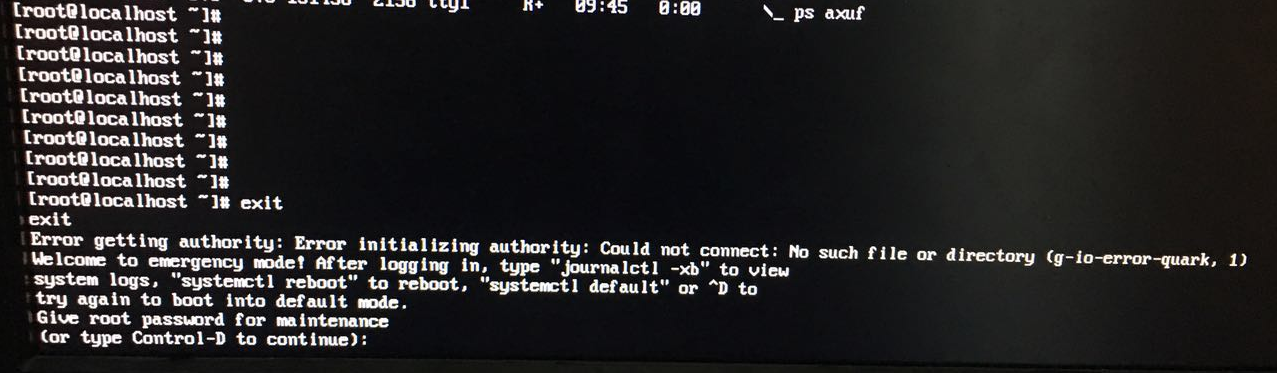

Enter the root password to enter the shell interface.
As prompted, use the command to view the log

# journalctl -xb -p3
-- Logs begin at Tue 2017-09-05 09:34:14 CST, end at Tue 2017-09-05 10:15:57 CST. --
.... Omitted content
Sep 05 09:34:18 localhost.localdomain kernel: :megaswr[ahci]: polling for interrupt status timed out for port=1, slot=0
Sep 05 09:34:18 localhost.localdomain kernel: :megasr[ahci]: warning PortReset called for port[1]
Sep 05 09:34:18 localhost.localdomain kernel: :megasr[ahci]: device on port:[1] online:[0x133] [0] milliseconds after reset
Sep 05 09:34:25 localhost.localdomain kernel: :megaswr[ahci]: polling for interrupt status timed out for port=1, slot=0
Sep 05 09:34:25 localhost.localdomain kernel: :megaswr[ahci]:Trouble port=1, slot=0
Sep 05 09:34:25 localhost.localdomain kernel: :megaswr[osl]: breakpoint called
Sep 05 09:34:25 localhost.localdomain kernel: :megasr[ahci]: Device:[2:INTEL SSDSC2BW48] NCQ:[Yes] Queue Depth:[0x20] capacity=0x37e436b0
Sep 05 09:34:25 localhost.localdomain kernel: :megasr[ahci]: Device:[3:INTEL SSDSC2BW48] NCQ:[Yes] Queue Depth:[0x20] capacity=0x37e436b0
Sep 05 09:34:25 localhost.localdomain kernel: :megasr[ahci]: Device:[4:ST9500620NS     ] NCQ:[Yes] Queue Depth:[0x20] capacity=0x3a386030
Sep 05 09:34:25 localhost.localdomain kernel: :megasr[ahci]: Device:[5:ST9500620NS     ] NCQ:[Yes] Queue Depth:[0x20] capacity=0x3a386030
Sep 05 09:34:25 localhost.localdomain kernel: :megasr: raid 10 logical drive is degraded, is not initialized, has 2 spans, and has a size of 0x6f869000 sectors
Sep 05 09:34:25 localhost.localdomain kernel: :megasr: raid 1 logical drive is online, is not initialized, has 2 drives, and has a size of 0x3a175800 sectors.
Sep 05 09:34:25 localhost.localdomain kernel: :megasr[raid_key]: [ ] RAID5 support    [ ] SAS drive support
Sep 05 09:35:57 localhost.localdomain systemd[1]: Timed out waiting for device dev-sdc1.device.

In the logs, you see a problem with the Dev-SDC1 device.
View disk partitions

# fdisk  -l

Disk /dev/sdb: 499.0 GB, 498999492608 bytes, 974608384 sectors
Units = sectors of 1 * 512 = 512 bytes
Sector size (logical/physical): 512 bytes/512 bytes
I/O size (minimum/optimal): 512 bytes/512 bytes
Disk label type: dos
Disk identifier: 0xfcae2784

   Device Boot      Start         End      Blocks   Id  System
/dev/sdb1            2048  1949216767   974607360   83  Linux
WARNING: fdisk GPT support is currently new, and therefore in an experimental phase. Use at your own discretion.

Disk /dev/sda: 958.0 GB, 957997907968 bytes, 1871089664 sectors
Units = sectors of 1 * 512 = 512 bytes
Sector size (logical/physical): 512 bytes/512 bytes
I/O size (minimum/optimal): 512 bytes/512 bytes
Disk label type: gpt


#         Start          End    Size  Type            Name
 1         2048       411647    200M  EFI System      EFI System Partition
 2       411648       821247    200M  Microsoft basic 
 3       821248   1871087615  891.8G  Linux LVM       

Disk /dev/mapper/cl-root: 946.8 GB, 946834767872 bytes, 1849286656 sectors
Units = sectors of 1 * 512 = 512 bytes
Sector size (logical/physical): 512 bytes/512 bytes
I/O size (minimum/optimal): 512 bytes/512 bytes


Disk /dev/mapper/cl-swap: 10.7 GB, 10737418240 bytes, 20971520 sectors
Units = sectors of 1 * 512 = 512 bytes
Sector size (logical/physical): 512 bytes/512 bytes
I/O size (minimum/optimal): 512 bytes/512 bytes

Obviously, the SDC is gone. I just remember that when I installed the system, I inserted an extra USB flash disk. At that time, the USB flash disk was identified as SDB and this disk was identified as SDC.
Check out fSTAB to prove it.

# cat /etc/fstab 

#
# /etc/fstab
# Created by anaconda on Tue Aug  8 13:10:48 2017
#
# Accessible filesystems, by reference, are maintained under ‘/dev/disk‘
# See man pages fstab(5), findfs(8), mount(8) and/or blkid(8) for more info
#
/dev/mapper/cl-root    /                      xfs     defaults        0 0
UUID=a51fd6f8-a756-4e8f-ba44-5589fb99861e /boot                   xfs     defaults        0 0
UUID=7D74-6C54          /boot/efi               vfat    umask=0077,shortname=winnt 0 0
/dev/mapper/cl-swap     swap                    swap    defaults        0 0
/dev/sdc1 /data ext4 defaults 0 0

It looks like you are changing the name of the disk you are writing to UUID.

# blkid 
/dev/sdc1: UUID="ab4c28b5-1708-483c-973a-40f91d320a9d" TYPE="ext4" 
...

The modified FSTAB is

# cat /etc/fstab 

#
# /etc/fstab
# Created by anaconda on Tue Aug  8 13:10:48 2017
#
# Accessible filesystems, by reference, are maintained under ‘/dev/disk‘
# See man pages fstab(5), findfs(8), mount(8) and/or blkid(8) for more info
#
/dev/mapper/cl-root    /                      xfs     defaults        0 0
UUID=a51fd6f8-a756-4e8f-ba44-5589fb99861e /boot                   xfs     defaults        0 0
UUID=7D74-6C54          /boot/efi               vfat    umask=0077,shortname=winnt 0 0
/dev/mapper/cl-swap     swap                    swap    defaults        0 0
UUID=ab4c28b5-1708-483c-973a-40f91d320a9d /data ext4 defaults 0 0

Try to restart daemon, same error still pops up.

# systemctl daemon-reload
Error getting authority. Error initializing authority: Could not connect: No such file or directory  (g-io-error-quark, 1)

Exit the shell and the error pops up again.

Error getting authority: Error initializing authority: Could not connect: No such file or directory (g-io-error-quark, 1)

Never mind, wait a few seconds, the system is ready to start normally.
Error: call-time pass-by-reference has been removed

This error may occur when PHP is upgraded to version 5.4 of PHP:
If a function (or class) is used in this way, a PHP Fatal error will result :
foo(& $var);
In fact, that’s what’s going to happen in PHp5.3, but it’s just going to Deprecated.

// Right
function myFunc(&$arg) { do something... }
 
myFunc($var);//Call myFunc
 
//Wrong
function myFunc($arg) { do something... }
 
myFunc(&$arg);//Call myFunc

Sync Error: some files/attrs were not transferred (see previous errors) (code 23) at main

1 Rsync error:

rsync error: some files/attrs were not transferred (see previous errors) (code 23) at main.c(1518)

According to the experience of others, rsync error: some files/attrs were not transferred and http://www.lingzhong.cn/tech/23765.htm
Method 1 is to modify the configuration file, and method 2 is to change the permissions.
The first one was a bit of a hassle, the second one was too much.
At this point, run the sync again,

linlf@ccrfox247:~/project/man$ ./transfer-cuda90.sh 
[email protected]'s password: 
sending incremental file list
rsync: send_files failed to open "/home/linlf/project/nohup.out": Permission denied (13)

sent 20,428,254 bytes  received 232 bytes  1,634,278.88 bytes/sec
total size is 211,679,681,443  speedup is 10,361.99
rsync error: some files/attrs were not transferred (see previous errors) (code 23) at main.c(1183) [sender=3.1.1]

List that file cannot be synchronized. The original owner and group of this file are root, but I synchronized the past user is a normal user, not root, so I reported an error.

ls -lh /home/linlf/project/nohup.out
-rw------- 1 root root 207K 6月  14 17:27 /home/linlf/project/nohup.out

It’s also easy to change the file permissions to my own:

sudo chown linlf /home/linlf/project/nohup.out
sudo chgrp linlf /home/linlf/project/nohup.out

Finally, modify the permissions of the folders to be synchronized altogether:

sudo chown -R linlf /home/linlf/project
sudo chgrp -R linlf /home/linlf/project

Re-run the script:

rsync -avz /home/linlf/project [email protected]:/home/linlf

Done

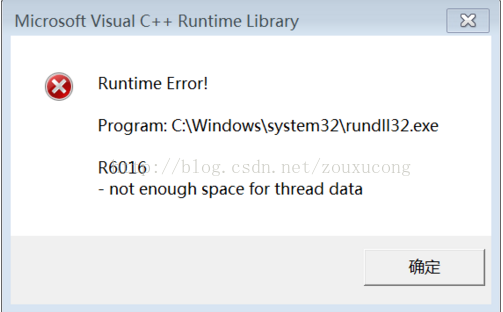
Microsoft Visual C++ Runtime library not enough space for thread data

When the computer has been running recently, a prompt box will pop up, as follows:

Solutions:

Start-->Run-->Type cmd Enter at the command prompt (paste the following characters) 
for %1 in (%windir%\system32\*.dll) do regsvr32.exe /s %1 
Enter (don't move the keyboard or mouse here) until the flash is finished and then do something else. After that there will be no more error boxes. This method does not work try this 
for %1 in (%windir%\system32\*.ocx) do regsvr32/s %1 (success rate %80) 
If it appears (there should be no doregsvr32.exe) can not operate please before: start --> run --> type regsvr32actxprxy.dll Enter; then run the following command: regsvr32 shdocvw.dll regsvr32 oleaut32.dll  regsvr32 actxprxy.dll regsvr32 mshtml.dll regsvr32 msjava.dll regsvr32 browseui.dll regsvr32 urlmon.dll Enter. 
If it appears (not an internal or external command, nor a runnable or batch file) My Computer Properties - >Advanced - >Environment Variables - >Find path in System Variables - >Edit - >See if the default value is this (%SystemRoot%\system32;%SystemRoot%;%) SystemRoot%\System32\Wbem ) If it doesn't work, just add ( ;%systemroot%\system32;%systemroot% ) to the end.

How to Fix Microsoft SQL Server Error 1326

When using SQL Server, we all encounter the problem that we cannot connect to the remote database instance using SQL Server Management Studio. The error description information is summarized as follows:
An error has contracted a connection to the server.
(provider: Named Pipes provider, error: 40 — Could not open a connection to SQL server)
An error has been sent to the server. 5)
An error has occurred while establishing a connection to the server. When connecting to SQL Server 2005, this failure may be caused by the fact that under the default settings SQL Server does not allow remote connections. (provider: Named Pipes Provider, error: 40 — Could not open a connection to SQL Server (Microsoft SQL Server, 1326)
— Could not open a connection to SQL Server (Microsoft SQL Server, 1326)
) In fact, this is a more typical database server setup problem, in the LAN or wan may be encountered, we only need to do some configuration of the database server can solve this problem, to see the specific steps.

The reason is that I modified the computer name and logged in with the original user name, so the above error occurred.
The solution is to re-search the SQL Server server and log in.

Gog cannot link PSN: the connection to the server timed out

Trying to pick up Wizard 3 on the GOG Galaxy, only to find that the connection to PSN keeps coming up after endless clicks to verify the image
“The Connection to The server Timed out.”
Solutions:
1. Turn off the running GOG Galaxy.
2. Log in to PSN with the browser (if logged in, log out, log in again).
3. After login, click on the link: https://ca.account.sony.com/api/v1/ssocookie (this link is to look at SONY’s cookies, don’t be afraid to trust point).
You will see

{"npsso":"xxx"}

XXX is the value of nPSSO, copy it down (without quotes).
4. Open my computer and type in the address bar:

%LocalAppData%\GOG.com\Galaxy\plugins\installed\

Open the “psn_xxxxxxxx_xxx…” Folders (unique folders). Find plugin.py and open it with any text editor.
5. Find line 64 and you will see:

stored_npsso = stored_credentials.get("npsso") if stored_credentials else None

Delete all of the equals sign and copy the nPSSO value into it. Be careful to switch to the English input method and include the value in double quotation marks.

stored_npsso = "Your npsso Key"

Save the change (CTRL + S) and close the file.
6. Restart GOG Galaxy and connect to PSN again.

Idea update failure problem: couldn’t save uncommitted changes solution

An error occurred during the update of the project today, which could not be solved after a long period of debugging.
error reason:

  Couldn't save uncommitted changes.
  Tried to save uncommitted changes in stash before Update, but failed with an error.
  Couldn't stash file://H:/IdeaProjects/SVSP_0.4: git-write-tree: error building trees
  Cannot save the current index state

After gradual investigation, it was found that colleagues uploaded redundant files, which caused the collective failure to update. The solution is as follows:
Enter

    into your project directory. My directory is H:\IdeaProjects\ svsp_0.4 . Right-click on Git Bash here and type Git status. Notice the Unmerged paths
Unmerged paths:
  (use "git reset HEAD <file>..." to unstage)
  (use "git rm <file>..." to mark resolution)
        both deleted:    .idea/artifacts/SVSP0_4.xml
    was found because there were extra files uploaded, and both deleted: followed by .idea/artifacts/ svsp0_4.xml this file is typed in git rm.idea /artifacts/ svsp0_4.xml and then enter the idea update to resolve the problem

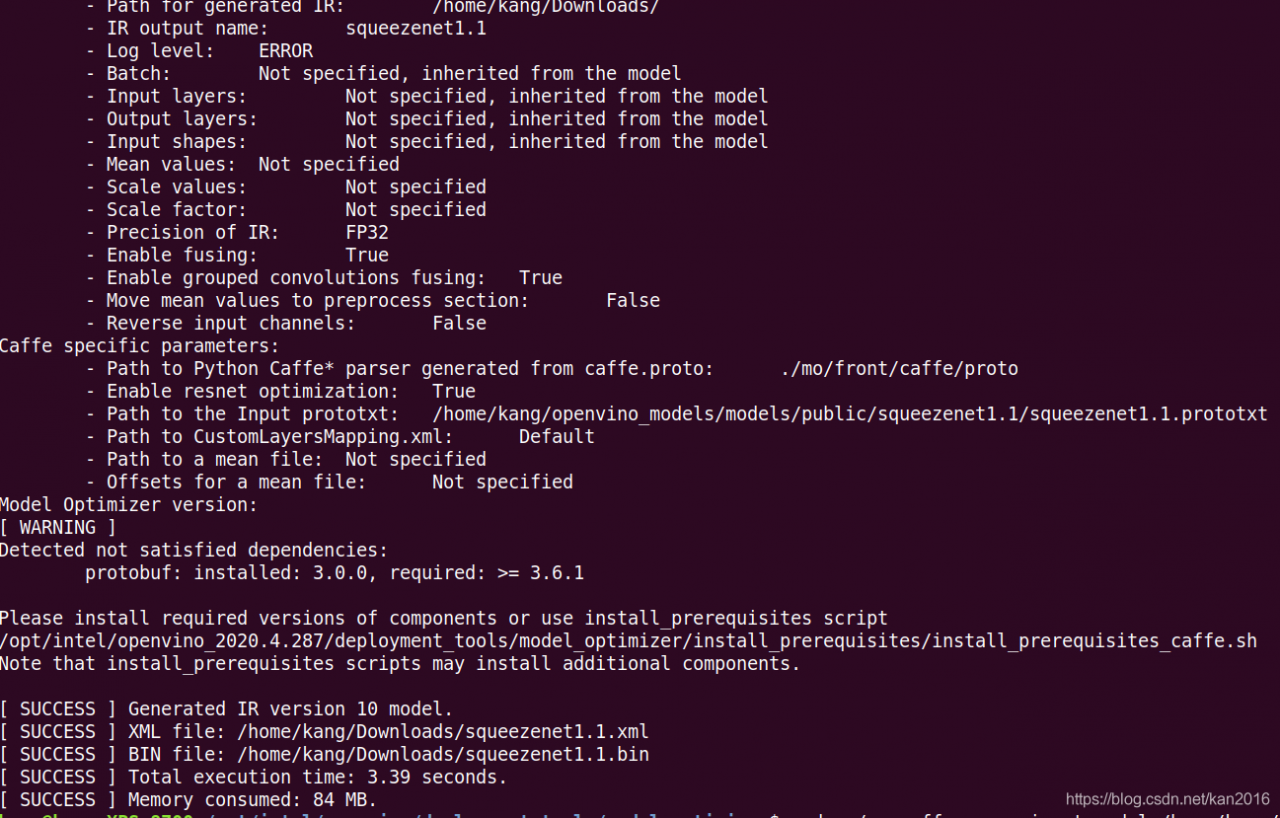
[ ERROR ] Error loading xmlfile: squeezenet1.1\FP16\squeezenet1.1.xml, File was not found at line: 1

1. Encounter problems:
ERROR loading XMLFile: C:\Users\USER\Documents\Intel\OpenVINO\ Openvino_models \ir\ Public \ Squeezenet1.1 \FP16\ Squeezenet1.1.XML, File was not found at line: 1 pos: 0
2. Solutions:
Find the Squeezenet1.1.caffemodel file

cd /home/kang/openvino_models/models/public/squeezenet1.1/
ls

Switch to the model_optimizer directory and use mo_caffe.py to optimize your models

cd /opt/intel/openvino/deployment_tools/model_optimizer
sudo ./mo_caffe.py  --input_model /home/kang/openvino_models/models/public/squeezenet1.1/squeezenet1.1.caffemodel --output_dir  ~/Downloads/

The parsed XML and bin are ready to use

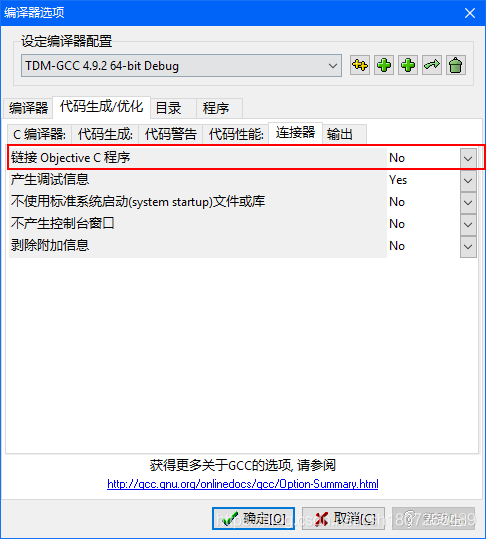
About the problem of collect2.exe [error] LD returned 1 exit status in dev!!!

This is the problem I encountered in writing C++ code in DEV. Description of the problem: at the beginning, I didn’t know what option was checked, which led to collect2.exe [Error] ld returned 1 exit status for all C++ codes run.

solution: open tool -> Compile options -& GT; Code generation/optimization -& GT; Connector, let’s see if this link to the Objective C program checks this option.