Author Archives: Robins

Solve cannot execute binary file: exec format error under Linux

For Linux, cannot execute Binary file: Exec Format error clearly indicates that it is an execution file format error.
1. Use the wrong command, such as GCC-c hello. c-o hello, and you get a.o file instead of an executable./hello will report the above error! Change to GCC hello. C-o Hello is ok!
2. If not the above error, it may be a version problem, such as the original 32 bit operating system, but the use of 64-bit software, at this time the need is to use the correct version of the software!

attached:
A solution to the problem that Cannot execute Binary File is encountered in Linux system,
From http://1381479.blog.51cto.com/1371479/888198

The problem that cannot execute Binary file is encountered in Linux system is generally caused by the following situations:

    1. 1.non-root user or non-execute permission
      1. 2.compilation environment is different (the program is copied from ot

    her operating environment)

For the first case, chmod + X program can be chmod +x program by adding execution permissions
In the second case, it is recommended to copy over the binary package of the program and recompile the program. In the actual operation process, I found that when I packaged the entire operating system environment of VPS in the United States and downloaded it to the local server, after unzipping it, the program running it would appear as shown in the question. I was puzzled. The system was all CENTOS5.2, and finally I found that it was caused by the difference between the two compilation environments:
1.The US VPS is the AMD64-bit processor

2.the local server is the Intel 32-bit processor

The hardware compilation environment of the two is different, which causes this problem. Of course, some programs downloaded from the non-binary package, can be executed directly, but the problem is also because the kernel does not match the CPU, Intel is x86, AMD is AMD64 or 32-bit version, corresponding to clear download. I hope this article will be helpful to you.

How to Fix “HTTP error 403: forbidden” in Python 3. X

problem:
The urllib.request-urlopen () method is often used to open the source code of a web page and then analyze the source code of the page, but it will throw an “HTTP Error 403: Forbidden” exception for some websites
For example, when the following statement is executed,

 urllib.request.urlopen("http://blog.csdn.net/eric_sunah/article/details/11099295")

will appear the following exception:

  File "D:\Python32\lib\urllib\request.py", line 475, in open
    response = meth(req, response)
  File "D:\Python32\lib\urllib\request.py", line 587, in http_response
    'http', request, response, code, msg, hdrs)
  File "D:\Python32\lib\urllib\request.py", line 513, in error
    return self._call_chain(*args)
  File "D:\Python32\lib\urllib\request.py", line 447, in _call_chain
    result = func(*args)
  File "D:\Python32\lib\urllib\request.py", line 595, in http_error_default
    raise HTTPError(req.full_url, code, msg, hdrs, fp)
urllib.error.HTTPError: HTTP Error 403: Forbidden

Analysis:
Appear abnormal, because if use urllib request. Open a URL urlopen way, the server will only receive a simple access request for the page, but the server does not know to send the request to use the browser, operating system, hardware platform, such as information, and often lack the information request are normal access, such as the crawler.
In order to prevent this abnormal access, some websites will verify the UserAgent in the request information (its information includes hardware platform, system software, application software, and user preferences). If the UserAgent is abnormal or does not exist, then the request will be rejected (as shown in the error message above).
So you can try to add the UserAgent’s information
to the request
Solution:
For Python 3.x, adding the UserAgent information to the request is simple as follows

#HTTPError: HTTP Error 403: Forbidden error appears if the following line is not added
    #The main reason is that the site is forbidden to crawl, you can add header information to the request, pretending to be a browser to access the User-Agent, specific information can be found through the Firefox FireBug plugin.
    headers = {'User-Agent':'Mozilla/5.0 (Windows NT 6.1; WOW64; rv:23.0) Gecko/20100101 Firefox/23.0'}
    req = urllib.request.Request(url=chaper_url, headers=headers)
    urllib.request.urlopen(req).read()

The urllib. Request. Urlopen. Read () to replace the above code, for problems page can normal visit

configure: error: C compiler cannot create executables See `config.log’ for more details

Install MPI on your MAC, where GCC is already installed.
install the following blog instructions to install MPI.
https://blog.csdn.net/yaochuyi/article/details/86939352
S1 double-click the downloaded file openmpi-4.0.0.tar.gz
S2 open CMD, CD to the unzipped folder.
S3 type CD/Users/ycy/Desktop/openmpi – 4.0.0
S4 installed under/usr/local, execute./configure.
S5 enter./configure –prefix=/usr/local
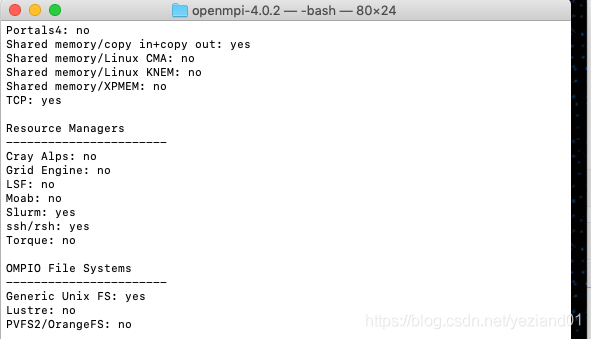
But it turns out that something went wrong, and it went as follows:

*** Startup tests
checking build system type... x86_64-apple-darwin18.5.0
checking host system type... x86_64-apple-darwin18.5.0
checking target system type... x86_64-apple-darwin18.5.0
checking for gcc... x86_64-apple-darwin13.4.0-clang
checking whether the C compiler works... no
configure: error: in `/Users/xxx/openmpi-4.0.2':
configure: error: C compiler cannot create executables
See `config.log' for more details

What’s wrong with the C compiler?But my GCC is clearly installed correctly.
check, may be a permission problem. Then change the S5 command to
sudo./configure –prefix=/usr/local
. Installation successful.

runtime error ‘9’: subscript out of range error in VBA programming

Question:
Today, in order to implement a seemingly simple function, it turned out that it took me nearly 3 hours to debug the VBA code, and I still haven’t finished a cup of coffee since I drank it in the morning.
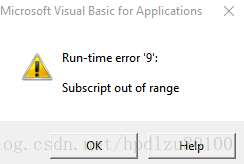
Among them, encountered a “Runtime-error ‘9’” : Subscript out of range error, which delayed a lot of time.

Problem code:

With workbooks(fileName).VBProject
        For Each objVbc In .VBComponents
        Select Case objVbc.Type
            Case 1, 2, 3
                .VBComponents.Remove .VBComponents(objVbc.Name)
            Case Else
                With objVbc.CodeModule
                    .DeleteLines 1, .CountOfLines
                End With
        End Select
        Next
    End With

Solutions:
That’s the problem

workbooks(fileName).VBProject

This sentence. No error will be reported after modification to the following code:
Modified code:

Dim wkBook As Workbook      'VBA code (modules and worksheets) used to delete the delivery file.
Dim objVbc As Object        'Defining a VBA Component in a delivery file (VB Component)
    Set wkBook = GetObject(Filename)
    'Remove VBA codes from delivery files (users do not need to see these codes)
    With wkBook.VBProject
        For Each objVbc In .VBComponents
        Select Case objVbc.Type
            Case 1, 2, 3
                .VBComponents.Remove .VBComponents(objVbc.Name)
            Case Else
                With objVbc.CodeModule
                    .DeleteLines 1, .CountOfLines
                End With
        End Select
        Next
    End With
 

———————————————————————————————————-

Subscript out of range (Error 9)

Elements of arrays and members of collections can only be accessed within their defined ranges. This error has the following causes and solutions:

You referenced a nonexistent array element. The subscript may be larger or smaller than the range of possible subscripts, or the array may not have dimensions assigned at this point in the application. Check the declaration of the array to verify its upper and lower bounds. Use the UBound and LBound functions to condition array accesses if you’re working with arrays that are redimensioned. If the index is specified as a variable, check the spelling of the variable name. You declared an array but didn’t specify the number of elements. For example, the following code causes this error:

Dim MyArray() As Integer
MyArray(8) = 234    ' Causes Error 9.

Visual Basic doesn’t implicitly dimension unspecified array ranges as 0 – 10. Instead, you must use Dim or ReDim to specify explicitly the number of elements in an array. You referenced a nonexistent collection member. Try using the For Each… Next construct instead of specifying index elements. You used a shorthand form of subscript that implicitly specified an invalid element. For example, when you use the ! operator with a collection, the ! implicitly specifies a key. For example, object!keyname. value is equivalent to object.item(keyname).value. In this case, an error is generated if keyname represents an invalid key in the collection. To fix the error, use a valid key name or index for the collection.

For additional information, select the item in question and press F1 (in Windows) or HELP (on the Macintosh).

Authentication token manipulation error appears in ubuntu18.04 password modification

Today I need to change the password of ubuntu18.04, but when I changed the password, the following error occurred:

Authentication token manipulation error

The explanation given online is that there is no authority.
 
The solution

sudo mount -o remount,rw /

Just add a sudo

eric@eric-HP-Z420-Workstation:~$ sudo passwd eric
Enter new UNIX password:
Retype new UNIX password:
passwd: password updated successfully

reference
[1]. The modified Linux password times “the Authentication token manipulation error” wrong solution. https://help.aliyun.com/knowledge_detail/41542.html
[2].Fix “Authentication Token Manipulation Error” When Changing User Password In Ubuntu. https://www.codevoila.com/post/26/fix-authentication-token-manipulation-error-when-changing-user-password-in-ubuntu

JDBC connection to Oracle: listener used the connection with the following error: ora-12505

Exception in thread "main" java.sql.SQLException: Listener refused the connection with the following error:
ORA-12505, TNS:listener does not currently know of SID given in connect descriptor
 
	at oracle.jdbc.driver.T4CConnection.logon(T4CConnection.java:419)
	at oracle.jdbc.driver.PhysicalConnection.<init>(PhysicalConnection.java:536)
	at oracle.jdbc.driver.T4CConnection.<init>(T4CConnection.java:228)
	at oracle.jdbc.driver.T4CDriverExtension.getConnection(T4CDriverExtension.java:32)
	at oracle.jdbc.driver.OracleDriver.connect(OracleDriver.java:521)
	at java.sql.DriverManager.getConnection(DriverManager.java:571)
	at java.sql.DriverManager.getConnection(DriverManager.java:215)
	at com.test.OracleTest.main(OracleTest.java:13)
Caused by: oracle.net.ns.NetException: Listener refused the connection with the following error:
ORA-12505, TNS:listener does not currently know of SID given in connect descriptor
 
	at oracle.net.ns.NSProtocol.connect(NSProtocol.java:386)
	at oracle.jdbc.driver.T4CConnection.connect(T4CConnection.java:1054)
	at oracle.jdbc.driver.T4CConnection.logon(T4CConnection.java:308)
	... 7 more

//create a Connection object.
Connection conn = DriverManager getConnection (” JDBC: oracle: thin: @ localhost: 1521: former “, “admit”, “123”);
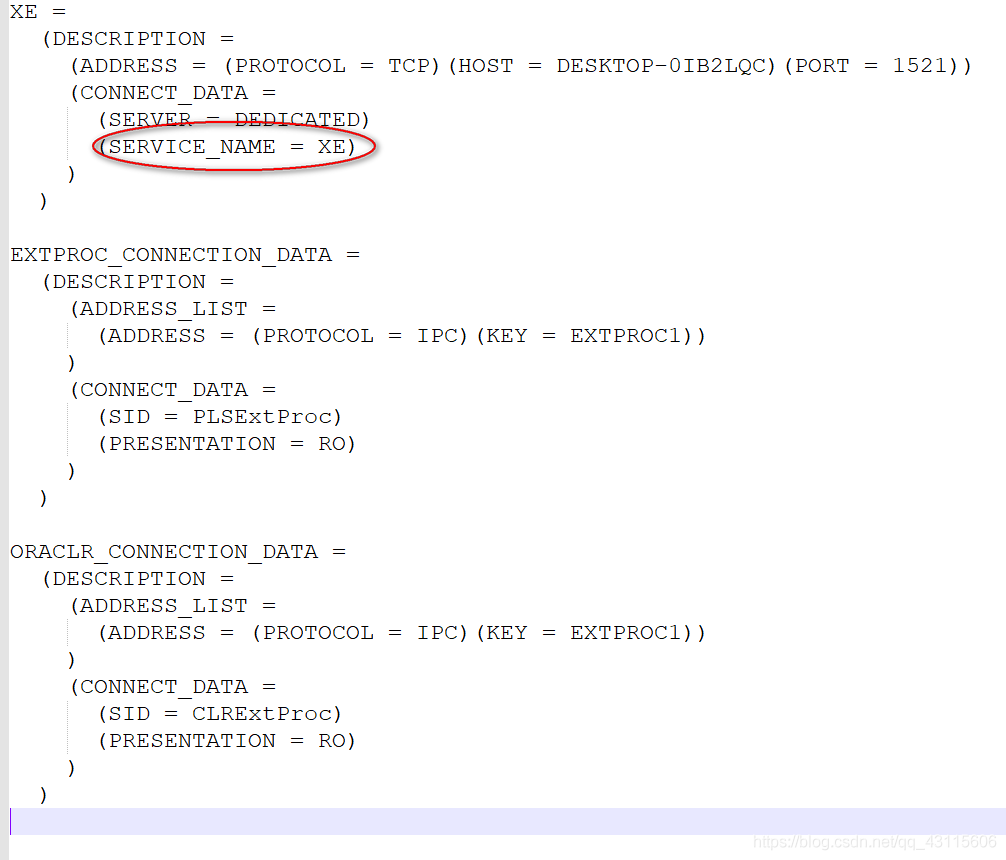
The problem is the database to monitor the sid in the configuration file is not correct, namely the “former” in the url, enter the database installation directory, find tnsnames. Ora file, for example, my path is/home/Oracle_11g/product/11.2.0/dbhome_1/network/admin/tnsnames. Ora
found SERVICE_NAME = XE, but not equal to the former, So you can change the url of the former to XE can
Connection conn = DriverManager. GetConnection (” JDBC: oracle: thin: @ localhost: 1521: former “, “admit”, “123”);

Windowserror: [error 183] error and in Python os.raname () detailed explanation

When I used Python to iterate over files in a folder and rename them, the correct code sometimes incorrectly reported WindowsError[183].
【 183 】 — & gt; Indicates that a file cannot be created while it exists.

Os.rename (oldFilepath,newfilepath), this error is most likely because your new path newfilepath has duplicated a file in the current folder [183].
Solution: Find duplicate files named other, or give a non-duplicate name first, then os.rename(oldFilepath, newFilepath)
Get the name you want.
For a variety of WindowsError error code, can refer to the article: https://blog.csdn.net/qq_35221523/article/details/79214356

HTTP Error 401.1 – Unauthorized:Access is denied due to invalid credentials

Phenomenon: The site is set as AD integrated authentication, but when accessing it, it is still prompted to enter the account password. An error occurred three times later.
Solution: in C: \ Inetpub \ Adminscripts run below: cscript adsutil. VBS set w3svc/NTAuthenticationProviders “NTLM” modify the authentication mechanism.
 
The text reads as follows:
http://support.microsoft.com/kb/871179
 
 
Ok when trying to Access a site that’s part of the IIS6.0 application pool, you get an Error message: “HTTP Error 401.1 – Access is denied due to Invalidcredentials” (HTTP Error 401.1 – Unauthorized:Access denied due to Invalidcredentials)
See the products this article applies to
Expand all | close all
symptoms
When you try to access a Microsoft Internet Information Service (IIS) 6.0 site configured to use only integrated Windows authentication, you are prompted for user credentials. .
When you try to access a Microsoft Internet Information Service (IIS) 6.0 site configured to use only integrated Windows authentication, you are prompted for user credentials. When you try to log in, you will receive another login prompt. After three login attempts, you receive the following error message:
HTTP error 401.1 – unauthorized: Access denied due to invalid credentials.
Back to the top
why
This problem can occur if an IIS 6.0 web site is part of an IIS application pool. The application pool runs under either a local account or a domain user account. The site is configured to use only integrated Win…
This problem can occur if:
· The IIS 6.0 site is part of the IIS application pool.
· Application pools run under local accounts or domain user accounts.
· The site is configured to use only integrated Windows authentication.
In this case, Kerberos authentication may not work when an integrated Windows authentication attempt is made to use Kerberos. To use Kerberos authentication, the service must register the service principal name (SPN) of the service under the account in the Active Directory Directory service (the account used to run the service). By default, Active Directory registers the computer name of the network’s basic input/output system (NetBIOS). Active Directory also allows the use of Kerberos for network services or local system accounts.
Back to the top
The solution
If this problem occurs while running the application pool under a local account, follow the steps in the Alternative Methods section. To resolve this problem when running the application pool under a domain user account, use the NetBIOS name and…
If this problem occurs while running the application pool under a local account, follow the steps in the Alternative Methods section. To resolve this problem when running the application pool under a domain user account, set the HTTP SPN using the NetBIOS name and the fully qualified domain name (FQDN) of the domain user account used to run the application pool. To do this, follow these steps on the domain controller:

important note: the service SPN can only be associated with one account. Therefore, if you use this suggested solution, any other application pool running under different domain user accounts cannot be used solely with integrated Windows authentication.
1. Install the setspn. exe tool. To obtain the Microsoft Windows 2000 version of this tool, visit the following Microsoft web site:
http://www.microsoft.com/downloads/details.aspx?FamilyID=5fd831fd-ab77-46a3-9cfe-ff01d29e5c46& displaylang=en (http://www.microsoft.com/downloads/details.aspx?FamilyID=5fd831fd-ab77-46a3-9cfe-ff01d29e5c46& displaylang=en)
Microsoft WindowsServer 2003 version of the setspn. exe command line tool is provided in WindowsServer 2003 SupportTools (WindowsServer 2003 SupportTools) included on WindowsServer 2003 CD. To install these Tools, double-click the Suptools.msi file in the Support/Tools folder.
2. Open a command prompt window and change to setspn.exe’s installation directory.
At the command prompt, type the following command. After typing each command, press Enter:
setspn.exe -a http/IIS_computer’s_NetBIOS_nameDomainName\UserName

setspn.exe -a http/IIS_computer’s_FQDN DomainName\UserName
Note: UserName is the user account used to run the application pool.
After setting the SPN of the HTTP service to the domain user account used to run the application pool, you can successfully connect to the web site without prompting you for user credentials.
Back to the top
Alternative methods
In cases where you have multiple pools of applications running under different domain user accounts, IIS must be forced to use NTLM as an authentication mechanism to resolve this issue (if you want to use only integrated Windows…
In cases where you have multiple pools of applications running under different domain user accounts, IIS must be forced to use NTLM as an authentication mechanism (if you want to use only integrated Windows authentication) to resolve this issue. To do this, follow these steps on the server where IIS is running:
1. Open a command prompt window.
2. Locate and change the directory containing adsutil.vbs file. By default, this directory is C:\Inetpub\Adminscripts.
3. Type the following command, then press Enter:
cscript adsutil.vbs set w3svc/NTAuthenticationProviders”NTLM”
4. To verify NtAuthenticationProviders metadata attribute is set to NTLM, please type the following command, and then press Enter:
cscript adsutil.vbs get w3svc/NTAuthenticationProviders
The following text should be returned:

NTAuthenticationProviders       : (STRING) "NTLM"

Back to the top
state
This behavior is caused by design.
Back to the top
For more information
If you set the SPN using only the FQDN of the server on which IIS is running, you will be prompted for user credentials after 30 minutes. Because Internet Explorer caches the domain name system…
If you set the SPN using only the FQDN of the server on which IIS is running, you will be prompted for user credentials after 30 minutes. There is a 30-minute timeout due to the way Internet Explorer caches domain name system (DNS) information. After 30 minutes, Internet Explorer will revert to the NetBIOS name. Therefore, you must also ensure that the SPN is registered using the NetBIOS name of the server on which IIS is running, so that you are not prompted for user credentials. For more information, click the article number below to view the corresponding article in the Microsoft Knowledge base:
Internet Explorer 263558 (http://support.microsoft.com/kb/263558/) how to use the cache of DNS host item
To verify the registered SPN for the user account used to run the application pool, open a command prompt window, type the following command from the setspn.exe installation directory, and then press Enter:
setspn.exe -l UserName
A list of registered SPNS for the user account is returned.
Copy Xcode project encountered MAC error code – 8058 (error code – 8058)

This morning, I opened the computer and routinely copied a copy of the program backup, but I encountered 8058 error. I tried to restart the computer, modify the folder permissions and change back, but all of them were invalid.
Thank you for the operation-can-t-be-completed-because-an-unexpected -error-error-COD problem. I was very upset when I saw that the number of answers was 0. I found that the problem was solved in the main building = W =.
Xcode is added to the project file, can add it to a folder itself, although this will prompt the item of the same name already exists in the engineering, operation fails, will not be shown in engineering, but in fact in the folder copy has been completed, and formed a recursive folder, can point to open. It’s fun, but you can’t replicate it… Go to this folder and delete it. 8058 error is resolved.

On the problem of from PIL import image

First, you need to find python27\Scripts with the CMD command, download and install PIP, and if you have, install pillow and image directly;
Next, we will find that the “from PIL import Image” in Pycharm still reports an error. Next, we will click file-& GT; settings-> Project Interpreter, double-click PIP, search Pillow, click Pillow, and there will be Install in the lower left corner, and the installation is successful.

As for pillow’s installation, please refer to the following one, but I personally think it can be installed directly in File -> settings-> Search the Pillow and Image installation in the Project Interpreter

PIL: Python Imaging Library is already the DE facto standard Library of image processing for the Python platform.
However, when we do image processing, we will report the exception of PIL in No Module Named. There is no library for image processing. Since Python2.7 doesn’t ship with the library, we’ll have to load and manipulate it ourselves. However, there is a lot of information on the Internet, no specific explanation. To save everyone time and not to be misled, I’ll write down the complete solution.
1. Install easy_install
Why install easy_install?
normally, to install a third-party extension for Python, you download the package, unzip it to a directory, open it at the command line or terminal, and then execute Python setup.py install to install it. It’s very tedious. It’s convenient to wrap Twisted if we run easy_install Twisted directly from the command line. So easy_install is meant to make it easier for us to install third-party extensions.
Easy_install download path: https://github.com/ActiveState/ez_setup
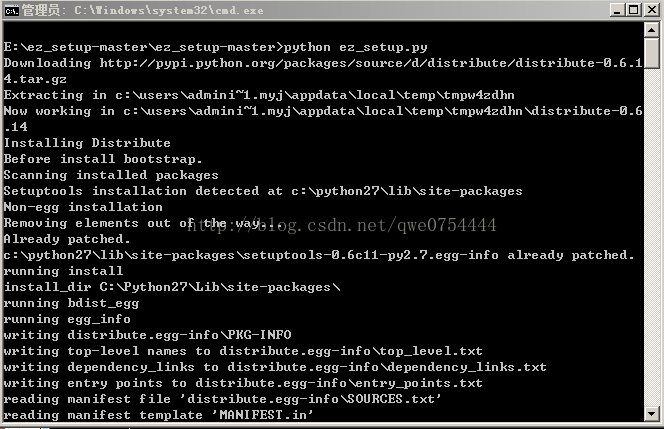
Unzip the package, open the command line, and execute Python ez_setup.py

2. Install the PIP
Installing the Python package is indeed the most convenient and quick way to install PIP, because it downloads files directly from PyPI, ensures security and reliability, and is rich in resources. PIP is a tool for installing and managing Python packages.
Download path: https://github.com/pypa/pip
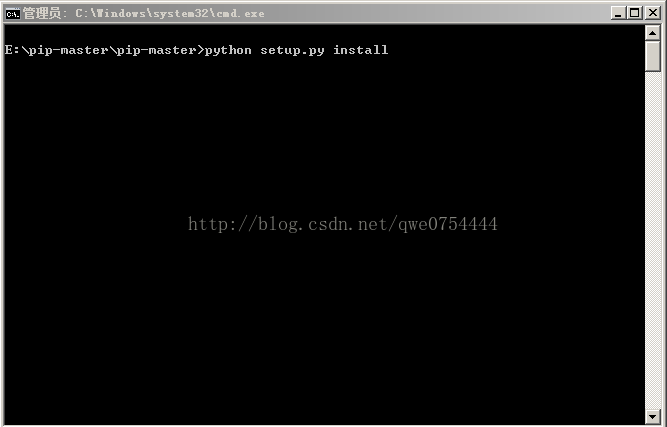
Unzip the package, open the command line, and execute Python Setup.py install

Normally, it should be unzipped in your Python installation path, just for the sake of illustration. After PIP is installed, there is a scripts folder under our Python installation path, and we need to configure PIP’s environment variable, which is too easy to configure, So I won’t show you.
3. The next step is to install PIL
Download path: http://www.lfd.uci.edu/~gohlk/Python libs

Before installing PIL, we need to install the wheel package. Wheel is essentially a compressed format package. Installation of python modules.
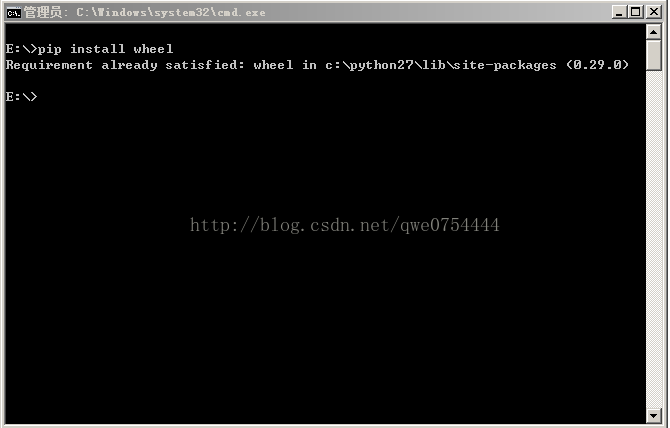
Execute PIP Install wheel from the command line, because I’ve already installed it and it doesn’t show up very well.


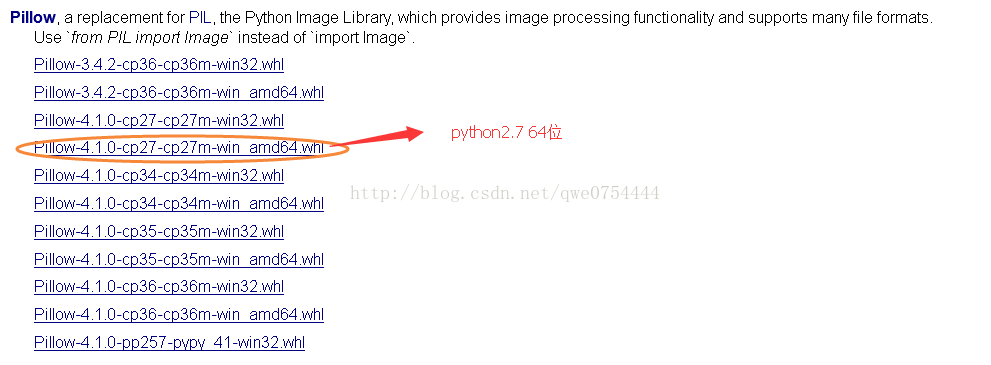
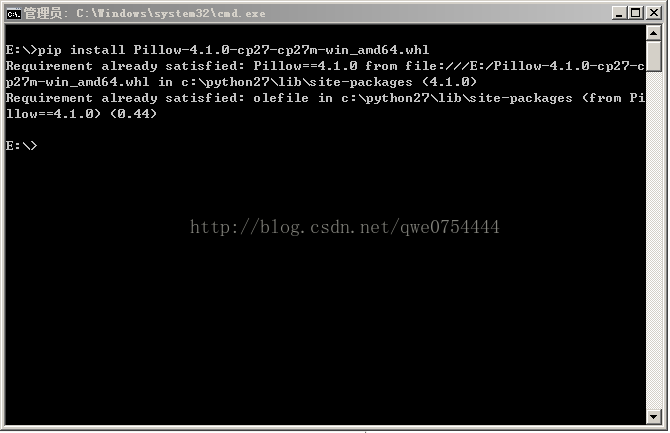
Next, we can install our PIL. Execute PIP Install Lion-4.1.0-cp27-cp27m-win_amd64.WHl

Because I’ve already installed it, I can’t show it well. When we install PIL successfully, it will prompt Successfully.
Let me show you how to install the WHL file:
If you add the D:\Python27\Scripts directory to your path, you can just open a CMD window with the administrator in the directory where the WHL file is located and execute the following statement directly. WHL

PIP install clip-4.1.0-cp27-cp27m-win_amd64. WHL

otherwise, you will need to run the PIP command in the D:\ pyth27 \Scripts directory with the administrator open CMD, The file name should be written to the full path)

PIP install C:\Users\ XXX \Downloads\ cites-4.1.0-cp27-cp27m-win_amd64. WHL
4. Installation is complete
So far, our PIL module has been successfully installed. We will be able to use it in python2.7.
To introduce PIL, the code is from PIL import Image.
5. At the end
Although python2.7 and python3.0 are not very different from each other, compatibility issues are unavoidable. For example, there is built-in PIP above 3.0, and not at 2.7. So we’re going to do the operation. But since I’m used to using python2.7, I need to download files and operations. Hopefully this article will help you who are still using python2.7.

kCFErrorDomainCFNetwork error 306

kCFErrorDomainCFNetwork error 306 means that your web proxy isn’t working. Make sure that your HTTPS proxy setting is correct, and that the proxy server is up and running if you are using one.

kCFErrorDomainCFNetwork error 306 means that your web agent is not working. Make sure your HTTPS proxy Settings are correct and the proxy server is up and running if you are using one.