Author Archives: Robins

After the go pointer is declared and assigned, a panic: runtime error: invalid memory address or nil pointer reference appears

pointer basics
package main

import "fmt"

func main() {
	var p *int
	p = new(int)
	*p = 1
	fmt.Println(p, &p, *p)
}

Output
0xc04204a080  0xc042068018  1

Go * represents the value stored in the pointer address, & is the address to take a value. For the pointer, it’s important to understand that the pointer stores the address of a value, but the pointer itself also needs the address to store
As above p is a pointer whose value is memory address 0xc04204a080</code b> and p memory address 0xc042068018 memory address 0xc04204a080 memory address 0 11
The

error instance

In golang if we define a pointer and assign it to it like a normal variable, such as the code below

package main

import "fmt"
func main() {
	var i *int
	*i = 1
    fmt.Println(i, &i, *i)
}

Would have reported such an error

panic: runtime error: invalid memory address or nil pointer dereference
[signal 0xc0000005 code=0x1 addr=0x0 pc=0x498025]

The reason for this error is that go when you initialize the pointer it gives the pointer I and it gives the pointer nil, but I is the address of * I , 0 nil1 the system doesn’t give the address of 2 * I 3, So there’s definitely an error in assigning * I and it’s very easy to solve this problem, you can just create a block of memory to allocate to an assignment object before you assign to a pointer

package main

import "fmt"
func main() {
	var i *int
	i = new(int)
	*i = 1
	fmt.Println(i, &i, *i)
}

Ubuntu can’t open Gnome terminal and display the error message exited status 8

I’ve been playing around with some environments for my virtual machine lately, and since I don’t have much experience, I’m just following the path of the server. However, once the virtual machine is restarted later, something goes wrong. The GNOME terminal cannot be opened. Start gnOMe-Terminal using Xterm.
Error constructing proxy for org.gnome.Terminal:/org/gnome/Terminal/Factory0: Error calling StartServiceByName for org.gnome.Terminal: GDBus.Error:org.freedesktop.DBus.Error.Spawn.ChildExited: Process org.gnome.Terminal exited with status 8

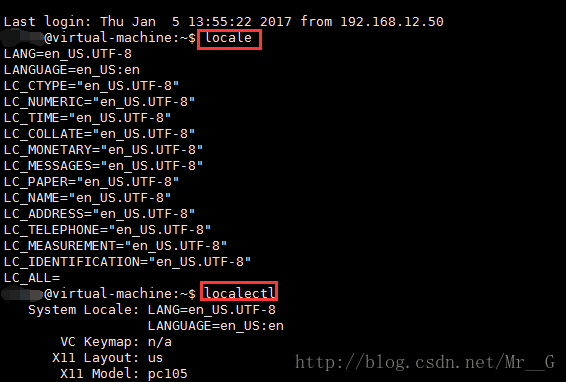
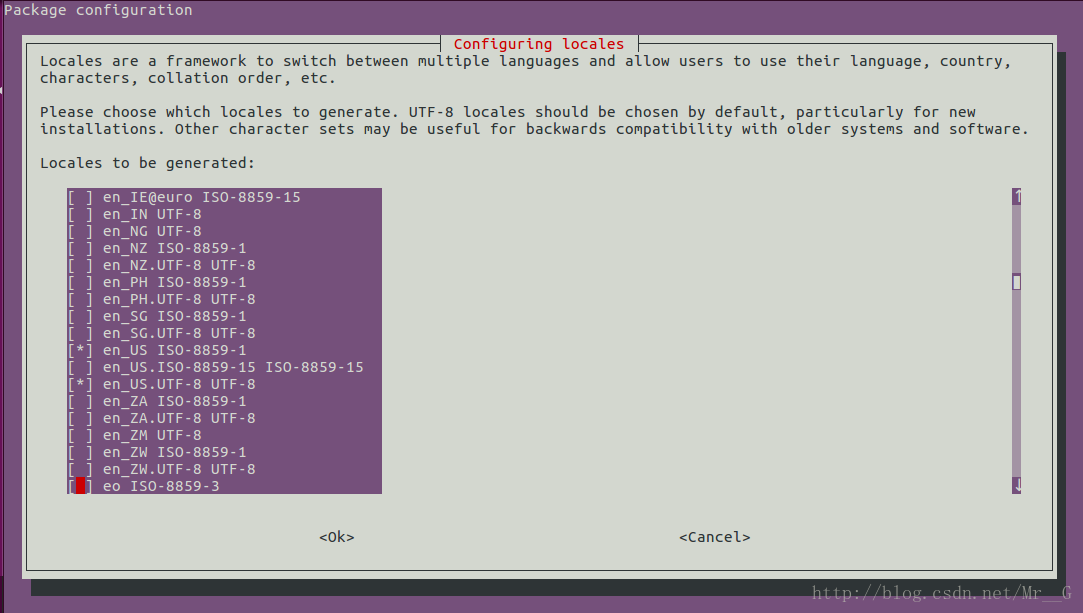
The next time I look it up, it’s a coding problem. Just use the command sudo DPkg-reconfigure locales to add the code you want.

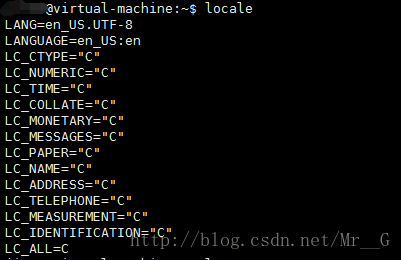
You think that’s the end of it?If you didn’t solve it, it should be the same problem I encountered. I accidentally found that when I configured the environment for my virtual machine, I actually configured another statement: export LC_ALL=C. In this way, no matter how I configured my code, I could not open the terminal in any way.

I finally get rid of that, and the locale in the terminal, works!

Net use Errors Explanation

Used to connect a computer to a Shared resource (set up a disk map) or to disconnect a computer from a Shared resource (delete the disk map). When used with no options, this command lists the computer’s connections.
NET USE
[devicename | ] [computernamesharename[volume] [password | ]]
[/USER:[domainname]username]
[/USER:[dotted domain name]username]
[/USER:[username@dotted domain name]
[/SMARTCARD]
[/SAVECRED]
[[/DELETE] | [/PERSISTENT:{YES | NO}]]
NET USE {devicename | } [password | ] /HOME
NET USE [/PERSISTENT:{YES | NO}]
Devicename specifies a name to connect to a resource or a device to disconnect from.
comes in two types of device names: disk drive (D: to Z:) and printer
(LPT1: to LPT3:). Enter an asterisk in place of a specified device
name to assign the next available device name.
computername refers to the name of the computer controlling the Shared resource. If the computer name contains the
null character, enclose the double backslash () with the computer name in quotation marks
(” “). Computer names can be 1 to 15 characters long.
sharename refers to the network name of a Shared resource.
volume specifies the NetWare volume on a server. The user must either install Netware
‘s customer service (Windows workstation) or Netware’s gateway service
(Windows server) and connect it to the Netware server.
password refers to the password needed to access the Shared resource.
* for password prompt. When entering a password at a password prompt, the password is not displayed.
/USER specifies a different USER name for the connection.
domainname specifies another field. If the default domain is used, the current logged in domain is used.
username specifies the login username.
/SMARTCARD specifies the credentials on which the connection will be used on the SMARTCARD.
/SAVECRED specifies to retain the username and password. This switch is ignored unless the command prompts for a username and password with
.
/HOME connects users to their HOME directory.
/DELETE cancels a network connection and deletes the connection from the permanent connection list.
/PERSISTENT controls the use of a permanent network connection. The default value is the most recently used setting.
YES saves them when the connection is generated and restores them the next time you log in.
NO does not save the connection being made or subsequent connections; The existing connection will be restored the next time you log
. Permanent connections can be removed using the /DELETE option switch.
System Errors
System error 5-access is denied
System error 5 – denied Access
System error 5 because of firewall
System error 5,
System error 5 because of firewall
System error 5, Firewall
System error 5 when using net view command in Vista
System error 5 in Vista using net view
System error 8 – Not enough storage is available to process this command
– Not enough storage is available to process this command
System error 21 has occurred on 21 September — The device is not ready.
System error occurred on 21 September — The device was not ready.
System error 51 has occurred — The remote computer is not available
System error 51 has occurred — The remote computer cannot reach
System error 52 — You were not connected because a duplicate name exists on The network System error 52 – The native has a duplicate name on the network.
System error 53 – The network path was not found
System error 59 has occurred.
System error 59 has occurred. An unexpected network error occurs in a network
System error 64 – “The specified network name is no longer available”
System error 64 – “specified network name is no longer available”
System error 67 – The network name cannot be required
System Error 71 – The network request was not accepted
System Error 71 has occurred
System Error 71 has occurred – sent
System Error 85 has occurred The local device name is already in use
system error 85 has occurred. The local device name is
System error 85 has occurred in use – Case Study
System error 234-more data is available
System error 1130 – “Not enough server storage is available to,” occurred in Case Study
System error 234-more data is available
System error 1130 – “Not enough server storage is available to Process this command “and” Not enough memory to complete transaction. Close some applications and retry ”
system error 1130 -” Not enough server storage is available to process this command “” Not enough memory to complete the processing. Close some applications and retry ”
System error 1219 has occurred – The credentials supplied conflict with an existing set of credentials
System error 1219 has occurred – credentials supply conflict with existing credentials
System error 1219 – Multiple
System error 1231 has occurred. The network location cannot be reached.
network error 1231 has occurred — network location cannot be reached.
System error 1231 – There are no entries on the list
System error 123 has entered – There are no entries on the list
System error 1240 – the account is not authorized to login from this station.
System error 1240 – The account is not authorized to log in from this site.
System error 1311 – There are currently no logon servers available to service the logon request
System error 1312 has detailed logon session
System error 1312 has occurred — A specified logon session Does not exist. It may already have been terminated.
system error, 1312 has occurred – the designated account meeting does not exist. It may have been terminated.
System Error 1314 — A required privilege is not held by the client
System Error 1314 — require privilege, is not held, by the client
System Error 1326 has occurred in the background of yibb-logon failure: Unknown user name
System error 1326-logon failure: unknown user name
System error 1326-logon failure: One more user name:
System error 1326 has occurred when using net use in Vista
System error, occurred in 1326, and was used in network in Vista
System error 1331 has occurred in general-logon failure: Account current disable
system error 1331 has occurred – login failure: One more occurred: the user has not been granted the requested Logon type at this computer
System error no. 1385 occurred – login failure: User has not been approved, requested login type, on this computer
System error 1396 has fallen-logon Failure: The target account name is incorrect.
System error, 1396 has occurred — Logon Failure: target account name is incorrect.
System error 6118 – The list of servers for this workgroup is not currently available
System error 6118 – The servers on The list,
System error 1726 has occurred. The remote procedure call failed.
System error 1726 has occurred. The remote procedure call failed. Note that there is a space between “/” and * in net use * /[parameter].

Differences between Java stack overflow ror and outofmemoryerror

1, StackOverflow: Whenever a Java program starts a new thread, the Java virtual machine allocates a stack for it, and the Java stack keeps the thread running in frames. When a thread calls a method, the JVM presses a new stack frame onto the thread’s stack, and the stack frame exists as long as the method has not returned.
if the method has too many layers of nested calls (such as recursive calls), as the number of frames in the Java stack increases, the total size of all stack frames in the stack of this thread will eventually be greater than the value set by -xss, resulting in a StackOverflowError overflow exception. When the Java program starts a new thread, there is not enough space to allocate the Java stack for the thread. The size of a thread’s Java stack is determined by the -XSS setting. The JVM throws an OutOfMemoryError exception. The Java heap is used to store instances of objects. When it is necessary to allocate memory for instances of objects, and the heap occupation has reached the maximum set value (via -Xmx), OutOfMemoryError will be thrown. The method area is used to store information about Java classes, such as class names, access modifiers, constant pools, field descriptions, method descriptions, and so on. As the class loader loads the class file into memory, the JVM extracts the class information and places it in the method area.
when the class information needs to be stored and the method area has reached its maximum memory footprint (via -xx :MaxPermSize); An OutOfMemoryError exception will be thrown for tests in this case, the basic idea being that the runtime generates a large number of classes to fill the method area until it overflows. You need to manipulate the bytecode runtime directly with the help of CGLib to generate a large number of dynamic classes.

Unserialize(): cause analysis and solution of error at offset

Unserialize (): Cause analysis and solution of Error at Offset2016-09-10
Classification: Practical knowledge
Reading (5590).
Comments (0)

In the use of PHP’s unserialize function, the following error occurs when a string or data is fetched from a database in Chinese

Notice: unserialize(): Error at offset xx of xxx bytes in C:\toolmao\php\index.php on line 21

Speaking of Chinese, we must first think of coding, so let’s see how the serialize function handles Chinese with different file codes, using the same piece of code and testing the file with different codes

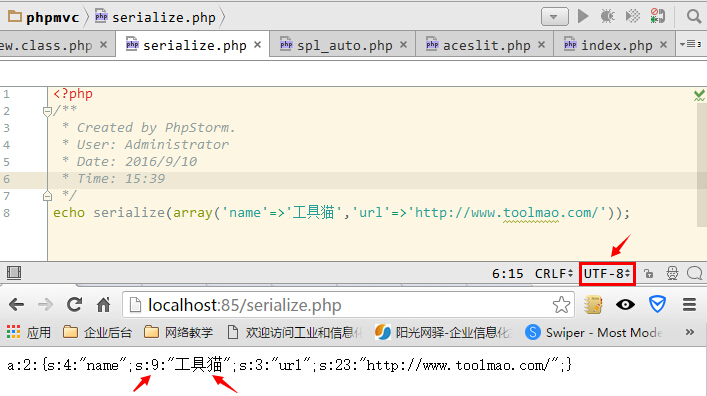
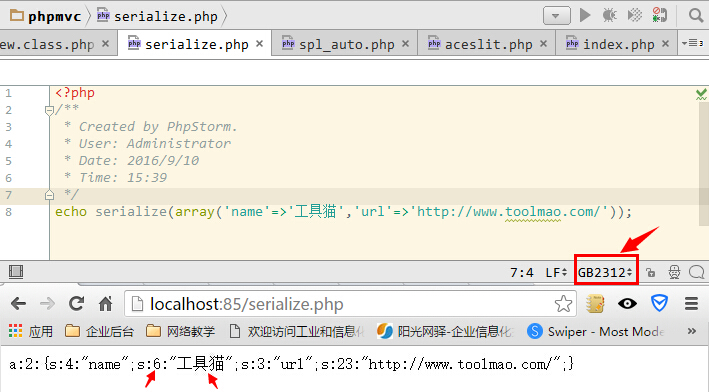
echo serialize(array('name'=>'Tools','url'=>'http://www.toolmao.com/'));

Looking at the UTF8 effect first, we find that the Length of the Chinese “tool cat” is 9

When the file code is GB2312, the length of Chinese “tool cat” is 6

Therefore, when we take out the database encoding GBK and other Chinese encoding, and then use transcoding function to convert to UTF8, and then use unserialize function, this problem will occur because the length of Chinese in different encodings is different. One might say that SET NAMES is not acceptable when the database is pulled out, but some databases (such as Access and SQLite) do not support this. So when the code does not match, you must take out the data transcoding. So how do you do that?Here’s the solution:
Above, we have already known the cause of Error at offset in unserialize. Therefore, it is easy to solve this problem. Just replace the Error length with the regular function.

unserialize(preg_replace('!s:(\d+):"(.*?)";!se', '"s:".strlen("$2").":\"$2\";"', $string))
From:http://www.phpddt.com/php/unserialize-error-at-offset.html

However, due to the PHP problem, the/E mode has been compromised, so this usage has been removed since PHP5.5, so don’t worry if you are using PHP5.5 +, here is another solution

preg_replace_callback('#s:(\d+):"(.*?)";#s',function($match){return 's:'.strlen($match[2]).':"'.$match[2].'";';},$data);

The above is my actual development encountered in the problem, combined with the solution of the net and their own actual situation finally write the code, I hope to help you!

If you open the store in iTunes, you will be prompted to solve the 310 error

When iTunes opens the Store, it prompts 310 for error resolution
Have seen this kind of circumstance on oneself computer before, this computer is so again today, check up just know, it is the problem that IE agent sets originally.
Because I sometimes use IP proxies and things like that.
See the Internet is IE agent set things, go to IE in a look, it is really. Speechless.

Problem solving of runas 740 error

In the AD domain, the runas command is often used to make small scripts.
With WIN10, it’s easy to report 740 errors.
This is because win10 is enabled by default to use administrators to approve all administrators to run
With this enabled, runas is not entitled, meaning that promotion can only be done using the local built-in administrator.
So just close it off

Easy solution atibtmon.exe Runtime error problem

Some AMD graphics laptops appear when they boot up

Just follow the steps below.
Control panel -& GT; Power option -& GT; Change the schedule Settings (in the select power plan, see which one you are using. For example, if you use “balance”, click “change schedule” and “save”, click “change schedule”.
-> Change the advanced power Settings -& GT; ATI graphics capability Settings (pull down until you find it at the end) -& GT; ATI Powerplay Settings -& GT; Use battery: Select optimize performance. Hit ok and you’re done.

Linux changing password enter new UNIX password: passwd: authentication token manipulation error

How to Fix “passwd: Authentication token manipulation error” in Linux
by Aaron Kili | Published: July 19, 2018 | Last Updated: July 19, 2018

Linux Certifications –
RHCSA/RHCE Certification |
Ansible Automation Certification |
LFCS/LFCE Certification

In Linux, the passwd command is used to set or change user account passwords, while using this command sometimes users may encountered the error: “passwd: Authentication token manipulation error” as shown in below example.
Recently I was logging in to my CentOS server using my username “tecmint“. Once I am logged in I am trying to change my password using passwd utility, but a second after I am getting the following error messages.

# su - tecmint
$ passwd tecmint
Changing password for user tecmint
Changing password for tecmint

(current) UNIX password: 
passwd: Authentication token manipulation error 

In this article, we will explain different ways of fixing “passwd: Authentication token manipulation error” in Linux systems.
1. Reboot System
The first basic solution is to reboot your system. I can’t really tell why this worked, but it did worked for me on my CentOS 7.

$ sudo reboot 


If this fails, try out the next solutions.
2. Set Correct PAM Module Settings
Another possible cause of the “passwd: Authentication token manipulation error” is wrong PAM (Pluggable Authentication Module) settings. This makes the module unable to obtain the new authentication token entered.
The various settings for PAM are found in /etc/pam.d/.

$ ls -l /etc/pam.d/

-rw-r--r-- 1 root root 142 Mar 23  2017 abrt-cli-root
-rw-r--r-- 1 root root 272 Mar 22  2017 atd
-rw-r--r-- 1 root root 192 Jan 26 07:41 chfn
-rw-r--r-- 1 root root 192 Jan 26 07:41 chsh
-rw-r--r-- 1 root root 232 Mar 22  2017 config-util
-rw-r--r-- 1 root root 293 Aug 23  2016 crond
-rw-r--r-- 1 root root 115 Nov 11  2010 eject
lrwxrwxrwx 1 root root  19 Apr 12  2012 fingerprint-auth -> fingerprint-auth-ac
-rw-r--r-- 1 root root 659 Apr 10  2012 fingerprint-auth-ac
-rw-r--r-- 1 root root 147 Oct  5  2009 halt
-rw-r--r-- 1 root root 728 Jan 26 07:41 login
-rw-r--r-- 1 root root 172 Nov 18  2016 newrole
-rw-r--r-- 1 root root 154 Mar 22  2017 other
-rw-r--r-- 1 root root 146 Nov 23  2015 passwd
lrwxrwxrwx 1 root root  16 Apr 12  2012 password-auth -> password-auth-ac
-rw-r--r-- 1 root root 896 Apr 10  2012 password-auth-ac
....

For instance a mis-configured /etc/pam. d/common-password file can result into this error, running the pam-auth-update command with root privileges can fix the issue.

$ sudo pam-auth-update

3. Remount Root Partition
You might also see this error if the / partition is mounted as read only, which means no file can be modified thus a user’s password can’t be set or changed. To fix this error, you need to mount the root partition as as read/write as shown.

$ sudo mount -o remount,rw /

4. Set Correct Permissions on Shadow File
Wrong permissions on the /etc/shadow file, which stores actual passwords for user accounts in encrypted format can also cause this error. To check the permissions on this file, use the following command.

$ ls -l  /etc/shadow

To set the correct permissions on it, use the chmod command as follows.

$ sudo chmod 0640 /etc/shadow

5. Repair and Fix Filesystem Errors
Minor storage drive or filesystem errors can also cause the error in question. You can use Linux disk scanning tools such as fsck to fix such errors.
[Python] notimplemented and notimplemented error

NotImplemented is a non-exception object, and NotImplementedError is an exception object.

>>> NotImplemented
NotImplemented
>>> NotImplementedError
<type 'exceptions.NotImplementedError'>


>>> type(NotImplemented)
<type 'NotImplementedType'>
>>> type(NotImplementedError)
<type 'type'>

TypeError is obtained if NotImplemented is thrown, because it is not an exception. Throwing a NotImplementedError will normally catch the exception.

>>> raise NotImplemented

Traceback (most recent call last):
  File "<pyshell#10>", line 1, in <module>
    raise NotImplemented
TypeError: exceptions must be old-style classes or derived from BaseException, not NotImplementedType


>>> raise NotImplementedError

Traceback (most recent call last):
  File "<pyshell#11>", line 1, in <module>
    raise NotImplementedError
NotImplementedError

Why is there a NotImplemented and a NotImplementedError?
Sorting a list in Python often USES a comparison operation such as ___ ().
Sometimes Python’s internal algorithms choose another way to determine the comparison result, or simply choose a default result. If an exception is thrown, the sorting operation will be broken. Therefore, it will not be thrown if NotImplemented is used, thus Python can try other methods.
The NotImplemented object sends a signal to the runtime environment to tell it that if the current operation fails, it should check out other feasible methods. For example, in the expression a == b, if a. ___, eq__(b) returns NotImplemented, Python will try B. ___ (a). If the call to the method of B/eq__ can return True or False, the expression is successful. If b.__eq__(a) also fails, Python continues to try other methods, such as using! = to compare.

ref:http://www.cnblogs.com/ifantastic/p/3682268.html

After installing mysql5.7 on centos7, an error 1045 (28000) is reported: access denied for user ‘root’ @’localhost ‘(using PAS)

After installing mysql, there will be a temporary password to check the log, but it still doesn’t work after checking the login modification secret
ERROR 1045 (28000): Access denied for user ‘root’@’localhost’ (using password:yes)
so
1. Stop mysql service

systemctl stop mysqld.service

2, modify the profile to log in without password

[HTML] view plain copy

    1. vi/etc/my CNF </ ol>

Add it at the end

[HTML] view plain copy

      1. skip – grant – tables </ ol>
      1. save

3. Start mysql

[HTML] view plain copy

        1. systemctl start mysqld. Service </ ol>
        1. 4, log in musql

[HTML] view plain copy

          1. mysql -u root </ ol>
          1. Be careful not to add minus p here

5, modify the password, mySQL5.7 use this syntax

[HTML] view plain copy
The

            1. use mysql; </ ol>

[HTML] view plain copy

              1. update mysql.user set authentication_string=password(‘123456′) where user=’root’; </ ol>
              1. 6, go back to the second step remove the plus

[HTML] view plain copy

                1. skip – grant – tables </ ol>
                1. Save and restart mysql

# # # # # # # # # # # # # # # # # # # # # # # # # # # # # # # # # # # # # # # # # # # # # # # # # # # # # # # # # # # # # # # # # # # # # # # # #
In fact, after installing mysql by default or in the log to generate a default password /var/log/mysqld.log
Login to mysql to reset the default password

[HTML] view plain copy

                  1. set password = password (‘ you password “); </ ol>

If the password level does not match the default level requirement, it will be reported

[HTML] view plain copy

                    1. Your password does not satisfy the current policy requirements

You need to change the level and the minimum default password number

[HTML] view plain copy
The

                    1. set global validate_password_policy = 0; The set global validate_password_length = 4; </ ol>
                    1. And then just set the password

# # # # # # # # # # # # # # # # # # #
Error 1130 on remote connection

[HTML] view plain copy

                    1. mysql; The use of mysql; Mysql; Select ‘host’ from user where user=’root’; Mysql; Update user set host =’ %’ where user =’root’; Mysql; Flush privileges; Mysql; Select ‘host’ from user where user=’root’; </ ol>