Author Archives: Robins

[Solved] ERROR 1030 (HY000): Got error 28 from storage engine

Problem background

When logging into the database to view the table structure in Linux environment, an error is reported:

desc base_mirror;
ERROR 1030 (HY000): Got error 28 from storage engine

Most of the conclusions of Google search are the problem of insufficient disk space

View the temporary space directory of MySQL

mysql> show variables like '%dir%';
+-----------------------------------------+----------------------------+
| Variable_name                           | Value                      |
+-----------------------------------------+----------------------------+
| basedir                                 | /usr/                      |
| binlog_direct_non_transactional_updates | OFF                        |
| character_sets_dir                      | /usr/share/mysql/charsets/ |
| datadir                                 | /var/lib/mysql/            |
| ignore_db_dirs                          |                            |
| innodb_data_home_dir                    |                            |
| innodb_log_group_home_dir               | ./                         |
| innodb_max_dirty_pages_pct              | 75                         |
| innodb_max_dirty_pages_pct_lwm          | 0                          |
| innodb_tmpdir                           |                            |
| innodb_undo_directory                   | .                          |
| lc_messages_dir                         | /usr/share/mysql/          |
| plugin_dir                              | /usr/lib64/mysql/plugin/   |
| slave_load_tmpdir                       | /tmp                       |
| tmpdir                                  | /tmp                       |
+-----------------------------------------+----------------------------+
15 rows in set (0.00 sec)

View this machine as follows:

#df -TH
Filesystem     Type      Size  Used Avail Use% Mounted on
devtmpfs       devtmpfs   17G  9.6G  7.2G  58% /dev
tmpfs          tmpfs      17G  4.1k   17G   1% /dev/shm
tmpfs          tmpfs      17G  1.5M   17G   1% /run
tmpfs          tmpfs      17G     0   17G   0% /sys/fs/cgroup
/dev/vda2      ext4       63G   63G   0G  100% /
/dev/vda1      ext4      1.1G  145M  809M  16% /boot
tmpfs          tmpfs     3.4G     0  3.4G   0% /run/user/0
overlay        overlay    63G   45G   15G  75% /home/docker/overlay/5a22b3cdbe381649e30044980fd09341ceb4460c98fd36055c4727c3c31f9f9b/merged
shm            tmpfs      68M     0   68M   0% /home/docker/containers/f61e00164f9f7d2077952af0a025670d7b88a7fb42c37c4e73d7e4c68ef3115e/shm

The overall space of the machine is still available, but the space of the root directory is insufficient, and the MySQL temporary space directory is under the root directory. You need to delete it to make space. After operation:

mysql> desc base_mirror;
+--------------------+--------------+------+-----+---------+----------------+
| Field              | Type         | Null | Key | Default | Extra          |
+--------------------+--------------+------+-----+---------+----------------+
| id                 | int(11)      | NO   | PRI | NULL    | auto_increment |
| mirror_name        | varchar(100) | NO   |     | NULL    |                |
| origin_mirror_name | varchar(100) | NO   |     | NULL    |                |
| mirror_tag         | varchar(100) | NO   |     | NULL    |                |
| cloud_version      | varchar(100) | NO   |     | NULL    |                |
| archi              | varchar(100) | NO   |     | NULL    |                |
| mirror_path        | varchar(200) | NO   |     | NULL    |                |
| os_version         | varchar(100) | NO   |     | NULL    |                |
| namespace          | varchar(100) | NO   |     | NULL    |                |
| description        | longtext     | NO   |     | NULL    |                |
| upgrade_log        | longtext     | YES  |     | NULL    |                |
| create_time        | datetime(6)  | NO   |     | NULL    |                |
| gitlab_path        | varchar(200) | NO   |     | NULL    |                |
| branch_name        | varchar(200) | NO   |     | NULL    |                |
| docker_file_path   | varchar(200) | NO   |     | NULL    |                |
| Dockerfile_info    | longtext     | YES  |     | NULL    |                |
| build_log          | longtext     | YES  |     | NULL    |                |
| commit_id          | varchar(100) | NO   |     | NULL    |                |
| user               | varchar(100) | YES  |     | NULL    |                |
| is_newest          | varchar(100) | NO   |     | NULL    |                |
| is_delete          | varchar(20)  | NO   |     | NULL    |                |
| is_free            | varchar(20)  | NO   |     | NULL    |                |
| can_upgrade        | int(11)      | NO   |     | NULL    |                |
| owner              | varchar(100) | NO   |     | NULL    |                |
| imageid            | varchar(64)  | NO   |     | NULL    |                |
| mirror_sha         | varchar(255) | NO   |     | NULL    |                |
| mirror_label       | varchar(25)  | NO   |     | NULL    |                |
| is_escrow          | int(11)      | NO   |     | NULL    |                |
| openapi_taskid     | int(11)      | YES  |     | NULL    |                |
| is_recommend       | int(11)      | NO   |     | NULL    |                |
+--------------------+--------------+------+-----+---------+----------------+
30 rows in set (0.00 sec)

Problem-solving.
How to Solve Microsoft.CppCommon.targets(279,5): error MSB3073

1>*** PARSE FAILURE ***
1>C:\Program Files (x86)\Microsoft Visual Studio\2019\Professional\MSBuild\Microsoft\VC\v160\Microsoft.CppCommon.targets(279,5): error MSB3073: The command "@echo off
1>C:\Program Files (x86)\Microsoft Visual Studio\2019\Professional\MSBuild\Microsoft\VC\v160\Microsoft.CppCommon.targets(279,5): error MSB3073: setlocal...

There is no problem with local compilation, and the compilation server reports an error.

The reason is the problem of GIT line feed in Windows system. The carriage return line feed in the project is modified in the vcxproj obtained by git, resulting in the script error in vcxproj.

Modify the GIT line feed setting of windows system, and the problem disappears.

[Solved] BLAST Database error: Error pre-fetching sequence data

1. Background:

Download the protein sequence in UniProt database to the local machine, use the file to create BLAST search database, and then use blastp command to search in the database.

2. Mistake

Follow the instructions in the blast manual. In order to speed up the search process, use the mask file. The sequence file sequences. Downloaded from UniProt FASTA, such as:

> sid1

xxxxxxxxxxxxxxxxxxxxxxxxxxxxxxxxxxxxxxxxxxxxxxx

> sid2

xxxxxxxxxxxxxxxxxxxxxxxxxxxxxxxxxxxxxxxxxxxxx

………………………………………………………..

1) To create a mask file:

segmasker -in sequences.fasta -infmt fasta -outfmt maskingfo_asnl_bin \

-out refsequences.asnb -parse_seqids

2) Create database

makeblastdb -in sequences.fasta -input_type fasta -dbtype prot -out uniprot \

-title “Uniprot” -parse_seqids

3) Sequence alignment

blastp -db uniprot -query input.fasta -out output.txt -outfmt 7

Result error: BLAST Database error: Error pre-fetching sequences data

3. Solution

databases_seqids is not used when creating mask files and database.

segmasker -in sequences.fasta -infmt fasta -outfmt maskingfo_asnl_bin \

-out refsequences.asnb

makeblastdb -in sequences.fasta -input_type fasta -dbtype prot -out uniprot -title “Uniprot”

[Solved] python Connect hive to Install sasl Error: Building wheel for sasl (setup.py) … error

Collecting sasl
  Using cached sasl-0.3.1.tar.gz (44 kB)
Requirement already satisfied: six in c:\programdata\anaconda3\lib\site-packages (from sasl) (1.16.0)
Building wheels for collected packages: sasl
  Building wheel for sasl (setup.py) ... error
  ERROR: Command errored out with exit status 1:
   command: 'C:\ProgramData\Anaconda3\python.exe' -u -c 'import io, os, sys, setuptools, tokenize; sys.argv[0] = '"'"'D:\\users\\jingtao.CENTALINE\\AppData\\Local\\Temp\\pip-install-2scxm6jd\\sasl_bdd59789a4b54e288cc48a38704a6ad4\\setu
p.py'"'"'; __file__='"'"'D:\\users\\jingtao.CENTALINE\\AppData\\Local\\Temp\\pip-install-2scxm6jd\\sasl_bdd59789a4b54e288cc48a38704a6ad4\\setup.py'"'"';f = getattr(tokenize, '"'"'open'"'"', open)(__file__) if os.path.exists(__file__) e
lse io.StringIO('"'"'from setuptools import setup; setup()'"'"');code = f.read().replace('"'"'\r\n'"'"', '"'"'\n'"'"');f.close();exec(compile(code, __file__, '"'"'exec'"'"'))' bdist_wheel -d 'D:\users\jingtao.CENTALINE\AppData\Local\Te
mp\pip-wheel-ea8xc0cu'
       cwd: D:\users\jingtao.CENTALINE\AppData\Local\Temp\pip-install-2scxm6jd\sasl_bdd59789a4b54e288cc48a38704a6ad4\
  Complete output (28 lines):
  running bdist_wheel
  running build
  running build_py
  creating build
  creating build\lib.win-amd64-3.9
  creating build\lib.win-amd64-3.9\sasl
  copying sasl\__init__.py -> build\lib.win-amd64-3.9\sasl
  running egg_info
  writing sasl.egg-info\PKG-INFO
  writing dependency_links to sasl.egg-info\dependency_links.txt
  writing requirements to sasl.egg-info\requires.txt
  writing top-level names to sasl.egg-info\top_level.txt
  reading manifest file 'sasl.egg-info\SOURCES.txt'
  reading manifest template 'MANIFEST.in'
  adding license file 'LICENSE.txt'
  writing manifest file 'sasl.egg-info\SOURCES.txt'
  copying sasl\saslwrapper.cpp -> build\lib.win-amd64-3.9\sasl
  copying sasl\saslwrapper.h -> build\lib.win-amd64-3.9\sasl
  copying sasl\saslwrapper.pyx -> build\lib.win-amd64-3.9\sasl
  running build_ext
  building 'sasl.saslwrapper' extension
  creating build\temp.win-amd64-3.9
  creating build\temp.win-amd64-3.9\Release
  creating build\temp.win-amd64-3.9\Release\sasl
  C:\Program Files (x86)\Microsoft Visual Studio\2019\Community\VC\Tools\MSVC\14.29.30133\bin\HostX86\x64\cl.exe /c /nologo /Ox /W3 /GL /DNDEBUG /MD -Isasl -IC:\ProgramData\Anaconda3\include -IC:\ProgramData\Anaconda3\include -IC:\Prog
ram Files (x86)\Microsoft Visual Studio\2019\Community\VC\Tools\MSVC\14.29.30133\ATLMFC\include -IC:\Program Files (x86)\Microsoft Visual Studio\2019\Community\VC\Tools\MSVC\14.29.30133\include -IC:\Program Files (x86)\Windows Kits\10\
include\10.0.19041.0\ucrt -IC:\Program Files (x86)\Windows Kits\10\include\10.0.19041.0\shared -IC:\Program Files (x86)\Windows Kits\10\include\10.0.19041.0\um -IC:\Program Files (x86)\Windows Kits\10\include\10.0.19041.0\winrt -IC:\Pr
ogram Files (x86)\Windows Kits\10\include\10.0.19041.0\cppwinrt /EHsc /Tpsasl/saslwrapper.cpp /Fobuild\temp.win-amd64-3.9\Release\sasl/saslwrapper.obj
  saslwrapper.cpp
  D:\users\jingtao.CENTALINE\AppData\Local\Temp\pip-install-2scxm6jd\sasl_bdd59789a4b54e288cc48a38704a6ad4\sasl\saslwrapper.h(22): fatal error C1083: 无法打开包括文件: “sasl/sasl.h”: No such file or directory
  error: command 'C:\\Program Files (x86)\\Microsoft Visual Studio\\2019\\Community\\VC\\Tools\\MSVC\\14.29.30133\\bin\\HostX86\\x64\\cl.exe' failed with exit code 2
  ----------------------------------------
  ERROR: Failed building wheel for sasl
  Running setup.py clean for sasl
Failed to build sasl
Installing collected packages: sasl
    Running setup.py install for sasl ... error
    ERROR: Command errored out with exit status 1:
     command: 'C:\ProgramData\Anaconda3\python.exe' -u -c 'import io, os, sys, setuptools, tokenize; sys.argv[0] = '"'"'D:\\users\\jingtao.CENTALINE\\AppData\\Local\\Temp\\pip-install-2scxm6jd\\sasl_bdd59789a4b54e288cc48a38704a6ad4\\se
tup.py'"'"'; __file__='"'"'D:\\users\\jingtao.CENTALINE\\AppData\\Local\\Temp\\pip-install-2scxm6jd\\sasl_bdd59789a4b54e288cc48a38704a6ad4\\setup.py'"'"';f = getattr(tokenize, '"'"'open'"'"', open)(__file__) if os.path.exists(__file__)
 else io.StringIO('"'"'from setuptools import setup; setup()'"'"');code = f.read().replace('"'"'\r\n'"'"', '"'"'\n'"'"');f.close();exec(compile(code, __file__, '"'"'exec'"'"'))' install --record 'D:\users\jingtao.CENTALINE\AppData\Loca
l\Temp\pip-record-l_ubu2on\install-record.txt' --single-version-externally-managed --compile --install-headers 'C:\ProgramData\Anaconda3\Include\sasl'
         cwd: D:\users\jingtao.CENTALINE\AppData\Local\Temp\pip-install-2scxm6jd\sasl_bdd59789a4b54e288cc48a38704a6ad4\
    Complete output (28 lines):
    running install
    running build
    running build_py
    creating build
    creating build\lib.win-amd64-3.9
    creating build\lib.win-amd64-3.9\sasl
    copying sasl\__init__.py -> build\lib.win-amd64-3.9\sasl
    running egg_info
    writing sasl.egg-info\PKG-INFO
    writing dependency_links to sasl.egg-info\dependency_links.txt
    writing requirements to sasl.egg-info\requires.txt
    writing top-level names to sasl.egg-info\top_level.txt
    reading manifest file 'sasl.egg-info\SOURCES.txt'
    reading manifest template 'MANIFEST.in'
    adding license file 'LICENSE.txt'
    writing manifest file 'sasl.egg-info\SOURCES.txt'
    copying sasl\saslwrapper.cpp -> build\lib.win-amd64-3.9\sasl
    copying sasl\saslwrapper.h -> build\lib.win-amd64-3.9\sasl
    copying sasl\saslwrapper.pyx -> build\lib.win-amd64-3.9\sasl
    running build_ext
    building 'sasl.saslwrapper' extension
    creating build\temp.win-amd64-3.9
    creating build\temp.win-amd64-3.9\Release
    creating build\temp.win-amd64-3.9\Release\sasl
    C:\Program Files (x86)\Microsoft Visual Studio\2019\Community\VC\Tools\MSVC\14.29.30133\bin\HostX86\x64\cl.exe /c /nologo /Ox /W3 /GL /DNDEBUG /MD -Isasl -IC:\ProgramData\Anaconda3\include -IC:\ProgramData\Anaconda3\include -IC:\Pr
ogram Files (x86)\Microsoft Visual Studio\2019\Community\VC\Tools\MSVC\14.29.30133\ATLMFC\include -IC:\Program Files (x86)\Microsoft Visual Studio\2019\Community\VC\Tools\MSVC\14.29.30133\include -IC:\Program Files (x86)\Windows Kits\1
0\include\10.0.19041.0\ucrt -IC:\Program Files (x86)\Windows Kits\10\include\10.0.19041.0\shared -IC:\Program Files (x86)\Windows Kits\10\include\10.0.19041.0\um -IC:\Program Files (x86)\Windows Kits\10\include\10.0.19041.0\winrt -IC:\
Program Files (x86)\Windows Kits\10\include\10.0.19041.0\cppwinrt /EHsc /Tpsasl/saslwrapper.cpp /Fobuild\temp.win-amd64-3.9\Release\sasl/saslwrapper.obj
    saslwrapper.cpp
    D:\users\jingtao.CENTALINE\AppData\Local\Temp\pip-install-2scxm6jd\sasl_bdd59789a4b54e288cc48a38704a6ad4\sasl\saslwrapper.h(22): fatal error C1083: 无法打开包括文件: “sasl/sasl.h”: No such file or directory
    error: command 'C:\\Program Files (x86)\\Microsoft Visual Studio\\2019\\Community\\VC\\Tools\\MSVC\\14.29.30133\\bin\\HostX86\\x64\\cl.exe' failed with exit code 2
    ----------------------------------------
ERROR: Command errored out with exit status 1: 'C:\ProgramData\Anaconda3\python.exe' -u -c 'import io, os, sys, setuptools, tokenize; sys.argv[0] = '"'"'D:\\users\\jingtao.CENTALINE\\AppData\\Local\\Temp\\pip-install-2scxm6jd\\sasl_bdd
59789a4b54e288cc48a38704a6ad4\\setup.py'"'"'; __file__='"'"'D:\\users\\jingtao.CENTALINE\\AppData\\Local\\Temp\\pip-install-2scxm6jd\\sasl_bdd59789a4b54e288cc48a38704a6ad4\\setup.py'"'"';f = getattr(tokenize, '"'"'open'"'"', open)(__fi
le__) if os.path.exists(__file__) else io.StringIO('"'"'from setuptools import setup; setup()'"'"');code = f.read().replace('"'"'\r\n'"'"', '"'"'\n'"'"');f.close();exec(compile(code, __file__, '"'"'exec'"'"'))' install --record 'D:\use
rs\jingtao.CENTALINE\AppData\Local\Temp\pip-record-l_ubu2on\install-record.txt' --single-version-externally-managed --compile --install-headers 'C:\ProgramData\Anaconda3\Include\sasl' Check the logs for full command output.


Solution:
Download a sasl file that corresponds to the Python version and Windows version you are using: https://www.lfd.uci.edu/~gohlke/pythonlibs/#sasl. For example, sasl-0.2.1-cp36 -cp36m-win_amd64.whl, which corresponds to Python version 3.6, and corresponds to Windows system 64-bit.
Install the executable pip install sasl-0.2.1-cp37-cp37m-win_amd64.whl

OTS parsing error: invalid version tag [How to Solve]

Target: package font file png|woff|woff2|svg|ttf|eot

Tools: use the webpack tool

Foundation: suitable for developers with node foundation

Plug in package to download

css-loader loader for parsing css files
file-loader loader for processing files
html-webpack-plugin plugin for creating an html page in virtual memory”

style-loader A loader that inserts the parsed css style file into the style and places the head tag
url-loader A loader that parses the url path
webpack A tool for compiling code
webpack-cli provides developers with a flexible set of commands to Improve speed when defining webpack projects
webpack-dev-server dev virtual server server

Static compilation: webpack

Dynamic compilation [enable dev to access through HTTP protocol]: NPM run dev


1. Download the iconfont font package from the website

2. Build CSS files according to the prompts in the font file package

3. Import HTML file test

[this step is omitted, and there are cases in the font package]


Configure man.js

//import the example
import './css/index.css';

index.htm

<!DOCTYPE html>
<html lang="zh">
<head>
	<meta charset="UTF-8">
	<meta name="viewport" content="width=device-width, initial-scale=1.0">
	<meta http-equiv="X-UA-Compatible" content="ie=edge">
	<title></title>
	<!-- <link rel="stylesheet" href="./css/index.css" /> -->
</head>
<body>
	<span class="iconfont afont">&#xe60d;</span>
	<span class="iconfont afont">&#xe60c;</span>
	<span class="iconfont afont">&#xe637;</span>
	<span class="iconfont afont">&#xe63b;</span>
	<span class="iconfont afont">&#xe620;</span>
</body>
</html>

index.css

@font-face {
  font-family: 'iconfont';
  src: url('./icon/iconfont.ttf?t=1650505701581') format('truetype');
}
.iconfont {
  font-family: "iconfont" !important;
  font-size: 16px;
  font-style: normal;
  -webkit-font-smoothing: antialiased;
  -moz-osx-font-smoothing: grayscale;
}

span{
	height: 100px;
	width: 100px;
	/* display: block; */

}
.afont{
	font-size: 150px;	
}

Project initialization

Module download is not cumbersome here

Key: Type: ‘JavaScript/auto’// you must specify the type. Although you don’t know what, it seems that you must specify the type before which version to display that the loading is normal. If you know, please tell us the specific reasons in the comment area below.

No type specified: ‘JavaScript/auto’

Failed to decode downloaded font: http://localhost:3000/36bdff0eed0ef8904943.ttf?t=1650505701581
localhost/:1 OTS parsing error: invalid version tag

webpack.config..js file configuration [complete solution]


const {resolve} = require('path');
const HtmlWebpackPlugin = require('html-webpack-plugin');

module.exports = {
	entry:'./src/main.js',
	output:{
		filename:'bundle.js',
		path:resolve(__dirname,'dist')
	},
	module:{
		rules:[
			{test:/\.css$/, use:['style-loader','css-loader']},//css
			// {exclude: /\.(css|js|html)$/, //Exclude the packaging of other resources (in addition to html js css resources unexpected resources) this static packaging font file
			// loader:'file-loader'
			// },
 //{test:/\.(png|woff|woff2|svg|ttf|eot)$/, use:'url-loader?esModule=false&limit=10*1024&name=[hash:8]-[name].[ext]' ,type: 'javascript/auto'},
			{test:/\.(png|woff|woff2|svg|ttf|eot)$/,
			loader:'url-loader',
			options: {
				limit: 10*1024,  //This should be large enough so that all the font icons are packed into the css
				esModule:false,
				name:"[hash:8]-[name]. [ext]"
				},
			// type: 'javascript/auto' // must specify type
			}
			]
			},
	plugins:[
		new HtmlWebpackPlugin({
			template:'./src/index.html',
			filename:'index.html'
		})
	],
	mode:'development'
}

Start the virtual server with NPM run dev

Enter http://localhost:3000 in the browser address and the iconfont font file of the page is displayed normally


[Solved] NCCL error in: /pytorch/torch/lib/c10d/ProcessGroupNCCL ,unhandled cuda error, NCCLversion 2.7.8

The method used in this paper

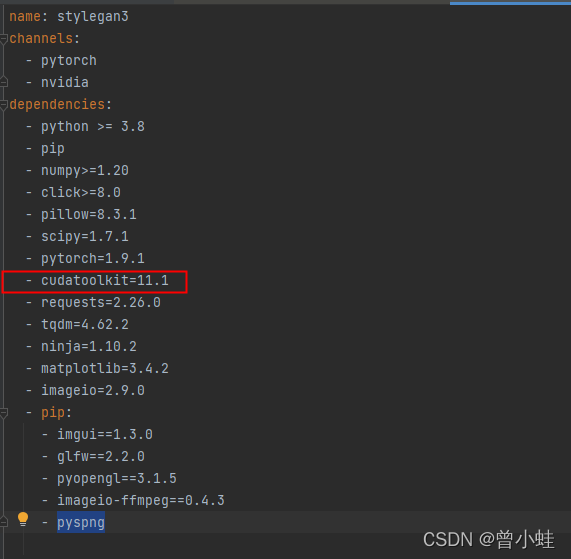
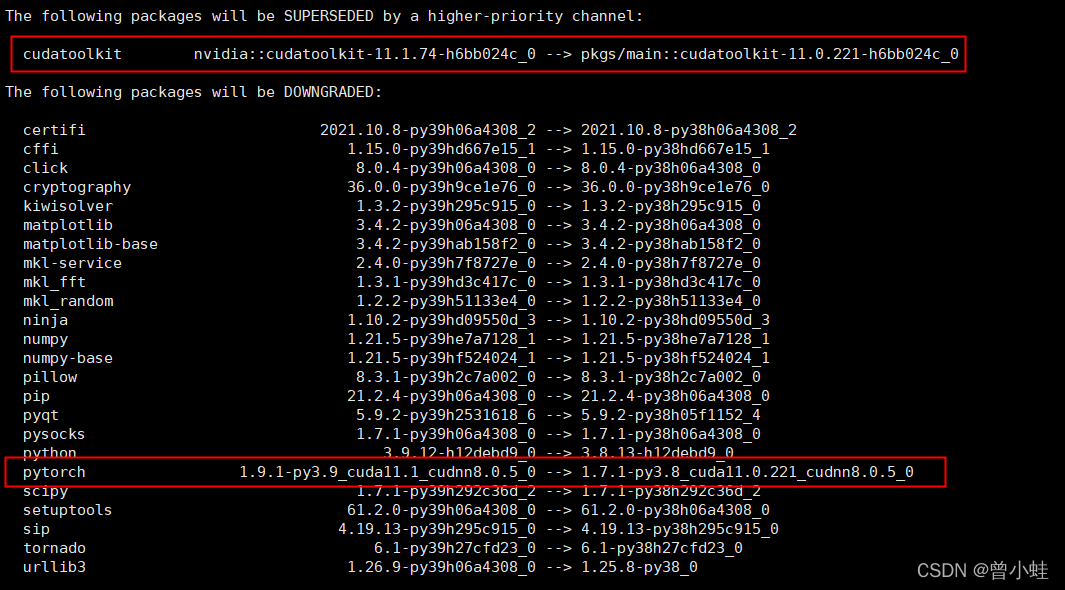
The versions of pytorch, cudatoolkit and CUDA driver should be consistent

Problem description

When training the stylegan3 model with multi GPU:

python train.py --outdir=training-runs --cfg=stylegan3-r \
--data=datastes/your_data.zip \
--cfg=stylegan3-r --gpus=4 --batch=32 --gamma=8 --kimg=1800 --snap=50  --tick=2  

Error Messages:

torch.multiprocessing.spawn.ProcessRaisedException:
……
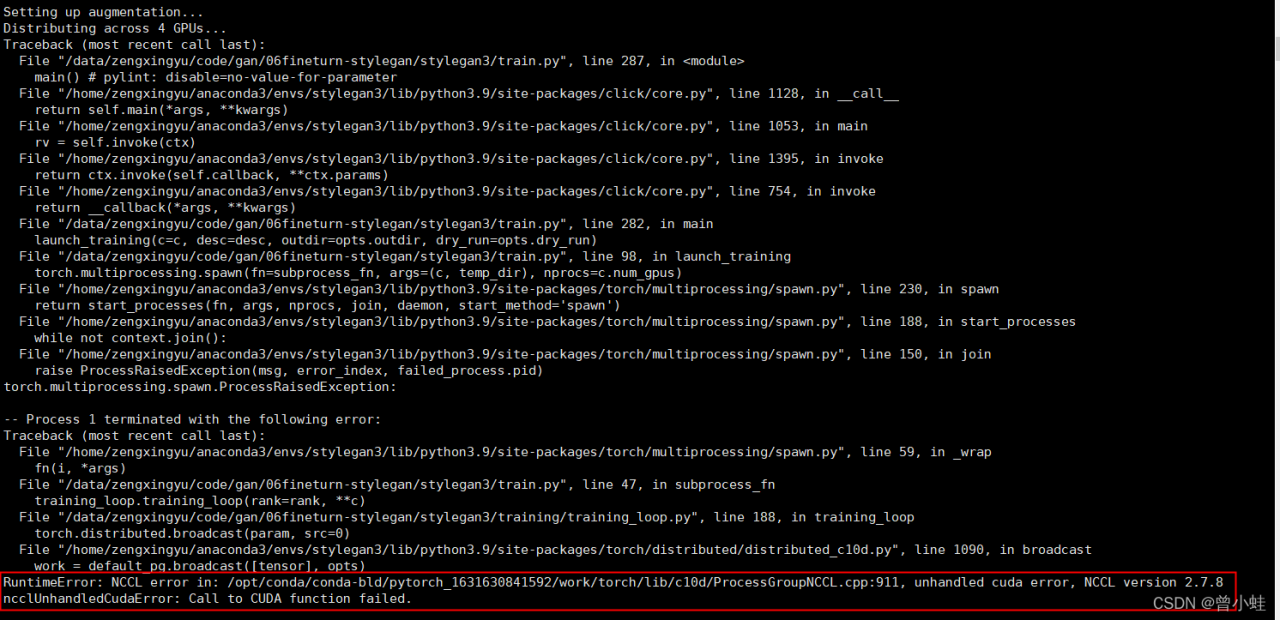
RuntimeError: NCCL error in: /opt/conda/conda-bld/pytorch_1631630841592/work/torch/lib/c10d/ProcessGroupNCCL.cpp:911, unhandled cuda error, NCCL version 2.7.8
ncclUnhandledCudaError: Call to CUDA function failed.

Local Environment
4xTeslaV100 graphics card drivers and CUDA version 11.0

stylegan3 Default Environment

Solution:
Go to the pytorch official website and search the corresponding version of  Cudatookit

conda install pytorch==1.7.0 torchvision==0.8.0 torchaudio==0.7.0 cudatoolkit=11.0 -c pytorch

Tried Method:

Method 1: install nccl (this article is useless)

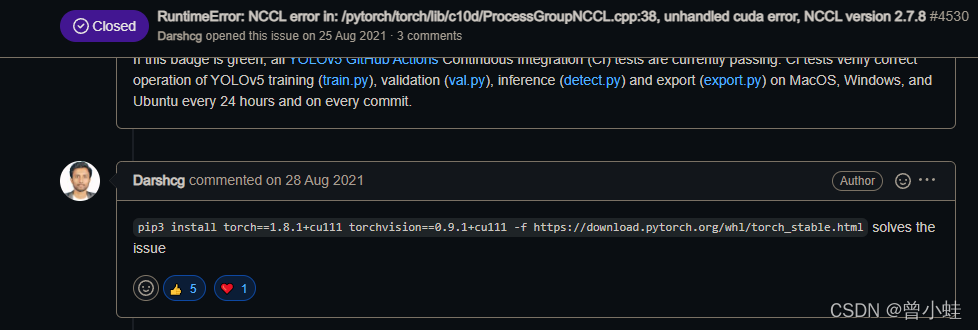
Method 2: the versions of pytorch, CUDA toolkit and CUDA driver are the same

https://github.com/ultralytics/yolov5/issues/4530

[Solved] Syntax Error: Error: Loading PostCSS Plugin failed: Cannot find module ‘autoprefixer‘

1. Errors occurred:

1. Code display

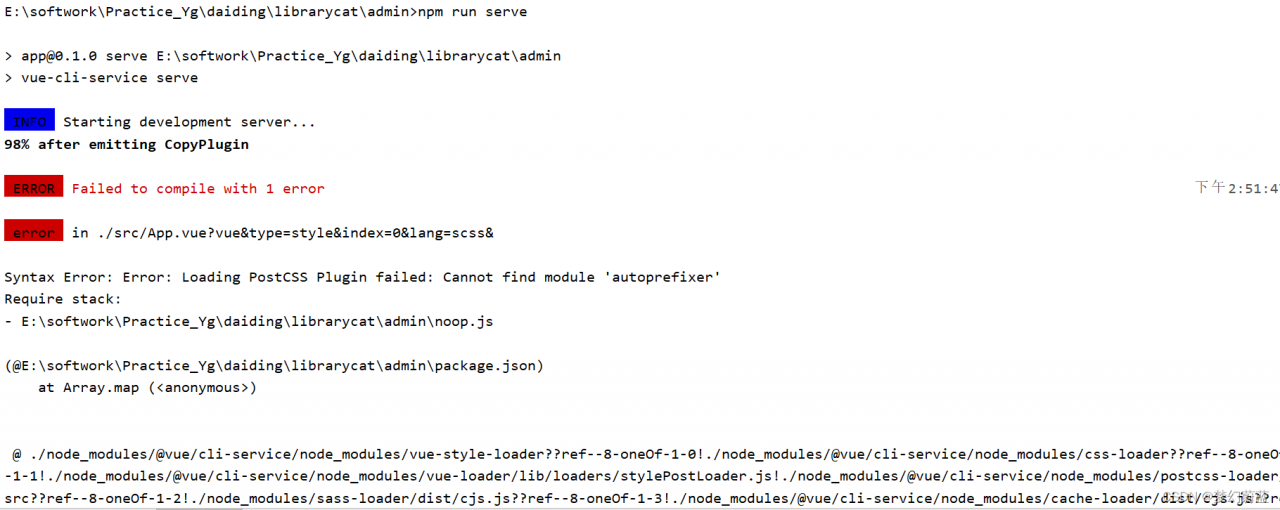
E:\librarycat\admin>npm run serve

> [email protected] serve E:\softwork\Practice_Yg\daiding\librarycat\admin
> vue-cli-service serve

 INFO  Starting development server...
98% after emitting CopyPlugin

 ERROR  Failed to compile with 1 error                                                                                                       下午2:51:47

 error  in ./src/App.vue?vue&type=style&index=0&lang=scss&

Syntax Error: Error: Loading PostCSS Plugin failed: Cannot find module 'autoprefixer'
Require stack:
- E:\softwork\Practice_Yg\daiding\librarycat\admin\noop.js

(@E:\softwork\Practice_Yg\daiding\librarycat\admin\package.json)
    at Array.map (<anonymous>)


 @ ./node_modules/@vue/cli-service/node_modules/vue-style-loader??ref--8-oneOf-1-0!./node_modules/@vue/cli-service/node_modules/css-loader??ref--8-oneOf
-1-1!./node_modules/@vue/cli-service/node_modules/vue-loader/lib/loaders/stylePostLoader.js!./node_modules/@vue/cli-service/node_modules/postcss-loader/
src??ref--8-oneOf-1-2!./node_modules/sass-loader/dist/cjs.js??ref--8-oneOf-1-3!./node_modules/@vue/cli-service/node_modules/cache-loader/dist/cjs.js??re
f--0-0!./node_modules/@vue/cli-service/node_modules/vue-loader/lib??vue-loader-options!./src/App.vue?vue&type=style&index=0&lang=scss& 4:14-563 15:3-20:
5 16:22-571
 @ ./src/App.vue?vue&type=style&index=0&lang=scss&
 @ ./src/App.vue
 @ ./src/main.js
 @ multi (webpack)-dev-server/client?http://192.168.0.145:8081/sockjs-node (webpack)/hot/dev-server.js ./src/main.js


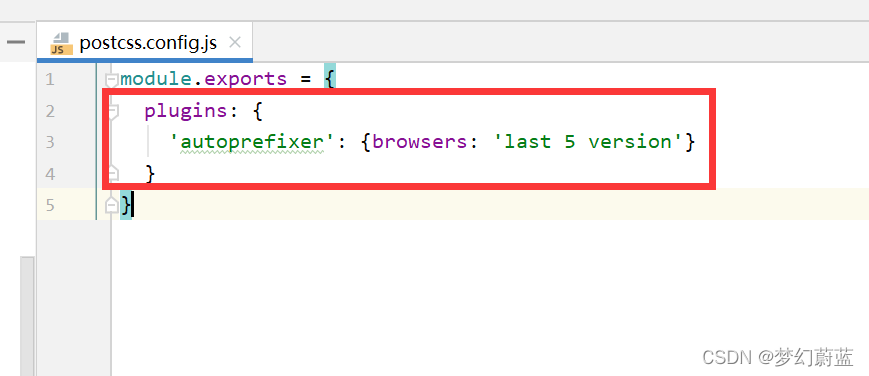
2. Picture presentation questions:


2. Problem-solving process

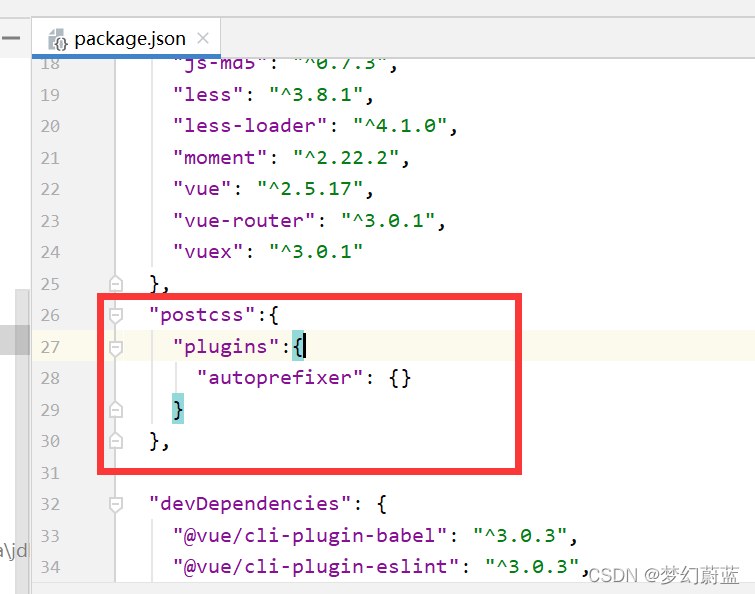
1. In package.json file

Delete the following

  "postcss":{
    "plugins":{
      "autoprefixer": {}
    }
  },

2. Add a sentence to main.js

import 'amfe-flexible'

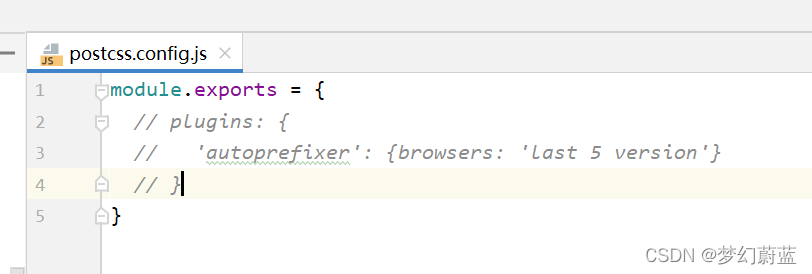
3. comment out the codes below:

jenkenis ERROR: Error fetching remote repo ‘origin‘ [How to Solve]

explain:

During the work, Jenkins made such a mistake in pulling gitlab as below:

jenkenis ERROR: Error fetching remote repo ‘origin‘


The pipeline command is as follows:

pipeline {
    agent any

  options {
      timeout(time: 2, unit: 'HOURS') 
  }
  
    stages {
        stage('Fetch code') {
            steps {
                echo 'Hello World'
                checkout([$class: 'GitSCM', branches: [[name: '*/master']],
                doGenerateSubmoduleConfigurations: false, extensions: [[$class: 'CloneOption', depth: 1, noTags: true, reference: '', shallow: true, timeout: 120]], 
				submoduleCfg: [],userRemoteConfigs: [[credentialsId: '49352c9d-3f03-4271-8b60-2fddab3ca058', url:
                '[email protected]']]])
                
            }
        }
    }
}

Solution:

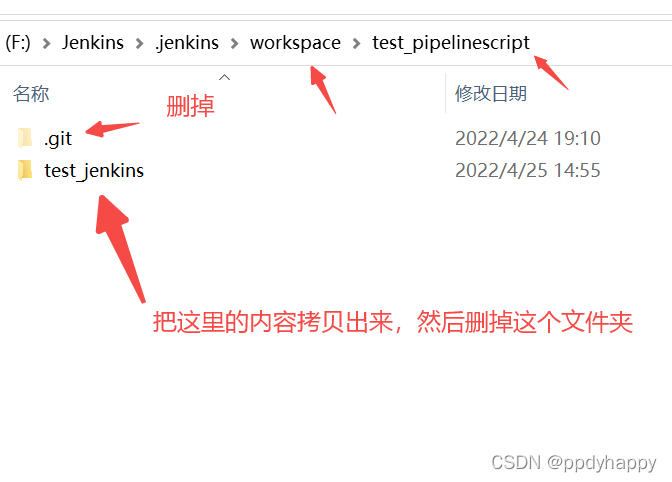
cd to the specified directory under the corresponding workspace, such as workspace\test_pipelinescript here, and manually clone the project to the local through git clone. It should be noted here:

1. Delete the .git folder in the test_pipelinescript directory;

2. Copy everything in the test_jenkins directory to test_pipelinescript

3. Restart Jenkins service.

Enter services.msc through Win + R, find Jenkins service and stop –> Start

4. Re-trigger Jenkins to execute again, and it’s OK.

[Solved] Python Connect to ES Error: elasticsearch.ApiError: ApiError(406

elasticsearch.ApiError: ApiError(406, ‘Content-Type header [application/vnd.elasticsearch+x-ndjson; compatible-with=8] is not supported’, ‘Content-Type header [application/vnd.elasticsearch+x-ndjson; compatible-with=8] is not supported’)


Solution:

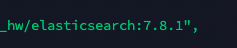
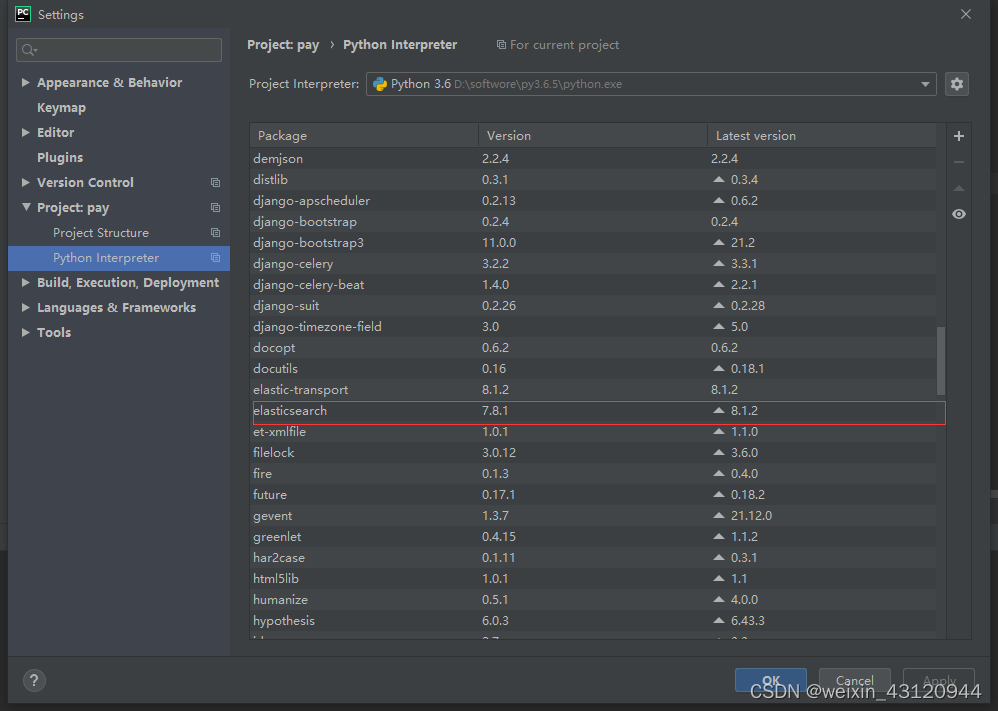
1. You need to keep the elasticsearch installation version consistent with the python elasticsearch third-party library (module) version to solve
view the server installation version

view the third-party library (module) version

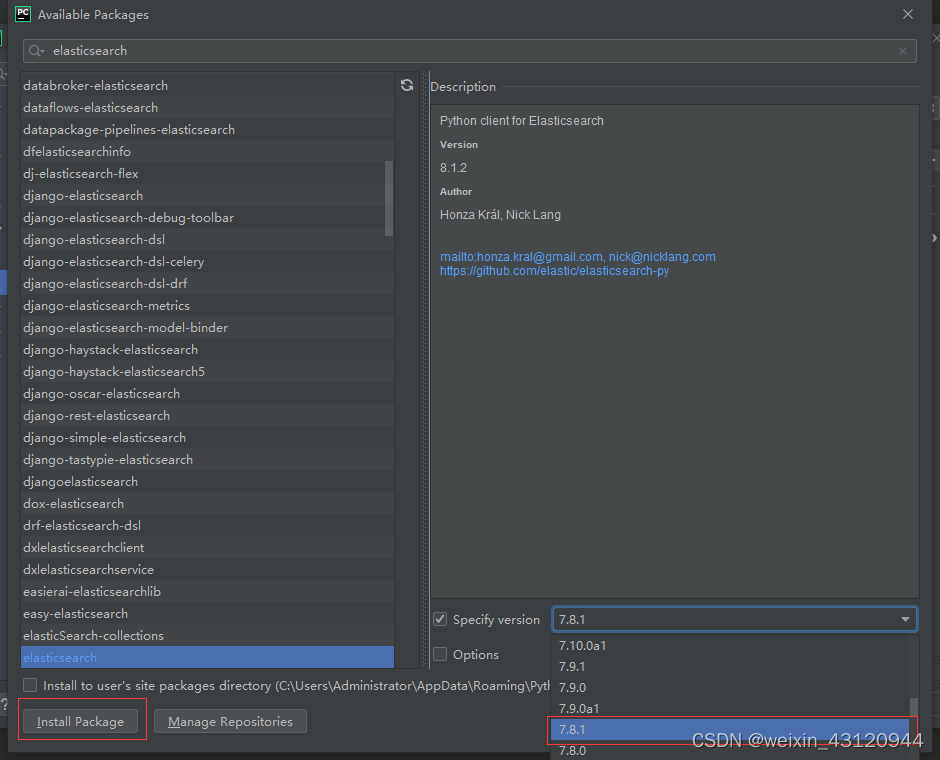
2 If not, upgrade or downgrade the third-party library (module) to achieve consistency

[Solved] Mysql Build Error: [ERROR] Slave I/O for channel ‘‘: error connecting to master

Project scenario:

mysql5. 7 build dual master replication:
host a: 192.168.218.62:3306 production library
host B: 192.168.218.95:3307 create a new empty library
operating system: centos7

Problem description

tip: describe the problems encountered in the project here:
start slave on host B:
change master to master_ host=‘192.168.218.62’,master_ port=3306,master_ user=‘repl’,master_ password=‘*****’,master_ log_ file=‘mysql-bin. 000017’,master_ log_ pos=****;
start slave replication is normal;

Enable slave on host a:
change master to master_ host=‘192.168.218.95’,master_ port=3307,master_ user=‘repl’,master_ password=‘*****’,master_ log_ file=‘mysql-bin. 1234’,master_ log_ pos=****;
after start save, show slave status reports the following error:
error connecting to master‘ [email protected] : 3307 ‘- retry time: 60 retries: 6
check that there are no other meaningful logs under/var/log/messages

Cause analysis:

Troubleshooting route:
1 Log in to host B MySQL on host a: MySQL – U repl – p ‘*****’ – P 3307 – H 192.168.218.95 normal – eliminate account and password errors
2. Check the permission of the replication account on host B, show grants for repl @ ‘%’ and find that it has the permission of replication slave and replication client – eliminate the permission problem
I tried to create a new account, but it didn’t work to restart the service.
finally, it is found that SELinux is not related
check SELinux status:

 [root@localhost ~]# getenforce
Enforcing(means selinux does not close)

Solution:

Close SELinux:
I Temporary shutdown
enter the command setenforce = 0 (it will be invalid after restarting the machine)
check SELinux status:

[root@localhost ~]# getenforce
	Permissive(means close successfully)

II Permanently close
open the /etc/selinux/config file and modify SELINUX=DISABLED (the server needs to be restarted to take effect);

re-change master and then restart to copy successfully

[Solved] OpenCV Train the class Error: Bad argument & Error: Insufficient memory

OpenCV(3.4.1) Error: Bad argument (Can not get new positive sample. The most possible reason is insufficient count of samples in given vec-file.
) in CvCascadeImageReader::PosReader::get, file


Solution: reduce the number of positive samples

opencv_traincascade.exe -data data_2 -vec positives.vec -bg bg.txt -numPos 350 -numNeg 1963 -mem 8192 -numStages 20 -w 20 -h 20

Here, you can reduce the numpos value

OpenCV(3.4.1) Error: Insufficient memory (Failed to allocate 782736980 bytes) in cv::OutOfMemoryError, file C:\application\opencv\opencv\sources\modules\core\src\alloc.cpp, line 55


Solution: increase memory

Here, increase the value of -mem and decrease the value of numPos

Summary: these two errors mainly lie in that the value of the number of positive samples for each level of training is too large. Numpos must be less than the total number of positive samples. Modifying MEM value only improves the running speed