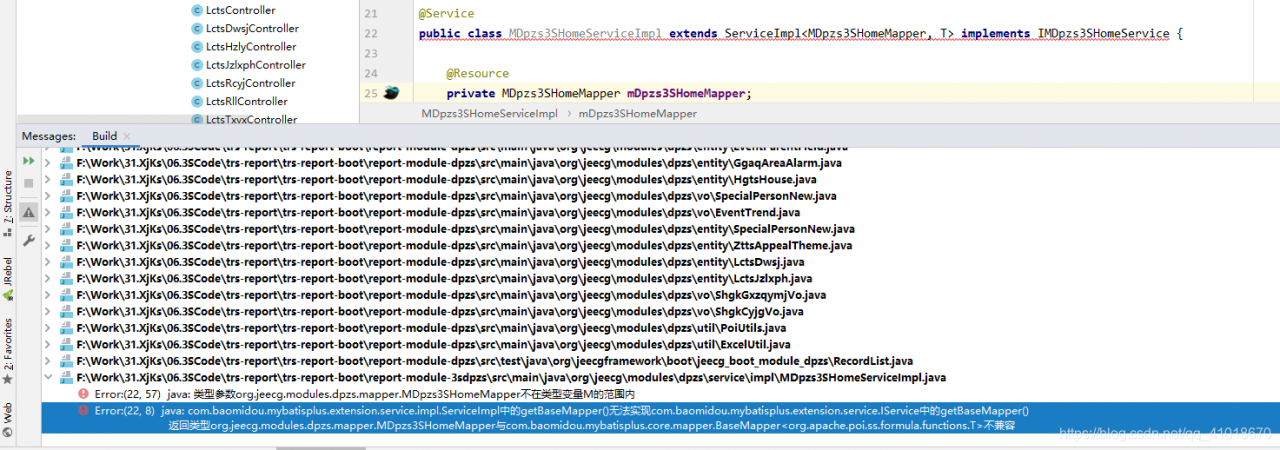
Problem solving:
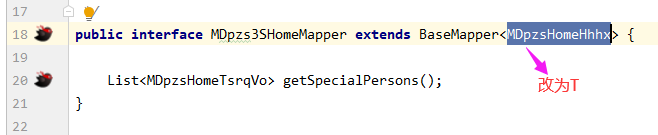
Problem solving:
Right click the project in idea, select project structure, open modules, and select dependencies
Select the module SDK below as Java version.
1. Garbled console
This is because the default encoding of windows’s CMD is GBK, while Tomcat is UTF-8. Of course, there will be garbled codes. But for this garbled code, we just need to make the encoding format printed on the console GBK.
Modify the logging.properties configuration
and add it in the logging.properties configuration file under conf
java.util.logging.ConsoleHandler.encoding = GBK
Restart Tomcat to see that the console output log is normal
2. HTML page garbled
Modifying the web.xml file in Tomcat
<servlet>
        <servlet-name>default</servlet-name>
        <servlet-class>org.apache.catalina.servlets.DefaultServlet</servlet-class>
        <init-param>
            <param-name>debug</param-name>
            <param-value>0</param-value>
        </init-param>
		<init-param>
        	<param-name>fileEncoding</param-name>
        	<param-value>UTF-8</param-value>
        </init-param>
        <init-param>
            <param-name>listings</param-name>
            <param-value>false</param-value>
        </init-param>
        <load-on-startup>1</load-on-startup>
    </servlet>
I’ve also read many articles about modifying server.xml and catalina.bat, but they didn’t work for me. I tried to restore all Tomcat configurations, only modifying web.xml here, and finally determined that I only need to modify here
If you don’t succeed according to me, try to modify others!
The number of rows returned by the mybatis UPDATE statement is always 1 or useaffectedrows = true
Problem solving explanation useaffectedrows = true
solve the problem
This is because the database url connection is missing useAffectedRows=true

The problem is solved here, but I'll explain it later useAffectedRows=true.
Explain useaffectedrows = true
 useAffectedRows defaults to false, and the value returned is the number of rows matched.
    useAffectedRows = true, the value returned is the number of rows affected.
@PostMapping("upload")
public ResponseVo upload(@RequestParam("files[]") MultipartFile[] files) {
    Map<String, Object> resultMap = new HashMap<>();
    if (ArrayUtils.isEmpty(files)) {
        //resultMap.put("message", MessageUtil.getMessage("upload.error.no_files"));
        return new ResponseVo(ErrorCode.ACTION_ERROR).setMsg("没有上传文件");
    }
    MultipartFile multipartFile = files[0];
    File tmpFile = new File(System.currentTimeMillis() + "_" + multipartFile.getOriginalFilename());
    try (BufferedOutputStream outBuff = new BufferedOutputStream(new FileOutputStream(tmpFile)); BufferedInputStream inBuff = new BufferedInputStream(multipartFile.getInputStream())) {
        // Buffered arrays
        byte[] b = new byte[1024 * 5];
        int len;
        while ((len = inBuff.read(b)) != -1) {
            outBuff.write(b, 0, len);
        }
        // Flush the output stream of this buffer
        outBuff.flush();
        resultMap.put("message", MessageUtil.getMessage("upload.success"));
        resultMap.put("data", tmpFile);
    } catch (Exception e) {
        log.error(e.getMessage(), e);
        return new ResponseVo().setMsg("upload failed");
    } finally {
        FileUtils.deleteQuietly(tmpFile);
    }
    return new ResponseVo().setData(resultMap);
}
Result of postman call:
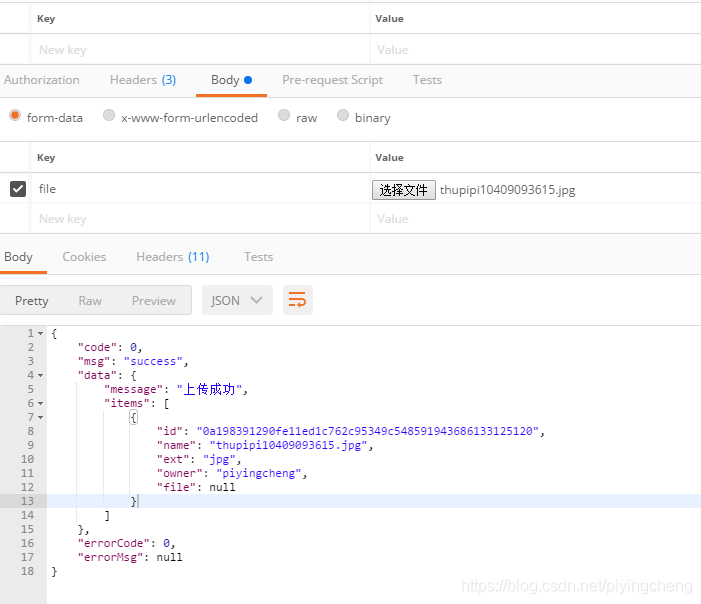
</ div>
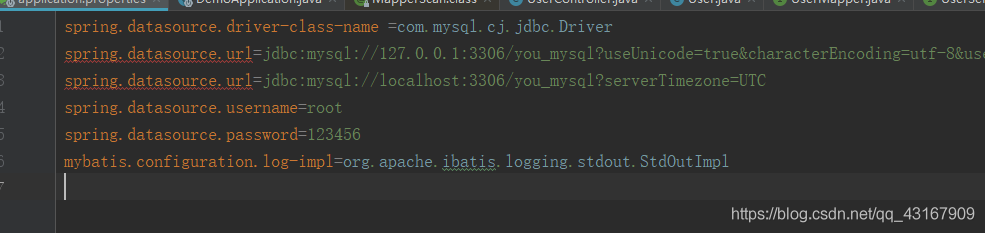
add the following codes to application.properties
spring.datasource.url=jdbc:mysql://localhost:3306/you_mysql?serverTimezone=UTC
IDEA suggests that lombok is not supported
IDEA version Community 2021.1
When debugging: “You aren’t using a compiler supported by lombok, so lombok will not work and has been disabled. ”
Solution.
File -> Settings -> Build,Execution,Deployment -> Compiler -> Shared build process VM options
Fill in:-Djps.track.ap.dependencies=false
Spring cloud hoxton.sr9 gateway is not compatible with reactor netty 0.9.0.release
An error occurred when starting the spring cloud Gateway project
runtime
Spring boot version: 2.2.0.release
spring cloud version: Hoxton. SR9
spring cloud Alibaba version: 2.2.1.release
***************************
APPLICATION FAILED TO START
***************************

Description:

An attempt was made to call a method that does not exist. The attempt was made from the following location:

    org.springframework.cloud.gateway.config.GatewayAutoConfiguration$NettyConfiguration.gatewayHttpClient(GatewayAutoConfiguration.java:675)

The following method did not exist:

    'reactor.netty.resources.ConnectionProvider reactor.netty.resources.ConnectionProvider.elastic(java.lang.String, java.time.Duration, java.time.Duration)'

The method's class, reactor.netty.resources.ConnectionProvider, is available from the following locations:

    jar:file:/E:/apache-maven-3.6.3/repo/io/projectreactor/netty/reactor-netty/0.9.0.RELEASE/reactor-netty-0.9.0.RELEASE.jar!/reactor/netty/resources/ConnectionProvider.class

It was loaded from the following location:

    file:/E:/apache-maven-3.6.3/repo/io/projectreactor/netty/reactor-netty/0.9.0.RELEASE/reactor-netty-0.9.0.RELEASE.jar


Action:

Correct the classpath of your application so that it contains a single, compatible version of reactor.netty.resources.ConnectionProvider


Process finished with exit code 1
Try to upgrade the reactor netty version to 0.9.4. Release
as a result, the spring weblux version is incompatible
***************************
APPLICATION FAILED TO START
***************************

Description:

An attempt was made to call a method that does not exist. The attempt was made from the following location:

    org.springframework.cloud.gateway.config.GatewayAutoConfiguration$NettyConfiguration.reactorNettyWebSocketClient(GatewayAutoConfiguration.java:803)

The following method did not exist:

    'void org.springframework.web.reactive.socket.client.ReactorNettyWebSocketClient.setHandlePing(boolean)'

The method's class, org.springframework.web.reactive.socket.client.ReactorNettyWebSocketClient, is available from the following locations:

    jar:file:/E:/apache-maven-3.6.3/repo/org/springframework/spring-webflux/5.2.0.RELEASE/spring-webflux-5.2.0.RELEASE.jar!/org/springframework/web/reactive/socket/client/ReactorNettyWebSocketClient.class

It was loaded from the following location:

    file:/E:/apache-maven-3.6.3/repo/org/springframework/spring-webflux/5.2.0.RELEASE/spring-webflux-5.2.0.RELEASE.jar


Action:

Correct the classpath of your application so that it contains a single, compatible version of org.springframework.web.reactive.socket.client.ReactorNettyWebSocketClient


Process finished with exit code 1
Restore the original version, and finally downgrade the spring cloud version to hoxton.sr1. It runs successfully. As a result, a new hole appears, and Nacos has a version incompatibility problem. There is no way to find the official recommended configuration of spring cloud Alibaba, and modify the spring boot, spring cloud, and spring cloud Alibaba versions. It runs successfully
Spring boot version: 2.3.2. Release
spring cloud version: Hoxton. SR8
spring cloud Alibaba version: 2.2.5. Release
Attach the official recommended version address of spring cloud Alibaba
recommended version
The error is as follows:

Error reason: jar package conflict.
Solution: clear the conflict or redundant jar package.
Phenomenon: the table cannot be opened and deleted
Solution:
>show full processlist;    // List the processes, find the processes that are waiting, to kill them
......
......
>kill ID; // The ID number is the first column of "Id" listed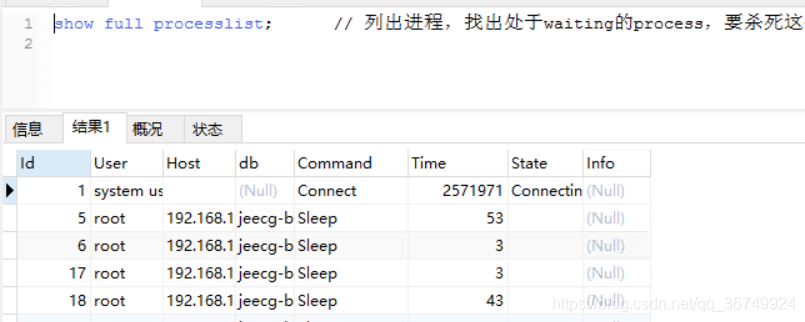
MySQL 5.7 has always been used before, because some changes have taken place after updating to MySQL 8.0, and some information needs to be modified in the configuration of MySQL driver connection.
In MySQL version 5.7, getting the database connection is realized by the following code
connection = DriverManager.getConnection("jdbc:mysql://localhost:3306/数据库名称","数据库账号","数据库密码");
In MySQL 8.0, you need to add a time zone. The implementation code is as follows
connection = DriverManager.getConnection(” jdbc:mysql :// localhost:3306/ Database name true & amp; characterEncoding=utf-8&& amp; serverTimezone=GMT%2B8& Usessl = false “,” database account “,” database password “);
After completing the above modification, you can perfectly solve the connection problem of mysql8.0. The connection is successful, as shown in the figure below

Can I convert Java objects to jsonnode objects directly
the only way to solve this problem is to convert the Java object to string and then to jsonnode
ObjectMapper mapper = new ObjectMapper();
//Method 1
String json = mapper.writeValueAsString(Java Object);
JsonNode jsonNode = mapper.readTree(json);
//Method 2
JsonNode jsonNode = mapper.valueToTree(Java Object);
//Method 3
JsonNode jsonNode = mapper.convertValue(Java Object, JsonNode.class);
Examples
	/**
	 * Converting Java objects to JsonNode in Jackson
	 *
	 * @param object
	 * @return
	 */
	public static JsonNode getJsonNode(Object object) {
		ObjectMapper mapper = new ObjectMapper();
		return mapper.convertValue(object, JsonNode.class);

	}