Tag Archives: java

[How to Solve] Invalid bound statement (not found)

When integrating mybatis with springboot, an error of invalid bound statement (not found) is reported. After repeated changes and trial and error, it is found that mapper.xml cannot be scanned. The key lies in two aspects.

    1. if you put XML in the Java directory, you need to configure the path in the POM package
<resources>
			<resource>
				<directory>src/main/java</directory>
				<includes>
					<include>**/sqlmap/*.xml</include>
				</includes>
				<filtering>false</filtering>
			</resource>
			<resource>
				<directory>src/main/resources</directory>
				<includes>
					<include>**/*.*</include>
				</includes>
				<filtering>true</filtering>
			</resource>
		</resources>
      1. add the statement of scan mapping file to mybatis configuration class
 PathMatchingResourcePatternResolver resolver = new PathMatchingResourcePatternResolver();
        sessionFactory.setMapperLocations(resolver.getResources("classpath*:**/sqlmap/*.xml"));//扫描映射文件
        1. if the mapper.xml file is placed in the resources directory, maperlocations should be configured in application.yml
mybatis:
  mapper-locations: classpath:mapping/*.xml  #Note: Be sure to correspond to the path where the mapper mapping xml file is located
[Solved] Springboot Project Start Error: An attempt was made to call the method com.google.common.collect.Multimaps.asMap

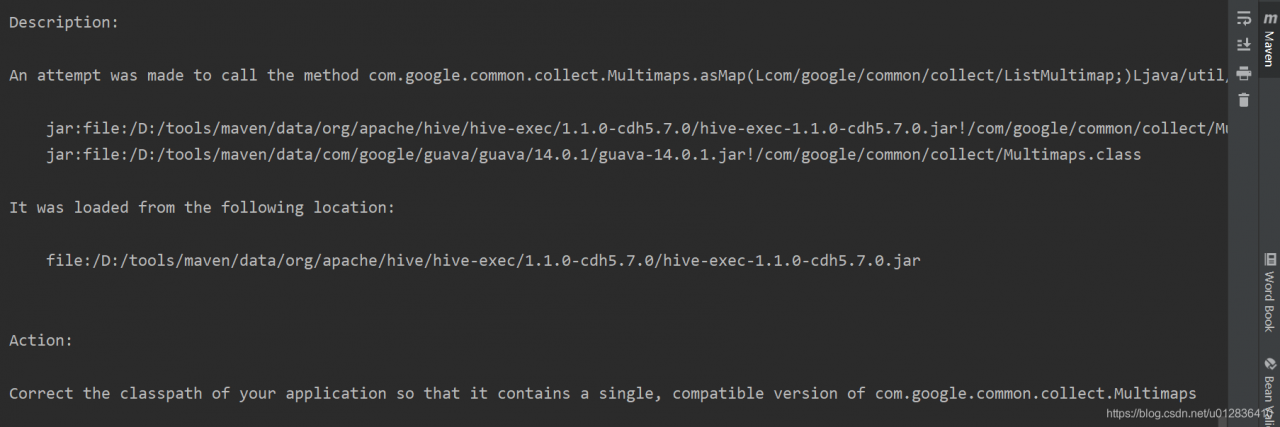
An attempt was made to call the method com.google.common.collect.Multimaps.asMap(Lcom/google/common/collect/ListMultimap;)Ljava/util/Map; but it does not exist. Its class, com.google.common.collect.Multimaps, is available from the following locations:
jar:file:/D:/tools/maven/data/org/apache/hive/hive-exec/1.1.0-cdh5.7.0/hive-exec-1.1.0-cdh5.7.0.jar!/com/google/common/collect/Multimaps.class
jar:file:/D:/tools/maven/data/com/google/guava/guava/14.0.1/guava-14.0.1.jar!/com/google/common/collect/Multimaps.class
It was loaded from the following location:
file:/D:/tools/maven/data/org/apache/hive/hive-exec/1.1.0-cdh5.7.0/hive-exec-1.1.0-cdh5.7.0.jar

Action:
Correct the classpath of your application so that it contains a single, compatible version of com.google.common.collect.Multimaps
 

Solution
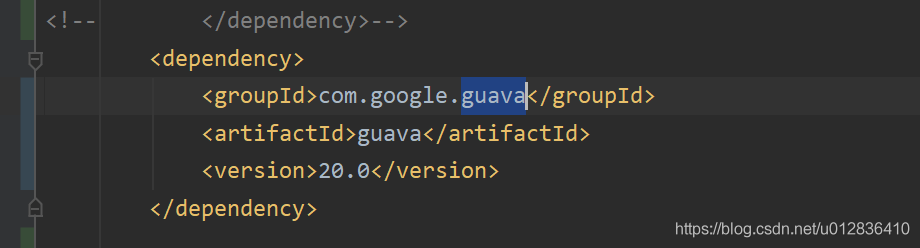
(istMultimap;)Ljava/util/Map; but it does not exist. Its class, com.google.common.collect.Multimaps,) This sentence already explains that the method can not be found, hive-exec inside the use of Multimaps method is not available under guava package, finally found that it is the version of the problem, add the following problem solved

git@gitlab invalid privatekey

SSH git code error caused by: org. Eclipse. Jgit. Errors. Transportexception: git@gitlab invalid privatekey

When using SSH git code, we found the problem of invalid private key:
the following shows some inline code chips .

Caused by: org.eclipse.jgit.errors.TransportException: [email protected]:xxx.git: invalid privatekey: [B@2fc74d70
        at org.eclipse.jgit.transport.JschConfigSessionFactory.getSession(JschConfigSessionFactory.java:158)
        at org.eclipse.jgit.transport.SshTransport.getSession(SshTransport.java:107)
        at org.eclipse.jgit.transport.TransportGitSsh$SshFetchConnection.(TransportGitSsh.java:247)
        at org.eclipse.jgit.transport.TransportGitSsh.openFetch(TransportGitSsh.java:137)
        at org.eclipse.jgit.transport.FetchProcess.executeImp(FetchProcess.java:105)
        at org.eclipse.jgit.transport.FetchProcess.execute(FetchProcess.java:91)
        at org.eclipse.jgit.transport.Transport.fetch(Transport.java:1260)
        at org.eclipse.jgit.api.FetchCommand.call(FetchCommand.java:211)
        ... 60 common frames omitted
Caused by: com.jcraft.jsch.JSchException: invalid privatekey: [B@2fc74d70
        at com.jcraft.jsch.KeyPair.load(KeyPair.java:664)
        at com.jcraft.jsch.KeyPair.load(KeyPair.java:561)
        at com.jcraft.jsch.IdentityFile.newInstance(IdentityFile.java:40)
        at com.jcraft.jsch.JSch.addIdentity(JSch.java:406)
        at com.dmall.autotestcenter.service.impl.GitServiceImpl$1.createDefaultJSch(GitServiceImpl.java:81)
        at org.eclipse.jgit.transport.JschConfigSessionFactory.getJSch(JschConfigSessionFactory.java:350)
        at org.eclipse.jgit.transport.JschConfigSessionFactory.createSession(JschConfigSessionFactory.java:308)
        at org.eclipse.jgit.transport.JschConfigSessionFactory.createSession(JschConfigSessionFactory.java:175)
        at org.eclipse.jgit.transport.JschConfigSessionFactory.getSession(JschConfigSessionFactory.java:105)
        ... 67 common frames omitted

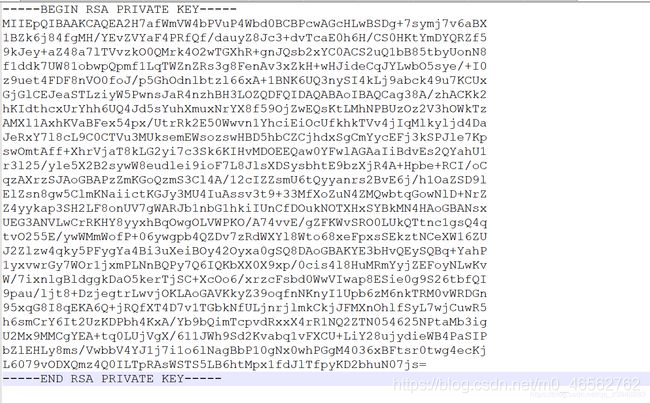
The reason is that the openssh version is used to generate the key, which leads to too high version:

solution:
SSH keygen – M PEM – t RSA regenerates the key in the old format, which can change the key format specified by the
– M parameter, and PEM (that is, RSA format) is the old format used before

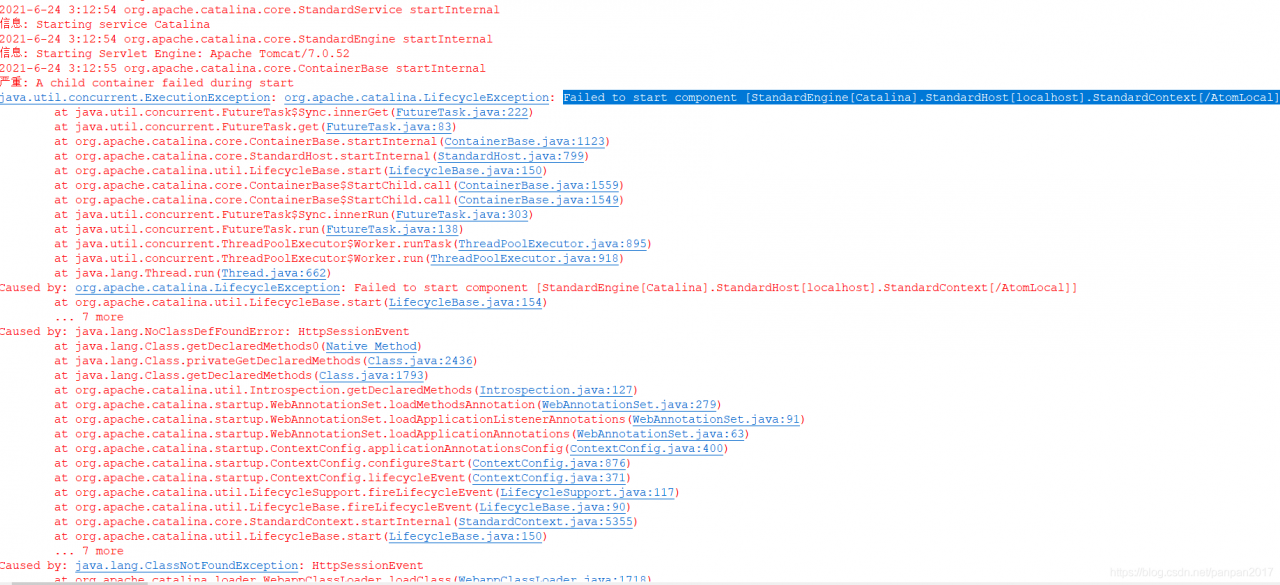
[Solved] Tomcat7 Start Error: Failed to start component [StandardEngine[Catalina].StandardHost[localhost].StandardCon

When transforming a project in eclipse, tomcat7 is always started

Failed to start component [StandardEngine[Catalina].StandardHost[localhost].StandardContext[/AtomLocal]]

terms of settlement:

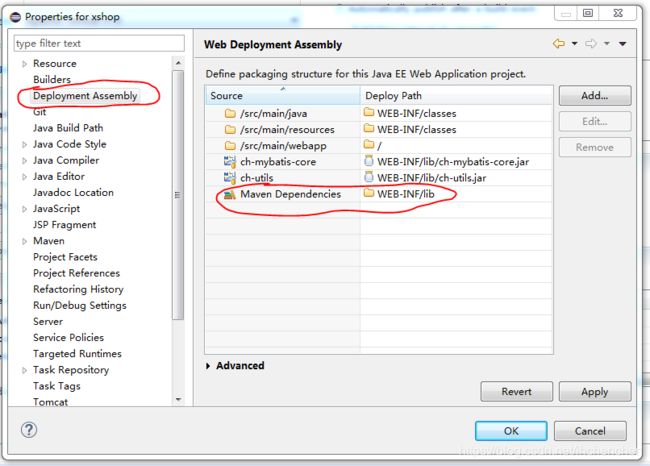
Right click project properties, find deployment assembly, add Java build path entries and Maven dependencies

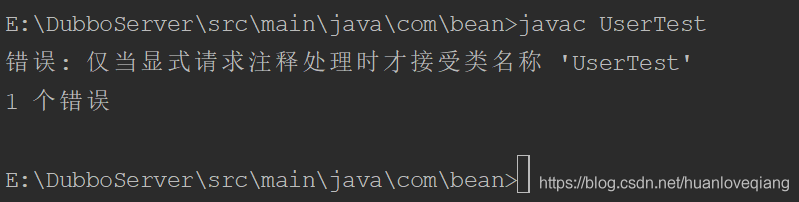
Error: the main class usertest could not be found or loaded

This class has a specified package

An error occurred when running java test from the command line: the main class usertest could not be found or loaded

    first of all, the user test needs to compile
    the command, such as the folder where the user test.java is located, executes javac user test.java to compile. After compiling, the user test.class file appears in the directory where the user test.java is located, and then it can be run on the command line<

    runs the usertest.class file through the Java command
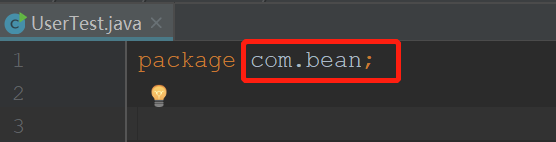
    first, let’s see what the package name written after the package of the class usertest.java is. My name is com.bean

    when I run Java usertest in the bean directory, I report an error: can't find or load the main class usertest

    later, I see that someone says Java com.bean.usertest can run, and it really can run after a try. But Java usertest can’t run. Later, it is found that this class has a specified package

This class does not specify a package

1. Use javac usertest. Java to compile our. Java file

2. If the java file does not specify a package, just use the Java command to run our class file (Java usertest)

Mybatis passes in multiple parameters to mapper. And uses @param details to report an error

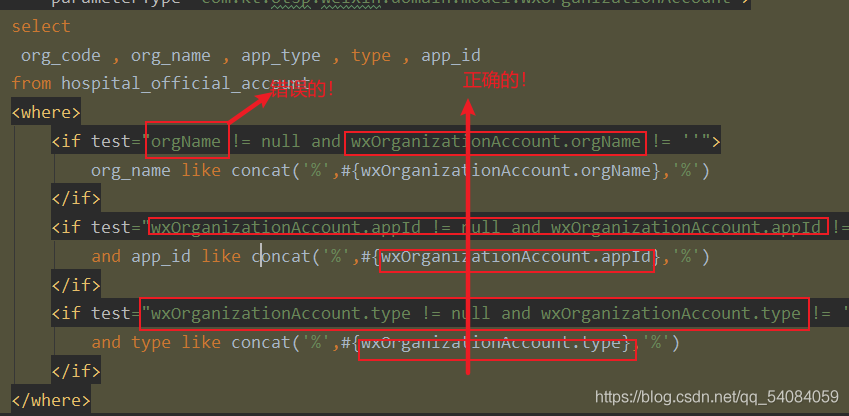
“nested   exception   is   org.apache.ibatis.binding.BindingException:   Parameter  ‘ orgName’   not   found.   Available   parameters   are  [ wxOrganizationAccount,   page,   param1,   param2]”,

This bug was fixed for a long time and finally found.

At the beginning, I thought that the @ param annotation was not written when multiple parameters were passed in, but I found that it was not right after writing,

“nested   exception   is   org.apache.ibatis.binding.BindingException:   Parameter  ‘ orgName’   not   found.   Available   parameters   are  [ wxOrganizationAccount,   page,   param1,   param2]”,

I want to add another parameter’s type field to an entity class, then save the parameter into the entity class, and then pass only one object in the process of passing the parameter. Of course, these are just my personal ideas. In the end, of course, they failed.

“nested   exception   is   org.apache.ibatis.binding.BindingException:   Parameter  ‘ orgName’   not   found.   Available   parameters   are  [ wxOrganizationAccount,   page,   param1]”,

It’s just missing a parameter, or it’s wrong. At this time, I was thinking that since it’s not the problem passed in, it might be the problem of value taking. Finally, I found that the value can’t be taken because it’s not accurate enough to get the value from the object!

Solution to redis error in CentOS of idea connected virtual machine

1. In CentOS, ifconfig determines redis.host

2. In CentOS, change the path to the installation directory of redis, and change the content of redis.conf file

Modify bind
change bind 127.0.0.1 to – & gt; Change bind 0.0.0.0 protected mode yes to — & gt; Protected mode no close firewall
systemctl stop firewalld.service # stop firewall
systemctl disable firewalld.service # disable firewall startup
firewall CMD — state # view default firewall status, firewall status display not running

3. Restart CentOS

4. Enable redis to start as specified configuration file

Switch to the SRC directory under the redis directory./redis server…/redis.conf to start redis

5. Test the connection between idea and redis

Spring boot integrates Mongo to solve some common connection and permission problems. Docker compose installs Mongo

Spring boot integrates Mongo to solve some common connection and permission problems. Docker compose installs Mongo

1、 Docker compose to install Mongo

version: '3.1'

services:

  mongo:
    image: mongo
    container_name: mongo
    restart: always
    ports:
      - 27017:27017
    environment:
      MONGO_INITDB_ROOT_USERNAME: root
      MONGO_INITDB_ROOT_PASSWORD: 123456

  mongo-express:
    image: mongo-express
    container_name: mongo-express
    restart: always
    ports:
      - 8081:8081
    environment:
      ME_CONFIG_MONGODB_SERVER: mongo
      ME_CONFIG_MONGODB_ADMINUSERNAME: root
      ME_CONFIG_MONGODB_ADMINPASSWORD: 123456

2、 Spring boot integrates Mongo

Maven dependency

<dependency>
    <groupId>org.springframework.boot</groupId>
    <artifactId>spring-boot-starter-data-mongodb</artifactId>
</dependency>

There are some points to pay attention to in the yaml configuration of springboot

1、 How to configure URI

1. Using the URI configuration method to configure password, user name, etc. will not take effect

2. If you encounter permission problems, check whether the user name and password match first. If you encounter

Command failed with error 17 (ProtocolError): ‘Attempt to switch database target during SASL authentication.

This kind of error report usually ends?Authsource = admin without

spring:
  data:
    mongodb:
      uri: mongodb://root:[email protected]:27017/demo?authSource=admin

2、 Configuration of traditional SQL

1. If you are a pure digital password, for example, the author’s password is 123456, use single or double quotation marks when configuring, otherwise you will be identified incorrectly, because the receiving password uses char array, and 123456 will obviously overflow

spring:
  data:
    mongodb:
      username: root
      password: '123456'
      host: 192.168.50.150
      port: 27017
      database: demo
      authentication-database: admin

Java.lang.exceptionininitializererror [How to Fix]

During the unit test of springboot project, the program always reports the error of Java. Lang. exceptionininitializererror, indicating the error in the line of mock static class

at org.powermock.modules.junit4.internal.impl.PowerMockJUnit44RunnerDelegateImpl$PowerMockJUnit44MethodRunner.runTestMethod(PowerMockJUnit44RunnerDelegateImpl.java:326)
	at org.junit.internal.runners.MethodRoadie$2.run(MethodRoadie.java:89)
	at org.junit.internal.runners.MethodRoadie.runBeforesThenTestThenAfters(MethodRoadie.java:97)
	at org.powermock.modules.junit4.internal.impl.PowerMockJUnit44RunnerDelegateImpl$PowerMockJUnit44MethodRunner.executeTest(PowerMockJUnit44RunnerDelegateImpl.java:310)
	at org.powermock.modules.junit4.internal.impl.PowerMockJUnit47RunnerDelegateImpl$PowerMockJUnit47MethodRunner.executeTestInSuper(PowerMockJUnit47RunnerDelegateImpl.java:131)
	at org.powermock.modules.junit4.internal.impl.PowerMockJUnit47RunnerDelegateImpl$PowerMockJUnit47MethodRunner.access$100(PowerMockJUnit47RunnerDelegateImpl.java:59)
	at org.powermock.modules.junit4.internal.impl.PowerMockJUnit47RunnerDelegateImpl$PowerMockJUnit47MethodRunner$TestExecutorStatement.evaluate(PowerMockJUnit47RunnerDelegateImpl.java:147)
	at org.powermock.modules.junit4.internal.impl.PowerMockJUnit47RunnerDelegateImpl$PowerMockJUnit47MethodRunner.evaluateStatement(PowerMockJUnit47RunnerDelegateImpl.java:107)
	at org.powermock.modules.junit4.internal.impl.PowerMockJUnit47RunnerDelegateImpl$PowerMockJUnit47MethodRunner.executeTest(PowerMockJUnit47RunnerDelegateImpl.java:82)
	at org.powermock.modules.junit4.internal.impl.PowerMockJUnit44RunnerDelegateImpl$PowerMockJUnit44MethodRunner.runBeforesThenTestThenAfters(PowerMockJUnit44RunnerDelegateImpl.java:298)
	at org.junit.internal.runners.MethodRoadie.runTest(MethodRoadie.java:87)
	at org.junit.internal.runners.MethodRoadie.run(MethodRoadie.java:50)
	at org.powermock.modules.junit4.internal.impl.PowerMockJUnit44RunnerDelegateImpl.invokeTestMethod(PowerMockJUnit44RunnerDelegateImpl.java:218)
	at org.powermock.modules.junit4.internal.impl.PowerMockJUnit44RunnerDelegateImpl.runMethods(PowerMockJUnit44RunnerDelegateImpl.java:160)
	at org.powermock.modules.junit4.internal.impl.PowerMockJUnit44RunnerDelegateImpl$1.run(PowerMockJUnit44RunnerDelegateImpl.java:134)
	at org.junit.internal.runners.ClassRoadie.runUnprotected(ClassRoadie.java:34)
	at org.junit.internal.runners.ClassRoadie.runProtected(ClassRoadie.java:44)
	at org.powermock.modules.junit4.internal.impl.PowerMockJUnit44RunnerDelegateImpl.run(PowerMockJUnit44RunnerDelegateImpl.java:136)
	at org.powermock.modules.junit4.common.internal.impl.JUnit4TestSuiteChunkerImpl.run(JUnit4TestSuiteChunkerImpl.java:117)
	at org.powermock.modules.junit4.common.internal.impl.AbstractCommonPowerMockRunner.run(AbstractCommonPowerMockRunner.java:57)
	at org.powermock.modules.junit4.PowerMockRunner.run(PowerMockRunner.java:59)
	at org.junit.runner.JUnitCore.run(JUnitCore.java:137)
	at com.intellij.junit4.JUnit4IdeaTestRunner.startRunnerWithArgs(JUnit4IdeaTestRunner.java:69)
	at com.intellij.rt.junit.IdeaTestRunner$Repeater.startRunnerWithArgs(IdeaTestRunner.java:33)
	at com.intellij.rt.junit.JUnitStarter.prepareStreamsAndStart(JUnitStarter.java:221)
	at com.intellij.rt.junit.JUnitStarter.main(JUnitStarter.java:54)

Finally, it is found that the class where the when new object is located is not added in @preparefortest, only the class for UT is added

Java 11.0.11 SQL Server connection error

After upgrading to Zulu JDK 11.0.11, connect to SQL server and prompt the server selected protocol version tls10 is not accepted by client preferences [tls13, tls12]
this is because Java gave up supporting tls1.0, 1.1 and other versions of the algorithm, while the SQL server server was not upgraded to tls1.2
in the downloaded JDK,… Zulu11.43.55-ca-jdk11.0.9.1-win_ Open Java. Security and search JDK. TLS. Disabledalgorithms . This is an unsupported algorithm. Delete tls1.0 to support it

android Caused by: java.util.ConcurrentModificationException

First look at the logcat log:

2021-06-25 10:47:47.262 29869-29869/com.***.*** E/AndroidRuntime: FATAL EXCEPTION: main
    Process: com.***.***, PID: 29869
    java.lang.RuntimeException: Error receiving broadcast Intent { act=com.***.servicecallback.content flg=0x10 (has extras) } in com.***.***.MainActivity$SocketMessageReceiver@b855039
        at android.app.LoadedApk$ReceiverDispatcher$Args.lambda$-android_app_LoadedApk$ReceiverDispatcher$Args_52497(LoadedApk.java:1323)
        at android.app.-$Lambda$aS31cHIhRx41653CMnd4gZqshIQ.$m$7(Unknown Source:4)
        at android.app.-$Lambda$aS31cHIhRx41653CMnd4gZqshIQ.run(Unknown Source:39)
        at android.os.Handler.handleCallback(Handler.java:790)
        at android.os.Handler.dispatchMessage(Handler.java:99)
        at android.os.Looper.loop(Looper.java:164)
        at android.app.ActivityThread.main(ActivityThread.java:6494)
        at java.lang.reflect.Method.invoke(Native Method)
        at com.android.internal.os.RuntimeInit$MethodAndArgsCaller.run(RuntimeInit.java:438)
        at com.android.internal.os.ZygoteInit.main(ZygoteInit.java:807)
     Caused by: java.util.ConcurrentModificationException
        at java.util.ArrayList$Itr.next(ArrayList.java:860)
        at com.***.***.MainActivity$SocketMessageReceiver.onReceive(MainActivity.java:733)
        at android.app.LoadedApk$ReceiverDispatcher$Args.lambda$-android_app_LoadedApk$ReceiverDispatcher$Args_52497(LoadedApk.java:1313)
        at android.app.-$Lambda$aS31cHIhRx41653CMnd4gZqshIQ.$m$7(Unknown Source:4) 
        at android.app.-$Lambda$aS31cHIhRx41653CMnd4gZqshIQ.run(Unknown Source:39) 
        at android.os.Handler.handleCallback(Handler.java:790) 
        at android.os.Handler.dispatchMessage(Handler.java:99) 
        at android.os.Looper.loop(Looper.java:164) 
        at android.app.ActivityThread.main(ActivityThread.java:6494) 
        at java.lang.reflect.Method.invoke(Native Method) 
        at com.android.internal.os.RuntimeInit$MethodAndArgsCaller.run(RuntimeInit.java:438) 
        at com.android.internal.os.ZygoteInit.main(ZygoteInit.java:807) 

At first, I thought it was the problem of broadcast onreceiver

java.lang.RuntimeException: Error receiving broadcast Intent { act=com.***.servicecallback.content flg=0x10 (has extras) } in com.***.***.MainActivity$SocketMessageReceiver@b855039

Later, I found out that it was caused by the following sentence:

 Caused by: java.util.ConcurrentModificationException

Look at the reason again: if you modify vector and ArrayList at the same time during iteration, you will throw a Java. Util. Concurrent modificationexception.

The reason is that I use the list when I process data in onreceiver. When I traverse and iterate the query, I insert the data, which leads to the collapse of the list.

Project read error when downloading Maven project

The reason is not very clear, but the online search method can solve the error;

Operation steps:
1, open the computer’s CMD operation interface, and find the folder to open the wrong project in the CMD interface, for example, my project folder is in F/user/workspace/cxfserver
Enter CD: F/user/workspace/cxfserver in the CMD interface     You can go to the folder where the project is located
2. Enter the MVN – x clean install command and click enter. After that, the interface will refresh continuously. Finally, build success will appear to indicate that the operation is completed
3, then right-click the target project Maven – & gt; Updata project, check your project for confirmation, then update the project and solve the project read error