Tag Archives: java

[Solved] Could not find resource COM / atguigu / Dao / studentdao.xm, the mapper file for storing SQL statements could not be found and an error occurred

The mapper file created by using the Maven project mybatis to operate the database is not put under the resource resource file. The following error occurs during compilation

org.apache.ibatis.exceptions.PersistenceException: 
### Error building SqlSession.
### The error may exist in com\atguigu\dao\StudentDao.xml
### Cause: org.apache.ibatis.builder.BuilderException: Error parsing SQL Mapper Configuration. Cause: java.io.IOException: Could not find resource com\atguigu\dao\StudentDao.xml

	at org.apache.ibatis.exceptions.ExceptionFactory.wrapException(ExceptionFactory.java:30)
	at org.apache.ibatis.session.SqlSessionFactoryBuilder.build(SqlSessionFactoryBuilder.java:80)
	at org.apache.ibatis.session.SqlSessionFactoryBuilder.build(SqlSessionFactoryBuilder.java:64)
	at com.atguigu.Test1.test01(Test1.java:23)
	at sun.reflect.NativeMethodAccessorImpl.invoke0(Native Method)
	at sun.reflect.NativeMethodAccessorImpl.invoke(NativeMethodAccessorImpl.java:62)
	at sun.reflect.DelegatingMethodAccessorImpl.invoke(DelegatingMethodAccessorImpl.java:43)
	at java.lang.reflect.Method.invoke(Method.java:498)
	at org.junit.runners.model.FrameworkMethod$1.runReflectiveCall(FrameworkMethod.java:47)
	at org.junit.internal.runners.model.ReflectiveCallable.run(ReflectiveCallable.java:12)
	at org.junit.runners.model.FrameworkMethod.invokeExplosively(FrameworkMethod.java:44)
	at org.junit.internal.runners.statements.InvokeMethod.evaluate(InvokeMethod.java:17)
	at org.junit.runners.ParentRunner.runLeaf(ParentRunner.java:271)
	at org.junit.runners.BlockJUnit4ClassRunner.runChild(BlockJUnit4ClassRunner.java:70)
	at org.junit.runners.BlockJUnit4ClassRunner.runChild(BlockJUnit4ClassRunner.java:50)
	at org.junit.runners.ParentRunner$3.run(ParentRunner.java:238)
	at org.junit.runners.ParentRunner$1.schedule(ParentRunner.java:63)
	at org.junit.runners.ParentRunner.runChildren(ParentRunner.java:236)
	at org.junit.runners.ParentRunner.access$000(ParentRunner.java:53)
	at org.junit.runners.ParentRunner$2.evaluate(ParentRunner.java:229)
	at org.junit.runners.ParentRunner.run(ParentRunner.java:309)
	at org.junit.runner.JUnitCore.run(JUnitCore.java:160)
	at com.intellij.junit4.JUnit4IdeaTestRunner.startRunnerWithArgs(JUnit4IdeaTestRunner.java:68)
	at com.intellij.rt.junit.IdeaTestRunner$Repeater.startRunnerWithArgs(IdeaTestRunner.java:33)
	at com.intellij.rt.junit.JUnitStarter.prepareStreamsAndStart(JUnitStarter.java:230)
	at com.intellij.rt.junit.JUnitStarter.main(JUnitStarter.java:58)
Caused by: org.apache.ibatis.builder.BuilderException: Error parsing SQL Mapper Configuration. Cause: java.io.IOException: Could not find resource com\atguigu\dao\StudentDao.xml
	at org.apache.ibatis.builder.xml.XMLConfigBuilder.parseConfiguration(XMLConfigBuilder.java:121)
	at org.apache.ibatis.builder.xml.XMLConfigBuilder.parse(XMLConfigBuilder.java:98)
	at org.apache.ibatis.session.SqlSessionFactoryBuilder.build(SqlSessionFactoryBuilder.java:78)
	... 24 more
Caused by: java.io.IOException: Could not find resource com\atguigu\dao\StudentDao.xml
	at org.apache.ibatis.io.Resources.getResourceAsStream(Resources.java:114)
	at org.apache.ibatis.io.Resources.getResourceAsStream(Resources.java:100)
	at org.apache.ibatis.builder.xml.XMLConfigBuilder.mapperElement(XMLConfigBuilder.java:371)
	at org.apache.ibatis.builder.xml.XMLConfigBuilder.parseConfiguration(XMLConfigBuilder.java:119)
	... 26 more


This is because the dao.xml file under the mapper file can not find the statement file to operate the database during compilation. There are two solutions to the problem.
the first one is to put the file to store the database statement under the resource file. Remember to modify the mybatis main configuration file

 	 <mappers>
        <mapper resource="com\zixi\dao\StudentDao.xml"/>
    </mappers>

    <!--    Modify your path directly to the following-->

    <mappers>
    <mapper resource="StudentDao.xml"/>
</mappers>
    

If you don’t want to modify and copy, you can directly add the Blid tag under the Maven configuration file and add the following content

  <build>
<!--        To solve the problem of writing sql statements in main.com.**. file, but when compiling, the xmlsql file error does not appear in out-->
        <resources>
            <resources>
                <directory>src/main/java</directory><! --directory where -->
                <includes><! --Includes directories where .properties, .xml files are scanned -->
                    <include>**/*.properties</include>
                    <include>**/*.xml</include>
                </includes>
                <filtering>false</filtering>
            </resource>
        </resources>
    </build>

This is my own practice problems, the above content can only be used as a reference, hope to be useful to you. thank you
[Solved] Unable to start web server; nested exception is org.springframework.boot.web.server.WebServerExcepti


1、 Background description

Project architecture: spring boot (v2.0.0. Release) + mybatis plus (v3.1.1)

Today, I developed a new function on an old project (running normally). Before adding new functions, the project started and ran normally. As a result, after the development, the project couldn’t start and the background didn’t report any error information. The key is that I didn’t even have a log. For a moment, I couldn’t start it.

2、 Cause analysis

According to the situation analysis, the project can’t be started. Thinking that there must be a problem in starting, a try… Catch… Block is added to the line of starting the project in the starting class (that is, the following code plus).

SpringApplication.run(DailyApplication.class, args);

See if there is an error log.

@Slf4j
@EnableScheduling
@EnableFeignClients(basePackages = "com.iot")
@SpringBootApplication(scanBasePackages={"com.iot"})
@MapperScan({"com.iot.daily.*.dao"})
public class DailyApplication implements ApplicationRunner {

    public static void main(String[] args) {
        try {
            SpringApplication.run(DailyApplication.class, args);
        } catch (Exception e) {
            e.printStackTrace();
            log.error("error: ============== ", e);
        }
    }

    @Override
    public void run(ApplicationArguments args) throws Exception {
        log.info("The daily report system was successfully launched!......");
    }
}

Start the project, and then, as expected, the console displays the error log with the following error message:

Unable to start web server; nested exception is org.springframework.boot.web.server.WebServerException: Unable to start embedded Tomcat

The specific error information will be supplemented later, but now it can’t be reproduced.

3、 Solutions

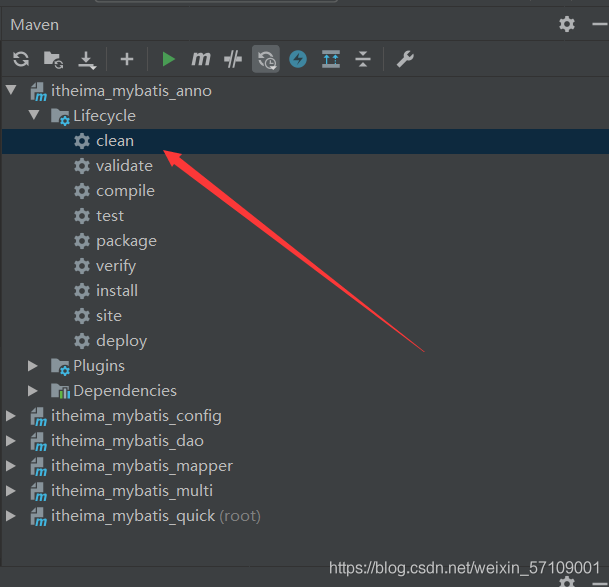
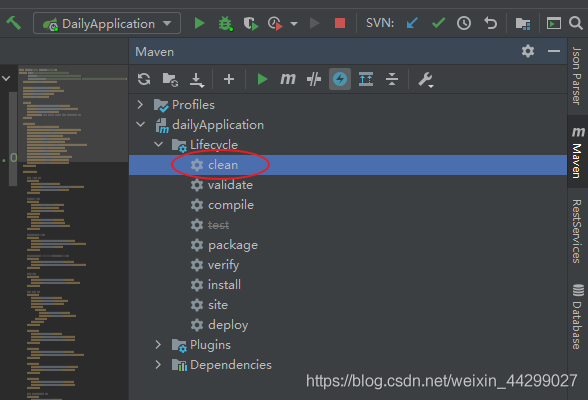
Here is my project solution, very simple, Maven clean once, and then restart.

end!

JDK installation exception link it with ‘- Z noexecstack’ and inux 64 bit zendguardloader.so: wrong elf class: elfclass32 error handling

N1.
It’s highly recommended that you fix the library with ‘execstack -c <libfile>’, or link it with ‘-z noexecstack’.
It means that it is recommended to use sunjdk instead of linux’s own openjdk

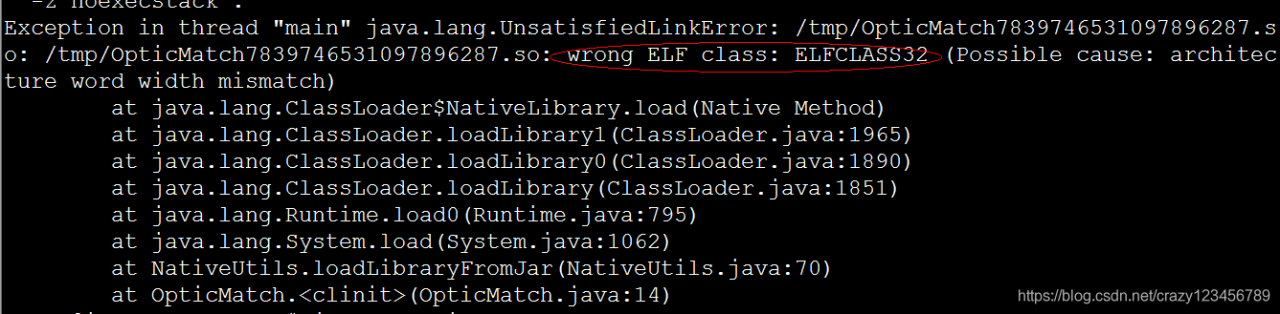
N2.linux 64bit system ZendGuardLoader.so: wrong ELF class: ELFCLASS32 error
1. Download Zend Guard
32位 http://downloads.zend.com/guard/5.5.0/ZendGuardLoader-php-5.3-linux-glibc23-i386.tar.gz
64位 http://downloads.zend.com/guard/5.5.0/ZendGuardLoader-php-5.3-linux-glibc23-x86_64.tar.gz
mkdir /usr/local/zend
tar -zxvf ZendGuardLoader-php-5.3-linux-glibc23-i386.tar.gz
sudo cp ZendGuardLoader-php-5.3-linux-glibc23-i386/php5.3.x/ZendGuardLoader.so /usr/local/zend/
2. Set
vim /etc/php.ini
Finally add.
zend_extension=/usr/local/zend/ZendGuardLoader.so
The reason for the above error is that the 64-bit system is using the 32-bit ZendGuardLoader.so.
The solution is to download a 64-bit ZendGuardLoader.so file that corresponds to the PHP version
1、Download Zend Guard
32位 http://downloads.zend.com/guard/5.5.0/ZendGuardLoader-php-5.3-linux-glibc23-i386.tar.gz
64位 http://downloads.zend.com/guard/5.5.0/ZendGuardLoader-php-5.3-linux-glibc23-x86_64.tar.gz
mkdir /usr/local/zend
tar -zxvf ZendGuardLoader-php-5.3-linux-glibc23-i386.tar.gz
sudo cp ZendGuardLoader-php-5.3-linux-glibc23-i386/php5.3.x/ZendGuardLoader.so /usr/local/zend/
2. Set
vim /etc/php.ini
Finally Add:
zend_extension=/usr/local/zend/ZendGuardLoader.so

[Solved] In case of “transactionmanager” while setting bean property “transactionmanager” error

When learning to write XML transactions in spring, you can refer to ‘transactionmanager’ while setting bean property ‘transactionmanager’

Warning: Exception encountered during context initialization - cancelling refresh attempt: org.springframework.beans.factory.BeanCreationException: Error creating bean with name 'userService' defined in file [D:\Codeworkstation\IDEAGuigu\Spring5\spring5_tedemo1\out\production\spring5_tedemo1\com\atgui\spring\service\UserService.class]: Initialization of bean failed; nested exception is org.springframework.beans.factory.BeanCreationException: Error creating bean with name 'txadvice': Cannot resolve reference to bean 'transactionManager' while setting bean property 'transactionManager'; nested exception is org.springframework.beans.factory.NoSuchBeanDefinitionException: No bean named 'transactionManager' available

org.springframework.beans.factory.BeanCreationException: Error creating bean with name 'userService' defined in file [D:\Codeworkstation\IDEAGuigu\Spring5\spring5_tedemo1\out\production\spring5_tedemo1\com\atgui\spring\service\UserService.class]: Initialization of bean failed; nested exception is org.springframework.beans.factory.BeanCreationException: Error creating bean with name 'txadvice': Cannot resolve reference to bean 'transactionManager' while setting bean property 'transactionManager'; nested exception is org.springframework.beans.factory.NoSuchBeanDefinitionException: No bean named 'transactionManager' available

XML configuration transaction code

 <!-- Create the transaction manager - >
    <bean id="dataSourceTransactionManager" class="org.springframework.jdbc.datasource.DataSourceTransactionManager">
<! -- Inject data source -- >
        <property name="dataSource" ref="dataSource"></property>
    </bean>

    <! -2 Configuration Notifications-->
    <tx:advice id="txadvice">
        <! -- Configure transaction parameters -->
        <tx:attributes>
            <! -- Specify which rule's method to add a transaction on top of -->
            <tx:method name="account" propagation="REQUIRED"/>
            <! --<tx:method name="account*"/>-->
        </tx:attributes>
    </tx:advice>

    <! -3 Configuring entry points and cut-planes -->
    <aop:config>
        <! -- Configure entry points -->
        <aop:pointcut id="pt" expression="execution(* com.atgui.spring.service.UserService.*(...))" />
        <! --configuration cutscene ->
        <aop:advisor advice-ref="txadvice" pointcut-ref="pt"/>
    </aop:config>

Service layer code

@Service
//@Transactional
public class UserService {

    @Autowired
    private UserDao userDao;

    public void account(){

        //Reduce money
        userDao.reducemo();
        int i=13/0;
        //Increase money
        userDao.addmo();
    }
}

The above error appears when running

You can modify the error code section in XML

 <!-- Creating a Transaction Manager-->
    <bean id="dataSourceTransactionManager" class="org.springframework.jdbc.datasource.DataSourceTransactionManager">
<!--        Injecting data sources-->
        <property name="dataSource" ref="dataSource"></property>
    </bean>

Change the above id = “datasourcetransactionmanager” to id = “transactionmanager”\

That’s it

    <bean id="transactionManager" class="org.springframework.jdbc.datasource.DataSourceTransactionManager">
<!--        Injecting data sources-->
        <property name="dataSource" ref="dataSource"></property>
    </bean>
``

This will solve the above problem


Error while extracting response for type [java.util.List<java.util.Map<java.lang.String,Object>>]

Some time ago, when we encountered such a problem in development, we reported the following error when a service called B service:
error while extracting response for type [Java. Util. List & lt; java.util.Map< java.lang.String, java.lang.Object>& gt;] and content type [application/json; charset=UTF-8]; nested exception is org.springframework.http.converter.HttpMessageNotReadableException: Invalid JSON input: Cannot deserialize instance of java.util.ArrayList< java.util.Map< java.lang.String,java.lang.Object>& gt; out of START_ OBJECT token; nested exception is com.fasterxml.jackson.databind.exc.MismatchedInputException: Cannot deserialize instance of java.util.ArrayList< java.util.Map< java.lang.String,java.lang.Object>& gt; out of START_ OBJECT token\n at [Source: (PushbackInputStream); Line: 1, column: 1]
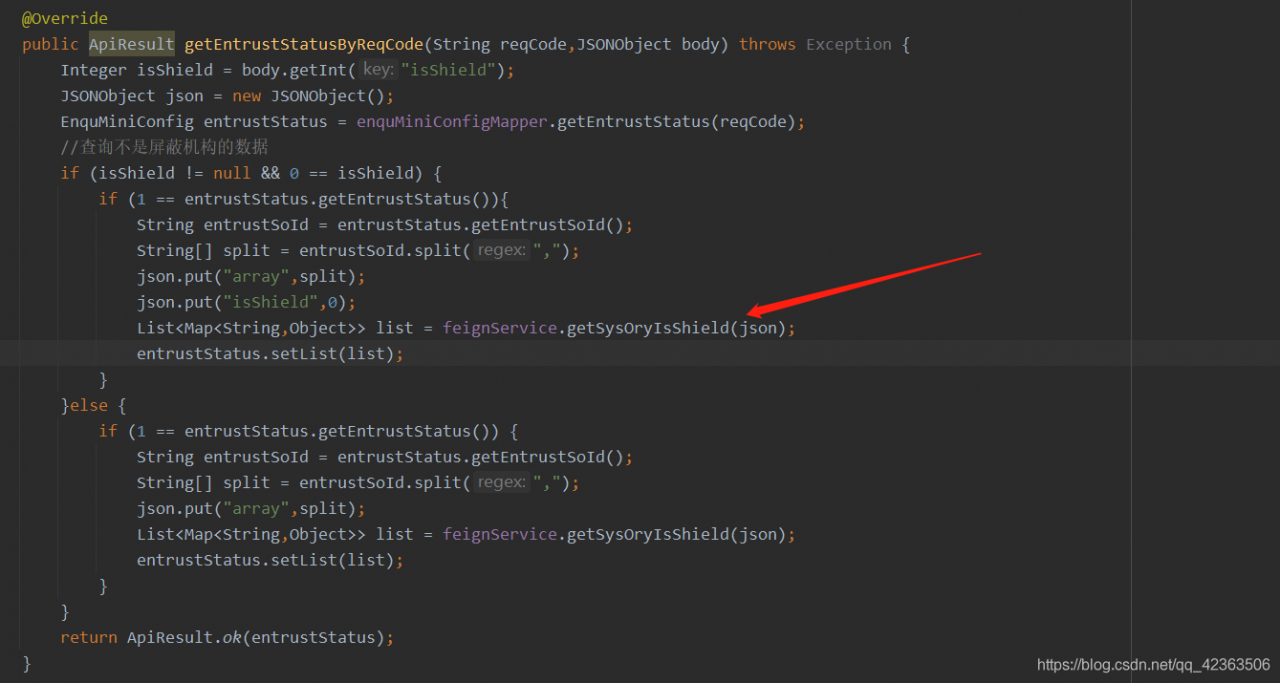
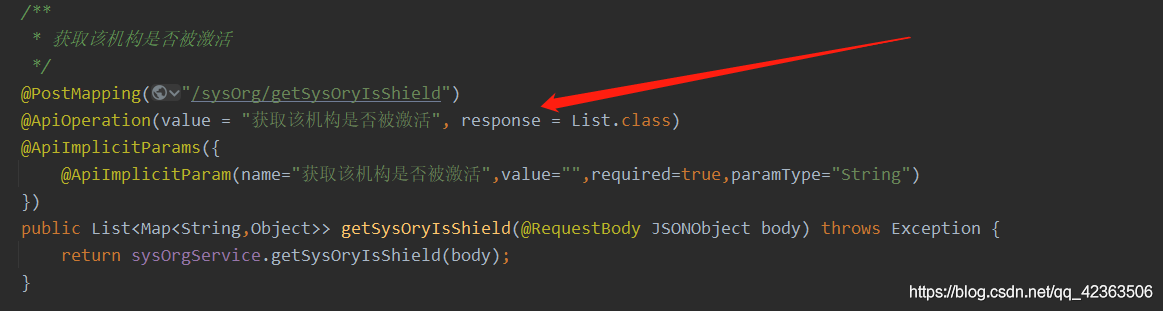
the red arrow is the code for service a to call service B. at that time, I searched Baidu online for a long time, and most of them said that there was a configuration problem. However, combined with the configuration posted by online friends, and then compared with the configuration of our service, we found no problem in the configuration of our service, Finally, through continuous debugging test and troubleshooting, we can eliminate all possible causes of this kind of bug. Finally, we lock the target to the response of the red arrow in the second picture. At the beginning, response = apiresult.class is a fixed return JSON lattice that we encapsulate, At that time, I didn’t doubt that this problem was caused by the annotation of swarge, which should not affect the returned result. But later, I changed the returned result to * * response = list. Class * * and the problem was solved

![]( https://img-blog.csdnimg.cn/20210627145852589.png?x-oss-process=image/watermark ,type_ ZmFuZ3poZW5naGVpdGk,shadow_ 10,text_ aHR0cHM6Ly9ibG9nLmNzZG4ubmV0L3FxXzQyMzYzNTA2,size_ 16,color_ FFFFFF,t_ 70

You have an error in your SQL syntax; check the manual that corresponds to your MySQL server version

    if your MySQL is copied, please replace the Chinese related spaces, Chinese commas and Chinese ‘with English
    this is my error: [2021-06-29 09:30:55.391] [MySQL] [000071] [MySQL] you have an error in your SQL syntax; Check the manual that responses to your MySQL server version for the right syntax to use near 'insert to Dept (ID, name, PID) values ('1000','head office ',') 'at line 1

Tomcat memory overflow in Eclipse: Java. Lang. outofmemoryerror: permgen space solution:

1. Configure the size of this part of heap memory through the JVM parameter – XX: maxpermsize = 256M.  

2. How to configure the memory size of Tomcat in eclipse?

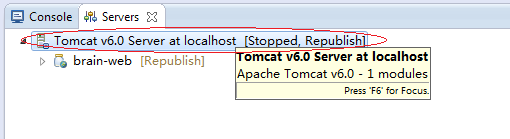
First, you need to double-click Tomcat server, as shown in the figure below:

Double click the figure above to display the Tomcat configuration interface

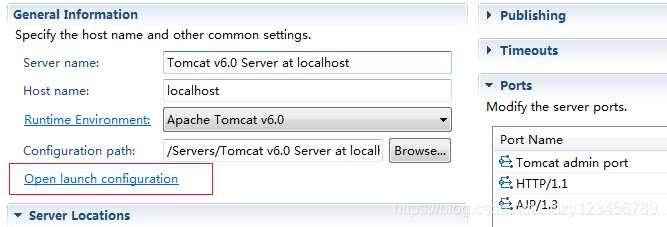
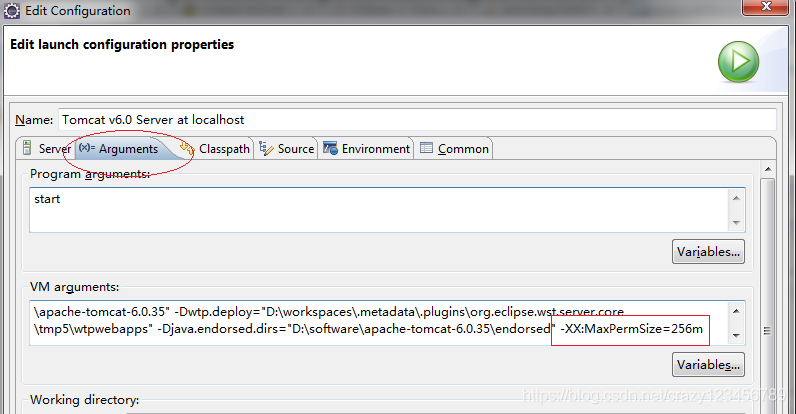
Then, click the link in the red rectangular box in the figure above, and the node of Tomcat parameter configuration will pop up. To select the arguments parameter box:

As shown in the figure above, you can set the value of – XX: maxpermsize = 256M in the VM arguments text box. Of course, you can add other JVM parameters, such as maximum memory, minimum memory, etc.

MySql 8.x java.sql.SQLNonTransientConnectionException: Public Key Retrieval is not allowed

Questions

Error in remote connection to MySQL 8.0 using mybatis plus to reverse generate entity class codegenerator

Exception in thread "main" java.lang.RuntimeException: java.sql.SQLNonTransientConnectionException: Public Key Retrieval is not allowed
	at com.baomidou.mybatisplus.generator.config.DataSourceConfig.getConn(DataSourceConfig.java:170)
	at com.baomidou.mybatisplus.generator.config.builder.ConfigBuilder.<init>(ConfigBuilder.java:110)
	at com.baomidou.mybatisplus.generator.AutoGenerator.execute(AutoGenerator.java:96)
	at com.dev.docker.config.CodeGenerator.main(CodeGenerator.java:125)
Caused by: java.sql.SQLNonTransientConnectionException: Public Key Retrieval is not allowed
	at com.mysql.cj.jdbc.exceptions.SQLError.createSQLException(SQLError.java:110)
	at com.mysql.cj.jdbc.exceptions.SQLError.createSQLException(SQLError.java:97)
	at com.mysql.cj.jdbc.exceptions.SQLExceptionsMapping.translateException(SQLExceptionsMapping.java:122)
	at com.mysql.cj.jdbc.ConnectionImpl.createNewIO(ConnectionImpl.java:836)
	at com.mysql.cj.jdbc.ConnectionImpl.<init>(ConnectionImpl.java:456)
	at com.mysql.cj.jdbc.ConnectionImpl.getInstance(ConnectionImpl.java:246)
	at com.mysql.cj.jdbc.NonRegisteringDriver.connect(NonRegisteringDriver.java:199)
	at java.sql/java.sql.DriverManager.getConnection(DriverManager.java:677)
	at java.sql/java.sql.DriverManager.getConnection(DriverManager.java:228)
	at com.baomidou.mybatisplus.generator.config.DataSourceConfig.getConn(DataSourceConfig.java:168)
	... 3 more

reason

Official website: https://mysqlconnector.net/connection-options/

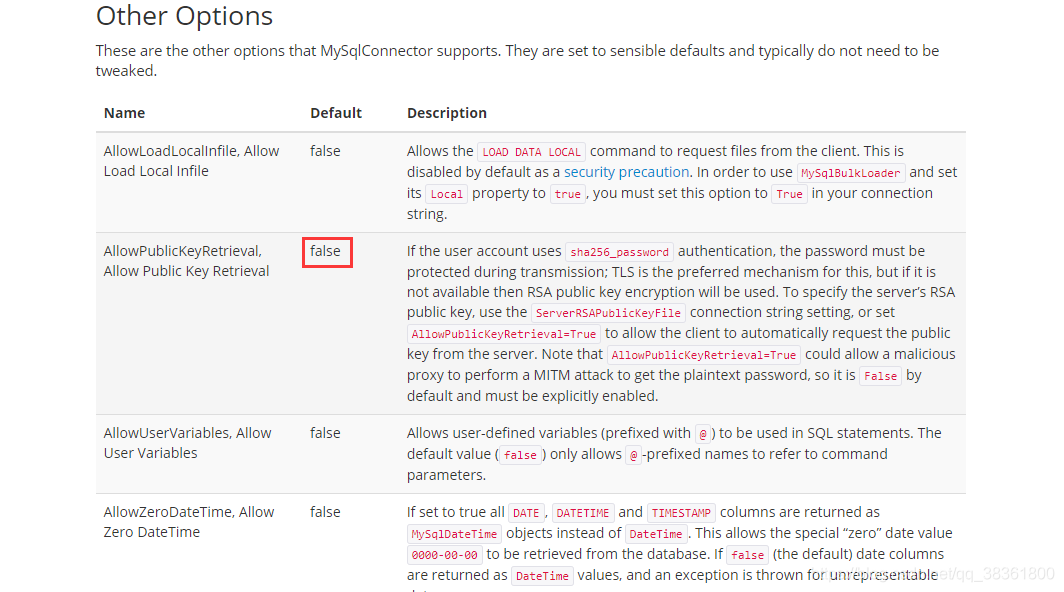
         If the user account uses sha256_ Password authentication, transmission must protect the password; TLS is the preferred mechanism, but if it is not available, RSA public key encryption will be used. To specify the RSA public key of the server, use the serverrsapublickeyfile connection string setting, or set allowpublickeyretrieval = true to allow clients to automatically request the public key from the server. Note that allowpublickeyretrieval = true may allow malicious agents to perform mitm attacks to obtain plaintext passwords, so it is false by default and must be explicitly enabled.

         Because allowpublickeyretrieval and allowpublickey retrieval are false by default, it is necessary to add “allowpublickeyretrieval = true” on the JDBC connection

Solutions

Add “allowpublickeyretrieval = true” to JDBC connection

jdbc:mysql://xxxx/xxx?serverTimezone=Asia/Shanghai&useUnicode=true&characterEncoding=UTF-8&useSSL=false&allowPublicKeyRetrieval=true

Maven install error: fatal error matching: error: invalid target distribution: 11.0.8 – > [help 1]

Project scenario:

Maven install: fatal error matching: error: invalid target distribution: 11.0.8 – & gt[ Help 1]

Solution:

Modify settings.xml in Maven directory

<profile> 
​	<id>jdk-11</id>
​	 <activation> 
​			<activeByDefault>true</activeByDefault> 
​			<jdk>11</jdk> 
​	</activation> 
​	<properties> 
​			<maven.compiler.source>11</maven.compiler.source> 		
​			<maven.compiler.target>11</maven.compiler.target> 					<maven.compiler.compilerVersion>11</maven.compiler.compilerVersion> 
​	</properties>
</profile>

https://www.cnblogs.com/zhao1949/p/6180155.html

Schema validation error in conig/config.xml. See the log for detais, Schema validation can be……

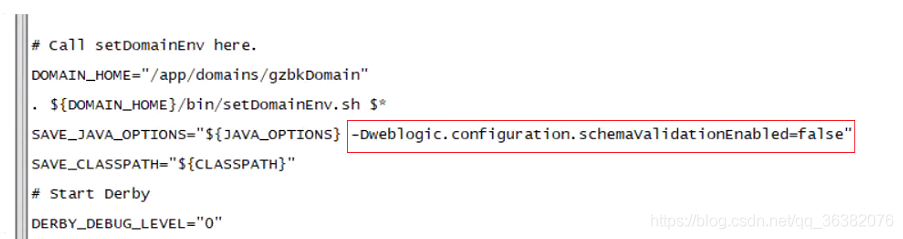
The problem of config.xml when Weblogic gives an error prompt when activating changes is related to the parameter dweblogic. Configuration. Schemavidationenabled = false

terms of settlement:

You need to add this parameter to the startweblogic. Sh file

The path is: install path/xdomain/bin           Modify startweblogic. SH in the directory as shown in the figure below

Then restart

If it is clustered, each server should be configured and then started. Otherwise, the same problem may occur

[Error][IntelliJ IDEA] Element XXX is not allowed here

Questions

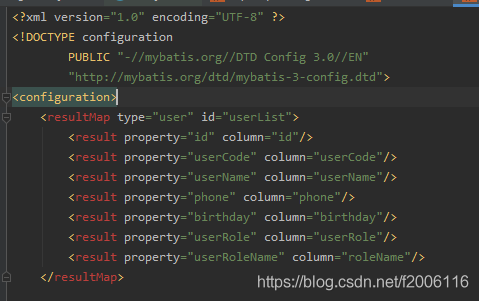
When using IntelliJ idea to build a project, errors such as element XXX is not allowed here are encountered in the XML file

For example, the following element resultmap is not allowed here error is encountered in the XML configuration file

resolvent

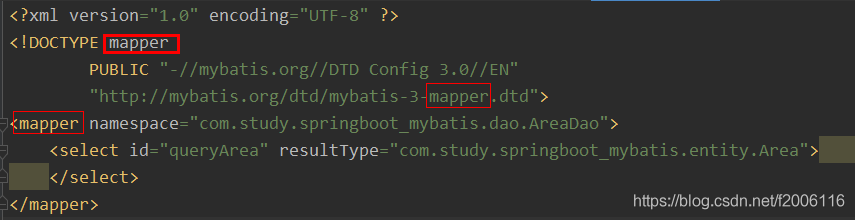
The configuration of the header of the XML file is wrong, and the names of the three places in the red box should be consistent