Tag Archives: java

[Solved] Internal error (java.lang.IllegalStateException): Duplicate key org.jetbrains

Exception description

Internal error (java.lang.IllegalStateException): Duplicate key org.jetbrains.jps.model.module.impl.JpsModuleImpl@25b485ba
java.lang.IllegalStateException: Duplicate key org.jetbrains.jps.model.module.impl.JpsModuleImpl@25b485ba
	at java.util.stream.Collectors.lambda$throwingMerger$0(Collectors.java:133)
	at java.util.HashMap.merge(HashMap.java:1253)
	at java.util.stream.Collectors.lambda$toMap$58(Collectors.java:1320)
	at java.util.stream.ReduceOps$3ReducingSink.accept(ReduceOps.java:169)
	at java.util.Iterator.forEachRemaining(Iterator.java:116)
	at java.util.Spliterators$IteratorSpliterator.forEachRemaining(Spliterators.java:1801)
	at java.util.stream.AbstractPipeline.copyInto(AbstractPipeline.java:481)
	at java.util.stream.AbstractPipeline.wrapAndCopyInto(AbstractPipeline.java:471)
	at java.util.stream.ReduceOps$ReduceOp.evaluateSequential(ReduceOps.java:708)
	at java.util.stream.AbstractPipeline.evaluate(AbstractPipeline.java:234)
	at java.util.stream.ReferencePipeline.collect(ReferencePipeline.java:499)
	at org.jetbrains.jps.maven.model.impl.MavenAnnotationProcessorTargetType.createLoader(MavenAnnotationProcessorTargetType.java:50)
	at org.jetbrains.jps.incremental.storage.BuildTargetTypeState.load(BuildTargetTypeState.java:63)
	at org.jetbrains.jps.incremental.storage.BuildTargetTypeState.<init>(BuildTargetTypeState.java:52)
	at org.jetbrains.jps.incremental.storage.BuildTargetsState.getTypeState(BuildTargetsState.java:122)
	at org.jetbrains.jps.incremental.storage.BuildTargetsState.getAverageBuildTime(BuildTargetsState.java:116)
	at org.jetbrains.jps.incremental.messages.BuildProgress.<init>(BuildProgress.java:73)
	at org.jetbrains.jps.incremental.IncProjectBuilder.runBuild(IncProjectBuilder.java:408)
	at org.jetbrains.jps.incremental.IncProjectBuilder.build(IncProjectBuilder.java:183)
	at org.jetbrains.jps.cmdline.BuildRunner.runBuild(BuildRunner.java:132)
	at org.jetbrains.jps.cmdline.BuildSession.runBuild(BuildSession.java:302)
	at org.jetbrains.jps.cmdline.BuildSession.run(BuildSession.java:132)
	at org.jetbrains.jps.cmdline.BuildMain$MyMessageHandler.lambda$channelRead0$0(BuildMain.java:219)
	at java.util.concurrent.ThreadPoolExecutor.runWorker(ThreadPoolExecutor.java:1142)
	at java.util.concurrent.ThreadPoolExecutor$Worker.run(ThreadPoolExecutor.java:617)
	at java.lang.Thread.run(Thread.java:745)


Solution:

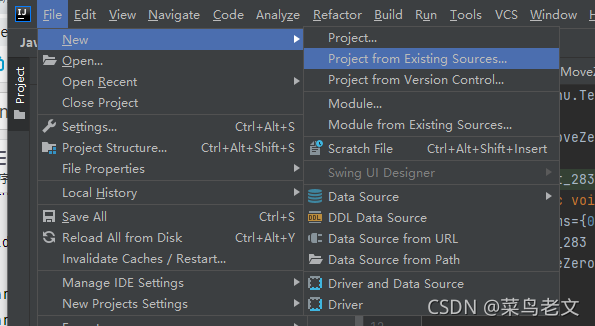
Delete the idea file:
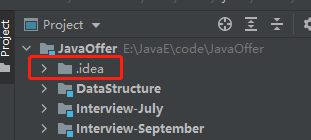
Reload:
[Solved] Scala error: type mismatch; found : java.util.List[?0] required: java.util.List[B]

Scala error: type mismatch; found : java.util.List[?0] required: java.util.List[B]


Problem:
Due to the incompatibility between Scala type inference and Java type inference;

import java.util
import java.util.stream.Collectors
class Animal
class Dog extends Animal
class Cat extends Animal

object ObjectConversions extends App {

  import java.util.{List => JList}
  implicit  def convertLowerBound[ B <: Animal] (a: JList[Animal]): JList[B] = a.stream().map(a => a.asInstanceOf[B]).collect(Collectors.toList())
  val a= new util.ArrayList[Animal]()
  a.add(new Cat)
  convertLowerBound[Cat](a)
}

Solution:

When calling Java methods and still want to infer generic types, you need to pass generic types specifically

#Or the implicit conversion statement is not imported
import scala.collection.JavaConversions._

def convertLowerBound[ B <: Animal] (a: JList[Animal]): JList[B] = a.stream().map[B](a => a.asInstanceOf[B]).collect(Collectors.toList[B]())


#or

def convertLowerBound[B <: Animal : TypeTag] (a: JList[Animal]) = a.asInstanceOf[JList[B]]

scala> def convertLowerBound[ B <: Animal] (a: JList[Animal]): JList[B] = a.stream().map[B](a => a.asInstanceOf[B]).collect(Collectors.toList[B]())
convertLowerBound: [B <: Animal](a: java.util.List[Animal])java.util.List[B]
scala> convertLowerBound[Cat](a)
res30: java.util.List[Cat] = [Cat@6325af19, Dog@6ff6743f]
scala> a.add(new Cat())
res16: Boolean = true
scala> convertLowerBound[Cat](a)
res17: java.util.List[Cat] = [Cat@6325af19]
scala> a.add(new Dog())
res19: Boolean = true
scala> convertLowerBound[Cat](a)
res20: java.util.List[Cat] = [Cat@6325af19, Dog@6ff6743f]

完整错误:
<console>:15: error: type mismatch;
found   : java.util.List[?0]
required: java.util.List[B]
Note: ?0 >: B, but Java-defined trait List is invariant in type E.
You may wish to investigate a wildcard type such as `_ >: B`. (SLS 3.2.10)
implicit  def convertLowerBound[ B <: Animal] (a: JList[Animal]): JList[B] = a.stream().map(a => a.asInstanceOf[B]).collect(Collectors.toList())

[Solved] Gurobi–Error code: 10005. Unable to retrieve attribute solved ‘Pi‘

Gurobi code

Question code:

I wanted to get the dual space of variables,

double[] dual=model.get(GRB.DoubleAttr.Pi,model.getConstrs());

Error code: 10005. Unable to retrieve attribute ‘Pi’

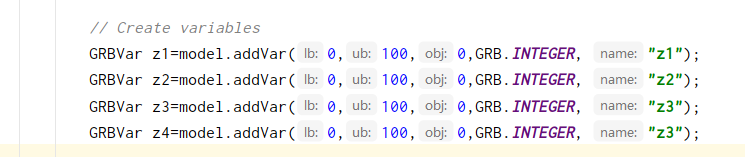
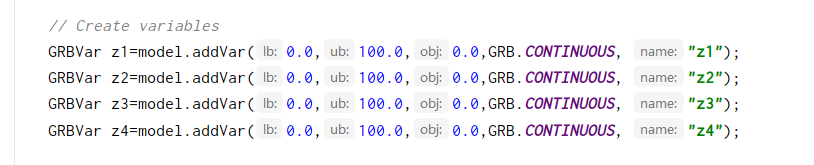
The reason is that in gurobi, binary variables and integer variables have no dual space. Change integer to continuous, as follows:

Error: write EPROTO 1593982200:error:100000f7:SSL routines:OPENSSL_internal

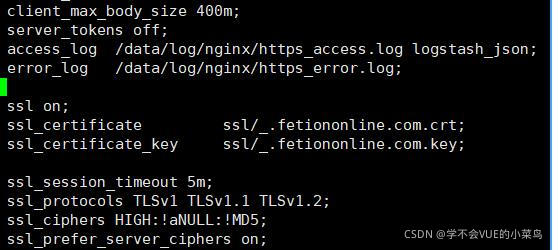
The probability is a nginx configuration problem. If the request is sent incorrectly, an SSL exception will be reported. The following is my configuration. The problem has been solved. If the certificate cannot be loaded, try to write the certificate path to the root directory.


ssl on;
        ssl_certificate         ssl/_.fetiononline.com.crt;
        ssl_certificate_key     ssl/_.fetiononline.com.key;
            
        ssl_session_timeout 5m;
        ssl_protocols TLSv1 TLSv1.1 TLSv1.2;
        ssl_ciphers HIGH:!aNULL:!MD5;
        ssl_prefer_server_ciphers on;

Error attempting to get column ‘xxxxx’ from result set — after Lombok is annotated with builder, mybatis cannot recognize the correct type of field

Pit stepping record – after Lombok is annotated with builder, mybatis cannot recognize the correct type of field

After adding Lombok to the entity class, sometimes we will use @ builder annotation, so we don’t need to write too many set methods to define the attribute content, which makes our code more elegant. Once the @ builder annotation is added to the entity class, it will cause problems in our mybatis mapping database fields

The questions are as follows

org.springframework.dao.DataIntegrityViolationException: Error attempting to get column 'username' from result set.  Cause: java.sql.SQLDataException: Cannot determine value type from string 'zhangsa'
; Cannot determine value type from string 'zhangsa'; nested exception is java.sql.SQLDataException: Cannot determine value type from string 'zhangsa'

note: when using @ builder annotation, a full parameter structure will be generated, resulting in the disappearance of no parameter structure

terms of settlement

    we can directly remove @ builder annotation, and there will be no problem for mybatis to query the database. We can generate parametric and nonparametric constructs in entity classes (you can add them manually or add annotations @ allargsconstructor , @ noargsconstructor )

    if it is still abnormal, you should check whether your entity class and database type mapping do not correspond

    Hold fireworks to seek life, poetic to seek love

[Solved] java.util.concurrent.ExecutionException: org.apache.catalina.LifecycleException: Failed to start component [StandardEngine[Tomcat].StandardHost[localhost].StandardContext[]]

Error Messages:

java.util.concurrent.ExecutionException: org.apache.catalina.LifecycleException: Failed to start component [StandardEngine[Tomcat].StandardHost[localhost].StandardContext[]]
.......
Caused by:
             org.apache.catalina.LifecycleException: Failed to start component [StandardEngine[Tomcat].StandardHost[localhost].StandardContext[]]
......
Caused by:
             java.lang.ClassCastException: class org.springframework.web.SpringServletContainerInitializer cannot be cast to class javax.servlet.ServletContainerInitializer (org.springframework.web.SpringServletContainerInitializer is in unnamed module of loader org.apache.catalina.loader.WebappClassLoader @1e0295e0; javax.servlet.ServletContainerInitializer is in unnamed module of loader org.codehaus.plexus.classworlds.realm.ClassRealm @3d88e6b9)
......


cause:
I imported the following dependencies in the project’s pom.xml and found that the tomcat7 plugin can’t run
E.g:

<dependency>
  <groupId>javax.servlet</groupId>
  <artifactId>javax.servlet-api</artifactId>
  <version>4.0.1</version>
</dependency>
<dependency>
  <groupId>javax.servlet.jsp</groupId>
  <artifactId>javax.servlet.jsp-api</artifactId>
  <version>2.3.3</version>
</dependency>

Check:

1. Check whether the current port is occupied by the process

2. Check whether there is a problem with the servlet mapping URL path in web.xml

3. Check for dependency conflicts

reason:

The servlet dependent version imported in the current Maven configuration file is too high and incompatible with tomcat7

Solution:

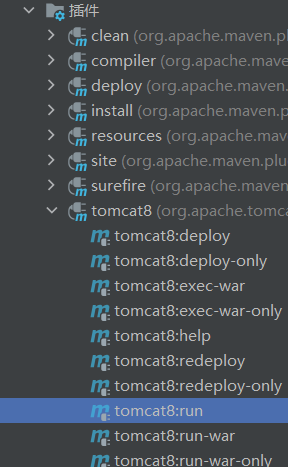
The tomcat7 plug-in in pom.xml can be upgraded to tomcat8

reference:

<pluginRepositories>
  <pluginRepository>
    <id>alfresco-public</id>
    <url>https://artifacts.alfresco.com/nexus/content/groups/public</url>
  </pluginRepository>
  <pluginRepository>
    <id>alfresco-public-snapshots</id>
    <url>https://artifacts.alfresco.com/nexus/content/groups/public-snapshots</url>
    <snapshots>
      <enabled>true</enabled>
      <updatePolicy>daily</updatePolicy>
    </snapshots>
  </pluginRepository>
  <pluginRepository>
    <id>beardedgeeks-releases</id>
    <url>http://beardedgeeks.googlecode.com/svn/repository/releases</url>
  </pluginRepository>
</pluginRepositories>
<build>
  <plugins>
    <plugin>
      <groupId>org.apache.tomcat.maven</groupId>
      <artifactId>tomcat8-maven-plugin</artifactId>
      <version>3.0-r1655215</version>
      <configuration>
        <port>80</port>
        <path>/</path>
      </configuration>
    </plugin>
  </plugins>
</build>

last:

Refresh the Maven management tool, recompile the Maven project, and then start it with tomcat8!

[Solved] android Execution failed for task ‘:app:processDebugManifest‘

Attribute application@appComponentFactory value=(androidx.core.app.CoreComponentFactory) from [androidx.core:core:1.3.1] AndroidManifest.xml:24:18-86
is also present at [com.android.support:support-compat:28.0.0] AndroidManifest.xml:22:18-91 value=(android.support.v4.app.CoreComponentFactory).
Suggestion: add ‘tools:replace=”android:appComponentFactory”‘ to <application> element at AndroidManifest.xml:5:5-20:19 to override.
See http://g.co/androidstudio/manifest-merger for more information about the manifest merger.

Execution failed for task ‘:app:processDebugManifest’.
> Manifest merger failed : Attribute application@appComponentFactory value=(androidx.core.app.CoreComponentFactory) from [androidx.core:core:1.3.1] AndroidManifest.xml:24:18-86
is also present at [com.android.support:support-compat:28.0.0] AndroidManifest.xml:22:18-91 value=(android.support.v4.app.CoreComponentFactory).
Suggestion: add ‘tools:replace=”android:appComponentFactory”‘ to <application> element at AndroidManifest.xml:5:5-20:19 to override.
* Try:
Run with –stacktrace option to get the stack trace. Run with –info or –debug option to get more log output. Run with –scan to get full insights.

After upgrading Android Studio to 4.2 today, I set up the project as before. A few days ago, it was fine (the previous version of Androidstudio 4.0). The third package and the version are the same. They are all copied from the runnable project. Suddenly this error was reported. According to other methods on the Internet, it will not work. The problem is mainly a package conflict, that is, the package conflict between appcomcat and AndroidX.
Solution:
It is found that after upgrading to Androidstudio4.2, in the gradle.properties file, the default android.enableJetifer = true attribute (that is, the third-party package is converted to AndroidX) is removed, and this attribute will not be reported after adding mistaken.

[Solved] Sqoop Error: ERROR tool.ImportTool: Import failed: java.io.IOException

21/11/08 12:13:10 ERROR tool.ImportTool: Import failed: java.io.IOException: Cannot initialize Cluster. Please check your configuration for mapreduce.framework.name and the correspond server addresses.
        at org.apache.hadoop.mapreduce.Cluster.initialize(Cluster.java:143)
        at org.apache.hadoop.mapreduce.Cluster.<init>(Cluster.java:108)
        at org.apache.hadoop.mapreduce.Cluster.<init>(Cluster.java:101)
        at org.apache.hadoop.mapreduce.Job$10.run(Job.java:1311)
        at org.apache.hadoop.mapreduce.Job$10.run(Job.java:1307)
        at java.security.AccessController.doPrivileged(Native Method)
        at javax.security.auth.Subject.doAs(Subject.java:422)
        at org.apache.hadoop.security.UserGroupInformation.doAs(UserGroupInformation.java:1844)
        at org.apache.hadoop.mapreduce.Job.connect(Job.java:1306)
        at org.apache.hadoop.mapreduce.Job.submit(Job.java:1335)
        at org.apache.hadoop.mapreduce.Job.waitForCompletion(Job.java:1359)
        at org.apache.sqoop.mapreduce.ImportJobBase.doSubmitJob(ImportJobBase.java:200)
        at org.apache.sqoop.mapreduce.ImportJobBase.runJob(ImportJobBase.java:173)
        at org.apache.sqoop.mapreduce.ImportJobBase.runImport(ImportJobBase.java:270)
        at org.apache.sqoop.manager.SqlManager.importTable(SqlManager.java:692)
        at org.apache.sqoop.manager.MySQLManager.importTable(MySQLManager.java:127)
        at org.apache.sqoop.tool.ImportTool.importTable(ImportTool.java:520)
        at org.apache.sqoop.tool.ImportTool.run(ImportTool.java:628)
        at org.apache.sqoop.Sqoop.run(Sqoop.java:147)
        at org.apache.hadoop.util.ToolRunner.run(ToolRunner.java:76)
        at org.apache.sqoop.Sqoop.runSqoop(Sqoop.java:183)
        at org.apache.sqoop.Sqoop.runTool(Sqoop.java:234)
        at org.apache.sqoop.Sqoop.runTool(Sqoop.java:243)
        at org.apache.sqoop.Sqoop.main(Sqoop.java:252)

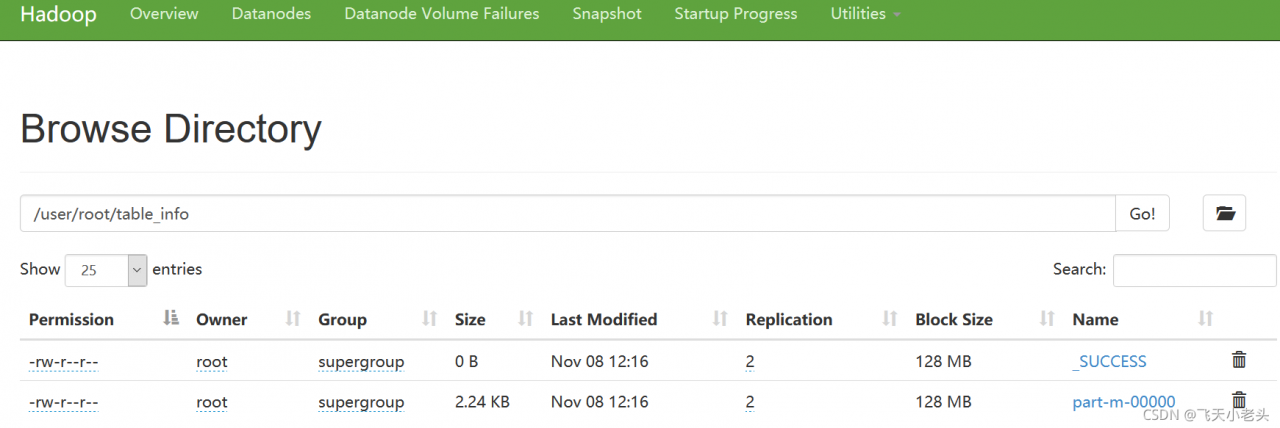
The above error occurs when running the sqoop script (the content of the script is to import MySQL data into HDFS). It is found that there is a lack of dependency. I still report an error after copying the two jar packages hadoop-mapreduce-client-common-2.8.5.jar and hadoop-mapreduce-client-core-2.8.5.jar to the Lib directory of sqoop, Then I copied all the jar packages in the hadoop-2.8.5/share/hadoop/mapreduce directory of Hadoop to solve the problem and run the script successfully. It was simple and violent.

[Solved] Failed to load class org.slf4j.impl.StaticLoggerBinder

The version of slf4j-log4j12 I used is 1.7.30, and I encountered an error when using Failed to load class org.slf4j.impl.StaticLoggerBinder:
Failed to load class org.slf4j.impl.StaticLoggerBinder
This warning message is reported when the org.slf4j.impl.StaticLoggerBinder class could not be loaded into memory. This happens when no appropriate SLF4J binding could be found on the class path. Placing one (and only one) of slf4j-nop.jar slf4j-simple.jar, slf4j-log4j12.jar, slf4j-jdk14.jar or logback-classic.jar on the class path should solve the problem.
According to the original statement, any one (and only one) of slf4j-nop.jar slf4j-simple.jar, slf4j-log4j12.jar, slf4j-jdk14.jar or logback-classic.jar can be in the class path, But this is the situation when the error is reported. My solution is to add slf4j-simple.jar 1.7.30 to the Maven dependency, and this error no longer appears.

[Solved] Hadoop failed on connection exception: java.net.ConnectException: Connection refused

First use the following command to check whether the port number is enabled

sudo netstat -ntlp

If you don’t find the port number you want to connect to, go to core-site.xml to see if you have this port number.

I don’t deserve 8020. I haven’t been connected with 8020 for a long time.

<property>
        <name>fs.defaultFS</name>
        <value>hdfs://hadoop131:9820</value>
</property>

You can change the port number of the connection to your own