[Solved] RuntimeError: Error(s) in loading state_dict for BertForTokenClassification

RuntimeError: Error(s) in loading state_dict for BertForTokenClassification

problem:
RuntimeError: Error(s) in loading state_dict for BertForTokenClassification:size mismatch for bert.embeddings.word_embeddings.weight: copying a param with shape torch.Size([21128, 768]) from checkpoint, the shape in current model is torch.Size([119547, 768]).
Solution:
The parameters of torch are not consistent with the mod
My original code was

model = AutoModelForTokenClassification.from_pretrained("bert-base-multilingual-cased", num_labels=len(label_names))

Just reinstall pytorch

conda install pytorch==1.7.1

[Solved] Windows pycrypto Install Error: ERROR: Failed building wheel for pycrypto

Windows will report an error when installing pycrypto.

Here are some errors

Collecting pycrypto
  Downloading http://mirrors.aliyun.com/pypi/packages/60/db/645aa9af249f059cc3a368b118de33889219e0362141e75d4eaf6f80f163/pycrypto-2.6.1.tar.gz (446 kB)
     |████████████████████████████████| 446 kB 344 kB/s
Building wheels for collected packages: pycrypto
  Building wheel for pycrypto (setup.py) ... error
  ERROR: Command errored out with exit status 1:
   command: 'd:\ProgramData\Anaconda3\envs\d2t\python.exe' -u -c 'import sys, setuptools, tokenize; sys.argv[0] = '"'"'C:\\Users\\zm\\AppData\\Local\\Temp\\pip-install-trmr6taw\\pycrypto_e1aaae9b5afb410691bac391ddb2c59f\\setup.py'"'"'; __file__='"'"'C:\\Users\\zm\\AppData\\Local\\Temp\\pip-install-trmr6taw\\pycrypto_e1aaae9b5afb410691bac391ddb2c59f\\setup.py'"'"';f=getattr(tokenize, '"'"'open'"'"', open)(__file__);code=f.read().replace('"'"'\r\n'"'"', '"'"'\n'"'"');f.close();exec(compile(code, __file__, '"'"'exec'"'"'))' bdist_wheel -d 'C:\Users\zm\AppData\Local\Temp\pip-wheel-egkss95d'
       cwd: C:\Users\zm\AppData\Local\Temp\pip-install-trmr6taw\pycrypto_e1aaae9b5afb410691bac391ddb2c59f\
  Complete output (183 lines):

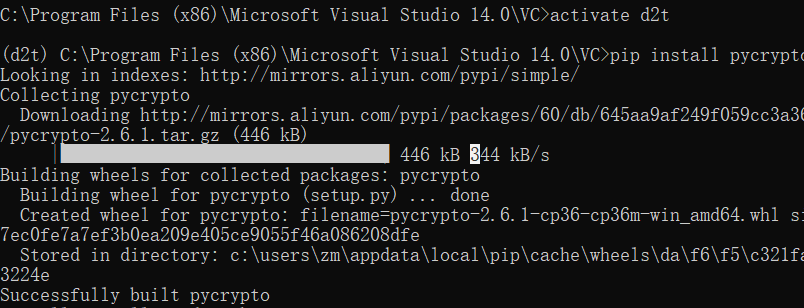
The solution is:

1. Enter VC directory: C:\Program Files (x86)\Microsoft Visual Studio 14.0\VC

2. Execute vcvarsall.bat

3. Execute set CL=-FI”%VCINSTALLDIR%\INCLUDE\stdint.h”

Install it (I install it in the env of anaconda, so I enter env first)

https://blog.csdn.net/zm274310577/article/details/124927922

[Solved] Error updating database. Cause: java.sql.SQLException: Incorrect integer value: ‘**‘ for column

### Error updating database. Cause: java.sql.SQLException: Incorrect integer value: ‘**‘ for column

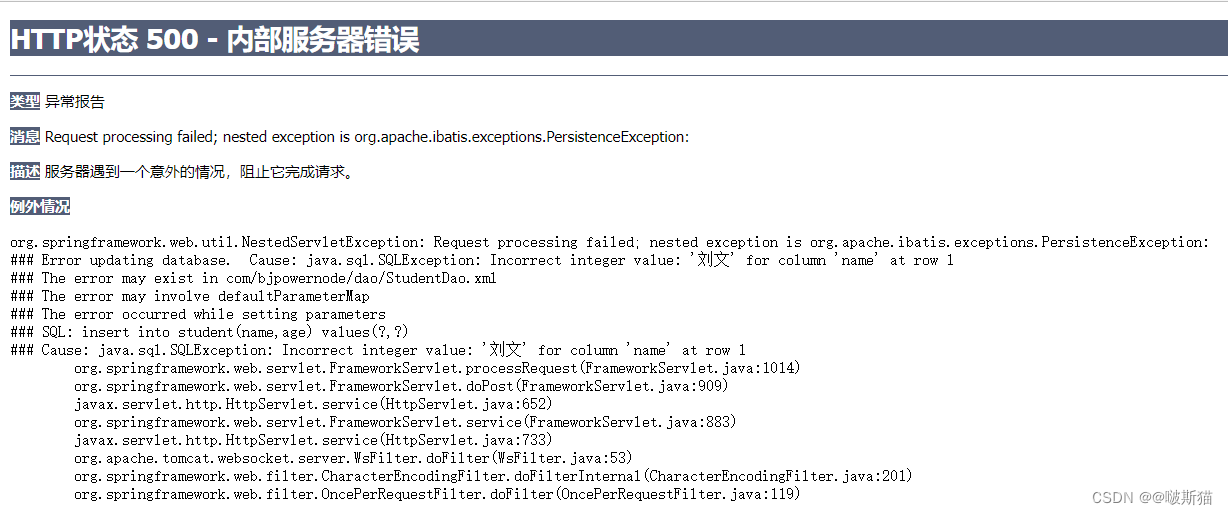
Type Exception Report

Message Request processing failed; nested exception is org.apache.ibatis.exceptions.PersistenceException:

Description The server encountered an unexpected condition that prevented it from completing the request.

Exceptions

org.springframework.web.util.NestedServletException: Request processing failed; nested exception is org.apache.ibatis.exceptions.PersistenceException: 
### Error updating database.  Cause: java.sql.SQLException: Incorrect integer value: '刘文' for column 'name' at row 1
### The error may exist in com/bjpowernode/dao/StudentDao.xml
### The error may involve defaultParameterMap
### The error occurred while setting parameters
### SQL: insert into student(name,age) values(?,?)
### Cause: java.sql.SQLException: Incorrect integer value: '刘文' for column 'name' at row 1
	org.springframework.web.servlet.FrameworkServlet.processRequest(FrameworkServlet.java:1014)
	org.springframework.web.servlet.FrameworkServlet.doPost(FrameworkServlet.java:909)
	javax.servlet.http.HttpServlet.service(HttpServlet.java:652)
	org.springframework.web.servlet.FrameworkServlet.service(FrameworkServlet.java:883)
	javax.servlet.http.HttpServlet.service(HttpServlet.java:733)
	org.apache.tomcat.websocket.server.WsFilter.doFilter(WsFilter.java:53)
	org.springframework.web.filter.CharacterEncodingFilter.doFilterInternal(CharacterEncodingFilter.java:201)
	org.springframework.web.filter.OncePerRequestFilter.doFilter(OncePerRequestFilter.java:119)


org.apache.ibatis.exceptions.PersistenceException: 
### Error updating database.  Cause: java.sql.SQLException: Incorrect integer value: '刘文' for column 'name' at row 1
### The error may exist in com/bjpowernode/dao/StudentDao.xml
### The error may involve defaultParameterMap
### The error occurred while setting parameters
### SQL: insert into student(name,age) values(?,?)
### Cause: java.sql.SQLException: Incorrect integer value: '刘文' for column 'name' at row 1
	org.apache.ibatis.exceptions.ExceptionFactory.wrapException(ExceptionFactory.java:30)
	org.apache.ibatis.session.defaults.DefaultSqlSession.update(DefaultSqlSession.java:199)
	org.apache.ibatis.session.defaults.DefaultSqlSession.insert(DefaultSqlSession.java:184)
	sun.reflect.NativeMethodAccessorImpl.invoke0(Native Method)
	sun.reflect.NativeMethodAccessorImpl.invoke(NativeMethodAccessorImpl.java:62)
	sun.reflect.DelegatingMethodAccessorImpl.invoke(DelegatingMethodAccessorImpl.java:43)
	java.lang.reflect.Method.invoke(Method.java:498)
	org.mybatis.spring.SqlSessionTemplate$SqlSessionInterceptor.invoke(SqlSessionTemplate.java:433)
	com.sun.proxy.$Proxy14.insert(Unknown Source)
	org.mybatis.spring.SqlSessionTemplate.insert(SqlSessionTemplate.java:278)
	org.apache.ibatis.binding.MapperMethod.execute(MapperMethod.java:62)
	org.apache.ibatis.binding.MapperProxy.invoke(MapperProxy.java:58)
	com.sun.proxy.$Proxy15.insertStudent(Unknown Source)
	com.bjpowernode.service.impl.StudentServiceImpl.addStudent(StudentServiceImpl.java:19)
	com.bjpowernode.controller.StudentController.addStudent(StudentController.java:26)
	sun.reflect.NativeMethodAccessorImpl.invoke0(Native Method)
	sun.reflect.NativeMethodAccessorImpl.invoke(NativeMethodAccessorImpl.java:62)
	sun.reflect.DelegatingMethodAccessorImpl.invoke(DelegatingMethodAccessorImpl.java:43)
	java.lang.reflect.Method.invoke(Method.java:498)
	org.springframework.web.method.support.InvocableHandlerMethod.doInvoke(InvocableHandlerMethod.java:190)
	org.springframework.web.method.support.InvocableHandlerMethod.invokeForRequest(InvocableHandlerMethod.java:138)
	org.springframework.web.servlet.mvc.method.annotation.ServletInvocableHandlerMethod.invokeAndHandle(ServletInvocableHandlerMethod.java:105)
	org.springframework.web.servlet.mvc.method.annotation.RequestMappingHandlerAdapter.invokeHandlerMethod(RequestMappingHandlerAdapter.java:879)
	org.springframework.web.servlet.mvc.method.annotation.RequestMappingHandlerAdapter.handleInternal(RequestMappingHandlerAdapter.java:793)
	org.springframework.web.servlet.mvc.method.AbstractHandlerMethodAdapter.handle(AbstractHandlerMethodAdapter.java:87)
	org.springframework.web.servlet.DispatcherServlet.doDispatch(DispatcherServlet.java:1040)
	org.springframework.web.servlet.DispatcherServlet.doService(DispatcherServlet.java:943)
	org.springframework.web.servlet.FrameworkServlet.processRequest(FrameworkServlet.java:1006)
	org.springframework.web.servlet.FrameworkServlet.doPost(FrameworkServlet.java:909)
	javax.servlet.http.HttpServlet.service(HttpServlet.java:652)
	org.springframework.web.servlet.FrameworkServlet.service(FrameworkServlet.java:883)
	javax.servlet.http.HttpServlet.service(HttpServlet.java:733)
	org.apache.tomcat.websocket.server.WsFilter.doFilter(WsFilter.java:53)
	org.springframework.web.filter.CharacterEncodingFilter.doFilterInternal(CharacterEncodingFilter.java:201)
	org.springframework.web.filter.OncePerRequestFilter.doFilter(OncePerRequestFilter.java:119)


java.sql.SQLException: Incorrect integer value: '刘文' for column 'name' at row 1
	com.mysql.cj.jdbc.exceptions.SQLError.createSQLException(SQLError.java:129)
	com.mysql.cj.jdbc.exceptions.SQLExceptionsMapping.translateException(SQLExceptionsMapping.java:122)
	com.mysql.cj.jdbc.ClientPreparedStatement.executeInternal(ClientPreparedStatement.java:953)
	com.mysql.cj.jdbc.ClientPreparedStatement.execute(ClientPreparedStatement.java:371)
	com.alibaba.druid.pool.DruidPooledPreparedStatement.execute(DruidPooledPreparedStatement.java:498)
	org.apache.ibatis.executor.statement.PreparedStatementHandler.update(PreparedStatementHandler.java:47)
	org.apache.ibatis.executor.statement.RoutingStatementHandler.update(RoutingStatementHandler.java:74)
	org.apache.ibatis.executor.SimpleExecutor.doUpdate(SimpleExecutor.java:50)
	org.apache.ibatis.executor.BaseExecutor.update(BaseExecutor.java:117)
	org.apache.ibatis.executor.CachingExecutor.update(CachingExecutor.java:76)
	org.apache.ibatis.session.defaults.DefaultSqlSession.update(DefaultSqlSession.java:197)
	org.apache.ibatis.session.defaults.DefaultSqlSession.insert(DefaultSqlSession.java:184)
	sun.reflect.NativeMethodAccessorImpl.invoke0(Native Method)
	sun.reflect.NativeMethodAccessorImpl.invoke(NativeMethodAccessorImpl.java:62)
	sun.reflect.DelegatingMethodAccessorImpl.invoke(DelegatingMethodAccessorImpl.java:43)
	java.lang.reflect.Method.invoke(Method.java:498)
	org.mybatis.spring.SqlSessionTemplate$SqlSessionInterceptor.invoke(SqlSessionTemplate.java:433)
	com.sun.proxy.$Proxy14.insert(Unknown Source)
	org.mybatis.spring.SqlSessionTemplate.insert(SqlSessionTemplate.java:278)
	org.apache.ibatis.binding.MapperMethod.execute(MapperMethod.java:62)
	org.apache.ibatis.binding.MapperProxy.invoke(MapperProxy.java:58)
	com.sun.proxy.$Proxy15.insertStudent(Unknown Source)
	com.bjpowernode.service.impl.StudentServiceImpl.addStudent(StudentServiceImpl.java:19)
	com.bjpowernode.controller.StudentController.addStudent(StudentController.java:26)
	sun.reflect.NativeMethodAccessorImpl.invoke0(Native Method)
	sun.reflect.NativeMethodAccessorImpl.invoke(NativeMethodAccessorImpl.java:62)
	sun.reflect.DelegatingMethodAccessorImpl.invoke(DelegatingMethodAccessorImpl.java:43)
	java.lang.reflect.Method.invoke(Method.java:498)
	org.springframework.web.method.support.InvocableHandlerMethod.doInvoke(InvocableHandlerMethod.java:190)
	org.springframework.web.method.support.InvocableHandlerMethod.invokeForRequest(InvocableHandlerMethod.java:138)
	org.springframework.web.servlet.mvc.method.annotation.ServletInvocableHandlerMethod.invokeAndHandle(ServletInvocableHandlerMethod.java:105)
	org.springframework.web.servlet.mvc.method.annotation.RequestMappingHandlerAdapter.invokeHandlerMethod(RequestMappingHandlerAdapter.java:879)
	org.springframework.web.servlet.mvc.method.annotation.RequestMappingHandlerAdapter.handleInternal(RequestMappingHandlerAdapter.java:793)
	org.springframework.web.servlet.mvc.method.AbstractHandlerMethodAdapter.handle(AbstractHandlerMethodAdapter.java:87)
	org.springframework.web.servlet.DispatcherServlet.doDispatch(DispatcherServlet.java:1040)
	org.springframework.web.servlet.DispatcherServlet.doService(DispatcherServlet.java:943)
	org.springframework.web.servlet.FrameworkServlet.processRequest(FrameworkServlet.java:1006)
	org.springframework.web.servlet.FrameworkServlet.doPost(FrameworkServlet.java:909)
	javax.servlet.http.HttpServlet.service(HttpServlet.java:652)
	org.springframework.web.servlet.FrameworkServlet.service(FrameworkServlet.java:883)
	javax.servlet.http.HttpServlet.service(HttpServlet.java:733)
	org.apache.tomcat.websocket.server.WsFilter.doFilter(WsFilter.java:53)
	org.springframework.web.filter.CharacterEncodingFilter.doFilterInternal(CharacterEncodingFilter.java:201)
	org.springframework.web.filter.OncePerRequestFilter.doFilter(OncePerRequestFilter.java:119)
):Note that the full stack information for the main issue can be viewed in the server logs


Solution:

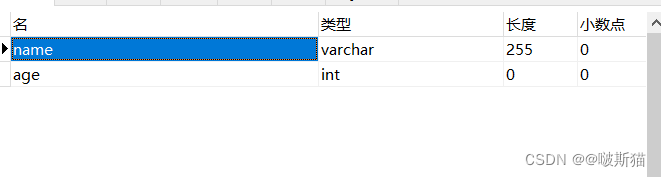
The reason is that I mistakenly wrote the name type as int type. Open navicate to find the created table, right-click to find the design table, and change the name type to varchar


Error: ENOSPC: no space left on device [How to Solve]

In case of the above error, generally speaking, the server cannot create the file. At this time, we can find the problem from two directions

1. The disk is full of blocks or inodes

1. The disk block is full. Check the command df -h

[root@S100900 ~]# df -h
Filesystem      Size  Used Avail Use% Mounted on
/dev/vda3        35G   28G  5.6G  83% /
tmpfs           504M     0  504M   0% /dev/shm
/dev/vda1       194M   47M  138M  26% /boot
/dev/vdb1       325G  118G  192G  38% /home/wwwroot/vdb1data

2. Disk inode is full. Check the command df -i

[root@S1000900 ~]# df -i
Filesystem       Inodes    IUsed   IFree IUse% Mounted on
/dev/vda3       2289280  1628394  660886   72% /
tmpfs            128827        1  128826    1% /dev/shm
/dev/vda1         51200       44   51156    1% /boot
/dev/vdb1      21626880 21626880       0  100% /home/wwwroot/vdb1data

We found after comparison that the disk block occupied 38%, but the inode occupied 100%, it can be imagined that the disk fragmentation of small files are particularly large, we can go to the corresponding disk under the deletion of useless small files to solve the problem; we have to keep the following two ideas, of course, to solve the fundamental problem also need to buy mount more disks to solve;

Idea one: inode is full: delete useless small files as much as possible to release enough inode

Idea two: block full: delete as many useless large files as possible to free up enough blocks


2. Error: ENOSPC: no space left on device, watch

node project reactnative Error: Error: ENOSPC: no space left on device, watch

[root@iz2zeihk6kfcls5kwmqzj1z JFReactNativeProject]# npm start
 
> [email protected] start /app/jenkins_workspace/workspace/JFReactNativeProject
> react-native start
 
┌──────────────────────────────────────────────────────────────────────────────┐
│                                                                              │
│  Running Metro Bundler on port 8081.                                         │
│                                                                              │
│  Keep Metro running while developing on any JS projects. Feel free to        │
│  close this tab and run your own Metro instance if you prefer.               │
│                                                                              │
│  https://github.com/facebook/react-native                                    │
│                                                                              │
└──────────────────────────────────────────────────────────────────────────────┘
 
Looking for JS files in
   /app/jenkins_workspace/workspace/JFReactNativeProject
 
Loading dependency graph...fs.js:1413
    throw error;
    ^
 
Error: ENOSPC: no space left on device, watch '/app/jenkins_workspace/workspace/JFReactNativeProject/node_modules/.staging/react-native-ddd311e5/ReactAndroid/src/androidTest/java/com/facebook/react/testing/idledetection'
    at FSWatcher.start (fs.js:1407:26)
    at Object.fs.watch (fs.js:1444:11)
    at NodeWatcher.watchdir (/app/jenkins_workspace/workspace/JFReactNativeProject/node_modules/[email protected]@sane/src/node_watcher.js:159:22)
    at Walker.<anonymous> (/app/jenkins_workspace/workspace/JFReactNativeProject/node_modules/[email protected]@sane/src/common.js:109:31)
    at Walker.emit (events.js:182:13)
    at /app/jenkins_workspace/workspace/JFReactNativeProject/node_modules/[email protected]@walker/lib/walker.js:69:16
    at go$readdir$cb (/app/jenkins_workspace/workspace/JFReactNativeProject/node_modules/[email protected]@graceful-fs/graceful-fs.js:187:14)
    at FSReqWrap.oncomplete (fs.js:169:20)
npm ERR! code ELIFECYCLE
npm ERR! errno 1
npm ERR! [email protected] start: `react-native start`
npm ERR! Exit status 1
npm ERR!
npm ERR! Failed at the [email protected] start script.
npm ERR! This is probably not a problem with npm. There is likely additional logging output above.
 
npm ERR! A complete log of this run can be found in:
npm ERR!     /root/.npm/_logs/2019-09-25T06_57_58_754Z-debug.log

Solution:

Enospc means error no more hard disk space available

First, use df -hTto find that there is still a lot of disk space

Then find FSWatcher and Object.fs.watch field, and then view the contents related to the number of files that the system allows users to listen to

#Indicates the number of watches that can be added by the same user at the same time (watches are generally directory-specific and determine the number of directories that can be monitored by the same user at the same time)
[root@iz2zeihk6kfcls5kwmqzj1z JFReactNativeProject]# cat /proc/sys/fs/inotify/max_user_watches
8192
[root@iz2zeihk6kfcls5kwmqzj1z JFReactNativeProject]# echo 100000 > /proc/sys/fs/inotify/max_user_watches
[root@iz2zeihk6kfcls5kwmqzj1z JFReactNativeProject]# cat /proc/sys/fs/inotify/max_user_watches
100000

The permanent effective method is as follows: (this method is recommended)

vim /etc/sysctl.conf
fs.inotify.max_user_watches = 100000(The latter value can be adjusted according to the actual situation)
Just add and run /sbin/sysctl -p 

Start validation:

Restart, normal

[Solved] vue Project Error: react lazy eslint error Parsing error: Unexpected token import

vue Project Error: react lazy eslint error Parsing error: Unexpected token import

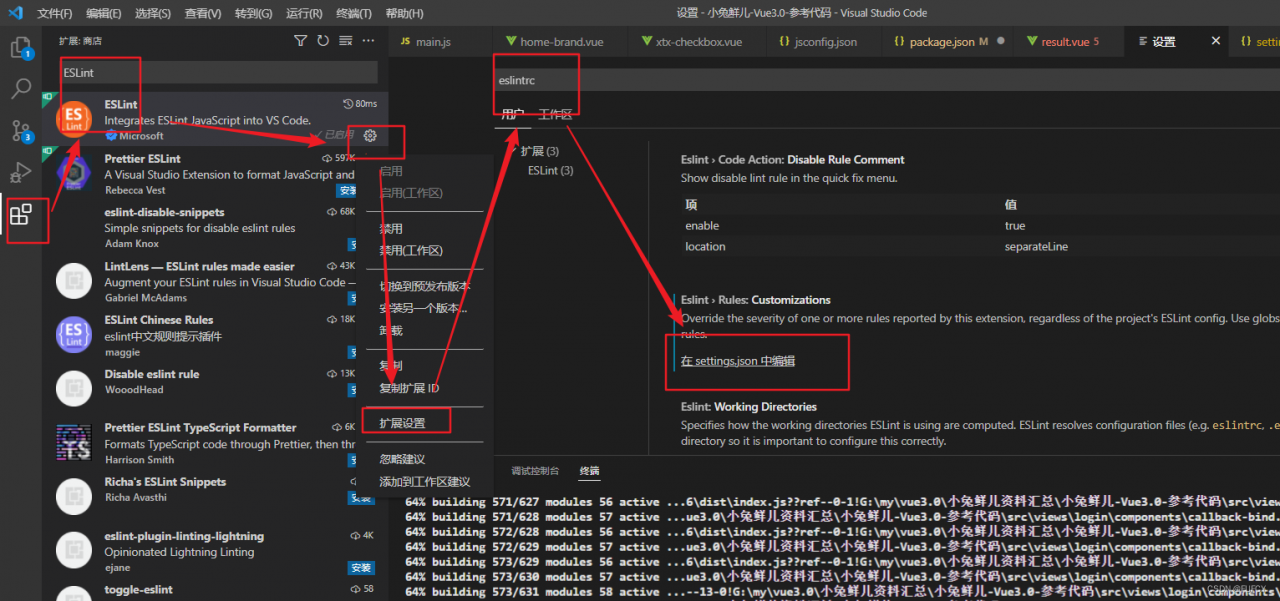
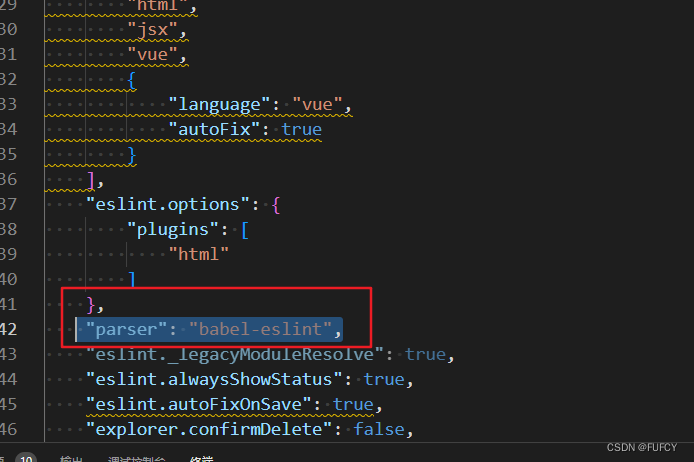
1. You need to install the extension component eslint, and then click settings in settings – extension search – eslintrc and add this line (“parser”: “Babel-eslint”) in settings.json, save the code, and then run the project

[Solved] javax.crypto.BadPaddingException: Decryption error

javax.crypto.BadPaddingException: Decryption error

When using RSA encrypt body spring boot for decryption. This error occurred

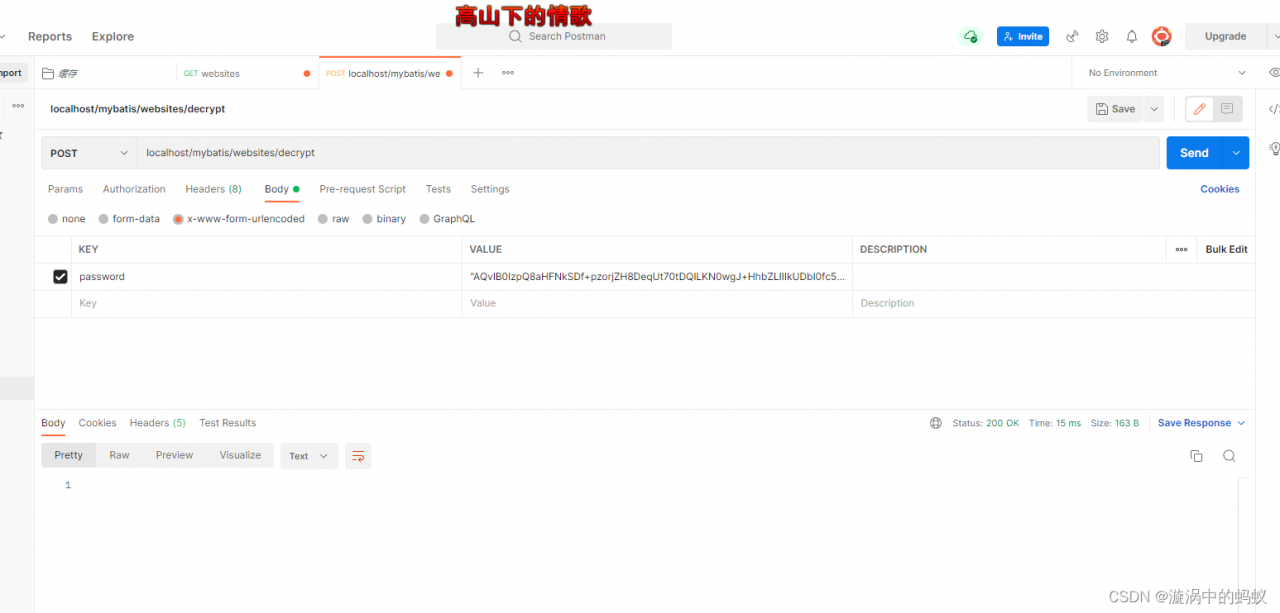
I access the interface in postman. As follows:

This error appears.

Solution:

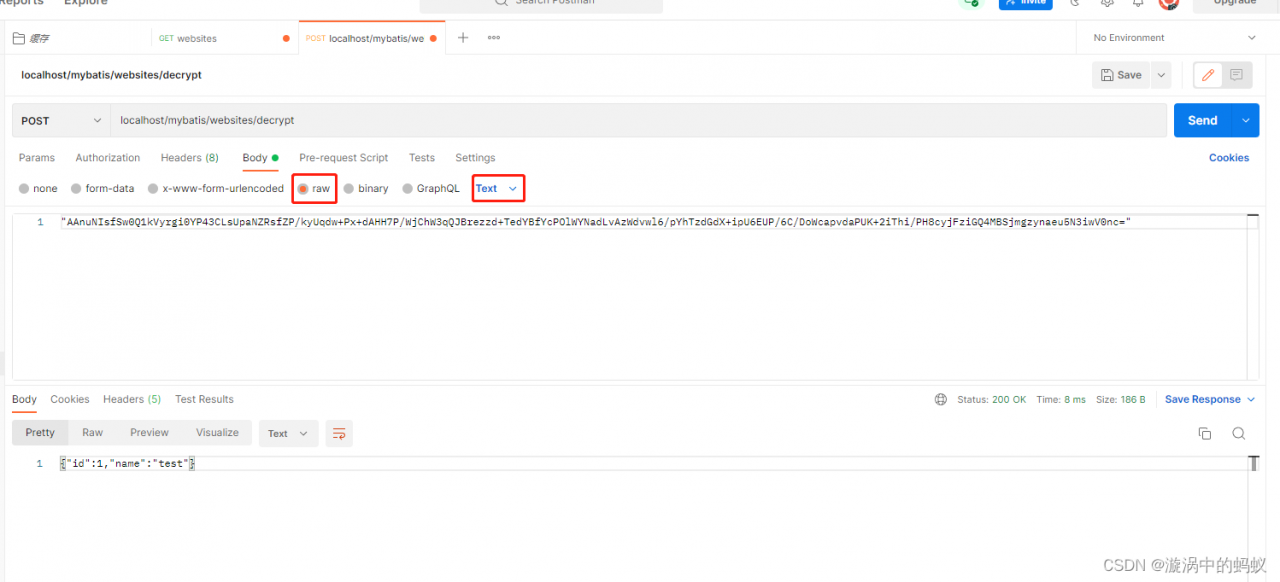
The value in raw contains all the requested parameters.

The @RequestBody is also required, otherwise it will not receive the value it should.

back-end:

    @Encrypt
    @GetMapping("/encrypt")
    public Student encrypt(){
        Student stu = new Student();
        stu.setId(1);
        stu.setName("test");
        return stu;
    }


    @Decrypt
    @PostMapping("/decrypt")
    public String testDecrypt(@RequestBody String username){
        System.out.println(username);
        return username;
    }

The correct postman is as follows:

At this time, pay attention to the data format of the transfer. There may be a problem with submitting the wrong data type. Text is not necessarily right. After that problem, I changed to JSON.

[Solved] PageHelper Error: syntax error, error in :‘it 1 LIMIT ? ‘

Error Messages:

syntax error, error in :‘it 1 LIMIT ? ‘


Problem Cause:
The PageHelper method uses static ThreadLocal parameters, and the paging parameters and threads are bound.
This is safe as long as we ensure that the PageHelper method is called immediately after the MyBatis query method. This is because PageHelper automatically clears the ThreadLocal stored object in the finally snippet.
The page started in the thread does not guarantee that the thread will have cleared the page variable by the time the current execution exits.
One PageHelper paging process is as follows.
i. Set the page parameter
Second, execute the query method
Third, the Interceptor interface checks whether there is a set page parameter in ThreadLocal
If the page parameter exists, regenerate count sql and page sql, and execute the query. If the page parameter does not exist, return the query result directly.
V. Execute LOCAL_PAGE.remove() to clear the page parameter.

Solution:
Call PageHelper.clearPage() at the end of the method using PageHelper;

[webpack-cli] Error: Cannot find module ‘vue/compiler-sfc‘

[webpack-cli] Error: Cannot find module ‘vue/compiler-sfc‘

An error is reported when webpack packages Vue files

[webpack-cli] Error: Cannot find module 'vue/compiler-sfc'

The reason is that I use vue2, but the version is wrong. The following is the corresponding version
Vue 3 requires Vue-loader V16 + @Vue/compiler-sfc
Vue 2 requires vue-loader v15 + vue-template-compiler.

Solution: downgrade to version 15

$ cnpm i vue-loader@15 -D

[Solved] FTP Setup Error: Job for vsftpd.service failed because the control process exited with error code…

Error in setting up FTP: job for vsftpd service failed because the control process exited with error code. See “systemctl status vsftpd.service” and “journalctl -xe” for details.


Solution:

First check whether our port 21 is occupied:

[root@VM-12-16-centos lighthouse]# lsof -i:21
COMMAND     PID USER   FD   TYPE  DEVICE SIZE/OFF NODE NAME
pure-ftpd 16235 root    4u  IPv4 1014289      0t0  TCP *:ftp (LISTEN)
pure-ftpd 16235 root    5u  IPv6 1014290      0t0  TCP *:ftp (LISTEN) 

We need to kill the process pure-ftpd with process number 16235:

[root@VM-12-16-centos lighthouse]# kill -9 16235 
[root@VM-12-16-centos lighthouse]# lsof -i:21

If there is no prompt, it means that kill is successful!

The next step is to solve the vsftpd configuration file:

[root@VM-12-16-centos lighthouse]# sudo vim /etc/vsftpd/vsftpd.conf

The content of vsftpd configuration file is, which can be copied directly. Just change the IP:

# Example config file /etc/vsftpd/vsftpd.conf
#
# The default compiled in settings are fairly paranoid. This sample file
# loosens things up a bit, to make the ftp daemon more usable.
# Please see vsftpd.conf.5 for all compiled in defaults.
#
# READ THIS: This example file is NOT an exhaustive list of vsftpd options.
# Please read the vsftpd.conf.5 manual page to get a full idea of vsftpd's
# capabilities.
#
# Allow anonymous FTP?(Beware - allowed by default if you comment this out).
anonymous_enable=NO
#
# Uncomment this to allow local users to log in.
# When SELinux is enforcing check for SE bool ftp_home_dir
local_enable=YES
#
# Uncomment this to enable any form of FTP write command.
write_enable=YES
#
# Default umask for local users is 077. You may wish to change this to 022,
# if your users expect that (022 is used by most other ftpd's)
local_umask=022
#
# Uncomment this to allow the anonymous FTP user to upload files. This only
# has an effect if the above global write enable is activated. Also, you will
# obviously need to create a directory writable by the FTP user.
# When SELinux is enforcing check for SE bool allow_ftpd_anon_write, allow_ftpd_full_access
#anon_upload_enable=YES
#
# Uncomment this if you want the anonymous FTP user to be able to create
# new directories.
#anon_mkdir_write_enable=YES
#
# Activate directory messages - messages given to remote users when they
# go into a certain directory.
dirmessage_enable=YES
#
# Activate logging of uploads/downloads.
xferlog_enable=YES
#
# Make sure PORT transfer connections originate from port 20 (ftp-data).
connect_from_port_20=YES
#
# If you want, you can arrange for uploaded anonymous files to be owned by
# a different user. Note! Using "root" for uploaded files is not
# recommended!
#chown_uploads=YES
#chown_username=whoever
#
# You may override where the log file goes if you like. The default is shown
# below.
#xferlog_file=/var/log/xferlog
#
# If you want, you can have your log file in standard ftpd xferlog format.
# Note that the default log file location is /var/log/xferlog in this case.
xferlog_std_format=YES
#
# You may change the default value for timing out an idle session.
#idle_session_timeout=600
#
# You may change the default value for timing out a data connection.
#data_connection_timeout=120
#
# It is recommended that you define on your system a unique user which the
# ftp server can use as a totally isolated and unprivileged user.
#nopriv_user=ftpsecure
#
# Enable this and the server will recognise asynchronous ABOR requests. Not
# recommended for security (the code is non-trivial). Not enabling it,
# however, may confuse older FTP clients.
#async_abor_enable=YES
#
# By default the server will pretend to allow ASCII mode but in fact ignore
# the request. Turn on the below options to have the server actually do ASCII
# mangling on files when in ASCII mode. The vsftpd.conf(5) man page explains
# the behaviour when these options are disabled.
# Beware that on some FTP servers, ASCII support allows a denial of service
# attack (DoS) via the command "SIZE /big/file" in ASCII mode. vsftpd
# predicted this attack and has always been safe, reporting the size of the
# raw file.
# ASCII mangling is a horrible feature of the protocol.
#ascii_upload_enable=YES
#ascii_download_enable=YES
#
# You may fully customise the login banner string:
#ftpd_banner=Welcome to blah FTP service.
#
# You may specify a file of disallowed anonymous e-mail addresses. Apparently
# useful for combatting certain DoS attacks.
#deny_email_enable=YES
# (default follows)
#banned_email_file=/etc/vsftpd/banned_emails
#
# You may specify an explicit list of local users to chroot() to their home
# directory. If chroot_local_user is YES, then this list becomes a list of
# users to NOT chroot().
# (Warning! chroot'ing can be very dangerous. If using chroot, make sure that
# the user does not have write access to the top level directory within the
# chroot)
chroot_local_user=YES
chroot_list_enable=YES
# (default follows)
chroot_list_file=/etc/vsftpd/chroot_list
#
# You may activate the "-R" option to the builtin ls. This is disabled by
# default to avoid remote users being able to cause excessive I/O on large
# sites. However, some broken FTP clients such as "ncftp" and "mirror" assume
# the presence of the "-R" option, so there is a strong case for enabling it.
#ls_recurse_enable=YES
#
# When "listen" directive is enabled, vsftpd runs in standalone mode and
# listens on IPv4 sockets. This directive cannot be used in conjunction
# with the listen_ipv6 directive.
listen=YES
#
# This directive enables listening on IPv6 sockets. By default, listening
# on the IPv6 "any" address (::) will accept connections from both IPv6
# and IPv4 clients. It is not necessary to listen on *both* IPv4 and IPv6
# sockets. If you want that (perhaps because you want to listen on specific
# addresses) then you must run two copies of vsftpd with two configuration
# files.
# Make sure, that one of the listen options is commented !!
#listen_ipv6=YES

pam_service_name=vsftpd
userlist_enable=YES
tcp_wrappers=YES
local_root=/var/ftp/test
allow_writeable_chroot=YES
pasv_enable=YES
pasv_address=xxx.xxx.xxx.xxx#Please change it to the public IP of your lightweight application server, you need to change it yourself
pasv_min_port=40000
pasv_max_port=45000

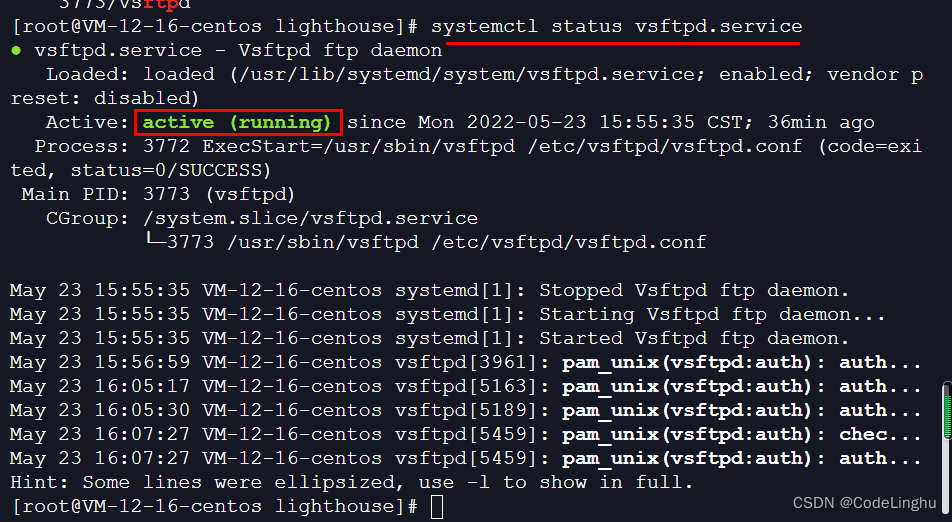
Finally, take a look at your vsftp on state:

[root@VM-12-16-centos lighthouse]# systemctl status vsftpd.service

[Solved] Keil Error: ST-LINK USB communication error

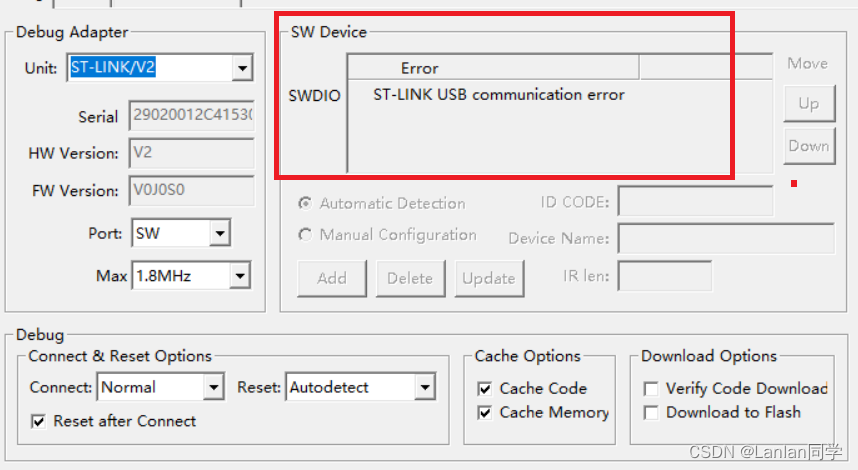
Keil Error: ST-LINK USB communication error

Today, when downloading the program with stlink-v2, there was st-link USB communication error. This problem suddenly appeared. I found many solutions on the Internet, but they can’t be used. My solutions are given below for reference only.

If there is a problem as shown in the figure below:

We can solve this problem by re brushing the firmware. you can download the stlink online.

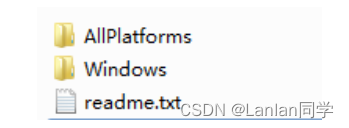
It is very easy to upgrade the firmware of ST-Link. If the ST-Link can be used normally, please do not come to upgrade easily. Here you can open our ST-Link package, there is a zip package inside: ST-Link firmware upgrade software.zip, you can see after decompression.

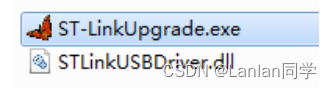
For windows computers, we go directly to the windows folder and click ST-LinkUpgrade.exe:

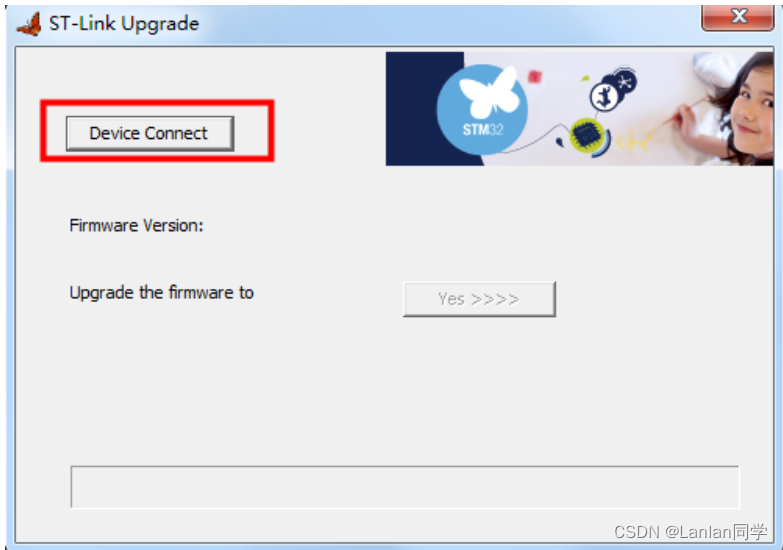
The opened interface is as follows:

At this time, we need to connect st link to the computer through USB. After connecting, click the device connect button on the interface,
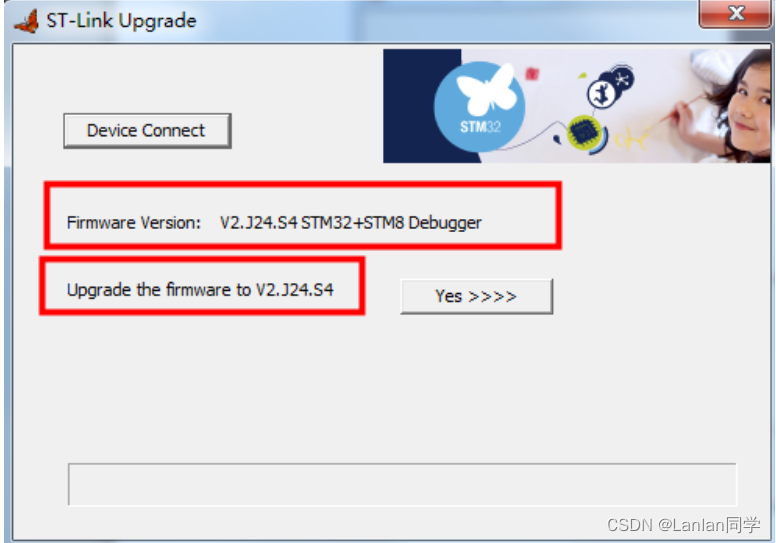
if the connection is successful, the prompt message in the following interface will appear:

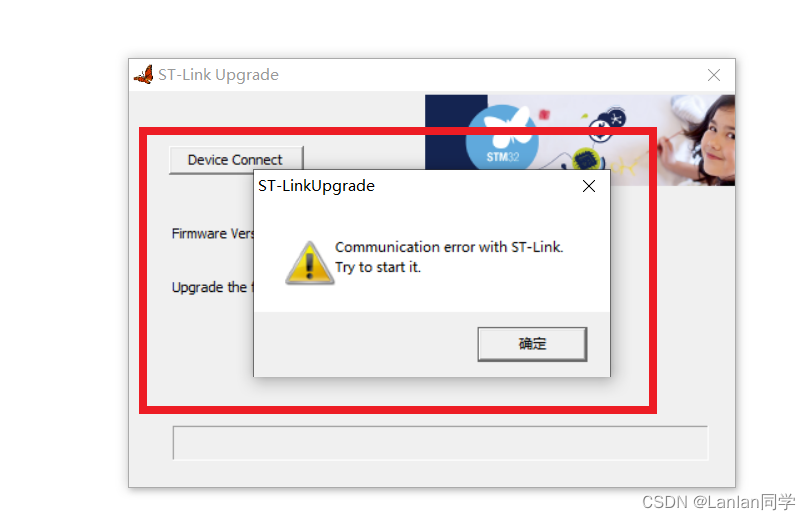
Note: if an error is reported when brushing firmware: Communication error with ST-Link .Try to start it. We can solve this problem by unplugging stlink and then continuing to update the firmware

[Solved] org.apache.ibatis.exceptions.PersistenceException: ### Error building SqlSession…

Error Messages:

org.apache.ibatis.exceptions.PersistenceException: ### Error building SqlSession. ### The error may exist in com/zcat/mybatis/mapper/UserMapper.xml ### Cause: org.apache.ibatis.builder.BuilderException: Error parsing SQL Mapper Configuration. Cause: org.


Note that: The typeAliases in mybatis-config.xml are
is the package name of the entity class
mappers is the package name of the mapping file, so you need to check it carefully.

<?xml version="1.0" encoding="UTF-8" ?>
<!DOCTYPE configuration
        PUBLIC "-//mybatis.org//DTD Config 3.0//EN"
        "http://mybatis.org/dtd/mybatis-3-config.dtd">
<configuration>
    <properties resource="jdbc.properties"></properties>
    <typeAliases>
        <package name="com.zcat.mybatis.pojo"/>
    </typeAliases>
    <environments default="development">
        <environment id="development">
            <transactionManager type="JDBC"/>
            <dataSource type="POOLED">
                <property name="driver" value="${jdbc.driver}"/>
                <property name="url" value="${jdbc.url}"/>
                <property name="username" value="${jdbc.username}"/>
                <property name="password" value="${jdbc.password}"/>
            </dataSource>
        </environment>
    </environments>
    <mappers>
        <package name="com.zcat.mybatis.mapper"/>
    </mappers>
</configuration>

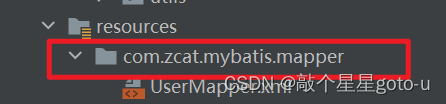
Check the creation of the mapping file. It is different from creating the package. Instead of clicking
, it is/XX/XX

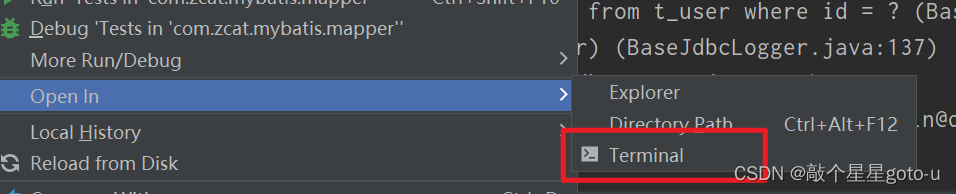
Open in terminal check whether the directory structure generated during creation is correct