Unable to resolve dependency tree

When installing webpack dev server on the command line, errors are reported all the time, and it is OK to check many places, including the error information on the terminal,
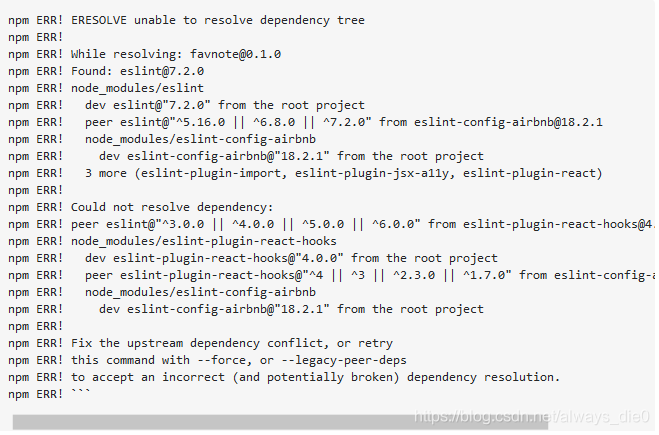
(this is not my error message, I forgot the screenshot, this is in the

https://stackoverflow.com/questions/64874754/unable-to-resolve-dependency-tree-with-esling-config-airbnb

(seen on the Internet)

I didn’t see anything,

Finally, I will save my folder except node_ All files except modules are sent to the person who successfully installed them, and they are asked to try whether they can be successfully installed on his computer. As a result, they can be installed

Therefore, it is considered that the plug-in incompatibility is caused by the high version of node

1. Use node – V to view the node version number

2. I installed 15.3.0 node.js Go to the latest version of the official website node.js There is a stable version of 14.15.1 on the Chinese website

3. In the control panel node.js After uninstalling, install with the lower version of the installation package (do not uninstall the higher version of the installation package) node.js Cannot install lower version)

4. Download the plug-in successfully….
pom.xml Depending on the error report, the problem of missing artifact XXX is solved

pom.xml Depending on the error report, the problem of missing artifact XXX is solved

Possible causes pom.xml The dependency configuration format specifies that you manually download the corresponding jar and then install it to the local repository pom.xml After modification

Eclipse imports or creates a new Maven project, pom.xml An error is reported in the configuration file, missing artifact XXX jar. The problem is that the jar package is not found in the specified warehouse after Maven is started.

Possible causes

    there is no such jar package in the central warehouse or local warehouse; some jar packages are charged (for example, Oracle) ojdbc.jar In fact, there is no such resource in Maven Central Library, so it cannot be loaded; pom.xml Configuration items do not match.

pom.xml Dependency configuration format description

// pom.xml
<dependencies>
		<dependency>
			<groupId>Package1</groupId>
			<artifactId>jarName</artifactId>
			<version>versionInJar</version>
		</dependency>
		<dependency>
			<groupId>Package2</groupId>
			<artifactId>jarName2</artifactId>
			<version>1.0.0</version>
		</dependency>
		......
</dependencies>

Groupid: the relative path of the dependent jar package. The parent-child directory is marked with “.” (example: package.packageNext ); artifactid: dependent jar package name; version: dependent jar package version.

Manually download the corresponding jar, and then install it to the local warehouse

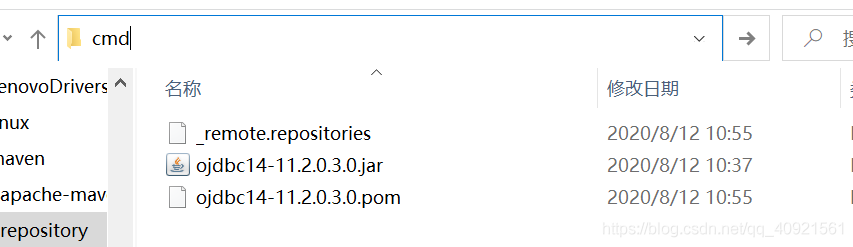
    download the corresponding version of the jar package; open the CMD, preferably in the path to be installed (the installation command is more convenient, directly in the address bar of the path to be installed, enter CMD to quickly open the command window); install here. Take Ojdbc14 as an example, after opening CMD, enter the command as follows:
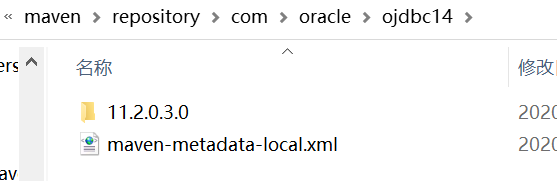
    mvn install:install-file -Dpackaging=jar -DgroupId= com.oracle -DartifactId=ojdbc14 -Dversion=11.2.0.3.0 -Dfile=ojdbc14-11.2.0.3.0.jar -DgeneratePom=true

    Command explanation:
    install: compile and package the project to the local warehouse;
    install file: install file;
    – dgroupid= com.oracle : Specifies that the groupid of the current package is com.oracle ;
    – dartifactid = Ojdbc14: Specifies that the current artifact ID is Ojdbc14;
    – dversion = 11.2.0.3.0: Specifies that the current package version is 11.2.0.3.0;
    – dversion = 11.2.0.3.0 -Dfile = D: ojdbc14-11.2.0.3.0.jar: Specifies the file location of the package to be typed (the reason why you want to open CMD in the path before is to avoid entering an excessively long path);
    – dgeneratepom = true: whether to generate a POM file.

      open the Maven project in eclipse, right-click Maven – & gt; update or click open pom.xml File, right-click Maven – & gt; update for project.

    pom.xml After modification

    <dependency>
    			<groupId>com.oracle</groupId>
    			<artifactId>ojdbc14</artifactId>
    			<version>11.2.0.3.0</version>
    </dependency>
    

Unexpected token o in JSON at p

Today, using JS to convert a $. Parsejson string to a JSON object will report an unexpected syntax error – unexpected token o in JSON at position 1. I couldn’t find the reason. After the ferry, I saw a sentence: there are strict requirements for JSON to convert objects into strings and store them locally, such as symbols or illegal strings, which may affect the later JOSN.parse The analysis of…

Change {type ‘:’name’} to {type ‘,’name’} and solve the problem

That’s right, JSON is sensitive to single and double quotation marks of strings, which leads to the single quotation mark in the real {} that reported the error…

****Replace single quotation marks with double quotation marks
var_ nstr = _ adrdata.replace (/’/g, ‘”’);

Tensorflow error: attributeerror: module ‘tensorflow’ has no attribute ‘unpack’ (‘pack ‘)

Tensorflow: attributeerror: module ‘tensorflow’ has no attribute ‘unpack’ (‘pack ‘)

As shown in the figure:

AttributeError: module ‘tensorflow’ has no attribute ‘unpack’

Analysis: after tensorflow version 1.0 + is updated, the method name changes

Solution:

error report

before update

after update

attributeerror: module ‘tensorflow’ has no attribute ‘unpack’

after update tf.unpack () tf.unstack ()
AttributeError: module ‘tensorflow’ has no attribute ‘pack’ tf.pack () tf.stack ()

Springboot startup error – classnotfound Exception:EnhancerBySpringCGLIB

Error classnotfound in springboot startup Exception:EnhancerBySpringCGLIB

Error information solution

Error information

Spring boot 2.4.1 project, start to report the following error, but start will be normal, although it does not affect the use, but look very boring.

java.lang.ClassNotFoundException: cn.demo.Application$$EnhancerBySpringCGLIB$$310af73e
	at java.net.URLClassLoader.findClass(URLClassLoader.java:382)
	at java.lang.ClassLoader.loadClass(ClassLoader.java:424)
	at sun.misc.Launcher$AppClassLoader.loadClass(Launcher.java:349)
	at java.lang.ClassLoader.loadClass(ClassLoader.java:357)
	at java.lang.Class.forName0(Native Method)
	at java.lang.Class.forName(Class.java:264)
	at cn.demo.ocean.common.prop.core.spring.SpringConfigPropertiesHandle.handleSpringConfig(SpringConfigPropertiesHandle.java:47)
	at cn.demo.ocean.common.prop.core.spring.ConfigServerPostProcessor.doProcessProperties(ConfigServerPostProcessor.java:305)
	at cn.demo.ocean.common.prop.core.spring.ConfigServerPostProcessor.processProperties(ConfigServerPostProcessor.java:122)
	at cn.demo.ocean.common.prop.core.spring.ConfigServerPostProcessor.postProcessBeanFactory(ConfigServerPostProcessor.java:102)
	at org.springframework.context.support.PostProcessorRegistrationDelegate.invokeBeanFactoryPostProcessors(PostProcessorRegistrationDelegate.java:299)
	at org.springframework.context.support.PostProcessorRegistrationDelegate.invokeBeanFactoryPostProcessors(PostProcessorRegistrationDelegate.java:170)
	at org.springframework.context.support.AbstractApplicationContext.invokeBeanFactoryPostProcessors(AbstractApplicationContext.java:751)
	at org.springframework.context.support.AbstractApplicationContext.refresh(AbstractApplicationContext.java:569)
	at org.springframework.boot.web.servlet.context.ServletWebServerApplicationContext.refresh(ServletWebServerApplicationContext.java:144)
	at org.springframework.boot.SpringApplication.refresh(SpringApplication.java:767)
	at org.springframework.boot.SpringApplication.refresh(SpringApplication.java:759)
	at org.springframework.boot.SpringApplication.refreshContext(SpringApplication.java:426)
	at org.springframework.boot.SpringApplication.run(SpringApplication.java:326)
	at org.springframework.boot.SpringApplication.run(SpringApplication.java:1309)
	at org.springframework.boot.SpringApplication.run(SpringApplication.java:1298)
	at cn.demo.Application.main(Application.java:19)
	at sun.reflect.NativeMethodAccessorImpl.invoke0(Native Method)
	at sun.reflect.NativeMethodAccessorImpl.invoke(NativeMethodAccessorImpl.java:62)
	at sun.reflect.DelegatingMethodAccessorImpl.invoke(DelegatingMethodAccessorImpl.java:43)
	at java.lang.reflect.Method.invoke(Method.java:498)
	at org.springframework.boot.devtools.restart.RestartLauncher.run(RestartLauncher.java:49)
java.lang.ClassNotFoundException: cn.demo.config.Swagger2Config$$EnhancerBySpringCGLIB$$589bf224
	at java.net.URLClassLoader.findClass(URLClassLoader.java:382)
	at java.lang.ClassLoader.loadClass(ClassLoader.java:424)
	at sun.misc.Launcher$AppClassLoader.loadClass(Launcher.java:349)
	at java.lang.ClassLoader.loadClass(ClassLoader.java:357)
	at java.lang.Class.forName0(Native Method)
	at java.lang.Class.forName(Class.java:264)
	at cn.demo.ocean.common.prop.core.spring.SpringConfigPropertiesHandle.handleSpringConfig(SpringConfigPropertiesHandle.java:47)
	at cn.demo.ocean.common.prop.core.spring.ConfigServerPostProcessor.doProcessProperties(ConfigServerPostProcessor.java:305)
	at cn.demo.ocean.common.prop.core.spring.ConfigServerPostProcessor.processProperties(ConfigServerPostProcessor.java:122)
	at cn.demo.ocean.common.prop.core.spring.ConfigServerPostProcessor.postProcessBeanFactory(ConfigServerPostProcessor.java:102)
	at org.springframework.context.support.PostProcessorRegistrationDelegate.invokeBeanFactoryPostProcessors(PostProcessorRegistrationDelegate.java:299)
	at org.springframework.context.support.PostProcessorRegistrationDelegate.invokeBeanFactoryPostProcessors(PostProcessorRegistrationDelegate.java:170)
	at org.springframework.context.support.AbstractApplicationContext.invokeBeanFactoryPostProcessors(AbstractApplicationContext.java:751)
	at org.springframework.context.support.AbstractApplicationContext.refresh(AbstractApplicationContext.java:569)
	at org.springframework.boot.web.servlet.context.ServletWebServerApplicationContext.refresh(ServletWebServerApplicationContext.java:144)
	at org.springframework.boot.SpringApplication.refresh(SpringApplication.java:767)
	at org.springframework.boot.SpringApplication.refresh(SpringApplication.java:759)
	at org.springframework.boot.SpringApplication.refreshContext(SpringApplication.java:426)
	at org.springframework.boot.SpringApplication.run(SpringApplication.java:326)
	at org.springframework.boot.SpringApplication.run(SpringApplication.java:1309)
	at org.springframework.boot.SpringApplication.run(SpringApplication.java:1298)
	at cn.demo.Application.main(Application.java:19)
	at sun.reflect.NativeMethodAccessorImpl.invoke0(Native Method)
	at sun.reflect.NativeMethodAccessorImpl.invoke(NativeMethodAccessorImpl.java:62)
	at sun.reflect.DelegatingMethodAccessorImpl.invoke(DelegatingMethodAccessorImpl.java:43)
	at java.lang.reflect.Method.invoke(Method.java:498)
	at org.springframework.boot.devtools.restart.RestartLauncher.run(RestartLauncher.java:49)

solve

Baidu has failed for many times, so we can only read the error report carefully. Last line found:

at org.springframework.boot.devtools.restart.RestartLauncher.run(RestartLauncher.java:49)

Doubt is the problem of devtools, and then pom.xml Devtools dependency removal in

<dependency>
    <groupId>org.springframework.boot</groupId>
    <artifactId>spring-boot-devtools</artifactId>
    <scope>runtime</scope>
    <optional>true</optional>
</dependency>

It’s solved (⊙ o ⊙)

Vue project installs Axios to implement HTTP request

Contents of articles

First, install Axios. Second, use axios1. Introduce axios2. Get method. Third, post method

summary


preface

we all know that the front end needs to request some data and services asynchronously from the back end, which is the so-called Ajax technology. and Vue.js It has no Ajax capability, so it needs to use Axios to complete the Ajax request.


1、 Install Axios

Axios is a promise based HTTP library, which can be used in browsers and websites node.js Medium

Using NPM:

$ npm install axios

Using yarn:

$ yarn add axios

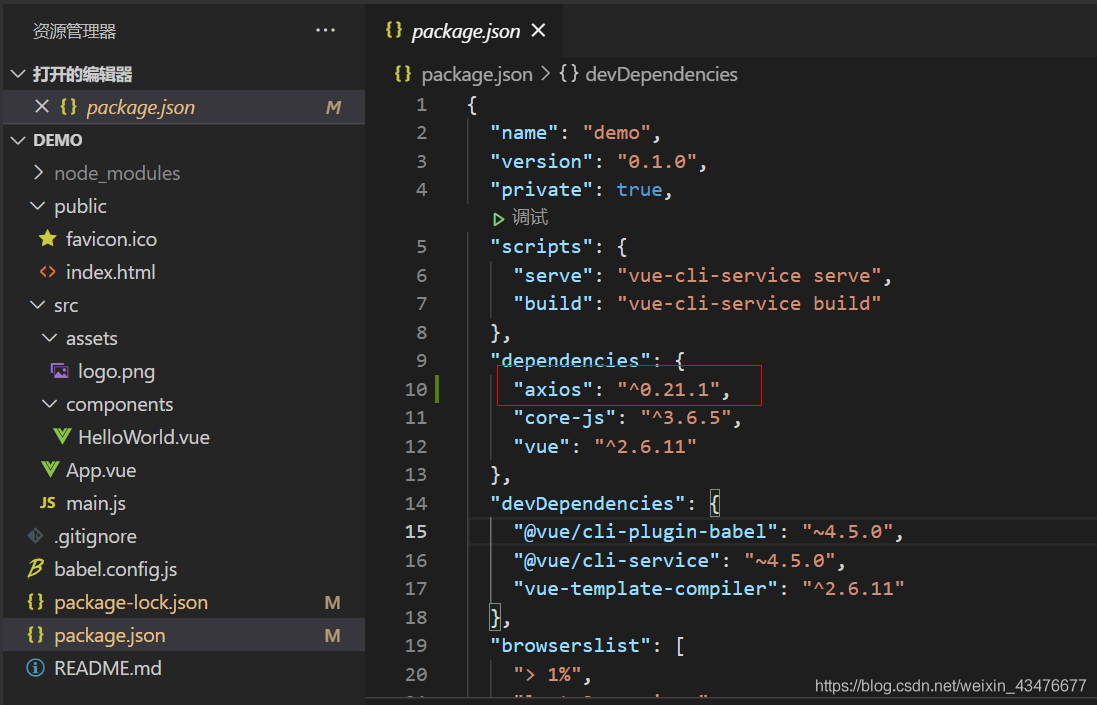
note: install in the root directory of Vue project, and select the configuration file of the project package.json With the corresponding version number, the installation is successful

2、 Using Axios

1. Introducing Axios

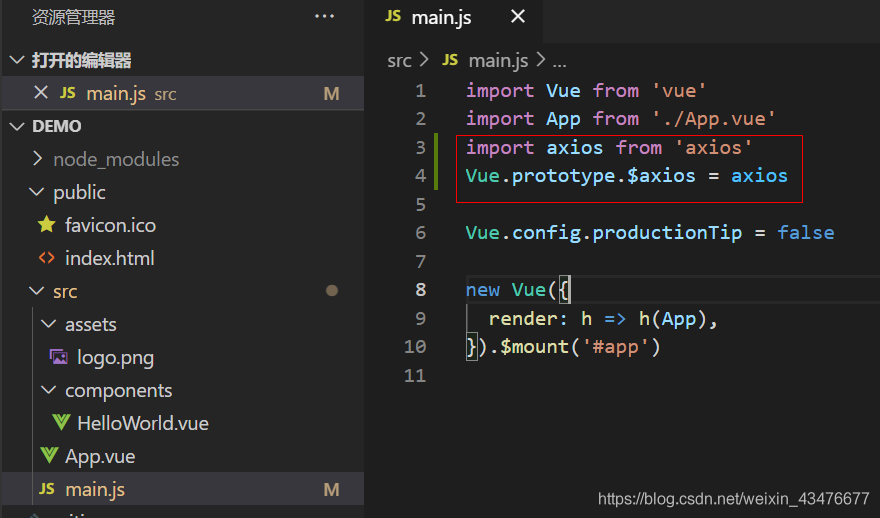
stay main.js When the file is injected into Axios:

import axios from 'axios'
Vue.prototype.$axios = axios  //The $axios before the equal sign can be replaced with another name, but use it consistently 

2. Get method

a relatively complete format: </ font>

this.$axios({ //The $axios here is the one named in main.js
            method: "get",
            url: "http://wthrcdn.etouch.cn/weather_mini",//an API for querying city weather
            headers:{
              'Content-type': "application/json;charset=utf-8"
            },
            params : { 
              city : "GuangZhou"
            },
            dataType:'json',
          })
          .then((res)=>{
            console.log(res.data);
            console.log("success")
          })
          .catch(function (error) {
            console.log(error);
            alert("Failed to connect server");
            console.log("fail")
          });

3. Post method

a relatively complete format: </ font>

this.$axios({
            method:"post",
            url:"http://test/...",
            headers:{
              'Content-type': "application/json;charset=utf-8"
            },
            data : { 
              a : '',
              b : ''
            },
            dataType:'json',
          })
          .then((res)=>{
            console.log(res.data);
            console.log("success")
          })
          .catch(function (error) {
            console.log(error);
            alert("Failed to connect server");
            console.log("fail")
          });

summary

for Axios, it is not too difficult to use without studying its principle. And through the above get and post methods, we can also find that its syntax is very similar to jQuery’s Ajax, and we can easily use it.

Failed to connect to driver at XXXXXXx

pyspark –master yarn
http://laptop:8042/node/containerlogs/container_1588409304631_0005_01_000001/appleyuchi/stderr/?start=-4096

led to connect to driver at license.sublimehq.com:41651, retrying ...
2020-05-02 16:53:04 ERROR ApplicationMaster:70 - Failed to connect to driver at license.sublimehq.com:41651, retrying ...

Inspection:

python test.py

And then access the browser license.sublimehq.com:41651

If the browser returns Hello world, the port is open.

After the first step is confirmed,

$SPARK_ HOME/conf/spark- defaults.conf

Add [2]:

spark.driver.port=20002
spark.driver.host=Desktop

#————————————————————

Do not restart spark, directly re-enter:

Pyspark — Master yard

How to Solve Ubuntu “Failed to fetch” Error

Operating system: Ubuntu 12.04 LTS


In the Ubuntu operating system, it is very convenient to use the apt get command to install the required development software. However, there are many times when the software source can not be linked and can not be installed normally. Therefore, many people will think of using the sudo apt get update command to update the software source. At this time, the update command can not work normally even in the rainy night, resulting in a large number of “failed to” “Fetch” error.


W: Failed to fetch http://archive.ubuntu.com/ubuntu/dists/precise-updates/main/binary-i386/Packages  Something wicked happened resolving 'archive.ubuntu.com:http' (-5 - No address associated with hostname)

W: Failed to fetch http://archive.ubuntu.com/ubuntu/dists/precise-updates/restricted/binary-i386/Packages  Something wicked happened resolving 'archive.ubuntu.com:http' (-5 - No address associated with hostname)

W: Failed to fetch http://archive.ubuntu.com/ubuntu/dists/precise-updates/universe/binary-i386/Packages  Something wicked happened resolving 'archive.ubuntu.com:http' (-5 - No address associated with hostname)

W: Failed to fetch http://archive.ubuntu.com/ubuntu/dists/precise-updates/multiverse/binary-i386/Packages  Something wicked happened resolving 'archive.ubuntu.com:http' (-5 - No address associated with hostname)

W: Failed to fetch http://archive.ubuntu.com/ubuntu/dists/precise-updates/main/i18n/Translation-en_US  Something wicked happened resolving 'archive.ubuntu.com:http' (-5 - No address associated with hostname)


In fact, it is very simple to solve this problem, as long as it is properly set up

DNS

Server is enough


$ sudo vim /etc/resolv.conf 

Modify DNS:

nameserver 8.8.8.8

nameserver 8.8.4.4

Then restart the network service: sudo etc/init.d/networking restart

Execute the sudo apt get update command again, and everything is normal.


After I changed it, I found that it still couldn’t work. Later, I click the link to go to the directory above the link. I found that there was no requested resource in the directory, not the network problem.

CSS Failed to decode downloaded font, OTS parsing error: Failed to convert WOFF 2.0 font to SFNT

Recently, I’ve been looking at some information about the web front end, and the following error occurred in processing a CSS, so as to record it.

I compiled a project under webstorm and loaded the index page on it. I got the following warning on the chrome console:

Failed to decode downloaded font: http://localhost:4200/assets/fonts/Simple-Line-Icons.woff2?v=2.4.0
OTS parsing error: Failed to convert WOFF 2.0 font to SFNT
Failed to decode downloaded font: http://localhost:4200/assets/fonts/Simple-Line-Icons.woff2?v=2.4.0
OTS parsing error: Failed to convert WOFF 2.0 font to SFNT
Failed to decode downloaded font: http://localhost:4200/assets/fonts/Simple-Line-Icons.woff2?v=2.4.0
OTS parsing error: Failed to convert WOFF 2.0 font to SFNT

Custom font and code used:

@font-face {
  font-family: 'simple-line-icons';
  src: url('../fonts/Simple-Line-Icons.eot?v=2.4.0');
  src: url('../fonts/Simple-Line-Icons.eot?v=2.4.0#iefix') format('embedded-opentype'),
       url('../fonts/Simple-Line-Icons.woff2?v=2.4.0') format('woff2'),
       url('../fonts/Simple-Line-Icons.ttf?v=2.4.0') format('truetype'),
       url('../fonts/Simple-Line-Icons.woff?v=2.4.0') format('woff'),
       url('../fonts/Simple-Line-Icons.svg?v=2.4.0#simple-line-icons') format('svg');
  font-weight: normal;
  font-style: normal;
}

The styleext I use is SCSS, and the stylesheet file suffix is. CSS.

There are two solutions

1. Will xxxx.css Change to xxxx.css.scss .

2. Change the format in the font declaration. Change format (‘woff ‘) to format (‘font woff’)

@font-face {
  font-family: 'simple-line-icons';
  src: url('../fonts/Simple-Line-Icons.eot?v=2.4.0');
  src: url('../fonts/Simple-Line-Icons.eot?v=2.4.0#iefix') format('embedded-opentype'),
       url('../fonts/Simple-Line-Icons.woff2?v=2.4.0') format('font-woff2'),
       url('../fonts/Simple-Line-Icons.ttf?v=2.4.0') format('truetype'),
       url('../fonts/Simple-Line-Icons.woff?v=2.4.0') format('font-woff'),
       url('../fonts/Simple-Line-Icons.svg?v=2.4.0#simple-line-icons') format('svg');
  font-weight: normal;
  font-style: normal;
}

Failed to open stream: http request failed!


When using PHP5’s own file_ get_ Content method to get remote files (in my

There are similar call requirements in the automated test framework, and sometimes the file will appear_ get_ Contents(): failed to open stream: http request failed.


The solution is to modify php.ini Let_ url_ Fopen is enabled and changed to allow_ url_ fopen = On


This can solve some people’s problems. Some people say that in China php.ini In, there are two options: allow_ url_ Fopen = on (indicates that the remote file can be opened through URL), user_ Agent = “PHP” (which script is used to access the network. By default, there is a “;” in front of it.) Restart the server.

But some will still have this warning message. If you want to use the perfect solution, you still need to set it php.ini User in it_ Agent, PHP’s default user_ Agent is PHP. We can change it to Mozilla/4.0 (compatible; MSIE 6.0; windows NT 5.0) to simulate browser, user_ agent=”Mozilla/4.0 (compatible; MSIE 6.0; Windows NT 5.0)”

Linux boot prompt “failed to initialize Hal!” solution

My operating system is debian5. There are some directories under/etc/that are RC *. D. * stands for numbers, which are all the services loaded when the system starts. Find DBUS and Hal in them. Pay attention to the numbers in front, which represent the startup order. For example, I found k88dbus and k16hal in RC1. D directory. The problem is that the startup order of DBUS is behind Hal, So it causes this problem. Therefore, write the startup sequence of dubs between Hal serial numbers. For example, I change k88dbus to k15dbus, and use the following command:

#mv K88dbus K15dbus

Restart again and the problem is solved.