Mac OpenSSL not found/loading failed
OpenSSL is a secure socket layer cipher library, including the main cryptographic algorithms, commonly used key and certificate encapsulation management functions and SSL protocol, and provides a wealth of applications for testing or other purposes.
Mac OSX install new OpenSSL
Currently, Mac OSX can install the specified version of OpenSSL through brew.
Confirm the version and location of the installed OpenSSL
$ which openssl
Determine version
$ openssl version
Brew install OpenSSL
$ brew install openssl
Brew update OpenSSL
$ brew upgrade openssl
Brew force link to OpenSSL
$ brew link openssl –force
The above is the introduction of updating OpenSSL under Mac to the latest version.
An error occurred when installing the software through homebrew or other ways
Error running ‘requirements_ osx_ brew_ libs_ install openssl’Library not loaded: /usr/local/opt/openssl/lib/libssl.1.0.0.dylib (LoadError)
It may be caused by not installing or environment variable problems (you can judge by inputting OpenSSL command in the terminal and viewing feedback information)
1. You can solve this problem by re installing OpenSSL
Steps to re install OpenSSL:
Remove OpenSSL (other versions may exist in the removal method. It is recommended to uninstall all versions through uninstall)
brew remove openssl
Uninstall all versions of OpenSSL
brew uninstall –force openssl
Install OpenSSL
brew install openssl
Configure environment variables
echo ‘export PATH=”/usr/local/opt/openssl/bin:$PATH”‘ >& gt; ~/. bash_ profile
Springboot uses druid to log in MySQL. An error occurred: access denied: errorcode 1045, state 28000
In case of an error, first of all, check whether the database can be accessed correctly through MySQL instructions:
it is found that the database can be accessed normally
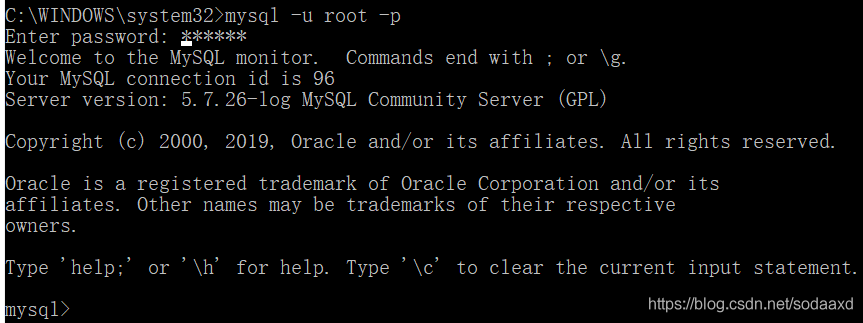
later, when I observed my configuration, I found that my password was all digital. There would be a little problem with all digital passwords in the YML file, so I need to add ‘single quotation mark to correctly identify them. The correct configuration is as follows:
spring:
  datasource:
    url: jdbc:mysql://127.0.0.1:3306/mall?useUnicode=true&characterEncoding=utf8&useOldAliasMetadataBehavior=true&zeroDateTimeBehavior=convertToNull&allowMultiQueries=true&serverTimezone=UTC
    username: root
    password: '123456'
    driver-class-name: com.mysql.cj.jdbc.Driver
    type: com.alibaba.druid.pool.DruidDataSource
Project with path ‘XXXX’ could not be found
My main problem is to delete a library module and submit the code to the server through GIT. When my colleagues pull the code I upload through git, the project still exists in the library and report the dependency error E rror:Project with path ‘XXXX’ could not be found
reason:
When the project is compiled, options corresponding to the related library will appear in gradle.xml automatically generated by. Idea, as shown in the figure
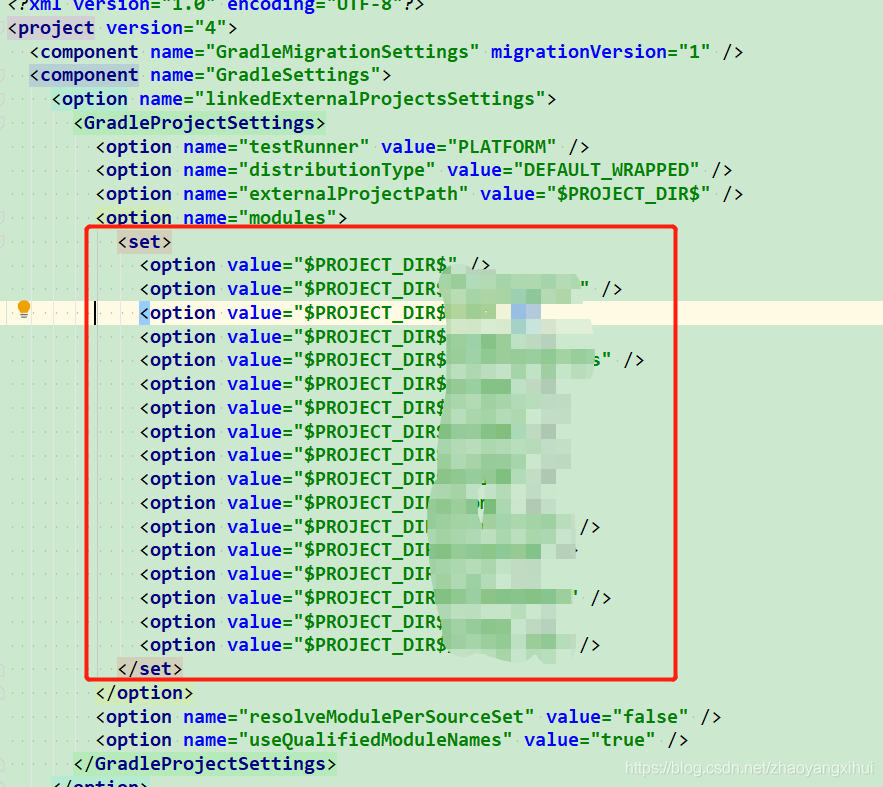
terms of settlement:
Delete the option node of the corresponding library, close the project and re open the compilation.
A more crude way is to delete the. Idea file directly, close the project, and reopen the compilation.
recipe for target ‘scripts/extract-cert‘ failed
sudo apt install libssl-dev
feign.codec.DecodeException
Error information:
feign.codec.DecodeException: Type definition error: [simple type, class com.rouchi.growth.rpc.dto.classroom.response.SimpleClassRoomResponse]; nested exception is com.fasterxml.jackson.databind.exc.InvalidDefinitionException: Cannot construct instance of `com.rouchi.growth.rpc.dto.classroom.response.SimpleClassRoomResponse` (no Creators, like default constructor, exist): cannot deserialize from Object value (no delegate- or property-based Creator)
 at [Source: (ByteArrayInputStream); line: 1, column: 61] (through reference chain: com.rouchi.commons.api.Result["data"]->java.util.ArrayList[0])
The main reason for reporting an error is that the return value cannot construct an object. After checking, it is found that there is an object using Lombok, which only writes @ builder, but does not write @ noargsconstructor
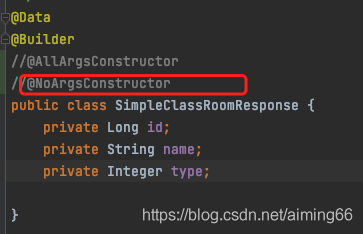 . Therefore, just let go of the comment.
Module build failed: Error: Node Sass version 6.0.0 is incompatible with ^4.0.0.
When we use sass in a project, we need to parse sass into CSS through sass loader. If node sass is not installed, sass loader will not work.
Sometimes, if the node sass version is too high, an error will be reported. The log is as follows:
Module build failed: Error: Node Sass version 6.0.0 is incompatible with ^4.0.0.
terms of settlement:
1. Uninstall the installed version of NPM install node sass
2. Install NPM install [email protected]
3. Restart the project
Solve the error OMP: error # 15: initializing libiomp5. Dylib
resolvent
Method 1
conda install nomkl
It can be solved after installation
Method 2
Add in code
import os

os.environ["KMP_DUPLICATE_LIB_OK"] = "TRUE"
Problem analysis
The complete error is: OMP: error # 15: initializing libiomp5.dylib, but found libomp.dylib already initialized , the error is caused by repeatedly loading the DLL.
Reference article
Github I ssues:https ://github.com/dmlc/xgboost/issues/1715
JSP error: The superclass “javax.servlet.http.HttpServlet” was not found on the Java Build Path
Today, a Javaweb project was established using Eclipse+Maven, and the web container Jboss eap 6.2 was configured in eclipse. Create a new jsp page, add a simple
Java classes. However, a “red” error message appears at the top of the JSP page: The superclass “javax.servlet.http.HttpServlet” was not
found on the Java Build Path. It turns out that there is no Web container Runtime related class added to the Javaweb project class.
Error message:
The superclass “javax.servlet.http.HttpServlet” was not found on the Java Build Path
The solution is very simple, just add the following configuration in pom.xml:
1  < dependency >
2  < groupId > javax.servlet </ groupId >
3  < artifactId > servlet-api </ artifactId >
4  < version > 2.5 </ version >
5  < scope > provided </ scope >
6  </ dependency >
Supplement: If you still get an error, you can also try the following ways:
1. Right-click on the web project-“Properties or Build Path-“Java Build Path->Libraries-> Add Libray…->Server Runtime -“JBoss 7.1 Runtime
2. Switch to Orader and Export in the Java Build Path interface, select
Solve web.xml is missing and is set to true error
I encountered the following error message when learning maven modular construction project:
web.xml is missing and <failOnMissingWebXml> is set to true.
At this time, you need to right-click the project——>Java EE Tools——>Generate Deployment Descriptor Stub. Then the system will create a web.xml file in the src/main/webapp/WEB_INF file. Error resolved!
Of course, this method is a solution for web projects. If your project is not a web project, there is another solution, which is to configure failOnMissingWebXml in the pom file. The specific configuration is as follows:
<build>

  <plugins>

   <plugin>

    <groupId>org.apache.maven.plugins</groupId>

    <artifactId>maven-war-plugin</artifactId>

    <version>2.6</version>

    <configuration>

     <failOnMissingWebXml> false </failOnMissingWebXml>

    </configuration>

   </plugin>

  </plugins>

 </build>
How to Solve Rabbitmq Error: Failed to start RabbitMQ broker
- systemctl start rabbitmq-server
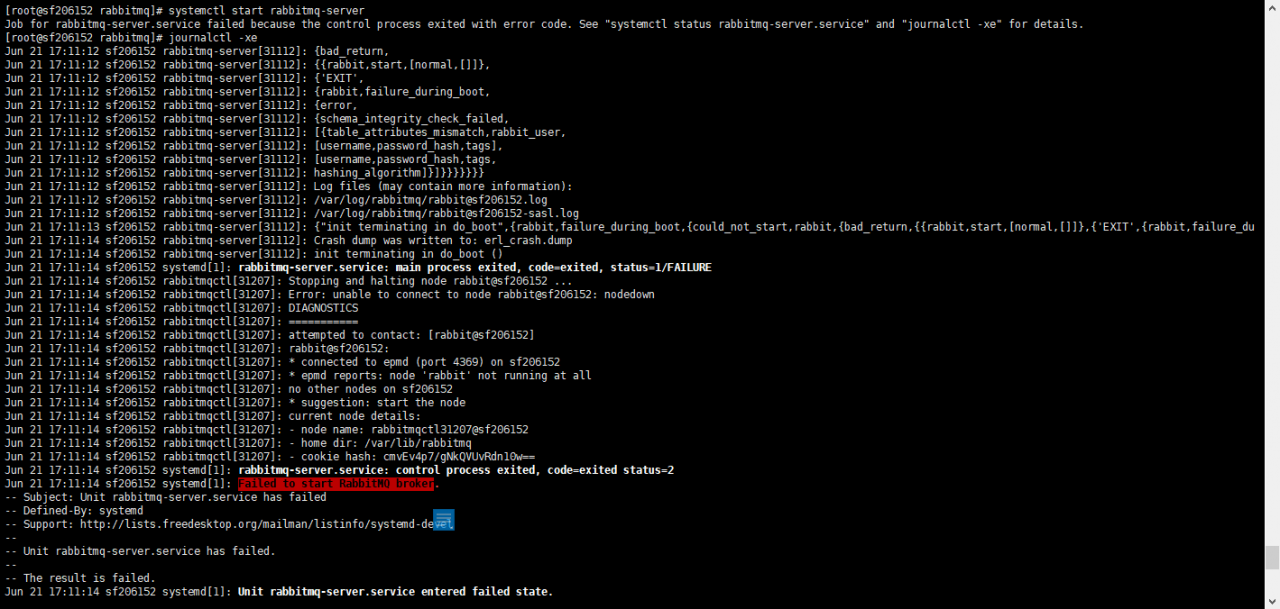
Error: unable to connect to node rabbit@sf206152: nodedown
Jun 21 17:11:12 sf206152 rabbitmq-server[31112]: {bad_return,
Jun 21 17:11:12 sf206152 rabbitmq-server[31112]: {{rabbit,start,[normal,[]]},
Jun 21 17:11:12 sf206152 rabbitmq-server[31112]: {‘EXIT’,
Jun 21 17:11:12 sf206152 rabbitmq-server[31112]: {rabbit,failure_during_boot,
Jun 21 17:11:12 sf206152 rabbitmq-server[31112]: {error,
Jun 21 17:11:12 sf206152 rabbitmq-server[31112]: {schema_integrity_check_failed,
Jun 21 17:11:12 sf206152 rabbitmq-server[31112]: [{table_attributes_mismatch,rabbit_user,
Jun 21 17:11:12 sf206152 rabbitmq-server[31112]: [username,password_hash,tags],
Jun 21 17:11:12 sf206152 rabbitmq-server[31112]: [username,password_hash,tags,
Jun 21 17:11:12 sf206152 rabbitmq-server[31112]: hashing_algorithm]}]}}}}}}}
Jun 21 17:11:12 sf206152 rabbitmq-server[31112]: Log files (may contain more information):
Jun 21 17:11:12 sf206152 rabbitmq-server[31112]: /var/log/rabbitmq/[email protected]
Jun 21 17:11:12 sf206152 rabbitmq-server[31112]: /var/log/rabbitmq/[email protected]
Jun 21 17:11:13 sf206152 rabbitmq-server[31112]: {“init terminating in do_boot”,{rabbit,failure_during_boot,{could_not_start,rabbit,{bad_return,{{rabbit,start,[normal,[]]},{‘EXIT’,{rabbit,failure_du
Jun 21 17:11:14 sf206152 rabbitmq-server[31112]: Crash dump was written to: erl_crash.dump
Jun 21 17:11:14 sf206152 rabbitmq-server[31112]: init terminating in do_boot ()
Jun 21 17:11:14 sf206152 systemd[1]: rabbitmq-server.service: main process exited, code=exited, status=1/FAILURE
Jun 21 17:11:14 sf206152 rabbitmqctl[31207]: Stopping and halting node rabbit@sf206152 …
Jun 21 17:11:14 sf206152 rabbitmqctl[31207]: Error: unable to connect to node rabbit@sf206152: nodedown
Jun 21 17:11:14 sf206152 rabbitmqctl[31207]: DIAGNOSTICS
Jun 21 17:11:14 sf206152 rabbitmqctl[31207]: ===========
Jun 21 17:11:14 sf206152 rabbitmqctl[31207]: attempted to contact: [rabbit@sf206152]
Jun 21 17:11:14 sf206152 rabbitmqctl[31207]: rabbit@sf206152:
Jun 21 17:11:14 sf206152 rabbitmqctl[31207]: * connected to epmd (port 4369) on sf206152
Jun 21 17:11:14 sf206152 rabbitmqctl[31207]: * epmd reports: node ‘rabbit’ not running at all
Jun 21 17:11:14 sf206152 rabbitmqctl[31207]: no other nodes on sf206152
Jun 21 17:11:14 sf206152 rabbitmqctl[31207]: * suggestion: start the node
Jun 21 17:11:14 sf206152 rabbitmqctl[31207]: current node details:
Jun 21 17:11:14 sf206152 rabbitmqctl[31207]: – node name: rabbitmqctl31207@sf206152
Jun 21 17:11:14 sf206152 rabbitmqctl[31207]: – home dir: /var/lib/rabbitmq
Jun 21 17:11:14 sf206152 rabbitmqctl[31207]: – cookie hash: cmvEv4p7/gNkQVUvRdn10w==
Jun 21 17:11:14 sf206152 systemd[1]: rabbitmq-server.service: control process exited, code=exited status=2
Jun 21 17:11:14 sf206152 systemd[1]: Failed to start RabbitMQ broker.
— Subject: Unit rabbitmq-server.service has failed
— Defined-By: systemd
— Support: http://lists.freedesktop.org/mailman/listinfo/systemd-devel
—
— Unit rabbitmq-server.service has failed.
—
— The result is failed.
solution:
[email protected], rabbit@localhost, rabbit@localhost-plugins-expand exist in the /var/lib/rabbitmq/mnesia directory. After deleting these 3 items, use systemctl start rabbitmq-server to start.
# Start Stop Restart
service rabbitmq-server start
service rabbitmq-server stop
service rabbitmq-server restart
# View status
rabbitmqctl cluster_status
rabbitmqctl status
Add a new user
[root@sf106212 etc]# rabbitmqctl add_user admin admin@2015
View current user list
[root@sf106212 etc]# rabbitmqctl list_users
Set user role super administrator (administrator)
[root@sf106212 etc]# rabbitmqctl set_user_tags admin administrator
Set user permissions
[root@sf106212 etc]# rabbitmqctl set_permissions -p / admin “.*” “.*” “.*”
View the authority information of the specified user
[root@sf106212 etc]# rabbitmqctl list_user_permissions admin
Listing permissions for user “admin” …
/ .* .* .*
# Start configure automatic start
rabbitmq-plugins enable rabbitmq_management
service rabbitmq-server start
chkconfig rabbitmq-server on
http://localhost:15672
Stream to MemoryStream to solve Stream.Length error report This stream does not support search operations
1.StreamToMemoryStream
 MemoryStream StreamToMemoryStream(Stream instream)
        {
            MemoryStream outstream = new MemoryStream();
             const  int bufferLen = 4096 ;
             byte [] buffer = new  byte [bufferLen];
             int count = 0 ;
             while ((count = instream.Read(buffer, 0 , bufferLen))> 0 )
            {
                outstream.Write(buffer, 0 , count);
            }
            return outstream;
        }
2.Stream.Length error: this stream does not support search
                HttpWebRequest request = (HttpWebRequest)WebRequest.Create(url + (data == "" ? "" : " ? " + Data));
                request.Method = " GET " ;
                 using (HttpWebResponse response = request.GetResponse() as HttpWebResponse)
                {
                    if (response.StatusCode == HttpStatusCode.OK)
                    {
                        Stream rs = response.GetResponseStream();

                        var ms = StreamToMemoryStream (rs);
                        ms.Seek( 0 , SeekOrigin.Begin);                         int buffsize =( int ) ms.Length ; //rs.Length This stream does not support searching, first convert to MemoryStream
                         byte [] bytes = new  byte [buffsize];

                        ms.Read(bytes, 0 , buffsize);
                        ms.Flush();ms.Close();
              rs.Flush();rs.Close();
                }
How to Solve AspectJ error: error at ::0 can’t find referenced pointcut XXX
When using AspectJ to annotate aspects today, I encountered an error.
The cutpoint expression is unrecognizable-the detailed error message is as follows:
Exception in thread "main" org.springframework.beans.factory.BeanCreationException: Error creating bean with name 'xingoo' defined in class path resource [bean.xml]: Initialization of bean failed; nested exception is java.lang.IllegalArgumentException: error at ::0 can't find referenced pointcut performance
    at org.springframework.beans.factory.support.AbstractAutowireCapableBeanFactory.doCreateBean(AbstractAutowireCapableBeanFactory.java:527)
    at org.springframework.beans.factory.support.AbstractAutowireCapableBeanFactory.createBean(AbstractAutowireCapableBeanFactory.java:456)
    at org.springframework.beans.factory.support.AbstractBeanFactory$1.getObject(AbstractBeanFactory.java:291)
    at org.springframework.beans.factory.support.DefaultSingletonBeanRegistry.getSingleton(DefaultSingletonBeanRegistry.java:222)
    at org.springframework.beans.factory.support.AbstractBeanFactory.doGetBean(AbstractBeanFactory.java:288)
    at org.springframework.beans.factory.support.AbstractBeanFactory.getBean(AbstractBeanFactory.java:190)
    at org.springframework.beans.factory.support.DefaultListableBeanFactory.preInstantiateSingletons(DefaultListableBeanFactory.java:580)
    at org.springframework.context.support.AbstractApplicationContext.finishBeanFactoryInitialization(AbstractApplicationContext.java:895)
    at org.springframework.context.support.AbstractApplicationContext.refresh(AbstractApplicationContext.java:425)
    at org.springframework.context.support.ClassPathXmlApplicationContext.<init>(ClassPathXmlApplicationContext.java:139)
    at org.springframework.context.support.ClassPathXmlApplicationContext.<init>(ClassPathXmlApplicationContext.java:83)
    at com.spring.test.chap44.test.main(test.java:8)
Caused by: java.lang.IllegalArgumentException: error at ::0 can't find referenced pointcut performance
    at org.aspectj.weaver.tools.PointcutParser.parsePointcutExpression(PointcutParser.java:315)
    at org.springframework.aop.aspectj.AspectJExpressionPointcut.buildPointcutExpression(AspectJExpressionPointcut.java:195)
    at org.springframework.aop.aspectj.AspectJExpressionPointcut.checkReadyToMatch(AspectJExpressionPointcut.java:181)
    at org.springframework.aop.aspectj.AspectJExpressionPointcut.getClassFilter(AspectJExpressionPointcut.java:162)
    at org.springframework.aop.support.AopUtils.canApply(AopUtils.java:200)
    at org.springframework.aop.support.AopUtils.canApply(AopUtils.java:254)
    at org.springframework.aop.support.AopUtils.findAdvisorsThatCanApply(AopUtils.java:286)
    at org.springframework.aop.framework.autoproxy.AbstractAdvisorAutoProxyCreator.findAdvisorsThatCanApply(AbstractAdvisorAutoProxyCreator.java:117)
    at org.springframework.aop.framework.autoproxy.AbstractAdvisorAutoProxyCreator.findEligibleAdvisors(AbstractAdvisorAutoProxyCreator.java:87)
    at org.springframework.aop.framework.autoproxy.AbstractAdvisorAutoProxyCreator.getAdvicesAndAdvisorsForBean(AbstractAdvisorAutoProxyCreator.java:68)
    at org.springframework.aop.framework.autoproxy.AbstractAutoProxyCreator.wrapIfNecessary(AbstractAutoProxyCreator.java:359)
    at org.springframework.aop.framework.autoproxy.AbstractAutoProxyCreator.postProcessAfterInitialization(AbstractAutoProxyCreator.java:322)
    at org.springframework.beans.factory.support.AbstractAutowireCapableBeanFactory.applyBeanPostProcessorsAfterInitialization(AbstractAutowireCapableBeanFactory.java:407)
    at org.springframework.beans.factory.support.AbstractAutowireCapableBeanFactory.initializeBean(AbstractAutowireCapableBeanFactory.java:1426)
    at org.springframework.beans.factory.support.AbstractAutowireCapableBeanFactory.doCreateBean(AbstractAutowireCapableBeanFactory.java:519)
    ... 11 more
I searched the Internet and found that the JDK does not match.
The JDK1.7 I used originally matches aspectjrt.1.6 and aspectjweaver.1.6, so an error will be reported.
If you want to use AspectJ to complete the annotation aspect, you need to pay attention to the following JDK and AspectJ matching:
JDK1.6 —— aspectJ1.6
JDK1.7 —— aspectJ1.7.3+