After QT vs environment is installed, the generated program can not start
Problem reason: Windows kit is not configured to system environment variables
solution: add environment variables
After QT vs environment is installed, the generated program can not start
Problem reason: Windows kit is not configured to system environment variables
solution: add environment variables
Could not install Gradle distribution
New computer, new Android studio 4.2, new first project error:
Could not install Gradle distribution from 'https\://services.gradle.org/distributions/gradle-6.7.1-bin.zip'
Solution:
(1) click the link in the error message:
1 https://services.gradle.org/distributions/gradle-6.7.1-bin.zip
Download the compressed package to the specified path and unzip it
(2) click file – & gt; Settings-> Build, Execution,Deployment-> Build Tools-> Gradle, in the gradle projects area, change use gradle from to your own download path, retry:
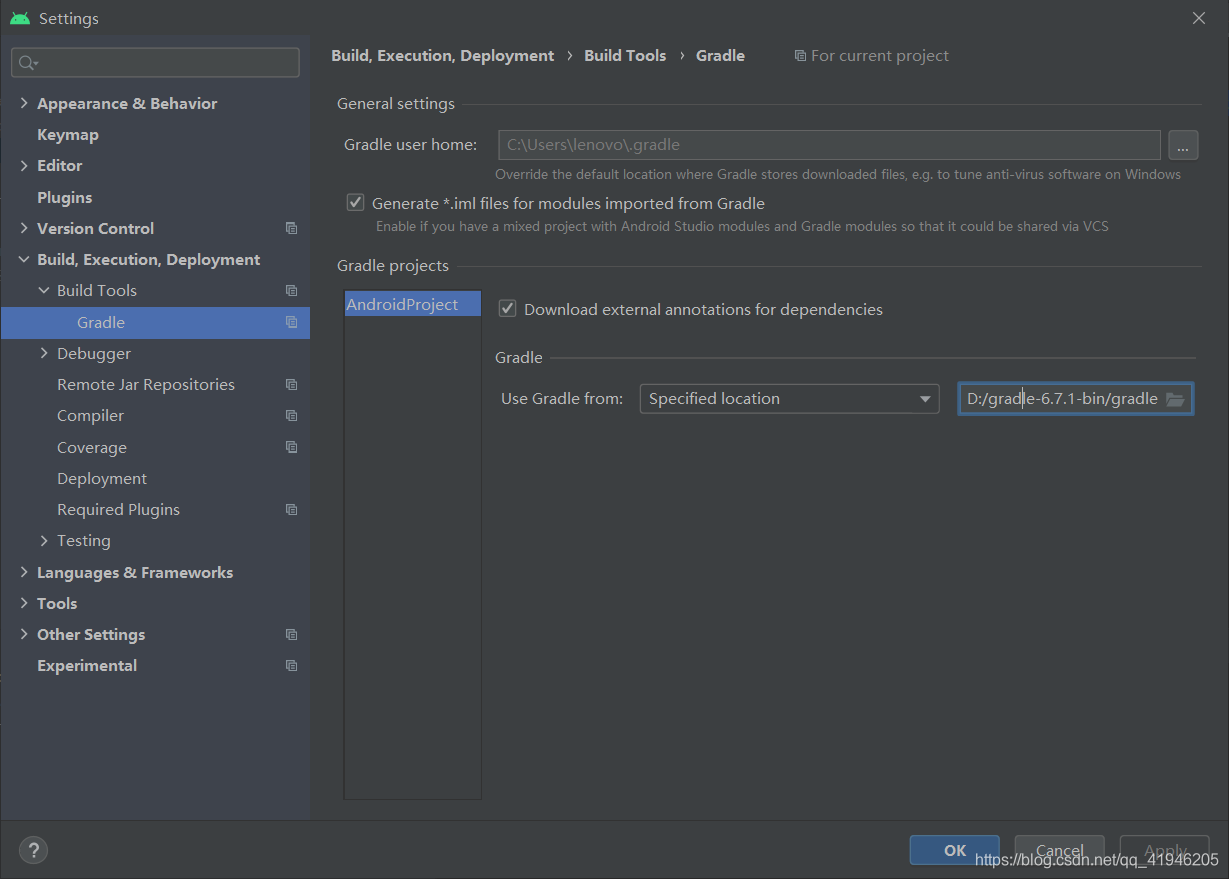
(3) Successful solution:

Creating Server TCP listening socket 127.0.0.1:6379: bind: No error。。。 Solutions to problems encountered in startup
D:\redis>redis-server.exe redis.windows.conf
[9952] 03 Jul 15:48:22.538 # Creating Server TCP listening socket 127.0.0.1:6379: bind: No error

D:\redis>redis-cli.exe
127.0.0.1:6379> shutdown
(0.51s)
not connected> exit

D:\redis>redis-server.exe redis.windows.conf
                _._
           _.-``__ ''-._
      _.-``    `.  `_.  ''-._           Redis 3.2.100 (00000000/0) 64 bit
  .-`` .-```.  ```\/    _.,_ ''-._
 (    '      ,       .-`  | `,    )     Running in standalone mode
 |`-._`-...-` __...-.``-._|'` _.-'|     Port: 6379
 |    `-._   `._   /    _.-'    |     PID: 16908
  `-._    `-._  `-./  _.-'    _.-'
 |`-._`-._    `-.__.-'    _.-'_.-'|
 |    `-._`-._        _.-'_.-'    |           http://redis.io
  `-._    `-._`-.__.-'_.-'    _.-'
 |`-._`-._    `-.__.-'    _.-'_.-'|
 |    `-._`-._        _.-'_.-'    |
  `-._    `-._`-.__.-'_.-'    _.-'
      `-._    `-.__.-'    _.-'
          `-._        _.-'
              `-.__.-'

[16908] 03 Jul 15:49:06.195 # Server started, Redis version 3.2.100
[16908] 03 Jul 15:49:06.246 * DB loaded from disk: 0.049 seconds
[16908] 03 Jul 15:49:06.246 * The server is now ready to accept connections on port 6379
When we are in brew install XXXX, we will encounter this kind of problem
curl: (22) The requested URL returned error: 404 Not Found
Warning: Bottle missing, falling back to the default domain...
==> Downloading https://ghcr.io/v2/homebrew/core/autoconf/manifests/2.69-4

curl: (22) The requested URL returned error: 404
Error: Failed to download resource "autoconf_bottle_manifest"
Download failed: https://ghcr.io/v2/homebrew/core/autoconf/manifests/2.69-4
The prompt said that one of the supporting plug-ins could not be installed, which was very annoying
This is the time we should visit https://bintray.com/ Website, to search the version of the software you can’t download
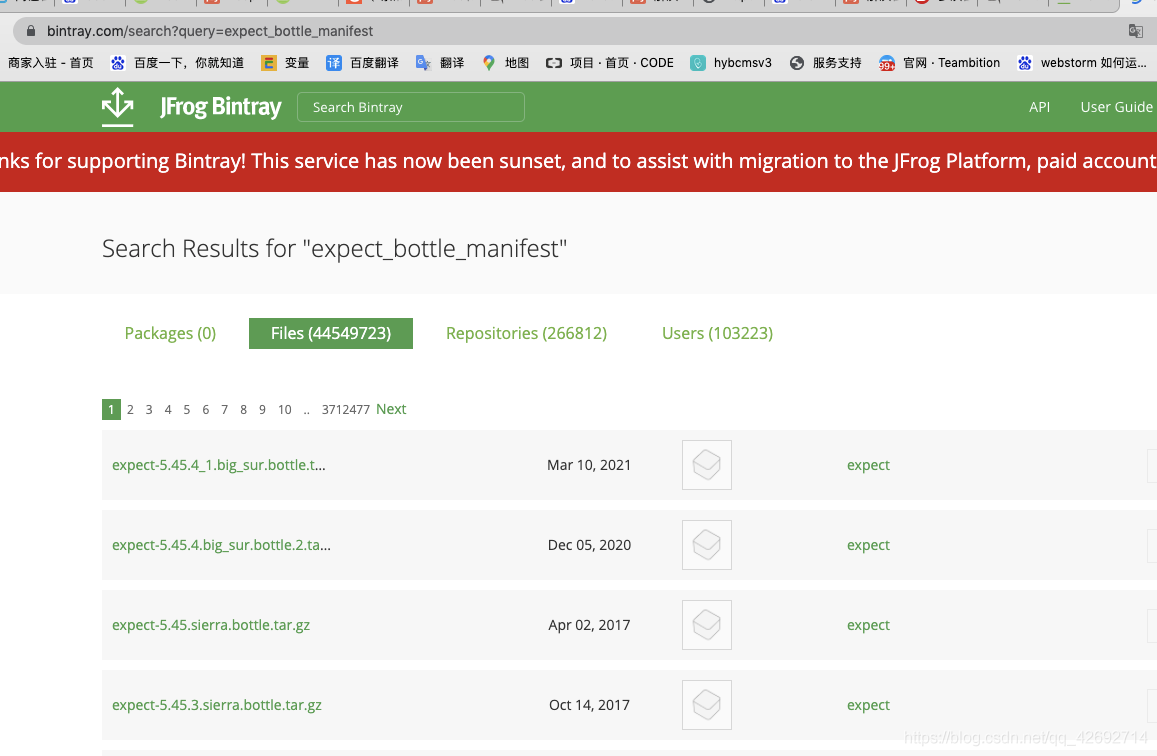
Find the software and download it, then put it on the local computer
/In usr/local/cell/folder, and then execute brew install XXX on the terminal,
You will find that this software is no longer needed to download
Fileprovider conflict resolution
Because the Maven service of Weibo sharing SDK is abnormal, the Maven automatic integration fails, so the AAR file of Weibo 10.10.0 is downloaded for local integration. Error report after adding project android:resource= “@xml/file_ XXX “reuse does not work
2. Add tools:replace= “ android:resource ”Go to the following figure
   <provider
            android:name="androidx.core.content.FileProvider"
            android:authorities="${applicationId}.fileProvider"
            android:exported="false"
            android:grantUriPermissions="true"
            tools:replace="android:authorities">
            <meta-data
                android:name="android.support.FILE_PROVIDER_PATHS"
                android:resource="@xml/file_xxx"
                tools:replace="android:resource" />
        </provider>
solve
Related commands:
sed 's/\"//g'Examples are as follows:
[test@localhost ~]# echo \"hello\" | sed 's/\"//g'
hello
[test@localhost ~]# echo \"hello\"
"hello"
[test@localhost ~]# cat test.log
"hello"
[test@localhost ~]# cat test.log | sed 's/\"//g'
hello
The following reports have been made in the implementation of failure checks.
2021-06-09-14.46.11.868000-420 I16975H265 LEVEL: Error PID : 1412 TID : 1800 FUNCTION: DB2 Tools, DB2 administration server, SchedulerThread_run, SchedulerThread_run, probe:5 DATA String, 50 bytes cannot complete scheduler thread’s initialization! 2008-05-01-14.46.16.868000-420 I170042H386 LEVEL: Error PID : 1412 TID : 1800 FUNCTION: DB2 Tools, DB2 administration server, MDUtility: :connectMD, MDUtility probe:10 DATA Sint32, 4 bytes – 300 DATA #2 : Sint32, 4 bytes 0 DATA #3 : Sint32, 4 bytes 0 DATA #4 : String, 7 bytes TOOLSDB DATA #5 : String, 8 bytes SYSTOLS DATA #6 : String, 4 bytes NULL
Reference is made to the website: https://www.ibm.com/support/pages/db2-scheduler-thread-initialization-error-db2diaglog
>
Yes
The main reason is abnormal shutdown.
if you have abnormal shutdown operation, please try the following methods
mongod --dbpath /usr/local/mongodb/data --logpath /usr/local/mongodb/mongod.log --fork
Dbpath is your data configuration path
logpath is your log path
through this command, similar to windows restart services Service
The sale object passed from the background is sale = null
${sale.warrantyPeriod}
You will be prompted that warrantyperiod cannot be found. Change it to the following:
th:value="${sale?.warrantyPeriod}"
If the object is empty, the output is empty; if the object exists, the output property value.
The error is shown in the figure 
The reason for this error is that there are two bridges when the log information is generated, and the conflict results in error.
The solution is as follows:
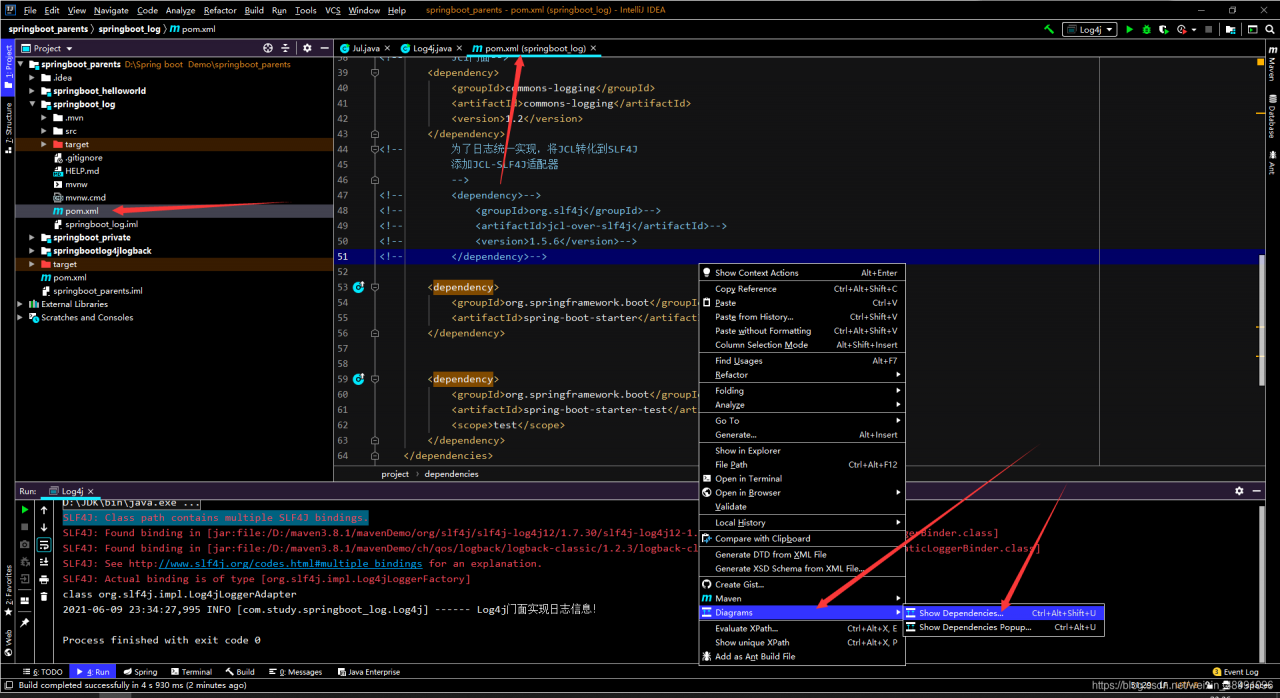
Find the structure diagram in the POM file, and press and hold the Cril key to enlarge the diagram
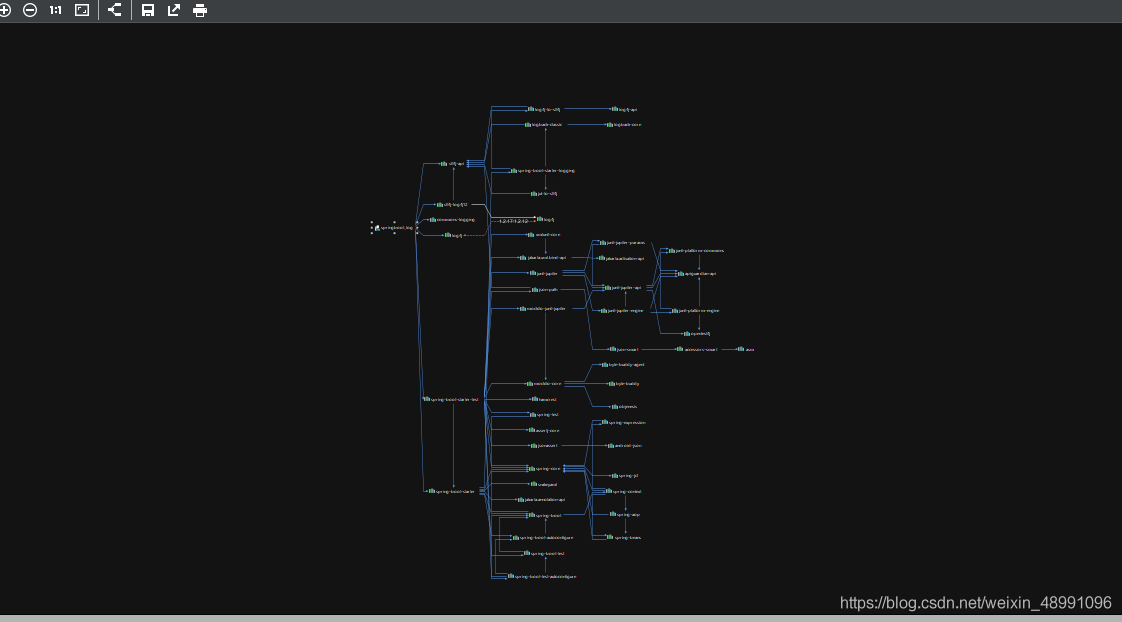
Find the dependency as shown in the figure below, because there are two bridge conflicts, we only need to eliminate one
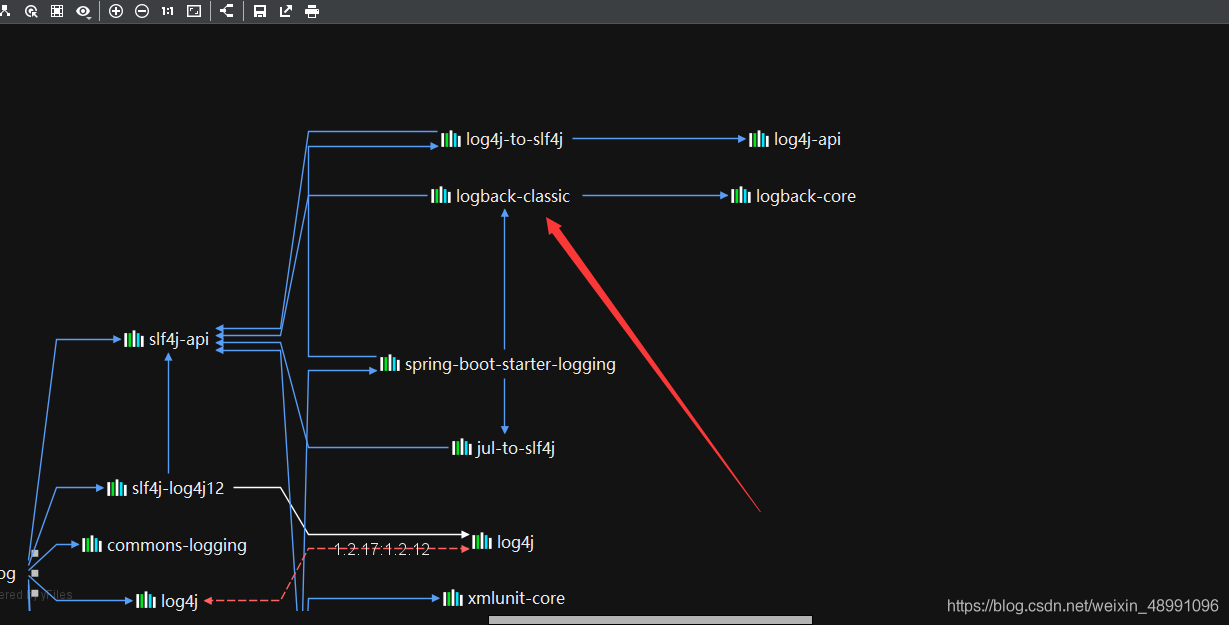
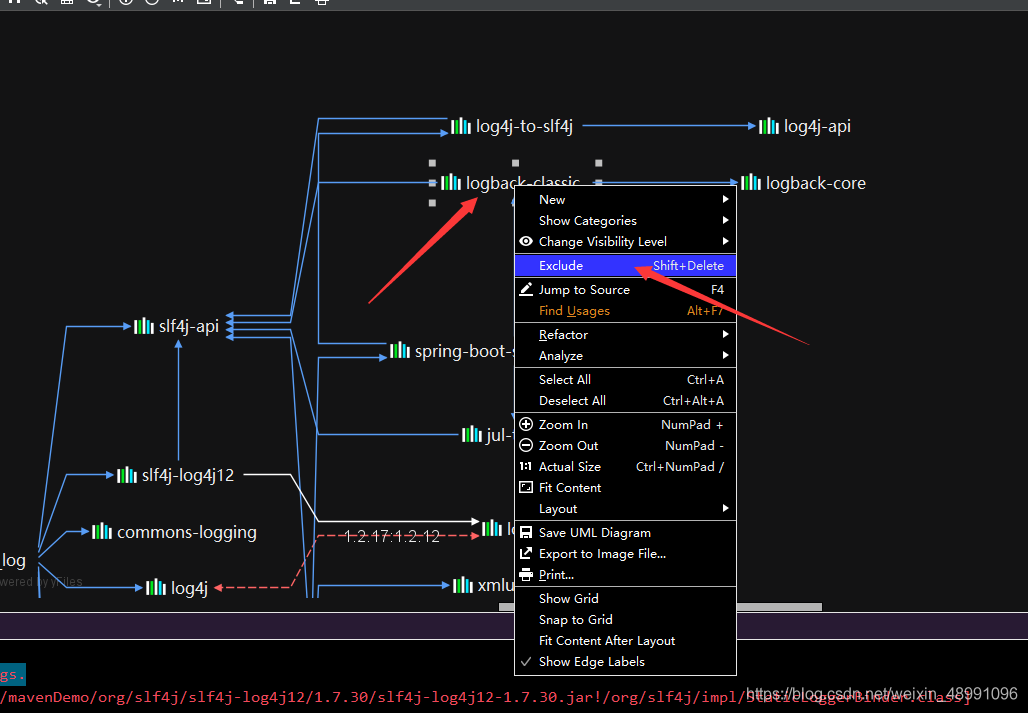
As shown in the figure below, right-click the logback classic we found and left-click exclude
At this point, our modification is good. Return to our POM file and update our modification, as shown in the following figure: 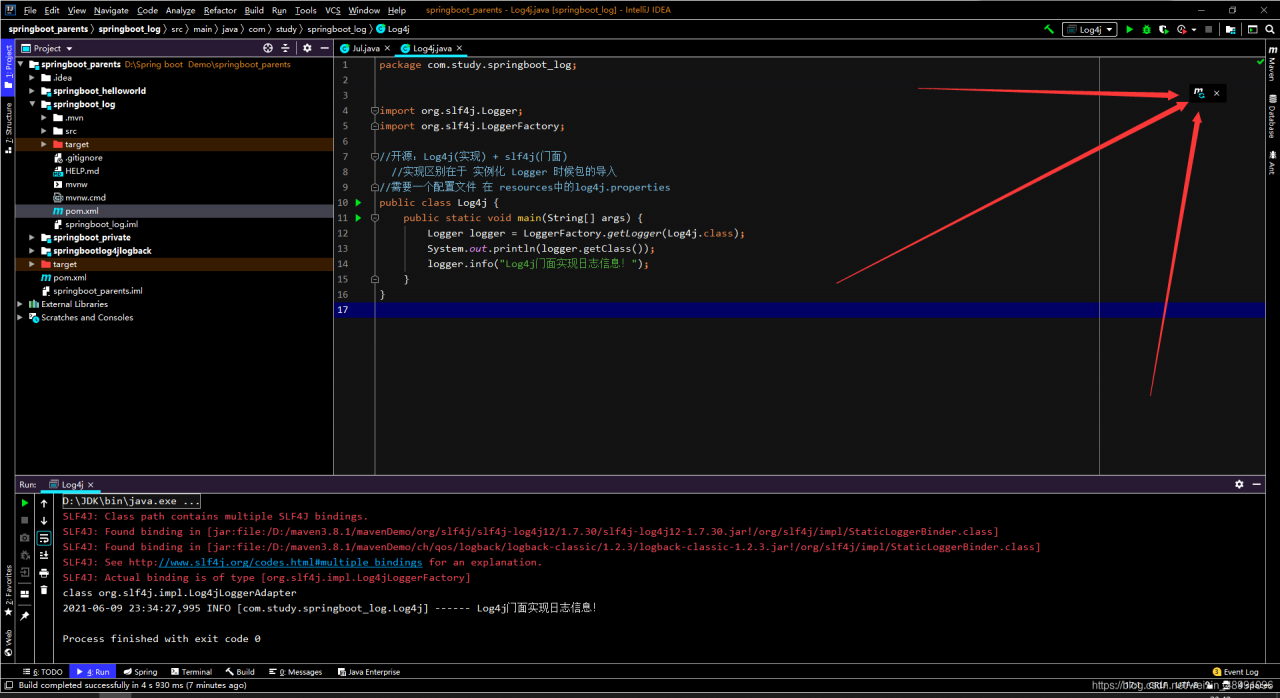
At this point, we can run our project again and find that our mistakes are gone, as shown in the figure below.

Why does asset database transaction committed tweet appear in unity
Assertion failed on expression: ‘m_ ErrorCode == MDB_ MAP_ RESIZED || ! HasAbortingErrors()’
Solution:
save the file, re open the unity or activate the license, you can get the solution
cause: error caused by resource loss, or license expiration.
The error of 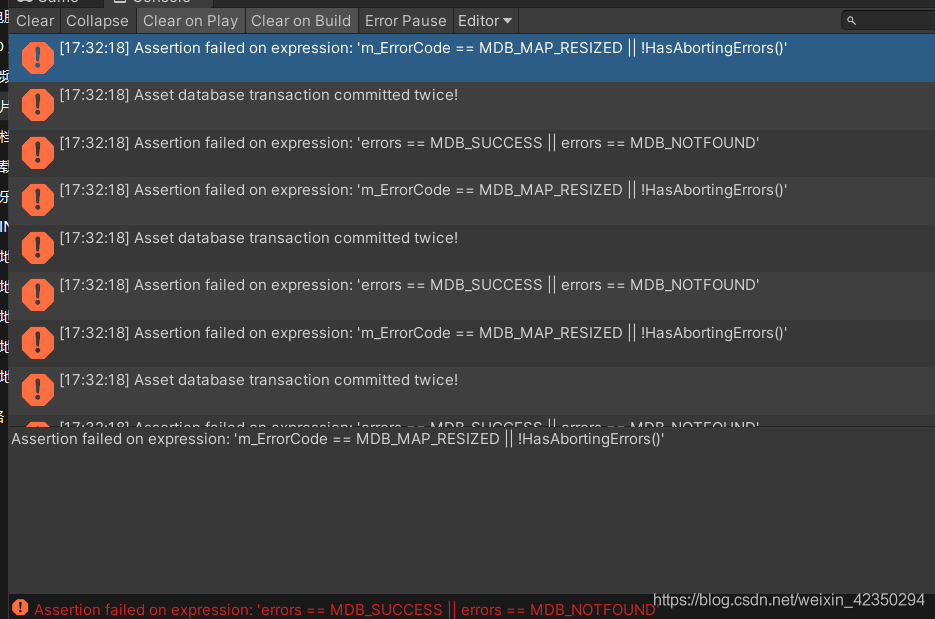 is shown in the figure
Error: “The method getContextPath() from the type HttpServletRequest refers to the missing type String”
Solution: See if the project’s jre is different from your local name (the jre version or the name is different will cause this problem).
Specific operation:
1. Right-click the project-Build Path-Configure Build Path, under the Libraries option, you will find an error jre Libraries, remove it.
2. Then right-click the project-Build Path-Add Library, select JRE System Library, select Workspace defaulr JRE (jdk1.6) (the JDK has been successfully installed and configured before), and then Finish.
Note: For your own experience, you must also check whether the environment variable configuration is correct, and then restart Eclipse and recompile the program clear.