[Solved] Opencv3. X fatal error: opencv2/nonfree/nonfree.hpp: there is no such file or directory

When SIFT algorithm is used for matching, an error is reported during compilation:

fatal error: opencv2/nonfree/nonfree.hpp: Not having that file or directory
#include <opencv2/nonfree/nonfree.hpp>

When you go online, you basically say to download opencv nonfree:

sudo apt-get update
sudo add-apt-repository --yes ppa:xqms/opencv-nonfree
sudo apt-get update
sudo apt-get install libopencv-nonfree-dev

As a result, a new error is reported when the second instruction is run:

sudo add-apt-repository --yes ppa:xqms/opencv-nonfree
Cannot add PPA: 'ppa:~xqms/ubuntu/opencv-nonfree'.
ERROR: '~xqms' user or team does not exist.

After careful review, it is found that the opencv2. X version is still very good to install under the Ubuntu system. You only need to install it through the above instructions

opencv-3.4.0/opencv_contrib-3.4.0/modules/xfeatures2d/include/opencv2/xfeatures2d/nonfree.hpp

Put #include < opencv2/nonfree/nonfree.hpp> Change to absolute path and solve it.

[Solved] Error: [email protected]: wrong number of arguments (given 1, expected 0)

First, let’s talk about the problems I encountered. Brew install & lt; formula> Error reporting:

(venv_mac)  haypin@HaypinsMBP  /usr/local/Cellar  brew install cmake
Error: [email protected]: wrong number of arguments (given 1, expected 0)

Even if I quit the previous virtual environment, I opened the debugging information and found:

(venv_mac)  ✘ haypin@HaypinsMBP  /usr/local/Cellar  brew install --debug cmake
/usr/local/Homebrew/Library/Homebrew/brew.rb (Formulary::FormulaLoader): loading /usr/local/Homebrew/Library/Taps/homebrew/homebrew-core/Formula/sphinx-doc.rb
/usr/local/Homebrew/Library/Homebrew/brew.rb (Formulary::FormulaLoader): loading /usr/local/Homebrew/Library/Taps/homebrew/homebrew-core/Formula/[email protected]
Error: [email protected]: wrong number of arguments (given 1, expected 0)

Executable/usr/local/homebrew/library/homebrew/brew.rb (formulary:: formulaloader): always loading/usr/local/homebrew/library/taps/homebrew/homebrew core/formula/ [email protected] , which reports an error Python 3.9 parameter transfer error.

It is said on the Internet that brew install cmake can solve the problem, but I still report this error on the premise that cmake has been installed. There is no way but to reinstall homebrew and hope for a new homebrew core/ [email protected] It can be executed normally

(venv_mac)  ✘ haypin@HaypinsMBP  /usr/local/Cellar  /usr/bin/ruby -e "$(curl -fsSL https://raw.githubusercontent.com/Homebrew/install/master/uninstall)"
Warning: The Ruby Homebrew uninstaller is now deprecated and has been rewritten in
Bash. Please migrate to the following command:
  /bin/bash -c "$(curl -fsSL https://raw.githubusercontent.com/Homebrew/install/HEAD/uninstall.sh)"

^C

It is found that the script for uninstalling homebrew has expired. It is recommended to use:

/bin/bash -c “$(curl -fsSL https://raw.githubusercontent.com/Homebrew/install/HEAD/uninstall.sh )”

Then use this:

(venv_mac)  ✘ haypin@HaypinsMBP  /usr/local/Cellar  /bin/bash -c "$(curl -fsSL https://raw.githubusercontent.com/Homebrew/install/HEAD/uninstall.sh)"
Warning: This script will remove:
/Users/haypin/Library/Caches/Homebrew/
/Users/haypin/Library/Logs/Homebrew/
/usr/local/Caskroom/
/usr/local/Cellar/
/usr/local/bin/brew -> /usr/local/bin/brew
Are you sure you want to uninstall Homebrew?This will remove your installed packages! [y/N] y
==> Removing Homebrew installation...
Warning: Failed to delete /usr/local/Caskroom
rm: /usr/local/Caskroom: Permission denied
Warning: Failed to delete /usr/local/Cellar
rm: /usr/local/Cellar: Permission denied
==> Removing empty directories...
==> /usr/bin/sudo /usr/bin/find /usr/local/bin /usr/local/etc /usr/local/include /usr/local/lib /usr/local/opt /usr/local/sbin /usr/local/share /usr/local/var /usr/local/Caskroom /usr/local/Cellar /usr/local/Homebrew /usr/local/Frameworks -name .DS_Store -delete
==> /usr/bin/sudo /usr/bin/find /usr/local/bin /usr/local/etc /usr/local/include /usr/local/lib /usr/local/opt /usr/local/sbin /usr/local/share /usr/local/var /usr/local/Caskroom /usr/local/Cellar /usr/local/Homebrew /usr/local/Frameworks -depth -type d -empty -exec rmdir {} ;
==> Homebrew uninstalled!
The following possible Homebrew files were not deleted:
/usr/local/.com.apple.installer.keep
/usr/local/Frameworks/
/usr/local/Homebrew/
/usr/local/bin/
/usr/local/etc/
/usr/local/go/
/usr/local/include/
/usr/local/lib/
/usr/local/mysql -> /usr/local/mysql
/usr/local/mysql-8.0.21-macos10.15-x86_64/
/usr/local/opt/
/usr/local/sbin/
/usr/local/share/
/usr/local/var/
You may wish to remove them yourself.

I didn’t use sudo, so/usr/local/cashroom and/usr/local/cell were not deleted. I forgot that CWD was in/usr/local/cell. Finally, I prompted that a possible homebrw file had not been deleted, so I deleted it manually:

(venv_mac)  ✘ haypin@HaypinsMBP  /usr/local  sudo rm -r Homebrew

Then reinstall homebrew according to the latest installation script on the official website:

/bin/bash -c "$(curl -fsSL https://raw.githubusercontent.com/Homebrew/install/HEAD/install.sh)"

This is the installation script of the official website. It uses foreign sources. The download speed is very slow and may fail. Just execute it a few more times. The domestic sources are very unfriendly when upgrading brew later. The error I reported in Python 3.9 this time is homebrew 2.4.9. Even if brew update is still 2.4.9, it will not be upgraded to the latest 3.2.0, so although slow down, I still want to use foreign sources.

Zshrc reports an error after changing the Tsinghua source:

(venv_mac)  haypin@HaypinsMBP  ~/cmake_tutorial  source ~/.zshrc
compinit:503: no such file or directory: /usr/local/share/zsh/site-functions/_brew_cask


Then I found that the cmake official website has a DMG installation package that can be installed to/applications, so I downloaded and installed it from the cmake official website. If there is a need to upgrade later, I will directly the whole RM – R  / Applications/cmake.app and then download the latest cmake-3.21.0-macos-universal.dmg installation. Of course, add the path/applications/cmake.app/contents/bin/ to the path.

I was frightened by the mistake reported by the brew install cmake. In the future, the software that I can download from the official website will go to the official website.
[Solved] Conversion not supported for type java.time.LocalDateTime

Conversion not supported for type java.time.LocalDateTime

After the springboot is started, use the postman access path to prompt the conversion not supported for type java.time.localdatetime error. Check the information on the Internet,

In the entity entity class, the localdatetime of the java8 feature requires that the MySQL connector java version should not be lower than 5.1.37, and the early POM file can run normally after being modified to version 5.3.7

<dependency>
            <groupId>org.springframework</groupId>
            <artifactId>spring-tx</artifactId>
            <version>5.3.7</version>
        </dependency>

Docker Run ‘echo core > /proc/sys/kernel/core_pattern‘ Error

1、 Background

In the previous article, the research group needs to encapsulate AFL as a web API with docker in order to make a visual display of AFL on the web side. When the script is redeployed, the AFL boot fails when calling AFL for fuzzing. Because before executing AFL fuzzy , if the system is configured to send core dump file (core) notification to external programs, the delay between sending crash information to fuzzer will increase, and the crash may be falsely reported as timeout. So you have to modify the core temporarily_ Pattern file, as follows:

echo core > /proc/sys/kernel/core_pattern

However, an error occurs when executing the above command in the docker container:

bash: /proc/sys/kernel/core_pattern: Read-only file system

Core_ Pattern is a system read-only file and cannot be modified

2、 Doubt

When docker is executed, the root user executes various commands internally. Why can’t you change the files with read-only permission?With this question, baidu found it again and again, but it didn’t find one. Therefore, it checked a machine turned post, which is also ambiguous.

Since Baidu can’t, then Google. After checking for two minutes, I found a blog of compatriots across the Strait and found a solution.

3、 Solution

Direct code:

# Add the --privileged parameter when building the container
docker run -idt -p xx:xx --privileged afl-api:0.0.3

As with the above command, the problem can be solved by adding an additional -- privileged parameter when building the container.

4、 Cause

About version 0.6, privileged was introduced into docker
with this parameter, the root in the container has real root permissions
otherwise, the root in the container is only an external ordinary user permission
with the container started by privileged, you can see many devices on the host and execute mount
it even allows you to start the docker container in the docker container

That is, the container with the -- privileged parameter can really execute root permission.

[Solved] Canoe CAPL Error: “the test module is not assigned or invalid”

The specific reason is unknown

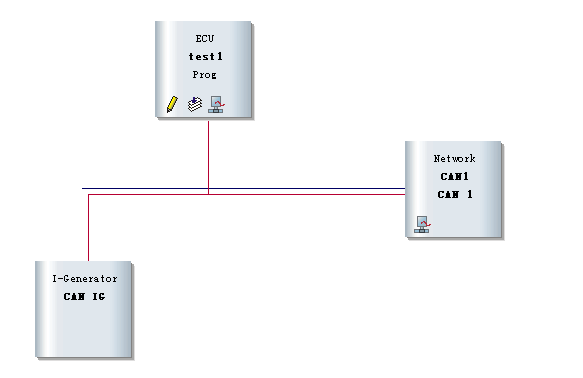
When using canoe’s CAPL function, in the can network diagram of simulation setup:

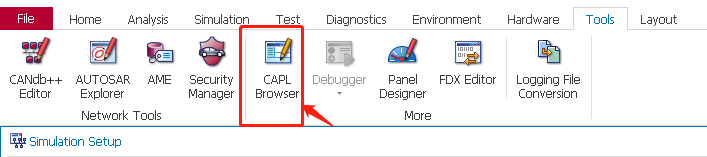
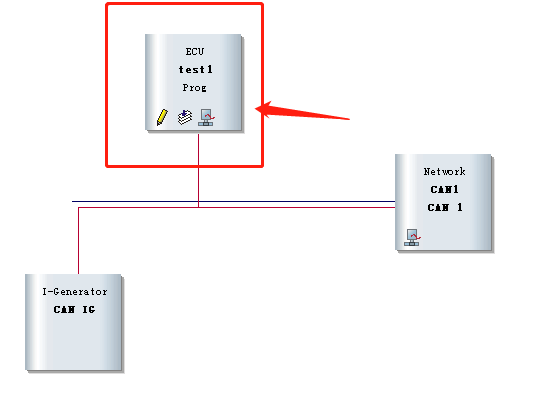
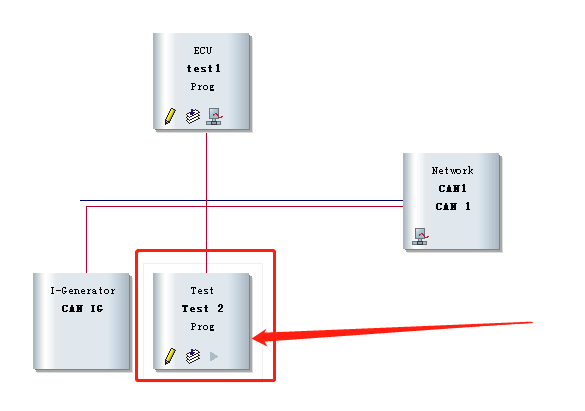
right click on the connection to add “insert CAPL test module”, as shown in the red box below, click “pencil”, open the CAPL editing interface, compile and run, and find an error: “the test module is not assigned or invalid”


Solution:

Create a new CAPL file

as shown in the figure below, right-click to add “insert network node”

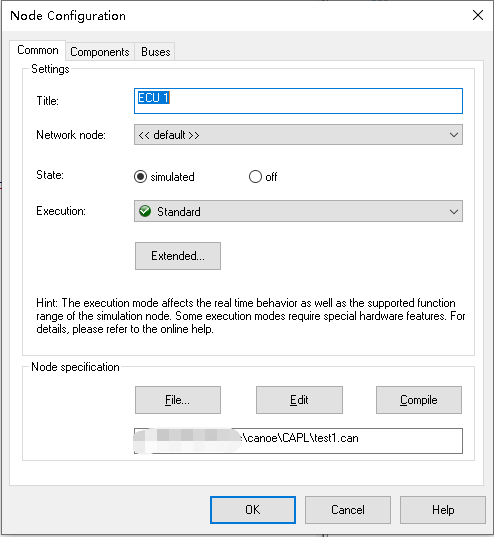
right-click test1, and click “configuration…”:
load your new. Can file

compile, run and test OK, and no more errors will be reported!

If you have any friends who know the reason, please reply in the comment area. Thank you first!!!

[Solved] ValueError: Connection error, and we cannot find the requested files in the cached path…

error:

self.tokenizer = CamembertTokenizer.from_pretrained(“camembert-base”)
resolved_vocab_files[file_id] = cached_path(
output_path = get_from_cache(
raise ValueError(
ValueError: Connection error, and we cannot find the requested files in the cached path. Please try again or make sure your Internet connection is on.

Solution.
When running the command line type

TRANSFORMERS_OFFLINE=1  python test.py
sh file is:
TRANSFORMERS_OFFLINE=1  \ python test.py

When running the code
Refer to the official website at
Reason for error reporting.

Firewalled environments
Some cloud and intranet setups have their GPU instances firewalled to the outside world, so if your script is trying to download model weights or datasets it will first hang and then timeout with an error message like:
ValueError: Connection error, and we cannot find the requested files in the cached path.
Please try again or make sure your Internet connection is on.
One possible solution in this situation is to use the “offline-mode”.

Solution: Offline mode

It’s possible to run 🤗 Transformers in a firewalled or a no-network environment.
Setting environment variable TRANSFORMERS_OFFLINE=1 will tell 🤗 Transformers to use local files only and will not try to look things up.
Most likely you may want to couple this with HF_DATASETS_OFFLINE=1 that performs the same for 🤗 Datasets if you’re using the latter.

Couldn‘t create temporary archive name. [How to Solve]

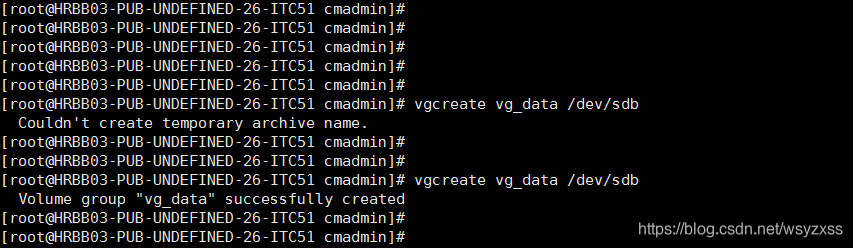
[root@HRBB03-PUB-UNDEFINED-26-ITC51 cmadmin]#
[root@HRBB03-PUB-UNDEFINED-26-ITC51 cmadmin]# vgcreate vg_data /dev/sdb
Couldn’t create temporary archive name.
[root@HRBB03-PUB-UNDEFINED-26-ITC51 cmadmin]#
[root@HRBB03-PUB-UNDEFINED-26-ITC51 cmadmin]#
[root@HRBB03-PUB-UNDEFINED-26-ITC51 cmadmin]# vgcreate vg_data /dev/sdb
Volume group “vg_data” successfully created
[root@HRBB03-PUB-UNDEFINED-26-ITC51 cmadmin]#

It could be that the , / root directory is running out of space and needs to be deleted.

[Solved] gitbook: node_modules\npm\node_modules\graceful-fs\polyfills.js:287

gitbook:node_modules\npm\node_modules\graceful-fs\polyfills.js:287


1. Exception
Error executing gitbook serve:

C:\Users\EB\AppData\Roaming\npm\node_modules\gitbook-cli\node_modules\npm\node_modules\graceful-fs\polyfills.js:287
      if (cb) cb.apply(this, arguments)
                 ^

Execute the gitbook serve procedure:

EB@DESKTOP-K45IA6V MINGW64 ~/Desktop/test1280-gitbook
$ gitbook serve
Live reload server started on port: 35729
Press CTRL+C to quit ...

C:\Users\EB\AppData\Roaming\npm\node_modules\gitbook-cli\node_modules\npm\node_modules\graceful-fs\polyfills.js:287
      if (cb) cb.apply(this, arguments)
                 ^

TypeError: cb.apply is not a function
    at C:\Users\EB\AppData\Roaming\npm\node_modules\gitbook-cli\node_modules\npm\node_modules\graceful-fs\polyfills.js:287:18
    at FSReqCallback.oncomplete (fs.js:169:5)

2. Environment

node

EB@DESKTOP-K45IA6V MINGW64 ~/Desktop/test1280-gitbook
$ node -v
v12.22.3

npm

EB@DESKTOP-K45IA6V MINGW64 ~/Desktop/test1280-gitbook
$ npm -v
6.14.13


3. Solution
My gitbook is installed globally: npm install -g gitbook-cli
According to the error message.
C:\Users\EB\AppData\Roaming\npm\node_modules\gitbook-cli\node_modules\npm\node_modules\graceful-fs\polyfills.js:287
if (cb) cb.apply(this, arguments)
I switch to the catalog.
C:\Users\EB\AppData\Roaming\npm\node_modules\gitbook-cli\node_modules\npm\node_modules\
Execute the command:

EB@DESKTOP-K45IA6V MINGW64 ~/AppData/Roaming/npm/node_modules/gitbook-cli/node_modules/npm/node_modules
$ npm install graceful-fs@latest --save
npm notice created a lockfile as package-lock.json. You should commit this file.
+ [email protected]
updated 1 package in 1.308s

Update succeeded (graceful FS).

Try again:

EB@DESKTOP-K45IA6V MINGW64 ~/Desktop/test1280-gitbook
$ gitbook serve
Live reload server started on port: 35729
Press CTRL+C to quit ...

info: 7 plugins are installed
info: loading plugin "livereload"... OK
info: loading plugin "highlight"... OK
info: loading plugin "search"... OK
info: loading plugin "lunr"... OK
info: loading plugin "sharing"... OK
info: loading plugin "fontsettings"... OK
info: loading plugin "theme-default"... OK
info: found 16 pages
info: found 14 asset files
_stream_readable.js:637
  if (state.pipesCount === 1) {
            ^

TypeError: Cannot read property 'pipesCount' of undefined
    at ReadStream.Readable.pipe (_stream_readable.js:637:13)
    at C:\Users\EB\.gitbook\versions\3.2.3\node_modules\cpr\lib\index.js:163:22
    at callback (C:\Users\EB\AppData\Roaming\npm\node_modules\gitbook-cli\node_modules\npm\node_modules\graceful-fs\polyfills.js:299:20)
    at FSReqCallback.oncomplete (fs.js:168:21)

Still report an error!

Final solution:

reference resources: https://blog.csdn.net/test1280/article/details/118961808

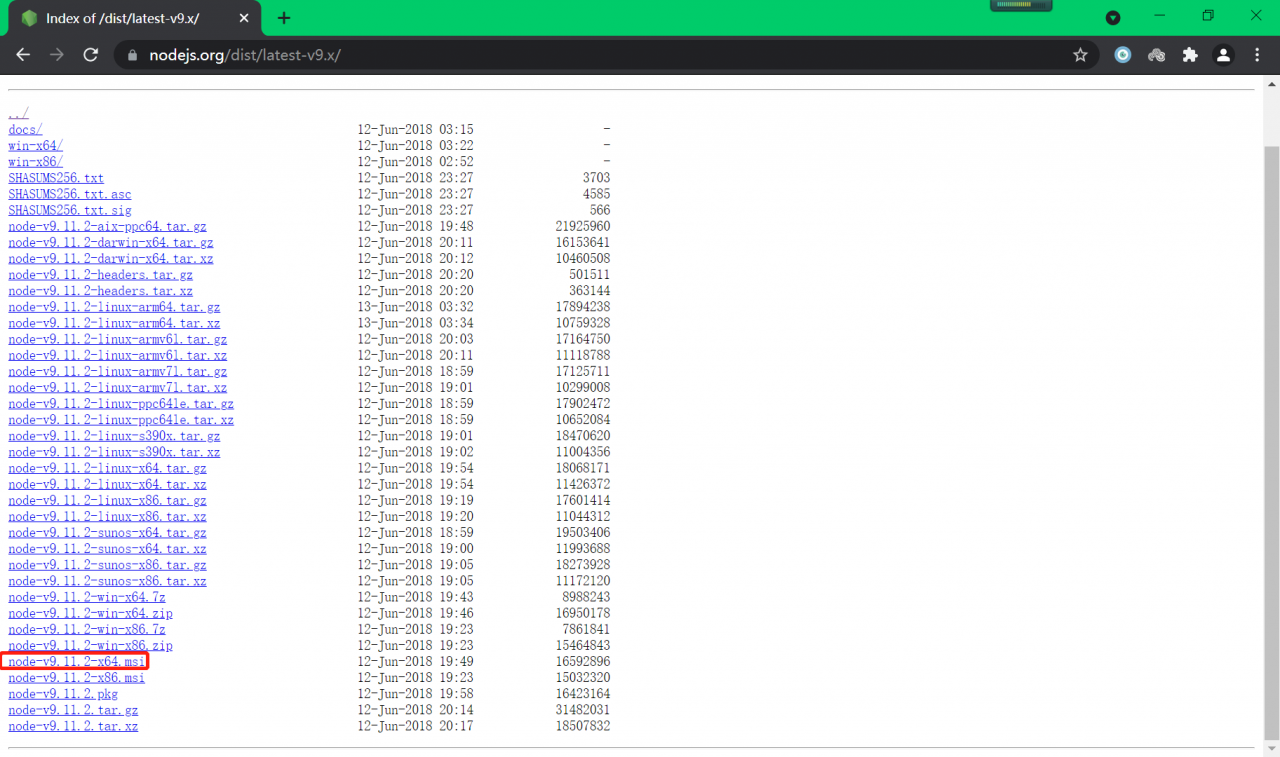
Downgrade nodejs version to: node-v9.11.2-x64.msi

Try again:

EB@DESKTOP-K45IA6V MINGW64 ~/Desktop/test1280-gitbook
$ gitbook init
info: create SUMMARY.md
info: initialization is finished

EB@DESKTOP-K45IA6V MINGW64 ~/Desktop/test1280-gitbook
$ gitbook serve
Live reload server started on port: 35729
Press CTRL+C to quit ...

info: 7 plugins are installed
info: loading plugin "livereload"... OK
info: loading plugin "highlight"... OK
info: loading plugin "search"... OK
info: loading plugin "lunr"... OK
info: loading plugin "sharing"... OK
info: loading plugin "fontsettings"... OK
info: loading plugin "theme-default"... OK
info: found 16 pages
info: found 14 asset files
info: >> generation finished with success in 1.2s !

Starting server ...
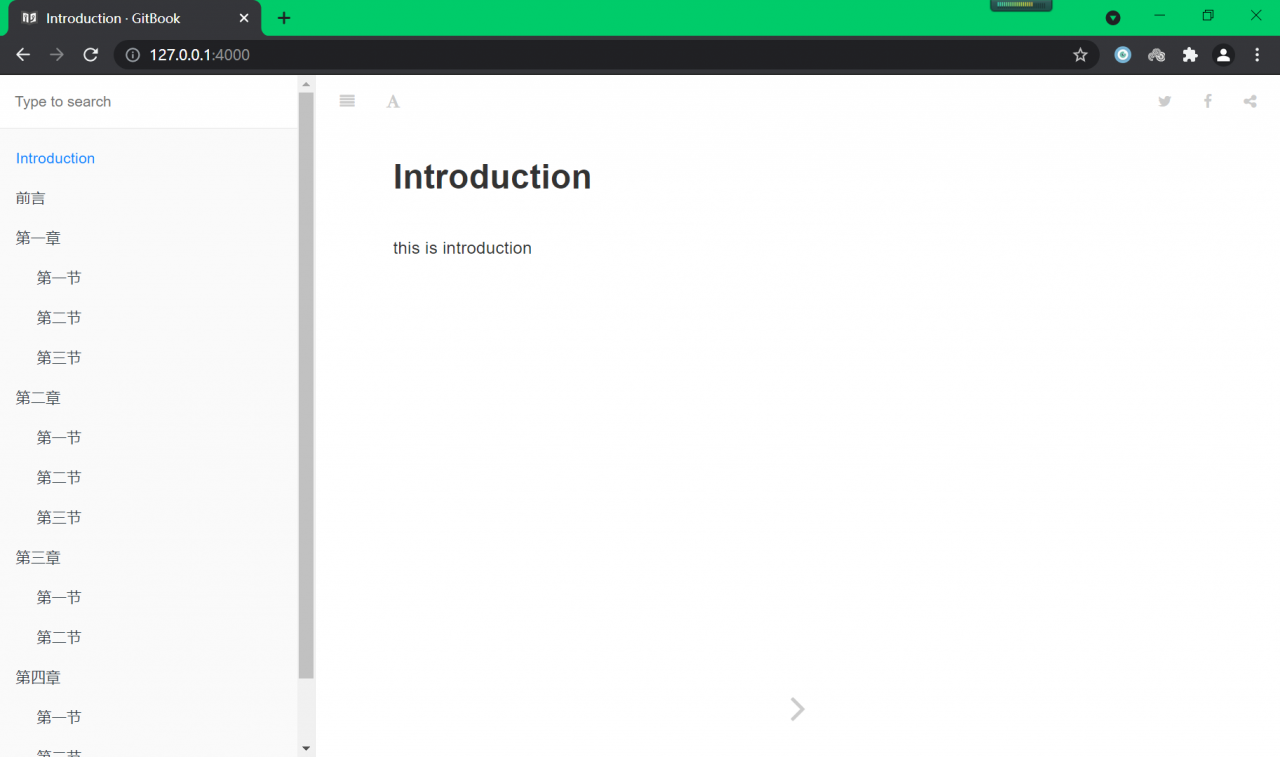
Serving book on http://localhost:4000

Successfully started:


5. Postscript

5.1.case1

node-v14.17.3-x64.msi

Gitbook init error:

EB@DESKTOP-K45IA6V MINGW64 ~/Desktop/test1280-gitbook
$ gitbook init
Installing GitBook 3.2.3
C:\Users\EB\AppData\Roaming\npm\node_modules\gitbook-cli\node_modules\npm\node_modules\graceful-fs\polyfills.js:287
      if (cb) cb.apply(this, arguments)
                 ^

TypeError: cb.apply is not a function
    at C:\Users\EB\AppData\Roaming\npm\node_modules\gitbook-cli\node_modules\npm\node_modules\graceful-fs\polyfills.js:287:18
    at FSReqCallback.oncomplete (fs.js:193:5)

Gitbook init error (or):

EB@DESKTOP-K45IA6V MINGW64 ~/Desktop/test1280-gitbook
$ gitbook init
warn: no summary file in this book
info: create README.md
info: create SUMMARY.md

TypeError [ERR_INVALID_ARG_TYPE]: The "data" argument must be of type string or an instance of Buffer, TypedArray, or DataView. Received an instance of Promise

5.2.case2

node-v12.22.3-x64.msi

gitbook server error:

EB@DESKTOP-K45IA6V MINGW64 ~/Desktop/test1280-gitbook
$ gitbook serve
Live reload server started on port: 35729
Press CTRL+C to quit ...

C:\Users\EB\AppData\Roaming\npm\node_modules\gitbook-cli\node_modules\npm\node_modules\graceful-fs\polyfills.js:287
      if (cb) cb.apply(this, arguments)
                 ^

TypeError: cb.apply is not a function
    at C:\Users\EB\AppData\Roaming\npm\node_modules\gitbook-cli\node_modules\npm\node_modules\graceful-fs\polyfills.js:287:18
    at FSReqCallback.oncomplete (fs.js:169:5)

Update graceful FS and still report an error:

EB@DESKTOP-K45IA6V MINGW64 ~/Desktop/test1280-gitbook
$ gitbook serve
Live reload server started on port: 35729
Press CTRL+C to quit ...

info: 7 plugins are installed
info: loading plugin "livereload"... OK
info: loading plugin "highlight"... OK
info: loading plugin "search"... OK
info: loading plugin "lunr"... OK
info: loading plugin "sharing"... OK
info: loading plugin "fontsettings"... OK
info: loading plugin "theme-default"... OK
info: found 16 pages
info: found 14 asset files
_stream_readable.js:637
  if (state.pipesCount === 1) {
            ^

TypeError: Cannot read property 'pipesCount' of undefined
    at ReadStream.Readable.pipe (_stream_readable.js:637:13)
    at C:\Users\EB\.gitbook\versions\3.2.3\node_modules\cpr\lib\index.js:163:22
    at callback (C:\Users\EB\AppData\Roaming\npm\node_modules\gitbook-cli\node_modules\npm\node_modules\graceful-fs\polyfills.js:299:20)
    at FSReqCallback.oncomplete (fs.js:168:21)

5.3. Case 3

Node-v9.11.2-x64.msi

Russian.

Mac Start IDEA Error: Cannot load JVM bundle…Value of IDEA_VM_OPTIONS is (null)

Open the package under the application. Double click MacOS/idea to open it. The following error message is displayed:

Last login: Wed Jul 21 10:25:35 on ttys000
/Applications/IntelliJ\ IDEA.app/Contents/MacOS/idea ; exit;
lyuwalle@lyuwalle ~ % /Applications/IntelliJ\ IDEA.app/Contents/MacOS/idea ; exit;
2021-07-21 10:25:44.347 idea[2312:81949] allVms required 1.8*,1.8+
2021-07-21 10:25:44.349 idea[2312:81953] Cannot load JVM bundle: Error Domain=NSCocoaErrorDomain Code=3585 "dlopen_preflight(/Applications/IntelliJ IDEA.app/Contents/jbr/Contents/MacOS/libjli.dylib): no suitable image found.  Did find:
	/Applications/IntelliJ IDEA.app/Contents/jbr/Contents/MacOS/libjli.dylib: mach-o, but wrong architecture
	/Applications/IntelliJ IDEA.app/Contents/jbr/Contents/MacOS/libjli.dylib: mach-o, but wrong architecture" UserInfo={NSLocalizedFailureReason=The bundle doesn’t contain a version for the current architecture., NSLocalizedRecoverySuggestion=Try installing a universal version of the bundle., NSFilePath=/Applications/IntelliJ IDEA.app/Contents/jbr/Contents/MacOS/libjli.dylib, NSDebugDescription=dlopen_preflight(/Applications/IntelliJ IDEA.app/Contents/jbr/Contents/MacOS/libjli.dylib): no suitable image found.  Did find:
	/Applications/IntelliJ IDEA.app/Contents/jbr/Contents/MacOS/libjli.dylib: mach-o, but wrong architecture
	/Applications/IntelliJ IDEA.app/Contents/jbr/Contents/MacOS/libjli.dylib: mach-o, but wrong architecture, NSBundlePath=/Applications/IntelliJ IDEA.app/Contents/jbr, NSLocalizedDescription=The bundle “OpenJDK 11.0.11” couldn’t be loaded because it doesn’t contain a version for the current architecture.}
2021-07-21 10:25:44.349 idea[2312:81953] Retrying as x86_64...
2021-07-21 10:25:44.390 idea[2312:81955] allVms required 1.8*,1.8+
2021-07-21 10:25:44.392 idea[2312:81968] Current Directory: /Users/lyuwalle
2021-07-21 10:25:44.392 idea[2312:81968] Value of IDEA_VM_OPTIONS is (null)
2021-07-21 10:25:44.392 idea[2312:81968] Processing VMOptions file at /Users/lyuwalle/Library/Application Support/JetBrains/IntelliJIdea2021.1/idea.vmoptions
2021-07-21 10:25:44.393 idea[2312:81968] Done
Improperly specified VM option 'SoftRefLRUPolicyMSPerMB=50Å'
2021-07-21 10:25:44.441 idea[2312:81968] JNI_CreateJavaVM (/Applications/IntelliJ IDEA.app/Contents/jbr) failed: -6
Saving session...
...copying shared history...
...saving history...truncating history files...
...completed.

The reason is that the idea.vmoptions file conflicts. Delete the idea.vmoptions (database library is a hidden folder) under the following folder
/users/XXXX/library/Application Support/JetBrains/intellijidea2020.1/idea.vmoptions