An error is reported when packaging Vue files: NPM err! missing script: build

View the scripts parameters in the file package. JSON
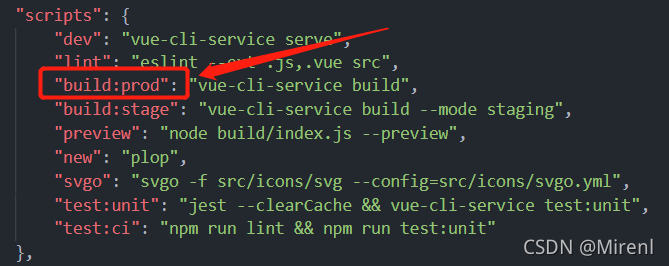
Therefore, the run command at this time should be
npm run build:prod --report
An error is reported when packaging Vue files: NPM err! missing script: build
View the scripts parameters in the file package. JSON
Therefore, the run command at this time should be
npm run build:prod --report
Android studio compilation project error: string index out of range 0
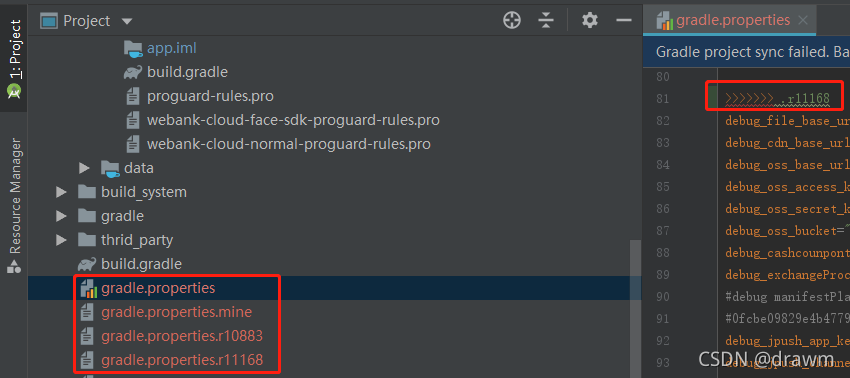
Compile the project after merging the SVN code. Android studio fails to compile the project. An error message appears: string index out of range 0
Cause: compilation fails due to conflicts caused by merging codes
solution:
Delete the other three files with the same name gradle.Properties , and there are no other three gradle.Properties files with the same name and different suffixes in the original project because of conflicts in the process of merging codes, and ->>> symbols that cannot be compiled, so delete ->>> symbol, build -- > Clear project or build -- > Rebuild project recompile the project, and the problem is solved.
clone warn: clone failed
Error Message:
4:07 PM Clone failed
4069 bytes of body are still expected
fetch-pack: unexpected disconnect while reading sideband packet
early EOF
fetch-pack: invalid index-pack output
Show details in console
Solution:
Modify git’s cache
git config –global http.postBuffer 1024M
Note: The exact value is set according to the actual download package size
java.lang.IllegalArgumentException: When allowCredentials is true, allowedOrigins cannot contain
the special value "*" since that cannot be set on the "Access-Control-Allow-Origin" response
header. To allow credentials to a set of origins, list them explicitly or consider using "allowedOriginPatterns" instead.
	at org.springframework.web.cors.CorsConfiguration.validateAllowCredentials(CorsConfiguration.java:460)

	Suppressed: reactor.core.publisher.FluxOnAssembly$OnAssemblyException:
Error has been observed at the following site(s):
	|_ checkpoint ⇢ org.springframework.cloud.gateway.filter.WeightCalculatorWebFilter [DefaultWebFilterChain][from www.fhadmin.cn]
The reason for the problem is that the new version of gateway cancels allowedorigins and the corresponding change is allowedOriginPatterns
The configuration is modified to:
#--------gateway config---fhadmin.cn-----
spring.cloud.gateway.discovery.locator.enabled=true
spring.cloud.gateway.discovery.locator.lower-case-service-id=true
#(java fhadmin.cn)
spring.cloud.gateway.globalcors.corsConfigurations.[/**].allowedOriginPatterns=*
spring.cloud.gateway.globalcors.corsConfigurations.[/**].allowedHeaders=*
spring.cloud.gateway.globalcors.corsConfigurations.[/**].allowedMethods=*
spring.cloud.gateway.globalcors.corsConfigurations.[/**].allowCredentials=trueSolution:
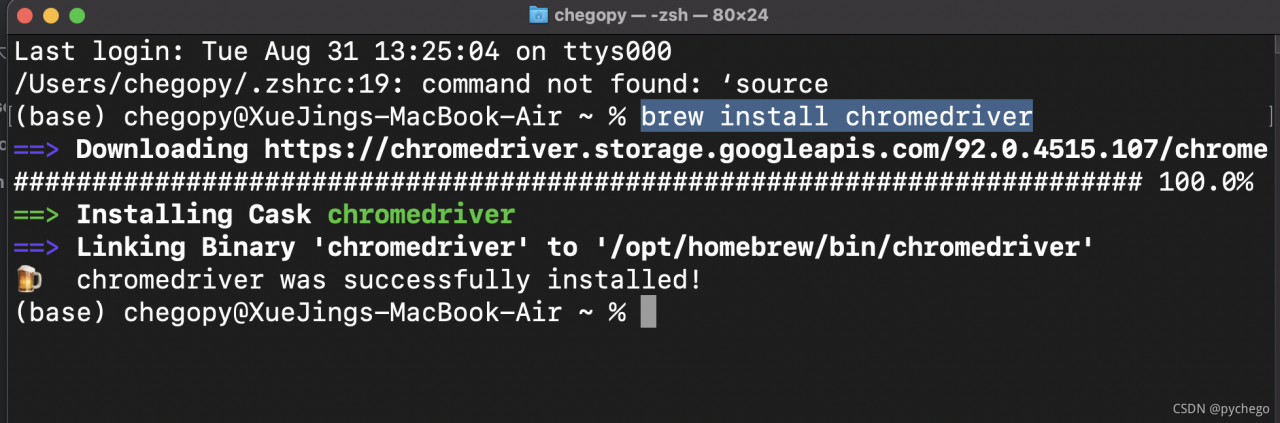
brew install chromedriver
└── Project
    ├── dir1
    │   ├── __init__.py
    │   └── module1.py
    │   └── module1_2.py
    ├── dir2
    │
    │   └── module2.py
    ├── file_a.py
    └── main.py
1. In main.py, you want to use from . import file_ Import error: attempted relative import with no known parent package
The error message means that an attempt was made to import using a relative path, but a known parent package could not be found. Generally speaking, this error occurs when you try to use relative path import in a running. Py file. The reason for the error is that the relative path import of Python actually needs to be implemented with the help of the parent package path of the current file, that is, by judging the path of a. Py file__ name__ And__ package__ Property to get information about the parent package. In a running. Py application file, there are:
if __name__ == '__main__':This introduces the main entry into the file. At this time, the file __ name__’s attribute is’ ‘__ main__’ And __ package__’s attribute is none. If the relative path is used in such a file, the interpreter cannot find any information about the parent package, so an error is reported.
Python seems to have a setting. The directory of the current executable file will not be treated as a package.
To solve the problem, you can add the following code to the file where the import code is located
print('__file__={0:<35} | __name__={1:<20} | __package__={2:<20}'.format(__file__,__name__,str(__package__))) The running result shows: __name__ = __main__ and __package__ = None, the python interpreter does not have any information about the package to which the module belongs, so it throws an exception that the parent package cannot be found.
solution:
Import directly from the module
from file_a import xxx
2. When I want to use from .. import file_a in module1.py, an error message is reported: attempted relative import beyond top-level package
The reason is the same as the above situation, that is, the current project directory is not a package, that is, the cheating setting of Python, and the current directory of the project entry will not be regarded as a package.
solution:
The content of file_a.py to be imported in module1.py:
from file_a import xxx
To import the content of module1_2.py in module1.py, you can use relative import:
from. import module1_2 as module12
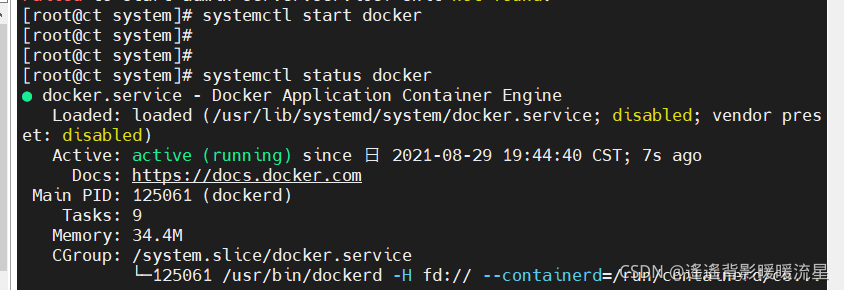
[root@ct system]# systemctl start docker
Warning: docker.service changed on disk. Run 'systemctl daemon-reload' to reload units.
Job for docker.service failed because the control process exited with error code. See "systemctl status docker.service" and "journalctl -xe" for details.
System ctl daemon-reload
System ctl start docker
Project scenario:
use less development file
Problem Description:
less installation error
 Failed to compile with 1 error
 Syntax Error: TypeError: this.getOptions is not a function
Cause analysis:
the current version does not match the less and less loader versions, and the less loader version needs to be replaced </ font>
Solution:
Install less version 4.1.1 and less loader version 7.3.0
<style scoped lang="less">
.wrapper{
	.header{...}
	.content{...}
}
</style>
I encountered this problem yesterday. First of all, I went online to inquire about these three solutions
1: Use the command fluent clean (some users report errors and solve them)
2 manually delete all files in the build/APP/APK and build/APP/outputs directories
3. There is also the official command to use fluent create
These three solutions failed to solve my error reporting. Then I suddenly had an idea that my outermost folder was a Chinese name. Sure enough, I solved the error reporting after I changed the Chinese name to the English name. I hope all developers will not encounter such a bug
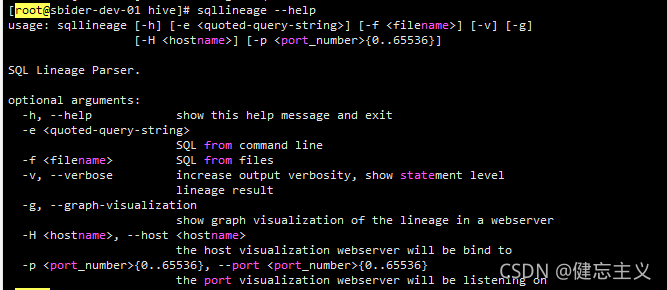
Python’s data kinship tool sqllineage
View the data kinship map according to the file
Note that -h must be connected to hostname, and an error will be reported when connecting to IP OSError: [Errno 99] Cannot assign requested address
sqllineage -g -H sbider-dev-01 -p 60000 -f ./ppn2/update-data/asset_sn_day_partition/asset_sn_day_partition.sqlHelp documentation
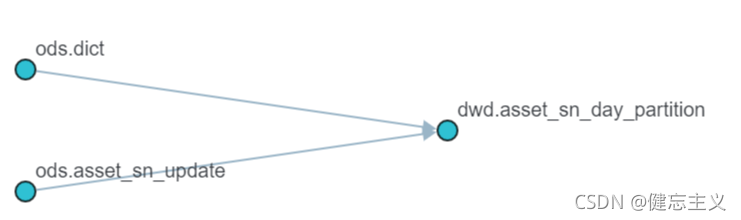
design sketch
Open the corresponding connection after execution, and you can see the following figure

the_tensor = tf.get_variable(
                initializer=tf.constant(0, shape=[batch_size, sequence_len]),
                name="a_name",
                dtype=tf.int32)
This assignment:
the_tensor[0][0].assign(0)
If the above error is reported,
it should:
the_tensor[0, 0].assign(0)
An error is reported when docker deletes an image. After docker images, the output is as follows:
REPOSITORY                             TAG                        IMAGE ID            CREATED             SIZE
nvidia/cuda                            9.0-base                   74f5aea45cf6        6 weeks ago         134MB
paddlepaddle/paddle                    1.1.0-gpu-cuda8.0-cudnn7   b3cd25f64a2a        8 weeks ago         2.76GB
hub.baidubce.com/paddlepaddle/paddle   1.1.0-gpu-cuda8.0-cudnn7   b3cd25f64a2a        8 weeks ago         2.76GB
paddlepaddle/paddle                    1.1.0-gpu-cuda9.0-cudnn7   0df4fe3ecea3        8 weeks ago         2.89GB
hub.baidubce.com/paddlepaddle/paddle   1.1.0-gpu-cuda9.0-cudnn7   0df4fe3ecea3
The first image directly docker RMI 74f5aea45cf6 will be deleted successfully. However, the latter two images appear in pairs. The direct docker RMI deletion fails. The error message is as follows:
Error response from daemon:
conflict: unable to delete b3cd25f64a2a (must be forced) - image
is referenced in multiple repositories
Solution:
First, specify the name instead of the image ID when docker RMI, and then execute docker RMI – f image IDJ:
docker rmi paddlepaddle/paddle:1.1.0-gpu-cuda8.0-cudnn7
docker rmi -f b3cd25f64a2a