K8s ❉ Error: cannot be handled as a** [How to Solve]

Error Messages:

[root@master ~]# kubectl create -f pod-nginx.yaml 
namespace/dev created
Error from server (BadRequest): error when creating "pod-nginx.yaml": pod in version "v1" cannot be handled as a Pod: no kind "pod" is registered for version "v1" in scheme "k8s.io/kubernetes/pkg/api/legacyscheme/scheme.go:30"


Solution:

Check the yaml file for the reason as below

apiVersion: v1
kind: pod  # Here it should be Pod, P should be capitalized
metadata:
    name: nginxpod
    namespace: dev
spec:
    containers:
    - name: nginx-containers
      image: nginx:latest

[Solved] ORB_SLAM3 Compile Error: opencv4.0 not found four

CMake Warning at CMakeLists.txt:33 (find_package):
  Could not find a configuration file for package "OpenCV" that is compatible
  with requested version "4.4".

  The following configuration files were considered but not accepted:

    /usr/share/OpenCV/OpenCVConfig.cmake, version: 3.2.0


CMake Error at CMakeLists.txt:35 (message):
  OpenCV > 4.4 not found.


-- Configuring incomplete, errors occurred!
See also "/home/tys/ORB_SLAM3/build/CMakeFiles/CMakeOutput.log".
make: *** No target specified and no makefile found. Stop.

The content of the error report is as above. I found a solution, and there is a solution available.

LIST(APPEND CMAKE_MODULE_PATH ${PROJECT_SOURCE_DIR}/cmake_modules)

find_package(OpenCV 4.4)
   if(NOT OpenCV_FOUND)
      message(FATAL_ERROR "OpenCV > 4.4 not found.")
   endif()

Find the above location in CMakeList.txt in the ORB_SLAM3 folder and modify

find_package(OpenCV 4.4), as shown in the following code.

LIST(APPEND CMAKE_MODULE_PATH ${PROJECT_SOURCE_DIR}/cmake_modules)

find_package(OpenCV 3 REQUIRED)
   if(NOT OpenCV_FOUND)
      message(FATAL_ERROR "OpenCV > 4.4 not found.")
   endif()

Normal, so that the fault can be solved.

[Solved] JAVA connect HBase program is stuck and does not report an error

Let me explain my situation first:

In the HBase shell interface, you can run it with commands, but not with Java API.

HBase and zookeeper configuration files are all OK.

During Java API operation, it is stuck and cannot be connected. Look at the HBase and zookeeper logs. There is no information available.

When the program runs for a long time, it reports an error (intercept a useful line):

java. net. UnknownHostException: can not resolve hadoop01,16020,164077701361

Maybe I can’t recognize Hadoop 01. What’s this?It’s my node hostname.

Here’s how to view it:

1 zkServer.SH check whether there are any leaders, followers, etc. in zookeeper.Mine (is it a zookeeper configuration problem)

2. Check the zookeeper log and enter the logs directory. One of mine is Hadoop 01 and the other is master (previous host name).

At this point, I probably know where the problem is

Possible

1 . Host name and configuration conflict

2 . HBase version data conflict (I have installed different versions)

Solution:

1. Close HBase and zookeeper

2 delete the data file of zookeeper (violence works miracles). Mine is in the data. Pay attention not to delete myid (all three nodes are deleted)

3 restart zookeeper and HBase

Run java code

Finish work

[Solved] Latex&VScode Error: I found no bibdata command//command//citation—while reading file*.aux

Latex& Vscode error I found no bibdata command// command// citation – while reading file * aux


Problem description

The template I use requires the compile order: Compile with: xelatex -> biber -> xelatex -> xelatex

Using various tutorials in the VScode plugin configuration json file are xelatex -> bibtex -> xelatex -> xelatex

In fact bibtex and biber are not a thing, refer to tex link

Resulting in the problem as shown
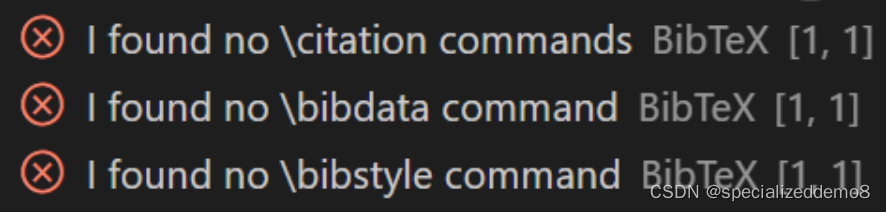
Solution:

Add the configuration for biber compilation to the setting.json configuration file in VScode’s Latex

 "latex-workshop.latex.tools": [
      
        {
            "name": "biber",
            "command": "biber",
            "args": [
                "%DOC%"
              
            ]
        }
    ],
 "latex-workshop.latex.recipes": [
     {
         "name": "xelatex -> biber -> xelatex*2",
         "tools": [
         "xelatex",
         "biber",
         "xelatex",
         "xelatex"
         ]

     }
 ],

Restart VScode and use xelatex -> biber -> xelatex*2 to compile successfully

Full Codes:

{
    "latex-workshop.latex.tools": [
        {
            "name": "latexmk",
            "command": "latexmk",
            "args": [
                "-synctex=1",
                "-interaction=nonstopmode",
                "-file-line-error",
                "-pdf",
                "%DOC%"
            ]
        },
        {
            "name": "xelatex",
            "command": "xelatex",
            "args": [
                "-synctex=1",
                "-interaction=nonstopmode",
                "-file-line-error",
                "%DOC%"
            ]
        },
        {
            "name": "pdflatex",
            "command": "pdflatex",
            "args": [
                "-synctex=1",
                "-interaction=nonstopmode",
                "-file-line-error",
                "%DOC%"
            ]
        },
        {
            "name": "bibtex",
            "command": "bibtex",
            // "command": "biber",
            "args": [
                // "%DOC%"
                "%DOCFILE%"
            ]
        },
        {
            "name": "biber",
            "command": "biber",
            // "command": "biber",
            "args": [
                "%DOC%"
              
            ]
        }
    ],
    "latex-workshop.latex.recipes": [
        {
            "name": "xelatex",
            "tools": ["xelatex"]
        },
        {
            "name": "latexmk",
            "tools": ["latexmk"]
        },
        {
            "name": "pdflatex -> bibtex",
            "tools": ["pdflatex","bibtex"]
        },
        // {
        //     "name": "pdflatex -> bibtex -> pdflatex*2",
        //     "tools": [
        //         "pdflatex",
        //         "bibtex",
        //         "pdflatex",
        //         "pdflatex"
        //     ]
        // },
        {
            "name": "xelatex -> bibtex -> xelatex*2",
            "tools": [
            "xelatex",
            "bibtex",
            "xelatex",
            "xelatex"
            ]

        },
        {
            "name": "xelatex -> biber -> xelatex*2",
            "tools": [
            "xelatex",
            "biber",
            "xelatex",
            "xelatex"
            ]

        }
    ],
    "latex-workshop.latex.clean.fileTypes": [
        "*.aux",
        "*.bbl",
        "*.blg",
        "*.idx",
        "*.ind",
        "*.lof",
        "*.lot",
        "*.out",
        "*.toc",
        "*.acn",
        "*.acr",
        "*.alg",
        "*.glg",
        "*.glo",
        "*.gls",
        "*.ist",
        "*.fls",
        "*.log",
        "*.fdb_latexmk"
    ],
    "latex-workshop.message.error.show": false,
    "latex-workshop.message.warning.show": false,

    "latex-workshop.showContextMenu": true, 
    "latex-workshop.intellisense.package.enabled": true, 
    "latex-workshop.latex.autoBuild.run": "onSave", 

}

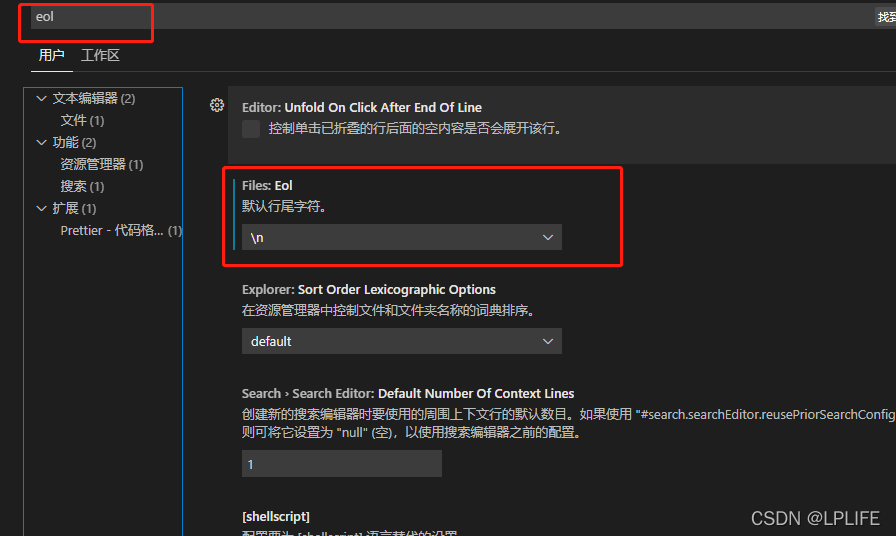
[Solved] VUE eslint Error: Expected linebreaks to be ‘LF‘ but found ‘CRLF

The reason for this: under Windows environment, GIT will automatically identify the current system environment when we pull the code. Change the original (Linux/Unix) line feed to the corresponding system. When we submit the code, it will be converted to the remote system environment (Linux/Unix), and then install eslint. LF is used by default, so this error will be reported

Line feed format in various environments
window: CRLF (\R \n or ^m \n)
MAC: Cr (\R or ^m)
linux/Unix: LF (\n)

Solution:

1. Manually cut the CRLF at the bottom of the vscode file code into LF, which can only make eslint not report errors for the time being. But in fact, when we pull down again, GIT will automatically convert all files to CRLF, and there will still be an error message

2. Rule configuration in eslint. Turn off line feed verification in the window environment and let it automatically convert CRLF to LF when submitting (it seems that we haven’t fundamentally solved this problem)

"linkbreak-style":["off","windows"]

3. When git pulls the code, let git pull according to the line feed (LF) of the remote code, and no longer convert the format according to the system. At the same time, configure the line feed character of vscode as LF. My approach is to configure the pull format of GIT, delete the whole local original warehouse, and then pull a code remotely again. This is OK. The command is as follows:

git config –global core. Autocrlf has three configurations (depending on the situation, I chose input)

True: automatically convert CRLF to LF when pushing, and CRLF when pulling (this configuration requires configuring eslint to turn off line break verification in window environment)

git config --global core.autocrlf true

Input: CRLF is automatically converted to LF when pushing, but LF is not automatically converted to CRLF when pulling (this configuration does not need to configure eslint, and the code format is consistent with that of the remote. I use this)

git config --global core.autocrlf input

False: no matter push or pull, the original file is what it is

git config --global core.autocrlf false

Other configurations:

1. Reject submission of files containing mixed line breaks

git config --global core.safecrlf true

2. Allow submission of files containing mixed line breaks

git config --global core.safecrlf true

3. Warn when submitting files containing mixed line breaks

git config --global core.safecrlf warn

vscode deployment:

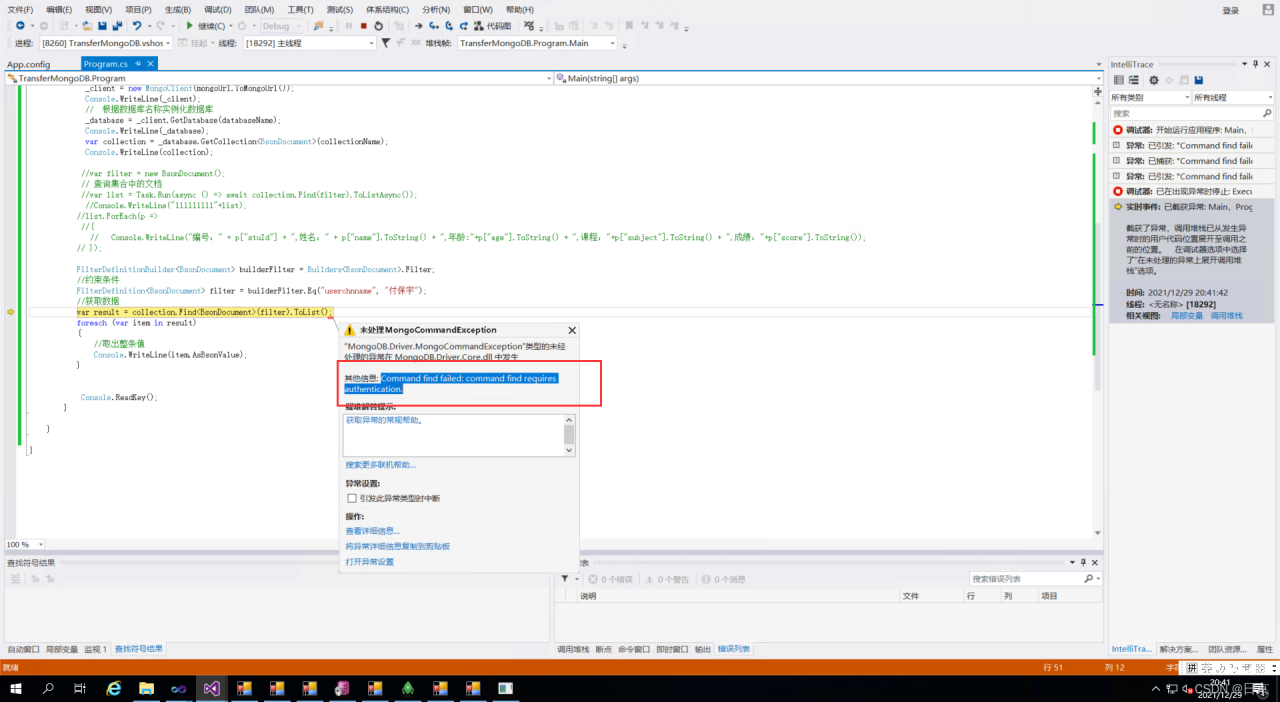
[Solved] C# Access Mongodb Database Error: command find failed: Command find requires authentication

The error reports are as follows:

error reason analysis:
literally means that the user name and password authentication are missing, so the database cannot be accessed
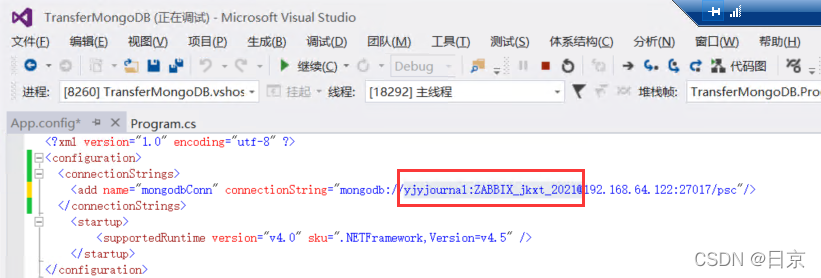
solution steps:
1 Add the user name and password to the configuration file connecting to mogondb

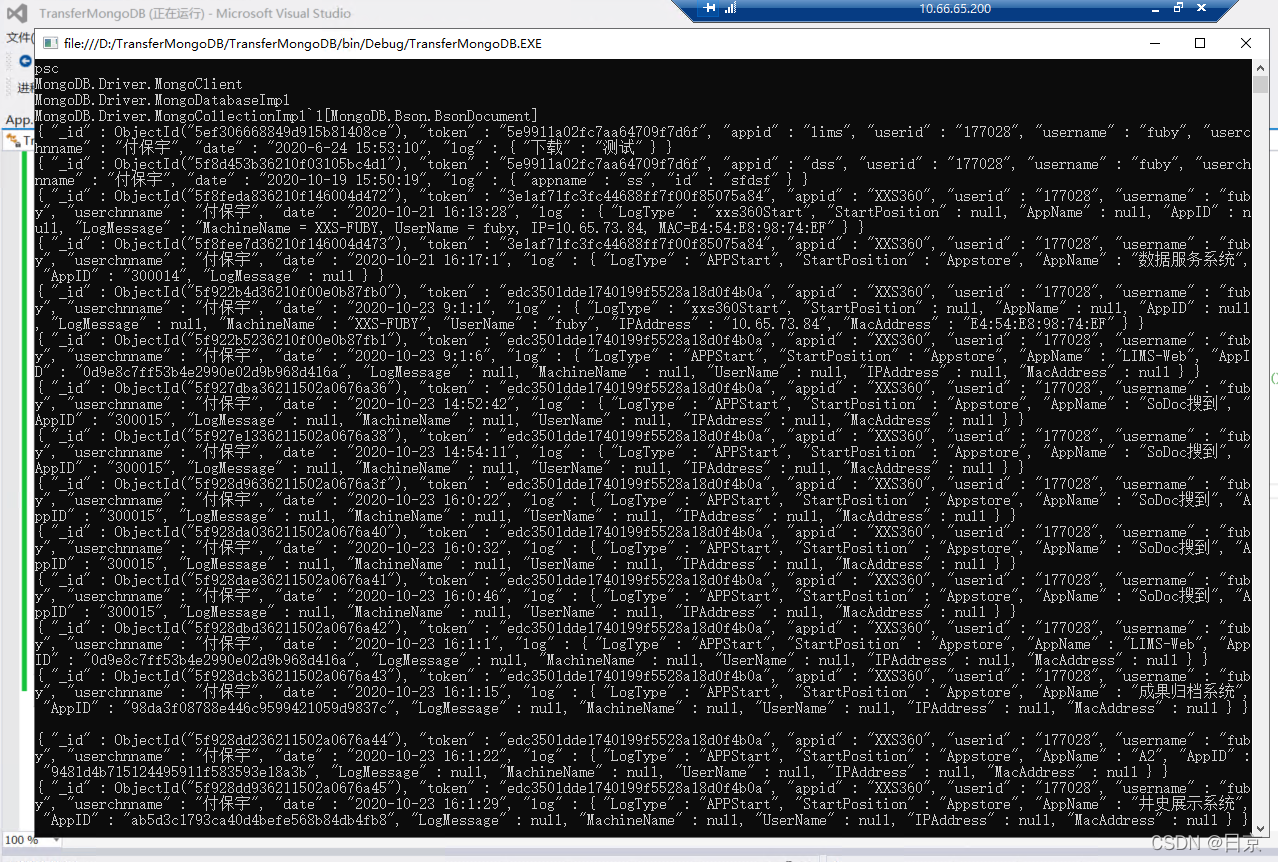
run the program again

over

[Solved] SpringBoot Error: org.springframework.http.converter.HttpMessageNotReadableException

SpringBoot Error: org.springframework.http.converter.HttpMessageNotReadableException


org.springframework.http.converter.HttpMessageNotReadableException:
Required request body is missing: * * * * *
at.org.springframework.web.servlet.mvc.method.annotation.RequestResponseBodyMethodProcessor.readWithMessageConverters(RequestResponseBodyMethodProcessor.java:161)
	

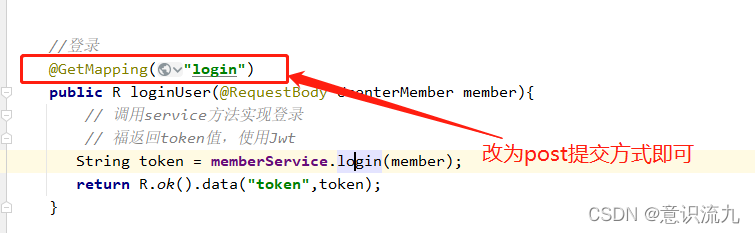
After careful investigation, I found that there are no errors in my other codes. Finally, the parameter submission method is wrong, because the @requestbody annotation is mainly used to accept JSON data in post and put methods, so @postmapping should be used here. It’s a perfect solution. I’m really getting farther and farther on the road of rookie

[Solved] selenium.common.exceptions.WebDriverException: Message: An unknown server-side error

Error code

from appium import webdriver
from selenium.webdriver.support.ui import WebDriverWait

desired_caps={}
desired_caps['platformName']='Android'
desired_caps['platformVersion']='7.1.2'
desired_caps['deviceName']='127.0.0.1:21503'

desired_caps['app']=r'D:\appium_app\dr.fone3.2.0.apk'
desired_caps['appPackage']='com.wondershare.drfone'
desired_caps['appActivity']='com.wondershare.drfone.ui.activity.WelcomeActivity'

# Port
driver=webdriver.Remote('http://localhost:4723/wd/hub',desired_caps)
driver.implicitly_wait(3)

driver.find_element_by_id('com.wondershare.drfone:id/btnBackup').click()

WebDriverWait(driver,15).until(lambda x:x.find_element_by_class_name('android.widget.Button'))
driver.find_element_by_class_name('android.widget.Button').click()

WebDriverWait(driver,8).until(lambda x:x.find_element_by_android_uiautomator('new UiSelector().text("Refresh")'))
driver.find_element_by_android_uiautomator('new UiSelector().text("Refresh")').click()


WebDriverWait(driver,8).until(lambda x:x.find_element_by_class_name('android.webkit.WebView'))
contexts=driver.contexts
print(contexts)

driver.switch_to.context('WEBVIEW_com.wondershare.drfone')
driver.find_element_by_id('email').send_keys('[email protected]')
driver.find_element_by_class_name('btn_send').click()

driver.switch_to.context('NATIVE_APP')
driver.find_element_by_class_name('android.widget.ImageButton').click

Error Messages:
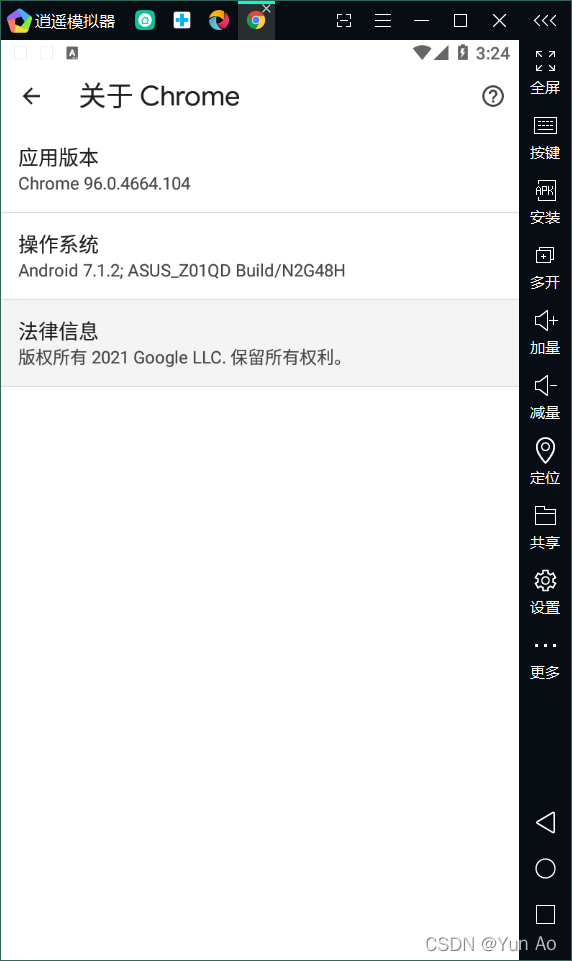
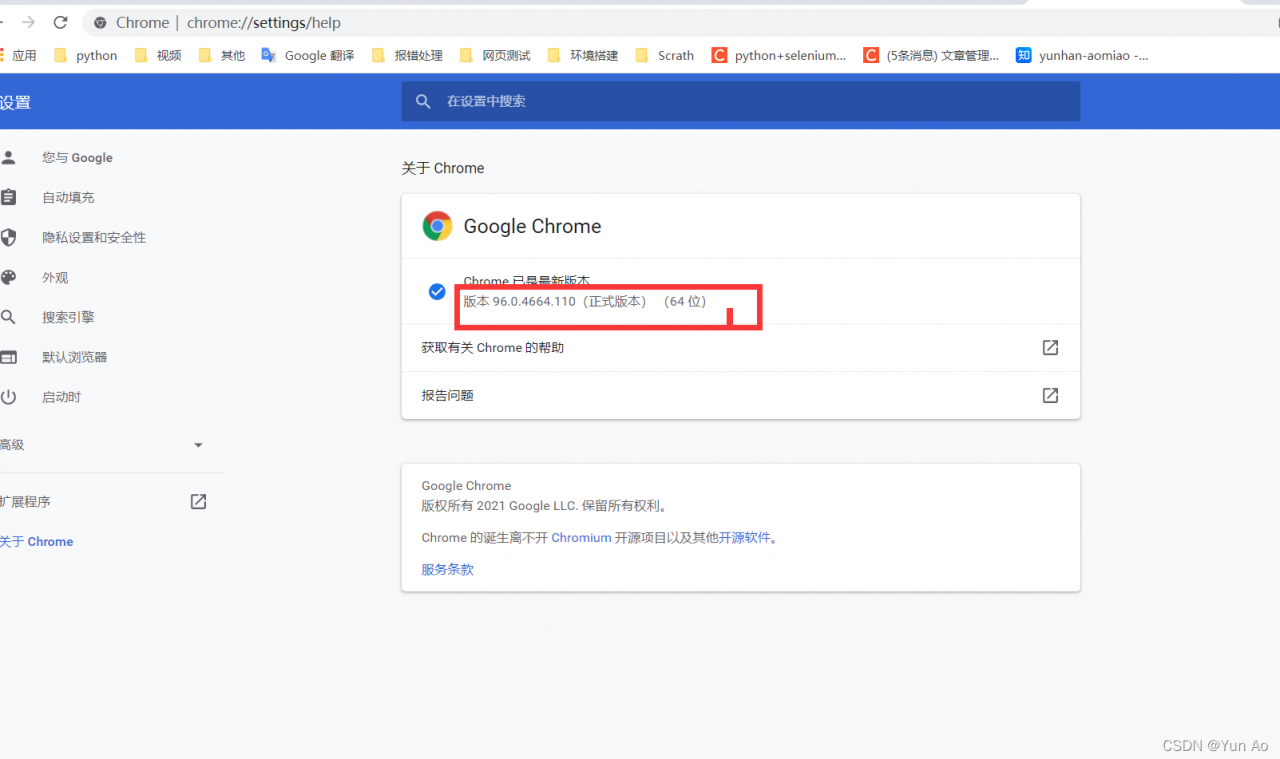
selenium.common.exceptions.WebDriverException: Message: An unknown server-side error occurred while processing the command. Original error: No Chromedriver found that can automate Chrome '68.0.3440'. You could also try to enable automated chromedrivers download server feature. See https://github.com/appium/appium/blob/master/docs/en/writing-running-appium/web/chromedriver.md for more details

Solution:

own local appium server without chromedriver.exe configured
Configure chromedriver.exe
Try to ensure that the emulator version and the PC version of the same download
## Replace or Save chromedriver.exe
Default path:
C:\Users\AppData\Local\Programs\Appium\resources\app\node_modules\appium\node_modules\appium-chromedriver\chromedriver\win Replace chromedrive to the original one.
My installation path
C:\Users\yunao\node_modules\appium-chromedriver\chromedriver\win

[Solved] swagger Docmentation Access Error: Illegal DefaultValue 1024 for parameter type integer, java.lang.NumberFormatException

Background error reporting problem log

2021-12-30 15:41:24.675  WARN [nio-9008-exec-1] [] i.s.m.p.AbstractSerializableParameter    [421] : Illegal DefaultValue 1024 for parameter type integer

java.lang.NumberFormatException: For input string: ""
	at java.lang.NumberFormatException.forInputString(NumberFormatException.java:65)
	at java.lang.Long.parseLong(Long.java:601)
	at java.lang.Long.valueOf(Long.java:803)
	at io.swagger.models.parameters.AbstractSerializableParameter.getExample(AbstractSerializableParameter.java:412)
	at sun.reflect.GeneratedMethodAccessor149.invoke(Unknown Source)
	at sun.reflect.DelegatingMethodAccessorImpl.invoke(DelegatingMethodAccessorImpl.java:43)
	at java.lang.reflect.Method.invoke(Method.java:498)
	at com.fasterxml.jackson.databind.ser.BeanPropertyWriter.serializeAsField(BeanPropertyWriter.java:689)
	at com.fasterxml.jackson.databind.ser.std.BeanSerializerBase.serializeFields(BeanSerializerBase.java:755)

Troubleshooting

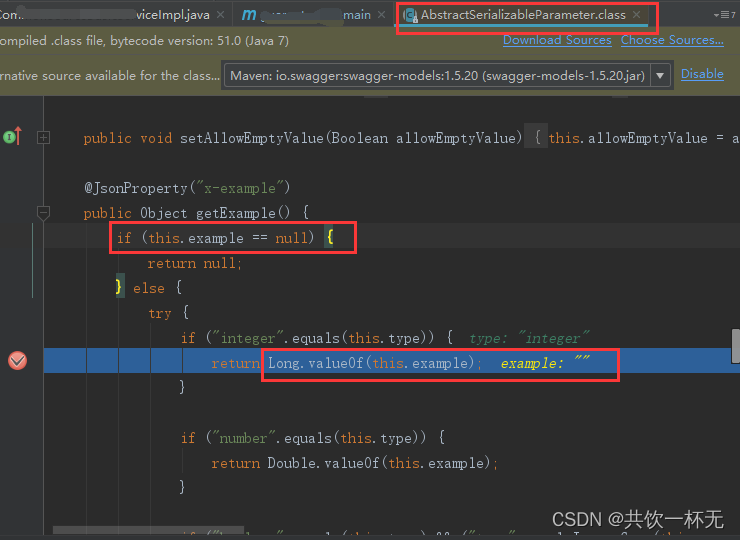
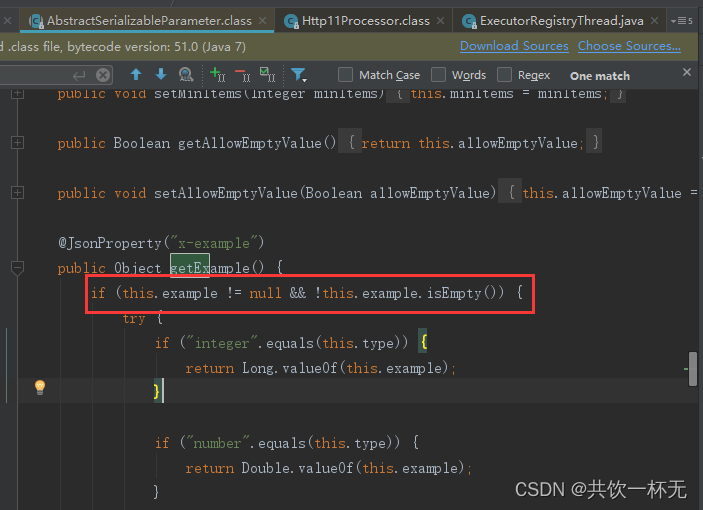
In abstractserializableparameter.getexample (abstractserializableparameter.java:412) break point debugging. You can find that the value of example is an empty string and execute long Valueof (this.example) will throw ‘Java.lang.numberformatexception’ exception

Solution:

1. modify source code

2. Download the source code and change the if (this.example = = null) judgment to if (this.example = = null | example.isempty())

3. adjust dependency (recommended)

4. Exclude swagger models of swagger2 and add swagger models with version 1.5.21

<!--  Illegal DefaultValue null for parameter type integer  -->
        <dependency>
            <groupId>io.swagger</groupId>
            <artifactId>swagger-models</artifactId>
            <version>1.5.21</version>
        </dependency>

        <dependency>
            <groupId>io.springfox</groupId>
            <artifactId>springfox-swagger2</artifactId>
            <version>2.10.5</version>
            <scope>compile</scope>
            <exclusions>
                <exclusion>
                    <groupId>io.swagger</groupId>
                    <artifactId>swagger-models</artifactId>
                </exclusion>
            </exclusions>
        </dependency>

After adjustment, you can see that the new version has modified the decision logic

after the above operations, no error will be reported when accessing the swagger document address.

[Solved] Flink jdbc Error: Access Denied for user ‘root‘@‘10.0.0.x‘ (using password: YES)

Error message:

2021-12-31 11:02:51.955 [Source: TableSourceScan(table=[[default_catalog, default_database, jdbc_source_table, project=[id]]], fields=[id]) -> Calc(select=[id, id AS id0, id AS id1]) -> Sink: Sink(table=[default_catalog.default_database.jdbc_upsert_sink_table], fields=[id, id0, id1]) (1/1)#1] WARN  org.apache.flink.runtime.taskmanager.Task - Source: TableSourceScan(table=[[default_catalog, default_database, jdbc_source_table, project=[id]]], fields=[id]) -> Calc(select=[id, id AS id0, id AS id1]) -> Sink: Sink(table=[default_catalog.default_database.jdbc_upsert_sink_table], fields=[id, id0, id1]) (1/1)#1 (85391b7c05a5282974f4da4cbb62f38e) switched from INITIALIZING to FAILED with failure cause: java.io.IOException: unable to open JDBC writer
	at org.apache.flink.connector.jdbc.internal.AbstractJdbcOutputFormat.open(AbstractJdbcOutputFormat.java:56)
	at org.apache.flink.connector.jdbc.internal.JdbcBatchingOutputFormat.open(JdbcBatchingOutputFormat.java:129)
	at org.apache.flink.connector.jdbc.internal.GenericJdbcSinkFunction.open(GenericJdbcSinkFunction.java:60)
	at org.apache.flink.api.common.functions.util.FunctionUtils.openFunction(FunctionUtils.java:34)
	at org.apache.flink.streaming.api.operators.AbstractUdfStreamOperator.open(AbstractUdfStreamOperator.java:102)
	at org.apache.flink.table.runtime.operators.sink.SinkOperator.open(SinkOperator.java:58)
	at org.apache.flink.streaming.runtime.tasks.OperatorChain.initializeStateAndOpenOperators(OperatorChain.java:442)
	at org.apache.flink.streaming.runtime.tasks.StreamTask.restoreGates(StreamTask.java:582)
	at org.apache.flink.streaming.runtime.tasks.StreamTaskActionExecutor$SynchronizedStreamTaskActionExecutor.call(StreamTaskActionExecutor.java:100)
	at org.apache.flink.streaming.runtime.tasks.StreamTask.executeRestore(StreamTask.java:562)
	at org.apache.flink.streaming.runtime.tasks.StreamTask.runWithCleanUpOnFail(StreamTask.java:647)
	at org.apache.flink.streaming.runtime.tasks.StreamTask.restore(StreamTask.java:537)
	at org.apache.flink.runtime.taskmanager.Task.doRun(Task.java:759)
	at org.apache.flink.runtime.taskmanager.Task.run(Task.java:566)
	at java.lang.Thread.run(Thread.java:748)
Caused by: java.sql.SQLException: Access denied for user 'root'@'10.0.0.23' (using password: YES)
	at com.mysql.cj.jdbc.exceptions.SQLError.createSQLException(SQLError.java:129)
	at com.mysql.cj.jdbc.exceptions.SQLError.createSQLException(SQLError.java:97)
	at com.mysql.cj.jdbc.exceptions.SQLExceptionsMapping.translateException(SQLExceptionsMapping.java:122)
	at com.mysql.cj.jdbc.ConnectionImpl.createNewIO(ConnectionImpl.java:836)
	at com.mysql.cj.jdbc.ConnectionImpl.<init>(ConnectionImpl.java:456)
	at com.mysql.cj.jdbc.ConnectionImpl.getInstance(ConnectionImpl.java:246)
	at com.mysql.cj.jdbc.NonRegisteringDriver.connect(NonRegisteringDriver.java:197)
	at org.apache.flink.connector.jdbc.internal.connection.SimpleJdbcConnectionProvider.getOrEstablishConnection(SimpleJdbcConnectionProvider.java:121)
	at org.apache.flink.connector.jdbc.internal.AbstractJdbcOutputFormat.open(AbstractJdbcOutputFormat.java:54)
	... 14 more

How to Solve:

The connector with parameter has incorrect connection information. The table field type in the database does not match the definition in the Flink SQL, resulting in table connection failure

[Solved] Django project locally Open Error: importerror: couldn’t import Django

There is a mature Django project. After it is opened locally, an error is reported: importerror: couldn’t import Django Are you sure it’s installed and available on your PYTHONPATH environment variable? Did you forget to activate a virtual environment?
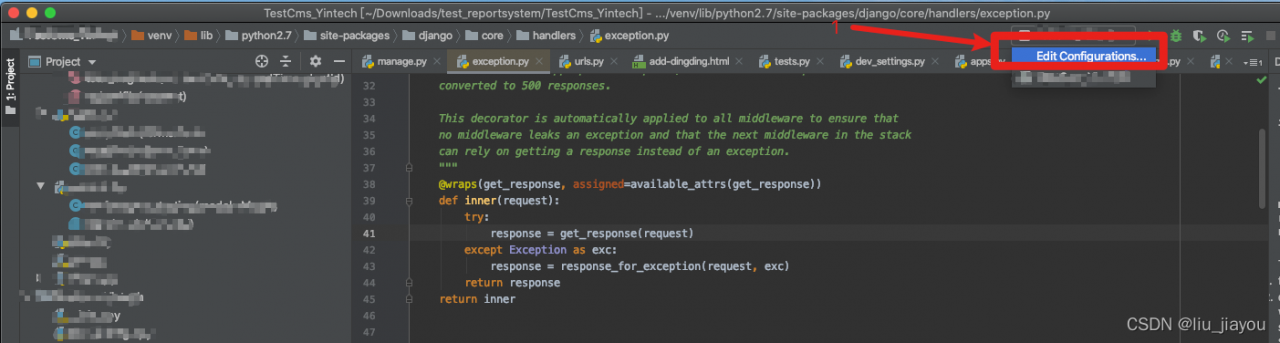
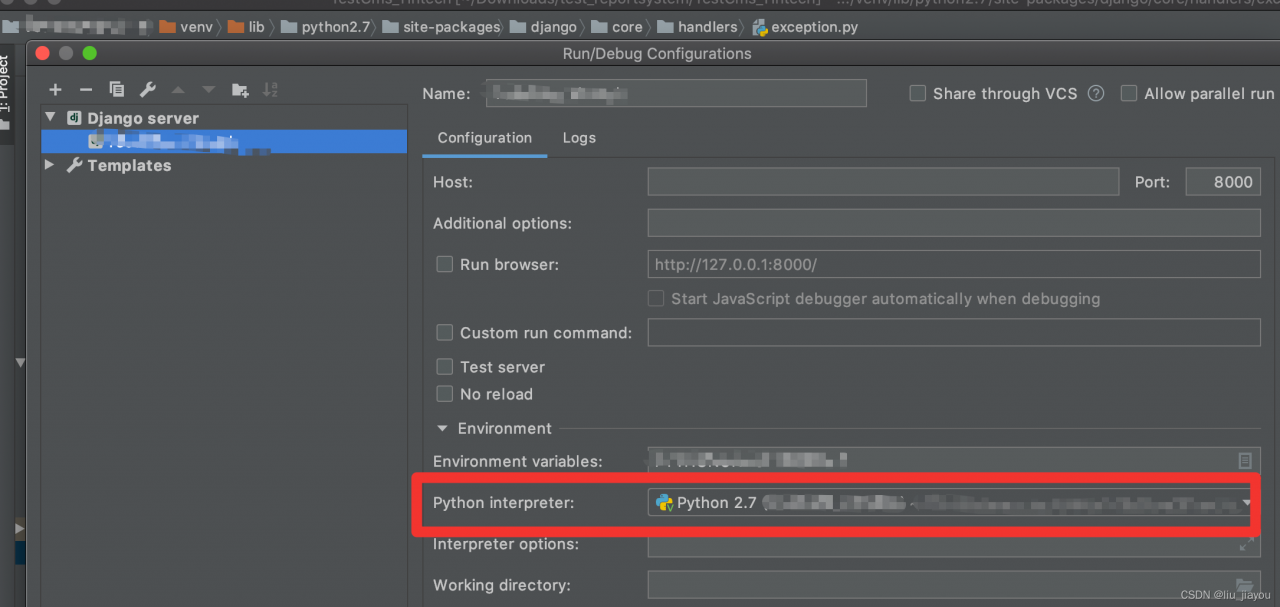
solution step 1: because this Django project uses python2.7. My local configuration environment variable is 3.7.7. After importing the Django project locally, the python compiler has been modified to 2.7

but an error is still reported after execution
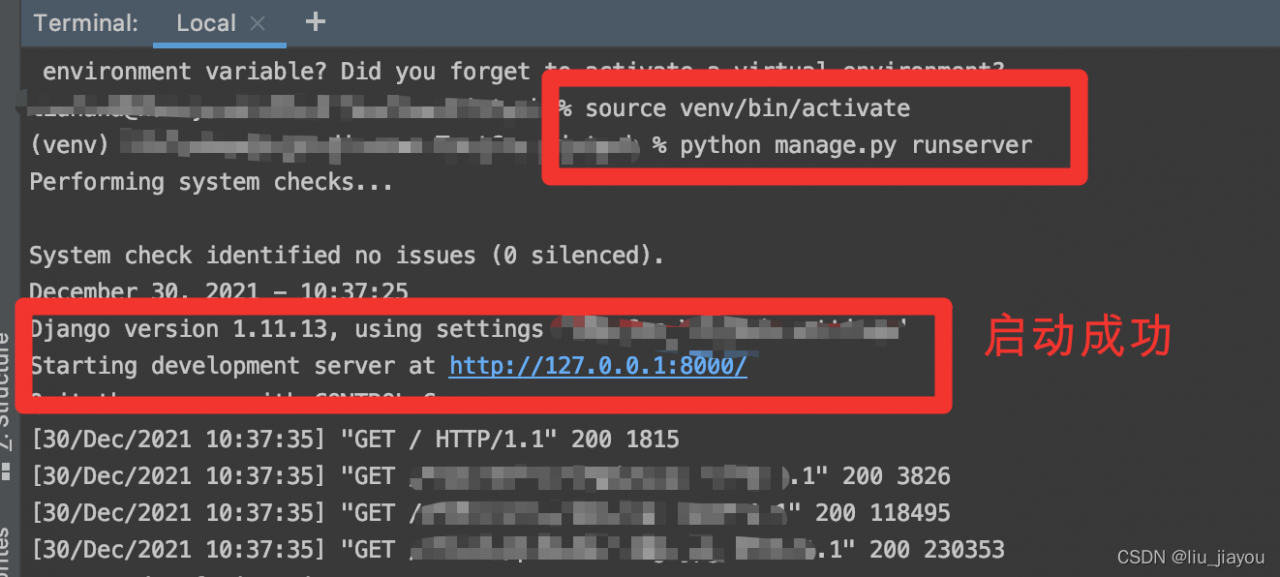
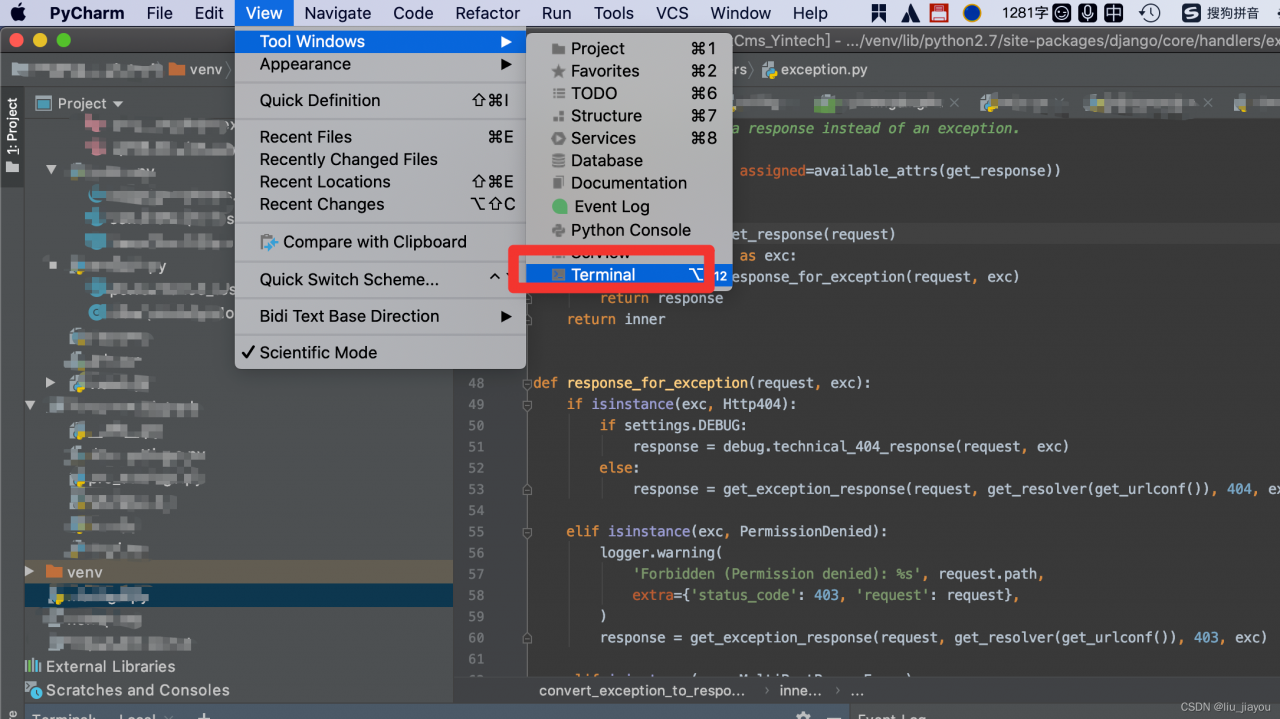
solution step 2: open the teminal terminal of pycharm

execute the command: source venv/bin/activate
start the Django project: Python manage Py runserver

the Django project was started successfully and the problem was solved perfectly.