The pygame.init() function, which must be called after the pygame module is imported and before you start using any of the functions provided by PyGame, you don’t have to know what this function does, just know that in order to work with pyGame functions, you must call it at the beginning. If you run into an error like Pygame.error: font not initialized, check to see if you forgot to call Pygame.init () in front of your program
The solution to the error of / etc / sudoers: syntax error in sudoer file under mac
In recent days, I tried to configure sudo for passwordless operation, which smashed the sudoers file and reported the following error
/etc/sudoers: syntax error near line 59 <<<
sudo: parse error in /etc/sudoers near line 59
sudo: no valid sudoers sources found, quitting
sudo: unable to initialize policy plugin
Search the Internet and jot down solutions
pkexec visudopkexec function is to execute the command as root, it doesn't seem to work on MAC, but ~ ~, I will update the solution later
MAC solution:
open /etc directory with folder, right-click -> Show introduction
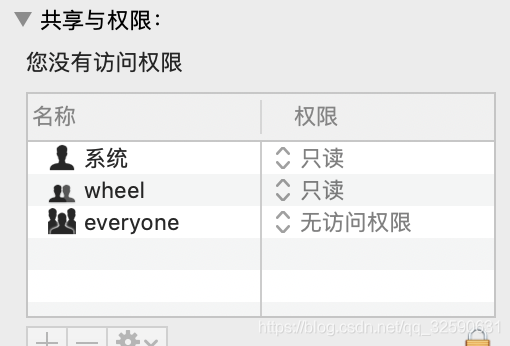
Undid the bottom right?”, and then change the everyone permission to read and write to be able to modify the sudoers file freely
How to Fix MySQL ERROR 1130 (HY000): Host ‘XXXX’ is not allowed to connect to this MySQL server
Environment: mysql5.7.11 + windows10 64-bit
Problem: When using mysql remote login command mysql — uroot — h192.168.1.102-p, ERROR mysql ERROR 1130 (HY000): Host ‘XXXX’ is not allowed to connect to this mysql server
The reason for the problem: For security reasons, the mysql server allows only local login to the database server by default.
Fix the problem: After you log in to mysql, change the “host” TAB in the “User” table in the “mysql” database, change the name from “localhost” to “%”, and restart mysql so that all remote machines can access it.
step 1: modify the mysql table
mysql -u root -pvmware
mysql> use mysql;
mysql> update user set host = ‘%’ where user = ‘root’;
mysql> flush privileges;
mysql> select host, user from user;
mysql> quit
Step 2: Restart mysql
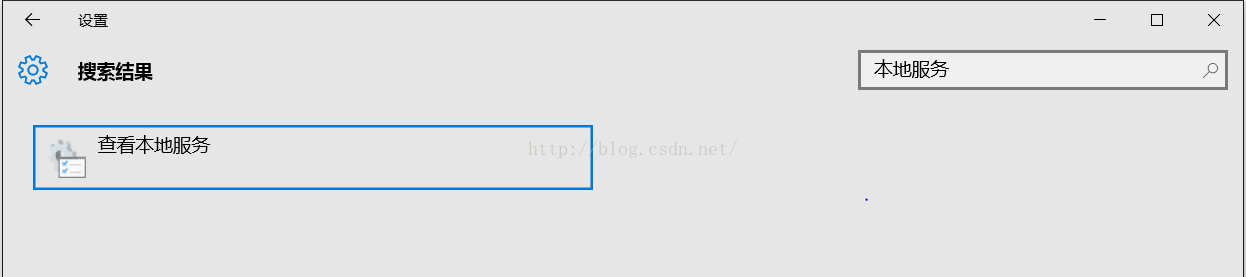
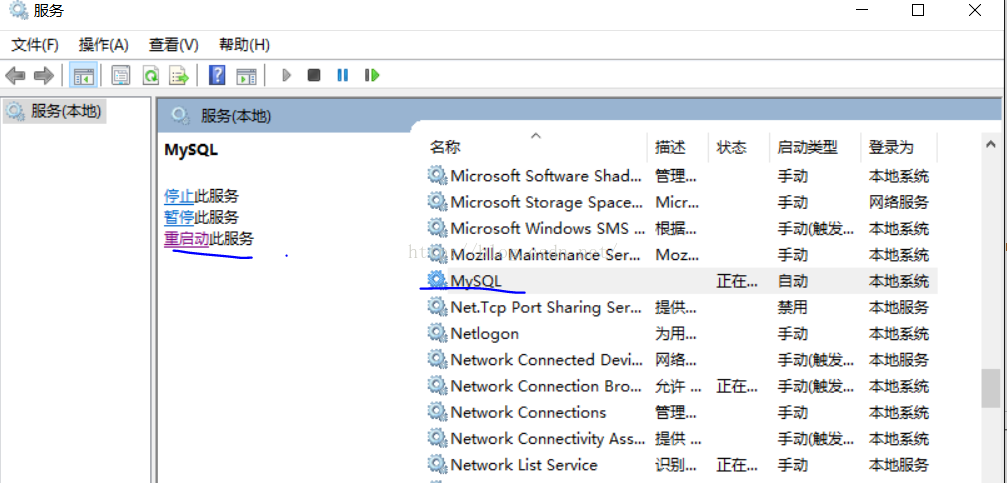
Method 1: Find “View Local Services” in Windows Settings, find mysql service, and restart mysql service
![]()
![]()
![]()
Method 2:
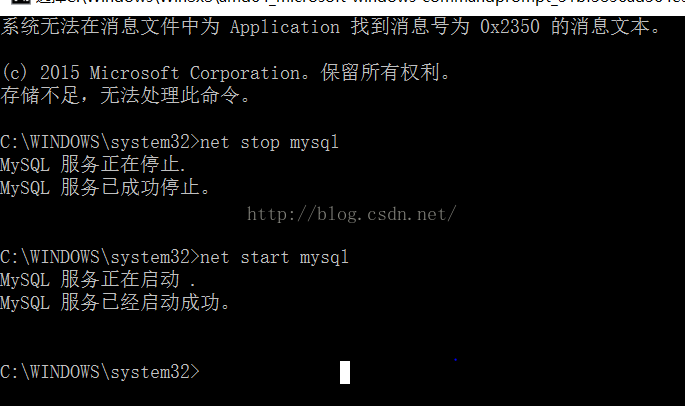
Win 7 or XP will start and stop mysql directly from the CMD command line by calling NET stop mysql /net Start mysql.
win8 and above versions need to use administrator privileges to use the CMD command to start the service. The author USES windows10, so you need to find CMD. Exe, right click and select “run as administrator”, and then enter net stop mysql /net start mysql to start and stop the service.
![]()
Step 3: Use the remote login command again and the login is successful.
![]()
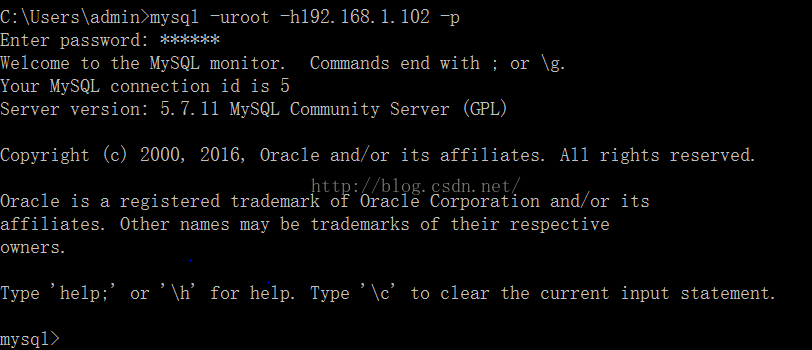
Problem: When using mysql remote login command mysql — uroot — h192.168.1.102-p, ERROR mysql ERROR 1130 (HY000): Host ‘XXXX’ is not allowed to connect to this mysql server
The reason for the problem: For security reasons, the mysql server allows only local login to the database server by default.
Fix the problem: After you log in to mysql, change the “host” TAB in the “User” table in the “mysql” database, change the name from “localhost” to “%”, and restart mysql so that all remote machines can access it.
step 1: modify the mysql table
mysql -u root -pvmware
mysql> use mysql;
mysql> update user set host = ‘%’ where user = ‘root’;
mysql> flush privileges;
mysql> select host, user from user;
mysql> quit
Step 2: Restart mysql
Method 1: Find “View Local Services” in Windows Settings, find mysql service, and restart mysql service
Method 2:
Win 7 or XP will start and stop mysql directly from the CMD command line by calling NET stop mysql /net Start mysql.
win8 and above versions need to use administrator privileges to use the CMD command to start the service. The author USES windows10, so you need to find CMD. Exe, right click and select “run as administrator”, and then enter net stop mysql /net start mysql to start and stop the service.
Step 3: Use the remote login command again and the login is successful.
django.core.exceptions . improveconfigured: error loading MySQL DB module. Django configuring MySQL database
A, errors,
Traceback (most recent call last):
  File "/home/ubuntu/anaconda2/envs/python3/lib/python3.6/site-packages/django/db/backends/mysql/base.py", line 15, in <module>
    import MySQLdb as Database
ModuleNotFoundError: No module named 'MySQLdb'

The above exception was the direct cause of the following exception:

Traceback (most recent call last):
  File "manage.py", line 15, in <module>
    execute_from_command_line(sys.argv)
  File "/home/ubuntu/anaconda2/envs/python3/lib/python3.6/site-packages/django/core/management/__init__.py", line 371, in execute_from_command_line
    utility.execute()
  File "/home/ubuntu/anaconda2/envs/python3/lib/python3.6/site-packages/django/core/management/__init__.py", line 347, in execute
    django.setup()
  File "/home/ubuntu/anaconda2/envs/python3/lib/python3.6/site-packages/django/__init__.py", line 24, in setup
    apps.populate(settings.INSTALLED_APPS)
  File "/home/ubuntu/anaconda2/envs/python3/lib/python3.6/site-packages/django/apps/registry.py", line 112, in populate
    app_config.import_models()
  File "/home/ubuntu/anaconda2/envs/python3/lib/python3.6/site-packages/django/apps/config.py", line 198, in import_models
    self.models_module = import_module(models_module_name)
  File "/home/ubuntu/anaconda2/envs/python3/lib/python3.6/importlib/__init__.py", line 126, in import_module
    return _bootstrap._gcd_import(name[level:], package, level)
  File "<frozen importlib._bootstrap>", line 994, in _gcd_import
  File "<frozen importlib._bootstrap>", line 971, in _find_and_load
  File "<frozen importlib._bootstrap>", line 955, in _find_and_load_unlocked
  File "<frozen importlib._bootstrap>", line 665, in _load_unlocked
  File "<frozen importlib._bootstrap_external>", line 678, in exec_module
  File "<frozen importlib._bootstrap>", line 219, in _call_with_frames_removed
  File "/home/ubuntu/anaconda2/envs/python3/lib/python3.6/site-packages/django/contrib/auth/models.py", line 2, in <module>
    from django.contrib.auth.base_user import AbstractBaseUser, BaseUserManager
  File "/home/ubuntu/anaconda2/envs/python3/lib/python3.6/site-packages/django/contrib/auth/base_user.py", line 47, in <module>
    class AbstractBaseUser(models.Model):
  File "/home/ubuntu/anaconda2/envs/python3/lib/python3.6/site-packages/django/db/models/base.py", line 114, in __new__
    new_class.add_to_class('_meta', Options(meta, app_label))
  File "/home/ubuntu/anaconda2/envs/python3/lib/python3.6/site-packages/django/db/models/base.py", line 315, in add_to_class
    value.contribute_to_class(cls, name)
  File "/home/ubuntu/anaconda2/envs/python3/lib/python3.6/site-packages/django/db/models/options.py", line 205, in contribute_to_class
    self.db_table = truncate_name(self.db_table, connection.ops.max_name_length())
  File "/home/ubuntu/anaconda2/envs/python3/lib/python3.6/site-packages/django/db/__init__.py", line 33, in __getattr__
    return getattr(connections[DEFAULT_DB_ALIAS], item)
  File "/home/ubuntu/anaconda2/envs/python3/lib/python3.6/site-packages/django/db/utils.py", line 202, in __getitem__
    backend = load_backend(db['ENGINE'])
  File "/home/ubuntu/anaconda2/envs/python3/lib/python3.6/site-packages/django/db/utils.py", line 110, in load_backend
    return import_module('%s.base' % backend_name)
  File "/home/ubuntu/anaconda2/envs/python3/lib/python3.6/importlib/__init__.py", line 126, in import_module
    return _bootstrap._gcd_import(name[level:], package, level)
  File "/home/ubuntu/anaconda2/envs/python3/lib/python3.6/site-packages/django/db/backends/mysql/base.py", line 20, in <module>
    ) from err
django.core.exceptions.ImproperlyConfigured: Error loading MySQLdb module.
Did you install mysqlclient?
Ii. Problem Solving
1. Source of problem
After installation of Django, the default database driver is sqlite, but I do not have sqlite database, so change to
mysql, then go to the directory first/first/settings.py, and find:
DATABASES = {
    'default': {
        'ENGINE': 'django.db.backends.sqlite3',
        'NAME': os.path.join(BASE_DIR, 'db.sqlite3'),
    }
}
Modified to:
DATABASES = {
    'default': {
        'ENGINE': 'django.db.backends.mysql',
        'NAME': 'first',
        'USER': 'python',
        'PASSWORD': '123456',
        'HOST': '192.168.99.124',
        # 'PORT': '',
    }
}
Run the command python manage. Py runserver then executes to start the service at the following Error:
django. Core. Exceptions. ImproperlyConfigured: Error loading MySQLdb module: No module named MySQLdb
2. Solve
Obviously, there is no mysql driver installed, just install it, so I quickly typed the command line:
pip install mysql-pythonImportError: No module named 'ConfigParser'
Python3.x is changed to lowercase relative to PYTHON 2.x, indicating that THE MYSQL python in PIP does not support Python3.x. Maybe the update in PIP is relatively slow, so we will download their source code installation. However, the latest update date of the source code is 2012, and there is still no support for Python3.x!
How does this work?Change the support python3 driver try, heart energizes, grass mud horse, of course, as a result on making a search, found a PyMySQL (https://github.com/PyMySQL/PyMySQL), which, of course, also have it in the PIP, then I quickly on the command line with:
pip install PyMySQLDjango does not recognize this alien monk, how to do, or to do, find mysite/mysite/init.py, enter the following content and save:
import pymysql
pymysql.install_as_MySQLdb()
Then When I ran Python Manager.py Runserver, another prompt popped up:
You have unapplied migrations; Run 'Python manage. Py Migrate' to apply them.
Of course, this prompt does not affect the operation of the native server. At this time, when we visit http://127.0.0.1:8000, we will see the successful prompt:
It worked!

Congratulations on your first Django-powered page.

Of course, you haven't actually done any work yet. Next, start your first app by running python manage.py startapp [app_label].

You're seeing this message because you have DEBUG = True in your Django settings file and you haven't configured any URLs. Get to work!
Of course, I didn't like the warning, and he told me what to do to get rid of him, of course! I quickly copy the contents to the command line:
python manage.py makemigrations
python manage.py migrate
Then restart the service, it's normal!
The environment
- Python version: 3.6.0Django version: 2.5
500 (International server error) server error in Flash + heroku
Recently I studied flask. I implemented it step by step in the book ** flasky: flask-web development: a practical approach to web application development based on Python **, which was flasky project on github. If you encounter one or two big problems, record them *
flask + heroku +postagres
1. Question 1:
After the success of heroku server git, the initial and updated database is similar to the following error:
heroku run python manager.py deploy # Initializing and updating the database

Running python manager.py deploy on ⬢ flasky-blog-mirui... ⣾
Running python manager.py deploy on ⬢ flasky-blog-mirui... ⣷ starting, run.7767 (Free)
Running python manager.py deploy on ⬢ flasky-blog-mirui... up, run.7767 (Free)

INFO  [alembic.runtime.migration] Context impl PostgresqlImpl.
INFO  [alembic.runtime.migration] Will assume transactional DDL.
INFO  [alembic.runtime.migration] Running upgrade  -> 8d6dba4cf1a4, the second migration

psycopg2.errors.UndefinedTable: relation "users" does not exist

sqlalchemy.exc.ProgrammingError: (psycopg2.errors.UndefinedTable) relation "users" does not exist
It is above error roughly, see the following error concretely one
-
- at the beginning, I read the error message, thinking that my
psycopg2
-
- was wrong (I installed binary package
psycopg2-binary
-
- , because I could not install
psycopg2
-
- ), I thought that there was something wrong with the database structure. Later, I optimized the data structure and type, and still reported an error. Execute
git push heroku master
-
- , it can be run. Open the link of
APP
-
- . As long as the page is dynamically connected to the database, it will be
500Internal Server Error
-
- to report Server Error. Apparently error connecting to the database to perform the
heroku logs - t </ code> found will report similar But ~ ~, remember that I searched sqlalchemy. Exc. ProgrammingError: (psycopg2. Errors. UndefinedTable) base "posts" does not exist </ code> wrong, as wrong as before. The local postagres library is also used, and everything is fine. Eliminate database errors, code problems. stackoverflow for Internal Server Error+flask+heroku and then I saw someone said to delete migrations 1 folder. git and initialization, there is no error, ztyd magic!
Solutions:
After making sure that the code is ok and running in the local virtual environment normally, the following actions can be taken:
Delete the annoying database version control
migrationsfolder
rm -rf ,/migrations
git add .
git commit -am 'It will be fine'
git push heroku master
heroku run python manage,py deploy
Okay, so you can open up your heroku app.
Welcome to my heroku app flasky-blog-mirui, remember to leave me a message ~ ~ ~
* a wrong
heroku run python manager.py deploy # Initializing and updating the database
Running python manager.py deploy on ⬢ flasky-blog-mirui... ⣾
Running python manager.py deploy on ⬢ flasky-blog-mirui... ⣷ starting, run.7767 (Free)
Running python manager.py deploy on ⬢ flasky-blog-mirui... up, run.7767 (Free)

INFO  [alembic.runtime.migration] Context impl PostgresqlImpl.
INFO  [alembic.runtime.migration] Will assume transactional DDL.
INFO  [alembic.runtime.migration] Running upgrade  -> 8d6dba4cf1a4, the second migration
Traceback (most recent call last):
  File "/app/.heroku/python/lib/python3.6/site-packages/sqlalchemy/engine/base.py", line 1244, in _execute_context
    cursor, statement, parameters, context
  File "/app/.heroku/python/lib/python3.6/site-packages/sqlalchemy/engine/default.py", line 552, in do_execute
    cursor.execute(statement, parameters)
psycopg2.errors.UndefinedTable: relation "users" does not exist


The above exception was the direct cause of the following exception:

Traceback (most recent call last):
  File "manager.py", line 83, in <module>
    manager.run()
  File "/app/.heroku/python/lib/python3.6/site-packages/flask_script/__init__.py", line 417, in run
    result = self.handle(argv[0], argv[1:])
  File "/app/.heroku/python/lib/python3.6/site-packages/flask_script/__init__.py", line 386, in handle
    res = handle(*args, **config)
  File "/app/.heroku/python/lib/python3.6/site-packages/flask_script/commands.py", line 216, in __call__
    return self.run(*args, **kwargs)
  File "manager.py", line 67, in deploy
    upgrade()
  File "/app/.heroku/python/lib/python3.6/site-packages/flask_migrate/__init__.py", line 95, in wrapped
    f(*args, **kwargs)
  File "/app/.heroku/python/lib/python3.6/site-packages/flask_migrate/__init__.py", line 280, in upgrade
    command.upgrade(config, revision, sql=sql, tag=tag)
  File "/app/.heroku/python/lib/python3.6/site-packages/alembic/command.py", line 276, in upgrade
    script.run_env()
  File "/app/.heroku/python/lib/python3.6/site-packages/alembic/script/base.py", line 475, in run_env
    util.load_python_file(self.dir, "env.py")
  File "/app/.heroku/python/lib/python3.6/site-packages/alembic/util/pyfiles.py", line 90, in load_python_file
    module = load_module_py(module_id, path)
  File "/app/.heroku/python/lib/python3.6/site-packages/alembic/util/compat.py", line 177, in load_module_py
    spec.loader.exec_module(module)
  File "<frozen importlib._bootstrap_external>", line 678, in exec_module
  File "<frozen importlib._bootstrap>", line 219, in _call_with_frames_removed
  File "migrations/env.py", line 96, in <module>
    run_migrations_online()
  File "migrations/env.py", line 90, in run_migrations_online
    context.run_migrations()
  File "<string>", line 8, in run_migrations
  File "/app/.heroku/python/lib/python3.6/site-packages/alembic/runtime/environment.py", line 839, in run_migrations
    self.get_context().run_migrations(**kw)
  File "/app/.heroku/python/lib/python3.6/site-packages/alembic/runtime/migration.py", line 362, in run_migrations
    step.migration_fn(**kw)
  File "/app/migrations/versions/8d6dba4cf1a4_the_second_migration.py", line 21, in upgrade
    op.add_column('users', sa.Column('confirmed', sa.Boolean(), nullable=True))
  File "<string>", line 8, in add_column
  File "<string>", line 3, in add_column
  File "/app/.heroku/python/lib/python3.6/site-packages/alembic/operations/ops.py", line 1904, in add_column
    return operations.invoke(op)
  File "/app/.heroku/python/lib/python3.6/site-packages/alembic/operations/base.py", line 345, in invoke
    return fn(self, operation)
  File "/app/.heroku/python/lib/python3.6/site-packages/alembic/operations/toimpl.py", line 131, in add_column
    operations.impl.add_column(table_name, column, schema=schema)
  File "/app/.heroku/python/lib/python3.6/site-packages/alembic/ddl/impl.py", line 231, in add_column
    self._exec(base.AddColumn(table_name, column, schema=schema))
  File "/app/.heroku/python/lib/python3.6/site-packages/alembic/ddl/impl.py", line 134, in _exec
    return conn.execute(construct, *multiparams, **params)
  File "/app/.heroku/python/lib/python3.6/site-packages/sqlalchemy/engine/base.py", line 988, in execute
    return meth(self, multiparams, params)
  File "/app/.heroku/python/lib/python3.6/site-packages/sqlalchemy/sql/ddl.py", line 72, in _execute_on_connection
    return connection._execute_ddl(self, multiparams, params)
  File "/app/.heroku/python/lib/python3.6/site-packages/sqlalchemy/engine/base.py", line 1050, in _execute_ddl
    compiled,
  File "/app/.heroku/python/lib/python3.6/site-packages/sqlalchemy/engine/base.py", line 1248, in _execute_context
    e, statement, parameters, cursor, context
  File "/app/.heroku/python/lib/python3.6/site-packages/sqlalchemy/engine/base.py", line 1466, in _handle_dbapi_exception
    util.raise_from_cause(sqlalchemy_exception, exc_info)
  File "/app/.heroku/python/lib/python3.6/site-packages/sqlalchemy/util/compat.py", line 398, in raise_from_cause
    reraise(type(exception), exception, tb=exc_tb, cause=cause)
  File "/app/.heroku/python/lib/python3.6/site-packages/sqlalchemy/util/compat.py", line 152, in reraise
    raise value.with_traceback(tb)
  File "/app/.heroku/python/lib/python3.6/site-packages/sqlalchemy/engine/base.py", line 1244, in _execute_context
    cursor, statement, parameters, context
  File "/app/.heroku/python/lib/python3.6/site-packages/sqlalchemy/engine/default.py", line 552, in do_execute
    cursor.execute(statement, parameters)
sqlalchemy.exc.ProgrammingError: (psycopg2.errors.UndefinedTable) relation "users" does not exist
Deployment project websocket failed: error during websocket Handshake: unexpected response code: 400
Fixed nginx forwarding WebSocket 400 error
Reprint link: https://www.cnblogs.com/duanweishi/p/9286461.html
because the personal server has a number of projects, configured with a secondary domain name, the need to forward the secondary domain name, in the forwarding work this quickly took the famous nginx. Before this, all the projects had no problem running forward, but today, when deploying a project with WebSocket communication, an unexpected error was reported, with the following error message:
Failed: Error during WebSocket handshake: Unexpected response code: 400
. This error worked in both the local test environment and access to non-Nginx forwarding, which inferred that the problem should have occurred in nginx forwarding.
Then, with the help of Google, saw the socket. IO official issues have a discussion about this problem, link: https://github.com/socketio/socket.io/issues/1942
Solution
read the solution in the discussion section, the problem appears in the configuration file of nginx, and the nginx.conf file needs to be modified. Type vim /etc/nginx/nginx.conf into the Linux terminal and find the location. The configuration file is as follows:
server {
        listen       80;
        server_name  school.godotdotdot.com;
        charset utf-8;

        location/{
            proxy_pass http://127.0.0.1:3000;
            proxy_set_header Host $host;
            proxy_http_version 1.1;
            proxy_set_header Upgrade $http_upgrade;
            proxy_set_header Connection "upgrade";
            proxy_set_header X-Real-IP $remote_addr;
            proxy_set_header X-Forwarded-For $proxy_add_x_forwarded_for;
            proxy_connect_timeout 60;
           proxy_read_timeout 600;
           proxy_send_timeout 600;
        }

        error_page   500 502 503 504  /50x.html;
        location = /50x.html {
            root   html;
        }
 }
The most important of these are the following three lines
proxy_http_version 1.1;
proxy_set_header Upgrade $http_upgrade;
proxy_set_header Connection "upgrade";
The first line tells Nginx to use the HTTP/1.1 communication protocol, which websoket must use.
The second and third lines tell Nginx to respond to an HTTP upgrade request when it wants to use WebSocket.
Supplement:
	server {
	        listen       80;
	        server_name  school.godotdotdot.com;
	        charset utf-8;

			proxy_http_version 1.1;
			proxy_set_header Upgrade $http_upgrade;
			proxy_set_header Connection "upgrade";


	        location/{
	            proxy_pass http://127.0.0.1:3000;
	            proxy_set_header Host $host;
	            proxy_set_header X-Real-IP $remote_addr;
	            proxy_set_header X-Forwarded-For $proxy_add_x_forwarded_for;
	            proxy_connect_timeout 60;
	           proxy_read_timeout 600;
	           proxy_send_timeout 600;
	        }

	        error_page   500 502 503 504  /50x.html;
	        location = /50x.html {
	            root   html;
	        }
	 }
Cannot connect to MySQL server on “host” (113)
Connection to remote MySQL error:
ERROR 2003 (HY000): Can’t connect to MySQL Server ‘IP’ (113)
View error types (Linux system)
perror 113The results are as follows:
OS error code 113: No route to host
The reason for this error is that the server-side firewall does not open the port used by the MySQL program. By default, it is 3306 and the open port is ok
/sbin/iptables -I INPUT -p tcp --dport 3306 -j ACCEPT Save the Settings and restart the firewall
service iptables save
service iptables restartERROR 1265 (01000): Data truncated for column ‘ENABLED’ at row 7
mysql> UPDATE performance_schema. setup_consumers SET ENABLED = ‘OFF’ WHERE NAME LIKE ‘events_transactions%’;
ERROR 1265 (01000): Data truncated for column ‘ENABLED’ at row 7
mysql> show create table performance_schema. setup_consumers \G
*************************** 1. row ***************************
Table: setup_consumers
Create Table: CREATE TABLE `setup_consumers` (
`NAME` varchar(64) NOT NULL,
`ENABLED` enum(‘YES’,’NO’) NOT NULL
) ENGINE=PERFORMANCE_SCHEMA DEFAULT CHARSET=utf8
1 row in set (0.00 sec)
It turns out that ENABLED is an enumeration type, where only the YES,NO.
mysql> UPDATE performance_schema. setup_consumers SET
ENABLED = ‘NO’ WHERE NAME LIKE ‘events_transactions%’;
The difference and usage of insmod and modprobe
Differences between Insmod and modprobe and their usage
(the 2013-01-04 14:55:03)
The  reproduced ▼
| tag: insmod modprobe driver load driver repeat load insmod and modprobe area hash | category: embedded Linux |
There was a problem loading the SD card driver into the development board
/ $ modprobe hi_mci
mmc_core: exports duplicate symbol mmc_detect_change (owned by kernel)
Insmod: always insert a `/lib/modules/2.6.24 – rt1 – hi3515v100/kernel/drivers/MMC/cor
e/mmc_core.ko’: Invalid module format (-1): Exec format error
modprobe: failed to load module hi_mci
Mmc_core loads modules twice (once manually and once automatically for the kernel);
The cause of the problem has been found for a long time, and will be manually loaded later
Modprobe hi_mci was changed to insmod
Later, the relationship between modprobe and Insmod was analyzed. The reason for the error is that although both modprobe and Insmod commands can load the module, modprobe is relatively intelligent. When you use modprobe to load the module, the system will load other modules according to the dependency of the module (that is, other modules that the module depends on). As a result, the MMC_core module was loaded twice. With insmod, the system loads only one specific module, the one we want to load
Hi_mci.ko, so no more error, error resolved.
The difference between modprobe and Insmod is as follows:
(The following is excerpted from online sources)
On Linux, both modprobe and Insmod can be used to load modules, but modprobe is now generally recommended instead of Insmod.
What’s the difference between modprobe and Insmod?
1. Modprobe can solve the load module dependencies, such as the load moudleA must first load mouduleB, such as it is through the/lib/modules// modules. Dep files to find the dependencies. Insmod doesn’t solve the dependency problem.
2. Modprobe looks for modules by default under /lib/modules//, and Insmod only looks for modules in the arguments given to it (by default, in the current directory). Sometimes, insmod has its USES, for example.
Have/root/my – mod. Ko this module, CD/root /, and then use insmod my – mod. Ko (insmod/root/my – mod. Ko) can insert the module, but with modprobe my – mod. Ko (modprobe/root/my – mod. Ko) does suggest “FATAL: Ko not found”. This is because modprobe is looking for /lib/modules/ ‘uname-r’/to find Module.
Linux device drivers can be loaded in two ways, insmod and modprobe, let’s talk about the differences in their usage.
1, insmod can only load a specific device driver at a time, and the specific address of the driver is required.
insmod drv.ko
2. Modprobe can load all the dependent drivers into the kernel at one time. The address of the driver is not added, but the driver module needs to be installed as make modues_install when installing the file system. Drivers are installed in /lib/ Modules /$(uname -r)/… Under.
modprob DRV
—
modprobe and insmod are used to load the kernel module
but modprobe is more intelligent, it can be based on the module dependency to automatically load for you;
and insmod can’t do that.
— — — — — — — — — — — — — separation line — — — — — — — — — — — — — — — — — —
for example USES ipmitool this tool need to exist in the dev/ipmi0 equipment, if not you need to load the
modprobe ipmi_si
modprobe ipmi_devintf
Read data from the local KCS interface using -i open for example
ipmitol-i open sensor
You want to uninstall modules. Use the rmmod
(the 2013-01-04 14:55:03)
The reproduced ▼
| tag: insmod modprobe driver load driver repeat load insmod and modprobe area hash | category: embedded Linux |
There was a problem loading the SD card driver into the development board
/ $ modprobe hi_mci
mmc_core: exports duplicate symbol mmc_detect_change (owned by kernel)
Insmod: always insert a `/lib/modules/2.6.24 – rt1 – hi3515v100/kernel/drivers/MMC/cor
e/mmc_core.ko’: Invalid module format (-1): Exec format error
modprobe: failed to load module hi_mci
Mmc_core loads modules twice (once manually and once automatically for the kernel);
The cause of the problem has been found for a long time, and will be manually loaded later
Modprobe hi_mci was changed to insmod
Later, the relationship between modprobe and Insmod was analyzed. The reason for the error is that although both modprobe and Insmod commands can load the module, modprobe is relatively intelligent. When you use modprobe to load the module, the system will load other modules according to the dependency of the module (that is, other modules that the module depends on). As a result, the MMC_core module was loaded twice. With insmod, the system loads only one specific module, the one we want to load
Hi_mci.ko, so no more error, error resolved.
The difference between modprobe and Insmod is as follows:
(The following is excerpted from online sources)
On Linux, both modprobe and Insmod can be used to load modules, but modprobe is now generally recommended instead of Insmod.
What’s the difference between modprobe and Insmod?
1. Modprobe can solve the load module dependencies, such as the load moudleA must first load mouduleB, such as it is through the/lib/modules// modules. Dep files to find the dependencies. Insmod doesn’t solve the dependency problem.
2. Modprobe looks for modules by default under /lib/modules//, and Insmod only looks for modules in the arguments given to it (by default, in the current directory). Sometimes, insmod has its USES, for example.
Have/root/my – mod. Ko this module, CD/root /, and then use insmod my – mod. Ko (insmod/root/my – mod. Ko) can insert the module, but with modprobe my – mod. Ko (modprobe/root/my – mod. Ko) does suggest “FATAL: Ko not found”. This is because modprobe is looking for /lib/modules/ ‘uname-r’/to find Module.
Linux device drivers can be loaded in two ways, insmod and modprobe, let’s talk about the differences in their usage.
1, insmod can only load a specific device driver at a time, and the specific address of the driver is required.
insmod drv.ko
2. Modprobe can load all the dependent drivers into the kernel at one time. The address of the driver is not added, but the driver module needs to be installed as make modues_install when installing the file system. Drivers are installed in /lib/ Modules /$(uname -r)/… Under.
modprob DRV
—
modprobe and insmod are used to load the kernel module
but modprobe is more intelligent, it can be based on the module dependency to automatically load for you;
and insmod can’t do that.
— — — — — — — — — — — — — separation line — — — — — — — — — — — — — — — — — —
for example USES ipmitool this tool need to exist in the dev/ipmi0 equipment, if not you need to load the
modprobe ipmi_si
modprobe ipmi_devintf
Read data from the local KCS interface using -i open for example
ipmitol-i open sensor
You want to uninstall modules. Use the rmmod
Recovery your PC / device needs to be repaired, boot
Windows failed to start, Recovery Your PC/Device needs to be repaired
Reconvery
Your PC/Device needs to be repaired
File: Boot\BCD
Error Code: 0Xc000000d
use the start U disk, enter the command prompt, respectively type:
BOOTREC /SCANOS
BOOTREC /FIXMBR
BOOTREC /FIXBOOT
BOOTREC /REBUILDBCD
Note:
BOOTREC /SCANOS scan hard disk has several startup
BOOTREC /REBUILDBCD rebuild startup, according to the prompt input can be.
Pandas read the CSV file error filenotf oundError:File b ‘***.csv’ does not exist
File B ‘test1.csv’ does not exist.
Problem location: One of the code or files is not in the default path.
Problem location: One of the code or files is not in the default path.
When reading a file, try to fill in the default relative path, not the relative path.
Solution: Put the code and the files to be read in the default path, solve!
Error reported in Python: syntax error: invalid character in identifier
Sometimes code copied from the Internet is left unmodified and is often reported as “SyntaxError” or “invalid Character in Identifier”
Online a search answer, said the Chinese state brackets, this is really a reason;
Another reason is that there is a space at the end of the code. After removing the space, the code runs
Online a search answer, said the Chinese state brackets, this is really a reason;
Another reason is that there is a space at the end of the code. After removing the space, the code runs