Category Archives: Python

Python ValueError: only 2 non-keyword arguments accepted

Tiger input the following code on the problem, because there is no clear matrix format. Just add a box outside the matrix group. See the following for details.

source code

import time
import numpy as np

A = np.array([56.0, 0.0, 4.4, 68.0],
             [1.2, 104.0, 52.0, 8.0],
             [1.8, 135.0, 99.0, 0.9])

cal=A.sum(axis=0)
print(cal)

After modification

import time
import numpy as np

A = np.array([[56.0, 0.0, 4.4, 68.0],
             [1.2, 104.0, 52.0, 8.0],
             [1.8, 135.0, 99.0, 0.9]])

cal=A.sum(axis=0)
print(cal)

Python 3 urllib has no URLEncode attribute

Today, when practicing in pychar (I use python3), I found an attributeerror: module ‘urllib’ has no attribute ‘URLEncode’. Later, we found that the urllib structure of python2 and python3 is different.

Let me demonstrate it with python3 in pychar

Error example:

import urllib
import urllib.parse
wd =  {"wd":"video"}
print(urllib.urlencode(wd))

结果:

C:\Users\DELL\AppData\Local\Programs\Python\Python36-32\python.exe E:/untitled/Python_Test/urllib2Demo1.py
Traceback (most recent call last):
File “E:/untitled/Python_Test/urllib2Demo1.py”, line 5, in <module>
print(urllib.urlencode(wd))
AttributeError: module ‘urllib’ has no attribute ‘urlencode’
Process finished with exit code 1

Right Example

import urllib
import urllib.parse
wd =  {"wd":"video"}
print(urllib.parse.urlencode(wd))

result:

C:\Users\DELL\AppData\Local\Programs\Python\Python36-32\ python.exe E:/untitled/Python_ Test/urllib2Demo1.py
wd=%E4%BC%A0%E6%99%BA%E6%92%AD%E5%AE%A2

Process finished with exit code 0

So remember that the urllib library is different between python2 and python3.

Popularize the following knowledge points:

The difference of urllib library between python2 and python3

Urllib is a module provided by Python for operating URL.

In Python 2, there are urllib library and urllib2 library. In Python 3, urllib2 is merged into urllib library, which is often used when we crawl web pages.

After upgrading and merging, the location of packages in the module changes a lot.

Here are the common changes about urllib Library in python2 and python3:

    use import urllib2 in python2 — corresponding, import urllib2 will be used in python3 urllib.request , urllib.error Import urllib is used in python2 – Import urllib is used in python3 urllib.request , urllib.error , urllib.parse Use import urlparse in python2 — correspondingly, use import urlparse in python3 urllib.parse Use urllib2. Urlopen in python2 — corresponding, use urllib2. Urlopen in python3 urllib.request.urlopen Using in python2 urllib.urlencode ————Correspondingly, it will be used in Python 3 urllib.parse.urlencode Using in python2 urllib.quote ————Correspondingly, it will be used in Python 3 urllib.request.quote Using in python2 cookielib.Cookie Jar — corresponding, will be used in Python 3 http.CookieJar Use urllib2. Request in python2 — corresponding, use urllib2. Request in python3 urllib.request.Request

These are the common changes of urllib related modules from python2 to python3.

Pytorch: How to Handle error warning conda.gateways.disk.delete:unlink_or_rename_to_trash(140)

I want to bring the version of Python back to 1.6.0, so I need to install it again.
Under the condition of Tsinghua image source, enter
CONDA install Torch = = 1.6.0 torch vision = = 0.7.0 in CONDA environment

However, the alarm during installation is as follows:

WARNING conda.gateways.disk . delete:unlink_ or_ rename_ to_ trash(140): Could not remove or rename D:\anaconda\pkgs\pytorch-1.6.0-py3.7_ cuda101_ cudnn7_ zero tar.bz2 . Please remove this file manually (you may need to reboot to free file handles)
WARNING conda.gateways.disk . delete:unlink_ or_ rename_ to_ trash(140): Could not remove or rename D:\anaconda\pkgs\pytorch-1.6.0-py3.7_ cuda101_ cudnn7_ 0\Lib\site-packages\torch\lib\torch_ cuda.dll . Please remove this file manually (you may need to reboot to free file handles)

This solution has been referred to here, but it can’t be solved, but I also open the permission.
Later, simply follow the prompts and manually set the_ cuda101_ cudnn7_ zero tar.bz2 And “D: anaconda, Pkgs, pytorch-1.6.0-py3.7″_ cuda101_ cudnn7_ 0\Lib\site-packages\torch\lib\torch_ cuda.dll The file referred to by “.” will be deleted and no error will be reported.
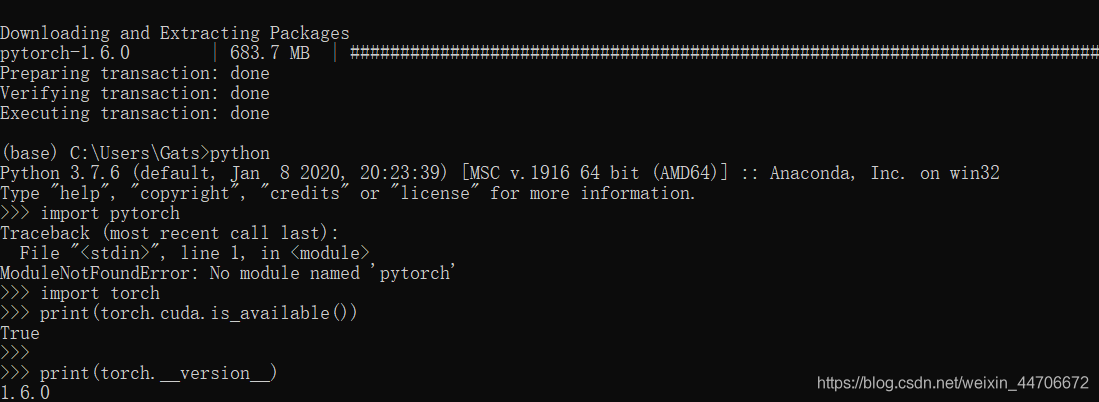
Finally, the installation is successful and the version number is displayed

import torch
print(torch.__version__)  #Note the double underscore

Python: How to Find the square root and square of numbers (Several methods)

Method 1: use the built-in module

>>> import math

>>> math.pow(12, 2)     # Request Square
144.0

>>> math.sqrt(144)      # Find the square root
12.0

>>>

Method 2: use expression

>>> 12 ** 2             # Request Square
144

>>> 144 ** 0.5          # Find the square root
12.0

>>> 

Method 3: use built-in function

>>> pow(12, 2)          # Request Square
144

>>> pow(144, .5)        # Find the square root
12.0

>>>

Tensorflow import Error: ImportError: libcuda.so.1: cannot open shared object file: No such file or dire

sudo nvidia-docker run -p 8888:8888  –name tf1.11_py3 -it   -v /home/wang/:/home/wang 0641cda31e80
How to Fix this issue:
>>> import tensorflow
Traceback (most recent call last):
File “<stdin>”, line 1, in <module>
File “/usr/local/lib/python2.7/dist-packages/tensorflow/__init__.py”, line 22, in <module>
from tensorflow.python import pywrap_tensorflow  # pylint: disable=unused-import
File “/usr/local/lib/python2.7/dist-packages/tensorflow/python/__init__.py”, line 49, in <module>
from tensorflow.python import pywrap_tensorflow
File “/usr/local/lib/python2.7/dist-packages/tensorflow/python/pywrap_tensorflow.py”, line 74, in <module>
raise ImportError(msg)
ImportError: Traceback (most recent call last):
File “/usr/local/lib/python2.7/dist-packages/tensorflow/python/pywrap_tensorflow.py”, line 58, in <module>
from tensorflow.python.pywrap_tensorflow_internal import *
File “/usr/local/lib/python2.7/dist-packages/tensorflow/python/pywrap_tensorflow_internal.py”, line 28, in <module>
_pywrap_tensorflow_internal = swig_import_helper()
File “/usr/local/lib/python2.7/dist-packages/tensorflow/python/pywrap_tensorflow_internal.py”, line 24, in swig_import_helper
_mod = imp.load_module(‘_pywrap_tensorflow_internal’, fp, pathname, description)
Tensorflow import error ImportError: libcuda.so.1: cannot open shared object file: No such file or directory
When starting docker, the original use was.
sudo docker run -p 8888:8888  –name tf1.11_py2 -it   -v /home//wang/:/home//wang 0641cda31e80
switch to
sudo nvidia-docker run -p 8888:8888  –name tf1.11_py3 -it   -v /home/wang/:/home/wang 0641cda31e80

[How to Fix] TypeError: Cannot cast array data from dtype(‘float64‘) to dtype(‘<U32‘)….

Both U32 and S32 indicate that your numpy array is a string array, not a number array. Check whether there are strings in the dataset. If there are, just delete them. In numpy array, as long as one item is string, the type returned by the array is string array.
If you need to convert numpy to floating-point number, please refer to the code:
train= train.astype (float)
train_ target = train_ target.astype (float)

Python Error: _csv.Error sequence expected

Today, I encountered an error when writing a script in Python. The specific code is as follows:

csv_write.writerow( strings )

And my string is: base_ Name, Nd, Lev , which is similar to a tuple. It seems that when the script is running, it will report an error like this. I found a reference on the Internet and just modified it as follows:

1、

csv_write.writerow( [strings] )

2、

It is also possible that the part in front of you is wrongly written, leading to an error in the back. In fact, it should be used when there are multiple lines first

csv_write.writerow( strings )

So when this kind of error occurs, you can also check whether the previous code has errors, or whether the file used for extraction has errors

RuntimeWarning: overflow encountered in ubyte_Scalars pixel addition and subtraction overflow exception

When using Python to process an image, it may involve the addition and subtraction between the pixel values of two images. Here, it should be noted that the pixel value of the image is of ubyte type, and the data range of ubyte type is 0-255. If the operation results in a negative value or exceeds 255, an exception will be thrown. Let’s take a look at an example of the exception

from PIL import Image
import numpy as np
image1 = np.array(Image.open("1.jpg"))                   
image2 = np.array(Image.open("2.jpg"))                  
# Exception statement
temp = image1[1, 1] - image2[1, 1] # Overflow if this is a negative value

# The correct way to write
temp = int(image1[1, 1]) - int(image2[1, 1]) # force to integer and then calculate without overflowing

The above code is the exception runtimewarning: overflow accounted in ubyte_ Scalars of the reasons and solutions, I hope to help friends who encounter this problem.


Python Valueerror: cannot index with vector containing Na / Nan values

Problem description;
when using dataframe, perform the following operations:

df[df.line.str.contains('G')]

The purpose is to find out all the lines in the line column of DF that contain the character ‘g’

---------------------------------------------------------------------------
ValueError                                Traceback (most recent call last)
<ipython-input-3-10f8503f73f2> in <module>()
---->  df.line.str.contains('G')

D:\Anaconda3\lib\site-packages\pandas\core\frame.py in __getitem__(self, key)
   2983 
   2984         # Do we have a (boolean) 1d indexer?
-> 2985         if com.is_bool_indexer(key):
   2986             return self._getitem_bool_array(key)
   2987 

D:\Anaconda3\lib\site-packages\pandas\core\common.py in is_bool_indexer(key)
    128             if not lib.is_bool_array(key):
    129                 if isna(key).any():
--> 130                     raise ValueError(na_msg)
    131                 return False
    132             return True

ValueError: cannot index with vector containing NA / NaN values

Obviously, it means that there are Na or Nan values in the line column, so Baidu has a lot of methods on the Internet to teach you how to delete the Na / Nan values in the line column.

However, deleting the row containing Na / Nan value in the line column still can’t solve the problem!! What shall I do?

Solution:
it’s very simple. In fact, it’s very likely that the element formats in the line column are not all STR formats, and there may be int formats, etc.
so you just need to unify the format of the line column into STR format!
The operation is as follows:

df['line'] = df['line'].apply(str) #Change the format of the line column to str

df[df.line.str.contains('G')] #Execute your corresponding statement

solve the problem!!

Python: How to parses HTML, extracts data, and generates word documents

Today, I try to use ptyhon to do a function of grabbing web content and generating word document. The function is very simple. Make a record for future use.

The third-party component Python docx is used to generate word, so install the third-party component first. As Python installed under Windows does not have the module of setuptools by default, you need to install the module of setuptools first

1. It can be found on the official website of Python https://bootstrap.pypa.io/ez_ setup.py , save the code locally and execute: Python EZ_ setup.py

2. Download Python docx( https://pypi.python.org/pypi/python-docx/0.7.4 )After downloading, unzip and go to XXX / python-docx-0.7.4 to install Python docx: Python setup.py install

In this way, the installation of Python docx is successful. You can use it to operate word documents. Here is a reference for the generation of word documents https://python-docx.readthedocs.org/en/latest/index.html


HTML parsing uses sgmlparser in sgmllib, and URL content acquisition uses urllib and urllib2
to parse

The code is as follows:

# -*- coding: cp936 -*-
from sgmllib import SGMLParser
import os
import sys
import urllib
import urllib2
from docx import Document
from docx.shared import Inches
import time

##Get the url to be parsed
class GetUrl(SGMLParser):
    def __init__(self):
        SGMLParser.__init__(self)
        self.start=False
        self.urlArr=[]


    def start_div(self,attr):
        for name,value in attr:
            if value=="ChairmanCont Bureau":#Fixed values in page js
                self.start=True


    def end_div(self):
        self.start=False


    def start_a(self,attr):
        if self.start:
            for name,value in attr:
                self.urlArr.append(value)


    def getUrlArr(self):
        return self.urlArr
    
##Parse the url obtained above to get useful data
class getManInfo(SGMLParser):
    def __init__(self):
        SGMLParser.__init__(self)
        self.start=False
        self.p=False
        self.dl=False
        self.manInfo=[]
        self.subInfo=[]

    def start_div(self,attr):
        for name,value in attr:
            if value=="SpeakerInfo":#Fixed values in page js
                self.start=True

    def end_div(self):
        self.start=False

    def start_p(self,attr):
        if self.dl:
            self.p=True

    def end_p(self):
        self.p=False

    def start_img(self,attr):
        if self.dl:
            for name,value in attr:
                self.subInfo.append(value)


    def handle_data(self,data):
        if self.p:
            self.subInfo.append(data.decode('utf-8'))


    def start_dl(self,attr):
        if self.start:
            self.dl=True

    def end_dl(self):
        self.manInfo.append(self.subInfo)
        self.subInfo=[]
        self.dl=False

    def getManInfo(self):
        return self.manInfo


urlSource="http://www.XXX"
sourceData=urllib2.urlopen(urlSource).read()

startTime=time.clock()
##get urls
getUrl=GetUrl()
getUrl.feed(sourceData)
urlArr=getUrl.getUrlArr()
getUrl.close()
print "get url use:" + str((time.clock() - startTime))
startTime=time.clock()


##get maninfos
manInfos=getManInfo()
for url in urlArr:#one url one person
    data=urllib2.urlopen(url).read()
    manInfos.feed(data)
infos=manInfos.getManInfo()
manInfos.close()
print "get maninfos use:" + str((time.clock() - startTime))
startTime=time.clock()

#word
saveFile=os.getcwd()+"\\xxx.docx"
doc=Document()
##word title
doc.add_heading("HEAD".decode('gbk'),0)
p=doc.add_paragraph("HEADCONTENT:".decode('gbk'))


##write info
for infoArr in infos:
    i=0
    for info in infoArr:
        if i==0:##img url
            arr1=info.split('.')
            suffix=arr1[len(arr1)-1]
            arr2=info.split('/')
            preffix=arr2[len(arr2)-2]
            imgFile=os.getcwd()+"\\imgs\\"+preffix+"."+suffix
            if not os.path.exists(os.getcwd()+"\\imgs"):
                os.mkdir(os.getcwd()+"\\imgs")
            imgData=urllib2.urlopen(info).read()

            try:
                f=open(imgFile,'wb')
                f.write(imgData)
                f.close()
                doc.add_picture(imgFile,width=Inches(1.25))
                os.remove(imgFile)
            except Exception as err:
                print (err)
  
            
        elif i==1:
            doc.add_heading(info+":",level=1)
        else:
            doc.add_paragraph(info,style='ListBullet')
        i=i+1

    
doc.save(saveFile)
print "word use:" + str((time.clock() - startTime))


Python: How to Processe “return multiple values”

def load_datasets():

    train_file = r'D:\CNMU\AI\1X\datasets\train_catvnoncat.h5'
    test_file = r'D:\CNMU\AI\1X\datasets\test_catvnoncat.h5'

    train_datasets = h5py.File(train_file,'r')
    # train_datasets.keys()
    # <KeysViewHDF5 ['list_classes', 'train_set_x', 'train_set_y']>
    train_set_x = np.array(train_datasets['train_set_x'])
    train_set_y = np.array(train_datasets['train_set_y'])
    
    
    test_datasets = h5py.File(test_file,'r')
    test_set_x = np.array(test_datasets['test_set_x'])
    test_set_y = np.array(test_datasets['test_set_y'])
    
    classes = np.array(test_datasets['list_classes'])
    
    train_set_y = train_set_y.reshape(1,train_set_x.shape[0])
    test_set_y = test_set_y.reshape(1,test_set_x.shape[0])
    
    return train_set_x,train_set_y,test_set_x,test_set_y,classes

Here, return returns five arrays and a tuple of five elements;

train_set_x,train_set_y,test_set_x,test_set_y,classes = load_datasets()

With this assignment, you can call each array directly