Category Archives: Python

Python Pandas Typeerror: invalid type comparison

When reading and processing the data in the CSV file with panda in Python, you may encounter such an error:

TypeError: invalid type comparison

Invalid type comparison

At this time, you can print the data in your data frame


1. There may be no data in some items, which will be displayed as Nan when printing. Nan can’t be compared with any data, and it’s not equal to any value, including himself (so you can also use a! =A to judge whether a is Nan.

Therefore, in the following data processing, if a comparison operation is performed, an error will be reported:

TypeError: invalid type comparison

Method, add parameters when reading the CSV

keep_default_na=False

In this way, entries without data will be recognized as null characters instead of Nan


2. Maybe the data types of different columns in your dataframe are different. Some of them are recognized as STR and some as int. although they all look like numbers, they will also report errors when compared later

At this time, you can add a parameter

converters={'from':str,'to':str} # Convert both the from and to columns to str

The explanation of converters is as follows:

converters: dict, default None
Dict of functions for converting values in certain columns. Keys can either
be integers or column labels

The same type can be compared together
Error reading file by pandas pandas.errors.EmptyDataError: no columns to parse from file

1. Problems encountered:

The source code for reading. CSV is as follows:

import pandas as pd

def main():
    aqi_data = pd.read_csv('china_city_aqi.csv')
    print(aqi_data.head(5))

if __name__ == "__main__":
    main()

The complete error information is as follows:

Traceback (most recent call last):
  File "D:/XXX/Python Learning/lect09/AQI_9.0.py", line 14, in <module>
    main()
  File "D:/XXX/Python Learning/lect09/AQI_9.0.py", line 10, in main
    aqi_data = pd.read_csv('china_city_aqi.csv')
  File "D:\XXX\Python Learning\lect09\venv\new\lib\site-packages\pandas\io\parsers.py", line 702, in parser_f
    return _read(filepath_or_buffer, kwds)
  File "D:\XXX\Python Learning\lect09\venv\new\lib\site-packages\pandas\io\parsers.py", line 429, in _read
    parser = TextFileReader(filepath_or_buffer, **kwds)
  File "D:\XXX\Python Learning\lect09\venv\new\lib\site-packages\pandas\io\parsers.py", line 895, in __init__
    self._make_engine(self.engine)
  File "D:\XXX\Python Learning\lect09\venv\new\lib\site-packages\pandas\io\parsers.py", line 1122, in _make_engine
    self._engine = CParserWrapper(self.f, **self.options)
  File "D:\XXX\Python Learning\lect09\venv\new\lib\site-packages\pandas\io\parsers.py", line 1853, in __init__
    self._reader = parsers.TextReader(src, **kwds)
  File "pandas\_libs\parsers.pyx", line 545, in pandas._libs.parsers.TextReader.__cinit__
pandas.errors.EmptyDataError: No columns to parse from file

2. Solutions

Take a look pandas.read_ The official document of CSV may be related to

Engine: {C ‘,’python’}, optional

Parser engine to use. The C engine is faster while the python engine is currently more feature-complete.

So read_ Add engine = “Python” to the parameter of csv()

The above code is modified as follows:

import pandas as pd

def main():
    aqi_data = pd.read_csv('china_city_aqi.csv', engine='python')
    print(aqi_data.head(5))

if __name__ == "__main__":
    main()

Run successfully after modification!

Python: How to Use os.path.join()

os.path.join() is often used to read path splicing operations.

import os
import cv2

a='D:\\download'  #  Note the double slash, if not spliced address, you can use r' ', quotation marks available single slash, but with the splicing operation, I will only use the double slash at present
b='dog.jpg'
path=os.path.join(a,b) 
img = cv2.imread(path)
print(img)
# D:\download\dog.jpg

Tensorflow: Common Usage of tf.get_variable_scope()

We know that tensorflow, once constructed, cannot be changed during training. And once the input is added to the graph, the data will flow in a series of parameters, and this series of parameters can only act on the data sent in from this input interface. If we get a group of data or a queue at this time, we want to make the data of this queue go through the same route as the previous input queue. In other words, we want to achieve this operation:

input_1 = tf.placeholder(...)
out_1 = model(input_1)
input_2 = tf.placeholder(...)
out_2 = model(input_2)

This will make a mistake. Let’s look at the following code:

import tensorflow as tf
import vgg

inputs_1 = tf.random_normal([10,224,224,3])
inputs_2 = tf.random_normal([10,224,224,3])
with tf.variable_scope('vgg_16') :
    net ,end_points = vgg.vgg_16(inputs_1,100,False)
    # tf.get_variable_scope().reuse_variables()
    net_, end_points_ = vgg.vgg_16(inputs_2,100,False)

with tf.Session() as sess:
    print("no error")

If the above code is correct, the final output is no error

But the error message is this:

ValueError: Variable vgg_16/vgg_16/conv1/conv1_1/weights already exists, disallowed. 
Did you mean to set reuse=True or reuse=tf.AUTO_REUSE in VarScope? Originally defined at:

This means that a variable already exists and cannot be generated again. In fact, the first input generates a series of variables, which can only be used for the data sent by the first input. Now the second input also wants to use the parameter corresponding to the first input, which is not OK. The solution is to add that line of comment:

import tensorflow as tf
import vgg

inputs_1 = tf.random_normal([10,224,224,3])
inputs_2 = tf.random_normal([10,224,224,3])
with tf.variable_scope('vgg_16') :
    net ,end_points = vgg.vgg_16(inputs_1,100,False)
    tf.get_variable_scope().reuse_variables()
    net_, end_points_ = vgg.vgg_16(inputs_2,100,False)

with tf.Session() as sess:
    print("no error")

tf.get_ variable_ scope().reuse_ Variables() will be in the current variable_ Under scope, set the variable to reuse = true. You can see the meaning of the name, that is, the two inputs can share the variable

pd.to_csv Error: need to escape, but no escapechar set

pd.to_ In the case of CSV,

df3.to_csv('E:\\data\\xxxx.csv',index=False,header= 0,sep='|', encoding="utf-8", quoting=csv.QUOTE_NONE)

Error: need to escape, but no escape set

Reason: this problem may be because the description contains’ | ‘,’ | ‘is also a separator, and the CSV tries to escape it, but it can’t, because there is no separator csv.escapechars set up

Solution:
provide an escape char when quoting is quote_ When none, specify a character so that it is not restricted by the separator for escape.

df3.to_csv('E:\\data\\xxxx.csv',index=False,header= 0,sep='|', encoding="utf-8", quoting=csv.QUOTE_NONE,escapechar='|')

Reference:
https://stackoverflow.com/questions/32107790/writing-to-csv-getting-error-need-to-escape-for-a-blank-string

Python Error aiohttp.client_exceptions.ClientConnectorCertificateError, Cannot connect to host:443

An error is reported by the python connection interface
as follows:

aiohttp.client_exceptions.ClientConnectorCertificateError: Cannot connect to  host:443 ssl:True [SSLCertVerificationError: (1, '[SSL: CERTIFICATE_VERIFY_FAILED] certificate verify failed: self signed certificate in certificate chain (_ssl.c:1056)')]

SSL handshake failed on verifying the certificate
protocol: <asyncio.sslproto.SSLProtocol object at 0x000000B1D4E2A7F0>
transport: <_SelectorSocketTransport fd=708 read=polling write=<idle, bufsize=0>>

Solution:

# conn = aiohttp.TCPConnector(verify_ssl=False)  # Prevent ssl from reporting errors
async with aiohttp.ClientSession(connector=aiohttp.TCPConnector(limit=64,verify_ssl=False)) as session:

Add verify_ SSL = false.

Python: How to Delete Empty Files or Folders in the Directory

Traverse all subordinate files and folders in the directory, including subfolders, to find empty files and empty folders and delete them

def Clean_empty(path):
    """
    Iterate through all subfolders and subfiles under a file, cleaning up empty folders and files
    path:file path
    """
    
    for (dirpath,dirnames,filenames) in os.walk(path):
        for filename in filenames:
            file_folder=dirpath+'/'+filename
            # print(file_folder)
            if os.path.isdir(file_folder): 
                if not os.listdir(file_folder): 
                    print(file_folder)
                    # os.rmdir(dirpath+filename) 
            elif os.path.isfile(file_folder): 
                if os.path.getsize(file_folder) == 0: 
                    print(file_folder)
                    os.remove(file_folder)  
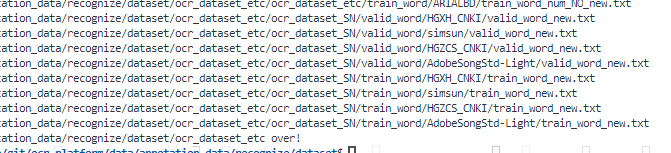
    print(path, 'clean over!')

if __name__ == "__main__": 
    path = '/data/git/ocr-platform/data/annotation_data/recognize/dataset/ocr_dataset_etc'
    Clean_empty(path)

Done!

Python Selenium: element is not attached to the page document error

Recently, when I was working on an automatic office project in selenium, I encountered an error in the mouse event Click(), when I was looking for page elements

div = driver.find_elements_by_xpath('//*[@id="test"]') #Find certain elements of a page
for x in range(10):#click on the first 10 links in order
	div[x].click()
	driver.switch_to.window(driver.window_handles[2])#switch to the page handle of the clicked page to perform the operation
	#Omit the operation code here
	driver.close()#close the current tab
	driver.switch_to.window(driver.window_handles[1])#switch to the initial tab handle

When the above code is executed, you can click the first link. When you loop to the second link, you will get the error of element is not attached to the page document.
After careful observation, it is found that when the first link is closed, the initial page will be forced to refresh once. Therefore, it is very likely that the element in the div has changed, resulting in that the element cannot be found later. Therefore, I try to put the statement of finding the element in the loop, that is, each loop will look up the element again, and the problem is solved. After the solution, the code comparison is as follows:

for x in range(10):#Click on the first 10 links in order
	div = driver.find_elements_by_xpath('//*[@id="test"]') # Move the find element statement inside the loop
	div[x].click()
	driver.switch_to.window(driver.window_handles[2])#Switch to the page handle of the clicked page to perform the operation
	#Omit the operation code here
	driver.close()#close the current tab
	driver.switch_to.window(driver.window_handles[1])#switch to the initial tab handle

Python: How to Set Line breaks and tabs for Strings

First of all, I would like to raise a question as follows.

With Python program code:

   print("I'm Bob. What's your name?") 

The output of the previous line is as follows:

      I’m Bob. What’s your name?

The output above does not wrap. If you want to wrap before what, the effect is:

     I’m Bob.
What’s your name?

What should we do?

Knock back before what, OK? No, the effect of this carriage return is to wrap the statement, not the output.

The solution of using newline character

The solution to this problem is to insert a newline before what. It is written as follows:

   print("I'm Bob.\nWhat's your name?")

Have you noticed the word in front of what? It’s a character combination, a combination of backslashes and n letters. However, the meaning of this combination is only one character, that is, the newline character.

Again, it’s a combination of two characters in writing, but only one character in meaning.

In Python language, in addition to the newline character, there are many cases where “the writing method is a combination of two characters, but the meaning is only one character”, and the tab character is one of them.

Tab

Tab also belongs to the situation that “the writing method is a combination of two characters, but the meaning is only one character”. It’s written as “ T”, a combination of backslash and T, and t means table. It means a character, called a tab. Its function is to align the columns of the table data. Run the following code, you should understand what tab is.

#The table-making character is written as \t and serves to align the columns of the table.
print("number\tname\t-a\t-b\t-c")
print("2017001\t1\t99\t\t88\t\t0")
print("2017002\t2\t92\t\t45\t\t93")
print("2017008\t3\t77\t\t82\t\t100")

Running the above code produces the following output:

Student number: Chinese, mathematics, English
2017001 Cao Cao 99 88 0
2017002 Zhou Yu 92 45 93
2017008 Huang Gai 77 82 100

note that the writing of line breaks and tabs only works within quotation marks and is considered a character.

Python 3.X error: valueerror: data type must provide an itemsize

1. Overview

The error occurs when multiplying the acquired data;
the reason for the error is that the data matrix is a string (read from the file);
the solution is to convert the data in batch, line by line, and convert the string data into floating point or integer.

2. Solutions

2.1 error code
#!/usr/bin/env python3
# -*- coding: utf-8 -*-
# @Time    : 2019/2/21 14:16
# @Author  : Arrow and Bullet
# @FileName: error.py
# @Software: PyCharm


def loadDataSet(fileName):
    fr = open(fileName)
    dataMat = []
    for line in fr.readlines():
        currLineListStr = line.strip().split("\t") 
        dataMat.append(currLineListStr[0:numFeat])
    return dataMat

The data read out here are all strings, for example:

# [['1.000000', '0.067732'], ['1.000000', '0.427810']]

Then, when you multiply a matrix like this, the error data type must provide an itemsize will be reported.

2.2 correct code (solution)

1

def loadDataSet(fileName):
    fr = open(fileName)
    dataMat = []
    for line in fr.readlines():
        currLineListStr = line.strip().split("\t") 
        currLineListFloat = []
        for i in currLineListStr:  # Convert string data to floating point numbers line by line
            currLineListFloat.append(float(i))
        dataMat.append(currLineListFloat[0:numFeat])
    return dataMat

The data read out here are all floating-point numbers, for example:

# [[1.0, 0.067732], [1.0, 0.42781]]

Then when you multiply with such a matrix, there is no error.

I hope I can help you. If you have any questions, you can comment on them directly. If you like, you can praise them for more people to see. If you are not detailed enough, you can also say that I will reply in time.

How to Solve attributeerror: ‘list’ object has no attribute ‘shape‘

Explanation:

AttributeError: ‘list’ object has no attribute ‘shape’

Property error: the ‘list’ object does not have the property ‘shape’

resolvent:

Use numpy or panda np.array Or dataframe has shape, which can be multi-dimensional, while list is one-dimensional and cannot be converted

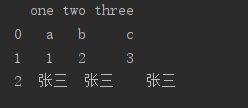
If conversion is needed, list is converted to dataframe. Example:

a = [['a', 'b', 'c'], ['1', '2', '3'], ['张三', '张三', '张三']]
df = pd.DataFrame(a, columns=['one', 'two', 'three'])
print(df)

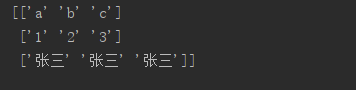
List to numpy example:

a = [['a', 'b', 'c'], ['1', '2', '3'], ['张三', '张三', '张三']]
data = np.array(a)
print(data)

Note: shape is a dimension. Only data frame and matrix have dimensions, while list is a slice single dimension

[How to Fix]RuntimeError: Python is not installed as a framework, If you are using (Ana)Conda

Error:

RuntimeError: Python is not installed as a framework. The Mac OS X backend will not be able to function correctly if Python is not installed as a framework. See the Python documentation for more information on installing Python as a framework on Mac OS X. Please either reinstall Python as a framework, or try one of the other backends. If you are using (Ana)Conda please install python.app and replace the use of ‘python’ with ‘pythonw’. See ‘Working with Matplotlib on OSX’ in t

How to Fix:

vim ~/.matplotlib/matplotlibrc
Then input the code below:
backend: TkAgg