Category Archives: Python

Opencv: How to Draw Palette

code implementation

# -*- coding:utf-8 -*-
import cv2
import numpy as np


r_range = 255

image_wh = 530
center_xy = image_wh // 2
image = np.zeros((image_wh, image_wh, 3), dtype=np.uint8)

for x in range(image_wh):
    for y in range(image_wh):
        # whether xy is inside the circle
        if (x - center_xy) ** 2 + (y - center_xy) ** 2 <= r_range ** 2:
            r = np.sqrt((x - center_xy) ** 2 + (y - center_xy) ** 2)
            theta = np.rad2deg(np.arctan2((y - center_xy), (x - center_xy)))
            theta += 180
            # [int(theta // 2), int(r), 255] hsv
            bgr = cv2.cvtColor(np.array([[[int(theta // 2), int(r), 255]]], dtype=np.uint8), cv2.COLOR_HSV2BGR)
            color = tuple([int(x) for x in bgr[0][0]])
            image[x, y] = color

cv2.namedWindow('img', 0)
cv2.imshow('img', image)
cv2.waitKey()

Effect display

Pytorch ValueError: Expected more than 1 value per channel when training, got input size [1, 768

Traceback (most recent call last):
  File "train_ammeter_twoclass.py", line 189, in <module>
    train(epoch)
  File "train_ammeter_twoclass.py", line 133, in train
    outputs = net(inputs)
  File "/home/iot/miniconda2/envs/pytorch3/lib/python3.6/site-packages/torch/nn/modules/module.py", line 477, in __call__
    result = self.forward(*input, **kwargs)
  File "/home/iot/chenjun/1_program/classifer/src/model.py", line 79, in forward
    x = self.net(x)             # inception will return two matrices
  File "/home/iot/miniconda2/envs/pytorch3/lib/python3.6/site-packages/torch/nn/modules/module.py", line 477, in __call__
    result = self.forward(*input, **kwargs)
  File "/home/iot/miniconda2/envs/pytorch3/lib/python3.6/site-packages/torchvision/models/inception.py", line 109, in forward
    aux = self.AuxLogits(x)
  File "/home/iot/miniconda2/envs/pytorch3/lib/python3.6/site-packages/torch/nn/modules/module.py", line 477, in __call__
    result = self.forward(*input, **kwargs)
  File "/home/iot/miniconda2/envs/pytorch3/lib/python3.6/site-packages/torchvision/models/inception.py", line 308, in forward
    x = self.conv1(x)
  File "/home/iot/miniconda2/envs/pytorch3/lib/python3.6/site-packages/torch/nn/modules/module.py", line 477, in __call__
    result = self.forward(*input, **kwargs)
  File "/home/iot/miniconda2/envs/pytorch3/lib/python3.6/site-packages/torchvision/models/inception.py", line 326, in forward
    x = self.bn(x)
  File "/home/iot/miniconda2/envs/pytorch3/lib/python3.6/site-packages/torch/nn/modules/module.py", line 477, in __call__
    result = self.forward(*input, **kwargs)
  File "/home/iot/miniconda2/envs/pytorch3/lib/python3.6/site-packages/torch/nn/modules/batchnorm.py", line 66, in forward
    exponential_average_factor, self.eps)
  File "/home/iot/miniconda2/envs/pytorch3/lib/python3.6/site-packages/torch/nn/functional.py", line 1251, in batch_norm
    raise ValueError('Expected more than 1 value per channel when training, got input size {}'.format(size))
ValueError: Expected more than 1 value per channel when training, got input size [1, 768, 1, 1]

Problem analysis: batch nomolization is used in the model. When batch is used in training, there should be an odd number. For example, the total number of samples of dataset is 17, and your batch number is 0_ If the size is 8, such an error will be reported.
Solution: delete a sample from the dataset.

Converted from: valueerror: expected more than 1 value per channel when training, got input size torch.Size ([1, 768, 1, 1])

Importerror: DLL load failed: unable to find the specified module in Python

Environmental description

Window 7, Python 3.6.5

Problem description

When importing based on python, the following error is reported:

>> from PIL import Image
Traceback (most recent call last):
  File "<ipython-input-12-0f6709e38f49>", line 1, in <module>
    from PIL import Image

  File "d:\ProgramData\Anaconda3\lib\site-packages\PIL\Image.py", line 58, in <module>
    from . import _imaging as core

ImportError: DLL load failed: The specified module could not be found.

Sometimes, similar errors are reported:

>> from PIL import Image
Traceback (most recent call last):

  File "<ipython-input-13-0f6709e38f49>", line 1, in <module>
    from PIL import Image

ImportError: cannot import name 'Image'

problem analysis

This kind of problem is usually when installing the library, the security is not complete, or the installed library is covered or damaged, so the corresponding class library cannot be known.

Problem solving

C:\Users\xxxx\>pip install Pillow
Requirement already satisfied: Pillow in d:\programdata\anaconda3\lib\site-packages (5.0.0)


C:\Users\xxxx>pip show Pillow
Name: Pillow
Version: 5.2.0
Summary: Python Imaging Library (Fork)
Home-page: http://python-pillow.org
Author: Alex Clark (Fork Author)
Author-email: [email protected]
License: Standard PIL License
Location: d:\programdata\anaconda3\lib\site-packages
Requires:
Required-by:

It can be seen from the above instructions that the class library has been installed. However, due to its problems, it needs to be re installed.
Uninstall first

pip uninstall Pillow

Uninstalling Pillow-5.0.0:
  Would remove:
    d:\programdata\anaconda3\lib\site-packages\pillow-5.0.0.dist-info\*
Proceed (y/n)? y
  Successfully uninstalled Pillow-5.0.0

Then re install:

pip install Pillow

Collecting Pillow
  Downloading https://files.pythonhosted.org/packages/1b/50/869910cd7110157fbefd0fed3db3656c1951f1bceecdd00e3716aa269609/Pillow-5.2.0-cp36-cp36m-win_amd64.whl (1.6MB)
    100% |████████████████████████████████| 1.6MB 69kB/s
Installing collected packages: Pillow
Successfully installed Pillow-5.2.0

verification

Then re import the image to find that everything is OK.

summary

If it has been installed but cannot be found, it is likely that the installation is damaged and needs to be re installed.

Python errors: valueerror: if using all scalar values, you must pass an index (four solutions)


1. Error scenarios:

import pandas as pd
dict = {'a':1,'b':2,'c':3}
data = pd.DataFrame(dict)

2. Error reason:

When passing in the dictionary with nominal attribute value directly, you need to write index, that is, you need to set index when creating the dataframe object.

3. Solution:

It is a common requirement to create dataframe objects through dictionaries, but there may be different writing methods for different object forms. Looking at the code, the following four methods can correct this error and produce the same correct results. Just choose which method to use according to your own needs.

import pandas as pd

#Method 1: Directly set the index when creating the DataFrame
dict = {'a':1,'b':2,'c':3}
data = pd.DataFrame(dict,index=[0])
print(data)

#Method 2: Convert the dictionary with value as nominal variable to DataFrame object by from_dict function
dict = {'a':1,'b':2,'c':3}
pd.DataFrame.from_dict(dict,orient='index').T
print(data)

#Method 3: When entering the dictionary, do not let the Value be the nominal property, convert the Value to a list object and then pass it in.
dict = {'a':[1],'b':[2],'c':[3]}
data = pd.DataFrame(dict)
print(data)

#Method 4: directly take out the key and value, are converted to list objects
dict = {'a':1,'b':2,'c':3}
pd.DataFrame(list(dict.items()))
print(data)

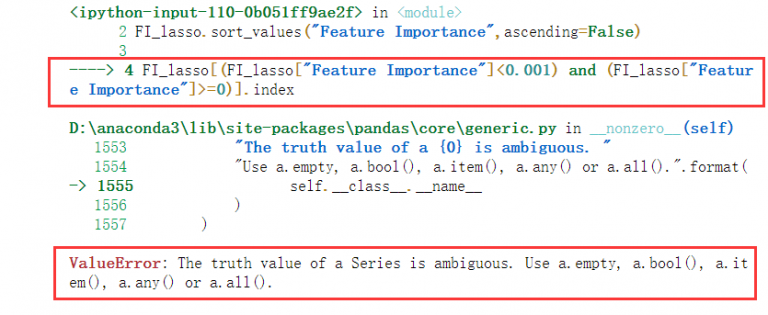
[How to Fix]The truth value of a series is ambiguous

The truth value of a series is ambiguous

It is estimated that you are using pandas when this problem occurs. If so, congratulations on finding a solution. Ha ha~

#General Purpose Example

FI_lasso[(FI_lasso["columns"]<0.001) and (FI_lasso["columns"]>=0)]

If you also encounter such a problem, Congratulations, the solution is very simple

The core meaning is to use & amp; instead of and or
for logical judgment in dataframe|

Like this


FI_lasso[(FI_lasso["columns"]<0.001) & (FI_lasso["columns"]>=0)]

Solve the problem and leave~

Pandas ValueError: The truth value of a Series is ambiguous. Use a.empty, a.bool(), a.item(), a.an

When performing data comparison, pandas reports an error:

ValueError: The truth value of a Series is ambiguous. Use a.empty, a.bool(), a.item(), a.any() or a.all().

The selected truth value is not clear, that is, the given value and the comparison value are of different types.

It should be a problem caused by comparing and matching a value with multiple values or values in a list

You can use one of its recommended methods before comparing

1)a.empty

if(a.empty):

    print("!!")  

Judge whether a is empty

2)a.item()

a. Item (I) represents the ith node

3)a.any()

if(a.any() in [1,2,3,4]):

print("!!") 

Judge whether any value in a is in [1,2,3,4]

4)a.all()

if(a.all() in [1,2,3,4]):
    print("!!") 

Judge whether all the values in a are in [1,2,3,4]

Httprunner output assure Report

Httprunner output assure Report

1. Install allure

Mac:

brew install allure 

Windows: https://repo.maven.apache.org/maven2/io/qameta/allure/allure-commandline/2.12.0/

After downloading, unzip, enter the bin directory, and use the allure.bat That is, the directory can be configured to an environment variable

2. Install assure pytest

pip install allure-pytest 

3. Execute httprunner command

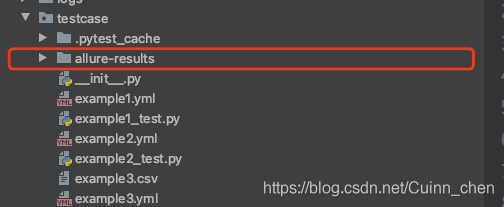
hrun --alluredir allure-results --clean-alluredir testcasesname 

After execution, you can see that there is an assure results folder

implement

allure generate Folder for generating alure reports 

Windows can use the allure.bat generate …

Or start the static service of the report directly:

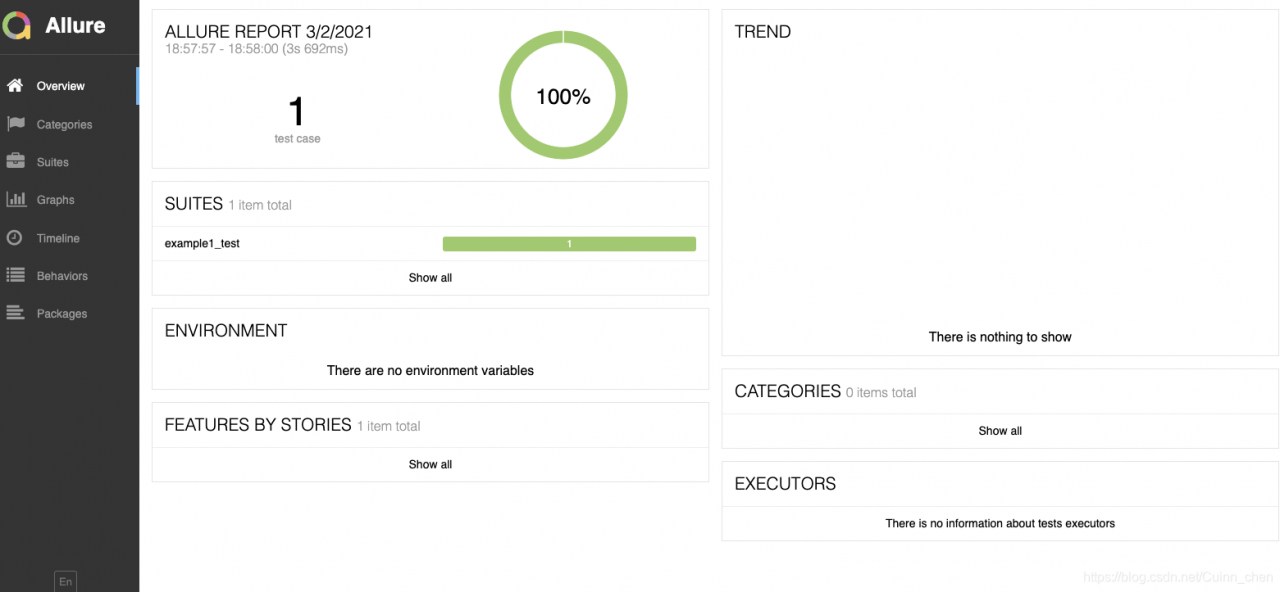
allure serve Folder for generating alure reports Generate reports.

*

*

Using Python error urlopen error unknown URL type: the solution of HTTPS

Analysis

This error has something to do with the SSL (secure sockets layer, an international standard communication protocol for encryption and identity authentication) module in Python. If you successfully install the SSL module, you can solve this problem.

resolvent

Windows system is slightly different from other UNIX like systems, but you can confirm whether SSL module is installed in the python version you are using. In the python environment, use the following command to view the installed module:

help("modules")

According to the official documents of python, SSL is a module used for network and interprocess communication in the python standard library. The Windows version of Python installation program usually includes the whole standard library, and even additional components. Other UNIX like operating systems are divided into a series of software packages, and some or all components may need to be installed through the package management tool.

Windows system

Because the Windows version of Python installation program contains SSL module, check whether the environment variables are set well.

If anaconda is used, because it already contains python, check the SSL in the installed module, and then check whether the following environment variables are added completely.

InstallPath              #Assuming InstallPath is your installation path
InstallPath\Scripts      
InstallPath\Library\bin

If there is no SSL module, or there is no problem with the above operations, and an error is still reported, you can try to re install python.

UNIX like operating system

After the default installation, the functions related to SSL cannot be used normally, and the corresponding parameters need to be added when checking the configuration before compilation.

# Add the --with-ssl parameter when installing python
./configure --prefix=/usr/local/python37 --with-ssl

When sending HTTP request, python encountered: error 54, ‘connection reset by peer’ solution

When sending HTTP request, python encountered: error 54, ‘connection reset by peer’ solution


background

The company will change all the Intranet environment from HTTP access to HTTPS access, and need to issue the self-made CA [certificate authority] to all the machines accessing the Intranet environment in order to log in to the Intranet environment.
When you need to send an HTTP request to the server to get some data, you will report an error “connection reset by peer”. The code is as follows:

f_path = '/tmp/ca.cert.pem'

def add_ca():
    # Importing ca certificates
    f = open(f_path, 'w+')
    ca = "-----BEGIN CERTIFICATE-----xxxxx-----END CERTIFICATE-----"
    f.writelines(ca)

url = 'https://jira.xx.local/rest/api/2/search'
res = requests.post(url, json=text, headers={"Authorization": "xxxx"}, verify=f_path)

reason

The OpenSSL library is too old. The URL you are requesting is not compatible.

Important

If more than one version of Python is installed in the system at the same time, please check which version of Python your code uses before taking the solution.

How to Fix

      1. the best way is to upgrade Python to 2.7. X or above, which will solve this problem. If you don’t want to upgrade python, you can use:

    PIP install requests [security]

      1. another outdated method:

    PIP install pyopenssl NDG httpclient pyasn1

Using certificate embedded code can save the trouble of installing CA manually for each machine

def add_ca():
    # Importing ca certificates
    f = open(f_path, 'w+')
    ca = "-----BEGIN CERTIFICATE----------END CERTIFICATE-----"
    f.writelines(ca)

This CA certificate is mandatory when sending HTTP request:

 res = requests.post(url, json=text, headers={"Authorization": "xxxxx"},verify=f_path)
 #f_path is the path to the ca certificate

ValueError: Found array with dim 4. Estimator expected and ValueError: Expected 2D array, got 1D array i

NumPy array is reduced or increased in dimension in Python 3
Resolve to report errors such as:
1.ValueError: Found array with dim 4. Estimator expected
2.ValueError: Expected 2D array, got 1D array instead:
Error 1 valueerror: Found array with dim 4. Estimator expected – solution: use the
np. Concatenate

Function model: Concatenate ((A1, A2…)) , axis=0)

• Passed Parameters (A1, A2, A3…) Must be a multiple of the array a tuple or list
also need to specify the stitching direction, the default axis = 0, that is an array of 0 axis (X/or line) object for joining together to get a combination of longitudinal array, (opposite the axis = 1); Note: In general, Axis = 0 is an operation on the array along this axis, and the direction of operation is another axis, namely Axis =1.

import numpy as np
a = np.array([[1,2],[2,3]])
b = np .array([[4,5],[3,4]])
print(np.concatenate((a, b), axis=0))

print(np.concatenate((a), axis=0))

Output :(This will reduce the dimensionality of the array (strip out a set of brackets []))

[[1 2]
 [2 3]
 [4 5]
 [3 4]]
 
[1 2 2 3]

Refer to the link: https://blog.csdn.net/brucewong0516/article/details/79158758
Error 2 function fit when ValueError: Expected a 2 d array, got home 1 d array: – solution:
here I will function when an error code fragment interception, the specific function of the data is not intercept method
1: use the brackets [] :
the original code:

import numpy as np  
from sklearn.neighbors import KNeighborsClassifier
knn = KNeighborsClassifier()  
knn.fit(x,y)                 
x_new = [50000,8,1.2]
y_pred = knn.predict(x_new)

An error:

Reshape your data either using array.reshape(-1, 1) if your data has a single feature or array.reshape(1, -1) if it contains a single sample.

NP.array. Reshape

x_new = np.array([50000,8,1.2]).reshape(1,-1)

Reshape (1,-1) : reshape(1,-1);

x_new = np.array([[50000,8,1.2]])

In the Python 3 version of Sklearn, all data should be two-dimensional matrices, that is, np.array() should contain at least two pairs of brackets [].