Category Archives: Python

How to Solve Error “ImportError: cannot import name imsave“

Problem description

Today, when running a GitHub code two years ago, an error was reported:

from scipy.misc import imsave

ImportError: cannot import name 'imsave'

But after checking, I found that I have installed the SciPy module. When checking the internal function module of SciPy, I found that there are no functions such as imsave

import scipy.misc

print(dir(scipy.misc))

After searching, it is found that the reason is the SciPy version: after SciPy 1.3, functions such as SciPy. Misc. Imread/imsave will be discarded.

resolvent

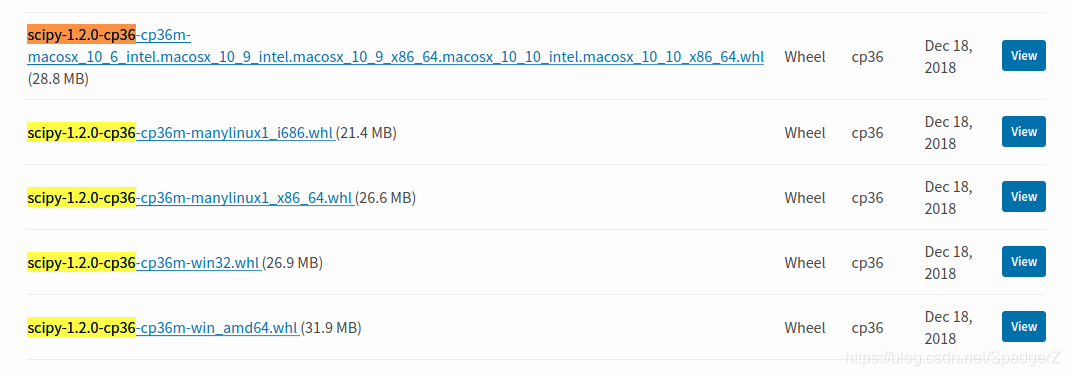
To re install the previous version of SciPy, first log in to the official website of SciPy and find the corresponding WHL file. As the python environment of this machine is Ubuntu + python = 3.6.9, download the third corresponding file:

Then uninstall the previous SciPy and install the file

# uninstal scipy
pip uninstall scipy


# install
pip install scipy-1.2.0-cp36-cp36m-manylinux1_x86_64.whl

Check the SciPy internal function again


You can see that there are functions like imread, imsave, imshow, etc

Facenet validate_on_lfw.py Error AssertionError: The number of LFW images must be an integer multip

When collecting Asian faces for model validation, run the following code:

python validate_on_lfw.py ../data/AsiaStar_160 ../20180402-114759 --lfw_pairs ../data/pairs_AsiaStar.txt

The error is as follows:

AssertionError: The number of LFW images must be an integer multiple of the LFW batch size

The number of pictures must be an integral multiple of the batch size. Batch size is 100, so the number of pictures must be an integral multiple of 100. In generating pairs. TXT, there must be 100 times of sample pairs.

Python PIP TypeError: expected str, bytes or os.PathLike object, not int

Exception:
Traceback (most recent call last):
File “/home/yu/anaconda3/envs/TRTC/lib/python3.6/site-packages/pip/basecommand.py”, line 215, in main
status = self.run(options, args)
File “/home/yu/anaconda3/envs/TRTC/lib/python3.6/site-packages/pip/commands/list.py”, line 157, in run
packages = self.get_outdated(packages, options)
File “/home/yu/anaconda3/envs/TRTC/lib/python3.6/site-packages/pip/commands/list.py”, line 168, in get_outdated
dist for dist in self.iter_packages_latest_infos(packages, options)
File “/home/yu/anaconda3/envs/TRTC/lib/python3.6/site-packages/pip/commands/list.py”, line 168, in
dist for dist in self.iter_packages_latest_infos(packages, options)
File “/home/yu/anaconda3/envs/TRTC/lib/python3.6/site-packages/pip/commands/list.py”, line 197, in iter_packages_latest_infos
with self._build_session(options) as session:
File “/home/yu/anaconda3/envs/TRTC/lib/python3.6/site-packages/pip/basecommand.py”, line 69, in _build_session
if options.cache_dir else None
File “/home/yu/anaconda3/envs/TRTC/lib/python3.6/posixpath.py”, line 78, in join
a = os.fspath(a)
TypeError: expected str, bytes or os.PathLike object, not int
Traceback (most recent call last):
File “/home/yu/anaconda3/envs/TRTC/bin/pip”, line 6, in
sys.exit(pip.main())
File “/home/yu/anaconda3/envs/TRTC/lib/python3.6/site-packages/pip/init.py”, line 249, in main
return command.main(cmd_args)
File “/home/yu/anaconda3/envs/TRTC/lib/python3.6/site-packages/pip/basecommand.py”, line 251, in main
timeout=min(5, options.timeout)) as session:
File “/home/yu/anaconda3/envs/TRTC/lib/python3.6/site-packages/pip/basecommand.py”, line 69, in _build_session
if options.cache_dir else None
File “/home/yu/anaconda3/envs/TRTC/lib/python3.6/posixpath.py”, line 78, in join
a = os.fspath(a)
TypeError: expected str, bytes or os.PathLike object, not int

Solution: (you can replace python with python3)
curl https://bootstrap.pypa.io/get-pip.py | python –
Guess the reason for the error is: setuptools and pip versions do not correspond, so upgrade the pip will be fine.

Python AttributeError: module ‘tensorflow‘ has no attribute ‘InteractiveSession‘

Error occurred while running tensorflow:

AttributeError: module 'tensorflow' has no attribute 'InteractiveSession'

This is not the first mock exam error in the package, because the module Session has been removed in the new Tensorflow 2 version, and the code is changed to:

sess = tf.InteractiveSession()

Replace with:

sess = tf.compat.v1.InteractiveSession()

Similarly, if there are similar “TF. * *” codes in the code, you should add “compat. V1.” after them.

If you are not used to it, you can reduce the version of tensorflow

pip install tensorflow==1.14

Python PIP Fatal error in launcher: Unable to create process using ‘“e:\program files\programdata

Error content

Fatal error in launcher: Unable to create process using '"e:\program 
files\programdata\python3.9\python.exe"  "E:\Program Files\ProgramData
\Python39\Scripts\pip.exe" ': ???????????

Solution

python -m pip install --upgrade pip

Problem solving
there is a problem with PIP. Updating PIP through Python will delete the wrong PIP and install the updated pip

Python TypeError: Unrecognized value type: <class ‘str‘>dateutil.parser._parser.ParserError: Unknow

When I want to convert a column of dates in the data frame into the date format of panda, I encountered this kind of error.

reader = pd.read_csv(f'new_files/2020-12-22-5-10.csv', usecols=['passCarTime'],dtype={'passCarTime':'string'})
pd.to_datetime(reader.passCarTime.head())
Out[98]: 
0   2020-12-22 10:00:00
1   2020-12-22 10:00:00
2   2020-12-22 10:00:00
3   2020-12-22 10:00:00
4   2020-12-22 10:00:00
Name: passCarTime, dtype: datetime64[ns]
pd.to_datetime(reader.passCarTime)
Traceback (most recent call last):
  File "D:\PyCharm2020\python2020\lib\site-packages\pandas\core\arrays\datetimes.py", line 2085, in objects_to_datetime64ns
    values, tz_parsed = conversion.datetime_to_datetime64(data)
  File "pandas\_libs\tslibs\conversion.pyx", line 350, in pandas._libs.tslibs.conversion.datetime_to_datetime64
TypeError: Unrecognized value type: <class 'str'>
During handling of the above exception, another exception occurred:
Traceback (most recent call last):
  File "D:\PyCharm2020\python2020\lib\site-packages\IPython\core\interactiveshell.py", line 3427, in run_code
    exec(code_obj, self.user_global_ns, self.user_ns)
  File "<ipython-input-99-e1b00dc18517>", line 1, in <module>
    pd.to_datetime(reader.passCarTime)
  File "D:\PyCharm2020\python2020\lib\site-packages\pandas\core\tools\datetimes.py", line 801, in to_datetime
    cache_array = _maybe_cache(arg, format, cache, convert_listlike)
  File "D:\PyCharm2020\python2020\lib\site-packages\pandas\core\tools\datetimes.py", line 178, in _maybe_cache
    cache_dates = convert_listlike(unique_dates, format)
  File "D:\PyCharm2020\python2020\lib\site-packages\pandas\core\tools\datetimes.py", line 465, in _convert_listlike_datetimes
    result, tz_parsed = objects_to_datetime64ns(
  File "D:\PyCharm2020\python2020\lib\site-packages\pandas\core\arrays\datetimes.py", line 2090, in objects_to_datetime64ns
    raise e
  File "D:\PyCharm2020\python2020\lib\site-packages\pandas\core\arrays\datetimes.py", line 2075, in objects_to_datetime64ns
    result, tz_parsed = tslib.array_to_datetime(
  File "pandas\_libs\tslib.pyx", line 364, in pandas._libs.tslib.array_to_datetime
  File "pandas\_libs\tslib.pyx", line 591, in pandas._libs.tslib.array_to_datetime
  File "pandas\_libs\tslib.pyx", line 726, in pandas._libs.tslib.array_to_datetime_object
  File "pandas\_libs\tslib.pyx", line 717, in pandas._libs.tslib.array_to_datetime_object
  File "pandas\_libs\tslibs\parsing.pyx", line 243, in pandas._libs.tslibs.parsing.parse_datetime_string
  File "D:\PyCharm2020\python2020\lib\site-packages\dateutil\parser\_parser.py", line 1374, in parse
    return DEFAULTPARSER.parse(timestr, **kwargs)
  File "D:\PyCharm2020\python2020\lib\site-packages\dateutil\parser\_parser.py", line 649, in parse
    raise ParserError("Unknown string format: %s", timestr)
dateutil.parser._parser.ParserError: Unknown string format: passCarTime

I’m not a professional, and my English is not good. I can’t understand what’s wrong. I have seen that there is no missing value in the date column of the file, and there is no date that does not conform to the format… This is very strange, welcome to leave a message, thanks in advance!

Solution

When converting, add a parameter errors ='coerce '.

reader = pd.read_csv(f'new_files/2020-12-22-5-10.csv', usecols=['passCarTime'],dtype={'passCarTime':'string'})
reader.passCarTime = pd.to_datetime(reader.passCarTime,errors='coerce') 
reader.passCarTime.head()
Out[120]: 
0   2020-12-22 10:00:00
1   2020-12-22 10:00:00
2   2020-12-22 10:00:00
3   2020-12-22 10:00:00
4   2020-12-22 10:00:00
Name: passCarTime, dtype: datetime64[ns]
reader.info()
<class 'pandas.core.frame.DataFrame'>
RangeIndex: 307707 entries, 0 to 307706
Data columns (total 1 columns):
 #   Column       Non-Null Count   Dtype         
---  ------       --------------   -----         
 0   passCarTime  307703 non-null  datetime64[ns]
dtypes: datetime64[ns](1)
memory usage: 2.3 MB
Python writes DICOM file (attributeerror: ‘filemetadataset’ object has no attribute ‘transfersyntax uid’ solution)

Write to DICOM file

import numpy as np
import matplotlib.pyplot as plt
import pydicom
import sys

def InitDicomFile():
    infometa = pydicom.dataset.Dataset()
    infometa.TransferSyntaxUID = pydicom.uid.ImplicitVRLittleEndian
    infometa.ImplementationVersionName = 'Python ' + sys.version
    infometa.MediaStorageSOPClassUID = 'CT Image Storage'
    infometa.FileMetaInformationVersion = b'\x00\x01'
    return infometa
    
filename = r'E:\34.dcm'
# ds = pydicom.dcmread(filename) # Read Tags from dicom image
ds = pydicom.read_file(filename) # Read Tags of the dicom image
info = pydicom.dataset.FileDataset({},ds) 
temp = pydicom.dcmread(filename).pixel_array # read in DICOM image and convert to numpy
img = temp.astype('uint16')
info.PixelData = img.tobytes()
infometa = InitDicomFile() # must be initialized otherwise read in will prompt an error
info = pydicom.dataset.FileDataset({},info,is_implicit_VR =True, file_meta=infometa)
# info = pydicom.dataset.FileDataset({},info) # Read without file_meta=infometa will prompt an error
info.save_as(r'M:\result.dcm')
# Verify that the newly stored DICOM can be read in
f = pydicom.dcmread(r'M:\result.dcm',force=True)
plt.imshow(f.pixel_array,'gray')
plt.show()

If there are not the following two lines, reading the stored DICOM file will prompt the following error:

infometa = InitDicomFile()
info = pydicom.dataset.FileDataset({},info,is_implicit_VR =True, file_meta=infometa)

AttributeError: ‘FileMetaDataset’ object has no attribute ‘TransferSyntaxUID’

Windows10 DOTA_devkit Error: TypeError: ‘>=‘ not supported between instances of ‘NoneType‘ and ‘str‘

1. The system configuration is: windows10 + python3.6 + anaconda3 + swig4.0.2. Swig needs to add environment variables to the system environment manually.

2. According to the official readme file, execute the command [swig – C + + – Python polyiou. I], basically no problem.

3. When executing the command [Python setup. Py build]_ The error [if self. LD] appears when “ext — inplace”_ version >= ” 2.10.90″: TypeError: ‘>=’ not supported between instances of ‘NoneType’ and ‘str’】。 In the python installation path of the virtual environment, find the file of  lib  distutils  distutils.cfg, open it and find the following content: [build] compiler = mingw32, the content of the file is correct.

4. Solution: after exploration and research, we need to configure GCC, install mingw-w64 compiler, command is [CONDA install libpython m2w64 toolchain – C msys2], and then execute the command [Python setup. Py build]_ Ext — inplace], run successfully, and you will find that the_ polyiou.cp36-win_ Amd64.pyd file.