Category Archives: Linux

Make update-api Error: ckati failed with: signal: killed

This situation is generally caused by the insufficient size of swap partition. Add swap partition and recompile it.
The following is the configuration method

cd /
sudo dd if=/dev/zero of=/swp bs=10M count=400
sudo mkswap /swp
sudo swapon /swp

Method 1:

Use free - m to view the swap space
refer to blog post
Add swap partition
to view the swap space

Method 2:

export LC_ALL=C

Setting up automatic networking alias for Mac Terminal

Set up automatic networking alias for @Mac terminal
#= alias for connect wifi.
alias lsnt=‘networksetup -listallhardwareports’ # list network device
alias lswf=’/System/Library/PrivateFrameworks/Apple80211.framework/Versions/A/Resources/airport scan’ # scan wifi, and show list
alias onwf=‘networksetup -setairportpower en0 on’
alias offwf=‘networksetup -setairportpower en0 off’
alias lkwf=‘networksetup -setairportnetwork en0’
#- alias lk413=‘networksetup -setairportnetwork en0 HUAWEI-xxx passwd’
alias lk413=‘lkwf HUAWEI-xxx passwd’
alias lsbb=‘lsbb(){ lswf | grep pi | cut -c 23-32 | grep “$1” ;}; lsbb’ # scan BB wifi, and show list
alias lkbb=‘lkbb(){ lkwf “$1” passwd ; }; lkbb’
alias lkb=‘lkb(){ lkwf lsbb "$1" passwd ; }; lkb’

Git Clone Error: ‘fatal: HTTP request failed‘

There are several possible reasons for this situation

1) Problems with git version

2) The system time is wrong

1) For the first case, use this command to see the GIT version.

git –version

Most of the time, just uninstall the original GIT and re install a newer version. ( https://www.kernel.org/pub/software/scm/git/ perhaps https://github.com/git/git/releases )

2) For the second case, just modify the system time directly.

Use commands to modify, such as:

date -s “25 MAY 2019 17:30:00”

Manual modification is also possible.

Opensuse12.3 installation of VirtualBox error resolution

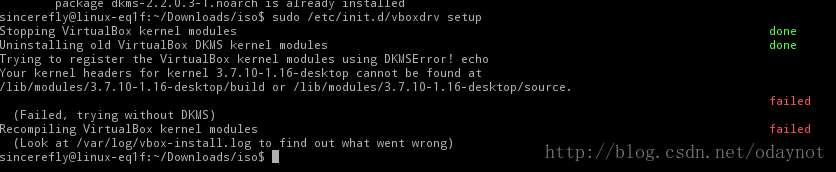
At the beginning, you will be prompted what to install DKMS, and then you will see the error as shown in the figure after downloading and installing, that is

sincerefly@linux-eq1f:~/Downloads/iso$ sudo rpm -Uivh dkms-2.2.0.3-1.noarch.rpm
root's password:
Ready...                          ################################# [100%]
        package dkms-2.2.0.3-1.noarch is already installed
sincerefly@linux-eq1f:~/Downloads/iso$ sudo /etc/init.d/vboxdrv setup
Stopping VirtualBox kernel modules                                                                            done
Uninstalling old VirtualBox DKMS kernel modules                                                               done
Trying to register the VirtualBox kernel modules using DKMSError! echo
Your kernel headers for kernel 3.7.10-1.16-desktop cannot be found at
/lib/modules/3.7.10-1.16-desktop/build or /lib/modules/3.7.10-1.16-desktop/source.
                                                                                                              failed
  (Failed, trying without DKMS)
Recompiling VirtualBox kernel modules                                                                         failed

I don’t know what’s the reason. It’s not good to worry about virtual machines. One is to learn from CentOS. The other is to do experiments. It’s not safe in the physical system, but it’s OK. There’s Baidu. If there is a problem, it needs to be solved

Search for

   sudo apt-get install dkms build-essential linux-headers-$(uname -r)
   sudo /etc/init.d/vboxdrv setup

It’s just a Debian command

I see such a sentence in it

The reason is that the corresponding package for the corresponding kernel is missing. Although I have executed the install command for kernel-devel before, the corresponding kernel-devel for the uek kernel is not installed, the correct one should be kernel-uek-devel.

That “kernel devel installation command” misled me for a long time, suddenly woke up, it was the package.

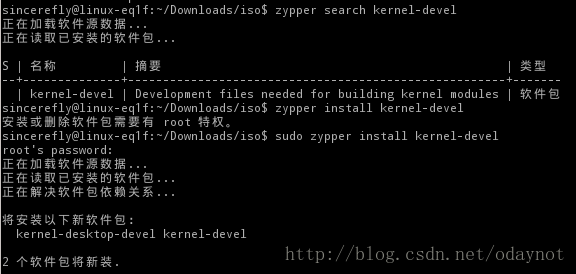
This is easy to do. Use zypper search kernel devel to search, and it is

After the installation, run it again

sudo /etc/init.d/vboxdrv setup

success!

Then my VB can run.

Using common file upload to upload files in SSH project

Today, the project used to upload. What I store in my database is the URL of the file, so I have to do some processing in the background. I have written several times before uploading, and I feel that the amount of code is too large. Today, I searched the Internet, and it will be much easier to upload with common file upload. After groping for an afternoon, I finally got it done. The background code is as follows

//The uploaded file
private File upload;
//file name and type
private String uploadContentType;
private String uploadFileName;
/*This is the variable to be written in the action, you must write it, otherwise it will be very troublesome, Struts2 will automatically assign the file to be uploaded, the file name, type, etc.*/

/// The following is the processing method
public String uploadStaffImage() throws Exception{
	//Take the file name and path, rename the file name with uuid to prevent Chinese mess
	String fileName = UUID.randomUUID().toString();
        //intercept file type
        String fileType = this.uploadFileName.substring(this.uploadFileName.lastIndexOf("."), this.uploadFileName.length());
        //New file name
        String file = fileName + fileType;
        // My directory is under "StaffImg" folder
        String path = request.getSession().getServletContext().getRealPath("/StaffImg");
	InputStream is = new FileInputStream(getUpload());  
        //Create an output stream to generate a new file  
        OutputStream os = new FileOutputStream(path + "//" + file);  
        //write disk 
        IOUtils.copy(is, os);
        os.flush();  
        IOUtils.closeQuietly(is);
        IOUtils.closeQuietly(os);
        //Update the URL in the database
        String imgURL = "StaffImg/"+file;
        this.staffFileUpLoadService.updataStaffImgURL(this.staffId, imgURL);
	return SUCCESS;
}

A total of 13 lines of code, compared to the previous written to be a lot more concise, method use is relatively simple.

This method can only upload a single file. If you upload in batches, the idea is the same, and you should add a loop in the outer layer
instead

Nginx, which is suitable for front-end H5 requests, routes and forwards according to the URL and cuts the URL

1. Ruqirement
nginx accepts the request url uniformly and forwards it
http://172.16.51.91:9000/api/order/create/44010000
http://172.16.51.91:9000/api/order/create/44060000
目标:
http://172.15.10.13:9001/api/order/create
http://172.15.10.13:9002/api/order/create
2. nginx Settings

server {
        listen      9000;
        server_name  172.16.51.91;

		location ~*(44010000)$ {
                rewrite ^/(.*)/44010000$ http://172.15.10.13:9001/$1 permanent;
        }
		 location ~*(44060000)$ {
                 rewrite ^/(.*)/44060000$ http://172.15.10.13:9002/$1 permanent;
        }	

}

Nginx routes and forwards according to the URL and cuts the URL

1. Ruqirement
nginx accepts the request url uniformly and forwards it
http://172.16.51.91:9000/44010000/api/order/create
http://172.16.51.91:9000/44060000/api/order/create
goal:
http://172.15.10.13:9001/api/order/create
http://172.15.10.13:9002/api/order/create
2. nginx Setting

server {
    listen   9000;
    server_name 172.16.51.91;

	location /44010000/ {
		    proxy_pass http://172.15.10.13:9001/;
    }
		 location /44060000/ {
         proxy_pass http://172.15.10.13:10002/;
    }
}

Nginx Error: [emerg] bind() to [::]:80 failed (98: Address already in use)

Problem description

When starting the nginx service, the following error occurred:

nginx: [emerg] bind() to 0.0.0.0:80 failed (98: Address already in use)
nginx: [emerg] bind() to [::]:80 failed (98: Address already in use)
nginx: [emerg] bind() to 0.0.0.0:80 failed (98: Address already in use)
nginx: [emerg] bind() to [::]:80 failed (98: Address already in use)
...

Cause of the problem

There are many reasons for this problem. We will list our scenarios and solutions here.

First, the port is occupied

This is the most common reason. Port 80 is occupied, which leads to binding of nginx service.

Solution 1

Find the process occupying port 80 and end it.

Second, dual stack sockets for IPv6

This is a common problem in the transition period from IPv4 to IPv6. The following configuration will also cause the above error:

server {
    listen [::]:80 ipv6only=off;        
    server_name dual-stack.example.com;
}
server {
    listen 0.0.0.0:80;
    server_name ipv4.example.com;
}

With the IPv6 only = off option, the currently created socket is dual stack, and IPv4 will be mapped to IPv6. At this time, only one monitor can be created, and IPv4 can no longer be monitored.

Solution 2

Since we can’t monitor IPv4, and now it’s a dual stack, we can monitor IPv6 address safely (and ensure IPv4 access at the same time)

server {
    listen [::]:80 ipv6only=off;        
    server_name dual-stack.example.com;
}
server {
    listen [::]:80;
    server_name ipv4.example.com;
}
# Because of the specific scenario, we cannot modify the configuration of the first Server
# Of course, it is also possible to turn off the double stack.

C# implementation of TXT document to table example code

code:

public DataTable TXTToDataTable(string fileName, string columnName)
    {
      DataTable dt = new DataTable();
      FileStream fs = new FileStream(fileName, System.IO.FileMode.Open, System.IO.FileAccess.Read);
      StreamReader sr = new StreamReader(fs, System.Text.Encoding.Default);
      //Record the line read each time
      string strLine = "";
 
      //record the content of each field in each line of the record
      string[] aryLine;
      //Mark the number of columns      
      int columnCount = 0;
      //indicate whether it is the first line read
      bool IsFirst = true;
 
      if (IsFirst == true)
      {
        //strLine = "ATTENDANCE_DATE,EMP,ATTENDANCE_DEPT,EMP_TYPE,SHITF,PLANT_CODE";
        strLine = columnName;
        aryLine = strLine.Split(',');
        IsFirst = false;
        columnCount = aryLine.Length;
        //create raw
        for (int i = 0; i < columnCount; i++)
        {
          DataColumn dc = new DataColumn(aryLine[i].ToUpper());
          dt.Columns.Add(dc);
        }
      }
 
      //Read the data in txt line by line
      while ((strLine = sr.ReadLine()) != null)
      {
        aryLine = strLine.Split('\t');//tab
        DataRow dr = dt.NewRow();
        for (int j = 0; j < columnCount; j++)
        {
          dr[j] = aryLine[j].ToUpper();
        }
        dt.Rows.Add(dr);
      }
 
      sr.Close();
      fs.Close();
      return dt;
    }
public DataTable TXTToDataTable(string fileName, string columnName)
    {
      DataTable dt = new DataTable();
      FileStream fs = new FileStream(fileName, System.IO.FileMode.Open, System.IO.FileAccess.Read);
      StreamReader sr = new StreamReader(fs, System.Text.Encoding.Default);
      //Record the line read each time
      string strLine = "";

      //record the content of each field in each line of the record
      string[] aryLine;
      //Mark the number of columns      
      int columnCount = 0;
      //indicate whether it is the first line read
      bool IsFirst = true;

      if (IsFirst == true)
      {
        //strLine = "ATTENDANCE_DATE,EMP,ATTENDANCE_DEPT,EMP_TYPE,SHITF,PLANT_CODE";
        strLine = columnName;
        aryLine = strLine.Split(',');
        IsFirst = false;
        columnCount = aryLine.Length;
        //create column
        for (int i = 0; i < columnCount; i++)
        {
          DataColumn dc = new DataColumn(aryLine[i].ToUpper());
          dt.Columns.Add(dc);
        }
      }

      //record the content of each field in each line of the record
      while ((strLine = sr.ReadLine()) != null)
      {
        aryLine = strLine.Split('\t');//tab
        DataRow dr = dt.NewRow();
        for (int j = 0; j < columnCount; j++)
        {
          dr[j] = aryLine[j].ToUpper();
        }
        dt.Rows.Add(dr);
      }

      sr.Close();
      fs.Close();
      return dt;
    }

The above is the C # implementation of TXT document to table example code, C # tutorial details, more about C # TXT document to table information please pay attention to

Successful cases of redis distributed lock

1. Custom distributed lock tool class

package com.cache.redis.demo.util;

import org.apache.commons.lang.time.DateFormatUtils;
import org.slf4j.Logger;
import org.slf4j.LoggerFactory;
import org.springframework.data.redis.connection.RedisStringCommands;
import org.springframework.data.redis.connection.ReturnType;
import org.springframework.data.redis.core.RedisCallback;
import org.springframework.data.redis.core.RedisTemplate;
import org.springframework.data.redis.core.types.Expiration;

import java.nio.charset.StandardCharsets;
import java.util.HashMap;
import java.util.Map;
import java.util.UUID;

/**
 * redisImplementing distributed locks
 * */
public class RedisLockHelper {

    private static final Logger log = LoggerFactory.getLogger(RedisLockHelper.class);

    /**
     * Default interval for lock acquisition by rotation, in milliseconds
     */
    private static final int DEFAULT_ACQUIRE_RESOLUTION_MILLIS = 100;

    private static final String UNLOCK_LUA;

    static {
        StringBuilder sb = new StringBuilder();
        sb.append("if redis.call(\"get\",KEYS[1]) == ARGV[1] ");
        sb.append("then ");
        sb.append("    return redis.call(\"del\",KEYS[1]) ");
        sb.append("else ");
        sb.append("    return 0 ");
        sb.append("end ");
        UNLOCK_LUA = sb.toString();
    }

    private RedisTemplate redisTemplate;

    private final ThreadLocal<Map<String, LockVO&>&> lockMap = new ThreadLocal<&>();

    public RedisLockHelper(RedisTemplate redisTemplate) {
        this.redisTemplate = redisTemplate;
    }

    /**
     * Get the lock and wait if it is not acquired
     *
     * @param key redis key
     * @param expire lock expiration time, in seconds
     */
    public void lock(final String key, long expire) {
        try {
            acquireLock(key, expire, -1);
        } catch (Exception e) {
            throw new RuntimeException("acquire lock exception", e);
        }
    }

    /**
     * If the lock is not acquired within the specified time, false is returned. otherwise, true is returned.
     *
     * @param key redis key
     * @param expire lock expiration time, in seconds
     * @param acquireTimeout The lock timeout period, -1 means never, in seconds.
     */
    public boolean lock(final String key, long expire, long acquireTimeout) throws RuntimeException {
        try {
            return acquireLock(key, expire, acquireTimeout);
        } catch (Exception e) {
            throw new RuntimeException("acquire lock exception", e);
        }
    }

    /**
     * 
     *
     * @param key redis key
     */
    public void unlock(String key) {
        try {
            release(key);
        } catch (Exception e) {
            throw new RuntimeException("release lock exception", e);
        }
    }


    private boolean acquireLock(String key, long expire, long acquireTimeout) throws InterruptedException {
        //If it was previously fetched and did not time out, then return the fetch success
        boolean acquired = acquired(key);
        if (acquired) {
            return true;
        }

        long acquireTime = acquireTimeout == -1 ?-1 : acquireTimeout * 1000 + System.currentTimeMillis();
        String currentTimeStr = DateFormatUtils.format(System.currentTimeMillis(),"yyyy-MM-dd HH:mm:ss.SSS");
        String acquireTimeStr = DateFormatUtils.format(acquireTime,"yyyy-MM-dd HH:mm:ss.SSS");
        log.info("Current time: {}, Timeout time.{}",currentTimeStr,acquireTimeStr);


        //The same process, for the same key lock, only allows the first one to try to get it.
        synchronized (key.intern()) {
            String lockId = UUID.randomUUID().toString();
            do {
                long before = System.currentTimeMillis();

                boolean hasLock = tryLock(key, expire, lockId);

                //Acquire lock successfully
                if (hasLock) {
                    long after = System.currentTimeMillis();
                    Map<String, LockVO&> map = lockMap.get();
                    if (map == null) {
                        map = new HashMap<&>(2);
                        lockMap.set(map);
                    }
                    map.put(key, new LockVO(1, lockId, expire * 1000 + before, expire * 1000 + after));
                    log.debug("acquire lock {} {} ", key, 1);
                    return true;
                }

                Thread.sleep(DEFAULT_ACQUIRE_RESOLUTION_MILLIS);

            } while (acquireTime == -1 || acquireTime &> System.currentTimeMillis());
        }
        log.debug("acquire lock {} fail,because timeout ", key);
        return false;
    }

    private boolean acquired(String key) {
        Map<String, LockVO&> map = lockMap.get();
        if (map == null || map.size() == 0 || !map.containsKey(key)) {
            return false;
        }

        LockVO vo = map.get(key);

        if (vo.beforeExpireTime < System.currentTimeMillis()) {
            log.debug("lock {} maybe release, because timeout ", key);
            return false;
        }
        int after = ++vo.count;
        log.debug("acquire lock {} {} ", key, after);
        return true;
    }

    private void release(String key) {
        Map<String, LockVO&> map = lockMap.get();
        if (map == null || map.size() == 0 || !map.containsKey(key)) {
            return;
        }

        LockVO vo = map.get(key);

        if (vo.afterExpireTime < System.currentTimeMillis()) {
            log.debug("release lock {}, because timeout ", key);
            map.remove(key);
            return;
        }
        int after = --vo.count;
        log.debug("release lock {} {} ", key, after);

        if (after &> 0) {
            return;
        }

        map.remove(key);
        RedisCallback<Boolean&> callback = (connection) -&>
                connection.eval(UNLOCK_LUA.getBytes(StandardCharsets.UTF_8), ReturnType.BOOLEAN, 1,
                        (RedisPrefix.LOCK_REDIS_PREFIX + key).getBytes(StandardCharsets.UTF_8), vo.value.getBytes(StandardCharsets.UTF_8));
        redisTemplate.execute(callback);
    }


    private boolean tryLock(String key, long expire, String lockId) {
        RedisCallback<Boolean&> callback = (connection) -&>
                connection.set((RedisPrefix.LOCK_REDIS_PREFIX + key).getBytes(StandardCharsets.UTF_8),
                        lockId.getBytes(StandardCharsets.UTF_8), Expiration.seconds(expire), RedisStringCommands.SetOption.SET_IF_ABSENT);
        return (Boolean) redisTemplate.execute(callback);
    }

    private static class LockVO {
        private int count;
        private String value;
        private long beforeExpireTime;
        private long afterExpireTime;

        LockVO(int count, String value, long beforeExpireTime, long afterExpireTime) {
            this.count = count;
            this.value = value;
            this.beforeExpireTime = beforeExpireTime;
            this.afterExpireTime = afterExpireTime;
        }
    }

}

2. Business thread

package com.cache.redis.demo.service;

import com.cache.redis.demo.util.RedisLockHelper;
import lombok.extern.slf4j.Slf4j;
import org.springframework.data.redis.core.StringRedisTemplate;

@Slf4j
public class MyThread implements Runnable {
    public static Integer count = 0;

    private String threadName;
    private StringRedisTemplate stringRedisTemplate;

    public MyThread() {
    }

    public MyThread(String threadName, StringRedisTemplate stringRedisTemplate) {
        this.threadName = threadName;
        this.stringRedisTemplate = stringRedisTemplate;
    }

    @Override
    public void run() {
        String key = "sync-key";
        RedisLockHelper redisLockHelper = new RedisLockHelper(stringRedisTemplate);
        //Way 1: Do not set the lock timeout time, the lock expires in 2 seconds
        redisLockHelper.lock(key, 2L);

        // mode 2: no lock timeout of 5 seconds and lock expiration of 2 seconds
       /* Boolean flag = redisLockHelper.lock(key, 2L,5L);
        log.info("Obtain synchronization lock identification.{}",flag);
        if(false == flag){
            return;
        }*/

        count++;
        log.info("Action" + this.threadName + "output:" + count);

        redisLockHelper.unlock(key);
    }
}

3. Testing

package com.cache.redis.demo.util;

import com.cache.redis.demo.service.MyThread;
import org.springframework.data.redis.connection.RedisStandaloneConfiguration;
import org.springframework.data.redis.connection.jedis.JedisConnectionFactory;
import org.springframework.data.redis.core.StringRedisTemplate;
import org.springframework.data.redis.serializer.Jackson2JsonRedisSerializer;
import org.springframework.data.redis.serializer.StringRedisSerializer;

import java.util.concurrent.ExecutorService;
import java.util.concurrent.Executors;

public class TestLock {

    public static void main(String[] args) {
        StringRedisTemplate stringRedisTemplate = getRedisTemplate();
        ExecutorService fixedThreadPool = Executors.newFixedThreadPool(10);

        for (int i = 0; i < 100; i++) {
            MyThread myThread = new MyThread("threadName" + i, stringRedisTemplate);
            fixedThreadPool.execute(myThread);
        }

    }

    public static StringRedisTemplate getRedisTemplate() {
        RedisStandaloneConfiguration config = new RedisStandaloneConfiguration();
        config.setHostName("127.0.0.1");
        config.setPort(6379);
        config.setPassword("pp@123e");
        JedisConnectionFactory jedisConnectionFactory = new JedisConnectionFactory(config);
       /* JedisConnectionFactory jedisConnectionFactory = new JedisConnectionFactory();
        jedisConnectionFactory.setHostName("127.0.0.1");
        jedisConnectionFactory.setPort(6379);
        jedisConnectionFactory.setPassword("pp@123e");*/

        StringRedisTemplate stringRedisTemplate = new StringRedisTemplate();
        Jackson2JsonRedisSerializer<Object&> fastJsonRedisSerializer = new Jackson2JsonRedisSerializer<Object&>(Object.class);
        //value fastJsonRedisSerializer
        stringRedisTemplate.setValueSerializer(fastJsonRedisSerializer);
        stringRedisTemplate.setHashValueSerializer(fastJsonRedisSerializer);
        //key StringRedisSerializer
        stringRedisTemplate.setKeySerializer(new StringRedisSerializer());
        stringRedisTemplate.setHashKeySerializer(new StringRedisSerializer());

        stringRedisTemplate.setConnectionFactory(jedisConnectionFactory);

        stringRedisTemplate.afterPropertiesSet();

        return stringRedisTemplate;
    }
}