Category Archives: Linux

Running shell script reports an error: “syntax error near unexpected token solution ‘”

Running shell script reports an error: “syntax error near unexpected token solution ‘”

Today, I wrote a cshell script to run syntax error near unexpected token ‘. There is no problem with the script syntax. Finally, I found the problem

  Open your SHELL script file with the command vi -b and you will. You will find an extra ^M at the end of each line of the script.

Old teletypewriters used two characters to start a new line. One character moves the carriage back to the first position (called carriage return, ASCII code 0d), and the other character moves one line on the paper (called line feed, ASCII code 0A). When computers came out, memory used to be very expensive. Some people don’t think it’s necessary to use two characters at the end of a line. UNIX developers decided that they could use a single character to indicate the end of a line. Linux follows UNIX, too. Apple developers have defined the use of. The guys who developed MS-DOS and windows decided to use the old-fashioned.

Because MS-DOS and windows use carriage return + line feed to indicate line feed, you can use VIM under Linux to view the code written in VC under windows. The “^ m” symbol at the end of the line indicates the symbol.

To solve this problem in VIM is very simple. You can kill all “^ m” by using the replacement function in vim. Type the following replacement command line:

1)vi -b setup.sh

2) On the command line & lt; press ESC, and then shift +: Colon & gt; enter% s/^ m// g

Note: the “ m” character in the above command line is not “</ sup>” plus “m”, but generated by “Ctrl + V” and “Ctrl + m” keys.

After this replacement, the save can be executed. Of course, there are other alternatives, such as:

a. Some Linux versions have dos2unix programs that can be used to remove ^ M.

b. Cat filename1 | tr – D “\ R” & gt; newfile removes ^ m to generate a new file, as well as sed command. All replaceable commands can be used to generate a new file.

according to the above, deleting the mshell script will run normally. Later, I asked my colleagues that he had modified the program path in his Windows Notepad, resulting in an extra </ sup> m in each line.
Grep: How to Find All the Files Containing a String in Linux

In the project, we often encounter the situation that the original table name has been replaced and needs to be replaced in batches in the script. However, it is troublesome to find out which tables are involved one by one, and it may be missed; replacing them directly on Linux may not be able to achieve good version synchronization; therefore, we can consider the combination of find and grep commands to find out the scripts that need to be modified before unified processing.


--Recursively find all files in the directory that contain this string
grep -rn "data_chushou_pay_info" /home/hadoop/nisj/automationDemand/

--find files in the current directory with filtered suffixes
grep -Rn "data_chushou_pay_info" *.py

--file in the current directory and set subdirectories that match the criteria
grep -Rn "data_chushou_pay_info" /home/hadoop/nisj/automationDemand/ *.py

--combine with the find command to filter directories and file name suffixes

find /home/hadoop/nisj/automationDemand/ -type f -name '*.py'|xargs grep -n 'data_chushou_pay_info'

In the end:

find /home/hadoop/nisj/automationDemand/ -type f -name ‘*.py’|xargs grep -n ‘data_ chushou_ pay_ [Info ‘] to meet the query requirements.


Grep options:

*: indicates all files in the current directory, or a file name

-R is a recursive search

-N is the display line number

-R find all files including subdirectories

-I ignore case


Interesting command line parameters:
grep – I pattern files: case insensitive search. Case sensitive by default

Grep – L pattern files: only the matching file names are listed, not the paths

Grep – L pattern files: lists unmatched file names

Grep – W pattern files: matches only the whole word, not part of the string (for example, matches’ magic ‘, not’ magic ‘)

Grep – C number pattern files: displays the [number] line for the matched context


Grep pattern1 | pattern2 files: displays rows that match pattern1 or pattern2


Grep pattern1 files | grep pattern2: displays rows that match both pattern1 and pattern2


Some special symbols used for search:
\ < and \ > mark the beginning and end of words respectively.

For example:

Grep man * will match “Batman”, “manic”, “man” and so on

Grep ‘< man’ * matches’ manic ‘and’ man ‘, but not’ Batman ‘

Grep ‘< man \ & gt;’ only matches’ man ‘, not other strings such as’ Batman’ or ‘manic’.

‘^’: refers to the matching string at the beginning of the line

‘$’: the matching string is at the end of the line

Error Running Context: The server unexpectedly closed the connection

Svn error:

Error running context : The server unexpectedly closed the connection

Error analysis:
means that the remote service has closed the connection. The inspection idea is as follows

1. view firewall firewalld&&iptables
firewall-cmd --stat  
If the return is not running, firewalld is not on
iptables -nL
Check if the rule has a 3690 drop
If you have not used iptables in the environment, you can use iptables -F to clear the rules! Use with caution!
2. Check if the svn service is up
ps uax | grep svn && netstat -lnpt | grep 2690
This method is used to determine the process and port
3. If you are using nginx reverse proxy, pay attention to the configuration of tcp forwarding
Note that especially if you use IF.Svnadmin and forget to configure it
server {
	listen xxx so_keepalived=on;
	server_name xxx;
	proxy_pass svn_server:3690;
	}

There are more methods than problems. Come on!!!!

Shell: How to Get System Current Tme and Format it

time=$(date “+%Y%m%d-%H%M%S”)

or

time=$(date “+%Y-%m-%d %H:%M:%S”)

…… etc. in any format you want

echo “${time}”

The above two lines of simple code is the shell to get the current time and output it in the format you want.

A few things to note

There is a space after date, otherwise the command cannot be recognized, the shell is still very strict about spaces.
Y shows 4-digit year, e.g. 2018; y shows 2-digit year, e.g. 18. m shows month; M shows minute. d shows day, while D shows current date, e.g. 1/18/18 (i.e. 2018.1.18). h shows hour, while h shows month (a bit confusing). s shows current second in milliseconds; S shows current second in seconds.

Read and write BMP image with Pure C language

Read and write BMP image with pure C language

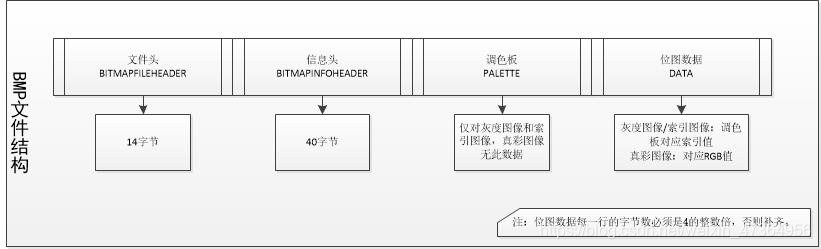
For the students who have just come into contact with digital images, there should be a question about how to read a BMP image in pure C language. I believe this is also the first step of digital image processing. If I am lucky to see this document, I will be the first light on your digital image processing road!

Understanding the composition of BMP


Don’t talk too much nonsense, just load the dry goods.

code

Define the header file as “BMP. H”, and define read_ BMP function is read function, write function_ BMP function is write function
read BMP diagram

#include <stdlib.h>
#include <math.h>
#include <Windows.h>
#include "bmp.h"
/* store the pixel width height and bitmap depth of the original image */
FILE* fpbmp;
FILE* fpout;
unsigned char* fpBmpHeader; //bitmap header
unsigned char* fpFileHeader; //bitmap information
RGBQUAD* pColorTable; //BMP palette
int read_bmp(const char* path, unsigned char *pBmpBuf,int *Width,int *Height,int * bitCount)
{
	fpbmp = fopen(path, "rb");//path is the image path
	unsigned short s;
	fread(&s, 1, 2, fpbmp);
	//judge whether the read image is a BMP image string"BM"=19778
	if (s == 19778)
	{
		printf("Open bmp success!!!\n");
	}
	else
	{
		printf("Open bmp fail!!!\n");
		return -1;
	}
	fseek(fpbmp, 0, SEEK_SET);
	BITMAPFILEHEADER fileHead;
	fread(&fileHead, sizeof(BITMAPFILEHEADER), 1, fpbmp);

	BITMAPINFOHEADER infoHead;
	fread(&infoHead, sizeof(BITMAPINFOHEADER), 1, fpbmp);

	*Width = infoHead.biWidth;
	*Height = infoHead.biHeight;
	*bitCount = infoHead.biBitCount;
	int lineByte = (*Width * *bitCount/8 + 3)/4 * 4;
	fseek(fpbmp, sizeof(BITMAPFILEHEADER) + sizeof(BITMAPINFOHEADER) + sizeof(RGBQUAD),SEEK_SET);
	fread(pBmpBuf, lineByte * *Height, 1, fpbmp);//pBmpBuf is the RGB data of the image, which is also the data we will process
	return 0;
}

Write BMP map

int write_bmp(unsigned char* img, int* Width, int* Height, int* bitCount)
{
	fpout = fopen("out.bmp", "wb+");
	if (fpbmp == NULL)
	{
		printf("read bmp failed!!!\n");
		return -1;
	}
	int lineByte = (*Width * *bitCount/8 + 3)/4 * 4;
	if (lineByte == 0)
	{
		printf("err");
		return -1;
	}
	fpFileHeader = new unsigned char[(sizeof(BITMAPFILEHEADER))];
	fseek(fpbmp, 0, SEEK_SET);  //Position the original image Offset position
	fseek(fpout, 0, SEEK_SET); //position the new map Offset position
	fread(fpFileHeader, 1, sizeof(BITMAPFILEHEADER), fpbmp);
	fwrite(fpFileHeader, 1, sizeof(BITMAPFILEHEADER), fpout);


	fpBmpHeader = new unsigned char[(sizeof(BITMAPINFOHEADER))];
	fseek(fpbmp, sizeof(BITMAPFILEHEADER), SEEK_SET);
	fseek(fpout, sizeof(BITMAPFILEHEADER), SEEK_SET);
	fread(fpBmpHeader, 1, sizeof(BITMAPINFOHEADER), fpbmp);
	fwrite(fpBmpHeader, 1, sizeof(BITMAPINFOHEADER), fpout);

	pColorTable = new RGBQUAD[256];
	fseek(fpbmp, sizeof(BITMAPFILEHEADER) + sizeof(BITMAPINFOHEADER), SEEK_SET);
	fseek(fpout, sizeof(BITMAPFILEHEADER) + sizeof(BITMAPINFOHEADER), SEEK_SET);
	fread(pColorTable, sizeof(RGBQUAD), 256, fpbmp);
	fwrite(pColorTable, sizeof(RGBQUAD), 256, fpout);

	fseek(fpout, sizeof(BITMAPFILEHEADER) + sizeof(BITMAPINFOHEADER) + sizeof(RGBQUAD), SEEK_SET);
	fwrite(img, lineByte * *Height, sizeof(char), fpout);
	fclose(fpout);
	fclose(fpbmp);
	return 0;
}

Main function call

#include <stdio.h>
#include <stdlib.h>
#include <math.h>
#include <Windows.h>
#include "bmp.h"

int main()
{
	int width, height, bitCount = 0;
	unsigned char* pBmpBuf = (unsigned char*)malloc(1000 * 1000 * 3);
	const char* path = "D:\\test\\read_bmp_image\\1-B.bmp";
	read_bmp(path, pBmpBuf, &width, &height, &bitCount);
	write_bmp(pBmpBuf, &width, &height, &bitCount);
}

Summarize, read_ The pbmpbuf parameter returned by BMP function is assigned to write_ The IMG parameter of BMP function realizes the whole process of BMP graph from reading to writing. If you are interested in it, you will get unexpected results.
Note: the website of online conversion BMP map can convert any format photos to BMP format. It’s easy to use. Link to BMP image conversion website

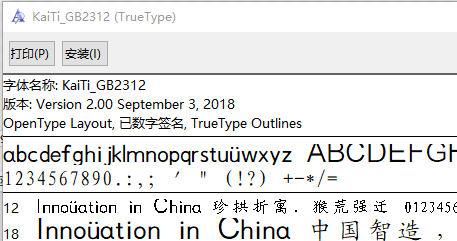
WPF: How to Reference Font Resource File

External font file

1. Background code reference font

We call it “Chinese” CharacterSpecialFont.ttf ”The TTF file is placed in the desktop path, and the background reference method is as follows:

1 var ttfFilePath = @"C:\Users\user\Desktop\";
2 HanziTextBlock.FontFamily = new System.Windows.Media.FontFamily(new Uri(ttfFilePath), "./#楷体_GB2312");

The path URI only needs a folder, and the next parameter family is “.”/# specify font type name “.

be careful:

The path URI is not the full path of the TTF file; the folder where the TTF file is located needs to be added with ‘/’ or ‘\ \’; any special character in the parameter family cannot be missing. Otherwise, the characters displayed in the interface will not be displayed in the specified font. The reference font has nothing to do with the name of the font file, only the font type name can be referenced.

#The font type name is indicated after it. You can double-click to open the TTF file

2. WPF XAML resource reference

Call it Chinese CharacterSpecialFont.ttf ”Ttf file, in the wpfapp2 project. The quotation is as follows:

1     <Window.Resources>
2         <FontFamily x:Key="HanziCharacterFontFamily">pack://application:,,,/WpfApp2;component/#楷体_GB2312</FontFamily>
3     </Window.Resources>
4     <Grid>
5         <TextBlock x:Name="HanziTextBlock" Text="a" FontFamily="{StaticResource HanziCharacterFontFamily}"
6                    FontSize="50" HorizontalAlignment="Center" VerticalAlignment="Center"/>
7     </Grid>

Install font files locally

The local installed fonts can be downloaded through Fonts.SystemFontFamilies obtain.

The XAML font goes without saying. You can set the font type in the background by:

1     var systemFontFamilies = Fonts.SystemFontFamilies;
2     var songTiFamily = systemFontFamilies.FirstOrDefault(i=>i.Source=="KaiTi");
3     HanziTextBlock.FontFamily = songTiFamily;

The system font is fontfamily data, and the source name is in English. How to get the corresponding font by Chinese name?

Familynames is a dictionary containing multi language items. Key is the language item and value is the font type name.

 1     var systemFontFamilies = Fonts.SystemFontFamilies;
 2     FontFamily filteredChineseFamily = null;
 3     foreach (FontFamily family in systemFontFamilies)
 4     {
 5         LanguageSpecificStringDictionary familyNames = family.FamilyNames;
 6         if (familyNames.ContainsKey(XmlLanguage.GetLanguage("zh-cn")))
 7         {
 8             if (familyNames.TryGetValue(XmlLanguage.GetLanguage("zh-cn"), out var chineseFontName)&&chineseFontName=="楷体")
 9             {
10                 filteredChineseFamily = family;
11                 break;
12             }
13         }
14     }
15     HanziTextBlock.FontFamily = filteredChineseFamily;

Keywords: TTF font referenced by background code, TTF font referenced by WPF front end

Ffmpeg about Avio_alloc_Context application for memory release

Question:

Using ffmpeg to discover AV_ The memory requested by malloc can’t use AV in the end_ If the free function is released, it will crash.

Code example:

   unsigned char * iobuffer = NULL; 
    iobuffer = (unsigned char *)av_malloc(40000);
    if (iobuffer == NULL)
    {
        printf("iobuffer av_malloc failed.\n");
        return -1;
    }

    AVIOContext *avio = avio_alloc_context(iobuffer, 40000, 0, this, fill_iobuffer, NULL, NULL);
    if (avio == NULL)
    {
        printf(" avio_alloc_context failed.\n");
        return -1;
    }
    /*.........*/

Release Avio_ alloc_ Context memory

Method 1: use Avio_ context_ free

            avio_context_free(&avio );

Method 2: using AV_ freep

            // memory release
            av_freep(&avio ->buffer);
            av_freep(&avio);

Appendix:

/**
 * Free the supplied IO context and everything associated with it.
 *
 * @param s Double pointer to the IO context. This function will write NULL
 * into s.
 */
void avio_context_free(AVIOContext **s);


/**
 * Free a memory block which has been allocated with a function of av_malloc()
 * or av_realloc() family, and set the pointer pointing to it to `NULL`.
 *
 * @code{.c}
 * uint8_t *buf = av_malloc(16);
 * av_free(buf);
 * // buf now contains a dangling pointer to freed memory, and accidental
 * // dereference of buf will result in a use-after-free, which may be a
 * // security risk.
 *
 * uint8_t *buf = av_malloc(16);
 * av_freep(&buf);
 * // buf is now NULL, and accidental dereference will only result in a
 * // NULL-pointer dereference.
 * @endcode
 *
 * @param ptr Pointer to the pointer to the memory block which should be freed
 * @note `*ptr = NULL` is safe and leads to no action.
 * @see av_free()
 */
void av_freep(void *ptr);

C Language Compilation Error: variably modified ‘* *’ at file scope

Error: variably modified ‘* *’ at file scope

Cause of error

Read only type used in array declaration.

This error is caused by the use of code similar to the following

const int length = 256;
char buffer[length] = {0};

In C language, const is not a real constant, its meaning is only read-only. The object declared with const is a runtime object and cannot be used as the initial value of a quantity, the length of an array, the value of a case, or in the case of a type. for example

//Error message in the comment
const int length = 256;
char buzzer[length];        //error: variably modified ‘buffer’ at file scope
int i = length;             //error: initializer element is not constant

switch (x) {
case length:            //error: case label does not reduce to an integer constant
	/* code */
	 break;
default:
	 break;
}

The solution is to use the macro definition instead of the read-only type const

//how to solve this error
#define LENGTH 256
char buzzer[LENGTH];        //error: variably modified ‘buffer’ at file scope
int i = LENGTH;             //error: initializer element is not constant

switch (x) {
case length:            //error: case label does not reduce to an integer constant
	/* code */
	 break;
default:
	 break;

#The difference between define and const
the type modified by const takes up space in memory, while # define does not. # define only replaces the corresponding part of the source file to be compiled with string before compilation. For example, the previous code will be preprocessed to

char buzzer[256];       
int i = 256;            

switch (x) {
case 256:           
	/* code */
	 break;
default:
	 break;

C# WPF Framework: How to Build Caliburn.Micro Quickly

1. What is Caliburn?

Caliburn is an open source framework of MVVM class proposed by Rob Eisenberg on January 26, 2009 (Rob’s mix10 talk “build your own MVVM framework”). It is a set of libraries used to assist in the development of WPF, Silverlight, WP7 and win RT applications.

Caliburn.Micro Officially released by Rob Eisenberg on June 7, 2010.

Caliburn.Micro Is a small and powerful framework designed to build applications on all XAML platforms. With strong support for MVVM and other proven UI patterns, Caliburn.Micro Will enable you to build solutions quickly without sacrificing code quality and testability

2. Project creation:

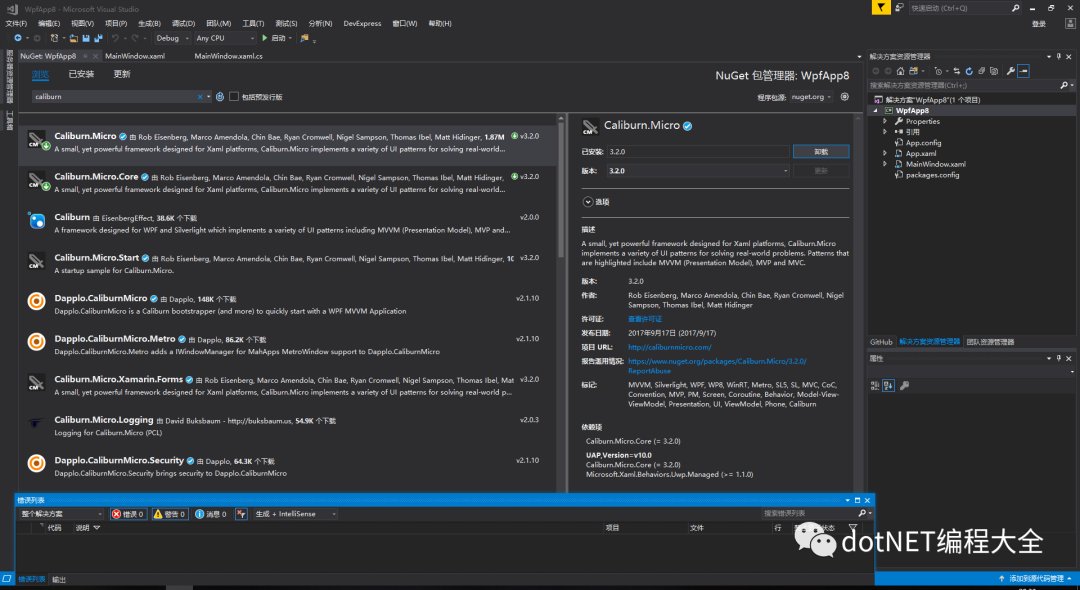
Step 1: create a project and install it for the current project using nuget package management tool Caliburn.Micro

Step 2: Project Creation:

newly build StartView.xaml

Delete the MainWindow.xaml

Modification App.xaml Delete startupuri=“ MainWindow.xmal “。

<Window x:Class="WpfApp8.StartView"
        xmlns="http://schemas.microsoft.com/winfx/2006/xaml/presentation"
        xmlns:x="http://schemas.microsoft.com/winfx/2006/xaml"
        xmlns:d="http://schemas.microsoft.com/expression/blend/2008"
        xmlns:mc="http://schemas.openxmlformats.org/markup-compatibility/2006"
        xmlns:local="clr-namespace:WpfApp8"
        mc:Ignorable="d"
        Title="StartView" Height="450" Width="800">
    <Grid Background="Gray">
        <Button x:Name="testBtn" Content="testBtn" HorizontalAlignment="Center"  VerticalAlignment="Center" Width="100" Height=" 50" Background="LightCyan"/>


    </Grid>


</Window>


newly build StartViewModel.cs

using Caliburn.Micro;
using System.Windows;


namespace WpfApp8
{
    class StartViewModel : Screen


    {
      
        public StartViewModel()
        {
           
        }


        public void testBtn()
        {
            MessageBox.Show("hello world!");
        }


    }
}


Create a new class that inherits bootstrapperbase. Here I name it mybootstrapper
class

using Caliburn.Micro;
using System.Windows;


namespace WpfApp8
{
    class MyBootstrapper : BootstrapperBase
    {


        public MyBootstrapper()
        {
            Initialize();//Initializing the framework
        }


        protected override void OnStartup(object sender, StartupEventArgs e)
        {
            DisplayRootViewFor<StartViewModel>();//show the main
        }
    }


}


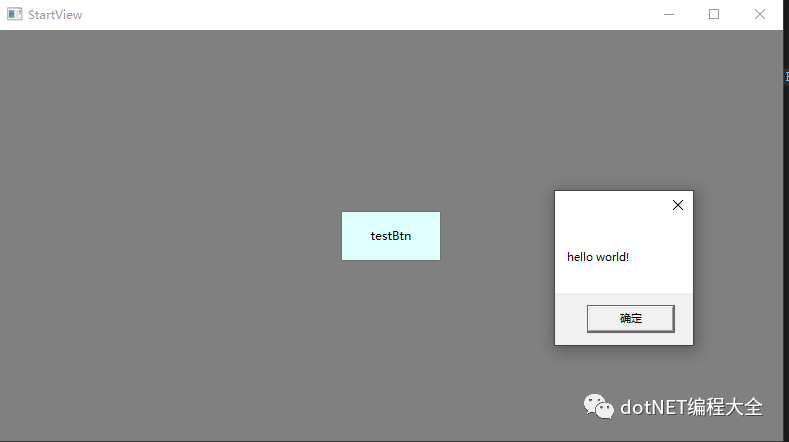
Running results:
0

Error in Linux running file: bash: $’\r’: command not found

Problem description

After the SH file is written in windows, an error will be reported when running in Linux: bash: $’\ R’: command not found

Problem-solving

This is because the windows system uses - for file wrapping, while the UNIX system uses - for file wrapping

Problem-solving

Method 1

Install dos2unix for file conversion

yum install -y dos2unix

dos2unix aaa.sh

Method 2

Use VIM to open the file, and then use the command: set FF = UNIX </ KBD>, save the file

# use vim to open file
vim aaa.sh
# change formate
:set ff=unix
# save file
:wq

C#: How to Use Itextsharp to Manipulate PDF Files

summary

How to convert HTML file to PDF file?Some recruitment online resume into doc file, can not be used directly, this caused great trouble, then it also has a format, that is HTML format. Export the file to HTML format, and then convert it to PDF file, so that it can be used directly. Usually in the project is also a lot of such requirements, need to convert the content into PDF file.

Now let’s take a look at how to convert HTML to PDF using itextsharp.

code implementation

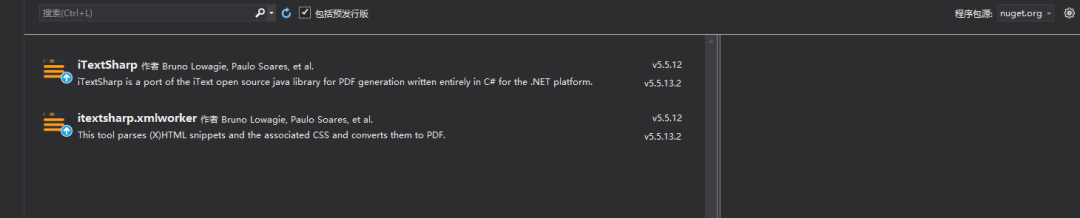
1. Nuget installs itextsharp.

using iTextSharp.text;
using iTextSharp.text.pdf;

2. Convert HTML document to PDF.

  /// <summary>
        /// Switch Html Document to pdf
        /// </summary>
        /// <param name="htmlText"></param>
        /// <returns></returns>
        public byte[] ConvertHtmlTextToPDF(string htmlText)
        {
            if (string.IsNullOrEmpty(htmlText))
                return null;
            //to avoid when the htmlText without any html tag tag plain text, to PDF will hang, so all with <p> tag
            htmlText = "<p>" + htmlText + "</p>";
            using (var outputStream = new MemoryStream())
            {
                byte[] data = Encoding.UTF8.GetBytes(htmlText);
                var msInput = new MemoryStream(data);
                var doc = new Document();//pdf file,default A4 formate
                var writer = PdfWriter.GetInstance(doc, outputStream);
                doc.Open();
                iTextSharp.tool.xml.XMLWorkerHelper.GetInstance().ParseXHtml(writer, doc, msInput, null, Encoding.UTF8, new UnicodeFontFactory());
                var pdfDest = new PdfDestination(PdfDestination.XYZ, 0, doc.PageSize.Height, 1f);
                var action = PdfAction.GotoLocalPage(1, pdfDest, writer);
                writer.SetOpenAction(action);
                doc.Close();
                msInput.Close();
                outputStream.Close();
                return outputStream.ToArray();
            }
        }

3. Unicode font support.

   /// <summary>
        /// Unicode font support
        /// </summary>
        public class UnicodeFontFactory : FontFactoryImp
        {
            public override Font GetFont(string fontname, string encoding, bool embedded, float size, int style, BaseColor color, bool cached)
            {
                //var chineseFontPath = Path.Combine(Environment.GetFolderPath(Environment.SpecialFolder.Fonts), "msyh.ttc,0");
                //BaseFont baseFont = BaseFont.CreateFont(@"c:\Windows\Fonts\simsun.ttc,0", BaseFont.IDENTITY_H, BaseFont.NOT_EMBEDDED);
                BaseFont baseFont = BaseFont.CreateFont(@"c:\Windows\Fonts\SIMHEI.ttf", BaseFont.IDENTITY_H, BaseFont.NOT_EMBEDDED);
                //var baseFont = BaseFont.CreateFont(chineseFontPath, BaseFont.IDENTITY_H, BaseFont.EMBEDDED);
                return new Font(baseFont, size, style, color);
            }
        }

4. Call build.

   string content = temp.Content;
            foreach (var dict in dicts)
            {
                content = content.Replace("{{" + dict.Key + "}}", dict.Value);
            }
            var path = _esignInfo.Value.ContractPath;
            //if (entity.ContractType == ContractType.First)
            //{
            //    path += "/" + appId + "/Agreements";
            //}
            entity.OriginalFileUrl = _pdfHelper.WritePdfFile(content, contractNo, path, "PDF");
            bool isSucc = !String.IsNullOrEmpty(entity.OriginalFileUrl);

How to Solve Ubuntu “Failed to fetch” Error

Operating system: Ubuntu 12.04 LTS


In the Ubuntu operating system, it is very convenient to use the apt get command to install the required development software. However, there are many times when the software source can not be linked and can not be installed normally. Therefore, many people will think of using the sudo apt get update command to update the software source. At this time, the update command can not work normally even in the rainy night, resulting in a large number of “failed to” “Fetch” error.


W: Failed to fetch http://archive.ubuntu.com/ubuntu/dists/precise-updates/main/binary-i386/Packages  Something wicked happened resolving 'archive.ubuntu.com:http' (-5 - No address associated with hostname)

W: Failed to fetch http://archive.ubuntu.com/ubuntu/dists/precise-updates/restricted/binary-i386/Packages  Something wicked happened resolving 'archive.ubuntu.com:http' (-5 - No address associated with hostname)

W: Failed to fetch http://archive.ubuntu.com/ubuntu/dists/precise-updates/universe/binary-i386/Packages  Something wicked happened resolving 'archive.ubuntu.com:http' (-5 - No address associated with hostname)

W: Failed to fetch http://archive.ubuntu.com/ubuntu/dists/precise-updates/multiverse/binary-i386/Packages  Something wicked happened resolving 'archive.ubuntu.com:http' (-5 - No address associated with hostname)

W: Failed to fetch http://archive.ubuntu.com/ubuntu/dists/precise-updates/main/i18n/Translation-en_US  Something wicked happened resolving 'archive.ubuntu.com:http' (-5 - No address associated with hostname)


In fact, it is very simple to solve this problem, as long as it is properly set up

DNS

Server is enough


$ sudo vim /etc/resolv.conf 

Modify DNS:

nameserver 8.8.8.8

nameserver 8.8.4.4

Then restart the network service: sudo etc/init.d/networking restart

Execute the sudo apt get update command again, and everything is normal.


After I changed it, I found that it still couldn’t work. Later, I click the link to go to the directory above the link. I found that there was no requested resource in the directory, not the network problem.