Category Archives: JAVA

[Fixed] Disgusting bug Error:Failed to Load project configuration: cannot parse filemessage: content is not allowed in the preface.

Error details:

Error:Failed to load project configuration: cannot parse file D:\Work\demo\.idea\libraries\Maven___com_test.e_caseapi_1_0_SNAPSHOT.xml: ParseError at [row,col]:[1,1]
Message: No content is allowed in the preface.

I copied a project and reopened a new workspace and threw this exception when I started. The analysis of this exception was caused by the fact that every workspace you imported IDEA generated a.idea file, because your current path did not match the workspace.
Solutions:
Find idea workspace. XML file, delete it, close idea

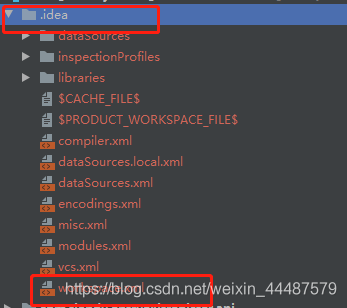
find your project workspace file, delete. Idea folder, then reopen idea and re-import the project into idea.

Executing Maven command error: Java_HOME is not defined correctly executing maven

Assuming you use bash shell and installed Java with the Oracle installer, you could add the following to your .bash_profile

export JAVA_HOME=$(/usr/libexec/java_home)
export PATH=$JAVA_HOME/jre/bin:$PATH

This would pick the correct JAVA_HOME as defined by the Oracle installer and will set it first in your $PATH making sure it is found.
Also, you don’t need to change it later when updating Java.

From:https://stackoverflow.com/questions/27319495/error-java-home-is-not-defined-correctly-executing-maven

Java error prompt….. cannot be resolved

Error message:
Type:… Always be resolved.
Reason analysis:
:
/* Any hint that… Always be resolved.
* 1. Variables are used without being declared or defined.
* 2. Some class, no import or definition
* 3. An object that is not defined or declared.
*
*
*/

Examples in specific projects:

import java.util.Scanner;
public class AppCAC
{
public static int Avg(int temp)
{
int avg1;
avg1=temp; // When written like this: avg1=temp; The error shown is: AvG1 cannot be Resolved // i.e. Avg1 cannot be resolved.
avg1=avg1+temp;

return avg1;
}

public static int Max(int temp)
{
int M=0;
if(temp> =M)
M=temp;
return M;

}

public static int Min(int temp)
{
int Min=0;
if(Min> =temp)
{
Min=temp;
}
return Min;
}

public static void main(String[] args)
{
int com;
int avg;
int max;
int min;
// here I want to define three methods
// how do I define methods?

/*Scanner scan=new Scanner(system.in); Multiple markers at this line
-scanner cannot be resolved to
a type*/

for(int I =1; i< 11. I++)
{
system.out.println (” please enter: “);
// com=scan.nextInt(); I can conclude by saying:

/* any scan cannot be resolved. Always be resolved.
* 1. Variables are used without being declared or defined.
* 2. Some class, no import or definition
* 3. An object that is not defined or declared.
*
*
*/
Avg(com);
Max(com);
Min(com);
}
/*for(i=1; i< 11. I++)
{
system.out.println (” please enter: “);
com=scan.nextInt();
Avg (com);
Max(com);
Min(com);
}
, this code shows: Multiple markers at this line
-i cannot be
-i cannot be
resolved
-i cannot be
resolved

this error, : error: I cannot be processed. Why can’t I be processed??The reason: I use it without defining I, and variables can only be used if they are defined.
*
*/
avg=Avg/10;
system.out.println (” now start output: \n”);
system.out.println (” mean: “,avg);
system.out.println (” Max: “,Max); // The method println(int) is not applicable for The arguments (String, int),
// learn how to use println method.

}

}

keytool error: java.lang.Exception: Input not an X.509 certificate

This error occurs while using the KeyTool because the native is using the OpenJDK and the tool needs to use the JDK that comes with Oracle.
1. View the JDK on your current machine:

rpm -qa | grep jdk

The result of the native query is openJDK
2. Uninstall the currently installed OpenJDK using Yum Remove.
3. Download the JDK for Linux on oracle’s official website.
4. Configure the environment variable vim /etc/profile locally and then modify the following:

export JAVA_HOME=/home/test/jdk1.8.0_131 (You need to replace it with your own jdk path.)
PATH=$JAVA_HOME/bin:$PATH
CLASSPATH=.:$JAVA_HOME/lib/dt.jar:$JAVA_HOME/lib/tools.jar
export JAVA_HOME  CLASSPATH  PATH

5. Reload /etc/profile:

source /etc/profile

6. Review the JDK on the current machine and configure it.
7, re-use the keytool command, successful.

[Errno 14] PYCURL ERROR 7 – “couldn’t connect to host”

[Errno 14] PYCURL ERROR 7 – “Couldn’t connect to host” solution
The new server points to the original server’s yum source, and after the configuration is completed, the
yum clean all operation and yum repolist
error are reported

[root@hadoop101 yum.repos.d]# yum repolist
Plugins loaded: fastestmirror, refresh-packagekit, security
Determining fastest mirrors
 * extras: mirror.bit.edu.cn
 * updates: ap.stykers.moe
http://192.168.1.100/cdrom/repodata/repomd.xml: [Errno 14] PYCURL ERROR 7 - "couldn't connect to host"
Try other mirrors.
http://192.168.1.100/cdrom/repodata/repomd.xml: [Errno 14] PYCURL ERROR 7 - "couldn't connect to host"
Try other mirrors.
extras                                                                    | 3.4 kB     00:00     
extras/primary_db                                                         |  29 kB     00:00     
updates                                                                   | 3.4 kB     00:00     
updates/primary_db                                                        | 3.7 MB     00:02 

The problem is a firewall problem
solution: return to the primary server
type /etc/init.d/iptables stop
or chkconfig iptables off
to close the firewall

java.net.SocketException: software caused connection abort: socket write error resolution (selenium)

First, the problem: Using eclipse to run test cases, report the following error
socket write error
at java.net.SocketOutputStream.socketWrite0(local method)
at java.net.SocketOutputStream.socketWrite(unknown source)
at java.net.SocketOutputStream.write(unknown source)
at sun.nio.cs.StreamEncoder. writeBytes(unknown source)
at sun.nio. css . streamencoder. implFlushBuffer(unknown source)
at sun.nio. ces . streamencoder. implFlush(Unknown Source)
StreamEncoder. Refresh at java.io.OutputStreamWriter (unknown source).
. BufferedWriter at java.io.
. Flushing (unknown source)

org.testng.remote.strprotocol.JsonMessageSender.sendMessage (JsonMessageSender.java: 41)
org.testng.remote.strprotocol.MessageHub.sendMessage (MessageHub.java: 42)
org.testng.remote.strprotocol.RemoteTestListener1.onTestStart (RemoteTestListener1.java: 49)
org.testng.internal.Invoker.runTestListeners (Invoker.java: 1904)
org.testng.internal.Invoker.runTestListeners (Invoker.java: 1879)
org.testng.internal.Invoker.invokeMethod (Invoker.java: 685)
org.testng.internal.Invoker.invokeTestMethod (Invoker.java: 901)
org.testng.internal.Invoker.invokeTestMethods (Invoker.java: 1231)
org.testng.internal.TestMethodWorker.invokeTestMethods (TestMethodWorker.java: 127)
org.testng.internal.TestMethodWorker.run (TestMethodWorker.java: 111)在org.testng.TestRunner.privateRun

(TestRunner.java: 767)org.testng.TestRunner.run (TestRunner.java: 617)
org.testng.SuiteRunner.runTest (SuiteRunner.java: 334)
org.testng.SuiteRunner.runSequentially (SuiteRunner.java: 329)
org.testng.SuiteRunner.privateRun (SuiteRunner.java: 291)
org.testng.SuiteRunner.run (SuiteRunner.java: 240)
org.testng.SuiteRunnerWorker.runSuite (SuiteRunnerWorker.java: 52)在org.testng.SuiteRunnerWorker.run

(SuiteRunnerWorker.java: 86)org.testng.TestNG.runSuitesSequentially (TestNG.java: 1198)
org.testng.TestNG.runSuitesLocally (TestNG.java: 1123)
org.testng.TestNG.run (TestNG.java: 1031)
org.testng.remote.AbstractRemoteTestNG.run (AbstractRemoteTestNG.java: 114)
org.testng.remote.RemoteTestNG.initAndRun (RemoteTestNG.java: 251)
org.testng.remote.RemoteTestNG.main (RemoteTestNG.java: 77)
[SeleniumAutoConsole]

Information [Main] com.cases.KfglTest.kfgl_0001_LoginSucc | (36) kfgl_0001_LoginSucc Run!
[SeleniumAutoConsole] info [main] com.cases.KfglTest.kfgl_0001_LoginSucc(40) | decibels –:zhangsan
Database result is: zhangsan// there are two data, the English data read correctly, the Chinese data read failed
SocketException:Software cause connection broken: socket write error
at java.net.SocketOutputStream.socketWrite0(local method)
at java.net.SocketOutputStream.socketWrite(unknown source)
at java.net.SocketOutputStream.write(unknown source)
at sun.nio. css . streamencoder. writeBytes(unknown source)
at sun.nio. css . streamencoder. implFlushBuffer(unknown source)
at sun.nio. ces . streamencoder. implFlush(Unknown Source)
StreamEncoder. Refresh at java.io.OutputStreamWriter (unknown source).
. BufferedWriter at java.io.
. Flushing (unknown source)

Translated with www.DeepL.com/Translator (free version)

org.testng.remote.strprotocol.JsonMessageSender.sendMessage (JsonMessageSender.java: 41)
org.testng.remote.strprotocol.MessageHub.sendMessage (MessageHub.java: 42)
org.testng.remote.strprotocol.RemoteTestListener1.onTestSuccess (RemoteTestListener1.java: 88)
org.testng.internal.Invoker.runTestListeners (Invoker.java: 1899)
org.testng.internal.Invoker.runTestListeners (Invoker.java: 1879)
org.testng.internal.Invoker.invokeMethod (Invoker.java: 778)
org.testng.internal.Invoker.invokeTestMethod (Invoker.java: 901)
org.testng.internal.Invoker.invokeTestMethods (Invoker.java: 1231)
org.testng.internal.TestMethodWorker.invokeTestMethods (TestMethodWorker.java: 127)
org.testng.internal.TestMethodWorker.run (TestMethodWorker.java: 111)在org.testng
II. Causes of the problem
Test data containing Chinese
III. Solutions
eclipse modify. ini, set system properties to utf – 8
-Dfile.encoding = utf – 8

Ternary operator in Java?: error: not a statement

Error when running the following code:

/* package whatever; // don't place package name! */

import java.util.*;
import java.lang.*;
import java.io.*;

/* Name of the class has to be "Main" only if the class is public. */
/**
 * Determination of score levels
 * Use the nesting of conditional operators to complete this question: students with an >=90 academic score are represented by A, those between 60-89 are represented by B, and those below 60 are represented by C.
 * (a>b)?a:b This is a basic example of a conditional operator
*/

class ClassifyGrade
{
	public static void main(String[] args)
	{
		System.out.println("Please enter the score for a particular student.");
		Scanner aInt = new Scanner(System.in);
		int score = aInt.nextInt();			// This way we have a score to experiment with
		String grade = classify(score);
		System.out.println(grade);
	}
	public static String classify(int n)
	{
		n>=90?(grade = "A"):(n>=60?(grade = "B"):(grade = "C"));
		return grade;
	
	}
}

Error:

Main.java:26: error: not a statement
		n>=90?(grade = "A"):(n>=60?(grade = "B"):(grade = "C"));
		     ^
1 error


The reason for the mistake is:
Java ternary operator?: different from C++
In Java, N> = 90?(grade = “A”):(n> = 60?(grade = “B”):(grade = “C”)); This is just an expression, not a statement,
There are specific requirements for expressions in JAVA. Namely: expression E;
To form an expression statement, the expression E must only be :
1) assignment expression,
2) autoincrement ++ expression,
3) autodecrement — expression,
4) method call expression,
5)new expression (object creation expression)
The following statement is easier to understand:
Conditional statement?[expression 1] : [expression 2] where expression 1 is executed if the conditional statement is true, otherwise expression 2 is executed. Expression 1 or expression 2 should have a return value, which means that expression 1 or expression 2 can be some value, such as the integer 123. In my code, grade = “B” is an assignment statement that cannot return any value.

Correct code:

/* package whatever; // don't place package name! */

import java.util.*;
import java.lang.*;
import java.io.*;

/* Name of the class has to be "Main" only if the class is public. */
/**
 * Determination of score levels
 * Use the nesting of conditional operators to complete this question: students with an >=90 academic score are represented by A, those between 60-89 are represented by B, and those below 60 are represented by C.
 * (a>b)?a:b This is a basic example of a conditional operator
*/

class ClassifyGrade
{
	public static void main(String[] args)
	{
		System.out.println("Please enter the score for a particular student.");
		Scanner aInt = new Scanner(System.in);
		int score = aInt.nextInt();			//This way we have a score to experiment with
		String grade = classify(score);
		System.out.println(grade);
	}
	public static String classify(int n)
	{
		String grade = n>=90?"A":(n>=60?"B":"C");
		return grade;
	}
}


See the reference post:
Why can’t the ternary operator stand alone as a sentence, but a method that returns a value can stand alone as a sentence?

IDEA-Error java error release version 5 not supported (How To Fix)

Refer to the

\rightarrow

→ Refer to article 1 and article 2
Content of the error
Error:java: error: release version 5 not supported

Error reason
Error setting Java compiler in project structure or Settings
The solution
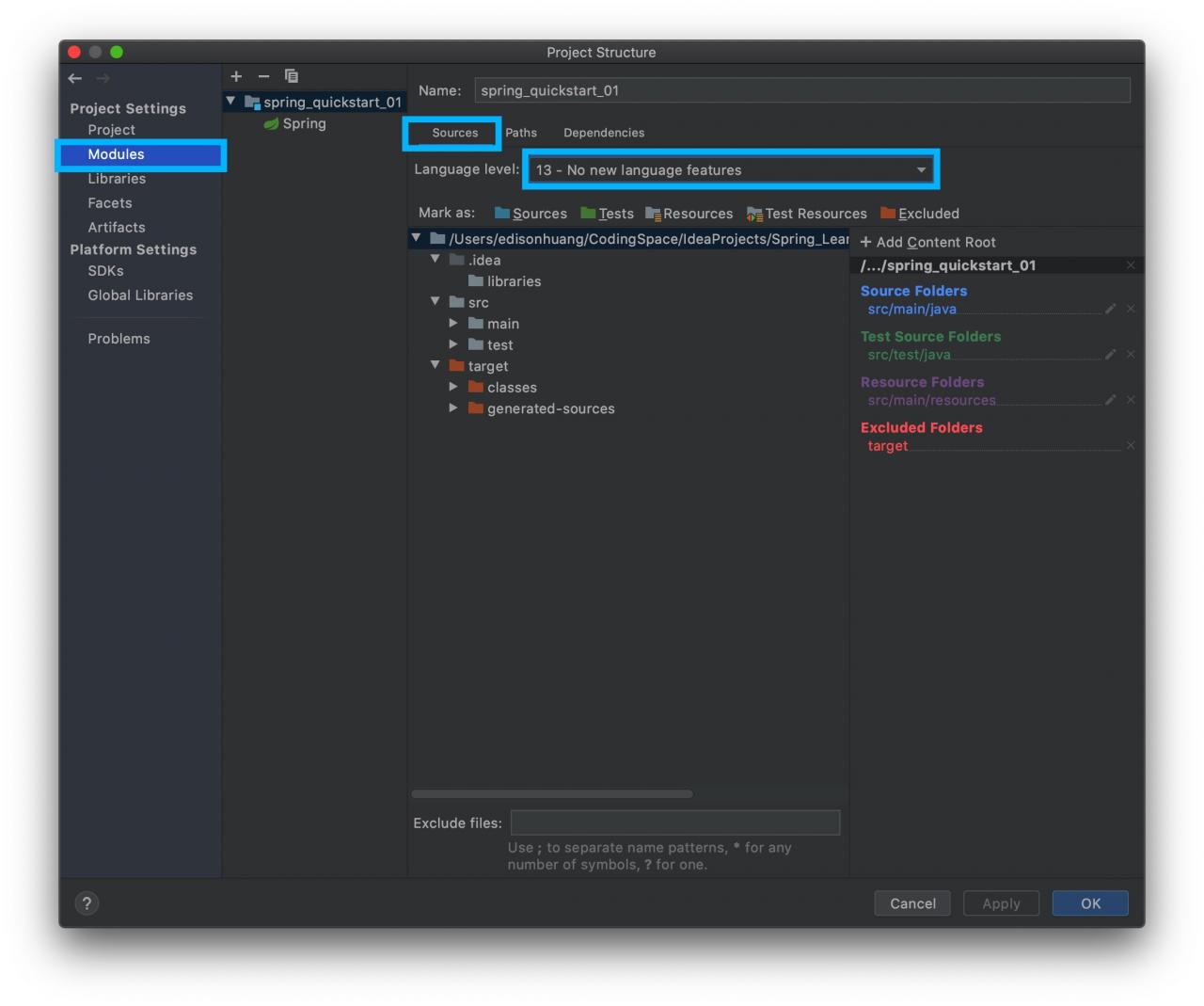
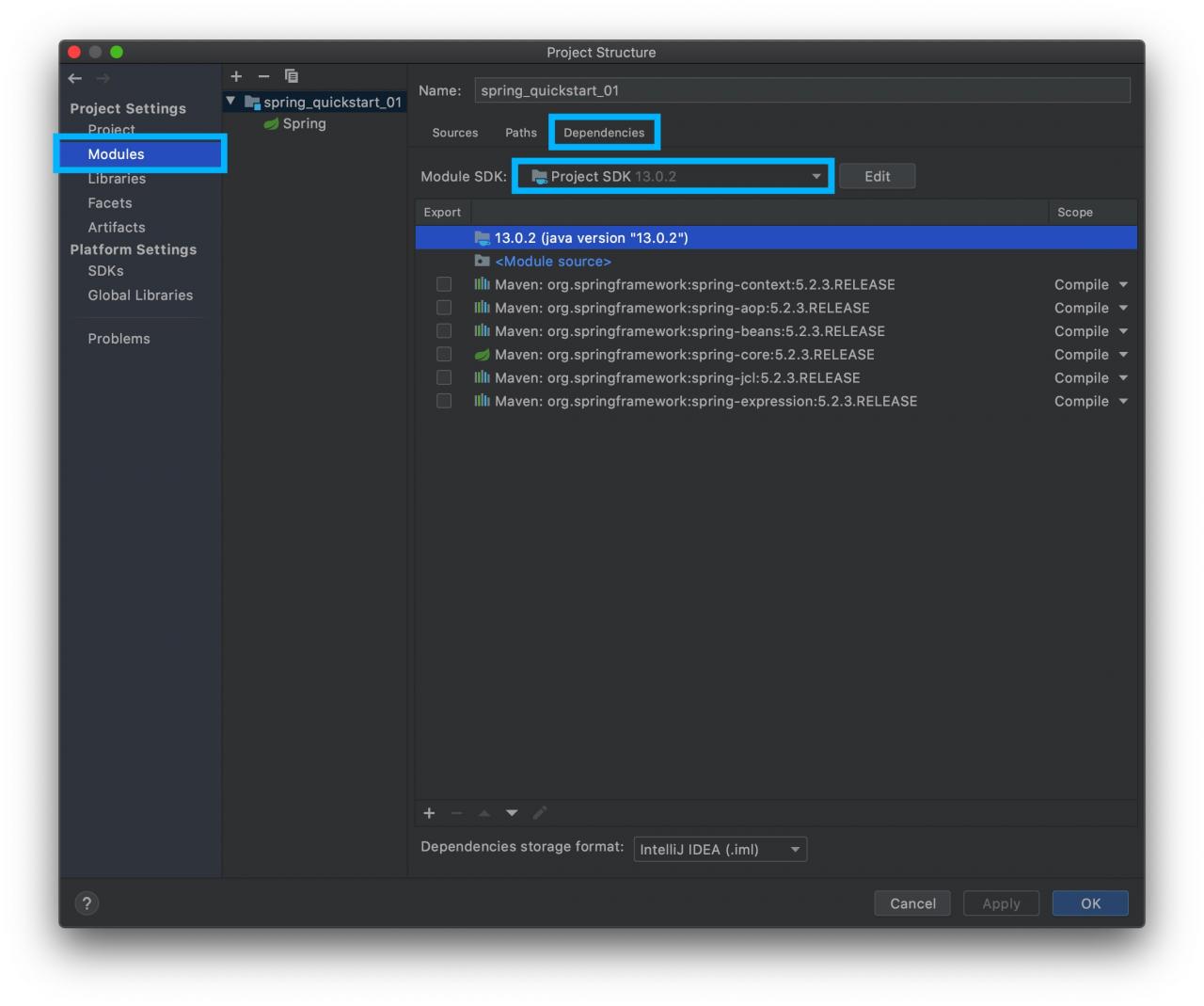
1, the project structure
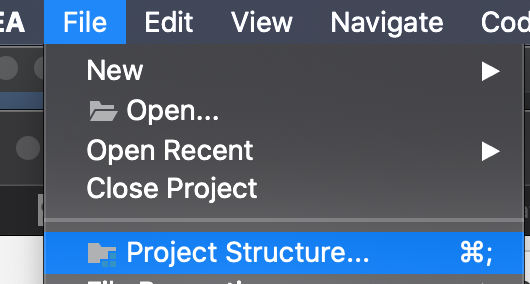
Click

File-Project Structure

File \rightarrow Project Structure

File→ProjectStructure
make sure that the SDK versions under the Project are the same
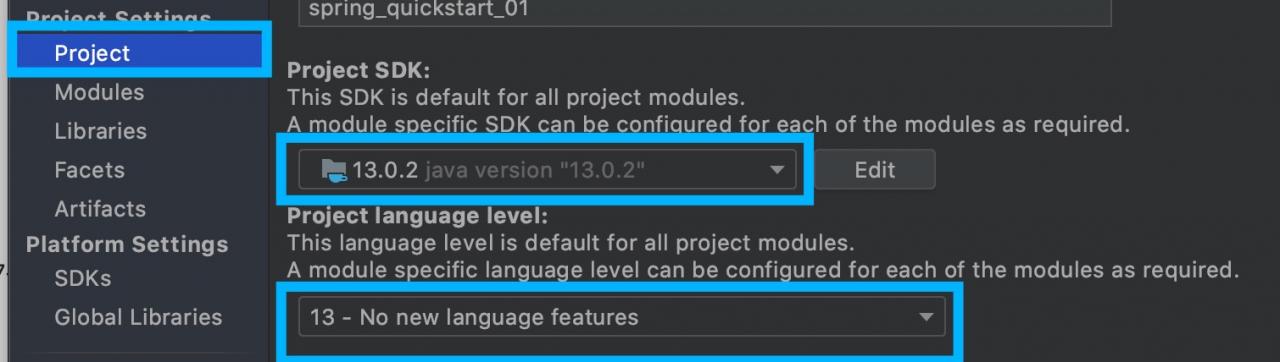
make sure that the Language level version in Sources is the same as the one used
make sure that the Module SDKl version is the same as the one used
2, the Preferences

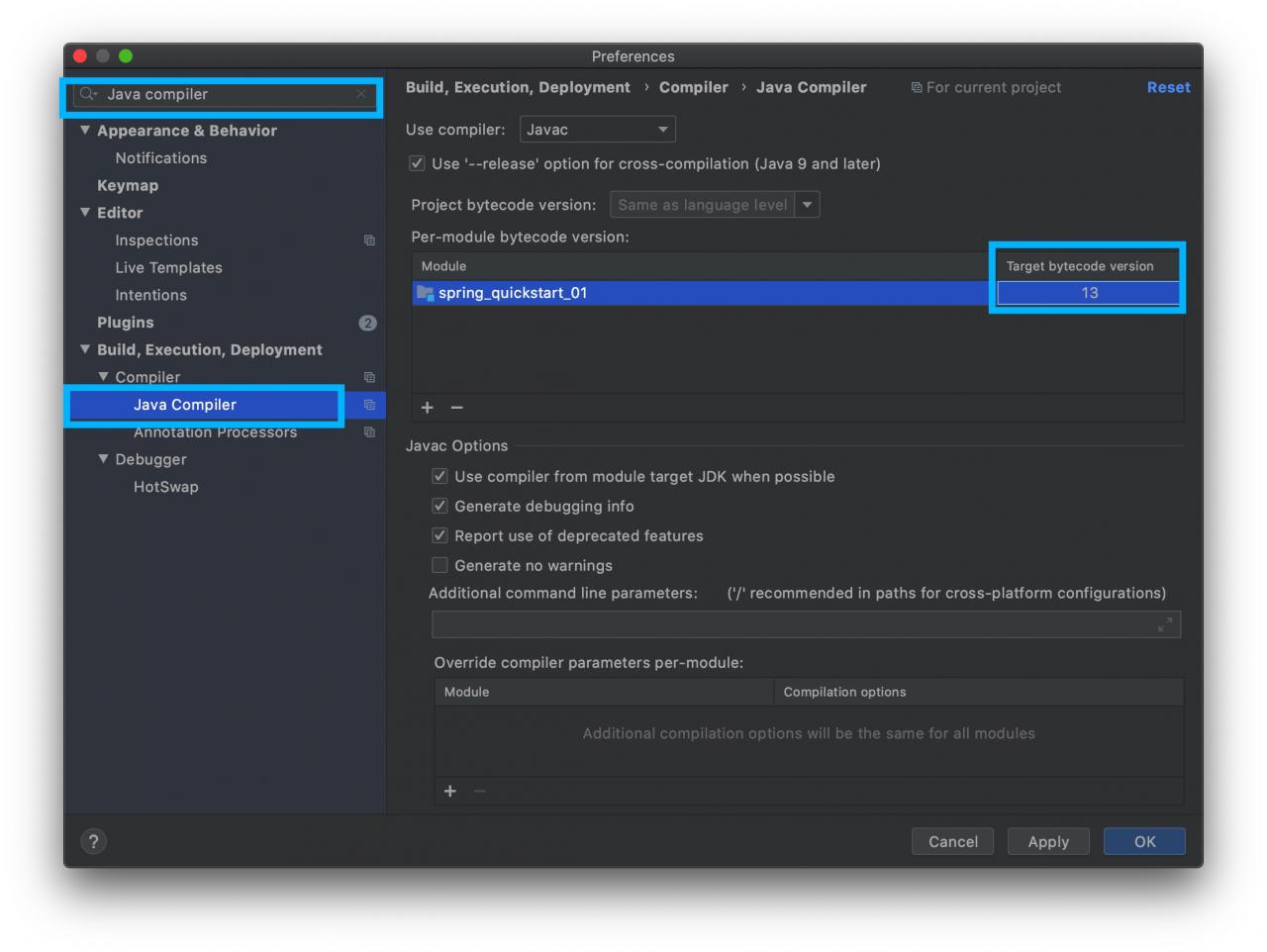
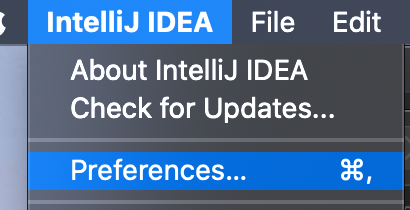
    1. Click on Preferences(or Settings in Win version

    1. ) to search Java Compiler to ensure that the Target byte code version is the same as the selected version

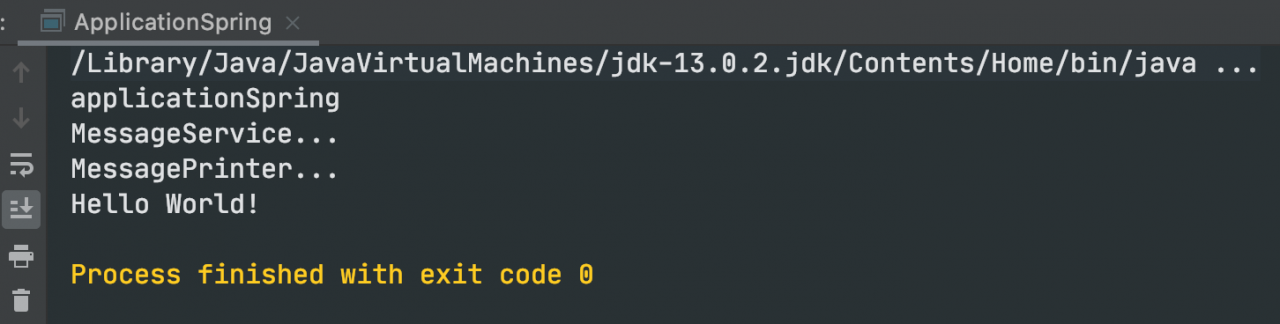
3. Re-execution should have been resolved

4. One more question
Every time the pom file is modified, the original setting is useless and the error is reported again. The solution is to add maven-compiler-plugin to
in the parent pom and specify the JDK version to be used by the JDK

	<build>
        <plugins>
            <plugin>
                <groupId>org.apache.maven.plugins</groupId>
                <artifactId>maven-compiler-plugin</artifactId>
                <version>3.1</version>
                <configuration>
                    <source>13</source>
                    <target>13</target>
                </configuration>
            </plugin>
        </plugins>
    </build>

Dubbo failed to register and consumer null pointer exception

Dubbo unable to register problem

error starting server:

Failed to register consumer:// 192.168.60.1/com. Duck. Service. The UserService?application=user-web& category=consumers& check=false& default.check=false& default.reference.filter=regerConsumerFilter& default.timeout=600000& Dubbo = server & amp; interface=com.atguigu.gmall.service.UserService& methods=getReceiveAddressByMemberId,getAllUser& pid=12648& side=consumer& Timestamp = 1583642177210 to zookeeper zookeeper:// 47.112.171.153:2181/com. Alibaba. Dubbo. Registry. RegistryService?application=user-web& client=zkclient& Dubbo = server & amp; interface=com.alibaba.dubbo.registry.RegistryService& pid=12648& timestamp=1583642177225, cause: Zookeeper is not connected yet!

problem, this is due to Linux firewall enabled, causing registration failure.

resolved: turn off the Linux (CentOS7 based) firewall

Service
systemctl stop firewaldeld. service
1
insert picture description

here

consumption null pointer exception problem

the reason is that the package name not consistent, do not agree the package name can lead to the provider and consumer is not a node, that consumers will never gain value!!!!!

dubbo could not register problem
consumer null pointer exception

Problems and causes of Java’s main function format (public static void main (string args()))

I believe that many people when learning Java always find the main function is used like this:

public static void main (String args[])

so why is that?
main () “method type” is void, indicating that the method does not return a value. It has a parameter, “GRAS,” which is an array of objects of type String. The method declaration for main() is fixed and cannot be changed. The access modifier for the
main () method is public, so you can run the program (call the method) from anywhere.

Java — for loop printing graphics (loop structure)

Java — for loop print graphics (loop structure)

Description
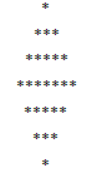
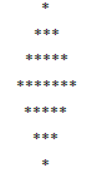
through the use of double for loop statements, print the following graph:

submit
Sample
the Output

import java.util.Scanner;

public class Main {

	public static void main(String[] args) {
		// TODO Auto-generated method stub
		Scanner reader = new Scanner(System.in);
		int i, j, m, t = 1;// m为后半截控制空格个数的变量
		for (i = 1; i <= 4; i++) {
			for (j = 1; j <= 4 - i; j++) {// 空格
				System.out.print(" ");
			}
			for (j = 1; j <= 2 * i - 1; j++) {// 星号
				System.out.print("*");
			}
			System.out.println();
		}
		for (i = 3; i >= 1; i--) {
			for (j = 1; j <= t; j++) {// 空格
				System.out.print(" ");
			}
			for (j = 1; j <= i * 2 - 1; j++) {
				System.out.print("*");// 星号
			}
			System.out.println();
			t++;
		}
	}

}

Explicit and implicit conversion of Java data type

implicit conversion:
two byte data type operation, the result is an int data type.


(byte, short) < int< long< float< Double;
an operation involving only a byte, short, the result will be converted to an int;
if other operations are involved, convert to a large data type according to the relational result above.
below are some code examples

public class TypeWay {
    public static void main(String[] args) {
        byte b1 = 1, b2 = 2;
        System.out.println(getType(b1+b2));
    }
    public static String getType(Object a){
        return a.getClass().toString();
    }
}

运行结果:class java.lang.Integer

a byte data type and a short data type operation result in an int data type.

public class TypeWay {
    public static void main(String[] args) {
        byte b1 = 1;
        short b2 = 2;
        System.out.println(getType(b1+b2));
    }
    public static String getType(Object a){
        return a.getClass().toString();
    }
}

结果为:class java.lang.Integer

the following code means: an int and long data type operation, the result of the long data type.

public class TypeWay {
    public static void main(String[] args) {
        int b1 = 1;
        long b2 = 2;
        System.out.println(getType(b1*b2));
        System.out.println("go and try");
    }
    public static String getType(Object a){
        return a.getClass().toString();
    }
}

结果为:class java.lang.Long

an int data type and a double data type operation result doule data type.

public class TypeWay {
    public static void main(String[] args) {
        int b1 = 1;
        double b2 = 2.0;
        System.out.println(getType(b1*b2));
        System.out.println("go and try");
    }
    public static String getType(Object a){
        return a.getClass().toString();
    }
}

结果为:class java.lang.Double

: a float and a double operation results in a double operation.

public class TypeWay {
    public static void main(String[] args) {
        float b1 = 1.0f;
        double b2 = 2.0;
        System.out.println(getType(b1*b2));
        System.out.println("go and try");
    }
    public static String getType(Object a){
        return a.getClass().toString();
    }
}

结果为:class java.lang.Double

conversion
directly precedes the data with the corresponding function of your conversion data type. However, there is no support for converting high-level data types to low-level data types.

here are some examples:
high data types cannot be converted to high data types.

public class TypeWay {
    public static void main(String[] args) {
        int b1 = 1;
        int b2 = 2;
        System.out.println(getType((byte)b1*b2));

    }
    public static String getType(Object a){
        return a.getClass().toString();
    }
}

结果是:class java.lang.Integer

low data type converted to high data type:

public class TypeWay {
    public static void main(String[] args) {
        int b1 = 1;
        int b2 = 2;
        System.out.println(getType((long)b1*b2));

    }
    public static String getType(Object a){
        return a.getClass().toString();
    }
}

结果是:class java.lang.Long