Category Archives: JAVA

JAVE: LeetCode(189) Rotate Array

Q:
Rotate Array Total Accepted: 19161 Total Submissions: 108570 My Submissions Question Solution
Rotate an array of n elements to the right by k steps.

For example, with n = 7 and k = 3, the array [1,2,3,4,5,6,7] is rotated to [5,6,7,1,2,3,4].

Here is the code:

/*
Runtime Error Message:	Line 5: java.lang.ArrayIndexOutOfBoundsException: 1
Last executed input:	[-1], 2 
Note: k might be larger num.length - 1.
225 ms
*/
public class Solution {
    void reverse(int[] nums, int start, int end) {
        while(start < end) {
            int temp = nums[start];
            nums[start] = nums[end];
            nums[end] = temp;
            ++start;
            --end;
        }
    }
    public void rotate(int[] nums, int k) {
        k = k % nums.length;
        reverse(nums, 0, nums.length - 1 );
        reverse(nums, 0, k - 1 );
        reverse(nums, k, nums.length - 1 );
    }
}


C++ String case conversion and transform, tower, upper, usage

String case conversion is not provided in C++, but as I wrote today, there are many ways to do it.
Of course, you could have s[I]+32 or s[I]-32

#include <iostream>
#include <string>
#include <cctype>
#include <algorithm>

using namespace std;

int main()
{
    string s = "Hello World";
    cout << s << endl;
    transform(s.begin(),s.end(),s.begin(),::toupper);//<span style="font-family:'Times New Roman';">::toupper</span>to<span style="font-family:'Times New Roman';">upp<span style="font-family:'Times New Roman';">er</span></span>
    cout << s << endl;
    transform(s.begin(),s.end(),s.begin(),::tolower);//<font face="'Times New Roman'">::t<span style="font-family:'Times New Roman';">olo<span style="font-family:'Times New Roman';">wer<span style="font-family:'Times New Roman';">使用</span></span></span></font><span style="font-family:'Times New Roman';"></span>to<span style="font-family:'Times New Roman';">lower</span>
    cout << s << endl;
    return 0;
}

Toupper and tolower are defined in C++ in STD and cctype, respectively

When defined in STD, the prototype is charT Toupper (charT C, Const Locale& loc);
While the transform function:
Applies an operation to each element of the specified scope.
The Transform function has two overloaded versions:

transform(first,last,result,op); // First is the first iterator of the container, last is the last iterator of the container, result is the container that holds the result, op is the unary function object or STURct, class to be operated on.

transform(first1,last1,first2,result,binary_op); // First1 is the first iterator of the first container, last1 is the last iterator of the first container, first2 is the first iterator of the second container, result is the container that holds the result, and binary_OP is the binary function object or STURct, class to be operated on
As above, the STD of toupper prototype as a binary function, so the use of STD: : toupper complains: unresolved overloaded function
But you can use it this way:

#include <iostream>
#include <string>
#include <algorithm>
using namespace std;

int main()
{
    string s = "Hello World";
    cout << s << endl;
    transform(s.begin(),s.end(),s.begin(),(int (*)(int))toupper);
    cout << s << endl;
    transform(s.begin(),s.end(),s.begin(),(int (*)(int))tolower);
    cout << s << endl;
    return 0;
}

Function pointer resolves

How to Close the Current Form in JAVA Swing

You see many people asking how to close only the current form in Java Swing, so write this.
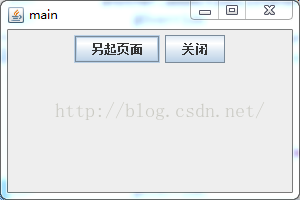
The main interface consists of two JButtons, one to invoke another JFame with a button event, and the other to close the current form.
1. The method setDefaultCloseOperation(jframe. EXIT_ON_CLOSE) cannot be used to close the current form, but setDefaultCloseOperation(jframe. DISPOSE_ON_CLOSE) can be used;
2. Exit() cannot be used through the JButton event, which will cause the entire form of the program to close, dispose () can be used; This closes only the current formSpecific implementation is as follows:
NewFrame.java

import java.awt.Dimension;
import java.awt.Toolkit;
import java.awt.event.ActionEvent;
import java.awt.event.ActionListener;

import javax.swing.JButton;
import javax.swing.JFrame;
import javax.swing.JPanel;

public class NewFrame extends JFrame {

	/**
	 * called another JFrame
	 * close this JFrame
	 * write by Jimmy.li
	 * time:2016/4/6 22:55
	 */
	private static final long serialVersionUID = 1L;

	public NewFrame() {
		// Normal button control
		JFrame jf = new JFrame("main");
		Toolkit tk = this.getToolkit();// Getting the Window Toolbar
		int width = 650;
		int height = 500;
		Dimension dm = tk.getScreenSize();
		jf.setSize(300, 200);// Set the size of the program
		jf.setLocation((int) (dm.getWidth() - width)/2,
				(int) (dm.getHeight() - height)/2);// Appears in the center of the screen
		jf.setDefaultCloseOperation(JFrame.DISPOSE_ON_CLOSE);
		jf.setVisible(true);
		JPanel contentPane = new JPanel();
		jf.setContentPane(contentPane);

		// Create two buttons and add them to the content panel.

		JButton another = new JButton("Start Another Page");

		JButton close = new JButton("close");

		contentPane.add(another);

		contentPane.add(close);

		another.addActionListener(new ActionListener() {
			@Override
			public void actionPerformed(ActionEvent e) {
				// TODO Auto-generated method stub
				new exit();
			}
		});

		close.addActionListener(new ActionListener() {

			@Override
			public void actionPerformed(ActionEvent e) {
				// TODO Auto-generated method stub
				System.exit(0);
			}
		});
	}

	public static void main(String[] args)

	{
		new NewFrame();

	}
}

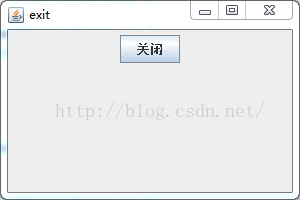
The renderings are as follows:

Close only exit’s form, not the parent form.
The exit.java code is as follows

import java.awt.event.ActionEvent;
import java.awt.event.ActionListener;

import javax.swing.JButton;
import javax.swing.JFrame;
import javax.swing.JPanel;

/**
 * called another JFrame close this JFrame write by Jimmy.li time:2016/4/6 22:55
 */

public class exit {

	private static final int WIDTH = 300;

	private static final int HEIGHT = 200;

	public exit() {
		// Normal button control
		final JFrame jf = new JFrame("exit");
		jf.setSize(WIDTH, HEIGHT);
		jf.setDefaultCloseOperation(JFrame.DISPOSE_ON_CLOSE);
		jf.setVisible(true);
		JPanel contentPane = new JPanel();
		jf.setContentPane(contentPane);

		// Create two buttons and add them to the content panel.

		JButton close1 = new JButton("Closed");
		contentPane.add(close1);

		close1.addActionListener(new ActionListener() {

			@Override
			public void actionPerformed(ActionEvent e) {
				// TODO Auto-generated method stub
				// System.exit(0);
				jf.dispose();
			}
		});
	}

	public static void main(String[] args)

	{
		new exit();
	}

}


By clicking the close button, only the current exit form is closed and the parent form still exists.

Good luck!

The principle and return value of get() function in C language

The first thing to remember is Never use gets().

this is because the gets() function doesn’t check whether the target array holds input, and the first thing you need to do to read a string into your program is to reserve space for the string. The gets() function doesn’t check this aspect, so the result is that the program is vulnerable to bugs. The famous’ worm ‘virus works by overwriting data with too much data and causing it to crash. So for important programming, never use gets()!

1, gets() takes an address, which you need to specify to put the input from the keyboard into memory, and gets(array name) is typically used to pass the input string into a given array. Note: The size of the array must be defined in advance! If you don’t define the size of the array, you may not know into which memory the string was entered, which may result in overwriting the original code in that memory.

2, gets();
2, gets(); This way, because do not know when will to the end of the string, so whenever type ‘\ n’, gets () function will automatically read in front of the line breaks all the content and add ‘\ 0’ at the end, and directly put the string returned to the calling its program, and then gets () to read and be read to the ‘\ n’ discarded, so that the next read will begin in a new line.

case 1:

        #include <stdio.h>
        #include <stdlib.h>
        #define MAX 81
        int main(void)
        {
            char name[MAX];
            printf("Hi, what's your name?\n");
            gets(name);
            printf("Nice name, %s\n", name);
            return 0;
        }

        /*
            Hi, what's your name?
            Herry potter
            Nice name, Herry potter

        */

Char * gets(char * s)
3, gets()

{

return s;

}

so you can see that gets() returns a pointer to char type data with the same pointer passed to it. Therefore, there are the following procedures:

example 2:

        #include <stdio.h>
        #include <stdlib.h>
        #define MAX 81
        int main(void)
        {
            char name[MAX];
            char * ptr;

            printf("Hi,what's your name?\n");
            ptr = gets(name); // Here ptr is a pointer to a type char, in this case ptr points to the first address of name.
            printf("%s?Ah?%s!", name, ptr); // At this point, the values pointed to by name and ptr are output, and it can be seen that they both give the same output.
            return 0;
        }

        /*
            Hi,what's your name?
            Herry
            Herry?Ah?Herry!
        */

4. Actually gets() has two possible return value types:
1) when the program is normal input string: return to read the address of the string, also is the first of an array of strings stored address; 2) when the program errors or meet the end of file: return NULL pointer NULL, be careful not to confuse the NULL pointer and the NULL character (‘ \ 0 ‘);

so can easily detect errors in the following form:

the while (gets (name)! = NULL)

note: you basically don’t use gets(), which is arguably a defunct function, and you can now replace it with scanf(), getchar(), fgets().

Resolve warning: could’t clear Tomcat cache java.lang.NoSuchFieldException: resourceEntries

Warning: couldn't clear tomcat cache
java.lang.NoSuchFieldException: resourceEntries
    at java.lang.Class.getDeclaredField(Class.java:1882)
    at com.opensymphony.xwork2.util.LocalizedTextUtil.clearMap(LocalizedTextUtil.java:835)
    at com.opensymphony.xwork2.util.LocalizedTextUtil.clearTomcatCache(LocalizedTextUtil.java:818)
    at com.opensymphony.xwork2.util.LocalizedTextUtil.reloadBundles(LocalizedTextUtil.java:797)
    at com.opensymphony.xwork2.util.LocalizedTextUtil.reloadBundles(LocalizedTextUtil.java:780)
    at com.opensymphony.xwork2.util.LocalizedTextUtil.findDefaultText(LocalizedTextUtil.java:205)
    at com.opensymphony.xwork2.util.LocalizedTextUtil.getDefaultMessage(LocalizedTextUtil.java:654)
    at com.opensymphony.xwork2.util.LocalizedTextUtil.findText(LocalizedTextUtil.java:534)
    at com.opensymphony.xwork2.TextProviderSupport.getText(TextProviderSupport.java:253)
    at com.opensymphony.xwork2.ActionSupport.getText(ActionSupport.java:130)
    at org.apache.struts2.util.TextProviderHelper.getText(TextProviderHelper.java:75)
    at org.apache.struts2.components.Text.end(Text.java:160)
    at org.apache.struts2.views.jsp.ComponentTagSupport.doEndTag(ComponentTagSupport.java:42)
    at org.apache.jsp.ognl.OgnlAction_jsp._jspx_meth_s_005ftext_005f0(OgnlAction_jsp.java:494)
    at org.apache.jsp.ognl.OgnlAction_jsp._jspService(OgnlAction_jsp.java:182)
    at org.apache.jasper.runtime.HttpJspBase.service(HttpJspBase.java:70)
    at javax.servlet.http.HttpServlet.service(HttpServlet.java:731)
    at org.apache.jasper.servlet.JspServletWrapper.service(JspServletWrapper.java:439)
    at org.apache.jasper.servlet.JspServlet.serviceJspFile(JspServlet.java:395)
    at org.apache.jasper.servlet.JspServlet.service(JspServlet.java:339)
    at javax.servlet.http.HttpServlet.service(HttpServlet.java:731)
    at org.apache.catalina.core.ApplicationFilterChain.internalDoFilter(ApplicationFilterChain.java:303)
    at org.apache.catalina.core.ApplicationFilterChain.doFilter(ApplicationFilterChain.java:208)
    at org.apache.catalina.core.ApplicationDispatcher.invoke(ApplicationDispatcher.java:747)
    at org.apache.catalina.core.ApplicationDispatcher.processRequest(ApplicationDispatcher.java:485)
    at org.apache.catalina.core.ApplicationDispatcher.doForward(ApplicationDispatcher.java:410)
    at org.apache.catalina.core.ApplicationDispatcher.forward(ApplicationDispatcher.java:337)
    at org.apache.struts2.dispatcher.ServletDispatcherResult.doExecute(ServletDispatcherResult.java:164)
    at org.apache.struts2.dispatcher.StrutsResultSupport.execute(StrutsResultSupport.java:186)
    at com.opensymphony.xwork2.DefaultActionInvocation.executeResult(DefaultActionInvocation.java:374)
    at com.opensymphony.xwork2.DefaultActionInvocation.invoke(DefaultActionInvocation.java:278)
    at org.apache.struts2.interceptor.debugging.DebuggingInterceptor.intercept(DebuggingInterceptor.java:256)
    at com.opensymphony.xwork2.DefaultActionInvocation.invoke(DefaultActionInvocation.java:249)
    at com.opensymphony.xwork2.interceptor.DefaultWorkflowInterceptor.doIntercept(DefaultWorkflowInterceptor.java:176)
    at com.opensymphony.xwork2.interceptor.MethodFilterInterceptor.intercept(MethodFilterInterceptor.java:98)
    at com.opensymphony.xwork2.DefaultActionInvocation.invoke(DefaultActionInvocation.java:249)
    at com.opensymphony.xwork2.validator.ValidationInterceptor.doIntercept(ValidationInterceptor.java:265)
    at org.apache.struts2.interceptor.validation.AnnotationValidationInterceptor.doIntercept(AnnotationValidationInterceptor.java:68)
    at com.opensymphony.xwork2.interceptor.MethodFilterInterceptor.intercept(MethodFilterInterceptor.java:98)
    at com.opensymphony.xwork2.DefaultActionInvocation.invoke(DefaultActionInvocation.java:249)
    at com.opensymphony.xwork2.interceptor.ConversionErrorInterceptor.intercept(ConversionErrorInterceptor.java:138)
    at com.opensymphony.xwork2.DefaultActionInvocation.invoke(DefaultActionInvocation.java:249)
    at com.opensymphony.xwork2.interceptor.ParametersInterceptor.doIntercept(ParametersInterceptor.java:211)
    at com.opensymphony.xwork2.interceptor.MethodFilterInterceptor.intercept(MethodFilterInterceptor.java:98)
    at com.opensymphony.xwork2.DefaultActionInvocation.invoke(DefaultActionInvocation.java:249)
    at com.opensymphony.xwork2.interceptor.ParametersInterceptor.doIntercept(ParametersInterceptor.java:211)
    at com.opensymphony.xwork2.interceptor.MethodFilterInterceptor.intercept(MethodFilterInterceptor.java:98)
    at com.opensymphony.xwork2.DefaultActionInvocation.invoke(DefaultActionInvocation.java:249)
    at com.opensymphony.xwork2.interceptor.StaticParametersInterceptor.intercept(StaticParametersInterceptor.java:190)
    at com.opensymphony.xwork2.DefaultActionInvocation.invoke(DefaultActionInvocation.java:249)
    at org.apache.struts2.interceptor.MultiselectInterceptor.intercept(MultiselectInterceptor.java:75)
    at com.opensymphony.xwork2.DefaultActionInvocation.invoke(DefaultActionInvocation.java:249)
    at org.apache.struts2.interceptor.CheckboxInterceptor.intercept(CheckboxInterceptor.java:90)
    at com.opensymphony.xwork2.DefaultActionInvocation.invoke(DefaultActionInvocation.java:249)
    at org.apache.struts2.interceptor.FileUploadInterceptor.intercept(FileUploadInterceptor.java:243)
    at com.opensymphony.xwork2.DefaultActionInvocation.invoke(DefaultActionInvocation.java:249)
    at com.opensymphony.xwork2.interceptor.ModelDrivenInterceptor.intercept(ModelDrivenInterceptor.java:100)
    at com.opensymphony.xwork2.DefaultActionInvocation.invoke(DefaultActionInvocation.java:249)
    at com.opensymphony.xwork2.interceptor.ScopedModelDrivenInterceptor.intercept(ScopedModelDrivenInterceptor.java:141)
    at com.opensymphony.xwork2.DefaultActionInvocation.invoke(DefaultActionInvocation.java:249)
    at com.opensymphony.xwork2.interceptor.ChainingInterceptor.intercept(ChainingInterceptor.java:145)
    at com.opensymphony.xwork2.DefaultActionInvocation.invoke(DefaultActionInvocation.java:249)
    at com.opensymphony.xwork2.interceptor.PrepareInterceptor.doIntercept(PrepareInterceptor.java:171)
    at com.opensymphony.xwork2.interceptor.MethodFilterInterceptor.intercept(MethodFilterInterceptor.java:98)
    at com.opensymphony.xwork2.DefaultActionInvocation.invoke(DefaultActionInvocation.java:249)
    at com.opensymphony.xwork2.interceptor.I18nInterceptor.intercept(I18nInterceptor.java:176)
    at com.opensymphony.xwork2.DefaultActionInvocation.invoke(DefaultActionInvocation.java:249)
    at org.apache.struts2.interceptor.ServletConfigInterceptor.intercept(ServletConfigInterceptor.java:164)
    at com.opensymphony.xwork2.DefaultActionInvocation.invoke(DefaultActionInvocation.java:249)
    at com.opensymphony.xwork2.interceptor.AliasInterceptor.intercept(AliasInterceptor.java:192)
    at com.opensymphony.xwork2.DefaultActionInvocation.invoke(DefaultActionInvocation.java:249)
    at com.opensymphony.xwork2.interceptor.ExceptionMappingInterceptor.intercept(ExceptionMappingInterceptor.java:187)
    at com.opensymphony.xwork2.DefaultActionInvocation.invoke(DefaultActionInvocation.java:249)
    at org.apache.struts2.impl.StrutsActionProxy.execute(StrutsActionProxy.java:54)
    at org.apache.struts2.dispatcher.Dispatcher.serviceAction(Dispatcher.java:510)
    at org.apache.struts2.dispatcher.ng.ExecuteOperations.executeAction(ExecuteOperations.java:77)
    at org.apache.struts2.dispatcher.ng.filter.StrutsPrepareAndExecuteFilter.doFilter(StrutsPrepareAndExecuteFilter.java:91)
    at org.apache.catalina.core.ApplicationFilterChain.internalDoFilter(ApplicationFilterChain.java:241)
    at org.apache.catalina.core.ApplicationFilterChain.doFilter(ApplicationFilterChain.java:208)
    at org.apache.catalina.core.StandardWrapperValve.invoke(StandardWrapperValve.java:218)
    at org.apache.catalina.core.StandardContextValve.invoke(StandardContextValve.java:122)
    at org.apache.catalina.authenticator.AuthenticatorBase.invoke(AuthenticatorBase.java:505)
    at org.apache.catalina.core.StandardHostValve.invoke(StandardHostValve.java:169)
    at org.apache.catalina.valves.ErrorReportValve.invoke(ErrorReportValve.java:103)
    at org.apache.catalina.valves.AccessLogValve.invo
ke(AccessLogValve.java:956)
    at org.apache.catalina.core.StandardEngineValve.invoke(StandardEngineValve.java:116)
    at org.apache.catalina.connector.CoyoteAdapter.service(CoyoteAdapter.java:442)
    at org.apache.coyote.http11.AbstractHttp11Processor.process(AbstractHttp11Processor.java:1082)
    at org.apache.coyote.AbstractProtocol$AbstractConnectionHandler.process(AbstractProtocol.java:623)
    at org.apache.tomcat.util.net.AprEndpoint$SocketProcessor.doRun(AprEndpoint.java:2517)
    at org.apache.tomcat.util.net.AprEndpoint$SocketProcessor.run(AprEndpoint.java:2506)
    at java.util.concurrent.ThreadPoolExecutor$Worker.runTask(ThreadPoolExecutor.java:886)
    at java.util.concurrent.ThreadPoolExecutor$Worker.run(ThreadPoolExecutor.java:908)
    at org.apache.tomcat.util.threads.TaskThread$WrappingRunnable.run(TaskThread.java:61)
    at java.lang.Thread.run(Thread.java:619)

I used Apache-Tomcat-7.0.70. Although it did not affect my use, I was not used to the obsessive-compulsive disorder. According to the Suggestions on the Internet, it could be solved by changing the lower version of Tomcat.
solution 1: use apache-tomcat-7.0.55 (pro test feasible)
solution 2: upgrade struts version, struts2.0.9==> Struts2.3.20 (Have not tried, can try)

Comparison between ArrayList and HashMap

ArrayList and HashMap are commonly used containers in Java project development. Let’s compare the two!
Example:
//ArrayList

ArrayList array = new ArrayList();
array.add("张三");
array.add("李四");
array.add("王五");
System.out.println("ArrayList The number of elements is."+array.size());

//Iteration Method 1: Iteration via Iterator 
Iterator iter = array.iterator();  
while(iter.hasNext()){  
    String name = (String)iter.next();  
    System.out.println(name); 
}
//Iteration method 2: Iteration using a for loop
for(int i=0;i<array.size();i++){  
    System.out.println(array.get(i));  
}  

HashMap

HashMap hashMap = new HashMap();
hashMap.put("name", "张三");
hashMap.put("name1", "李四");
hashMap.put("name2", "王五");
System.out.println("HashMap的元素个数为:"+hashMap.size());

//Iteration method 1: the hashMap.entrySet() method, through the iterator Iterator iterate high efficiency, recommended to use
Iterator iter1 = hashMap.entrySet().iterator();  
while(iter1.hasNext()){  
    Map.Entry name = (Map.Entry)iter1.next();  
    String nameKey = (String)name.getKey();  
    String nameValue = (String)name.getValue();  
    System.out.println(nameKey + "'s name is " + nameValue);
}

//Iteration method 2: the hashMap.keySet() method, iterate through the Iterator Iterator is inefficient and not recommended.
Iterator iter2 = hashMap.keySet().iterator();
while (iter2.hasNext()) {
    Object key = iter.next();
    Object val = hashMap.get(key);
}

//Iteration method three: the foreach method to iterate over the keyset, no different from the second one.
Set keySet = hashMap.keySet();
for(Object key: keySet) {
    System.out.print("[key=" + key + ",value=" + hashMap.get(key) + "]  ");
}

//Iteration method 4: New method forEach in java 8.
hashMap.forEach((key,value) -> {
    System.out.print("[key=" + key + ",value=" + value + "]  ");
});

Similarities:
1) All threads are unsafe and out of sync
2) Both can store null values
3) The method of obtaining the number of elements is the same, and size() is used to obtain the number of elements
The difference between:
1) Implemented interface
ArrayList implements List interface (Collection (interface) -& GT; List (interface) -& GT; ArrayList (class), which USES arrays at the bottom; The HashMap is now the Map interface (Map (interface) -& GT; HashMap (class), which USES a Hash algorithm to store data.
2) Store elements
An ArrayList stores data as an array with sequential elements that can be repeated. A HashMap stores data as key-value pairs. The hashCode of the key cannot be the same. The same value will overwrite the previous value, the value can be repeated, and the elements inside are out of order.
3) Methods to add elements
ArrayList adds elements with the add(Object Object) method, while HashMap adds elements with the put(Object key, Object Value) method.
4) Default size and capacity expansion
In Java 7, the default size of an ArrayList is 10 elements, and the default size of a HashMap is 16 elements (which must be a power of 2).
//ArrayList source

 /**
  * Default initial capacity.
  */
 private static final int DEFAULT_CAPACITY = 10;

//a HashMap the source code

 /**
  * The default initial capacity - MUST be a power of two.
  */
 static final int DEFAULT_INITIAL_CAPACITY = 1 << 4; // aka 16

Expansion increment of ArrayList: 0.5 times +1 of the original capacity. For example, the capacity of ArrayList is 10, and the capacity after one expansion is 16.
HashMap expansion increment: one time of the original capacity, the loading factor is 0.75: that is, when the number of elements exceeds 0.75 times of the capacity length, the capacity is expanded. For example, the capacity of HashSet is 16, and after one expansion, the capacity is 32
Usage Scenario:
If you need quick random access to elements, you should use an ArrayList. When you need data in the form of key-value pairs, you should use a HashMap
Supplementary Content:
The load factor is the degree to which the elements in the Hash table are filled. If the loading factor is larger, the more elements are filled, the advantage is that the space utilization rate is higher, but the chance of conflict is increased. Conversely, the smaller the loading factor is, the fewer elements will be filled. The advantage is that the chance of conflict will be reduced, but more space will be wasted. The greater the chance of conflict, the higher the cost of finding. Conversely, the cost of finding is smaller. As a result, the search time is smaller. Therefore, a balance and compromise must be found between “opportunities for conflict” and “space utilization”. This trade-off is essentially a trade-off between the so-called “time-space” contradiction in data structures. Expansion occurs when the number of elements exceeds the coefficient of capacity length * loading factor.

if you have written wrong, I hope god more advice, let my younger brother correct, thank you!

java.util.zip.zipexception: error in opening zip file

java.util.zip.ZipException: error in opening zip fileThe literal meaning of this question is that the compression package cannot be opened,
The problem I have here is that the JAR package is corrupted and won’t open.The Linux system can use the command to determine if the JAR is normal:

jar -vtf xxx.jar

view the jar archive directory

[root@localhost classes]# jar -h
Illegal options: h
Usage: jar {ctxui}[vfmn0PMe] [jar-file] [manifest-file] [entry-point] [-C dir] files ...
Options:
    -c create new file
    -t List archive directory
    -x Extracts specified (or all) files from the archive
    -u Update existing archives
    -v Generates detailed output from standard output
    -f Specify file name of file
    -m Contains inventory information from a specified inventory file
    -n Execute Pack200 normalization after creating a new profile
    -e for standalone applications that are bundled into the executable jar file
        Specifying application entry points
    -0 Storage only; does not use any ZIP compression
    -P Preserves leading '/' (absolute path) and "..." (parent directory) components in filenames (parent directory) components
    -M Inventory file without creating entries
    -i generates index information for a specified jar file
    -C changes to the specified directory and contains the following files
If any file is a directory, it is recursively processed.
Specify the order of the list file name, file name and entry point name.
in the same order as the 'm', 'f' and 'e' tags are specified.

Example 1: Archiving two class files into a file called classes.jar: 
       jar cvf classes.jar Foo.class Bar.class 
Example 2: Using an existing manifest file 'mymanifest' and the
           Archive all files from the foo/ directory into 'classes.jar':
       jar cvfm classes.jar mymanifest -C foo/ .

if it can be opened, it means it is normal; if it cannot be opened, it means the jar package is damaged:

The following error occurs:

java.util.zip.ZipException: error in opening zip file
at java.util.zip.ZipFile.open(Native Method)
at java.util.zip.ZipFile.<init>(ZipFile.java:220)
at java.util.zip.ZipFile.<init>(ZipFile.java:150)
at java.util.jar.JarFile.<init>(JarFile.java:166)
at java.util.jar.JarFile.<init>(JarFile.java:130

The solution is to switch to a usable jar. If the jar isn’t working because of maven’s packaging, check out the blog: click the open link
Follow WeChat: community of programmers and developers

keytool error java.io.IOException:keystore was tampered with,or password was incorre

Keytool error: Java. IO. IOException: keystore was tampered with, or the password was incorrect

The inscription 2012-01-15

D:\> Keytool – import – trustcacerts – alias javacas – the file “D:/Tomcat 6.0/conf/myserver. Cert” – keypass 123456 – keystore “% JAVA_HOME %/jre/lib/security/cacerts”

The following error occurred when keytool generated the root certificate:
Keytool error: Java. IO. IOException: keystore was tampered with, or the password was incorrect

The reason is that the cacerts file will exist in the specified directory, backup it, remove it, and then execute the command Ok

Mybatis single parameter pass in exception (How to Fix)

MyBatis passes in an exception for a single parameter

Integer or java.lang.String, if we do not perform dynamic SQL splicing, it will not report an error, when performing dynamic splicing, it will report an error, the error is as follows

Caused by: org.apache.ibatis.exceptions.PersistenceException: 
### Error querying database.  Cause: org.apache.ibatis.reflection.ReflectionException: There is no getter for property named 'rname' in 'class java.lang.String'
### Cause: org.apache.ibatis.reflection.ReflectionException: There is no getter for property named 'rname' in 'class java.lang.String'

1. Interface code

 int selectCount(String rname);

2. Configuration file code

  <select id="selectCount" resultType="int" parameterType="string">
        select count(*) from cst_customer where 1=1
        <if test="rname!=null and rname!=''">
        and cust_name like #{rname}
        </if>
    </select>

3. How to solve it

   <select id="selectCount" resultType="int" parameterType="string">
        select count(*) from cst_customer where 1=1
        <if test="_parameter!=null and _parameter!=''">
        and cust_name like #{rname}
        </if>
    </select>

4. Why are errors reported

When passing a single parameter to dynamically splice sql, mybatis converts our parameter to _parameter by default, or you can add the @Param comment to the interface field.

Extracting JDBC tool class: JDBC utils

## Extraction of JDBC tool classes: JDBCUtils
* :: Purpose: to simplify writing
* :: Analysis.
	1. Register the driver and also extract
	2. Extract a method to get a connected object
* :: Requirements: do not want to pass parameters (cumbersome), but also need to ensure the generality of the tool class
* :: Resolution: configuration file
		jdbc.properties
			url=
			user=
			password= 
3. Extract a method to release resources

Create jDBc.properties in the SRC directory

url=jdbc:mysql:///db3
user=root
password=123456
driver=com.mysql.cj.jdbc.Driver

JDBCUtils.java

package cn.itcast.utils;

import jdk.swing.interop.SwingInterOpUtils;

import java.io.FileInputStream;
import java.io.FileReader;
import java.io.IOException;
import java.net.URI;
import java.net.URL;
import java.sql.*;
import java.util.Properties;

// JDBC Tool
public class JDBCUtils {

    private static String url;
    private static String user;
    private static String password;
    private static String driver;

    // The file is read only once to get these values. Using static code blocks
    static {
        // Read the resource file, get the value.
        try {
            // Create the Properties collection class.
            Properties pro = new Properties();
            // The way to get the files in the src path - >ClassLoader class loader
            ClassLoader classLoader = JDBCUtils.class.getClassLoader();
            URL res = classLoader.getResource("jdbc.properties");
            String path = res.getPath();
            System.out.println(path);
            // 2. Load the file.
            pro.load(new FileReader(path));

            // 3. Get the data and assign a value.
            url = pro.getProperty("url");
            user = pro.getProperty("user");
            password = pro.getProperty("password");
            driver = pro.getProperty("driver");

            // 4. Registration drive
            Class.forName(driver);
        } catch (IOException | ClassNotFoundException e) {
            e.printStackTrace();
        }
    }

    // Get connection, return connection object
    public static Connection getConnection() throws SQLException {
        return DriverManager.getConnection(url,user,password);
    }
    // Release of resources
    public static void close(Statement stmt, Connection conn){
        if(stmt != null){
            try {
                stmt.close();
            } catch (SQLException throwables) {
                throwables.printStackTrace();
            }
        }

        if(conn != null){
            try {
                conn.close();
            } catch (SQLException throwables) {
                throwables.printStackTrace();
            }
        }
    }

    // Release of resources
    public static void close(ResultSet rs, Statement stmt, Connection conn){
        if(rs != null){
            try {
                rs.close();
            } catch (SQLException throwables) {
                throwables.printStackTrace();
            }
        }

        if(stmt != null){
            try {
                stmt.close();
            } catch (SQLException throwables) {
                throwables.printStackTrace();
            }
        }

        if(conn != null){
            try {
                conn.close();
            } catch (SQLException throwables) {
                throwables.printStackTrace();
            }
        }
    }
}

jdbcdemo.java

    // Demo JDBC tool class
    // Query all emp objects.
    public List<Emp> findAll() {

        Connection conn = null;
        Statement stmt = null;
        ResultSet rs = null;
        List<Emp> list = null;

        try {
            conn = JDBCUtils.getConnection();
            // 3. Defining sql
            String sql = "select * from emp";
            // 4. Get the object to execute sql.
            stmt = conn.createStatement();
            // 5. execute sql
            rs = stmt.executeQuery(sql);
            // 6. traverse the result set, encapsulate the object, load the set
            Emp emp = null;
            list = new ArrayList<Emp>();
            while(rs.next()){
                // Access to data
                int id = rs.getInt("id");
                String ename = rs.getString("ename");
                int job_id = rs.getInt("job_id");
                int mgr = rs.getInt("mgr");
                Date joindate = rs.getDate("joindate");
                double salary = rs.getDouble("salary");
                double bounds = rs.getDouble("bounds");
                int dept_id = rs.getInt("dept_id");

                // Create an emp object and assign it a value.
                emp = new Emp();
                emp.setEname(ename);
                emp.setJob_id(job_id);
                emp.setMgr(mgr);
                emp.setJoindate(joindate);
                emp.setSalary(salary);
                emp.setBounds(bounds);
                emp.setDept_id(dept_id);

                // load a collection
                list.add(emp);
            }
        }catch (SQLException e){
            e.printStackTrace();
        }finally {
            JDBCUtils.close(rs,stmt,conn);
        }
        return list;
    } 

Xdoc generates API documents based on Java annotations

XDoc generates API documentation based on Java comments

<!--Adding maven dependencies-->
<dependency>
    <groupId>com.github.treeleafj</groupId>
    <artifactId>spring-boot-starter-xDoc</artifactId>
    <version>1.1.0</version>
</dependency>
@EnableXDoc //<--- Add this note to enable XDOC online HTML documents
@SpringBootApplication
public class TestApplication {

    public static void main(String[] args) {
        SpringApplication.run(TestApplication.class, args);
    }
}
#在application.propertiesConfigure the location of the project source code, directly in the project start, if it is a single module of the maven project, the default can not be configured
xdoc.enable=true #Start XDoc or not, default is true, production environment suggest change to false.
xdoc.sourcePath=F:/java/project/xDoc/samples/sample-springboot/src/main/java # sourcePath, multiple paths separated by commas
xdoc.title=User Center Interface Document #For configuring document page title
xdoc.version=1.0 #Identifies the version number of the interface document

Test code (Controller)

/**
 * User Moudle
 *
 * @author treeleaf
 * @date 2017-03-03 10:11
 */
@Controller
@RequestMapping("api/user")
public class UserController {

    /**
     * Login
     *
     * @param username Usernaem|compulsory fields
     * @param password password
     * @return Basic information of current registered users
     * @resp code Return code(0000 means successful login,others means failed)|string|Required
     * @resp msg login info|string
     * @resp username The username returned after successful login|string
     */
    @ResponseBody
    @PostMapping("login")
    public Map<String, String> login(String username, String password) {
        Map<String, String> model = new HashMap<>();
        model.put("code", "0000");
        model.put("msg", "Login success");
        model.put("username", username);
        return model;
    }


    /**
     * 用户注册
     *
     * @param user :username Username|Required
     * @param user :password Password
     * @return Basic information of the user generated after registration
     * @respbody {"id":"123","password":"123456","username":"admin"}
     * @see User
     */
    @ResponseBody
    @RequestMapping(value = "register", method = {RequestMethod.POST, RequestMethod.PUT})
    User register(User user) {
        user.setId(UUID.randomUUID().toString());
        return user;
    }
}

The last visit http://localhost:8080/xdoc/index.html directly
Two: Offline documentation
html:

/**
 * Generate offline interface files in HTML format
 */
@Test
public void buildHtml() throws Exception {
    /**NOTICE!!!! The path must be able to scan the source code project path, the implementation of the file generated to open the interface directory does not indicate that not scanned, please prioritize to confirm their own incoming path is correct!!!! */
    FileOutputStream out = new FileOutputStream(new File(userDir, "api.html"));
    XDoc xDoc = new XDoc(new File("F:/java/project/xDoc/samples/sample-springboot/src/main/java"), new SpringWebHttpFramework());
    xDoc.build(out, new HtmlForamt());
}

Markdown:

/**
 * Generate offline interface files in Markdown format.
 */
@Test
public void buildMarkdown() {
    /**Note!!!! The path must be able to scan the source code project path, the implementation of the generated markdown if there is no interface content, that is not scanned, please prioritize to confirm that their incoming path is correct!!!!*/
	
    ByteArrayOutputStream out = new ByteArrayOutputStream();
    XDoc xDoc = new XDoc(new File("F:/java/project/xDoc/samples/sample-springboot/src/main/java"), new SpringWebHttpFramework());
    
    xDoc.build(out, new MarkdownFormat());

    System.out.println(out.toString());
}

Usage of comment tag:
The @title interface title. If you don’t add this, the default is to read the description on the first line of the interface comment
“Parameter name parameter describes |(parameter type)|(mandatory)”, in which “parameter type” is optional and default is String, “mandatory” is optional and default is non-mandatory. The values of “mandatory” include mandatory (Y) and non-mandatory (N), and the commonly used format is as follows: Username username username username username username username username username username username username | is required or username username username |Y username username | is not required or username username |N username username |String username username |String| is required
For IDEA, using Java’s own @param annotation is an error if the parameter name above is not on the current method argument. To solve this problem,XDoc supports putting a colon before the annotation parameter name to avoid detection of IDEA, such as: :username username or user :username username
When @paramobj feel that the parameter itself is in a Dto, but it is troublesome to add @param one by one, we can use @paramobj to specify the Dto object. The usage is the same as @see, but @paramobj supports multiple interface methods. At the same time,@param is mixed with @paramobj, when some attribute name in @paramobj object conflicts with the parameter name of @param, it will take the @param first. Accountcontroller.java in samples that can be referenced is used
@resp specifies the parameters to return in the same format as @param
@Respbody specifies the demo that will return the data, supports formatting json data only for presentation purposes, and USES userController.java in reference samples
@see specifies the returned reference object, similar to @paramobj, but one is incoming and one is out, only one @see can appear in a method, meanwhile, when mixed with @resp, the attribute name conflicts, which is @resp, accountcontroller.Java in reference samples is used
@return returns a description of the information, which is plain text and used for presentation only
@ IgnoreApi this annotation, not on the annotation, used to indicate which interfaces do not need to generate documentation