Category Archives: JAVA

[Solved] JSON parse error: Cannot construct instance of

JSON parse error: Cannot construct instance of `com.request.ApplyRequest$Detail` (although at least one Creator exists): can only instantiate non-static inner class by using default, no-argument constructor; nested exception is com.fasterxml.jackson.databind.exc.MismatchedInputException: Cannot construct instance of `com.request.ApplyRequest$Detail` (although at least one Creator exists): can only instantiate non-static inner class by using default, no-argument constructor\n at [Source: (PushbackInputStream); line: 8, column: 13] (through reference chain: com.request.ApplyRequest[\"detailList\"]->java.util.ArrayList[0])


The problem appears: can only instantiate non-static inner class by using default
When you declare an inner class as an attribute of the current class, you need to make the inner class static, otherwise it won’t be loaded during class loading!
Solution: Declare the inner class as static directly!
How to Solve Error:java.io.InvalidClassException

Exception information:

Caused by:java. io. InvalidClassException: com. eastcom xxx. xxxxxx. bean. AlarmReq; local class incompatible: stream classdesc serialversionUID =8050743254081999660, local class seriaiversionuId = 6638111461888145730

Cause of exception:
when serializing objects, they will be stored in redis memory, and then through redistemplate getValueSerializer(). The deserialize () method deserializes the data to the bean object. If the current bean object changes, that is, if an attribute is added, the serialVersionUID will change.

Because the serialVersionUID of this class is generated by the JVM according to the class name and the hash value of its attributes during serialization. When the properties of the class change, the serialVersionUID will also change accordingly, resulting in an error when the serialVersionUID does not match when the old data in redis is deserialized.

Solution:

I. Add code before the error reporting class property
private static final long serialVersionUID = 8050743254081999660L;
Here the UID corresponds to the above stream classdesc serialversionUID
ii.Clear the redis data linked by the current service.Clear the redis data linked by the current service.

Error resolving template [index], template might not exist

Problem: error resolving template [index], template may not exist
Solution:
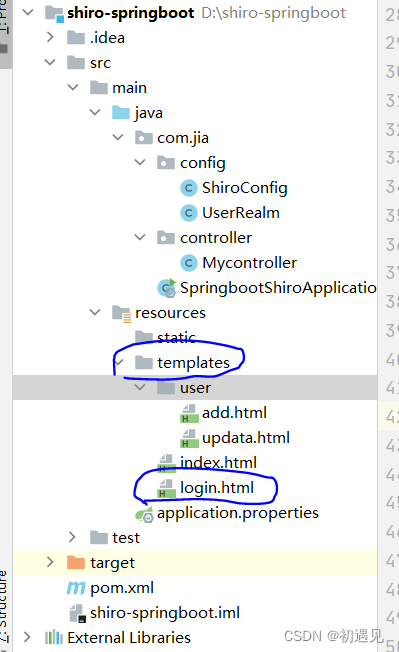
1. Check the project structure first and check whether the location of the static resource file is misplaced

2. Check if the thymeleaf dependency in pom.xml is imported correctly
At first, I only imported the following dependencies, but it reported an error

  <dependency>
            <groupId>org.springframework.boot</groupId>
            <artifactId>spring-boot-starter-thymeleaf</artifactId>
        </dependency>

3. Change to the following, just download it again

<!--        thymeleaf -->
        <dependency>
            <groupId>org.thymeleaf</groupId>
            <artifactId>thymeleaf-spring5</artifactId>
        </dependency>
        <dependency>
            <groupId>org.thymeleaf.extras</groupId>
            <artifactId>thymeleaf-extras-java8time</artifactId>
        </dependency>
        <dependency>
            <groupId>org.springframework.boot</groupId>
            <artifactId>spring-boot-starter-thymeleaf</artifactId>
        </dependency>

[Solved] IDEA Startup Error: java: Internal error in the mapping processor

1. Error information

java: Internal error in the mapping processor: java.lang.NullPointerException  at org.mapstruct.ap.internal.processor.DefaultVersionInformation.createManifestUrl(DefaultVersionInformation.java:180)      at org.mapstruct.ap.internal.processor.DefaultVersionInformation.openManifest(DefaultVersionInformation.java:151)  at org.mapstruct.ap.internal.processor.DefaultVersionInformation.getLibraryName(DefaultVersionInformation.java:127)    at org.mapstruct.ap.internal.processor.DefaultVersionInformation.getCompiler(DefaultVersionInformation.java:120)    at org.mapstruct.ap.internal.processor.DefaultVersionInformation.fromProcessingEnvironment(DefaultVersionInformation.java:98)  at org.mapstruct.ap.internal.processor.DefaultModelElementProcessorContext.<init>(DefaultModelElementProcessorContext.java:59)      at org.mapstruct.ap.MappingProcessor.processMapperElements(MappingProcessor.java:222)  at org.mapstruct.ap.MappingProcessor.process(MappingProcessor.java:162)    at sun.reflect.NativeMethodAccessorImpl.invoke0(Native Method)      at sun.reflect.NativeMethodAccessorImpl.invoke(NativeMethodAccessorImpl.java:62)    at sun.reflect.DelegatingMethodAccessorImpl.invoke(DelegatingMethodAccessorImpl.java:43)    at java.lang.reflect.Method.invoke(Method.java:498)    at org.jetbrains.jps.javac.APIWrappers$1.invoke(APIWrappers.java:255)  at org.mapstruct.ap.MappingProcessor.process(Unknown Source)    at com.sun.tools.javac.processing.JavacProcessingEnvironment.callProcessor(JavacProcessingEnvironment.java:794)    at com.sun.tools.javac.processing.JavacProcessingEnvironment.discoverAndRunProcs(JavacProcessingEnvironment.java:705)  at com.sun.tools.javac.processing.JavacProcessingEnvironment.access$1800(JavacProcessingEnvironment.java:91)    at com.sun.tools.javac.processing.JavacProcessingEnvironment$Round.run(JavacProcessingEnvironment.java:1035)    at com.sun.tools.javac.processing.JavacProcessingEnvironment.doProcessing(JavacProcessingEnvironment.java:1176)    at com.sun.tools.javac.main.JavaCompiler.processAnnotations(JavaCompiler.java:1170)    at com.sun.tools.javac.main.JavaCompiler.compile(JavaCompiler.java:856)    at com.sun.tools.javac.main.Main.compile(Main.java:523)    at com.sun.tools.javac.api.JavacTaskImpl.doCall(JavacTaskImpl.java:129)    at com.sun.tools.javac.api.JavacTaskImpl.call(JavacTaskImpl.java:138)  at org.jetbrains.jps.javac.JavacMain.compile(JavacMain.java:231)    at org.jetbrains.jps.incremental.java.JavaBuilder.lambda$compileJava$2(JavaBuilder.java:514)    at org.jetbrains.jps.incremental.java.JavaBuilder.invokeJavac(JavaBuilder.java:560)    at org.jetbrains.jps.incremental.java.JavaBuilder.compileJava(JavaBuilder.java:512)    at org.jetbrains.jps.incremental.java.JavaBuilder.compile(JavaBuilder.java:355)    at org.jetbrains.jps.incremental.java.JavaBuilder.doBuild(JavaBuilder.java:280)    at org.jetbrains.jps.incremental.java.JavaBuilder.build(JavaBuilder.java:234)  at org.jetbrains.jps.incremental.IncProjectBuilder.runModuleLevelBuilders(IncProjectBuilder.java:1464)      at org.jetbrains.jps.incremental.IncProjectBuilder.runBuildersForChunk(IncProjectBuilder.java:1101)    at org.jetbrains.jps.incremental.IncProjectBuilder.buildTargetsChunk(IncProjectBuilder.java:1247)  at org.jetbrains.jps.incremental.IncProjectBuilder.buildChunkIfAffected(IncProjectBuilder.java:1066)    at org.jetbrains.jps.incremental.IncProjectBuilder.buildChunks(IncProjectBuilder.java:832)      at org.jetbrains.jps.incremental.IncProjectBuilder.runBuild(IncProjectBuilder.java:419)    at org.jetbrains.jps.incremental.IncProjectBuilder.build(IncProjectBuilder.java:183)    at org.jetbrains.jps.cmdline.BuildRunner.runBuild(BuildRunner.java:132)    at org.jetbrains.jps.cmdline.BuildSession.runBuild(BuildSession.java:301)  at org.jetbrains.jps.cmdline.BuildSession.run(BuildSession.java:132)    at org.jetbrains.jps.cmdline.BuildMain$MyMessageHandler.lambda$channelRead0$0(BuildMain.java:219)  at java.util.concurrent.ThreadPoolExecutor.runWorker(ThreadPoolExecutor.java:1149)      at java.util.concurrent.ThreadPoolExecutor$Worker.run(ThreadPoolExecutor.java:624)      at java.lang.Thread.run(Thread.java:748)

2. Solutions

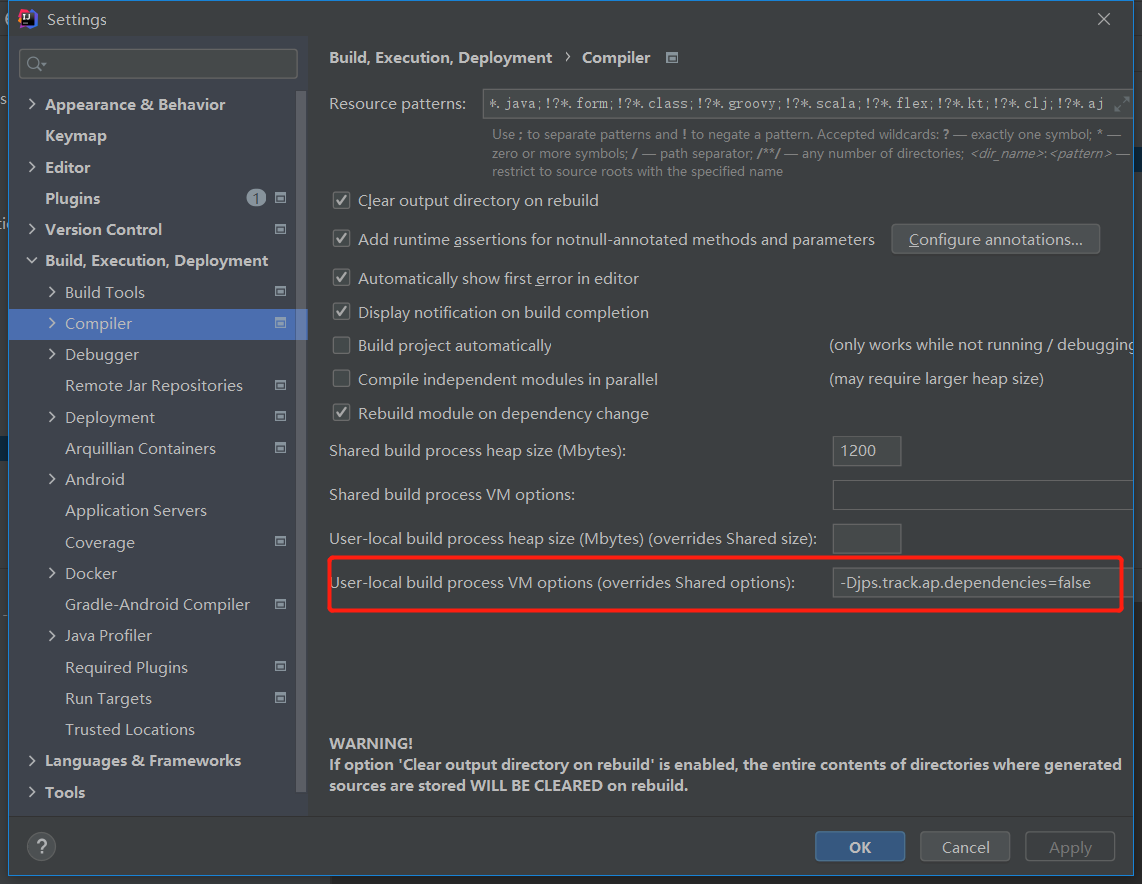
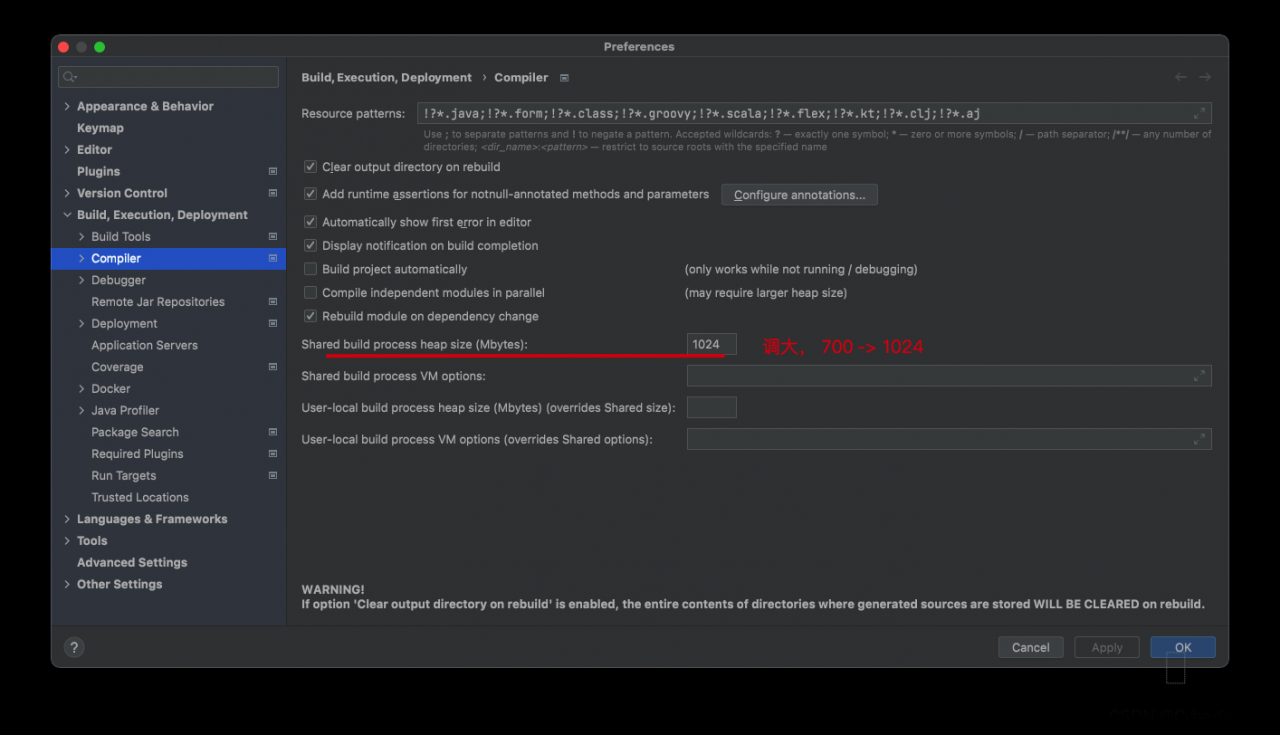
1. Set File→settings→Compiler’s User-local build process VM options (overrides Shared options) option to set -Djps.track.ap.dependencies=false, select apply

2. modify the version of mapstruct-processor in pom.xml and upgrade it to 1.4.1.Final or higher

Both methods can be tried, I was successful in the first method

[Solved] Eclipse Error: A JNI error has occurred, please check your installation and try again

Solution:

① Check whether the package name contains “Java” and modify it. Java should be avoided when creating the package.

② Run the Java version and javac version commands in CMD to check their own JDK and JRE versions. If they are different, reconfigure the environment variables to make them consistent

The above two steps can solve most of the problems. If they are still not solved, it is recommended to reinstall the JDK and reconfigure the environment variables.

[Solved] IDEA: Internal error (java.lang.UnsupportedClassVersionError)

After creating a spark project and testing a “hello word”, I encountered the following error:

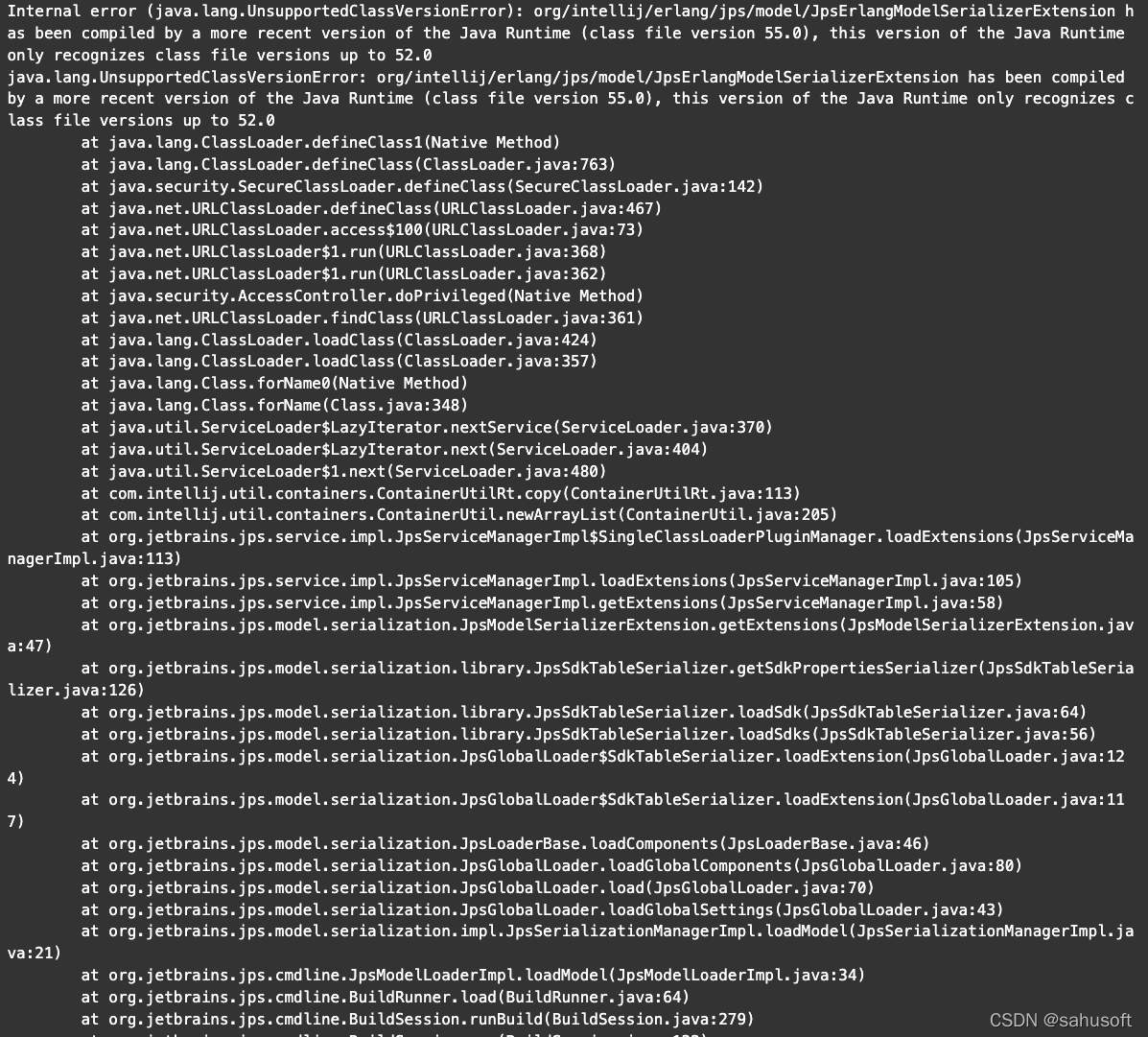
Internal error (java.lang.UnsupportedClassVersionError): org/intellij/erlang/jps/model/JpsErlangModelSerializerExtension has been compiled by a more recent version of the Java Runtime (class file version 55.0), this version of the Java Runtime only recognizes class file versions up to 52.0
java.lang.UnsupportedClassVersionError: org/intellij/erlang/jps/model/JpsErlangModelSerializerExtension has been compiled by a more recent version of the Java Runtime (class file version 55.0), this version of the Java Runtime only recognizes class file versions up to 52.0


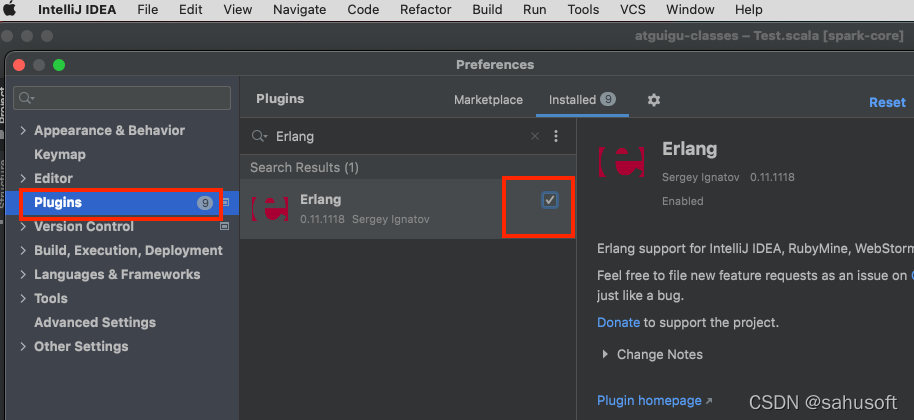
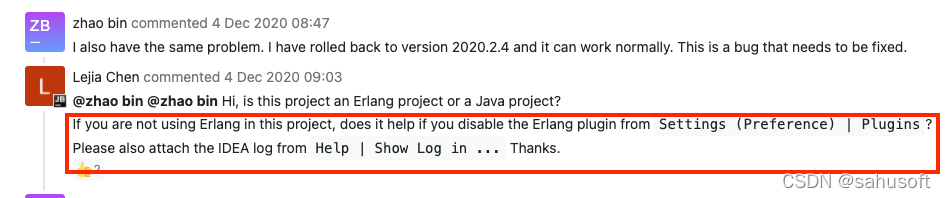
Solution: Close the Erlang plugin and restart IDEA
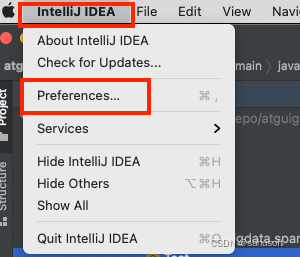
Steps: Intel iJ IDEA -> Preferences -> Pluglinis -> (search Erlang) Remove the checkbox

Referencehttps://youtrack.jetbrains.com/issue/IDEA-256900

[Solved] Error getting generated key or setting result to parameter object. UnsupportedOperationException

Mybatis batch inserts and returns the primary key to the original list

report errors

Error getting generated key or setting result to parameter object. UnsupportedOperationException

reason

The version before mybatis 3.3.1 does not support the function of batch adding and returning the primary key ID; Some versions after mybatis # 3.3.1 support batch insert return ID, but do not support multiple parameters of Dao layer batch insert function, @ param annotation; (that is, table splitting is not supported) mybatis versions after 3.5.1 support batch insertion, return ID, multiple parameters, and @ param annotation

Solution:

Upgrade mybatis 3.5.1 (and ensure that all mybatis versions that Maven depends on are greater than 3.5.1) Dao

void batchInsert(@Param("idx") Integer idx, @Param("list") List<DO> list);

mapper

    <insert id="batchInsert" useGeneratedKeys="true" keyProperty="list.id">
        insert into do_${idx} (name, address)
        values
        <foreach collection="list" item="item" separator=",">
            (#{item.name},#{item.address})
        </foreach>
    </insert>

Note: because the function has multiple parameters, it is impossible to determine which parameter ID is taken, so it needs to indicate that it is list in keyproperty = “list.ID”.

[Solved] jar file Execute Error: power shell error: unable to access jarfile


Problem description

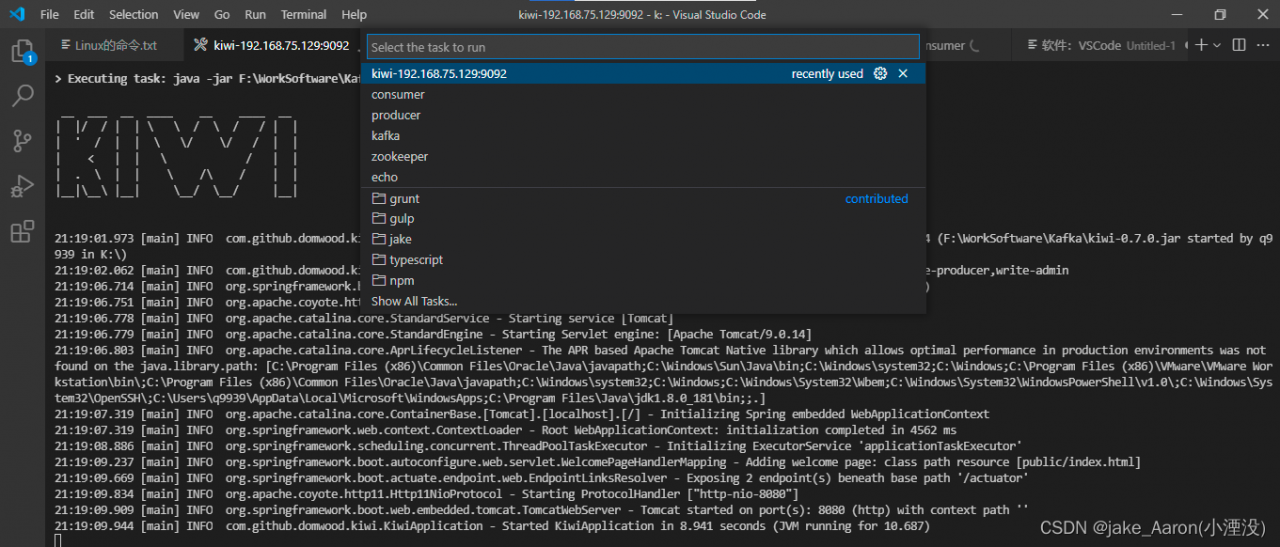
When using the configuration task of vscode, there are problems in executing the jar file, so there are the following solutions.

preparation

Software: vscode
environment: windows10

How to configure

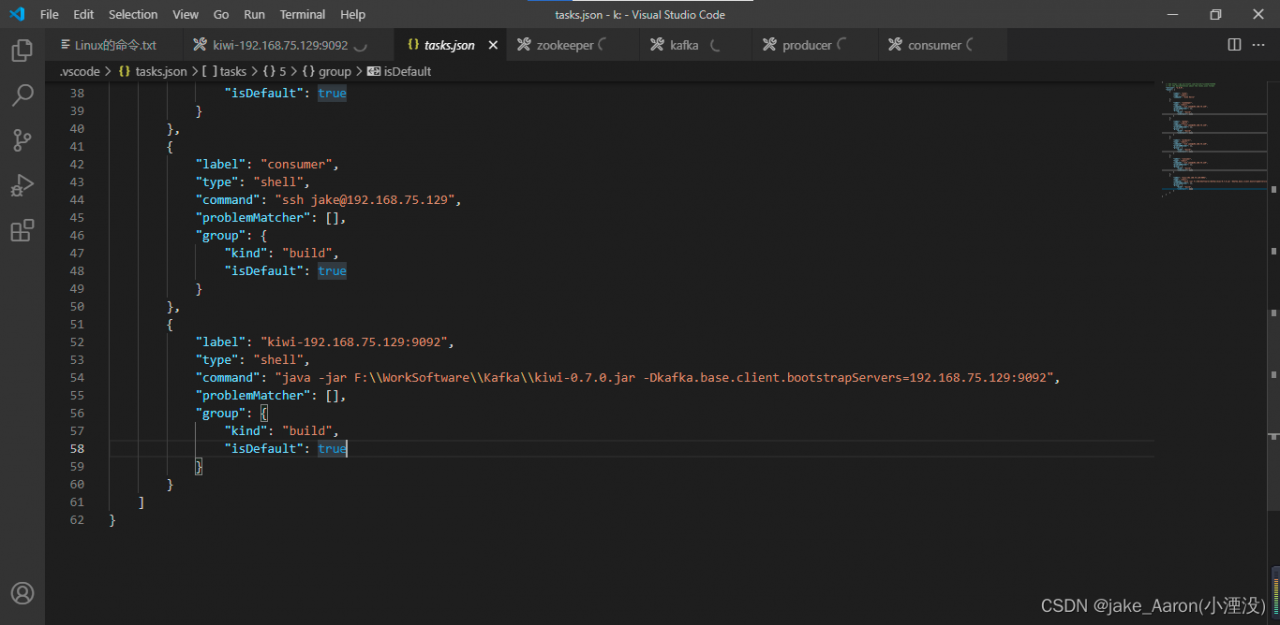
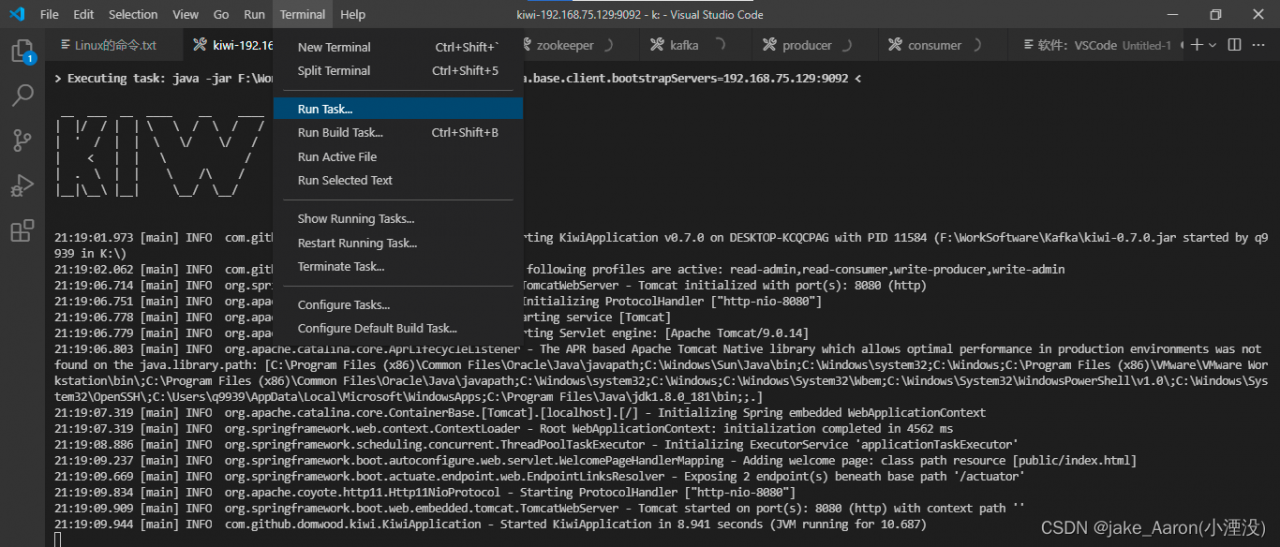
1. Create a task and execute the jar file:

2. Configurable parameters must be placed later

-Dkafka.base.client.bootstrapServers=192.168.75.129:9092

How does it work

1. Run profile location

2. Find the executable file name

More

Building Java code
You can use Maven to perform multiple build lifecycle goals, including compiling project code, creating library packages (such as JAR files), and installing libraries in a local Maven dependency repository
To attempt a build, issue the following command from the command line.
mvn compile

This will run Maven and tell it to perform a compile of the target. When it is done, you should find the compiled .class file in the target/classes directory.
Since you are unlikely to want to distribute or use the .class files directly, you may want to run the package target instead:
mvn package

The package target will compile the Java code, run any tests, and package the code up in the completion target directory via an internal JAR file. the name of the JAR file will be based on the project's <artifactId> and <version>.
For example, given the previous minimal pom.xml file, the JAR file will be named kiwi-0.7.0.jar.

To execute the JAR file, run.
java -jar F:\WorkSoftware\Kafka\kiwi-0.7.0.jar -Dkafka.base.client.bootstrapServers=192.168.75.129:9092

If you change the value of <packaging> "jar" to "war", the result will be a WAR file in the target directory instead of a JAR file.

kakfa Create topic Error: java.util.concurrent.ExecutionException: org.apache.kafka.common.errors.InvalidReplicationFactorException: Replication factor: 3 larger than available brokers: 2.

Error message:

java. util. concurrent. ExecutionException: org. apache. kafka. common. errors. InvalidReplicationFactorException: Replication factor: 3 larger than available brokers: 2.

According to the error message, the number of copies of topic to be created is 3 and the number of brokers is 2. Indicates that Kafka did not get the stored brokers information in zookeeper.

Check:

Whether the Kafka cluster is enabled normally. At the same time, it should be noted that the number of topic replicas created cannot be greater than the number of surviving brokers in the cluster

Lsof – I check whether each Kafka node is normal

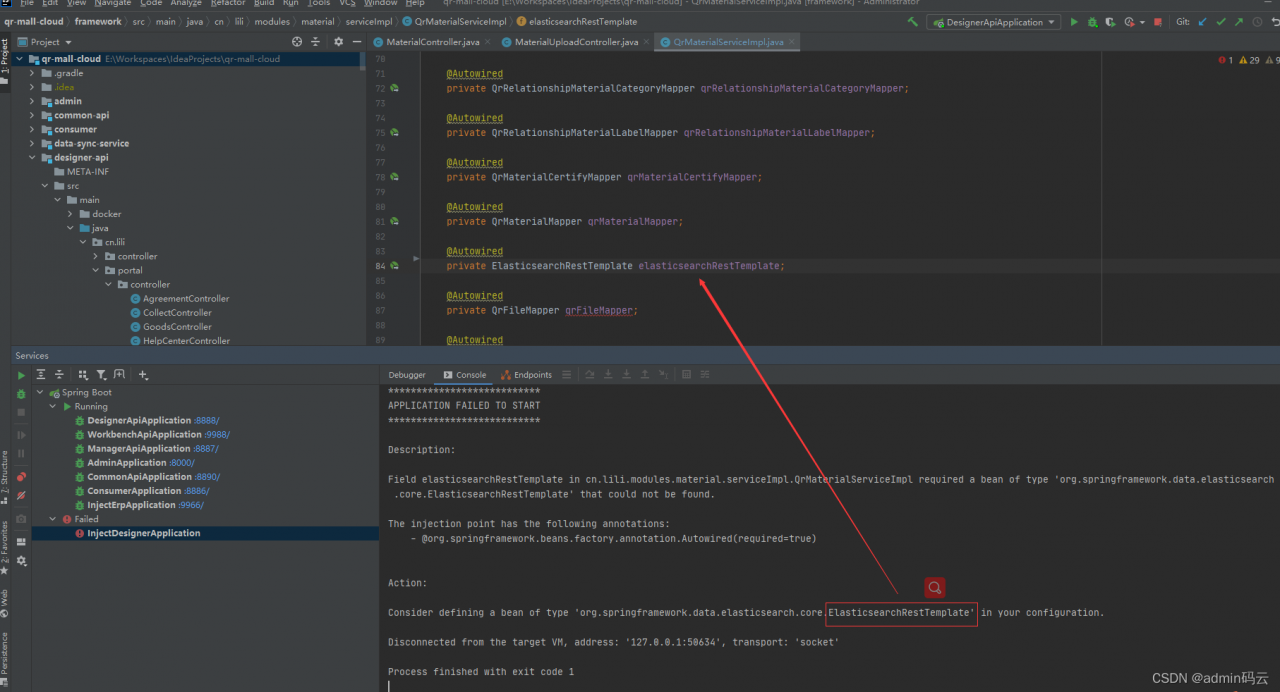
Springboot startup error: Field elasticsearchRestTemplate in cn.lili.modules.material.serviceImpl.QrMaterialServiceImpl required a bean of type


Description:

Field elasticsearchRestTemplate in cn.lili.modules.material.serviceImpl.QrMaterialServiceImpl required a bean of type ‘org.springframework.data.elasticsearch.core.ElasticsearchRestTemplate’ that could not be found.
The injection point has the following annotations:
- @org.springframework.beans.factory.annotation.Autowired(required=true)
Action:
Consider defining a bean of type ‘org.springframework.data.elasticsearch.core.ElasticsearchRestTemplate’ in your configuration.
Process finished with exit code 1

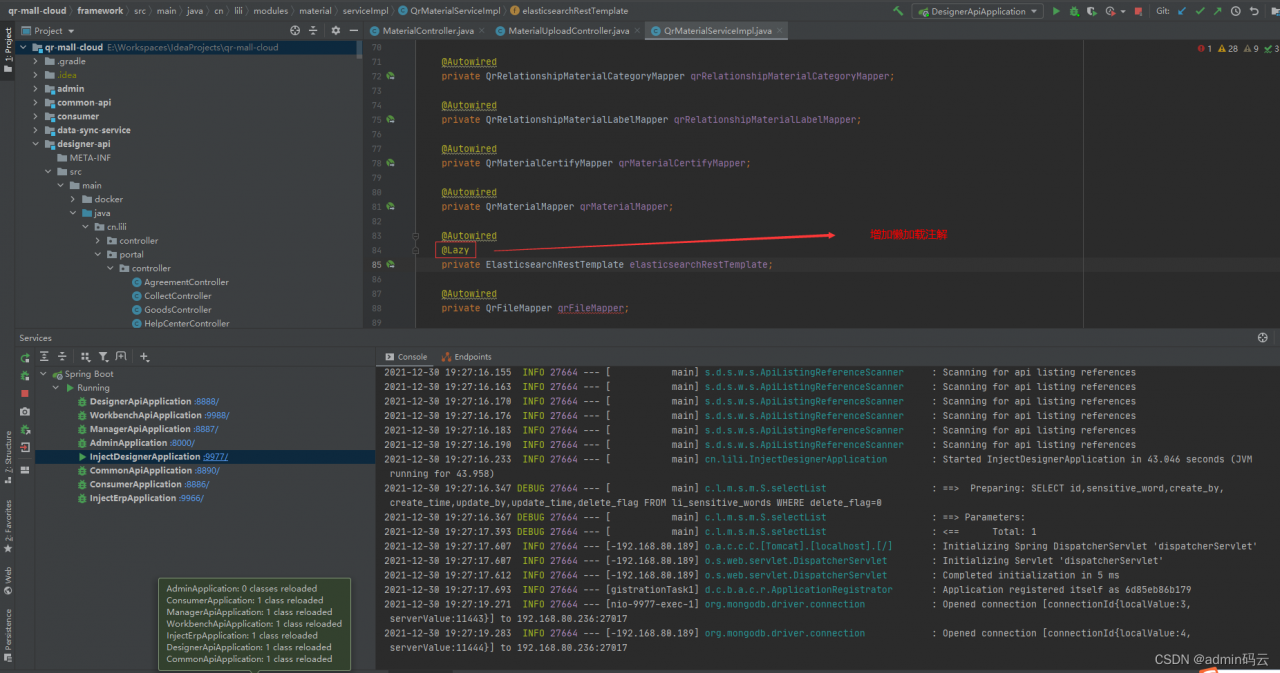
Solution:

Add lazy loading annotation: @Lazy

Spring MVC project error: Namespace in turns red

Namespace in <mapper namespace> turns red

Solution:

The XML file header language should be changed to the mapper mapping instead of the config
previously used as follows:

<!DOCTYPE mapper
        PUBLIC "-//mybatis.org//DTD Config 3.0//EN"
        "http://mybatis.org/dtd/mybatis-3-config.dtd">

Change to

<!DOCTYPE mapper
        PUBLIC "-//mybatis.org//DTD Mapper 3.0//EN"
        "http://mybatis.org/dtd/mybatis-3-mapper.dtd">

Create folders with different functions