Category Archives: How to Fix

About the error querying database. Cause: java.lang.nullpointerexception reported in mybatis

There is such a problem when upgrading the previous project today

### Error querying database.  Cause: java.lang.NullPointerException
### The error may exist in file [/Users/xxxx/IDEA-Pr/Hire/UserInformation/target/classes/mapper/EmployeeDao.xml]
### The error may involve com.app.hire.dao.EmployeeDao.selectEmployee
### The error occurred while handling results
### SQL: select         e.user_id,         e.name,         e.age,         e.sex,         e.employee_desc,         e.create_time,         e.last_edit_time,         e.phone,         e.address,         e.image,         a.area_id,         a.area_name,         a.area_desc         from tb_area a,tb_employee e         where a.area_id=e.area_id and e.user_id=?
### Cause: java.lang.NullPointerException] with root cause

The wrong information as like as two peas in the mapper file, I ran the code that didn’t upgrade. The result is the same code. It can’t be used here. The springboot version of the previous code is 2.3.7.RELEASE. The current version is 2.2.2.RELEASE
after two hours of crazy inquiries. Finally, the problem is found
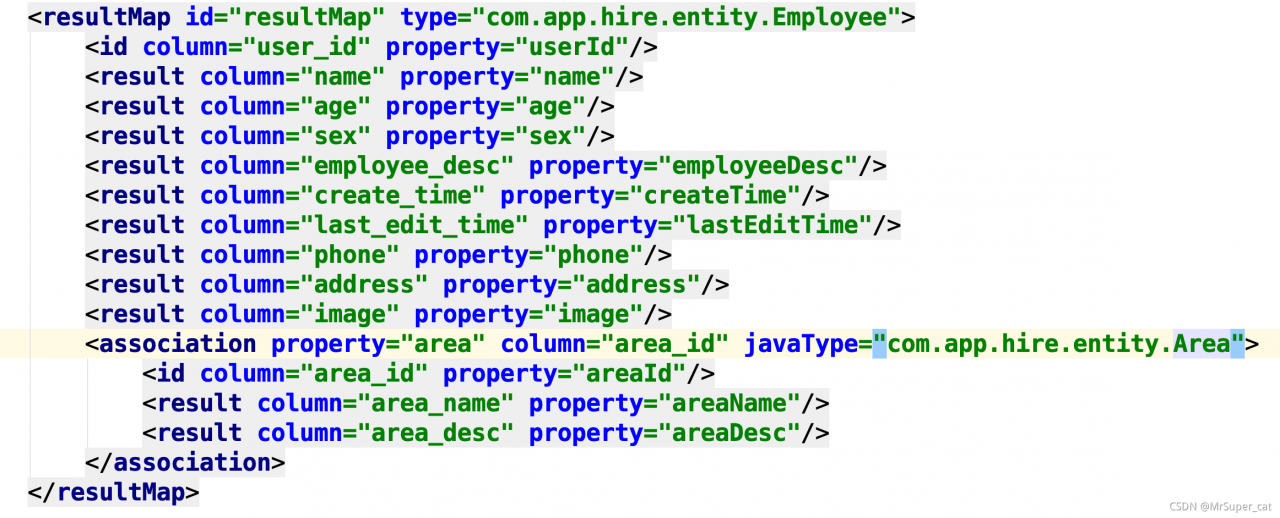
in our mapper file, if you want to perform a joint query, you will write a resultmap to put the query results. The class to be jointly queried has an attribute javatype. Set the real class of the object as shown in the figure below

but it is strange that my previous version can run without this javatype, As a result, the version has been reduced, but it can’t run. Do you have a boss to help answer the reason?Is it because the springboot version has been upgraded?

Conclusion: when writing resulmap, you’d better add javatype, otherwise there’s no place to find such errors.

error: unknown type name ‘Q_DECLARE_METATYPE‘

Recently, when developing with QT4, there was a problem that Q could not be recognized_ DECLARE_ The error code of the metatype macro was transplanted from Qt5. I thought it was not supported by QT4. After checking later, I found that the qmetatype. H header file must be included in QT4, and only qvariant needs to be included in Qt5.

Solve MySQL installation error: initializing database prompts an error when installing mysql

Solve MySQL installation error: initializing database prompts an error when installing mysql

when we install MySQL database, we report an error in initializing database because MySQL has not been completely uninstalled before. We can solve it according to the following methods:

1. First stop the original MySQL service

-Right click my computer
– select “management”
– click “service”
– find MySQL
– right click to close the service

2. Enter the control panel to uninstall mysql

in the panel, right-click Mysql to uninstall, and then follow the steps prompted to uninstall

3. Go to MySQL installation directory and delete relevant files

generally, the database is on Disk C by default. Open it in the file browser, and then check the “hidden items” to open the following three files

– Program Files
– Program Files (x64)
– ProgramData

delete the MySQL directory under these three folders

4. Clean the registry and completely delete the MySQL service

Press and hold the windows key + r on the keyboard to open the command line, enter regedit to enter the registry
and find it in turn:

HKEY_ LOCAL_ MACHINE——SYSTEM——ControlSet001——services——eventlog——Application——MySQL

right click the MYSQL to delete it. If there are still the following directories:

HKEY_ LOCAL_ MACHINE——SYSTEM——ControlSet002——services——eventlog——Application——MySQL

you can also right-click to delete. If not, it will be ignored

5. Restart the system
Error querying database. Cause: java.util.ConcurrentModificationException

Caused by: org.apache.ibatis.exceptions.PersistenceException:
### Error querying database. Cause: java.util.ConcurrentModificationException
### Cause: java.util.ConcurrentModificationException
at org.apache.ibatis.exceptions.ExceptionFac

For the iterative stability problem, it is used for database query. The value of lastbyparam.getid is re assigned to ID, and an error is reported due to the reference of the object; Another problem is that valueconfig is the value obtained from Nacos. The global variable cannot always add ID, and the collection will slowly grow

List<Long> Ids = valueConfig.getIds();
Ids.add(Id);
ObjectDO lastByParam = testMapper.getLastByParam(userId, Ids, null);
if (lastByParam != null){
    Id = lastByParam.getId();
}

The solution is to re new a collection

ERROR: Pool overlaps with other one on this address space

Error: pool overlaps with other one on this address space is sometimes reported when creating networks in docker. This is because the target network segment already exists. Usually, this occurs when the network to be created manually specifies the subnet network segment address.

At this time, there are two options: one is to check whether the container of the existing network segment is in use. If it is no longer used, you can delete the network card corresponding to the network segment, and the other is to modify the address of the target subnet network segment.

Docker network LS
View docker network card

Docker network RM network card ID
delete docker network card

Docker network inspect network card ID
view the details of the docker network card