Category Archives: How to Fix

Solution of redisconnection factory in springboot2 not Autowired

1. No redis package imported, then import the following jar package to solve

<dependency>
            <groupId>org.springframework.boot</groupId>
            <artifactId>spring-boot-starter-data-redis</artifactId>
        </dependency>

2. Do the project separation, so pay attention to the @component scanning scope of the Application startup class, default scanning of the Application startup class package and the beans under the subpackage.
is redis – common such as A project, A project of the package name is com.zhangsan.com mon. Redis. B project imports the JAR package of A project, the package name of B project is com. Zhangsan.service.B, then the Application start-up class of B project should be placed under com. Zhangsan, so as to load the beans of A project into A project.


svn: E230001: Server SSL certificate verification failed: certificate issued

svn: E230001: Server SSL certificate verification failed: certificate issued

literally means that the server’s SSL certificate validation failed.

solution:

execute SVN ls on terminal https://*/ SVN / (your project address)

and then the terminal will ask you to choose R, t, or p. P stands for accept

after we enter p, press enter, and then the computer user’s password and SVN account password will be prompted to input, according to the prompt operation line

input is completed, press enter to do

Spring boot can’t scan XML (invalid bound statement (not found))

in a recent work on a project, a headache problem, the background and foreground, after a successful start in obtaining some mapper, always show can not find the mapper, but if use Ctrl or can enter this method, on the Internet to find a lot of solutions, did not solve my problem, the following are some of the common rule out way:

1, check whether namespace in your XML file is correct

2. Check whether the mapper method written by yourself is consistent or missing with the method in XML, and whether the return type or name is consistent

3. If it is not possible yet, take a look to see if the XML configuration path of mapper is correct

4. Delete some Spaces in XML

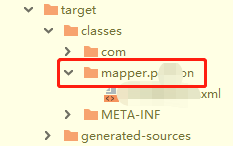
5, I encountered myself, to see if the target file exists and is a level 1 directory:

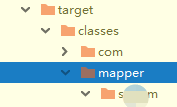
, if you’re like me, you can delete the new mapper, and when you create a new mapper, you can create a new mapper, and you can create a new directory on the mapper.

and finally the target should look like this:

is just like that.

if not solved, you can leave a message to communicate with oh ~

Error inflating class in WebView in Android 5. X android.webkit.WebView Solutions

using WebView in Android version 5.x May report the following error

android.view.InflateException: Binary XML file line #24: Error inflating class android.webkit.WebView

solution 1:

use createConfigurationContext () method to get the Context

public class LollipopFixedWebView extends WebView {

    public LollipopFixedWebView(Context context) {
        super(getFixedContext(context));
    }

    public LollipopFixedWebView(Context context, AttributeSet attrs) {
        super(getFixedContext(context), attrs);
    }

    public LollipopFixedWebView(Context context, AttributeSet attrs, int defStyleAttr) {
        super(getFixedContext(context), attrs, defStyleAttr);
    }

    @TargetApi(Build.VERSION_CODES.LOLLIPOP)
    public LollipopFixedWebView(Context context, AttributeSet attrs, int defStyleAttr, int defStyleRes) {
        super(getFixedContext(context), attrs, defStyleAttr, defStyleRes);
    }

    public LollipopFixedWebView(Context context, AttributeSet attrs, int defStyleAttr, boolean privateBrowsing) {
        super(getFixedContext(context), attrs, defStyleAttr, privateBrowsing);
    }

    public static Context getFixedContext(Context context) {
        // Android Lollipop 5.0 & 5.1
        if (Build.VERSION.SDK_INT >= 21 && Build.VERSION.SDK_INT <= 22) 
            return context.createConfigurationContext(new Configuration());
        return context;
    }
}

solution 2:

in the build.gradle of the project, appcompat version 1.1.0 May be buggy, use the following version to solve the problem

implementation 'androidx.appcompat:appcompat:1.2.0'


[NLP] NameError in using nltk: name ‘freqdist’ is not defined

The author also began to learn NLP technology in order to do graduation design, and wrote out some problems or experiences I met in daily life. For everyone to study and progress together!

recently encountered this problem “NameError: name ‘FreqDist’ is not defined” while learning python natural language to work with the book. The solution is as follows:

from NLTK import * or from nltk.book import * .

operating results will return to normal:

mysql Table ‘performance_ schema.session_ Variables’ doesn’t exist solution

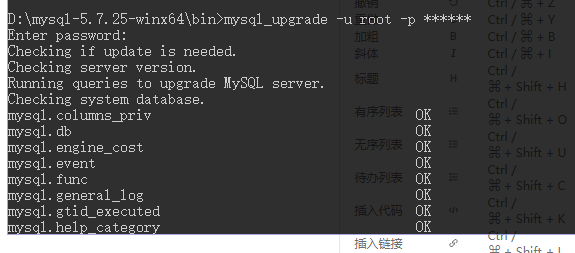
connection with SQLyog database, “mysql Table ‘performance_schema.session_variables’ doesn’t exist” error, the solution

  • enters the DOS system, Enter into the bin folder
    DOS system under the MySQ directory you installed is D :, CD to the folder you want to enter

  • enter mysql_upgrade -u root-p *****0
    1

  • restart mysql
    enter the shutdown command: Net stop mysql
    enter the start command: net start mysql

How to solve the problem that the project module turns grey in Maven

wrong project, built to remove reconstruction, suddenly have been project identification, always prompt project can’t find, then see the maven inside of bar on the right, according to project is gray, the diagram below:

for this reason, find relevant solution and steps are as follows:
1 file – setting

2 maven – ignored files, the following figure

save after 3 o ‘clock, gray disappears inside maven:

Java and Android commons codec usage and nosuch method error

introduction

Commons codec, a utility class package provided by the Apache open source organization for handling common encoding methods, such as DES, SHA1, MD5, Base64, URL, Soundx, and so on. Not only encoding, but also decoding.

common classes and functions

1, Base64 encoding and decoding 2, Hex encoding and decoding 3, MD5 encryption (MD5 is an irreversible algorithm, encryption only) 4, SHA encryption 5, Metaphone and Soundex 6, URLCodec

source

the address https://commons.apache.org/proper/commons-codec/download_codec.cgi
or
https://github.com/apache/commons-codec </ p>

Java project using

<dependency>
  <groupId>commons-codec</groupId>
  <artifactId>commons-codec</artifactId>
  <version>1.15</version>
</dependency>

Android USES

it’s a pity that did not provide gradle dependence, only from the source code or download bin file copies jars to the Android projects in use, can appear but in Android USES Java. Lang. NoSuchMethodError: No static method decodeHex (Ljava/lang/String;)
[B in class Lorg/apache/commons/codec/binary/Hex; or its super classes (declaration of ‘org.apache.commons.codec.binary.Hex’ appears in /system/framework/org.apache.http.legacy.boot.jar)

why

Android also has a copy of the package name and class name of the API we use, but the point is there is no such method in the system! This results in a package name conflict, and the system finds the same class with the same name in its SDK, and then calls the method we use below the system’s own class.
however the system does not have that method at all, it is not called at all. And then there’s no and then there’s less than /p>

solution

obtained the source code by itself, modified the package name, and then recompiled into a jar package, and then imported into the Android project for use; Recompile and run your Own Android project, and you’ll see that the previous problems are gone;

Oracle database missing init.ora Solutions

In general, the following file

is automatically created after we create the database instance on the Oracle database

pfile (.ora), which records the basic configuration of the database, plain text, not much content, usually beginning with init, startup command required file

spfile (.ora), binary file, similar to pfile, can be generated by pfile

table space container (.dbf), binary file, this should be familiar, often tens of hundreds of GB

control file and backup, generally under database instance default directory and fast_recovery directory, file names are generally control01.ctl and control02.ctl

The

redo file (.log) is usually installed in the database instance installation directory, along with the.dbf file above. The file name defaults to redo01.log redo02.log redo03.log
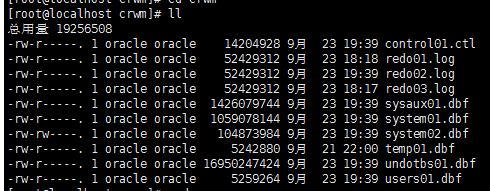
these files are the main ones in a database. In other words, if we copy these files to another server with Oracle, we can theoretically pull up the database and continue running.

Losing any of the files above

would be disastrous. This will cause the database to fail startup, and not just for those files. If you open archived logs, the loss of archived logs will cause the database to fail to start.

table space file is lost and data is lost and cannot be recovered unless there is a backup.

The

control file creates two instances by default when you create an instance, if you lose one you can copy the other, if you lose both then the backup with table space does not have

pfile and spfile lost will cause the database cannot startup, but the pfile content is less, plaintext, can be copied from other instances over reference. Spfile, on the other hand, can be generated from a pfile via SQLPlus, so the loss of these two files is not necessarily catastrophic.

After

pfile is lost or tampered, you will often encounter “ora-03113 communication channel end file “error or ora-01507 database not mounted error

let’s first look at the structure of the pfile

# 
# $Header: rdbms/admin/init.ora /main/23 2009/05/15 13:35:38 ysarig Exp $ 
# 
# Copyright (c) 1991, 1997, 1998 by Oracle Corporation
# NAME
#   init.ora
# FUNCTION
# NOTES
# MODIFIED
#     ysarig     05/14/09  - Updating compatible to 11.2
#     ysarig     08/13/07  - Fixing the sample for 11g
#     atsukerm   08/06/98 -  fix for 8.1.
#     hpiao      06/05/97 -  fix for 803
#     glavash    05/12/97 -  add oracle_trace_enable comment
#     hpiao      04/22/97 -  remove ifile=, events=, etc.
#     alingelb   09/19/94 -  remove vms-specific stuff
#     dpawson    07/07/93 -  add more comments regarded archive start
#     maporter   10/29/92 -  Add vms_sga_use_gblpagfile=TRUE 
#     jloaiza    03/07/92 -  change ALPHA to BETA 
#     danderso   02/26/92 -  change db_block_cache_protect to _db_block_cache_p
#     ghallmar   02/03/92 -  db_directory -> db_domain 
#     maporter   01/12/92 -  merge changes from branch 1.8.308.1 
#     maporter   12/21/91 -  bug 76493: Add control_files parameter 
#     wbridge    12/03/91 -  use of %c in archive format is discouraged 
#     ghallmar   12/02/91 -  add global_names=true, db_directory=us.acme.com 
#     thayes     11/27/91 -  Change default for cache_clone 
#     jloaiza    08/13/91 -         merge changes from branch 1.7.100.1 
#     jloaiza    07/31/91 -         add debug stuff 
#     rlim       04/29/91 -         removal of char_is_varchar2 
#   Bridge     03/12/91 - log_allocation no longer exists
#   Wijaya     02/05/91 - remove obsolete parameters
#
##############################################################################
# Example INIT.ORA file
#
# This file is provided by Oracle Corporation to help you start by providing
# a starting point to customize your RDBMS installation for your site. 
# 
# NOTE: The values that are used in this file are only intended to be used
# as a starting point. You may want to adjust/tune those values to your
# specific hardware and needs. You may also consider using Database
# Configuration Assistant tool (DBCA) to create INIT file and to size your
# initial set of tablespaces based on the user input.
###############################################################################

# Change '<ORACLE_BASE>' to point to the oracle base (the one you specify at
# install time)

db_name='mydb'
memory_target=1G
processes = 150
audit_file_dest='/u01/oracle/admin/mydb/adump'
audit_trail ='db'
db_block_size=8192
db_domain=''
db_recovery_file_dest='/u01/oracle/flash_recovery_area'
db_recovery_file_dest_size=2G
diagnostic_dest='/db/oracle'
dispatchers='(PROTOCOL=TCP) (SERVICE=mydbXDB)'
open_cursors=300 
remote_login_passwordfile='EXCLUSIVE'
undo_tablespace='UNDOTBS1'
# You may want to ensure that control files are created on separate physical
# devices
control_files = (control01.ctl,control02.ctl)
compatible ='11.2.0'

the field of the file is not much, most are fixed, such as the version of the database, the location of the database recovery file, size, connection protocol and so on. Parameters that vary between instances, except for the name and the corresponding storage path, are left with the block size.

db_block_size, which is the block size specified when we set up the database, determines the maximum size and efficiency of our database table space and buffer pool. Default is 8192. Under 8192, the maximum size of a single table space file is only 32gb, and expanding this value to 16384 would raise the single table space limit to 64GB, so this parameter will vary from database to database, and errors will cause startup failure.

control_files are control files for the database and can be written to multiple times, separated by commas. Written here is the actual control file name, path can go to find, to the startup log (startup fails will print the full path of this file), the name of the XML, you can use the locate the XML to search the file, or according to your oracle installation position, the path is about/oracle/diag/RDBMS/ora11g ora11g/alert log. The XML

watch the log, if the pfile was written incorrectly, then there will be the following error

ORA-00210: cannot open the specified control file
ORA-00202: control file: /opt/oracle/oradata/ora11g/control03.ctl;

you can refer to this article https://www.cnblogs.com/sparkbj/articles/6146247.html

spfile we can enter sqlplus to generate, the command is as follows:

sqlplus/as sysdba
create spfile from pfile='/u01/mydb/initmydb.ora';

Finally, after we have written the new pfile and spfile files, we can use the startup command to start

startup pfile='/u01/mydb/init.ora' mount