Category Archives: How to Fix

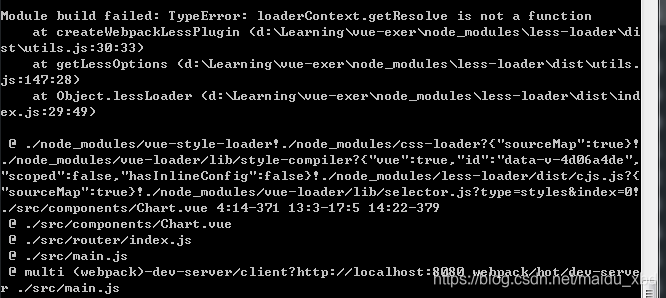
Vue — report error with less module build failed: typeerror: loaderContext.getResolve is not a function

installation and use steps are as follows:

1, install [NPM install less-loader –save]

2. Add

to [rules] in [webpack.base.conf.js] file under [build] file

 {
    test: /\.less$/,
    loader: "style-loader!css-loader!less-loader"
 }

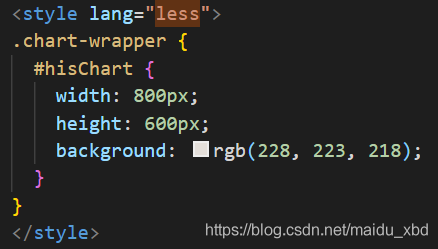
3, write [lang=”less”]

in the “style” tag

4, [NPM run dev] :

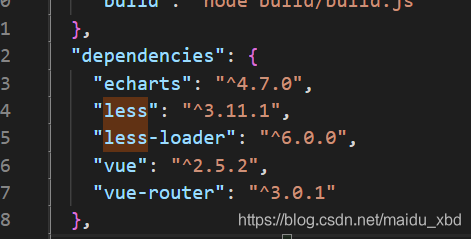
error was reported because the version installed by the less-loader was too high. In [package. Json], you can see the installed version

5, the solution: uninstall install high version of the less – loader, the NPM uninstall less – loader 】, installation specified low version of the less – loader (NPM install [email protected] – save 】 can solve the error.

Django + jQuery get data in the form + Ajax send data

1. Method 1: obtain form data through Jquery$("# corresponding form id). SerializeArray (), and directly assign values to $. Ajax data.

.serializearray () method see jQuery ajax-serializearray () method
this method puts back an array of JSON objects.

$("#postSubmit").click(function () {
                    let data = $("#postContent").serializeArray();
                    $.ajax({
                        url: '/decuhub/home-post-ajax',
                        method: 'POST',
                        data: data,
                        async: true,
                        success: function (result) {
                            console.log("post successfully!")
                        }
                    })
                })

2. The method 2: by $(" # corresponding form form id) serializer () to obtain the form data:

$("#postSubmit").click(function () {
                    let data = $("#postContent").serializer();
                    $.ajax({
                        url: '/decuhub/home-post-ajax',
                        method: 'POST',
                        data: data,
                        async: true,
                        success: function (result) {
                            console.log("post successfully!")
                        }
                    })
                })

. Method 3:

is not recommended

$("#postSubmit").click(function () {
                    let postContentForm = $("#postContent").serializeArray();
                    let data = {};
                    $.each(postContentForm, function(){
                        data[this.name] = this.value;
                    })
                    $.ajax({
                        url: '/decuhub/home-post-ajax',
                        method: 'POST',
                        data: data,
                        async: true,
                        success: function (result) {
                            console.log("post successfully!")
                        }
                    })
                })

$.each() reference jQuery. Each ()

Django's request-post gets

<QueryDict: {'csrfmiddlewaretoken': ['vO34OFZtTj2Bp2ARMlXVJxZQb37CyuWR7ywaDC4QaJhHtcxB4xB9fnb2IOnbQ2AR'], 'content': ['asdfsd']}>

Solve the unexpected end of stream exception thrown by jedis

tonight the Internet is off. I haven’t fixed it for a long time. Write a super short post, and then take a rest as soon as possible.

has a Flink program that reads data from Kafka, summarizes the calculation indicator by the 1-minute scrolling window, and writes the result to Redis, that is, writes once every 1 minute. Although the Kafka Source inputs a huge amount of data, the result is only a few hundred kilobytes per minute. After a few hours of running, the following exception is thrown:

redis.clients.jedis.exceptions.JedisConnectionException: Unexpected end of stream.
        at redis.clients.util.RedisInputStream.ensureFill(RedisInputStream.java:199)
        at redis.clients.util.RedisInputStream.readByte(RedisInputStream.java:40)
        at redis.clients.jedis.Protocol.process(Protocol.java:151)
        at redis.clients.jedis.Protocol.read(Protocol.java:215)
// 以下略...

is then restarted frequently, and after up to five minutes the same exception is thrown repeatedly, rendering the data completely unwritable. Redis is standalone version 3.2.10, and Jedis is a version 2.9.0 built into the Flink-Redis connector provided by Bahir.

tracing the Jedis source code according to the exception stack in the figure does not yield any useful information. After various googles, find three search directions:

  1. client output buffer is full;
  2. Jedis instance is operated concurrently by multiple threads;
  3. connection idle for a long time disconnected by the server.

take a look at the buffer Settings:

> config get client-output-buffer-limit
1) "client-output-buffer-limit"
2) "normal 0 0 0 slave 268435456 67108864 60 pubsub 33554432 8388608 60"

has no limit at all. And even if you do, output of a few hundred K per minute is not a bottleneck at all. The multithreading problem also doesn’t exist, because RedisSink’s parallelism was set to 1 in the code in the first place. So there’s only a third possibility left, take a look at the timeout setting in Redis.conf.

> config get timeout
1) "timeout"
2) "120"

120 seconds is pretty short. Look at the structure when we use connector FlinkJedisPoolConfig instances where I used to, the answer is RedisCommandsContainerBuilder:

    public static RedisCommandsContainer build(FlinkJedisPoolConfig jedisPoolConfig) {
        Objects.requireNonNull(jedisPoolConfig, "Redis pool config should not be Null");

        GenericObjectPoolConfig genericObjectPoolConfig = new GenericObjectPoolConfig();
        genericObjectPoolConfig.setMaxIdle(jedisPoolConfig.getMaxIdle());
        genericObjectPoolConfig.setMaxTotal(jedisPoolConfig.getMaxTotal());
        genericObjectPoolConfig.setMinIdle(jedisPoolConfig.getMinIdle());

        JedisPool jedisPool = new JedisPool(genericObjectPoolConfig, jedisPoolConfig.getHost(),
            jedisPoolConfig.getPort(), jedisPoolConfig.getConnectionTimeout(), jedisPoolConfig.getPassword(),
            jedisPoolConfig.getDatabase());
        return new RedisContainer(jedisPool);
    }

shows that the JedisPool does not monitor idle connection at all. Because concurrency is so low, as the program runs, all connections in JedisPool gradually become idle and do not get cleaned up, and an exception occurs. So be sure to poke fun at the Redis connector first.

has to be changed. There are three ways to modify the idea:

  1. set maxIdle to 0. It is too simple and crude. It treats the symptoms rather than the root causes.

  2. directly adds the configuration items of testOnBorrow and testOnReturn to the FlinkJedisPoolConfig class code, that is, when getting and returning connections from JedisPool, the validity of the connections is tested, and the failed connections are cleaned up. There are two more pings, but there is no bottleneck if you only write one batch of data per minute.

  3. replaces GenericObjectPoolConfig with JedisPoolConfig in the above code. The code for JedisPoolConfig is simple:

public class JedisPoolConfig extends GenericObjectPoolConfig {
  public JedisPoolConfig() {
    // defaults to make your life with connection pool easier :)
    setTestWhileIdle(true);
    setMinEvictableIdleTimeMillis(60000);
    setTimeBetweenEvictionRunsMillis(30000);
    setNumTestsPerEvictionRun(-1);
  }
}

is simple, but the four parameters it defaults to are really ‘make our life easier’ :

  • testWhileIdle: turn on idle connection detection;
  • minEvictableIdleTimeMillis: JedisPool connection in the free time threshold, when this threshold is reached, idle connections will be removed. Redis defaults to 30 minutes, which is too long, so JedisPoolConfig defaults to 1 minute;
  • timeBetweenEvictionRunsMillis: testing free connection cycle, it is 30 seconds;
  • numTestsPerEvictionRun: how many connections are taken for each test. If set to -1, all links are detected.

Of course we could also add an idle connection detection parameter to the GenericObjectPoolConfig used by flinkjejedispoolconfig, but that wouldn’t be as convenient as using JedisPoolConfig directly. This approach is more universal because the overhead associated with testOnBorrow and testOnReturn can be significant at times of high concurrency.

people then good night good night.
[Linux] curl: (7) failed to connect to 127.0.0.1 port 1086: connection reused solution

problem description

enter curl www.baidu.com in the terminal to return the following error:
curl: (7) Failed to connect to 127.0.0.1 port 1086: Connection union

baidu for a long time, found no one reliable, all is a repeat machine! Have a fart ~/. Curlrc! There is no ~/. Curlrc file under home!

solution

enter export-p in the terminal, if you find ftp_proxy, http_proxy, https_proxy, then this solution is suitable for you!
continue input at the terminal:

export -n ftp_proxy
export -n http_proxy
export -n https_proxy

enter export -p again, if the above three things do not appear, it is ok!

the reason why these three things appear is probably because when you get on the Internet, you added these three lines in ~/. Bashrc , so remember to go to ~/. Bashrc and delete all the codes related to ftp_proxy, http_proxy, and https_proxy0, then it won’t appear again.

ImportError: dlopen: cannot load any more object with static TLS

The

problem occurs when using import torch.

is a very weird problem that has been discussed a lot on github, but there is no fundamental solution, and it is not just a problem with torch, but also with tensorflow.

solution:

1, switch the order of the call package, for example:

import cv2
import torch # 报错
# different order
import torch
import cv2   # ok

2. However, the above method does not work for me:

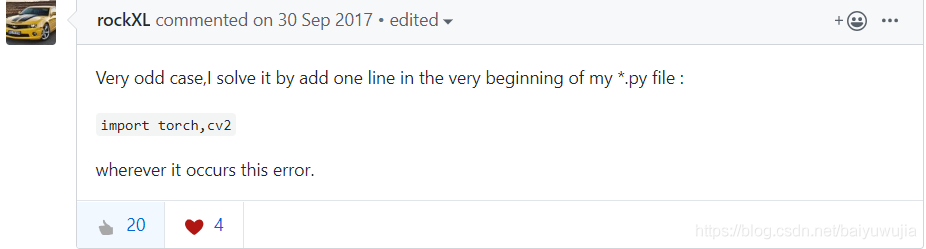
reference: https://github.com/pytorch/pytorch/issues/2083

using the old brother’s method, which still makes no sense, but it works for me

Error: unable to process source

1, error description:

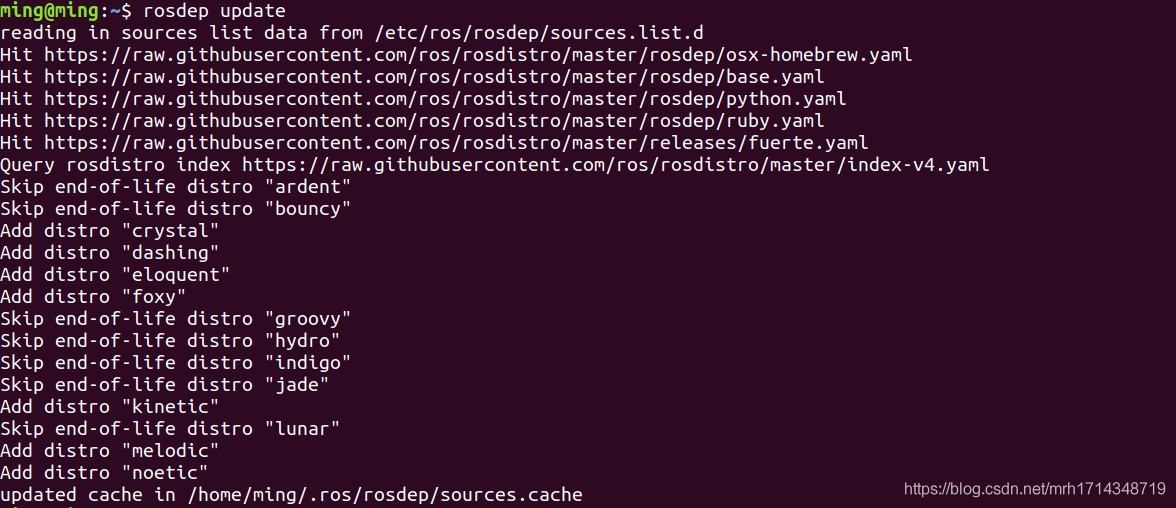
ming@ming:~$ rosdep update

reading sources in the list data from/etc/ros/rosdep/sources list. D
ERROR: unable to process the source [https://raw.githubusercontent.com/ros/rosdistro/master/rosdep/osx-homebrew.yaml] :
& lt; urlopen error [Errno 111] Connection refused> (https://raw.githubusercontent.com/ros/rosdistro/master/rosdep/osx-homebrew.yaml)
ERROR: Unable to process the source [https://raw.githubusercontent.com/ros/rosdistro/master/rosdep/base.yaml] :
& lt; urlopen error [Errno 111] Connection refused> (https://raw.githubusercontent.com/ros/rosdistro/master/rosdep/base.yaml)
ERROR: unable to process the source [https://raw.githubusercontent.com/ros/rosdistro/master/rosdep/python.yaml] :
& lt; urlopen error [Errno 111] Connection refused> (https://raw.githubusercontent.com/ros/rosdistro/master/rosdep/python.yaml)
ERROR: unable to process the source [https://raw.githubusercontent.com/ros/rosdistro/master/rosdep/ruby.yaml] :
& lt; urlopen error [Errno 111] Connection refused> (https://raw.githubusercontent.com/ros/rosdistro/master/rosdep/ruby.yaml)
Hit https://raw.githubusercontent.com/ros/rosdistro/master/releases/fuerte.yaml
Query rosdistro index https://raw.githubusercontent.com/ros/rosdistro/master/index-v4.yaml
Add distro “ardent”
ERROR: ERROR loading sources list:
& lt; urlopen error < urlopen error [Errno 111] Connection refused> (https://raw.githubusercontent.com/ros/rosdistro/master/ardent/distribution.yaml)>

solution:

sudo gedit /etc/resolv.conf

comments the old nameserver line, and adds the following two lines:

Nameserver 8.8.8.8 # Google nameserver

Nameserver 8.8.4.4 # Google nameserver

save exit, execute

sudo apt to get the update

and then

rosdep update

occurs:

is OK!

2. Error description:
Ming @ming:~$sudo rosdep init
ERROR: default sources list file already exists:
/etc/ros/rosdep/sources.list.d/20-default.list
Please delete if you wish to re-initialize

solution:

deletes the existing initialization file by issuing the following command:

sudo rm /etc/ros/rosdep/sources.list.d/20-default.list

and then rerun

sudo rosdep init

problem solved.

Springboot error: property ‘sqlsessionfactory’ or ‘sqlsessiontemplate’ are required error details

problem 1

is in the Mapper layer and it needs to be annotated with @mapper, but then someone put @respository online and it gets mixed up and it could be either one. It’s always going to be @mapper. Add the annotations, but if the Mapper layer in the configuration main class SpringBootMybatisApplication inside there is no need for @ MapperScan (” com. Example. Demo. Mapper “) scans annotations, add scan to the configuration class notes mean under this package all annotations into Mapper.

problem 2

SpringBoot project created with STS, where the configuration file defaults to application.properties, where the data source is typically configured. But want to play this file, you must add @ EnableAutoConfiguration to configure the main class (exclude = {DataSourceAutoConfiguration. Class}) automatic injection, otherwise the configuration in the configuration file is invalid. Failed to configure a DataSource: ‘URL’ attribute is not specified and no embedded DataSource could be configured. Error

but if this annotation is added at this time,

is dependent on the jar package in Mybatis

<dependency>
	<groupId>org.mybatis.spring.boot</groupId>
	<artifactId>mybatis-spring-boot-starter</artifactId>
	<version>1.3.2</ version>
</dependency>

problem three

Automatic injection of SqlSessionFactory and SqlSessionTemplate is cancelled in

mybatis spring-1.3.2, so Property ‘SqlSessionFactory’ or ‘SqlSessionTemplate’ are required error will be reported.
you need to find a solution, so search the web for a solution, refer to this article, create a base class, and then let your dao inherit.

https://www.cnblogs.com/hawk0035/p/3337283.html?utm_source=tuicool

but my Mapper layer is using the annotated version of Mybatis, which is an interface and cannot inherit classes. So that’s not going to work.
since auto injection was eliminated in mybatis spring-1.3.2, I switched to a lower version of mybatis spring-1.1.1, but the fact remains the same, nothing has changed.

it is to find a way to don’t @ EnableAutoConfiguration (exclude = {DataSourceAutoConfiguration. Class}) automatic injection, so must the application. The properties to the application configuration file. The yml. The problem was finally solved.

Attributeerror: module tensorflow no attribute app solution

is due to the tensorflow version, if you guessed right you should be using tensorflow2.0 and the source code is tensorflow1. A few versions. So there are errors.

solution :(1) change the import tensorflow as tf to import tensorflow.compat.v1 as tf

(2) use tf.com pat. V1. The flags replace tf. The app. The flags

either way. I personally recommend the first one.

Download pycharm, select python version, and create a corresponding virtual environment for python in pycharm. If the original tensorflow2.0 version is uninstalled, install tensorflow 1.x version. Remember to check specific Version to install.

Android has applied for permission and still prompts open failed: eacces (permission denied)

solution

people need to upload the latest file in Android10, declare and dynamically apply for permissions, but it still indicates that the file cannot be opened. To solve this problem, the following steps should be done:

  1. permissions that are requested in the Manifest file

< USES – permission android: name = “android. Permission. WRITE_EXTERNAL_STORAGE”/& gt;
< USES – permission android: name = “android. Permission. READ_INTERNAL_STORAGE”/& gt;

  1. dynamically applies for read file permissions (called in the activity)
private  final int REQUEST_EXTERNAL_STORAGE = 1;
private  String[] PERMISSIONS_STORAGE = {
        Manifest.permission.READ_EXTERNAL_STORAGE,
         Manifest.permission.WRITE_EXTERNAL_STORAGE };
public  void verifyStoragePermissions(Activity activity) {
    // Check if we have write permission
    int permission = ActivityCompat.checkSelfPermission(activity,
            Manifest.permission.WRITE_EXTERNAL_STORAGE);
    if (permission != PackageManager.PERMISSION_GRANTED) {
        // We don't have permission so prompt the user
        ActivityCompat.requestPermissions(activity, PERMISSIONS_STORAGE,
                REQUEST_EXTERNAL_STORAGE);
    }
}
    The new Android10

  1. requires a property
  2. to be declared in the Application

< application
Android: requestLegacyExternalStorage = “true”/& gt;

at this point, you can really read the files in the system.

Undeclared identifier CV in opencv4.2.0_ WINDOW_ AUTOSIZE

environment : OpenCV 4.2.0

#include "opencv2/imgproc/imgproc.hpp"
#include "opencv2/core/core.hpp"
#include "opencv2/highgui/highgui.hpp"

#include <iostream>
#include <stdio.h>

using namespace std;
using namespace cv;

//......

    /// 创建窗口
    namedWindow("Source Image", CV_WINDOW_AUTOSIZE);
    
    //......

    /// 对于方法 SQDIFF 和 SQDIFF_NORMED, 越小的数值代表更高的匹配结果. 而对于其他方法, 数值越大匹配越好
    if (match_method == CV_TM_SQDIFF || match_method == CV_TM_SQDIFF_NORMED)
    {
        //......
    }

error :

“CV_WINDOW_AUTOSIZE” : undeclared identifier.

“CV_TM_SQDIFF_NORMED” : undeclared identifier.

reason :

opencv4 partial naming changes, change CV_WINDOW_AUTOSIZE to WINDOW_AUTOSIZE; CV_TM_SQDIFF_NORMED is changed to TM_SQDIFF_NORMED.