Category Archives: How to Fix

AttributeError: module ‘pkg_resources‘ has no attribute ‘declare_namespace‘

Record a problem. Anaconda3 CONDA version 4.6.7 is installed NB_ CONDA failed and damaged the original environment, resulting in an error as shown in the title.

It is speculated that there is a problem with the dependency. First, check the piptree and find that all dependencies are satisfied. However, I manually updated setuptools during the process of CONDA update CONDA. Although the update of CONDA update CONDA failed, the version of setuptools has been updated to 58.0.0,

– setuptools [required: >=36, installed: 58.0.0]

The highest requirement is only 36. It is suspected that the version is too new and the old version is not compatible. Then I tried the degraded version

pip uninstall setuptools

pip install setuptools==36.0.2

Problem solving.

Error when using OpenCV: use of unclared identifier ‘CV_ Bgr2rgb ‘solution

catalogue

1. Error message:

2. Analysis:

3. Solution:

1. Error message:

F:\test\Qt-Demo\mainwindow.cpp:55: error: use of undeclared identifier ‘CV_ BGR2RGB’

2. Analysis:

Because opencv is used   CV_ Bgr2gray did not declare it. Therefore, an undeclared identifier is prompted.

3. Solution:

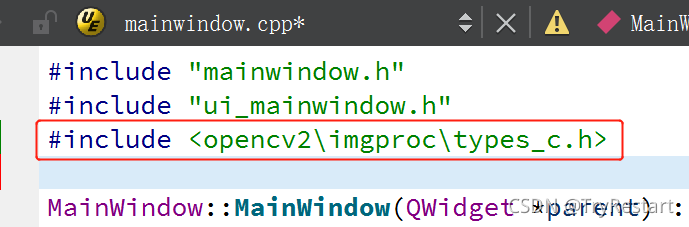
Reference the following code in the header file:

#include < opencv2\imgproc\types_ c.h>

When idea executes the command, an error is reported: CreateProcess error = 2. The system cannot find the specified file

Problem description

Error running ' mvn install:install-file -DgroupId=xxx.xxx.xxx -DartifactId=myArtifactId -Dversion=0.7.0 -Dpackaging=jar -Dfile=E:\myProject.jar ': Cannot run program "mvn" (in directory "E:\javawarkspace\webhisprotal\ips-portal-admin\hsa-ips-admin-biz\src\main\java\cn\hsa\ips\admin"): CreateProcess error=2, The system cannot find the specified file . However, it can be executed normally in the command line window.

Problem solving

When using the idea command, the prefix cannot have extra spaces. Note the beginning of the command: 'MVN install: install file... , there is a space here. Cause program exception.

error: multiple substitutions specified in non-positional format; did you mean to add the formatted

When used

 aapt2 compile -o build/res.zip --dir ./app/src/main/res

You may encounter the following problems

./app/src/main/res/values/strings.xml:4: error: multiple substitutions specified in non-positional format; did you mean to add the formatted="false" attribute?.
./app/src/main/res/values/strings.xml: error: file failed to compile.

You can check the strings. XML file and replace placeholders such as % s with % 1 $s

Cause: java.sql.SQLSyntaxErrorException: You have an error in your SQL syntax; check the

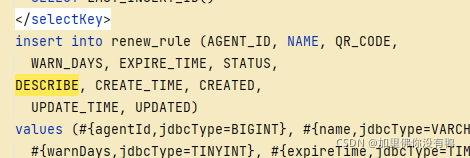
There is a problem when adding, deleting, modifying and querying the interface of a table, as shown in figure

  Error codes are as follows:

Cause: java.sql.SQLSyntaxErrorException: You have an error in your SQL syntax; check the manual that corresponds to your MySQL server version for the right syntax to use near 'DESCRIBE , CREATE_TIME,
    CREATED, UPDATE_TIME, UPDATED
   
    from renew_rul' at line 3
; bad SQL grammar []; nested exception is java.sql.SQLSyntaxErrorException: You have an error in your SQL syntax; check the manual that corresponds to your MySQL server version for the right syntax to use near 'DESCRIBE , CREATE_TIME,
    CREATED, UPDATE_TIME, UPDATED
   
    from renew_rul' at line 3 

Prompt me that my SQL syntax is abnormal. I have searched the Internet for a long time, but I haven’t found a similar problem. I specially record it,

The database used is MySQL and the database graphical interface Navicat.


The reason for the problem is that description is a keyword, which needs further processing in mybatis, but it’s strange that status should also be a keyword. Why doesn’t it report an error?

Solution: change the description field to des so that it can be compiled.

Error starting ApplicationContext. To display the conditions report re-run your application with ‘de

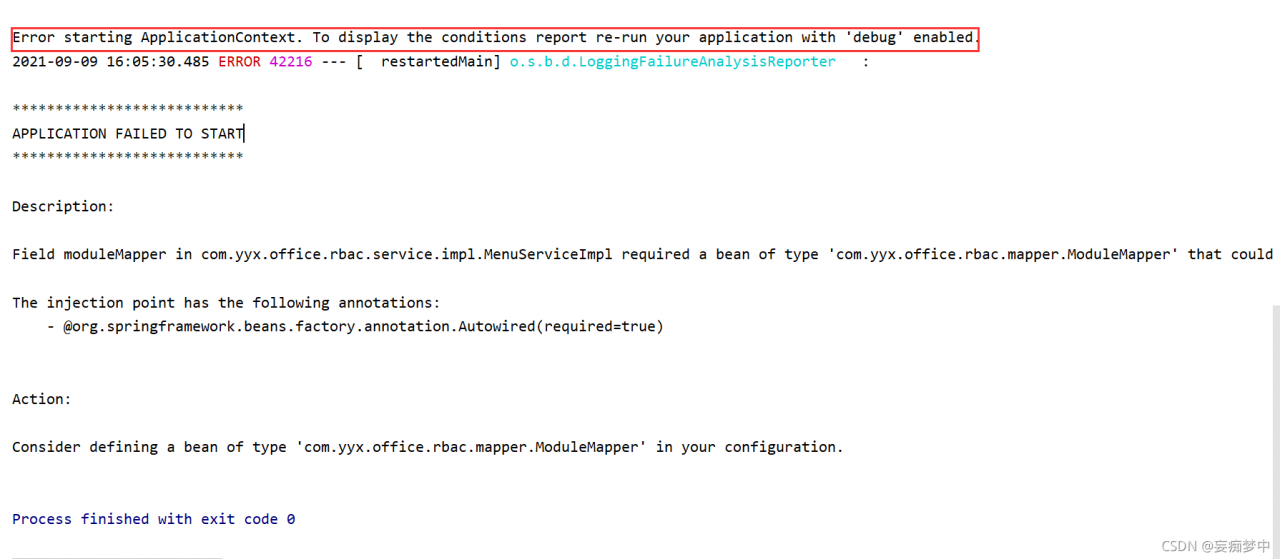
Error starting ApplicationContext. To display the conditions report re run your application with ‘debug’ enabled.
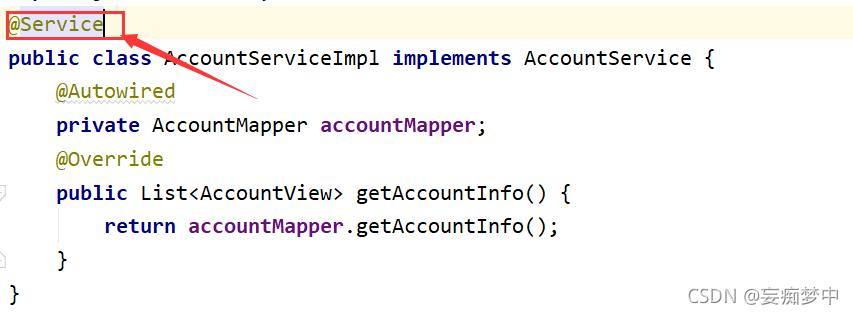
without much talking, go straight to the figure above (this may be the reason why the editor encountered the bug)

for details, see the description above: when mapper or service
solution:
(reason: your mapper is not scanned when springboot starts)
method 1: add your mapper package address in the core control class

(reason: it is not scanned to the service layer)
method 2: do not add service annotation

Can solve the above problems

Error response from daemon: failed to parse mydockerfile-centos: ENV must have two arguments

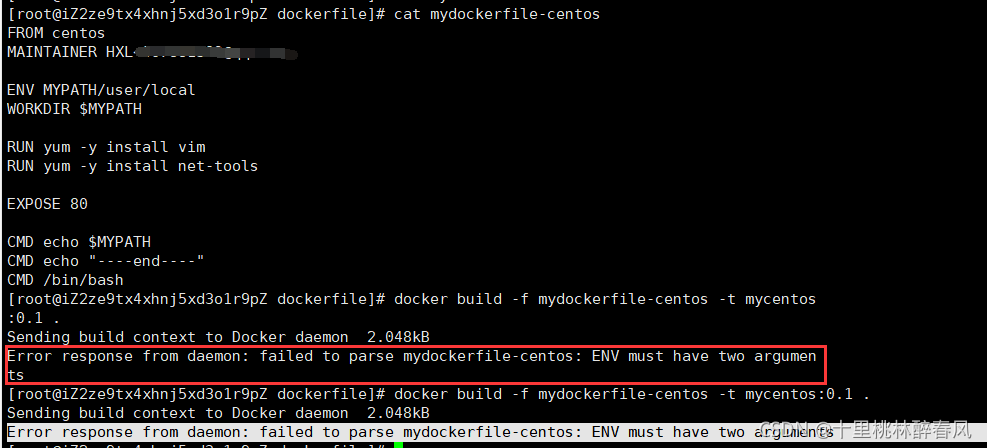
This problem occurred when I was trying to create my own dockerfile ready to execute build

Error response from daemon: failed to parse mydockerfile-centos: ENV must have two arguments

The question is shown in the figure. This question means  

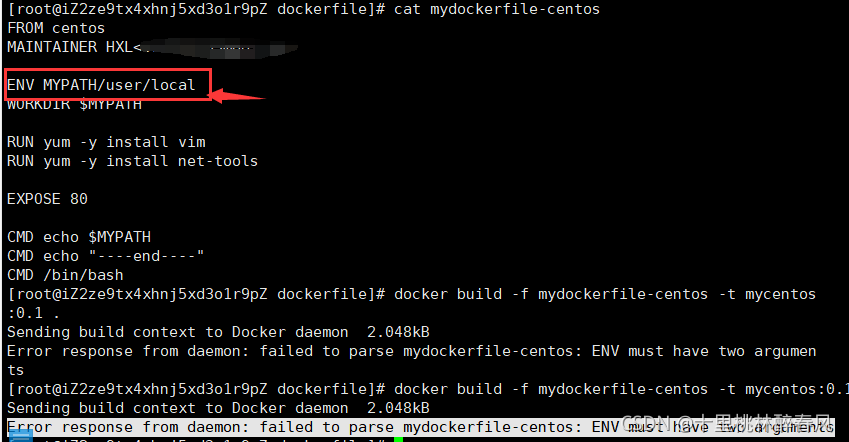
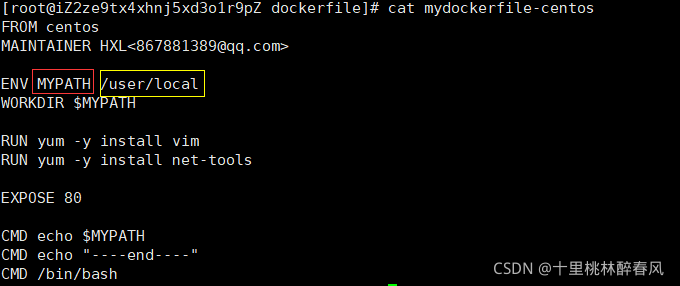
  At this time, we found that our env must require two parameters. Let’s take a look at our screenshot

As shown in the figure, there is only one parameter in my env. At this time, I found that I forgot the space

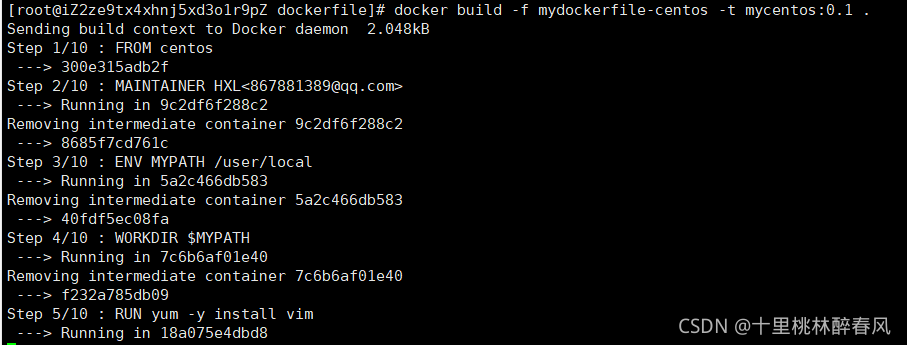
Make the following modifications

Obviously, I changed the env parameter to two parameters

  In the newly built dockerfile we created ourselves

It’s a success!


Error running docker container: starting container process caused “exec: \“python\“: executable file

Problem: minicanda3 virtual environment creates a python environment, and uses the following dockerfile to compile the docker image

FROM cuda10.2_pt1.5:09061
COPY . /workspace
WORKDIR /workspace
CMD ["python","run.py","/input_path","/output_path"]

Error using:

docker: Error response from daemon: OCI runtime create failed: container_linux.go:345: starting container process caused "exec: \"python\": executable file not found in $PATH": unknown.

Try to add an environment variable. It takes effect in the container after adding, and python can be recognized. However, after the build image, python still has the same problem, and python cannot be recognized

EXPORT PATH="/root/miniconda3/bin:&PATH"

Try to establish a soft connection to python

ln -s /root/miniconda3/bin/python /usr/bin/python

It takes effect in the container after adding, and python can be recognized, but there is still an error after using the build image

docker: Error response from daemon: OCI runtime create failed: container_linux.go:345: starting container process caused "exec: \"/root/miniconda3/bin/path\": stat /root/miniconda3/bin/path: no such file or directory": unknown.

Analysis: an automatically executed command cannot locate the executable location

Solution: since Python for short cannot be located, just give the complete path directly./root/minikonda3/bin/python. Meanwhile, refer to some schemes and use run to add some necessary environments. The modified dockerfile is as follows:

FROM cuda10.2_pt1.5:09061
RUN apt-get update && apt-get install -y --no-install-recommends \
         build-essential \
         cmake \
         curl \
         ca-certificates \
         libjpeg-dev \
         libpng-dev && \
     rm -rf /var/lib/apt/lists/*
COPY . /workspace
WORKDIR /workspace
CMD ["/root/miniconda3/bin/python","run.py","/input_path","/output_path"]