-
abnormal information
org.apache.nifi.controller.UninheritableFlowException: Failed to connect node to cluster because local flow is different than cluster flow.
	at org.apache.nifi.controller.StandardFlowService.loadFromConnectionResponse(StandardFlowService.java:1026)
	at org.apache.nifi.controller.StandardFlowService.load(StandardFlowService.java:539)
	at org.apache.nifi.web.server.JettyServer.start(JettyServer.java:1028)
	at org.apache.nifi.NiFi.<init>(NiFi.java:158)
	at org.apache.nifi.NiFi.<init>(NiFi.java:72)
	at org.apache.nifi.NiFi.main(NiFi.java:301)
Delete the problem node ${NIFI_HOME}/conf/flow.xml.gz file, and then restart the node.
[root@cdh01 conf]$ rm -rf flow.xml.gz
[root@cdh01 conf]$ ../bin/nifi.sh restart
Category Archives: How to Fix
use cv.imshow Error: (- 215: assertion failed) size.width >0 && size.height >0 in function ‘cv::imshow’
USES cv2 to display images:
import tensorflow as tf
import cv2 as cv
image = cv.imread('F:\CODES\n07740461_173.jpg')
cv.imshow("input", image)
error:

resolution 1: changes the “\” of the image path to “/” to display correctly.
image = cv.imread('F:/CODES/n07740461_173.jpg')resolution 2: in the image path before the “r”, can be displayed correctly.
image = cv.imread(r'F:\CODES\n07740461_173.jpg')
(Virtual machine monitor failed and Virtual ethernet failed)
after installing the win10 virtual machine on the ubuntu20.04 host by VM Workstation Pro, some errors occur when you first boot:
VMWare Virtual Machine Monitor Failed
The
link may help you, it has solved my problem :
click this link
you may not know the following operations :
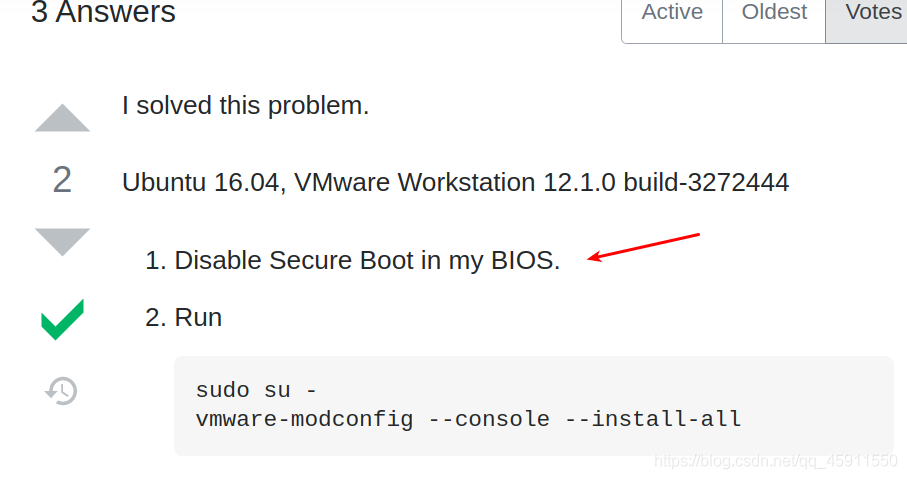
so see this link :
how to disable secure boot in my BIOS
When
has completed all operations, execute this command :
vmware-modconfig --console --install-all
if this page appears :
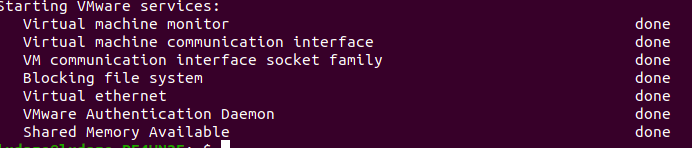
congratulations, you have succeeded!
error:Failed to connect to 127.0.0.1:27017, reason: errno:111 Connection refused;error:couldn‘t ….
error : MongoDB shell version: 2.6.10
connecting connecting to: test
2020-01-06T19:04:40.945+0800 warning: Failed to connect to 127.0.0.1:27017, reason: Errno :111 Connection union 40
2020-01-06 t19:04:40. 946+0800 Error: Couldn ‘t connect to server 127.0.0.1:27017 (127.0.0.1), the connection attempt failed at the SRC/mongo/shell/mongo. Js: 146
I am under a virtual machine, download the mongo, want to get into mongo library, found an error (above), the Internet a lot, according to their way to try many, but is not go, Later, I found that because I did not enter into the docker image (just started to contact the image)
, I learned from docker image , and learned
by virtue of virtual machine
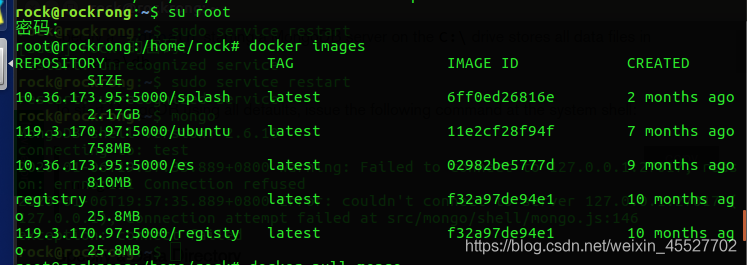
step 1 , switch to su root, check all images under docker images
step 2 , if no mongo, pull mongo through docker pull mongo official website, if you have pulled direct operation step 3
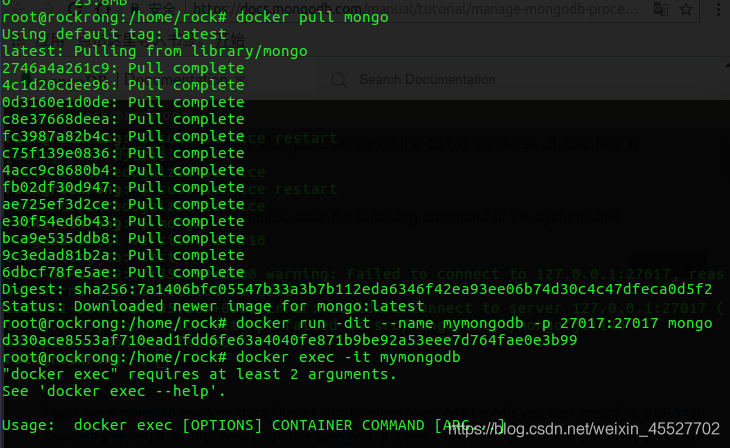
step 3 0, Start container docker run-dit –name mymongodb-p 27017:27017 mongo

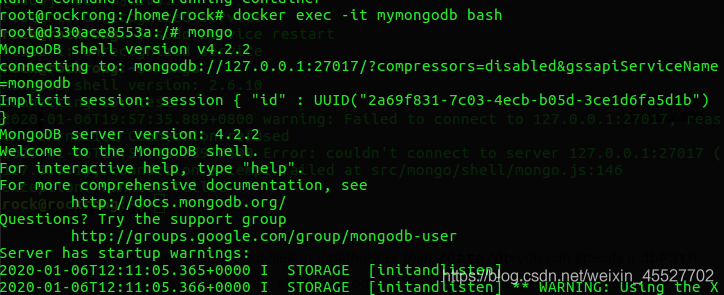

step 4 , open container docker exec-it mymongodb bash, enter mongo
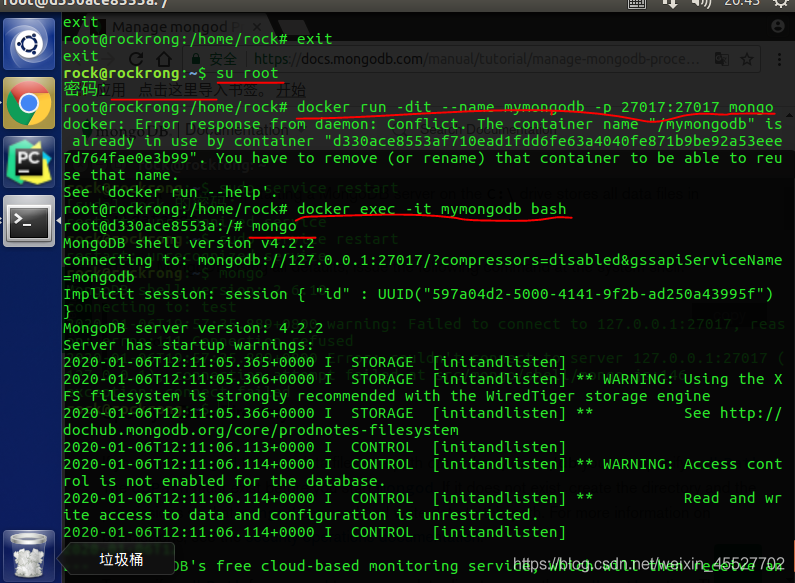 appear the pattern in the blue circle, indicating that you have entered mongo, directly enter the command statement to operate
How to solve the failed to start switch root error during centos8.1 startup?
boot today found CentOS8.1 system can not boot!! I recall that I updated some system packages yesterday. At that time, the updated system was not restarted, and the updated system was not detected. It was an oversight!
take a closer look at the log and it turns out that the Switch Root is wrong, as shown below:
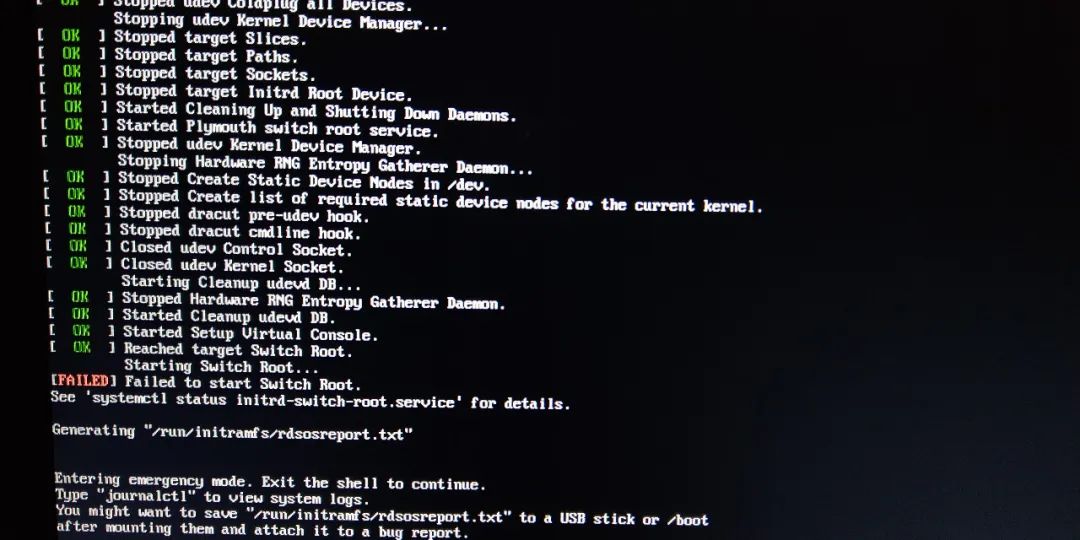
prompt error log generation, a simple look, want to get the U disk first, then follow up.
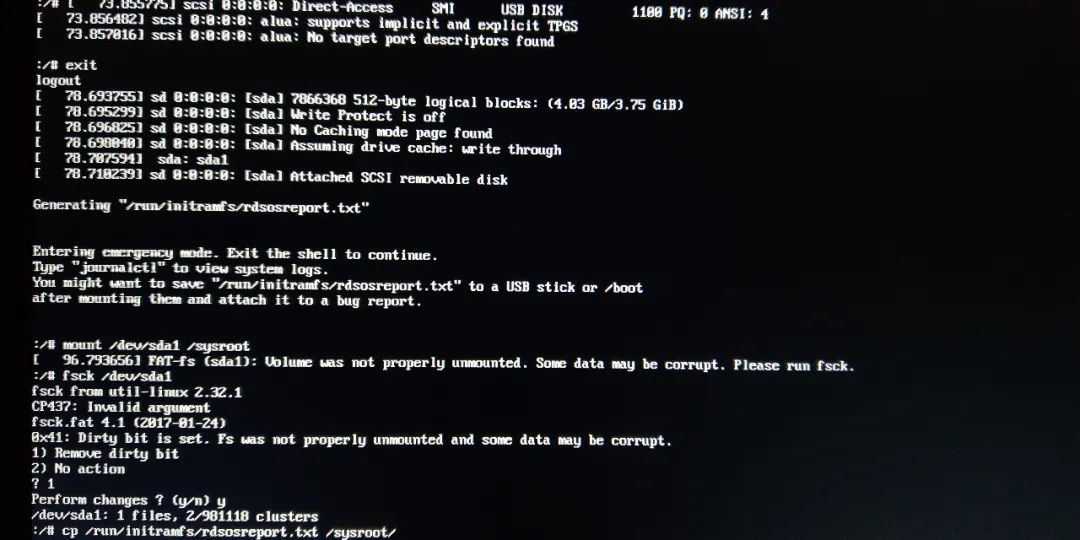
is inserted into the U disk, no device is detected, exit is performed, and sda is identified after repeated twice. As shown below:
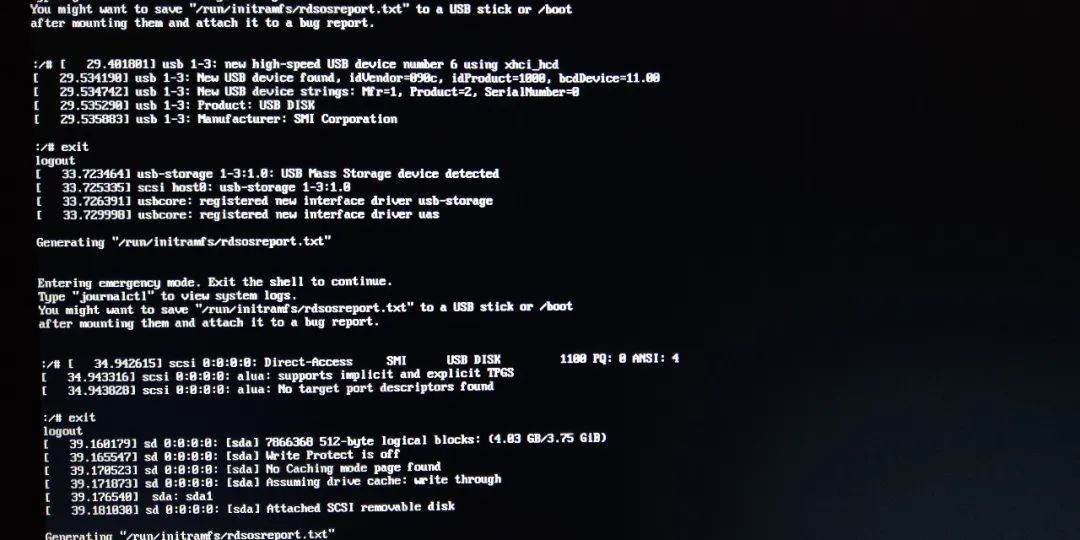
then U disk mounted to/sysroot, prompt data to test with U disk,, FSCK detection, the log file/run/initramfs/rdsosreport. TXT is copied to the U disk, and then uninstall U disk. As shown below:
try manually mounting CentOS8 system disk to /sysroot and find the partition mount corresponding to CentOS8. As shown below:
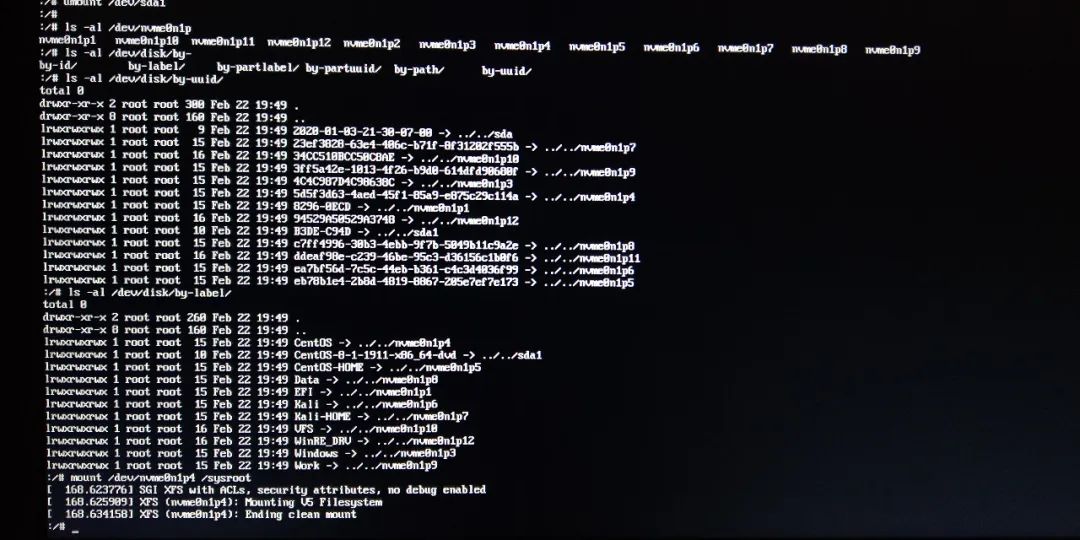
then exit and the system starts normally! Fortunately, it’s not a big problem.
come in the system, think under the analysis of the cause, to fundamentally solve it…
open the log file rdsosreport.txt in the U disk, find the error fragment log analysis:
[ 79.300190] xxx systemd[1]: Reached target Switch Root.[ 79.300600] xxx systemd[1]: Starting Switch Root...[ 79.304948] xxx systemctl[2113]: Failed to switch root: Specified switch root path '/sysroot' does not seem to be an OS tree. os-release file is missing.[ 79.305456] xxx systemd[1]: initrd-switch-root.service: Main process exited, code=exited, status=1/FAILURE[ 79.305593] xxx systemd[1]: initrd-switch-root.service: Failed with result 'exit-code'.[ 79.305789] xxx systemd[1]: Failed to start Switch Root.[ 79.305811] xxx systemd[1]: initrd-switch-root.service: Triggering OnFailure= dependencies.[ 79.306342] xxx systemd[1]: Starting Setup Virtual Console...[ 79.364641] xxx systemd[1]: Started Setup Virtual Console.[ 79.365205] xxx systemd[1]: Started Emergency Shell.[ 79.365348] xxx systemd[1]: Reached target Emergency Mode.[ 79.380910] xxx systemd[1]: Received SIGRTMIN+21 from PID 1675 (plymouthd).
see the key record:
Failed to switch root: Specified switch root path '/sysroot' does not seem to be an OS tree. os-release file is missing.because the root path was not mounted successfully, /sysroot had no content, and the os-release file was not found.
, can you imagine if the os-release file for the system is gone?Open the /etc/cenos-release file and find the content, that’s not the problem with this file!
[root@server ~]# cat /etc/os-releaseNAME="CentOS Linux"VERSION="8 (Core)"ID="centos"ID_LIKE="rhel fedora"VERSION_ID="8"PLATFORM_ID="platform:el8"PRETTY_NAME="CentOS Linux 8 (Core)"ANSI_COLOR="0;31"CPE_NAME="cpe:/o:centos:centos:8"HOME_URL="https://www.centos.org/"BUG_REPORT_URL="https://bugs.centos.org/"CENTOS_MANTISBT_PROJECT="CentOS-8"CENTOS_MANTISBT_PROJECT_VERSION="8"REDHAT_SUPPORT_PRODUCT="centos"REDHAT_SUPPORT_PRODUCT_VERSION="8"
continue to search, efi directory to see centos related files are there any questions?The size of the GRUbenv file is zero. Is that the problem?!
[root@server ~]# ls -al /boot/efi/EFI/centos/total 5364drwx------. 3 root root 4096 Feb 21 23:01 .drwx------. 6 root root 4096 May 11 2019 ..-rwx------. 1 root root 134 Jun 7 2019 BOOTX64.CSVdrwx------. 2 root root 4096 Feb 5 09:46 fonts-rwx------. 1 root root 9570 Feb 13 22:08 grub.cfg-rwx------. 1 root root 0 Feb 21 23:01 grubenv-rwx------. 1 root root 1876872 Feb 5 09:46 grubx64.efi-rwx------. 1 root root 1160136 Jun 7 2019 mmx64.efi-rwx------. 1 root root 1205152 Jun 7 2019 shimx64-centos.efi-rwx------. 1 root root 1211224 Jun 7 2019 shimx64.efi
then edits the grubenv file and adds the following.
# GRUB Environment Blocksaved_entry=16611cc1c45441e1a5aa9fa702a005ff-4.18.0-147.5.1.el8_1.x86_64kernelopts=root=UUID=5d5f3d63-4aed-45f1-85a9-e875c29c114a ro resume=UUID=ddeaf98e-c239-46be-95c3-d36156c1b0f6 rhgb quietboot_success=0boot_indeterminate=0################################################################################################################################################################################################################################################################################################################################################################################################################################################################################################################################################################################################################################################################################################################################################################################################
main parameter description (do not write wrong! :
saved_entry:是默认的引导项kernelopts:root填写/分区的UUID,resume填写swap分区的UUID
restart, normal start, no more error. Problem solved!
============
Note: if you do not know how to edit this file, you can regenerate grub by executing the following:
[root@server EFI]# grub2-mkconfig -o /boot/efi/EFI/centos/grub.cfgGenerating grub configuration file ...Found Windows Boot Manager on /dev/nvme0n1p1@/EFI/Microsoft/Boot/bootmgfw.efiAdding boot menu entry for EFI firmware configurationdone
generates grubenv as follows, there will be some incomplete parameters oh.
# GRUB Environment Blockkernelopts=root=UUID=5d5f3d63-4aed-45f1-85a9-e875c29c114a ro resume=UUID=ddeaf98e-c239-46be-95c3-d36156c1b0f6 rhgb quiet################################################################################################################################################################################################################################################################################################################################################################################################################################################################################################################################################################################################################################################################################################################################################################################################
summary:
-
to calmly analyze problems, to learn to analyze and solve problems, this ability is very important.
-
systematically study, master the knowledge of a field is very necessary. The idea and process of solving the problem depends on your understanding of the system!
note: this article is original and shall not be reproduced on any platform without permission. For reprint, contact the author ~

Error: cudaGetDevice() failed. Status: CUDA driver version is insufficient for CUDA runtime version
… Status: CUDA driver version is insufficient for CUDA runtime version
may be cuda and video card drivers are inconsistent
CUDA version with video card driver version match query: https://docs.nvidia.com/cuda/cuda-toolkit-release-notes/index.html
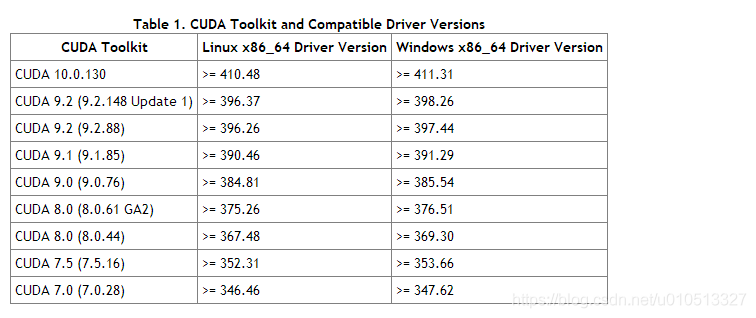
Cuda version number query: nvcc-v

view graphics driver: cat/proc/driver/nvidia/version

driver version and cuda version no problem
may also be a conflict between the TensorFlow version and cuda version:
tensorflow version number query:
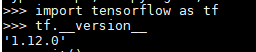
query TensorFlow corresponds to cuda version:
Windows side
https://tensorflow.google.cn/install/source_windows
Linux:
https://tensorflow.google.cn/install/source
final solution: lower the TensorFlow version
reference: http://www.cnblogs.com/liaohuiqiang/archive/2018/10/15/9791365.html
https://blog.csdn.net/qq_30163461/article/details/80314630
wish India and Pakistan peace, every day there are strawberries to eat
VBoxClient (seamless): failed to start. Stage: Setting guest IRQ filter mas Error: VERR_INTERNAL_ERR
ubuntu17.10 install enhancements, if the interface has VBoxClient (seamless): failed to start. Stage: Setting guest IRQ filter mask Error: VERR_INTERNAL_ERROR
(added: ubuntu18.04 install enhancements, if you do not cancel the 3D acceleration, restart will not enter the page)
to these commands:
sudo apt-get install gcc make perl
cd /media/$USER/<...>
sudo ./VBoxLinuxAdditions.run
sudo rebootADB remount failed: operation not permitted
adb remount failed: Operation not permitted problem resolved
go to console and execute # echo “enable 0;” > The/proc/alog can
or for the yaffs2 file system
# mount -o rw, remount-t yaffs2 /dev/block/mtdblock3 /system
# chmod 777 /system
# chmod 777 /system/lib
or for an ext4 file system
# mount -o rw, remount -t corruption/dev/block/mtdblock3/system
# chmod 777/system
# chmod 777/system/lib
Vue failed to log in. F12 reported an error: request failed with status code 404
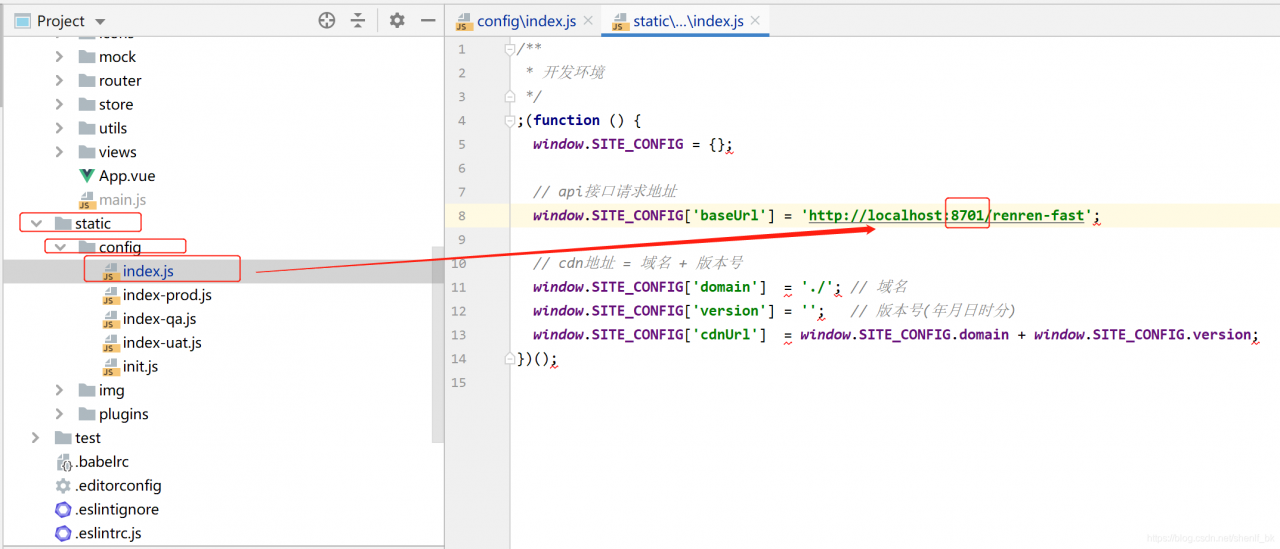
1.Vue login, F12 as follows 404 error
POST http://localhost:8701/renren-fast/sys/login 404 (Not Found)

Uncaught (in promise) Error: Request failed with status code 404
    at createError (createError.js?16d0:16)
    at settle (settle.js?db52:18)
    at XMLHttpRequest.handleLoad (xhr.js?ec6c:77)
solution:
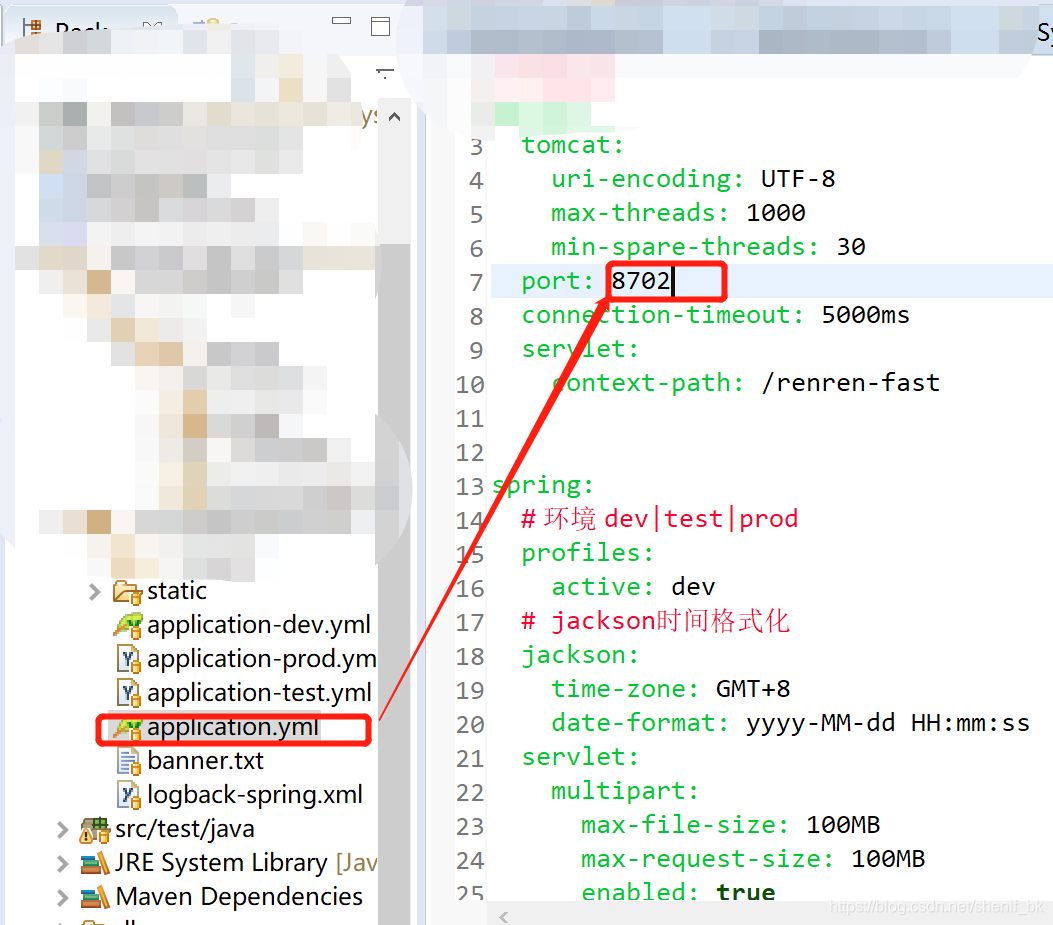
vue front-end project static> config> Index,js project path port is inconsistent with backend renren-fast port. Here is 8701, but in application, YML configuration file is 8702, here is changed to 8702 after the access takes effect.
Error occurred when Oracle started controltc. Startservicectrldispatcher failed with err 1063
1. First, set IP
in Hosts
2. Named rows run: net start OracleDBConsoleTC
Failed to load resource: net::ERR_ INSECURE_ Response problem solving record
Failed to load resource: net::ERR_INSECURE_RESPONSE problem solving record
reference article:
(1) Failed to load resource: net::ERR_INSECURE_RESPONSE problem solving record
(2) https://www.cnblogs.com/liyinsakura/p/10309598.html
memo.
Solution: error dllregisterserver in iviewers failed when opening OLEVIEW
run oleview.exe with administrator privileges (Visual Studio Tools\VS20XX developer command prompt -> Run with administrator privileges -& GT; Enter OleView)
http://stackoverflow.com/questions/7621461/dllregisterserver-in-iviewers-failed