Category Archives: How to Fix

Error encountered when running WCF

HTTP could not register URL http://+:3723/CalulatorService/.
Your process does not have access rights to this namespace (see http://go.microsoft.com/fwlink/?LinkId=70353 for details).

The reason for this problem is a lack of permissions.
This doesn’t happen if you’re just logged in as a standalone system administrator, it does happen when you log in with a domain user,
Open program -> attachment -> Command Prompt
Enter the following statement to register.
Netsh HTTP add urlacl url=http://+:3723/CalulatorService/ user= domain name/user name

Just run it again.
If you report this error:
Create SDDL failed, Error: 1332 The parameter is incorrect.
You change the port number.

OpenCV3.1 + Python2.7 error “DLL load failed: The specified module could not be found”

According to the web site [http://docs.opencv.org/3.1.0/d5/de5/tutorial_py_setup_in_windows.html] method 2 manual compiled OpenCV3.1.0 and install python.
but error “DLL load failed: The specified module could not be found” appears when importing cv2.
I looked for the following reasons online, the possible reason is that
1) opencv and python corresponding versions are different, such as one is 32bit and one is 64bit. Pyd
2) did not add cv2.pyd to C:/Python27/lib/site-packages
3) system environment variable could not be found cv2.pyd
the final solution to my computer problem was:
add [C:\ opencv-3.1.0 \build\bin\Release] to system environment variable.

How to Fix Failed to add the host to the list of known hosts

The first mistake you encounter might be

    Macintosh:Permissions 0755 for '/User/xxxx/.ssh/id_rsa' are too open.
    Linux:Permissions 0755 for '/home/xxxx/.ssh/id_rsa' are too open.

This means that your private key permissions are too large, so only you need to operate

    sudo chmod 600 ~/.ssh/id_rsa sudo chmod 600 ~/.ssh/id_rsa.pub

The known_hosts file has a problem with permissions when you encounter the following situation

    Are you sure you want to continue connecting (yes/no)?yes Failed to add the host to the list of known hosts

Execute this command

    sudo chmod 644 ~/.ssh/known_hosts

Finally, to get your.ssh folder permissions right, execute the following command

    sudo chmod 755 ~/.ssh

Then your.ssh folder and the private and public key permissions within it are resolved!

Build LNMPR Error — php_network_getaddresses: getaddrinfo failed: Temporary failure in name resolution

background
After installing Ubuntu subsystem in Win10 system, L(Linux)N(Nginx)M(mysql)P(PHP)R(Redis) environment was set up.
The error message
php_network_getaddresses: getaddrinfo failed: Temporary failure in name resolution
The screening process

    check whether the services of nginx, php-fpm and redis-server are started normally; sudo /etc/init.d/nginx status check whether win10 can ping the ubuntu subsystem; Check if Redis configuration is correct; Check that Hosts is configured correctly;
is finally determined that DNS cannot be resolved normally, and DNS configuration

needs to be modified
The solution
Gateway configuration:
, 1 sudo vi/etc/resolvconf resolv. Conf., d/base

# 添加下面网关(223.5.5.5 和 223.6.6.6 是阿里的网关)

nameserver 223.5.5.5
nameserver 223.6.6.6

2, sudo resolvconf-u will synchronize the configured DNS to /etc/resolv.conf
3, check vi /etc/resolv.conf whether there is a newly configured DNS
4. Restart PHP sudo /etc/init.d/php-fpm restart

MySQL error STORAGE ENGINE failed

MySQL reported an error and the STORAGE ENGINE failed
An error was reported when MySQL was restarted, which may be caused by modifying my.CNF:
[ERROR] Plugin ‘InnoDB’ init function returns ERROR.
[ERROR] Plugin ‘InnoDB’ registration as a STORAGE ENGINE fails.
[ERROR] Unknown/unsupported STORAGE ENGINE: InnoDB

CD /var/lib/mysql
cd-rf ib_logfile*
service mysql restart
service>
Unknown/unsupported storage engine: InnoDB
1. Maybe the innodb_buffer_POOL_size setting is too small and there is not enough memory. 2. Check the parameters related to innodb in the configuration file: skip-innodb/skip-bdb/skip-locking
, the three tuning parameters are easy to cause problems. In particular, the first parameter is said to be saved in the province after opening. However, after use, MySQL may fail to restart. The corresponding parameter of
skip-external locking is the same for some old versions: skip-external locking
. In the new version, such parameters as skip-innodb may be removed. If the configuration is improper, the parameters of the old version are used, which may lead to startup failure.
skip-innodb new version has been changed to loose-skip-innodb
skip-bdb new version has been abolished;
skip-external-locking has been changed to skip-locking

skip-external-locking: Skipping external locking, external-locking is used for locking MyISAM tables in multi-process conditions, according to the official MySQL development website. If more than one server is using the same database directory, each server must open external locking.
when external-locking works, each process must wait for the previous process to complete the operation and release the locking if it wants to access the table. Because the server often needs to wait for unlocking when accessing the data table, external locking in the single-server environment can degrade MySQL performance. Therefore, in many sources of Linux distributions, the MySQL configuration file USES skp-external-locking by default to avoid external locking. When skip-innodb is not added, three files such as data/ibdata1,ib_logfile0 and ib_logfile1 are deleted. These three files will be created automatically when MySQL starts.
if you delete these three files, add skip-innodb, startup will not regenerate into these three files. 3. If you reset innodb_log_file_size and so on, you need to delete the ib_logfile in the data directory, and then restart the database, otherwise an error
will be reported
Idea svn connection https error report: E230001: Server SSL certificate verification failed: certificate issued

After reinstalling windows10, E170013 E230001: Server SSL certificate verification failed: certificate issued,
The same problem was found online and the solution is recorded here
 
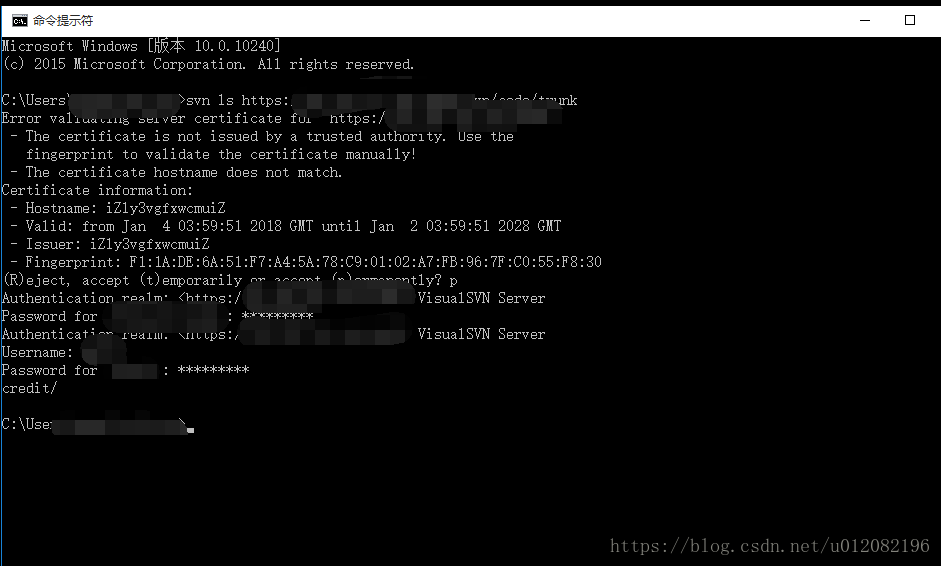
CMD opens the run window and executes the following command
SVN ls https://xxx
XXX is the specific SVN project address
So you can display (R) Eject, accept (t)emporarily or Accept (p) Ermanently, right?
Just input P
Then follow the prompts and enter the SVN account name UserName and Password
Finally, checkout from subversion with a refresh


Initctl: Job failed to start appears when installing VMware-tools

Vmware-tools installation appears in:

* * * * * * *
Creating a new initrd boot image for the kernel.
update – initramfs: Generating/boot/initrd img – 2.6.38-8 – generic
the initctl: Job failed to start
Unable to start the services for VMware Tools
* * * * *

Reason: Previously installed
open-vm_tools conflicts with it

Solutions:

sudo apt-get remove open-vm-tools

Just install vmware-Tools

Information contained in Debug Assertion Failed of Microsoft Visual C++ Runtime Library

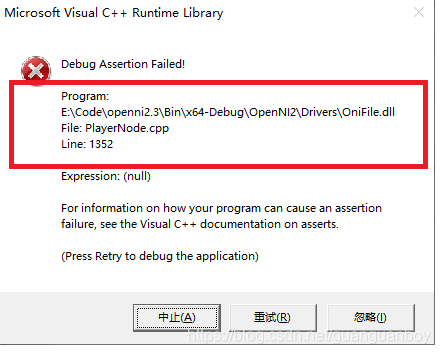
When an assertion check fails in the Microsoft Visual C++ Runtime Library, the following dialog is usually prompted:

After encountering this error, I had to debug for half a day before I found the problem. In fact, you don’t have to spend that much time debugging. The above dialog box has clearly indicated that except for the wrong line of code, as shown in the red box above, the error occurred in 1352 lines of code in the playerNode. CPP file in the onifile.dll dynamic library.

PHP message:filesize(): stat failed for Error

PHP Information: File Size(): Statistics Failure Errors

message:filesize(): stat failed for F:s2017\SinaImgUpload\SinaImgUpload\bin\Debug\TempPath\Cookies.txt

I checked that the path written by Phpstorm was correct, but I could not get the data
After careful examination, I found that \v had been escaped.

const SinaCookiesFile="F:\vs2017\SinaImgUpload\SinaImgUpload\bin\Debug\TempPath\Cookies.txt";

So I converted 
The problem was solved when \\v became \\v.

The reason for this problem is "" instead of using '' 
In php, variables ($var) and special characters (\r\n and such) in double quotes are escaped, content in single quotes is not escaped (so it's more efficient). 

So cut the language's future habits to accommodate single quotes and improve program efficiency.