Category Archives: How to Fix

Window installation of MongoDB exception: connect failed exception

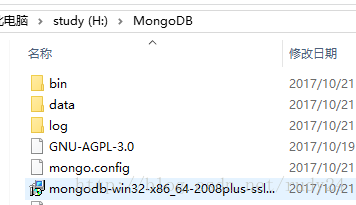
After Mongo is installed, the following problems are found after Mongo starts (H: \MongoDB\bin)

It took a lot of searching to find the answer
Create a mongo. config // touch mongo. config with Git

Then add the following in mongo.config


dbpath=H:\MongoDB\data
## all output locations
logpath=H:\MongoDB\log\mongo.log

Create the corresponding folder
in the file directory and then execute the configuration file mongod from the command line

If there is no task exception, do not close the command,
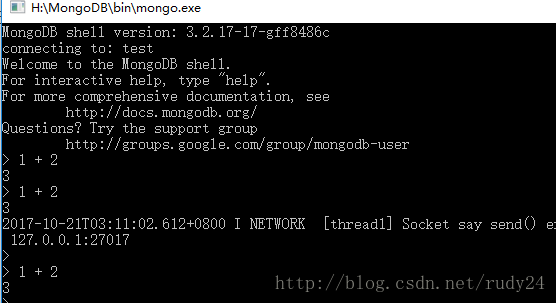
open MongDB/bin directory, then double-click mongo. Exe
, the link has been successful, and the mongo xshell can be executed

Install anaconda error: failed to create anaconda menus

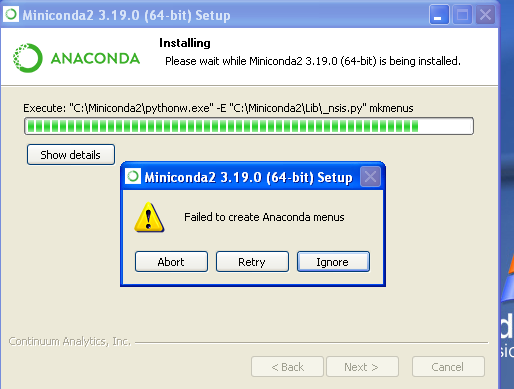
Problem: my computer is Windows server 2008, installed anaconda 64 bit

Finally, failed to create anaconda menus, the following references for picture reference,

Solution:
to install Microsoft Visual c + + 2008 Redistributable Package (x64)
https://www.microsoft.com/en-us/download/details.aspx?id=15336
You should be able to run the Anaconda installer again.
Reference: https://github.com/ContinuumIO/anaconda-issues/issues/732

Endnote inserting documents causes word to crash! ! Solution

Read the following online.
1. Close Proofreading
2. Recovery from backups
The above is a bit tedious.
———————– official response ——————-
The cause of the problem is that there are interactions such as field codes that conflict with the endnotes. The solution is to clean the word file, i.e. delete the field code.
Official Steps.
The details are as follows (see original English for windows and mac):
1. back up your documents
2. Ctrl + a check mark
3.Crtl + 6 to remove the code (this is the key step)
4. Ctrl + C and V to copy to a new document.
Actually, operation 3 should solve the problem, I did try copying to the new document and indeed I can insert documents at will without crashing.
—————————————————————–
PS (error): just tried, will be in front of the chart directory ctrl + 6 after the document can be inserted into the literature normally.
My steps are: 1. select all the preceding directories 2. ctrl + 6 3. find the location of the insert literature or directly follow the new, successfully completed 4. ctrl + z to reply to the directory link status.
I hope this will help you.


tomcat Issues org.apache.catalina.LifecycleException: Failed to start component

1. Problem description

Sep 09, 2019 11:38:05 AM org.apache.catalina.core.ContainerBase startInternal
Warning: A child container failed during start
java.util.concurrent.ExecutionException: org.apache.catalina.LifecycleException: Failed to start component [StandardEngine[Catalina].StandardHost[localhost].StandardContext[/third]]
	at java.util.concurrent.FutureTask.report(FutureTask.java:122)
	at java.util.concurrent.FutureTask.get(FutureTask.java:188)
	at org.apache.catalina.core.ContainerBase.startInternal(ContainerBase.java:1120)
	at org.apache.catalina.core.StandardHost.startInternal(StandardHost.java:819)
	at org.apache.catalina.util.LifecycleBase.start(LifecycleBase.java:147)
	at org.apache.catalina.core.ContainerBase$StartChild.call(ContainerBase.java:1572)
	at org.apache.catalina.core.ContainerBase$StartChild.call(ContainerBase.java:1562)
	at java.util.concurrent.FutureTask.run(FutureTask.java:262)
	at java.util.concurrent.ThreadPoolExecutor.runWorker(ThreadPoolExecutor.java:1145)
	at java.util.concurrent.ThreadPoolExecutor$Worker.run(ThreadPoolExecutor.java:615)
	at java.lang.Thread.run(Thread.java:745)
Caused by: org.apache.catalina.LifecycleException: Failed to start component [StandardEngine[Catalina].StandardHost[localhost].StandardContext[/third]]
	at org.apache.catalina.util.LifecycleBase.start(LifecycleBase.java:153)
	... 6 more
Caused by: java.lang.IllegalStateException: Unable to complete the scan for annotations for web application [/third] due to a StackOverflowError. Possible root causes include a too low setting for -Xss and illegal cyclic inheritance dependencies. The class hierarchy being processed was [org.bouncycastle.asn1.ASN1EncodableVector->org.bouncycastle.asn1.DEREncodableVector->org.bouncycastle.asn1.ASN1EncodableVector]
	at org.apache.catalina.startup.ContextConfig.checkHandlesTypes(ContextConfig.java:2178)
	at org.apache.catalina.startup.ContextConfig.processAnnotationsStream(ContextConfig.java:2124)
	at org.apache.catalina.startup.ContextConfig.processAnnotationsJar(ContextConfig.java:1985)
	at org.apache.catalina.startup.ContextConfig.processAnnotationsUrl(ContextConfig.java:1946)
	at org.apache.catalina.startup.ContextConfig.processAnnotations(ContextConfig.java:1931)
	at org.apache.catalina.startup.ContextConfig.webConfig(ContextConfig.java:1330)
	at org.apache.catalina.startup.ContextConfig.configureStart(ContextConfig.java:889)
	at org.apache.catalina.startup.ContextConfig.lifecycleEvent(ContextConfig.java:386)
	at org.apache.catalina.util.LifecycleSupport.fireLifecycleEvent(LifecycleSupport.java:117)
	at org.apache.catalina.util.LifecycleBase.fireLifecycleEvent(LifecycleBase.java:90)
	at org.apache.catalina.core.StandardContext.startInternal(StandardContext.java:5472)
	at org.apache.catalina.util.LifecycleBase.start(LifecycleBase.java:147)
	... 6 more

Sep 09, 2019 11:38:05 AM org.apache.catalina.core.ContainerBase startInternal
Warning: A child container failed during start
java.util.concurrent.ExecutionException: org.apache.catalina.LifecycleException: Failed to start component [StandardEngine[Catalina].StandardHost[localhost]]
	at java.util.concurrent.FutureTask.report(FutureTask.java:122)
	at java.util.concurrent.FutureTask.get(FutureTask.java:188)
	at org.apache.catalina.core.ContainerBase.startInternal(ContainerBase.java:1120)
	at org.apache.catalina.core.StandardEngine.startInternal(StandardEngine.java:300)
	at org.apache.catalina.util.LifecycleBase.start(LifecycleBase.java:147)
	at org.apache.catalina.core.StandardService.startInternal(StandardService.java:444)
	at org.apache.catalina.util.LifecycleBase.start(LifecycleBase.java:147)
	at org.apache.catalina.core.StandardServer.startInternal(StandardServer.java:738)
	at org.apache.catalina.util.LifecycleBase.start(LifecycleBase.java:147)
	at org.apache.catalina.startup.Catalina.start(Catalina.java:693)
	at sun.reflect.NativeMethodAccessorImpl.invoke0(Native Method)
	at sun.reflect.NativeMethodAccessorImpl.invoke(NativeMethodAccessorImpl.java:57)
	at sun.reflect.DelegatingMethodAccessorImpl.invoke(DelegatingMethodAccessorImpl.java:43)
	at java.lang.reflect.Method.invoke(Method.java:606)
	at org.apache.catalina.startup.Bootstrap.start(Bootstrap.java:294)
	at org.apache.catalina.startup.Bootstrap.main(Bootstrap.java:428)
Caused by: org.apache.catalina.LifecycleException: Failed to start component [StandardEngine[Catalina].StandardHost[localhost]]
	at org.apache.catalina.util.LifecycleBase.start(LifecycleBase.java:153)
	at org.apache.catalina.core.ContainerBase$StartChild.call(ContainerBase.java:1572)
	at org.apache.catalina.core.ContainerBase$StartChild.call(ContainerBase.java:1562)
	at java.util.concurrent.FutureTask.run(FutureTask.java:262)
	at java.util.concurrent.ThreadPoolExecutor.runWorker(ThreadPoolExecutor.java:1145)
	at java.util.concurrent.ThreadPoolExecutor$Worker.run(ThreadPoolExecutor.java:615)
	at java.lang.Thread.run(Thread.java:745)
Caused by: org.apache.catalina.LifecycleException: A child container failed during start
	at org.apache.catalina.core.ContainerBase.startInternal(ContainerBase.java:1128)
	at org.apache.catalina.core.StandardHost.startInternal(StandardHost.java:819)
	at org.apache.catalina.util.LifecycleBase.start(LifecycleBase.java:147)
	... 6 more

Sep 09, 2019 11:38:05 AM org.apache.catalina.startup.Catalina start
Warning: The required Server component failed to start so Tomcat is unable to start.
org.apache.catalina.LifecycleException: Failed to start component [StandardServer[8005]]
	at org.apache.catalina.util.LifecycleBase.start(LifecycleBase.java:153)
	at org.apache.catalina.startup.Catalina.start(Catalina.java:693)
	at sun.reflect.NativeMethodAccessorImpl.invoke0(Native Method)
	at sun.reflect.NativeMethodAccessorImpl.invoke(NativeMethodAccessorImpl.java:57)
	at sun.reflect.DelegatingMethodAccessorImpl.invoke(DelegatingMethodAccessorImpl.java:43)
	at java.lang.reflect.Method.invoke(Method.java:606)
	at org.apache.catalina.startup.Bootstrap.start(Bootstrap.java:294)
	at org.apache.catalina.startup.Bootstrap.main(Bootstrap.java:428)
Caused by: org.apache.catalina.LifecycleException: Failed to start component [StandardService[Catalina]]
	at org.apache.catalina.util.LifecycleBase.start(LifecycleBase.java:153)
	at org.apache.catalina.core.StandardServer.startInternal(StandardServer.java:738)
	at org.apache.catalina.util.LifecycleBase.start(LifecycleBase.java:147)
	... 7 more
Caused by: org.apache.catalina.LifecycleException: Failed to start component [StandardEngine[Catalina]]
	at org.apache.catalina.util.LifecycleBase.start(LifecycleBase.java:153)
	at org.apache.catalina.core.StandardService.startInternal(StandardService.java:444)
	at org.apache.catalina.util.LifecycleBase.start(LifecycleBase.java:147)
	... 9 more
Caused by: org.apache.catalina.LifecycleException: A child container failed during start
	at org.apache.catalina.core.ContainerBase.startInternal(ContainerBase.java:1128)
	at org.apache.catalina.core.StandardEngine.startInternal(StandardEngine.java:300)
	at org.apache.catalina.util.LifecycleBase.start(LifecycleBase.java:147)
	... 11 more

Sep 09, 2019 11:38:05 AM org.apache.coyote.AbstractProtocol pause
Message: Pausing ProtocolHandler ["http-bio-8080"]
Sep 09, 2019 11:38:05 AM org.apache.coyote.AbstractProtocol pause
Message: Pausing ProtocolHandler ["ajp-bio-8009"]
Sep 09, 2019 11:38:05 AM org.apache.catalina.core.StandardService stopInternal
Message: Stopping service Catalina
Sep 09, 2019 11:38:05 AM org.apache.coyote.AbstractProtocol destroy
Message: Destroying ProtocolHandler ["http-bio-8080"]
Sep 09, 2019 11:38:05 AM org.apache.coyote.AbstractProtocol destroy
Message: Destroying ProtocolHandler ["ajp-bio-8009"]

2. Solutions
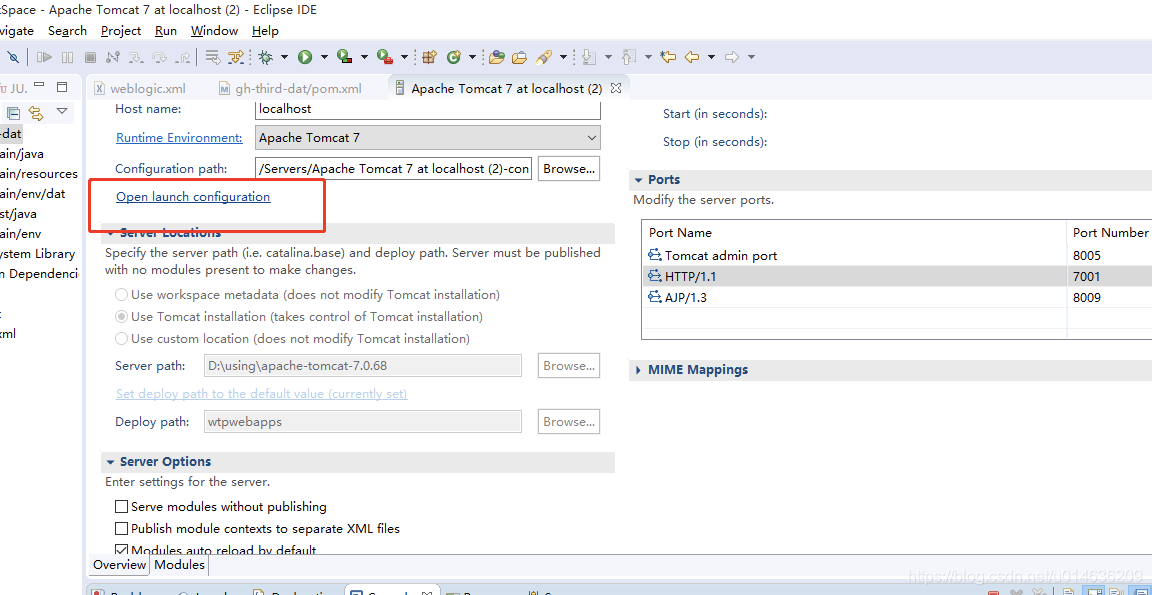
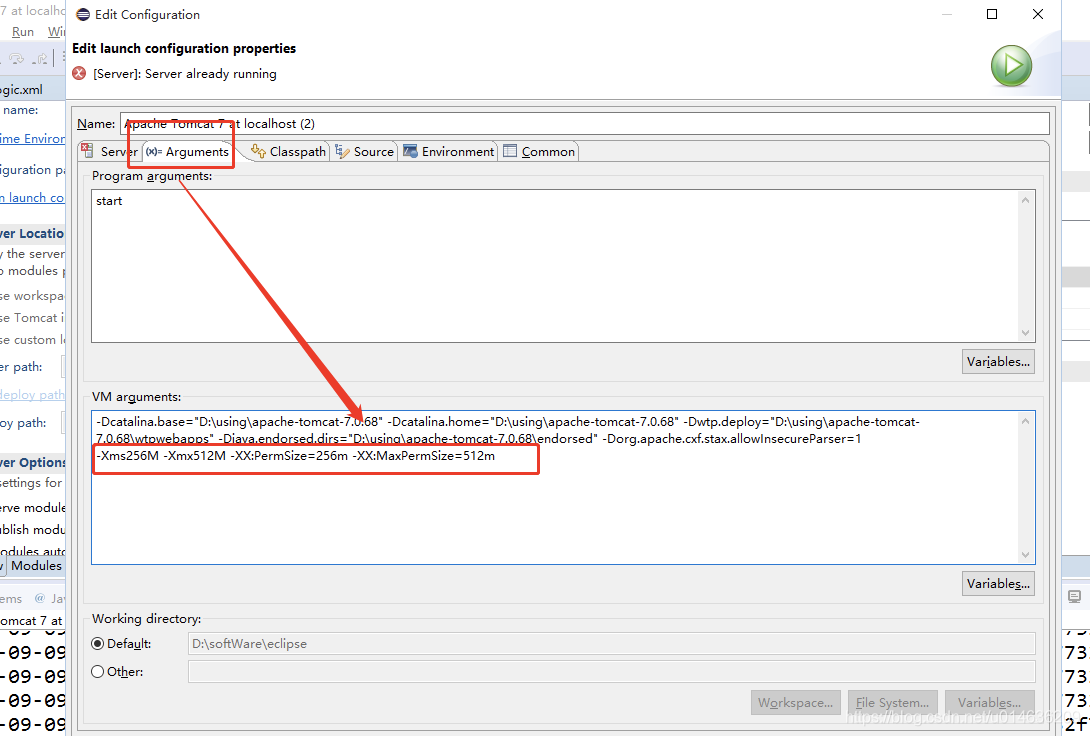
Just adjust your Tomcat memory parameters

-Xms256m -Xmx512m -XX:PermSize=256M -XX:MaxPermSize=512m


Mac USB error 3: Unable to claim interface: Access denied (insufficient permissions)

View USB device information
You can view information about the USB device to which you are connected at the terminal input: system_profiler SPUSBDataType
For example, my USB information is as follows (part content) :
Android:

          Product ID: 0x2769

          Vendor ID: 0x22d9

          Version: 2.31

          Serial Number: 6e5d48a4

          Speed: Up to 480 Mb/sec

          Manufacturer: Android

          Location ID: 0x1d110000/8

          Current Available (mA): 500

          Current Required (mA): 500

See the vendor ID for my Android phone: 0 x22d9 Remember this ID!
USB error 3: Unable to declare interface: Access denied (insufficient permissions)
Here are the steps on how to do it.

Create information. plist/Proxmark3 /System/Library/Extensions. kext/Contents. if missing. the parent folder should be created and the file contents should look like this:

<?xml version="1.0" encoding="UTF-8"?>
    <!DOCTYPE plist PUBLIC "-//Apple Computer//DTD PLIST 1.0//EN" "http://www.apple.com/DTDs/PropertyList-1.0.dtd">
    <!-- This is a dummy driver which binds to Proxmark. It -->
    <!-- contains no actual code; its only purpose is to     -->
    <!-- prevent Apple's USBHID driver from exclusively      -->
    <!-- opening the device.                                 -->
    <plist version="1.0">
    <dict>
        <key>CFBundleDevelopmentRegion</key>
        <string>English</string>
        <key>CFBundleIconFile</key>
        <string></string>
        <key>CFBundleIdentifier</key>
        <string>com.proxmark.driver.dummy</string>
        <key>CFBundleInfoDictionaryVersion</key>
        <string>6.0</string>
        <key>CFBundlePackageType</key>
        <string>KEXT</string>
        <key>CFBundleSignature</key>
        <string>????</string>
        <key>CFBundleVersion</key>
        <string>1.0.0d1</string>
        <key>IOKitPersonalities</key>
        <dict>
            <!-- The Proxmark3 USB interface -->
            <key>Proxmark3</key>
            <dict>
                <key>CFBundleIdentifier</key>
                <string>com.apple.kpi.iokit</string>
                <key>IOClass</key>
                <string>IOService</string>
                <key>IOProviderClass</key>
                <string>IOUSBInterface</string>
                <key>bConfigurationValue</key>
                <integer>1</integer>
                <key>bInterfaceNumber</key>
                <integer>0</integer>
                <key>idProduct</key>
                <integer>{your-usb-hardware-product-id}</integer>
                <key>idVendor</key>
                <integer>{your-usb-hardware-vendor-id}</integer>
            </dict>
        </dict>
        <key>OSBundleLibraries</key>
        <dict>
            <key>com.apple.iokit.IOUSBFamily</key>
            <string>1.8</string>
        </dict>
    </dict>
</plist>

Note:{your-usb-hardware-product-id} and {your-usb-hardware-vendor-id} must be your own hardware id, which can be obtained from About this mac – System Report – Hardware – USB.

Enter /System/Library/Extensions as the root runner.

sudo chown -R root:wheel Proxmark3.kext

sudo chmod -R 755 Proxmark3.kext

sudo kextcache -system-caches
    1. Restart the system and view the results.

Implement Ogre video texture with VMR9

These two days watch the KlayGE engine, video textures inside. I thought I’d do it in the Ogre.
The core idea is to use VMR9 to render video and update Ogre texture in Ogre frame monitoring. Below give their own code, if necessary, you can also ask me to learn together.
The key code is given below:

DShowVMR9Allocator. H

 1  
 2 
 3 #ifndef _DSHOWVMR9ALLOCATOR_HPP
 4 #define _DSHOWVMR9ALLOCATOR_HPP
 5 
 7   
 8 #ifndef CHECK_HRESULT 
 9 #define CHECK_HRESULT(x) { HRESULT _hr = x; if (static_cast<HRESULT>(_hr) < 0) { std::stringstream ss;ss << __FILE__ << ": " << __LINE__; throw std::runtime_error(ss.str()); } }
10 #endif
11 
12 #include <d3d9.h>
13 #include <strmif.h>
14 #include <vmr9.h>
15 #include <vector>
16 #include"Ogre.h"
17 #include "mutex.hpp"
18  
19 
20 
21 #define USER_ID  0x12345678
22 
23  class VMR9Allocator : public IVMRSurfaceAllocator9, IVMRImagePresenter9
24 { 
25     public:
26         explicit VMR9Allocator(HWND wnd,Ogre::String texname);
27         virtual~VMR9Allocator();
28          
29         virtual HRESULT STDMETHODCALLTYPE InitializeDevice(DWORD_PTR dwUserID,VMR9AllocationInfo *lpAllocInfo,DWORD *lpNumBuffers);
30         virtual HRESULT STDMETHODCALLTYPE TerminateDevice(DWORD_PTR dwID);
31         virtual HRESULT STDMETHODCALLTYPE GetSurface(DWORD_PTR dwUserID,DWORD SurfaceIndex,DWORD SurfaceFlags,IDirect3DSurface9 **lplpSurface);
32         virtual HRESULT STDMETHODCALLTYPE AdviseNotify(IVMRSurfaceAllocatorNotify9 *lpIVMRSurfAllocNotify);
33         virtual HRESULT STDMETHODCALLTYPE StartPresenting(DWORD_PTR dwUserID);
34         virtual HRESULT STDMETHODCALLTYPE StopPresenting(DWORD_PTR dwUserID);
35         virtual HRESULT STDMETHODCALLTYPE PresentImage(DWORD_PTR dwUserID,VMR9PresentationInfo *lpPresInfo);
36         virtual HRESULT STDMETHODCALLTYPE QueryInterface(REFIID riid,void** ppvObject);
37         virtual ULONG STDMETHODCALLTYPE AddRef();
38         virtual ULONG STDMETHODCALLTYPE Release(); 
39     public:
40         void ResetDecive();
41         Ogre::TexturePtr PresentTexture(); 
42         Ogre::TexturePtr GetTexture()const{ return present_tex_;};
43 
44     protected: 
45         void CreateDevice();
46         void DeleteSurfaces();
47     private:  
48         static int d3DDLLRefCount_;
49         static HMODULE mod_d3d9_;
50     private:
51         HWND wnd_;
52         int    ref_count_;
53 
54         IDirect3D9* d3d_;
55         IDirect3DDevice9* d3d_device_;
56 
57         IVMRSurfaceAllocatorNotify9* vmr_surf_alloc_notify_;
58         std::vector<IDirect3DSurface9*>    surfaces_;
59         int cur_surf_index_; 
60         IDirect3DSurface9* cache_surf_; 
61 
62         typedef IDirect3D9* (WINAPI *Direct3DCreate9Func)(UINT SDKVersion);
63         Direct3DCreate9Func DynamicDirect3DCreate9_; 
64         D3DPRESENT_PARAMETERS d3dpp_; 
65    private:
66         Ogre::TexturePtr present_tex_; 
67         Ogre::String     texName;
68 private:
69     VMR::mutex  mMutex;
70     }; 
71 
72 #endif

DShowVMR9Allocator.cpp


View Code

VMR9Allocator::VMR9Allocator(HWND wnd,Ogre::String texname): wnd_(wnd),texName(texname), ref_count_(1),cur_surf_index_(0xFFFFFFFF),cache_surf_(nullptr)
{
    if(d3DDLLRefCount_++==0)
     VMR9Allocator::mod_d3d9_ = ::LoadLibraryW(L"d3d9.dll");
    if (nullptr == mod_d3d9_)
     {
         ::MessageBoxW(nullptr, L"failure to load d3d9.dll", L"Error", MB_OK);
     }
         if (mod_d3d9_ != nullptr)
         {
             DynamicDirect3DCreate9_ = reinterpret_cast<Direct3DCreate9Func>(::GetProcAddress(mod_d3d9_, "Direct3DCreate9"));
         }
         d3d_ =  DynamicDirect3DCreate9_(D3D_SDK_VERSION);
         this->CreateDevice();
}

VMR9Allocator::~VMR9Allocator()
{    
    this->DeleteSurfaces();
    if( --d3DDLLRefCount_==0) FreeLibrary( VMR9Allocator::mod_d3d9_);
}


View Code

HRESULT VMR9Allocator::InitializeDevice(DWORD_PTR dwUserID,VMR9AllocationInfo* lpAllocInfo, DWORD* lpNumBuffers)
{
        if (dwUserID != USER_ID)
        {
            return S_OK;
        }

        if (nullptr == lpNumBuffers)
        {
            return E_POINTER;
        }

        if (!vmr_surf_alloc_notify_)
        {
            return E_FAIL;
        }
         

        HRESULT hr = S_OK;
 
        lpAllocInfo->dwFlags |= VMR9AllocFlag_TextureSurface;
        this->DeleteSurfaces();
        surfaces_.resize(*lpNumBuffers);
        hr = vmr_surf_alloc_notify_->AllocateSurfaceHelper(lpAllocInfo, lpNumBuffers, &surfaces_[0]);
        if (FAILED(hr) && !(lpAllocInfo->dwFlags & VMR9AllocFlag_3DRenderTarget))
        {
            this->DeleteSurfaces();

            lpAllocInfo->dwFlags &= ~VMR9AllocFlag_TextureSurface;
            lpAllocInfo->dwFlags |= VMR9AllocFlag_OffscreenSurface;

            CHECK_HRESULT(vmr_surf_alloc_notify_->AllocateSurfaceHelper(lpAllocInfo, lpNumBuffers, &surfaces_[0]));
        } 
         
        
        //Create Ogre Texture
        if(present_tex_.isNull())
        {
            printf("Create Ogre\n");
            present_tex_=Ogre::TextureManager::getSingleton().createManual(
            texName,
            Ogre::ResourceGroupManager::DEFAULT_RESOURCE_GROUP_NAME,
            Ogre::TEX_TYPE_2D,
            lpAllocInfo->dwWidth,
            lpAllocInfo->dwHeight,
            0,
            Ogre::PF_BYTE_BGRA,
            Ogre::TU_DYNAMIC_WRITE_ONLY
            );
        }
        CHECK_HRESULT(d3d_device_->CreateOffscreenPlainSurface(lpAllocInfo->dwWidth, lpAllocInfo->dwHeight,
            D3DFMT_X8R8G8B8, D3DPOOL_SYSTEMMEM, &cache_surf_, nullptr)); 

        return S_OK;
}


View Code

Ogre::TexturePtr VMR9Allocator::PresentTexture()
{ 
    if(present_tex_.isNull())
    {
        printf("wenli\n");
        return Ogre::TexturePtr();
    }
    VMR::TryLock _lock(mMutex);
    if(!_lock.IsLock()) return Ogre::TexturePtr();

    if (FAILED(d3d_device_->TestCooperativeLevel()))
    {
            return Ogre::TexturePtr();
    } 

    if (cur_surf_index_ < surfaces_.size())
    {
            CHECK_HRESULT(d3d_device_->GetRenderTargetData(surfaces_[cur_surf_index_], cache_surf_));

            D3DLOCKED_RECT d3dlocked_rc;
            if(cache_surf_==NULL) return Ogre::TexturePtr();
            CHECK_HRESULT(cache_surf_->LockRect(&d3dlocked_rc, nullptr, D3DLOCK_NOSYSLOCK | D3DLOCK_READONLY));

            uint32_t const width = present_tex_->getWidth();
            uint32_t const height = present_tex_->getHeight(); 
            uint8_t const * src = static_cast<uint8_t const *>(d3dlocked_rc.pBits);
            {  
                Ogre::HardwarePixelBufferSharedPtr pixelBuffer = present_tex_->getBuffer();
                pixelBuffer->lock(Ogre::HardwareBuffer::HBL_DISCARD);
                const Ogre::PixelBox& pixelBox = pixelBuffer->getCurrentLock();
                size_t rowPitch = pixelBox.rowPitch;
                Ogre::uint32* dst = static_cast<Ogre::uint32*>(pixelBox.data);
                {
                    for (uint32_t y = 0; y < height; ++ y)
                    {
                        memcpy(dst, src, width * 4);
                        dst += rowPitch;
                        src += d3dlocked_rc.Pitch;
                    }
                } 
                pixelBuffer->unlock();
            } 
            CHECK_HRESULT(cache_surf_->UnlockRect());
    } 
    return present_tex_;
}

ShowVideoTexture.h


View Code

#pragma once
#include <windows.h>
#include <control.h>
#include <d3d9.h>
#include <strmif.h>
#include <vmr9.h>
#include "Ogre.h"
#include "OgreFrameListener.h"
#include "string" 
using namespace std;


enum ShowState
{
    SS_Unkown,
    SS_Uninit,
    SS_Stopped,
    SS_Paused,
    SS_Playing,
};

//已解决D3D设备丢失 纹理重设

class ShowVideoTexture:public Ogre::FrameListener,public Ogre::RenderSystem::Listener
{
public:
    ShowVideoTexture(HWND hwnd);
    ~ShowVideoTexture();

    bool IsComplete();

    void Load(std::string const & fileName);
    Ogre::TexturePtr PresentTexture();

    ShowState State(long msTimeout = -1);

    bool frameStarted(const Ogre::FrameEvent& evt);
    void eventOccurred(const Ogre::String &  eventName,const Ogre::NameValuePairList *parameters = 0);

private:
    IGraphBuilder*        graph_;
    IBaseFilter*        filter_;
    IMediaControl*        media_control_;
    IMediaEvent*        media_event_;
    IMediaSeeking*      media_seek_;
    IVMRSurfaceAllocator9* vmr_allocator_;
    ShowState    state_;
    HWND HWnd;
    float               mtimeOffset;
    float               currTimeflow;
private:
    void Init();
    void Free();

    void DoPlay();
    void DoStop();
    void DoPause(); 

public:
    bool CanPlay() const;
    bool CanStop() const;
    bool CanPause() const;
    bool IsInitialized() const;

    void Play();
    void Stop();
    void Pause(); 
    LONGLONG GetMediaLength()const;
    LONGLONG GetCurrPosition()const;
    void SetPosition(LONGLONG );

    void SetTexUpdateTimeOffset(float timeos){mtimeOffset = timeos;};

    Ogre::TexturePtr GetTexture();
    string VideofileName;

private:
    void CreateMaterial(Ogre::String matName);
    Ogre::MaterialPtr mMaterial;
    bool ResetTexture;
public:
    Ogre::MaterialPtr GetMaterial()const{return mMaterial;};
};

ShowVideoTexture.cpp


View Code

ShowVideoTexture::ShowVideoTexture(HWND hwnd):HWnd(hwnd),vmr_allocator_(NULL),media_seek_(NULL),ResetTexture(false),
        media_event_(NULL),media_control_(NULL),filter_(NULL),graph_(NULL),mtimeOffset(0.05f),currTimeflow(0)
{
        Ogre::Root::getSingletonPtr()->addFrameListener(this);
        Ogre::Root::getSingletonPtr()->getRenderSystem()->addListener(this);
}

ShowVideoTexture::~ShowVideoTexture()
{
        this->Free();
        Ogre::Root::getSingletonPtr()->removeFrameListener(this);
        Ogre::Root::getSingletonPtr()->getRenderSystem()->removeListener(this);
}

Create Ogre materials


View Code

void ShowVideoTexture::CreateMaterial(Ogre::String matName)
{ 
    mMaterial=Ogre::MaterialManager::getSingleton().create(matName,Ogre::ResourceGroupManager::DEFAULT_RESOURCE_GROUP_NAME);
    //Create texture objects and set parameters
    Ogre::TextureUnitState *tex= mMaterial->getTechnique(0)->getPass(0)->createTextureUnitState();
    tex->setTextureFiltering(Ogre::FO_LINEAR, Ogre::FO_LINEAR, Ogre::FO_NONE);
    //Get the texture space and assign a value to it.
    tex=mMaterial->getTechnique(0)->getPass(0)->getTextureUnitState(0); 
    tex->setTexture( GetTexture());  
}


View Code

void ShowVideoTexture::Load(std::string const & fileName)
{
         this->Free();
         this->Init(); 
         VideofileName = fileName;
         
        CHECK_HRESULT(::CoCreateInstance(CLSID_FilterGraph, nullptr, CLSCTX_ALL,
            IID_IGraphBuilder, reinterpret_cast<void**>(&graph_))); 

     
        CHECK_HRESULT(::CoCreateInstance(CLSID_VideoMixingRenderer9, nullptr, CLSCTX_INPROC_SERVER,
            IID_IBaseFilter, reinterpret_cast<void**>(&filter_))); 

        IVMRFilterConfig9* filter_config;
        { 
            CHECK_HRESULT(filter_->QueryInterface(IID_IVMRFilterConfig9, reinterpret_cast<void**>(&filter_config))); 
        }

        CHECK_HRESULT(filter_config->SetRenderingMode(VMR9Mode_Renderless));
        CHECK_HRESULT(filter_config->SetNumberOfStreams(1));

        IVMRSurfaceAllocatorNotify9*vmr_surf_alloc_notify; 
            CHECK_HRESULT(filter_->QueryInterface(IID_IVMRSurfaceAllocatorNotify9, reinterpret_cast<void**>(&vmr_surf_alloc_notify))); 


        std::wstring fn;
        ConvertToWstr(fn, fileName);

        // create our surface allocator
        vmr_allocator_ =  new VMR9Allocator(HWnd,fileName);

        // let the allocator and the notify know about each other
        CHECK_HRESULT(vmr_surf_alloc_notify->AdviseSurfaceAllocator(static_cast<DWORD_PTR>(USER_ID),vmr_allocator_));
        CHECK_HRESULT(vmr_allocator_->AdviseNotify(vmr_surf_alloc_notify));
          
        CHECK_HRESULT(graph_->AddFilter(filter_, fn.c_str()));

        { 
            CHECK_HRESULT(graph_->QueryInterface(IID_IMediaControl, reinterpret_cast<void**>(&media_control_))); 
        }
        { 
            CHECK_HRESULT(graph_->QueryInterface(IID_IMediaEvent, reinterpret_cast<void**>(&media_event_))); 
        } 
    
        CHECK_HRESULT(graph_->RenderFile(fn.c_str(), nullptr));  
        { 
            CHECK_HRESULT(graph_->QueryInterface(IID_IMediaSeeking, reinterpret_cast<void**>(&media_seek_))); 
        } 
        state_ = SS_Stopped;

        media_seek_->SetTimeFormat(&TIME_FORMAT_FRAME);  

        CreateMaterial(fileName);
}


View Code

bool ShowVideoTexture::frameStarted(const Ogre::FrameEvent& evt)
{ 
    if(ResetTexture)
    {
        printf("Resetting Texture Materials\n");
        mMaterial->getTechnique(0)->getPass(0)->getTextureUnitState(0)->setTexture( GetTexture());  
        ResetTexture = false;
        return true;
    }

    //mMaterial->getTechnique(0)->getPass(0)->getTextureUnitState(0)->setTexture( GetTexture());  

        currTimeflow+=evt.timeSinceLastFrame;
        if(currTimeflow >mtimeOffset)
        {
            currTimeflow = 0;
            this->PresentTexture();
        }  
//         if(IsComplete()) 
//         {
//             SetPosition(0);
//             Play();
//         }  
        return true;
}


View Code

void ShowVideoTexture::eventOccurred(const Ogre::String &  eventName,const Ogre::NameValuePairList *parameters)
{    
         if (eventName == "DeviceRestored")
        {  
            printf("Resetting Messages\n"); 
            ((VMR9Allocator*)vmr_allocator_)->ResetDecive();
            Play();   
            ResetTexture = true; 
         }
}


View Code

#pragma once

#include "Windows.h"

namespace VMR
{

    class Lock;
    class TryLock;

    class mutex
    {
        protected: 
        mutex(mutex&);
        mutex& operator=(mutex const&);
    public:
        mutex()
        {
           InitializeCriticalSection(&critical_sec);
        }
        ~mutex()
        {
            DeleteCriticalSection(&critical_sec);
        }

        friend Lock;
        friend TryLock;

    private:
        void Lock()
        {
            EnterCriticalSection(&critical_sec);
        }
        void UnLock()
        {
            LeaveCriticalSection(&critical_sec);
        }
        bool TryLock()
        {
            return TryEnterCriticalSection(&critical_sec);
        }

    private:
        CRITICAL_SECTION critical_sec;
    };

    class Lock
    {
    public:
        Lock(mutex&mut):mut_(&mut)
        {
            mut_->Lock();
        }

        ~Lock()
        {
            mut_->UnLock();
        }
    private:
        Lock(Lock&);
        Lock& operator=(Lock const&);
        mutex*mut_;
    }; 


    class TryLock
    {
    public:
        TryLock(mutex&mut):mut_(&mut),islock(false)
        {
            islock = mut_->TryLock();
        }

        ~TryLock()
        {
            if(islock)
            mut_->UnLock();
        }

        bool IsLock()const{return islock;};
    private:
        TryLock(Lock&);
        TryLock& operator=(TryLock const&);
        mutex*mut_;
        bool islock;
    }; 
}

The VMR9Allocator class is used to allocate the VMR9 resources and implement the corresponding interfaces, and is also responsible for the actual Ogre texture update. The ShowVideoTexture class is used to create the Ogre materials and provide the interfaces for external calls. Meanwhile, the ShowVideoTexture class is also responsible for the responses such as Lost of the corresponding D3D Device. Ogre is easy to device lost, and so is THE D3D device of VMR9. Here, I am responsible for the re-initialization of video texture resources after Ogre D3D device lost.
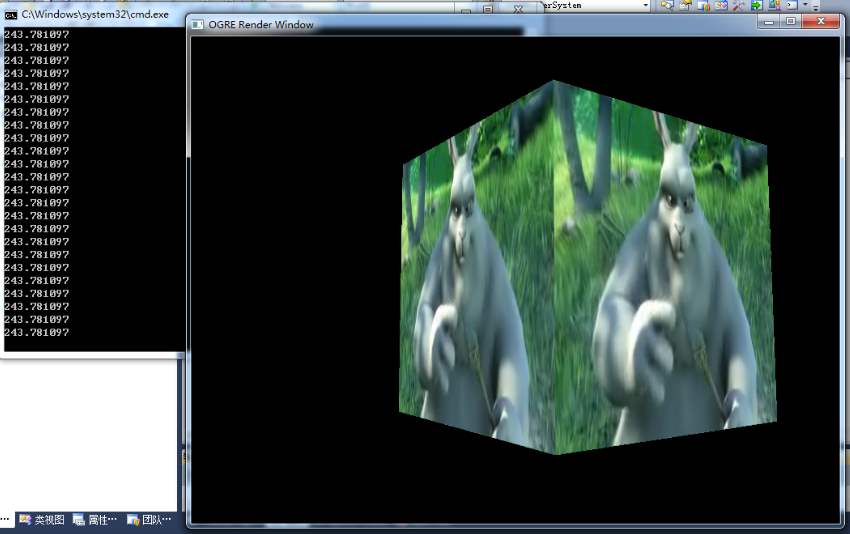
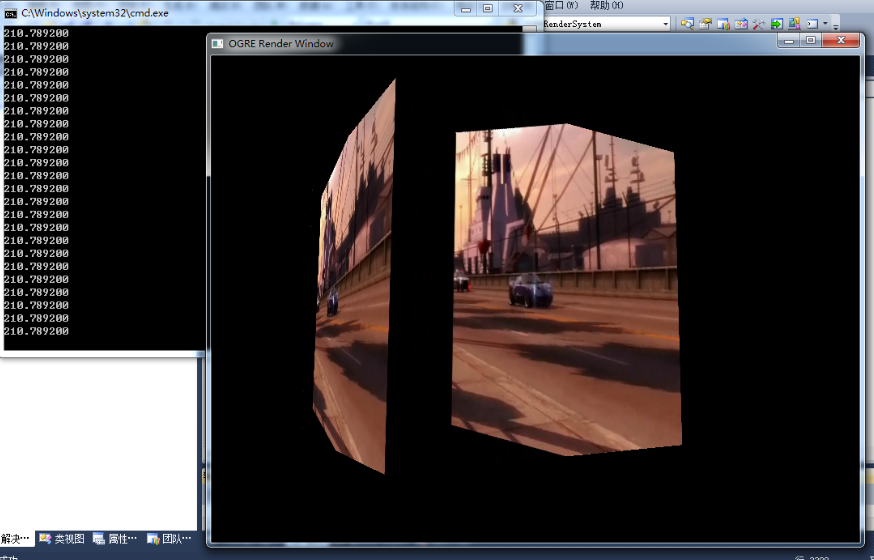
I’m not good at writing, just post the code. Welcome board brick. Here is the effect map:
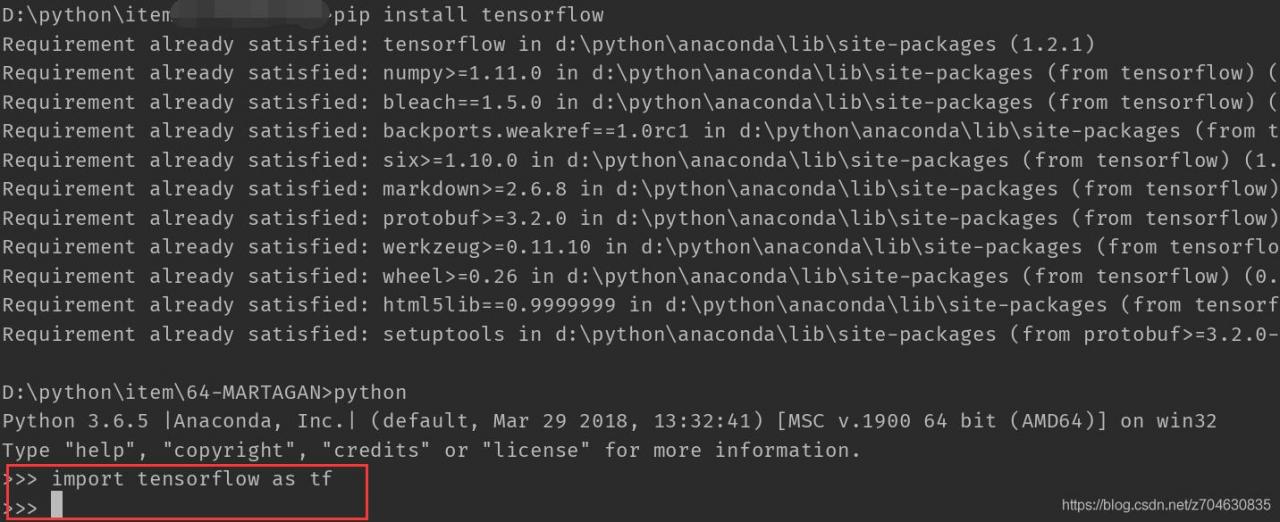
tensorflow import error: DLL load failed: The specified module could not be found (DLL load failed: The specified module could not be found)

The background,
Recently, after my tensorFlow version was updated, there was a problem, and the error was also very vague: DLL Load failed: the specified module could not be found. Here is my environment first:

win10 + pycharm
Anaconda3 (python3.6)
tensorflow1.9

Ii. Problem description
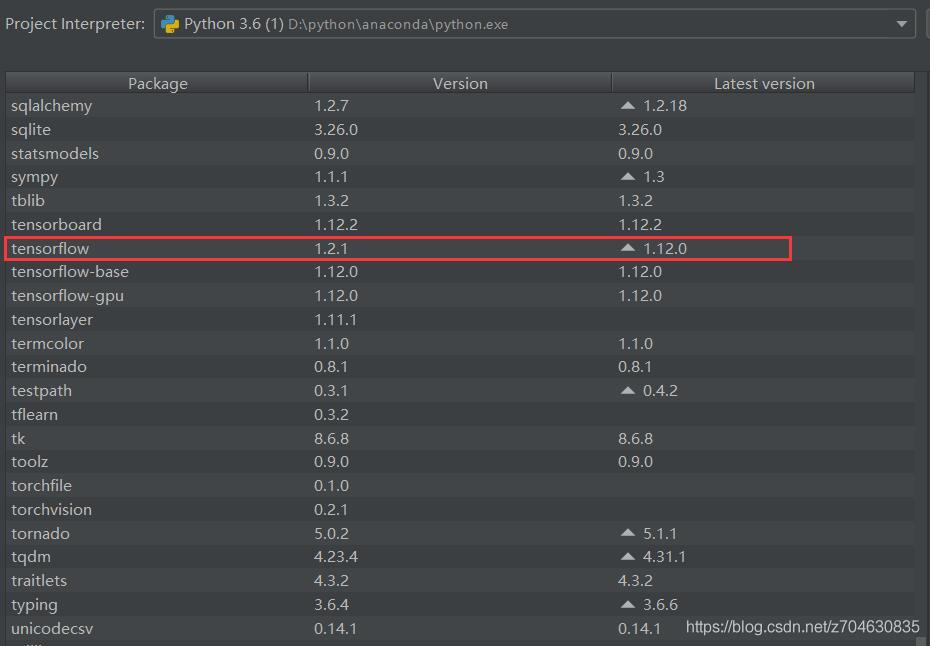
My own version of TensorFlow, 1.9, has been in use for almost a year and has been fine. Later, I saw that the version of TensorFlow was updated to 1.12, so I thought I would update it. However, after the update, the error of importing tensorFlow was reported. Later, even if the tensorFlow version was reduced to 1.2, the error was still reported:

When importing TensorFlow, an error message will be sent:

D:\python\anaconda\python.exe D:*****.py
Traceback (most recent call last):
  File "D:\python\anaconda\lib\site-packages\tensorflow\python\pywrap_tensorflow.py", line 58, in <module>
    from tensorflow.python.pywrap_tensorflow_internal import *
  File "D:\python\anaconda\lib\site-packages\tensorflow\python\pywrap_tensorflow_internal.py", line 28, in <module>
    _pywrap_tensorflow_internal = swig_import_helper()
  File "D:\python\anaconda\lib\site-packages\tensorflow\python\pywrap_tensorflow_internal.py", line 24, in swig_import_helper
    _mod = imp.load_module('_pywrap_tensorflow_internal', fp, pathname, description)
  File "D:\python\anaconda\lib\imp.py", line 243, in load_module
    return load_dynamic(name, filename, file)
  File "D:\python\anaconda\lib\imp.py", line 343, in load_dynamic
    return _load(spec)
ImportError: DLL load failed: The specified module cannot be found.

During handling of the above exception, another exception occurred:

Traceback (most recent call last):
  File "D:/python/item/64-MARTAGAN/train_marta_gan.py", line 7, in <module>
    import tensorflow as tf
  File "D:\python\anaconda\lib\site-packages\tensorflow\__init__.py", line 24, in <module>
    from tensorflow.python import pywrap_tensorflow  # pylint: disable=unused-import
  File "D:\python\anaconda\lib\site-packages\tensorflow\python\__init__.py", line 49, in <module>
    from tensorflow.python import pywrap_tensorflow
  File "D:\python\anaconda\lib\site-packages\tensorflow\python\pywrap_tensorflow.py", line 74, in <module>
    raise ImportError(msg)
ImportError: Traceback (most recent call last):
  File "D:\python\anaconda\lib\site-packages\tensorflow\python\pywrap_tensorflow.py", line 58, in <module>
    from tensorflow.python.pywrap_tensorflow_internal import *
  File "D:\python\anaconda\lib\site-packages\tensorflow\python\pywrap_tensorflow_internal.py", line 28, in <module>
    _pywrap_tensorflow_internal = swig_import_helper()
  File "D:\python\anaconda\lib\site-packages\tensorflow\python\pywrap_tensorflow_internal.py", line 24, in swig_import_helper
    _mod = imp.load_module('_pywrap_tensorflow_internal', fp, pathname, description)
  File "D:\python\anaconda\lib\imp.py", line 243, in load_module
    return load_dynamic(name, filename, file)
  File "D:\python\anaconda\lib\imp.py", line 343, in load_dynamic
    return _load(spec)
ImportError: DLL load failed: The specified module cannot be found.


Failed to load the native TensorFlow runtime.

See https://www.tensorflow.org/install/errors

for some common reasons and solutions.  Include the entire stack trace
above this error message when asking for help.

Process finished with exit code 1

My error message is in Chinese: DLL Load failed: the specified module cannot be found; Specified Module Could not be Found DLL Load Failed: The Specified Module could not be found
3. Solutions
The problem is new, the current solution is less online, after a search, finally found a similar problem and I post on making the first link: https://github.com/tensorflow/tensorflow/issues/25597, are described in detail below.
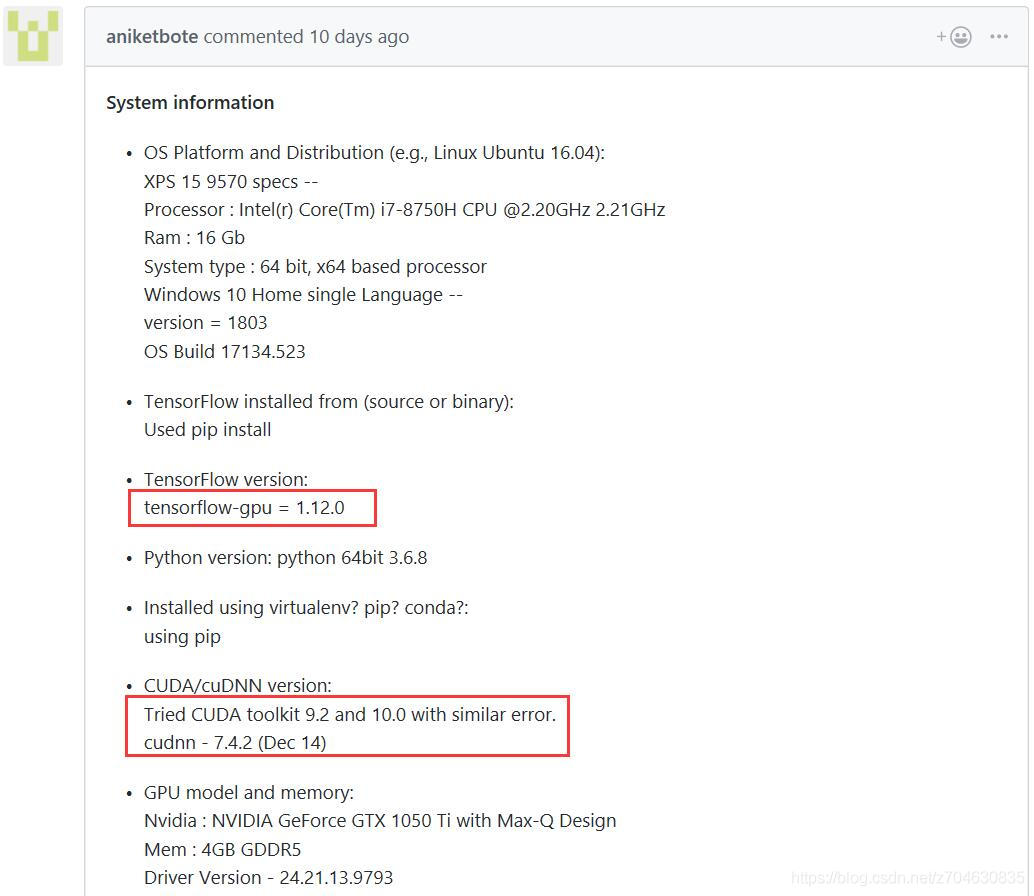
The situation of paster is similar to mine. The environment of paster is given first:

You can see that the sponsor also updated the TensorFlow version to 1.12 before encountering this problem. The following is a detailed description of how to configure your environment, and mentions that this error still occurs with CUDA9.2 and CUDA10.0 versions.
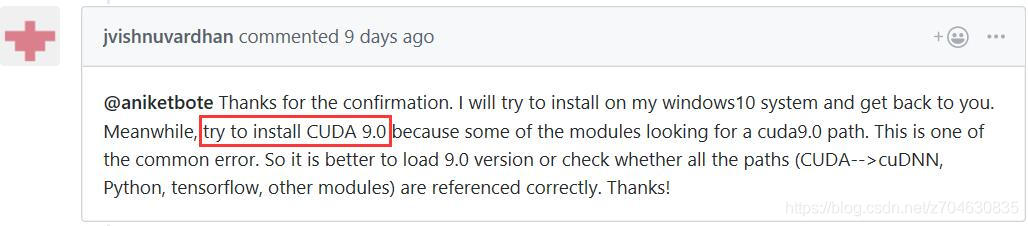
To address this problem, it has been proposed to install CUDA9.0:

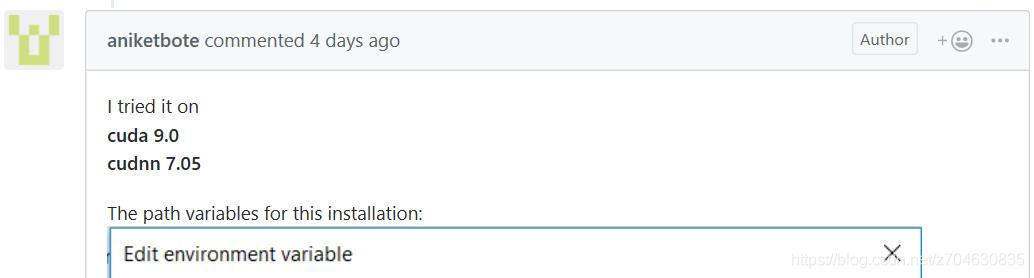
The user then reconfigured his environment to CUDA9.0 and cuDNN7.05

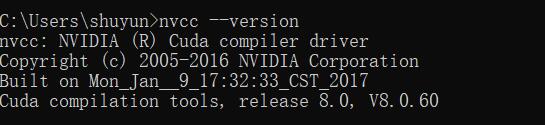
About how to view your CUDA version, you can open CMD and type NVCC — Version in CMD to view:

Here are some of the approaches I tried, but none of them solved the problem:
(1) Install other versions of CUDA. But it didn’t solve the problem…
(2) Update VS2015, reference blog: TensorFlow installation issues and Github. But it doesn’t solve the problem…

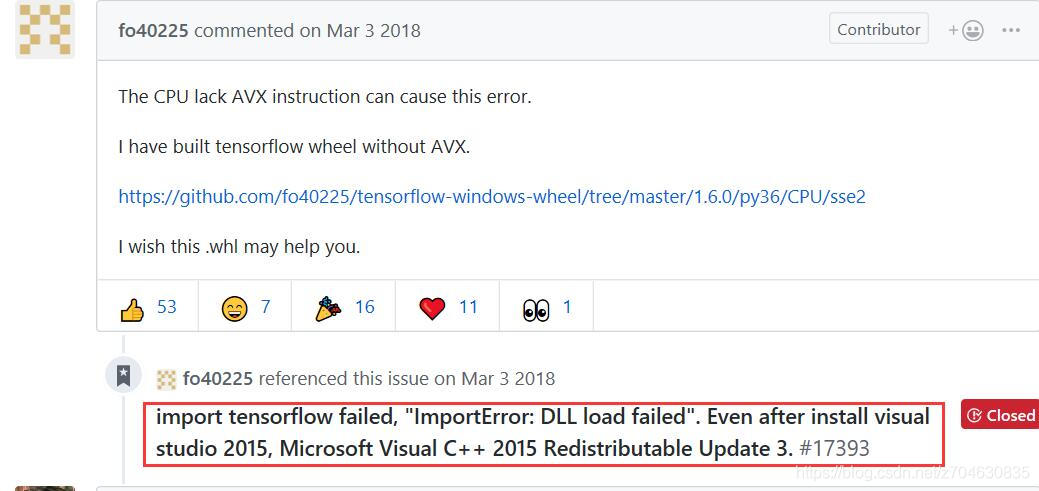
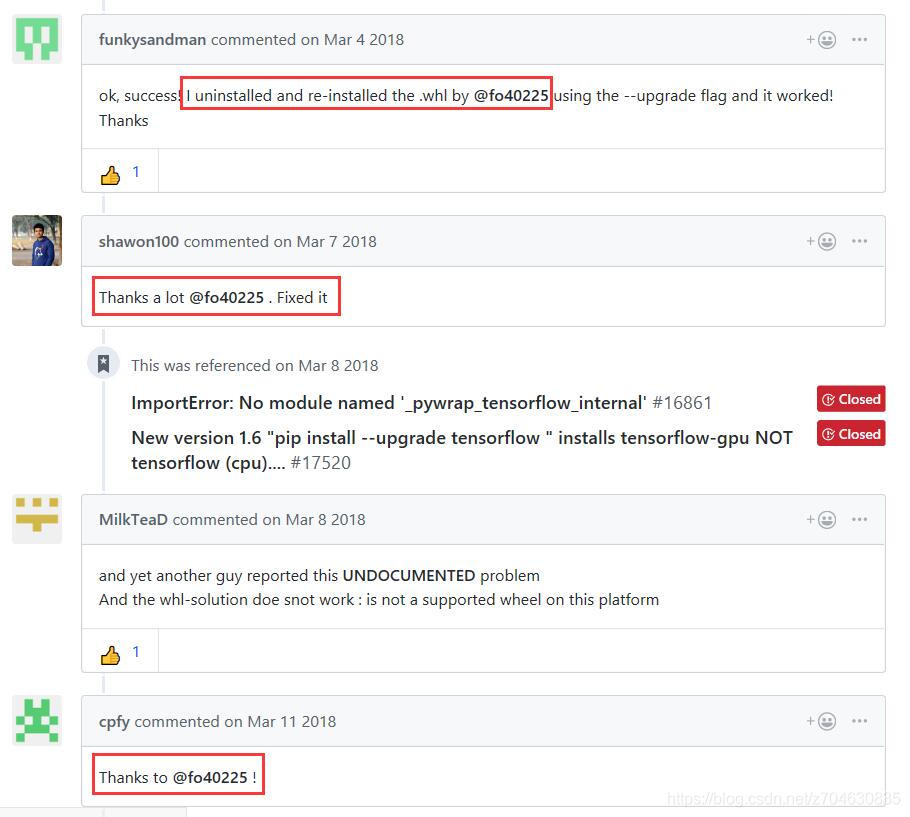
(3) Continue to read the post on Github, found that many people are thanking the layer owner FO40255, which is the above (2) layer owner message, reinstall the.WHL file, but I did not try this method, I will mention my method later, here is a random post:

To sum up my own approach to this problem:
(1) Open CMD and enter PIP Uninstall tensorFlow, that is, uninstall TensorFlow.
(2) Re-install after uninstalling and enter PIP Install TensorFlow.
(3) After the installation of a simple test, there is no error. In short, if it breaks, reinstall it… (That’s how I got it back.)

Of course, if reinstall will not solve the problem, can consider fo40255 layer above the main method, cover again. WHL file, the file link here also is given, by the way: https://github.com/fo40225/tensorflow-windows-wheel/tree/master/1.6.0/py36/CPU/sse2

Failed to load Main-Class manifest attribute from when the jar file is running

First of all, I would like to share with you a tutorial on artificial intelligence of Giant cow giant cow, which I found by accident. The course is not only zero basis, easy to understand, but also very funny humor, and from time to time there are connotation jokes, like reading a novel, haha ~ I am learning, I think it is too great, so to share with you! Click here to jump to the tutorial

               
Failed to load main-class manifest Attribute from… , this is due to the program is not set up to run the entry program.

Right-click on your JAR file, select Open mode — Winrar — to open the Meta-INF folder, and double-click on the MANIFEst.MF file inside. When you open it, you will see that there is only manifest-Version: 1.0 and no main-class: XXX configuration.
The solution —
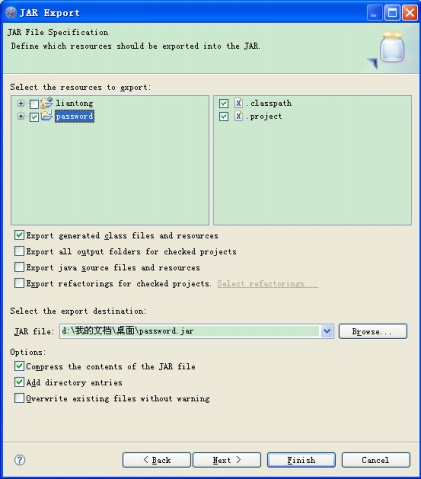
Reopen your Eclipse, select the project that requires Export, right-click Export, and select Java –JAR File

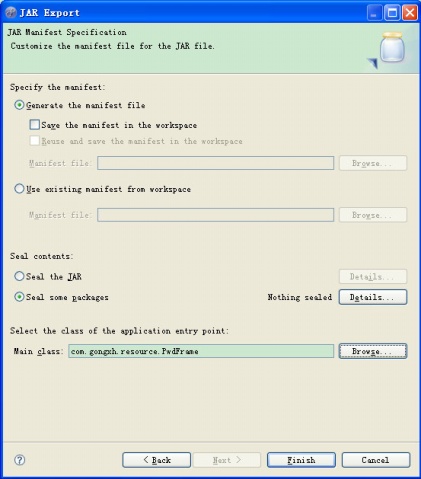
After selecting the items you want to export, click Next – Next and go to the following page:

Notice the Main class :(you definitely don’t have any text), click Browse, select your Main function, and then finish.


Browse the artificial intelligence tutorial

Start Eclipse and pop up the “Failed to load the JNI shared library jvm.dll” dialog box

Look at the
1 Whether the SETTING of JAVA_HOME is correct, my computer -& GT; Property (right click) –& GT; Advanced system setup –& GT; Environmental variable –& GT; System variable, new JAVA_HOME=D:/ Java/JDK
Modify the Path = % % Path; %JAVA_HOME%\bin
Open the command line and type Java-Version to see the output, see the version of Java, and see if it’s 32-bit or 64-bit
 

$ java -version
java version "1.7.0_25"
Java(TM) SE Runtime Environment (build 1.7.0_25-b17)
Java HotSpot(TM) 64-Bit Server VM (build 23.25-b01, mixed mode)

2 It is possible that Java and Eclipse are not compatible 32-bit and 64-bit, Java is 32-bit and Eclipse is 64-bit, or vice versa
The Eclipse.ini file in the Eclipse directory, marked in red as 64-bit Eclipse

-startup
plugins/org.eclipse.equinox.launcher_1.3.0.v20130327-1440.jar
--launcher.library
plugins/org.eclipse.equinox.launcher.win32.win32.x86_64_1.1.200.v20130521-0416
-product
org.eclipse.epp.package.java.product
--launcher.defaultAction
openFile
--launcher.XXMaxPermSize
256M
-showsplash
org.eclipse.platform
--launcher.XXMaxPermSize
256M
--launcher.defaultAction
openFile
--launcher.appendVmargs
-vmargs
-Dosgi.requiredJavaVersion=1.6
-Xms1024m
-Xmx1024m

Where can I view a version of an Eclipse product?A. Eclipseproduct file in the Eclipse directory, the version entry is the version of Eclipse

name=Eclipse Platform
id=org.eclipse.platform
version=4.3.0

SSL handshake failed: SSL error: illegal key usage detected in the certificate

SVN under Linux cannot connect to the Windows server: SSL failure: SSL error: Illegal key usage detected in the certificate.
The SVN server has been configured with visualSVN on Windows 2003 and is available on the Windows virtual machine client side.
Today, however, trying to run SVN on Ubuntu 11.10 installed Subversion. But use times similar to the following error:
SVN: method OPTIONS fail in “https://1.0.0.2:8443/svn/xxx” : the SSL handshake failed: SSL error: key usage of detected irregularities in the certificate.
 
Reason for error: This is because Virtual SVN USES a plug-in when generating authentication data that is supported by OpenSSL but not by GnuTls.
The
correction is to modify the certificate source sky generated for third-party certificates used by visualsvn on the server so that both Windows and Linux can recognize it.
Process:

1.Add the following registry value to the Windows registry :(mine is 32 bits)
for 32-bit system :(run regedit-> Find the following registry key -& GT; Add a value of type DWORD)
[HKEY_LOCAL_MACHINESOFTWAREVisualSVNVisualSVN Server]
“CreateGnuTLSCompatibleCertificate” = dword: 00000001
for 64 – bit system:
[HKEY_LOCAL_MACHINESOFTWAREWow6432NodeVisualSVNVisualSVN Server]
“CreateGnuTLSCompatibleCertificate” = dword: 00000001
Start VisualSVN Server Manager. (open virsualSVN Server)
2. Go to Action | Properties | Certificate.
3.Click Change certificate…
execute SVN again, it will prompt the certificate generator to be warned that it is not trusted, choose to accept it permanently.

and that solves the problem.
 
Another solution (without testing) is to make SVN clients on LINUX support OPENSSL.
The methods are as follows:

wget wget http://subversion.tigris.org/downloads/subversion-1.6.3.tar.gz

http://subversion.tigris.org/downloads/subversion-deps-1.6.3.tar.gz tar XVFZ subversion – 1.6.3. Tar. Gz
the tar XVFZ subversion-deps-1.6.3.tar.gz
CD subversion-1.6.3/neon/

sudo apt-get install libssl-dev libxml2-dev
./configure –with-ssl –with-pic
make
make install

CD.
rm -rf neon
edit /etc/ld.so.conf and add /usr/local/lib
ldconfig

./configure –with-ssl –with-neon=/usr/local
make
make install

dpkg –purge subversion

Chrome Failed to load resource: net::ERR_CACHE_MISS

There is no such error message in IE/FF, but the following error message appears on the Chrome command line:
Failed to load resource: net::ERR_CACHE_MISS
The issue is a bug in the Chrome browser development tool that appears to be related to caching and has been submitted to the Chrome issues system
(https://code.google.com/p/chromium/issues/detail?Id = 424599).
Does not affect normal use, can be ignored, will be fixed in chrome40.x.x.x version.