The following errors occurred during Git pull:
error: Pulling is not possible because you have unmerged files.
hint: Fix them up in the work tree, and then use 'git add/rm <file>'
hint: as appropriate to mark resolution and make a commit.
fatal: Exiting because of an unresolved conflict.
Local pushes and merges form merge-head (FETCH-HEAD) and HEAD(push -HEAD) references. A HEAD represents a local reference that has been formed after a recent successful push. Merge-head represents a reference formed after a successful local pull. We can use merge-head or HEAD to achieve a similar effect to SVN Revet.
To solve
- flushes out local conflicting files, requiring not only a merge-head or HEAD reset, but also a -hard reset. The local workspace will not be flushed without the following hard. It just overwhelms the stage.
git reset --hard FETCH_HEAD
- then executes the following command, and it will succeed.
git pull
error: ‘::main’ must return ‘int’
#include <iostream>

using namespace std;

int i=1;
void main()
{
    int i=i;
}
Error running:
error: '::main' must return 'int'
Reason: The C standard allows the main function to be of type void. In C++, main must be of type int.
Java:Error:Open registry key software \ JavaSoft \ Java Runtime Environment Problems
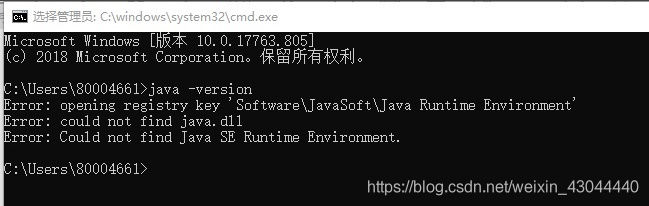
is certain that there is something wrong with the Java runtime environment. What should we do in this case?There are actually two steps that you can take to solve the problem.
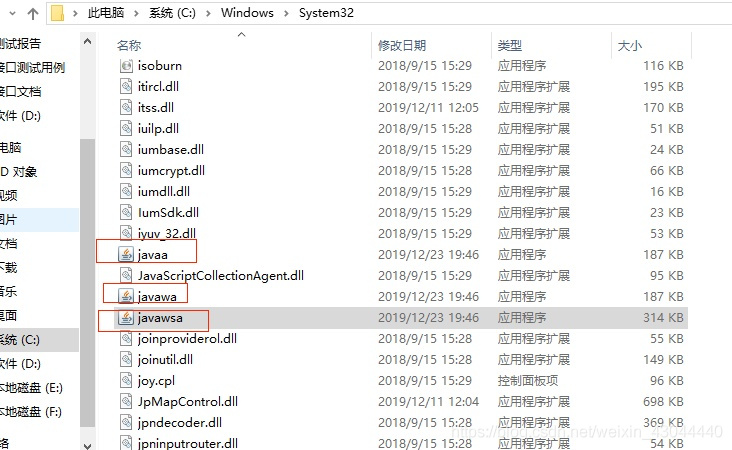
(1) into the C: \ Windows \ System32 to Java, javaw, javaws deleted or optional change (I will in the Java, javaw, javaws into javaa javawa javawsa), such as:
2. Because the environment variable configuration without any change, so the reshipment JDK can (new folder path consistent with the original configuration), such as new jdk1.8 in D set, I will install the path set to D: \ jdk1.8. 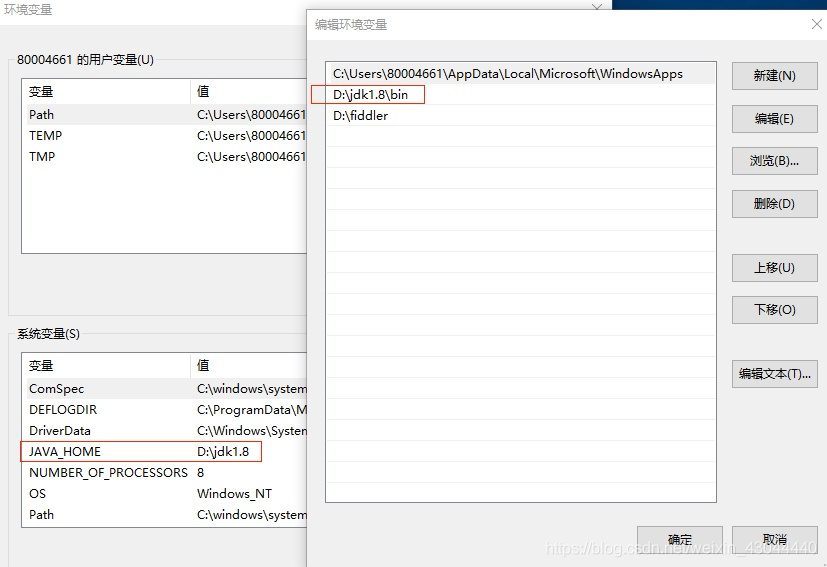
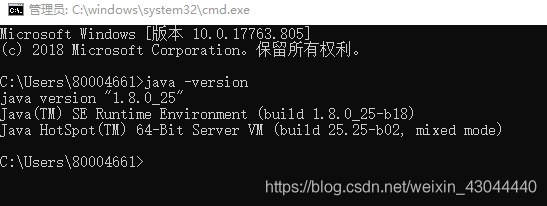
after the completion of the above two steps, re-enter CMD, and then input java-version, this problem is perfectly solved, complete!
ABAQUS system Error code 1073741819
Finite Element Analysis Error Code System Error Code 1073741819
The first thing to note is that the system error code 1073741819 is a Windows error exit code and not an Abaqus ! This is due to an access conflict, i.e. the program is trying to access a location in memory (RAM or storage) that it is not allowed to access.
Therefore, there are many reasons why Abaqus causes this error. Here are a few, in order of likelihood.
-
- Your model is too large: memory requirements are greater than available, given by the sum of RAM + page file. sys (usually equal to the installed RAM). Some errors in the model formulas escape pre. exe’s checks, so it is translated into an incoherent model in standard.exe. It is usually a syntactically correct but physically inconsistent feature (boundary condition issues, definition of material properties). It is incompatible with CPU architecture. This is usually resolved by changing the suffix of the .dll file, as suggested earlier. If you’re using the most recent version of Abaqus on a recent computer (I bet both versions were released after 2010), this is unlikely
-
- So, how does it work? Here’s a step-by-step debugging process.
- Run an example provided by Abaqus, possibly a simple one. Did it complete correctly? If not, try changing the dll suffix. Does it work? If yes, that’s issue 3. If no, it could be an installation/hardware architecture/hardware failure (e.g. hard drive failure) issue. Try reinstalling Abaqus and/or run a system check. Run your model with a very rough mesh:Is the simulation complete? If so, this is a size issue, i.e. your model needs more memory than is available. Move to a more powerful system or optimize your model: Can you reduce the number of elements? Can you use lower order or reduced order elements? If the coarse grid simulation is incomplete, this is a problem in model formulation. It’s not a syntax error, it’s a physics error: you have defined a parameter that Abaqus can read, but it doesn’t make sense physically. Check the geometry, material definition, boundaries and initial conditions.
Unable to find or load master class org.codehaus.groovy.grails.cli.support
The answer reproduced from: http://stackoverflow.com/questions/24577480/org-codehaus-groovy-grails-cli-support-grailsstarter-not-found-error
Recently upgraded the Ubuntu, but then when run grails projects: “Could not find or load a main class org. Codehaus. Groovy. Grails. Cli. Support. GrailsStarter” error, Google for a long time found was solved by a strange answer:
Just go to the Grails /bin directory and run the Grails commands from the command line. I don’t know why.
Error: You have not concluded your merge (MERGE_HEAD exists)
Difference between Git fetch and Git pull: Error: You have not concluded your merge (MERGE_HEAD exists)

The difference between FETCH and pull is that you can fetch the latest version from remote to local
1. Fetch: only fetch the latest version from remote to local, not merge(merge)
git fetch origin master   //Get the latest version on the origin/master branch from the master master branch on a remote origin.
git log -p master..origin/master //Compare the difference between a local master branch and an origin/master branch.
git merge origin/master          //consolidation
2. Pull: get the latest version remotely and merge(merge) locally
git pull origin master //This is equivalent to doing a git fetch and a git merge.In practice, it may be better to git fetch, because before merge, it can be decided whether to merge according to the actual situation
Besides, it causes error: error: You have not concluded your merge (MERGE_HEAD exists). may be caused by the failure of automatically merging the code pulled down before
Solution 1: keep the local changes and abort the merge -& GT; Re-amalgamate -& GT; To pull
git merge --abort //Termination of pooling
git reset --merge //re-merger
git pull //refetch
Solution 2: Abandon the local code, and the remote version overwrites the local version (careful)
git fetch --all
git reset --hard origin/master
git fetchAbout java “Error: bad binary operator types”
O(1) Check Power of 2) : bad operand types for binary Operator ‘& ‘”.
First paste the code:
copy code
public class Solution {
    /**
     * @param n: An integer
     * @return: True or false
     */
    public boolean checkPowerOf2(int n) {
        // write your code here
         if(n<=0)
           return false;
         return (n&(n-1)==0)?true:false;
    }
}
Copy the code
Error:
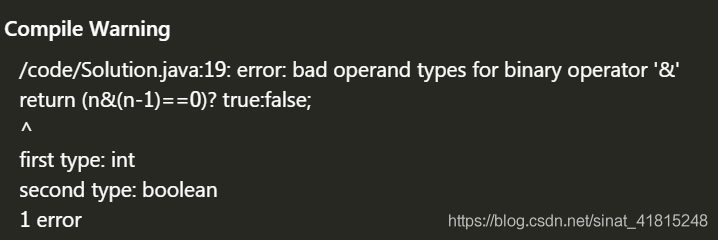 initially suspected an operator problem, but also ruled it out. I always think there is something wrong with the “true” and “false”, but I can’t find it. It turns out that it is really a priority problem and may be affected by the assignment (=) operator, as & “Is higher in priority than” == “, in fact the opposite is true. The identity operator has a higher priority than the bit operator, resulting in “&”; The left hand side is an int, and the right hand side is a Boolean.
so just put “return (n& (n-1)==0)?True, false;” Instead of “return ((n& (n-1))==0)?True, false;” It’ll be ok.
Latex error: option clash for package xcolor
Original link:https://tex.stackexchange.com/questions/57364/ op-clash-forpackagexcolor
Therefore, the following is just a copy of the above link:
xcolorpackage is loaded via list. Put the line before\usepackage{listing}. But your preamble is too messy. Most importantly, you callhyperrefas the last package and put all the options beforegeometryfancyhdr.
ucsis irrelevant to your settings.As Harish wrote
\PassOptionsToPackage{svgnames}{xcolor}is fine in\usepackage{listing}, the problem is the sameTikZ</ code>. With\PassOptionsToPackage, you can avoid conflicts between options.
JAVA lambda Syntax error on tokens, Expression expected instead
The author USES versions: MyEclipse8.5, JDK1.8.0, and IDEA2018.2.5
When I run the following lambda code on MyEclipse, an error message appears:
package com.text;

public class Lambda {
	public static void main(String[] args) {
		Lambda lambda = new Lambda();
		lambda.oldRunable();
		lambda.runable();
	}

	public void oldRunable() {
		new Thread(new Runnable() {
			public void run() {
				System.out.println("The old runable now is using!");
			}
		}).start();
	}

	public void runable() {
        new Thread(()->System.out.println("It's a lambda function!")).start();
    }
}
Code line 19 reports an error:
Multiple markers at this line
    - Syntax error on tokens, Expression expected instead
    - Syntax error on token(s), misplaced construct (s)
After a search on the Internet, there was no explanation for this anomaly, and then I decided to run IDEA for a try. It turned out that the same code IDEA was not wrong, so this is for record
The author estimates that it may be because the version of MyEclipse8.5 is too low, but the author has not changed the version of MyEclipse, and I will try it again in the future. You are welcome to comment on the upgraded version, thank you
Using the pit in Git that rebase encountered two could not apply XXXX
git rebase -i resumeerror: could not apply 6b442cc… accout infoWhen you have resolved this problem, run “git rebase –continue”.If you prefer to skip this patch, run “git rebase –skip” instead.To check out the original branch and stop rebasing, run “git rebase –abort”.Could not apply 6b442cc81d1feba15b2f851753483a82b1044438… accout info
You can use Git Status to see the cause of this problem
Both modified: SRC/resume/js/account/index/the js
Both added: SRC/resume/js/account/index/the vm
Both modified: SRC/resume/js/account/modules/the js
Both modified: SRC/resume/js/account/modules/info. The js
It tells us that we have modified these files at the same time and there is a conflict
So here’s the next step
1. Conflict resolution
2. The git add git commit
3. git rebase –continue
Solve the problem that node. js USES MySQL to connect econnunion 127.0.0.0.1:3306
const sequelize = new Sequelize('mysql', 'account', 'password', {
    host: 'localhost',
    // host: '118.25.35.81',
    dialect: 'mysql',
    operatorsAliases: false,
    dialectOptions: {
        charset: "utf8mb4",
        collate: "utf8mb4_unicode_ci",
        supportBigNumbers: true,
        bigNumberStrings: true
    },
    socketPath: '/tmp/mysql.sock',
    pool: {
        max: 5,
        min: 0,
        acquire: 30000,
        idle: 10000
    },
    timezone: '+08:00'
});
solution :
socketPath: '/tmp/mysql.sock',Error: Error Building Trees
Due to the excessive number of articles in Add. I was impatient and just used the task manager to turn off idea. After restarting idea to update. Gitignore file, Error Building Trees are submitted.
The solution
Force reset Git
git reset --hard