Category Archives: How to Fix

R language error in match.names (clabs, names(xi)) :

Today, when I used the rbind function in R language, this error occurred, and I couldn’t find the error after searching for a long time.
The reason for this mistake:
1. The data type used is data.frame
2. The header files for the rows to be merged are different

Solution: change the data to matrix, and you can do it. In addition, when you read the data, add the data header=FALSE, which is also ok. I tried it, but it is hard to use, so I changed it to matrix.

Error name: Error in match. Names (CLABS, names(XI)) : Names do not match previous names

Mac installation software, error permission denied @ unlink_ internal

Problem 1.
On the MAC, I install Ansible with the following commands

# brew install Ansible

abnormal

Pouring gdbm-1.15.high_sierra.bottle.tar.gz
Error: An unexpected error occurred during the `brew link` step
The formula built, but is not symlinked into /usr/local
Permission denied @ unlink_internal - /usr/local/bin/gdbm_dump
Error: Permission denied @ unlink_internal - /usr/local/bin/gdbm_dump

2. Solutions

# sudo chown -R $(whoami):admin /usr/local

# brew update

# brew link gdb

# brew install Ansible

error: invalid use of non-static member function

Transfer learning: https://blog.csdn.net/bill_ming/article/details/6872165
#include < iostream>

using namespace std;
class A
{
public:
A (int I)
{
A = I;

} int fun (int) b
{
return a * c + b;

} int c;
private :
int a;
};

int main()
{
A x(18);
int A: : * PC;
PC = & amp; A::c;
x. * PC = 5;
int (A: : * pfun) (int);
pfun = A: : fun;
A *p = & x;
cout & lt; < (p-> *pfun)(10)< < endl;

return 0;
}

error: error: invalid use of non-static member function ‘int A::fun(int)’|

int (A::*pfun)(int)=A::fun;
=
int (A::*pfun)(int)=& A::fun;
 
In C++, for something that consists of the class name plus two colons plus A member name (quilified-id), such as: A::x, A::x can only represent an left value if x is A static member of class A.
The default conversion from a function type to a function pointer type only works if the function type is an lvalue. For non-static member functions, there is no default conversion from function type to function pointer type, so the compiler does not know what to do with the
p = A::f
.
 
(1) To say that the address of the function is not certain, because the non-static member function pointer can have polymorphic behavior, so, at least at compile time, its address is really not determined.
(2) although all compilers will certainly generate only one copy of the code for a class’s non-static member functions (either at compile time or at run time), this is different from non-static member variables, which have a separate copy for each object. But In my opinion, this is still an implementation detail of the compiler, not a language feature. From an abstract language point of view, non-static member functions, like non-static member variables, cannot be left valued without an object instance.

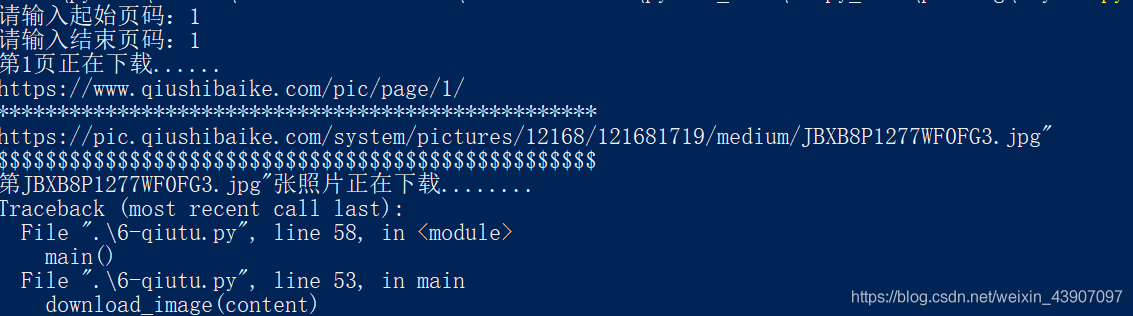
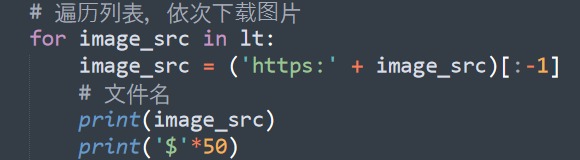
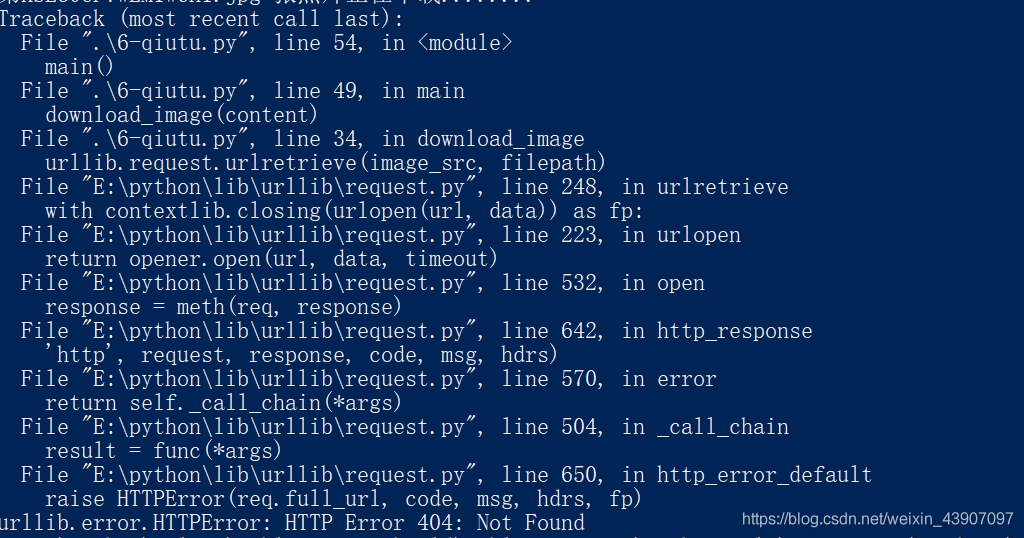
Python crawler: urllib.error.HTTPError : HTTP Error 404: Not Found

* *
Python crawler: urllib.error.httperror: HTTP error 404: Not Found


See a 404 error, I am also very depressed, and read the code and again, there is no problem, as the small white, the most afraid of this kind of error, but after the attack, full of a sense of accomplishment, nonsense not much said, so is the Internet search the cause of the error, the answer is multifarious, but still find the feeling, that is to see if the address was wrong.
the truth is there’s something wrong with the address. You want to cry.

Summary of database

Group By
Group By and aggregation function can be used to achieve Group accumulation. For example, if you were asked to display the salary totals for each
department, you could use the following statement.
SELECT department_number
,SUM (salary_amount)
FROM employee
GROUP BY department_number;

result:
department_number Sum(salary_amount)
401 74150.00
403 80900.00
301 58700.00

note that all the fields accumulated without grouping in the SELECT clause must appear in the
GROUP BY clause, otherwise the following error message will be returned:
ERROR: 3504 Selected non-aggregate values must be part of the associated group.

for the above example the Department_Number field is not accumulated so it must appear in the group
BY clause. This basic rule must be borne in mind.

WHERE clause and GROUP BY clause
WHERE clause and GROUP BY clause are used together, GROUP BY only performs grouping aggregation calculation on data records that conform to the WHERE limit
system. In other words, the WHERE sub-
sentence removes unqualified data records before doing the actual aggregate calculation. What’s the combined salary for department 401 and 403?
SELECT department_number
,SUM (salary_amount)
FROM employee
WHERE department_number IN (401, 403)
GROUP BY department_number
;

results:
department_number Sum (salary_amount)
403 80900.00
401 74150.00

GROUP BY and ORDER BY
after the GROUP BY, ORDER BY makes the grouping statistics show
in the specified ORDER. For example, to show the number of people in a department, the total salary, the highest salary in a department, the lowest salary in a department
, and the average salary in a department by department number, you can use the following SQL statement:
SELECT department_number (TITLE ‘DEPT’)
,COUNT (*) (TITLE ‘#_EMPS’)
,SUM (salary_amount) (TITLE ‘TOTAL’)
(FORMAT ‘zz, ZZZ,zz9.99’)
,MAX (salary_amount) (TITLE ‘HIGHEST’)
(FORMAT ‘ ‘zz, ZZZ,zz9.99’)
,MIN (TITLE ‘amount)
(FORMAT ‘zz, ZZZ,zz9.99’)
,AVG (TITLE ‘AVERAGE’)
(FORMAT ‘zz, ZZZ,zz9.99’)
FROM employee
GROUP BY department_number
ORDER BY department_number
;

results are as follows:
DEPT #_EMPS TOTAL LOWEST AVERAGE
301 3 116,400.00 57,700.00 29,250.00 38,800.00
401 7 245,575.00 46,000.00 24,500.00 35,082.14
403 6 233,000.00 49,700.00 31,000.00 38,833.33

SELECT department_number AS DEPT
,COUNT (*) AS #_EMPS
,CAST (SUM (salary_amount) AS FORMAT ‘zz, ZZZ,zz9.99’)
AS TOTAL
,CAST (MAX (salary_amount) AS FORMAT ‘zz, ZZZ,zz9.99’)
AS LOWEST
,CAST (MIN (salary_amount) AS FORMAT ‘zz, ZZZ,zz9.99’)
AS br>,CAST (AVG (salary_amount) AS FORMAT ‘zz, ZZZ,zz9.99’)
AS _AVERAGE)
FROM employee
GROUP BY department_number
ORDER BY department_number; Since AVERAGE is itself a keyword, in the above example, it is preceded by an underscore
to distinguish it.
when grouping statistics on multiple fields, GROUP BY produces only one level of summary. Example
such as: for the department 401 and 403 according to the work code group statistics salaries.
SELECT department_number
,job_code
,SUM (salary_amount)
FROM employee
WHERE department_number IN (401, 403)
GROUP BY department_number, job_code
ORDER BY 1, 2;

results:
department_number job_code SUM (salary_amount)
401 411100 37850.00
401 412101 107825.00
401 412102 56800.00
401 413201 43100.00
403 431100 31200.00
403 432101 As you can see from this example, when there are multiple fields in GROUP BY, it can only produce a summary of level
, and the summary is made according to the last field (here is job_code).

GROUP BY and HAVING conditions
HAVING conditions clause is used together with GROUP to limit the result of grouping statistics to
and only return the grouping statistics that meet its conditions.
for example, show the number of people in the department, total salary, maximum salary in the department,
minimum salary and average salary in the department by department number order, if only show the department with average salary less than 36000.
SELECT department_number (TITLE ‘DEPT’)
,COUNT (*) (TITLE ‘#_EMPS’)
,SUM (salary_amount) (TITLE ‘TOTAL’)
(FORMAT ‘zz, ZZZ,zz9.99’)
,MAX (salary_amount) (TITLE ‘HIGHEST’)
(FORMAT ‘ ‘zz, ZZZ,zz9.99’)
,MIN (TITLE ‘amount)
(FORMAT ‘zz, ZZZ,zz9.99)
,AVG (TITLE ‘AVERAGE’)
(FORMAT ‘zz, ZZZ,zz9.99’)
FROM employee
GROUP BY department_number
HAVING AVG (salary_amount) < 36000;

result:
DEPT #_EMPS TOTAL b> 401 7 245,575.00 46,000.00 24,500.00 35,082.14

1, WHERE: data records are used to qualify the tables that participate in the grouping aggregation operation. Only
data records that meet the criteria are selected to participate in the grouping aggregation.
2, GROUP BY: to GROUP the records that meet the WHERE clause
3, HAVING: to qualify the GROUP aggregation results that can be returned
4, ORDER BY: to specify the output ORDER of the results

angular.js Error:[$ injector:modulerr ]Why

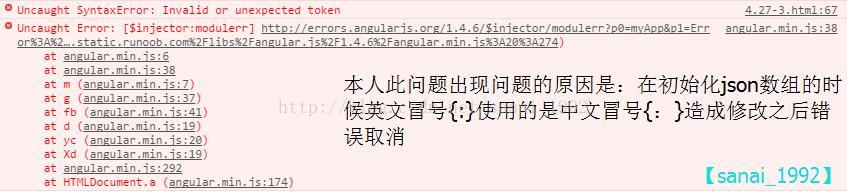
Error prompt is shown in the figure below:

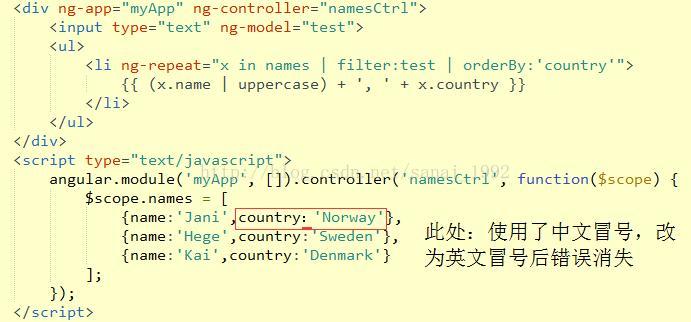
What’s causing it: Punctuation errors. [note, the test in this paper is tested in the punctuation in the array, the errors caused by other parts of punctuation have not been sorted out]
Example:

As can be seen from the first picture above, two errors are reported. If there is a punctuation problem, the second error is exactly the same, but the first error may occur in the following ways :(may not be complete, please add in the comments below)

The above problem is basically concluded to be a punctuation problem, which can be checked globally for the presence of Chinese punctuation before other screening.
If There are any other reasons for me to comment below the article, I will put it in the article after confirmation, and indicate the information of the provider.

Error: could not find java.dll Error: could not find Java se runtime environment solution

DLL Error: could not find Java SE Runtime Environment
As title.
my situation is more complicated, and this is just a problem I had when reconfiguring Java environment variables.
My computer was originally configured with the latest JDK13, and the environment variables were set according to JDK13. Later JDK10 and JDK1.8 were downloaded for course reasons
Writing Java using Intellij Idea all the time has not been a problem. But a few days ago on a whim, I wrote a small program to run on the command line, and something went wrong
1. Javac conflicts with Java commands
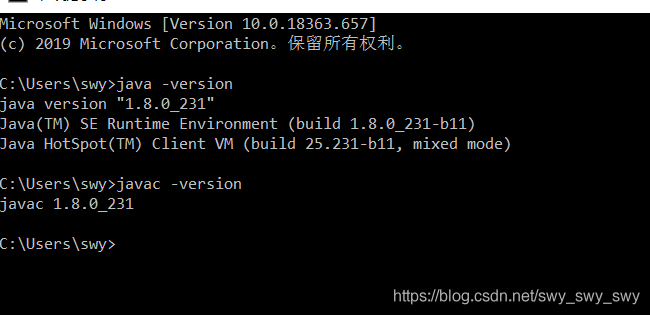
It’s an error saying that the.class file I compiled with Javac is different from the version of the Java command that followed me. I checked the following with the -version command. My Javac is JDK13, and Java is a mix of JDK10 and 13.
because currently JDK10 is useless, it is removed, resulting in javac and Java command all die.
considering recent course requirements, we decided to simply reconfigure the JDK1.8 environment variable
2. Javac-version is not working properly
After resetting path and so on in accordance with the same configuration method, Java command reported the error as shown in the question, and JavAC was also not good. I searched for a circle on the Internet and finally had no choice but to restart the computer. The result javAC was actually normal, but Java was still abnormal
3. Java Error: could not find Java Runtime Environment
First we open the environment variable (just search “edit environment variable” by Corna on Win10)

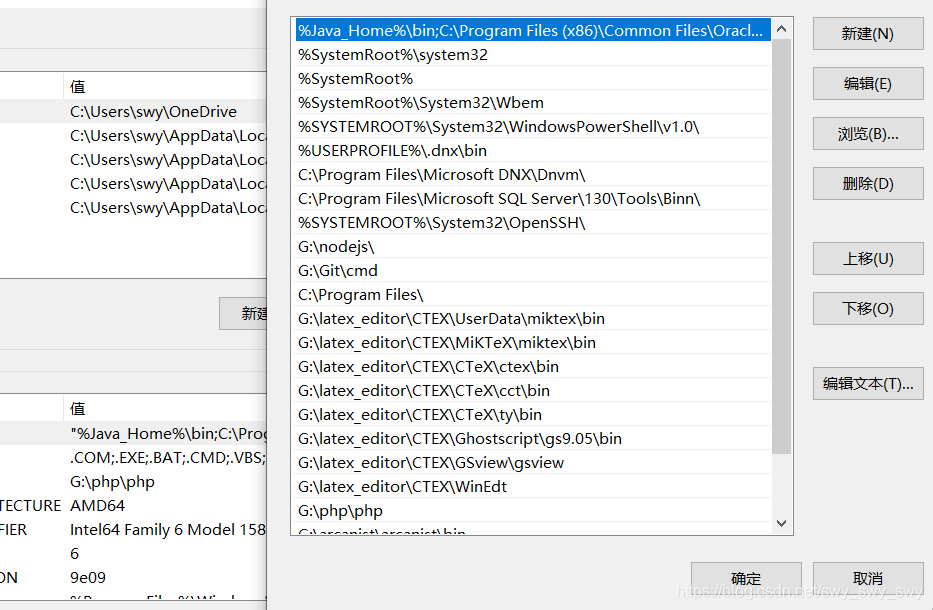
We noticed that the path variable has an extra C:\Program Files(x86)\Common Files\Oracle… When executing Java commands on the command line, the default is to execute this Java first instead of adding our own %Java_Home%\bin, etc., so we need to put this added variable in front of the Oracle variable.
The problem is that I always end up with double quotes in front of the variable path, and the command line test still doesn’t work.
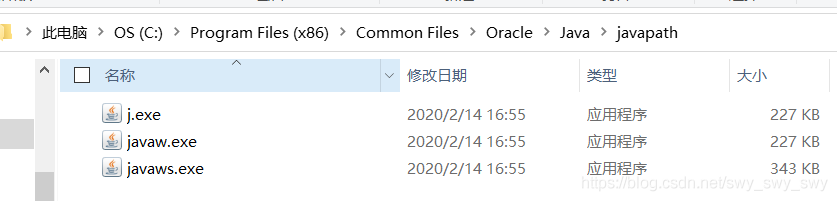
Continue searching and find someone said to change the java.exe in the System32 path, just rename it, but there is no Java.exe in my System32 path
Exe

as shown in the figure, j.xe
command line test successful!

After the

DB2 SQL Error: SQLCODE=-206, SQLSTATE=42703


Encounter 206 this mistake, but my SQL statement did not write wrong ah!

Baidu said that my SQL statement is not the field wrong, but checked several times but there is no problem, my SQL statement is:

update  ZZC_ANTI_REPORT_HIT_RULES_LIST set APP_NO="33" where org="000000000005"

is really best not sister;

The final solution is that the scripting environment of dbVisualiazer cannot use double quotes, it must be single quotes; Oh, really.

update  ZZC_ANTI_REPORT_HIT_RULES_LIST set APP_NO='33' where org='000000000005'

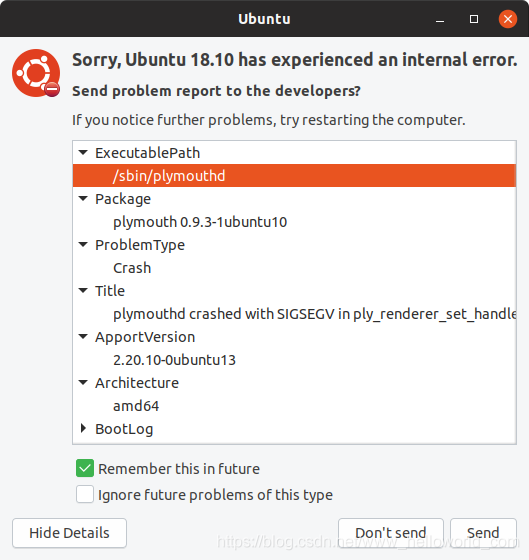
sorry,ubuntu 14.04 has experienced an internal error

The newly installed Ubuntu18 will report an error every time it boots, as shown in the figure below:

A search revealed this:
https://wiki.ubuntu.com/Apport
This information can be used by developers to catch bugs in certain aspects of the system and make improvements.
This is the function of Apport. If you have any questions, please report them to the developer for reference. It should be a good thing, but for the novice, there is no psychological preparation in advance, and the frequency of occurrence is too frequent, which often affects the operation of the program.
I’m so bored, so I’m going to turn it off for the time being
so /etc/defaul/apport
which is enabled=1
instead of enabled=0
it’s going to shut up
but if there’s a problem no one is going to tell you so please make your own choice

supplement
new version installation problems are more
as improvements and updates become less and less problems

error: expected unqualified-id before ‘.’ token

C++ introduced the mutex header, which USES mutext.lock() to lock and mutex.unlock() to release the lock.

#include <mutex>

using namespace std;

mutex t_mutex;

class Csingleob
{
        private:
                Csingleob(){}
        static Csingleob *p;

        public:
                static Csingleob* getInstance()
                {
                        mutex.lock();
                        if (p == NULL)
                        {
                                p = new Csingleob();
                        }
                        mutex.unlock();
                        return p;
                }
};

However, an error is reported at compile time. Prompt:

error: expected unqualified-id before ‘.’ token    mutex.lock();

It is an error to use mutext.lock() to lock, and mutex.unlock() to release the lock. You should instantiate the class or structure first, then call the corresponding method with “.”
After modification:

#include <mutex>

using namespace std;

mutex t_mutex;

class Csingleob
{
        private:
                Csingleob(){}
        static Csingleob *p;

        public:
                static Csingleob* getInstance()
                {
                        t_mutex.lock();
                        if (p == NULL)
                        {
                                p = new Csingleob();
                        }
                        t_mutex.unlock();
                        return p;
                }
};

Csingleob* Csingleob::p = NULL;