Category Archives: How to Fix

ER_ACCESS_DENIED_ERROR: Access denied for user ‘root‘@‘localhost‘ (using password: NO)

ER_ACCESS_DENIED_ERROR: Access Denied for user ‘root’@’localhost’ (using password: NO) How to handle this?
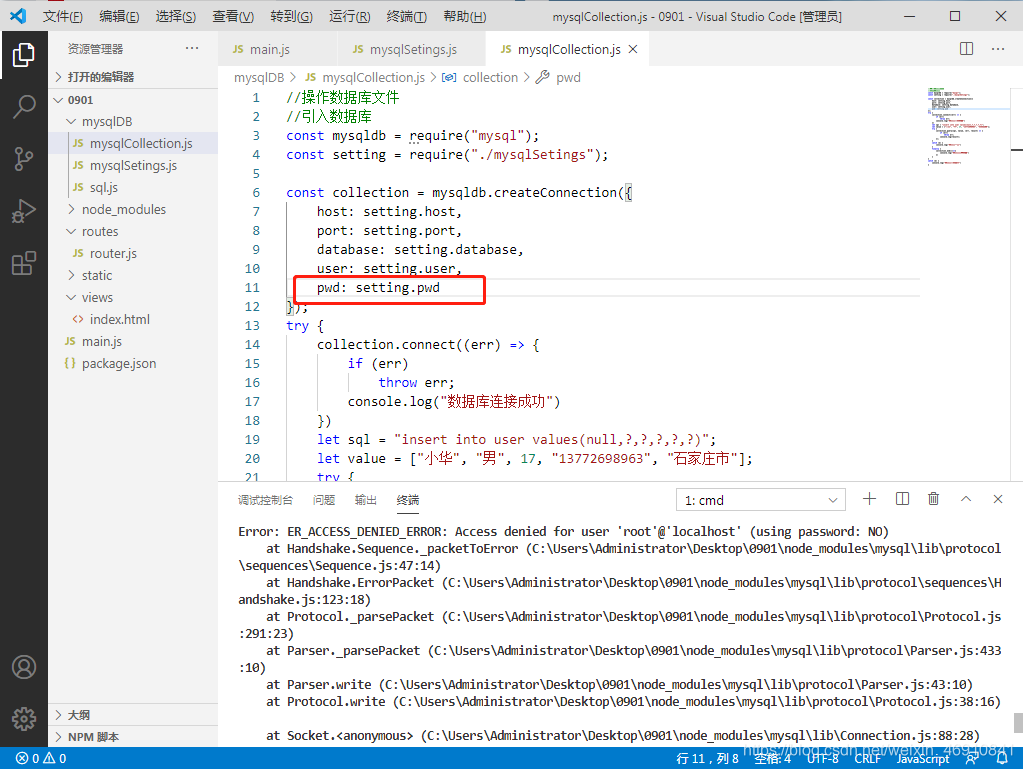
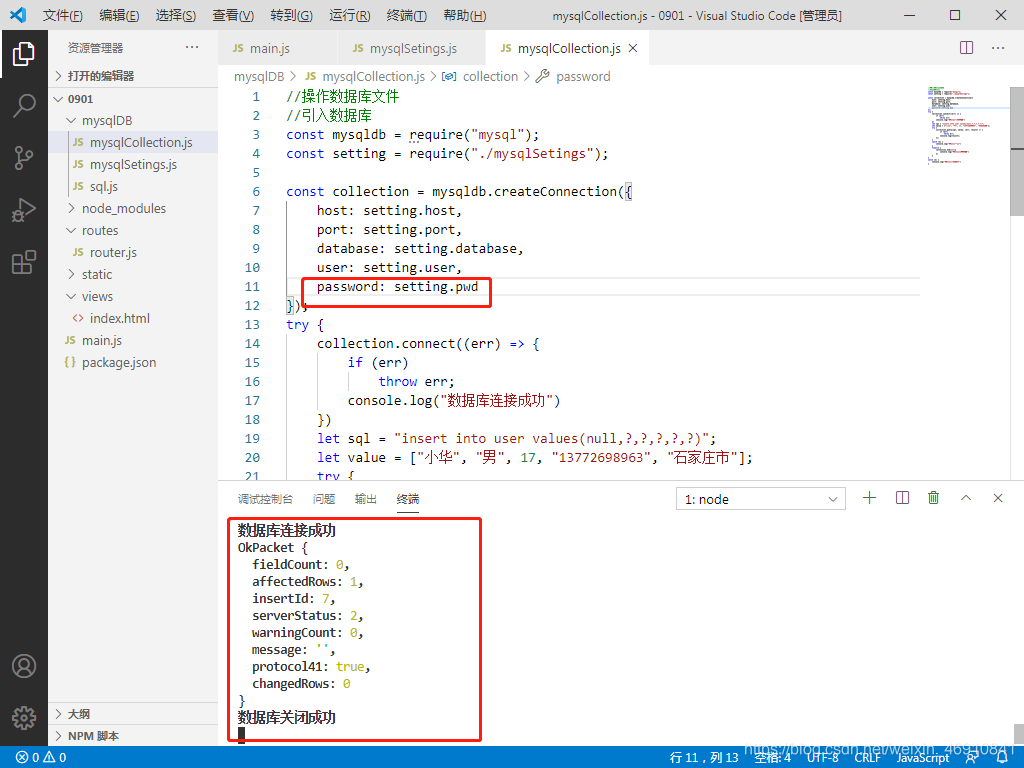
Recently, redo node. Js connect mysql, this problem has been appear, can start the project, is has been submitted to the error and write the information also can not add in mysql, then baidu search, most above all, what password is modified, said of the fog, I didn’t do this, then in a pet write before all deleted, I knocked again and again finally found an error or accidentally got the wrong number, and then see the reason for the error.
In Vscode, it’s the red box, it was password, it’s PWD, so let’s just change PWD to password.

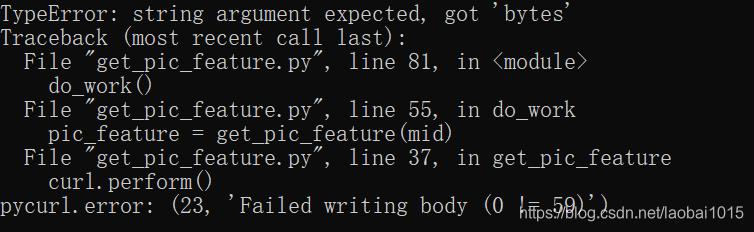
curl.perform() pycurl.error: (23, ‘Failed writing body (0 != 59)’)

The introduction of the pycurl and StringIO modules when using python3.7 is prone to the above errors
The solution for importing the StringIO module:
StringIO module can only be imported in python2, directly from StringIO import StringIO
But python3, STringIO, and cStringIO modules are gone, and to use them you have to import the IO modules:

from io import StringIO
dot_data = StringIO()

StringIO can also be used by importing the Six module:

from six import StringIO

or

from sklearn.externals.six import StringIO 

Provide a method that is both Python2 and Python3 compatible:

try:
    from StringIO import StringIO
except ImportError:
    from io import StringIO

This solves the problem of importing the StringIO module in different Python versions.
But Pycurl is also influenced by the Python version when it encodes strings, as follows:
Write instead
Under python 2, you can use StringIO object:

import pycurl
from StringIO import StringIO
c = pycurl.Curl()
c.setopt(c.URL,'http://pycurl.io')
buffer = StringIO()
c.setopt(c.WRITEDATA, buffer)
# Same result if using WRITEFUNCTION instead:
#c.setopt(c.WRITEFUNCTION, buffer.write)
c.perform()
# ok

Under python 3, when pycurl USES the bytes parameter, the response must be written to the BytesIO object:

import pycurl
from io import BytesIO
c = pycurl.Curl()
c.setopt(c.URL,'http://pycurl.io')
buffer = BytesIO()
c.setopt(c.WRITEDATA, buffer)
# Same result if using WRITEFUNCTION instead:
#c.setopt(c.WRITEFUNCTION, buffer.write)
c.perform()
# ok

Trying to use the StringIO object will produce an error: :

import pycurl
from io import StringIO
c = pycurl.Curl()
c.setopt(c.URL,'http://pycurl.io')
buffer = StringIO()
c.setopt(c.WRITEDATA, buffer)
c.perform()

The error message is as follows:

The following idiom is available for code that requires compatibility with Python2 and Python3:

import pycurl
try:
    # Python 3
    from io import BytesIO
except ImportError:
    # Python 2
    from StringIO import StringIO as BytesIO
c = pycurl.Curl()
c.setopt(c.URL,'http://pycurl.io')
buffer = BytesIO()
c.setopt(c.WRITEDATA, buffer)
c.perform()
# ok
# Decode the response body:
string_body = buffer.getvalue().decode('utf-8')


Abaddressbooksave about the failure of saving to address book

First of all, the premise is that you add the address book statement without any errors.
And then there is
// Add the newly created contact to the address book
ABAddressBookAddRecord (addressBook, person, NULL);
The next step is to save the address book in order to better learn how to deal with the Error that will not cause crashes and prompts. It is recommended that you create an Error object to see the Error prompts given by the system

CFErrorRef error = NULL;
If (ABAddressBookSave (addressBook, & amp; error))
{
UIAlertView * Alert = [[UIAlertView Alloc] initWithTitle:@” prompt “Message :@” has successfully imported contacts into address book” delegate: Self cancelButtonTitle:@” confirm “otherButtonTitles:nil];
[alert show];
        
}
The else
{
NSLog (@ “% @”, the error).
UIAlertView * Alert = [[UIAlertView Alloc] initWithTitle: @@” prompt “message:@” import failed” delegate:self cancelButtonTitle:@” confirm “otherButtonTitles:nil];
[alert show];
}

The error is “error Domain=ABAddressBookErrorDomain Code=1 “The operation couldn’t be completed. (ABAddressBookErrorDomain error 1.)”

This error basically means that the operation is not complete, which does nothing to me, but at least it tells us one thing, that there is nothing wrong with the code we write. If there’s nothing wrong with the code, why did it fail to save the contact to the address book?The only answer seems to be that the system won’t allow you to access the address book
Solution: First in the phone’s privacy Settings, address book privacy to see if the permissions are turned on.
It then gives a code to request application access to the address book before importing.

if (ABAddressBookGetAuthorizationStatus() == kABAuthorizationStatusNotDetermined) {
ABAddressBookRequestAccessWithCompletion (addressBook, ^ (bool granted, CFErrorRef error) {
The first time, a prompt will pop up telling the user whether to allow the application to access the address book
});
}
Else if (ABAddressBookGetAuthorizationStatus () = = kABAuthorizationStatusAuthorized) {
Description accessible
        
}
The else {
The user may have turned off access to the communication.
}

Well, the problem with the address book not being able to hold data has finally been solved.

Solving GitHub push error: the requested URL returned error:403 Forbidden while accessing

Resolve Git push errors
The requested URL returned error:403 Forbidden while accessing
 
Answer: Private project, no permissions, enter the username and password, the latter remote address is of this type: vi.git/config

will

[Premote “origin”]
url=https://github.com/ user name/repository name. Git
Modified to

[Premote “origin”]
Url =https:// username: password @github.com/ username/repository name.git
 

Solution to Tomcat starting error listener start

Blog categories:
Tomcat

tomcat

Tomcat cannot be started today, the following error is reported:

org. Apache. Catalina. Core. StandardContext startInternal

SEVERE: the Error listenerStart

org. Apache. Catalina. Core. StandardContext startInternal

SEVERE: Context [/*****] startup failed due to previous errors

online to find more than N articles, all did not hit the point.  

later found a method on foreign websites

http://grails.1312388.n4.nabble.com/Deployment-problems-td4628710.html.  

I tried it and it worked. The plan is as follows.  

Tomcat Error is too vague, nothing is reported, only prompt Error listenerStart. To debug, we need to get a more detailed log. You can create a new file called Logging.Properties in the Web-inf/Classes directory as follows

Java code

    handlers = org. Apache. Juli. FileHandler, Java. Util. Logging. ConsoleHandler # # # # # # # # # # # # # # # # # # # # # # # # # # # # # # # # # # # # # # # # # # # # # # # # # # # # # # # # # # # # # Handler specific properties. # Describes specific configuration info for Handlers. # # # # # # # # # # # # # # # # # # # # # # # # # # # # # # # # # # # # # # # # # # # # # # # # # # # # # # # # # # # # org. Apache. Juli. FileHandler. Level = FINE Org. Apache. Juli. FileHandler. Directory = ${catalina. Base}/logs org. Apache. Juli. FileHandler. The prefix = error – debug. Java. Util. Logging. ConsoleHandler. Level = FINE Java. Util. Logging. ConsoleHandler. Formatter = Java. Util. Logging. SimpleFormatter

    thus, when we start tomcat again, we will generate a more detailed log error-debug.2012-05-31.log under the logs directory.  

    let’s go in and see what’s wrong.  

    the error I encountered was FileNotFoundException. The mistake that everybody encounters should have all sorts of, so want specific problem specific analysis.  

    tomcat logging of document may refer to http://tomcat.apache.org/tomcat-7.0-doc/logging.html

After the two hosts set up the master-slave replication of MySQL, the show slave status displays: last_ IO_ Error: error connecting to master ……

Last_IO_Error: error connecting to master ‘Replication @vMS00782 :3306’…… Results: Last_IO_Error: error connecting to master’ Replication @vms00782 :3306’……

First, check the error log file of B and find the following errors:
ERROR: Slave I/O: ERROR connecting to master ‘replication @vms00782 :3306’ – retry-time: 60 retry: 2, Error_code: 1045

Then look at the error code from the previous section with Perror:
perror 1045
MySQL error code 1045 (ER_ACCESS_DENIED_ERROR): Access denied for user ‘%-.48s’@’%-.64s’ (using password: %s)

Is there a problem with the account used for copying?First verify on A that the replication user account exists and that the correct permissions have been granted
Mysql> show grants for ‘usvr_replication’@’%’;
+ — — — — — — — — — — — — — — — — — — — — — — — — — — — — — — — — — — — — — — — — — — — — — — — — — — — — — — — — — — — — — — — — — — — — — — — — — — — — — — — — — — — — — — — — — — — — — — — — — — — — — — — — — — — — — — — — — — — — — — — — — — — — — +
| Grants for usvr_replication @ %
| + — — — — — — — — — — — — — — — — — — — — — — — — — — — — — — — — — — — — — — — — — — — — — — — — — — — — — — — — — — — — — — — — — — — — — — — — — — — — — — — — — — — — — — — — — — — — — — — — — — — — — — — — — — — — — — — — — — — — — — — — — — — — — +
| GRANT REPLICATION SLAVE ON *.* TO ‘usvr_replication’@’%’ IDENTIFIED BY PASSWORD ‘*F4039654D0AFD80BB0A7775938EFD47ACB809529’ |
+ — — — — — — — — — — — — — — — — — — — — — — — — — — — — — — — — — — — — — — — — — — — — — — — — — — — — — — — — — — — — — — — — — — — — — — — — — — — — — — — — — — — — — — — — — — — — — — — — — — — — — — — — — — — — — — — — — — — — — — — — — — — — — +
1 row in the set (0.00 SEC)
No problem found!

Then, try connecting from B to A using this account:
Mysql-uusvr_replication – H 192.168.83.35-P-p55944
Enter the password you set and press enter, not connected!! Enter again, not connected yet!!
It seems that the problem is here, carefully check, the original password was a mistake!

Try to recreate the replication relationship with the correct password:
Execute on B:
mysql> stop slave;
mysql> researt slave;
mysql> change master to master_host = ‘VMS00782’,
master_user = ‘replication’,
master_password = ‘ReplPass@123456’,
master_port = 3306,
master_log_file = ‘VMS00782-bin.000001’,
master_log_pos = 120;
mysql> start slave;
mysql> show slave status;
Everything is ok!!

A few points to note:
Use the original password instead of the hashed password in the master_password section of the change master to statement.
Be aware of looking at the error log file in the first place, using the Perror tool to see specific errors based on the error code.

Other FREQUENTLY asked questions:
Mysql fails to start: first look at the error prompted in the error log file, and find the cause according to the error; Check whether the data directory and other configurations in the configuration file are correct; Check whether the owner and group of MySQL related directories are correct; Check to see if any mySQld processes are still running that were not shut down properly.
Mysql cannot connect: first check if the mySQld process is started correctly; See if the provided link string is correct.

matplotlib error – no module named tkinter

The article directories
1 Error report 2 solution

1 error
Try using the Matplotlib package on Linux via Pycharm IDE. When I run this code:

from matplotlib import pyplot

Result error:

ImportError: No module named 'tkinter'

2 Solutions
Ubuntu’s system:

sudo apt-get install python3-tk

Or, if you are a centos server:

sudo yum install python36u-tkinter.x86_64

Node.js Cannot find module ‘mysql’ ‘express’

Not only ‘mysql’, but also ‘express’ Cannot find module.
When you use NodeJS, you inevitably refer to modules written by others, just as you must refer to third-party JARS when writing Java code.
At the time of reference, it can be obtained through NPM. At this time, if the location of execution command is not correct, it will cause the error of Cannot find Module ‘mysql’.
 
Different command locations will make the module installation location different, because there is no -g in the command, will be installed under the current path:
(Both 1 and 2 are in the wrong installation position, and the 3 bits are in the correct installation position. The reason is at the end.)
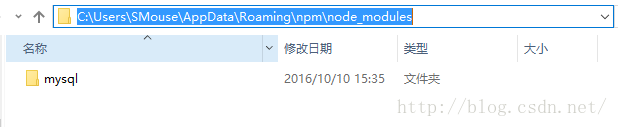
1. Execute command at any location: NPM install mysql-g. This module will appear in The directory C:\Users\SMouse\AppData\ NPM \ Node-Modules, as shown in the figure below
(Execute command)

(File location)
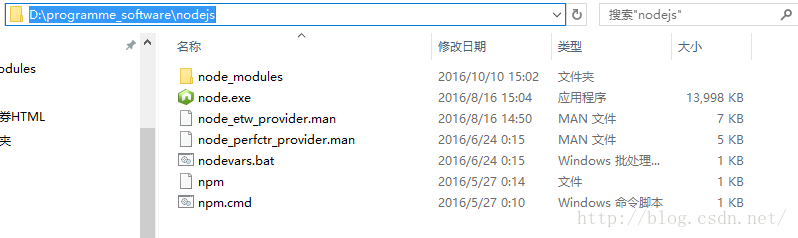
2. NPM install mysql in nodeJS installation directory. The ‘mysql’ module will be installed in the following node_modules
3. NPM install mysql in the project code, and the ‘mysql’ module will be installed in the following Node_modules (one will be automatically generated without this file).
(The following node_modules is where the modules are in my project. The rest of the files are code for various projects.)
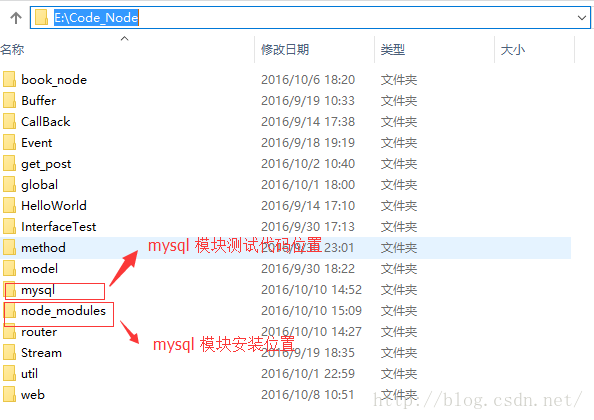

mysql directory has a mysql. Js test code as follows:
var mysql = require(‘mysql’);

:
At first I thought I was going to put all the modules in nodejs in the node_modules directory. If the project code is on disk, it is ok, but if NodeJS is installed on disk D and the project code is on disk E, then the module is not referenced. C:\Users\SMouse\AppData\ NPM \ Node-Modules Path is the same.
The following three steps occur when a custom module (non-core module) is referenced in Node
1. Path analysis
2. File positioning
3. Compile and execute
The path analysis is carried out in the following way:
1) Node_modules in the current directory,
2) Node_modules in the parent directory;
3) Node_modules in the parent directory;
4) Recurse step by step until node_modules in the root directory.
If the module referenced in the code is not found in any of these directories, an error is reported: Cannot find Module ‘mysql’

— — — — — — — — — — — — — — — — — — — — —
the author: SMouse fish bones
source: CSDN
,
https://blog.csdn.net/fouglelove/article/details/52778021 copyright statement: this article original articles for bloggers, reproduced please attach link to blog!
Solve syntax error: unexpected end of file or /bin/bash^m: bad interpeneter: no match file or directory

We create shell script files on Windows and upload them to Linux server. When executing shell scripts, the following errors will be reported if there is no accident:
Syntax Error: unexpected end of File or /bin/bash^M: bad Interpreter: No such file or directory

For example:
[root@sjk3 ~]# sh percona-xtradb-cluster-install. Sh
percona-xtradb-cluster-install. Sh: line 25: syntax error: unexpected end of file
or
Sh
-bash:./ percona-xtradb-cluster-install:./ percona-xtradb-cluster.sh: /bin/bash^M: bad interpreter: No such file or directory

When executing shell scripts, such errors are prompted mainly because shell script files are in DOS format, where each line ends with \r\n and Unix format files end with \n.
Several ways to view a script file in DOS or Unix format:
Method 1
Vi filename or Vim filename opens the file, in DOS format, with a prompt at the bottom [DOS]

If it is in Unix format, there is no prompt at the bottom

Method 2
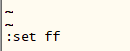
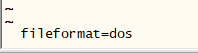
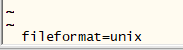
Vi filename or Vim filename opens the file and executes :set FF, enter. If the file is in DOS format, it will be displayed as FileFormat = DOS; if it is in Unix format, it will be displayed as FileFormat = Unix as shown in the figure below:
, enter
or
Methods 3
Cat -A filename can tell from the display that the DOS file ends with A line to the ^M$and the Unix file ends with A line of $

Solutions:
Method 1
Vi filename or Vim filename opens the file, executes: set FF = Unix setting the file as Unix, then executes: WQ, saving to Unix format.
Method 2
Use the sed command sed – I “s/\r//” filename or SED – I “s/^M//” filename to directly replace the terminators in Unix format.
(sed – I “s/\r//” filename is recommended, as sed – I “s/^M//” filename may become invalid)
 

Win10 install iTunes appears: “installation assembly microsoft.VC80 . CRT, tupe = Win32, version = 8.0.50727.6195 “…”

There is an error installing ITunes64setup.exe, “Install assembly Microsoft.vc80.crt, Tupe =” Win32 “, Version =”8.0.50727.6195″, publicKeytoken=” 1FC8b3B9A1e18e3B “, processorArchitecture=”x86”.
solution:
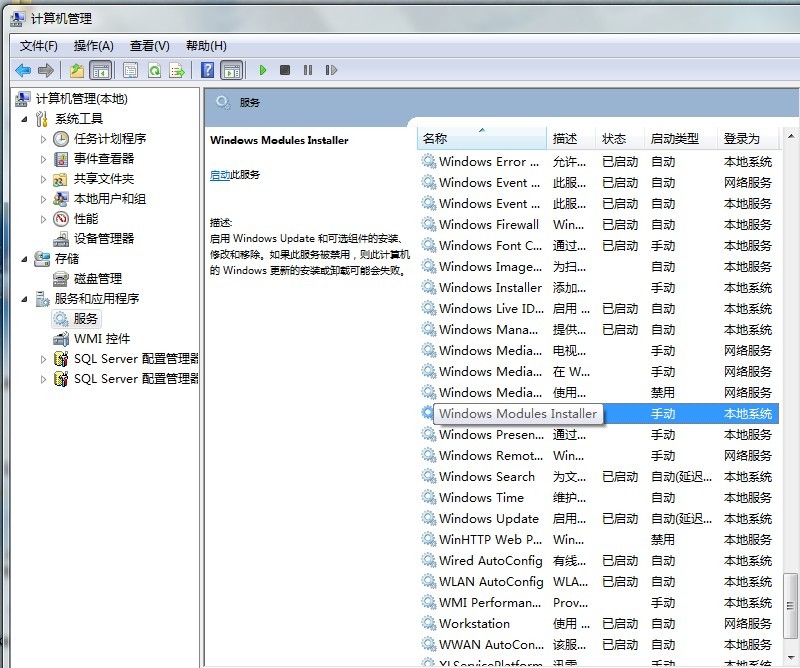
press Win+R to run, type services.msc, launch the service, find the Windows Module Installer, right-click, and choose start. If it starts successfully, try the installation again.

If the prompt “Windows Module Installer cannot start and the specified Module cannot be found” is a registry missing TrustedInstaller entry. You can check whether the registry has this or export it from the same WIN10 system if it does not. HKEY_LOCAL_MACHINE\SYSTEM\CurrentControlSet\services\TrustedInstaller
 
Before installing iTunes, you need to install the security update “Microsoft Visual C ++ 2005 Service Pack 1 Redistributable Component Pack ATL Security Update”. Download and install: Microsoft Visual C ++ 2005 Service Pack 1 redistributable Component Pack ATL security updates
 
If: Error 1935. Installation assembly Microsoft-vc80.atl,type=”win32″,version=”8.0.50727.762″
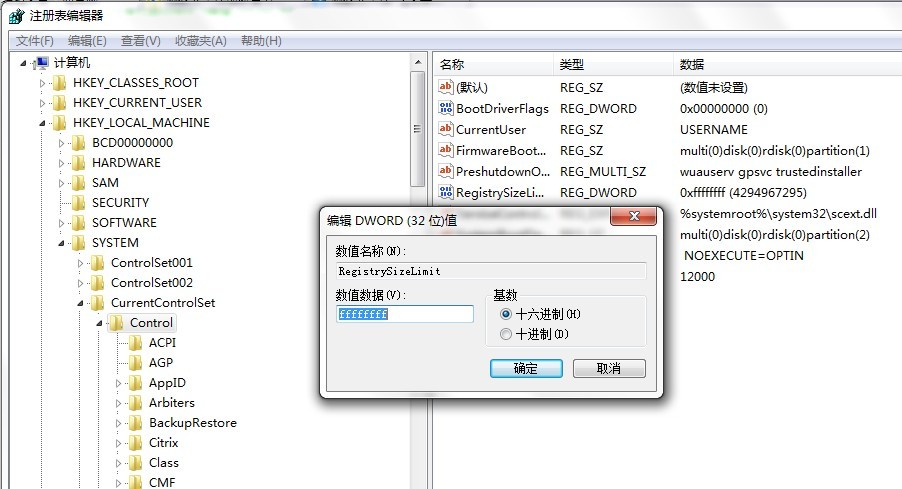
That’s because the previous installation of some software limited the size of the registry. The solution is to enter regedit into the registry in the start window. Find the HKEY_LOCAL_MACHINE \ System \ CurrentControlSet \ Control. Note that with Control selected, select the RegistrySiziT (REG_DWORD type) on the right and change the value to FFFFFFFF (base 10 is 4294967295) to start the Windows Module Installer after restarting the computer.

 
If you’ve installed a previous version of iTunes, make sure all iTunes launches are open before restarting.
This completes the installation.