Category Archives: How to Fix

Git solves pull origin error: the following untracked working tree files would be rewritten by merge

error: The following untracked working tree files would be overwritten by merge:

bin/AndroidManifest. XML

Please move or remove them before you can merge.

Aborting

scheme 1:

git clean-d-fx “”

one of them

x — deleting ignored files is no longer recognized by git

d — deletes files not added to git’s path

F — Forced operation
Scheme 2:

The following error occurred in git pull on the server today:
error: Your local changes to the following files would be overwritten by merge:
application/config/config. PHP
application/controllers/home. PHP
Please, commit your changes or stash them before you can merge.
Aborting
I do not know what causes the code conflict, the solution is as follows:
If you want to keep the changes made on the production server, simply incorporate the new configuration item:
git stash
git pull
git stash pop
You can then use Git diff-w + file names to verify that the code is automatically merged.
If you want to completely overwrite the local working version with files from the code base, do so as follows:
git reset –hard
git pull

Solution 3:

Problem 1: Fix GIT repositories that are out of sync
Appear today when performing git pull:

 
    [root@gitserver /data/work/www/rest/lib/Business/Inventory]# git pull  Enter passphrase for key '/root/.ssh/id_rsa':  Updating 70e8b93..a0f1a6c  error: Your local changes to the following files would be overwritten by merge:          rest/lib/Business/Inventory/ProductStatus.php  Please, commit your changes or stash them before you can merge.  Aborting 

The solution :
executes git checkout-f, and then pulls git checkout again

 
    [root@gitserver /data/work/www/rest/lib/Business/Inventory]# git checkout -f  Your branch is behind 'origin/master' by 2 commits, and can be fast-forwarded. 

When git pull is performed, it is ready:

 
    [root@gitserver /data/work/www/rest/lib/Business/Inventory]# git pull  Enter passphrase for key '/root/.ssh/id_rsa':  Updating 70e8b93..a0f1a6c  Fast-forward  rest/lib/Business/Inventory/ProductStatus.php |    1 +   1 files changed, 1 insertions(+), 0 deletions(-)   mode change 100644 => 100755 rest/lib/Business/Inventory/ProductStatus.php 

 
Second problem: the default location of Git Pull.
1. When Git is under the branch of master, the default remote is origin;
2. When using git pull under the master brach, specify remote and merge, use the default remote and merge.

but for your own project, and push to the remote server, there is no such thing, you need to configure yourself.
if you directly run git pull, you will get the following results:
Tips after executing Git Pull:

 
    $ git pull  Password:  You asked me to pull without telling me which branch you  want to merge with, and 'branch.master.merge' in your configuration file does not tell me, either. Please  specify which branch you want to use on the command line and try again (e.g. 'git pull <repository> <refspec>').  See git-pull(1) for details.     If you often merge with the same branch, you may want to use something like the following in your configuration file:     [branch "master"]   remote = <nickname>   merge = <remote-ref>     [remote "<nickname>"]   url = <url>   fetch = <refspec>     See git-config(1) for details. 

The solution is to configure git Config as follows.

 
    git remote add -f origin [email protected]:rest.git  git config branch.master.remote origin  git config branch.master.merge refs/heads/master 

Plan 3 from “ritto ‘s blog” blog, please be sure to keep this from http://ritto.blog.51cto.com/427838/741342

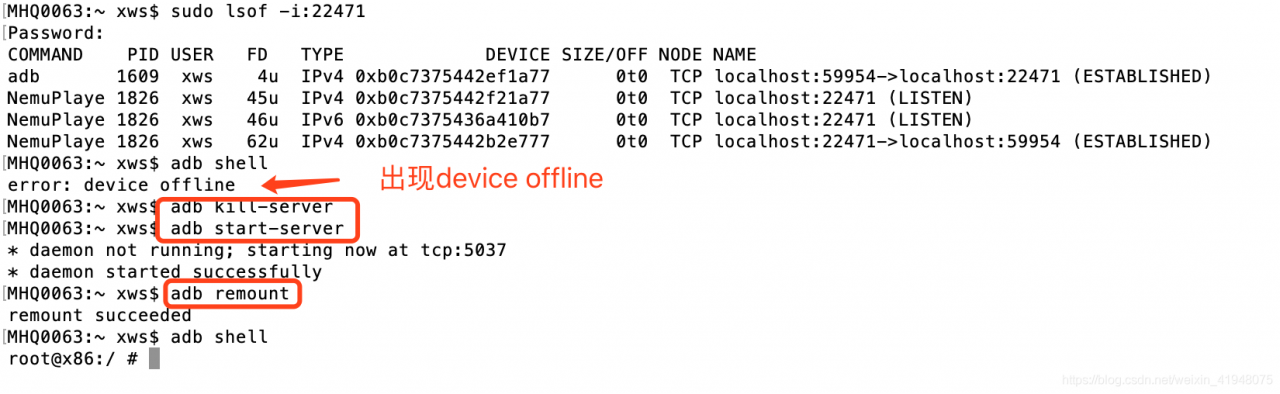
adb shell error: device offline [How to Solve]

How to Solve error: error: device offline

Today I used a terminal command to connect to the NetEase mumu emulator, and when I tried to access the emulator’s files after connecting, I got an error: device offline when executing the adb shell command

Solution:

adb kill-server
adb start-server
adb remount


This error has been successfully resolved

Compile error: invalid storage class

There was a weird compilation error yesterday that I hadn’t seen before, and the code flow didn’t seem to have much of a quirk. Later unbearable, Baidu, found that others have encountered this mistake, his solution is: less “} “.

hey, I started tracking every function and finally found this place. That’s right. Just because there’s a “} “missing. So be careful, be careful. Here’s what happens after make:

xxxxx.c:100: error: invalid storage class for function’xxxxxxx’

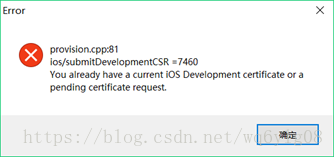
Electra Cydia impactor jailbreak error resolution: provision cpp:81 You already have a current iOS Development certificate

Normal Electra escape steps:
 
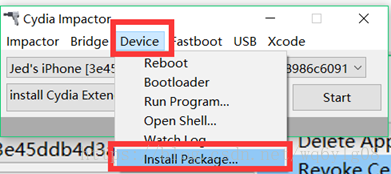
1. Be sure to manually import the Electra installation package in Cydia Impactor

2. Enter your Apple ID and password and always confirm
 
Error BUG:
1.Provision cpp:81 You already have a current iOS Development certificate

 
Solutions:
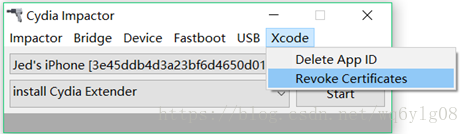
(1) Download the old version of Cydia Impactor (0.9.43) to Revoke Certification (because the new version (0.9.44) to Revoke Certification),
Click Revoke Certification and enter the Apple ID and password that failed the last time, and finally you’ll be notified that it succeeded

Windows of the old version of Cydia Impactor (0.9.43) download address: https://cache.saurik.com/impactor/win/Impactor_0.9.43.zip
(2) Unplug and reconnect the iPhone/iPad data cable (note: this step should not be omitted; otherwise, the error will still be reported :81)
(3) Switch back to the latest CydiaImpactor (0.9.44) to jailbreak (that is, repeat the normal Electra jailbreak step above) and you will succeed this time
 

Apache [error] server reached MaxClients setting, consider raising the MaxClients setting

Recently, a company customer reported a problem with an error message in the Apache log /var/log/ HTTPD /error_log file after running for a while

[Fri Jul 29 15:45:37 2016] [error] server reached MaxClients setting, consider raising the MaxClients setting

I checked that this was due to the number of concurrent links. Later, I checked the Apache documentation and found that I could modify the Apache configuration file
The/etc/HTTPD/conf/HTTPD. Conf the MaxClients parameter to adjust.
In adjusting the first thing to check before running apache is a kind of mode is prefork or worker, use “/ usr/sbin/HTTPD -l” command to check, after checking out what kind of pattern, you can find the/etc/HTTPD/conf/HTTPD. Corresponding to the configuration of the part to modify the conf.

# httpd -l
Compiled in modules:
  core.c
  prefork.c
  http_core.c
  mod_so.c

Change the parameters and put them in

<IfModule prefork.c>  
StartServers       8  
MinSpareServers    5  
MaxSpareServers   20  
ServerLimit      256  
MaxClients       256  
MaxRequestsPerChild  4000  
</IfModule> 

Modified to

<IfModule prefork.c>  
StartServers     8  
MinSpareServers  5  
MaxSpareServers  20  
ServerLimit     1024  
MaxClients      1024  
MaxRequestsPerChild  50  
</IfModule>

Then restart Apache “Service HTTPD Restart”.
The meaning of parameters is explained in detail in the Apache configuration, as follows:

# prefork MPM  
# StartServers: number of server processes to start  
# MinSpareServers: minimum number of server processes which are kept spare  
# MaxSpareServers: maximum number of server processes which are kept spare  
# ServerLimit: maximum value for MaxClients for the lifetime of the server  
# MaxClients: maximum number of server processes allowed to start  
# MaxRequestsPerChild: maximum number of requests a server process serves  
# worker MPM  
# StartServers: initial number of server processes to start  
# MaxClients: maximum number of simultaneous client connections  
# MinSpareThreads: minimum number of worker threads which are kept spare  
# MaxSpareThreads: maximum number of worker threads which are kept spare  
# ThreadsPerChild: constant number of worker threads in each server process  
# MaxRequestsPerChild: maximum number of requests a server process serves  

About MySQL error: subquery returns more than 1 row

Report: SQLSTATE[21000]: Cardinality cheesecake: 1242 Subquery returns more than 1 row
error means that the sub-query results are less than one row. The error is as follows:

Select * from table1 where table1. Colums =(select columns from table2); Take this SQL statement as an example.

1) if you are writing duplicates, remove the duplicates. When writing, you can add a logical decision (PHP) or a foreign key (mysql) to prevent the data from being written repeatedly.
(in my actual development, I encountered the situation of repeatedly writing data, I found the same two data in the database, which is not consistent with the original business requirements)
2) add limit 1 in the sub-query condition statement, find a qualified one can be
select * from table1 where table1. Colums =(select columns from table2 limit 1);

ISDEV : fatal error -6109: Internal build error

To use InstallShield2015 Premier and installshields to shields up to the last occurrence of “ISDEV: Fatal error-6109: Internal build error”.

But create a new project and drag a few files into the project without prompting
Step by step, the problem was found that all files in the project with error-1069 prompt were deleted, and the prompt disappeared
Later, I added DLLS that were not dependent on other libraries to the project first, and then added DLLS that were dependent on other libraries. After several rounds of adjustment, it was normal at last
InstallShield has all these years of products have this problem

supplement:
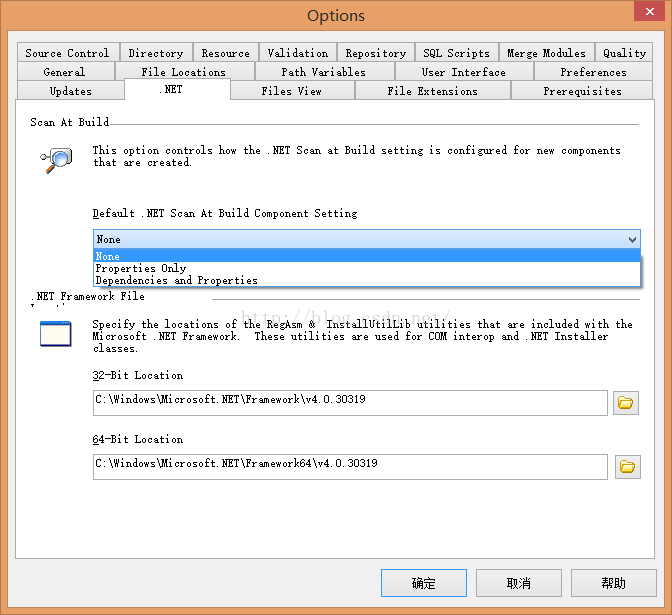
later I will Options -> .NET -> In default.net Scan At Build Component Setting, the option is changed to None, (as shown in the figure below)
delete all files in the project again, add them again, and Build again. is OK

An error occurred during the installation of assembly ‘Microsoft.VC80.CRT,version=”8.0.50727.42″,typ

An error occurred during the installation of the assembly ‘Microsoft. VC80. CRT, version = “8.0.50727.42” type = “win32” processorArchitecture = “x86, publicKeyToken =” 1 “fc8b3b9a1e18e3b’. Both Please refer to the Help and
this problem occurred when I was installing database 2012 for others. After some searching and thinking, the problem was solved.
* the problem said that a version of Microsoft.Vc80 was missing, after I solved the problem, I realized that this thing is a vs c++ configuration environment, I do not know why, you do not have this thing in your computer, so when installing the problem will pop up this problem. Simply download the widget, run it and install it.
it’s the software link:
link: https://pan.baidu.com/s/1PqE8SN6GOWIhvJkfZtdi0A
extraction code: owfc
copy this paragraph after open the baidu network backup phone App, operation more convenient oh
if you have any questions, welcome evaluation!

vector length_error

Reserve Length error’ STD ::length_error’ What (): Vector ::_M_fill_insert
The reason is that the reserved length (resize() parameter of the vector function) is incorrect.
Such as:
Examples in the c++ reference documentation.

// length_error example
#include <iostream>       // std::cerr
#include <stdexcept>      // std::length_error
#include <vector>         // std::vector

int main (void) {
  try {
    // vector throws a length_error if resized above max_size
    std::vector<int> myvector;
    myvector.resize(myvector.max_size()+1);
  }
  catch (const std::length_error& le) {
	  std::cerr << "Length error: " << le.what() << '\n';
  }
  return 0;
}

is resize assigns the maximum length +1,
there are V.r esize (n.) not sure, but n (code appear the error, not for n assignment, all can sometimes run, sometimes when n is negative)
references: cplusplus.com/reference/stdexcept/length_error/


Node error: spawn eacces

@ XXX XXX – All – Series: ~/projects/mobile/mobile/hiteplay $ gulp serve
[13:22:16] Using gulpfile ~/projects/mobile/mobile/hiteplay/gulpfile js
[13:22:16] Starting ‘scripts’…

/home/XXX/projects/mobile/mobile/hiteplay/SRC/app/main/main controller. The js
line 7 col 6 This character may get silently does by one or More browsers.
line 8 col 23 ‘mainctrl was 2 before it was defined.

2 warnings

/home/XXX/projects/mobile/mobile/hiteplay/SRC/app/services/ExampleService js
line 30 col 11 ‘the console is not defined.
line 33 col 11 ‘the console is not defined.

2 warnings

/home/XXX/projects/mobile/mobile/hiteplay/SRC/app/Settings/settingsController js
line 13 col 48 ‘$scope is defined but never informs.

1 warning

[13:22:16] all files 5.39 kB
[13:22:16] Finished ‘scripts’ after 234 ms
[13:22:16] Starting ‘inject’…
[13:22:16] gulp-inject 1 files into index.html.
[13:22:16] gulp-inject 13 files into index.html.
[13:22:16] Finished ‘inject’ after 129 ms
[13:22:16] Starting ‘watch’…
[13:22:17] Finished ‘watch’ after 19 ms
[13:22:17] Starting ‘serve’…
[13:22:17] Finished ‘serve’ after 18 ms
[BS] [BrowserSync SPA] Running…
(BS) Access URLs:
— — — — — — — — — — — — — — — — — — — — — — — — — — — — — — — — — — — — — — —
Local: http://localhost:3000/
External: http://192.168.5.136:3000/
— — — — — — — — — — — — — — — — — — — — — — — — — — — — — — — — — — — — — — —
UI: http://localhost:3001
External UI: http://192.168.5.136:3001
— — — — — — — — — — — — — — — — — — — — — — — — — — — — — — — — — — — — — — —
(BS) Serving files from: .tmp/serve
[BS] Serving files from: SRC
child_process.js:1162
throw errnoException(err, ‘spawn’);
^
the Error: Spawn EACCES
at exports. _errnoException (util. Js: 746:11)
at ChildProcess. Spawn (child_process. Js: 1162:11)
at the Object. Exports. The spawn (child_process. Js: 995:9)
at the module. The exports (/ home/XXX/projects/mobile/mobile/hiteplay/node_modules/browser – sync/node_modules/opn/index, js: 58:24)
at the Object. The utils. Open (/ home/XXX/projects/mobile/mobile/hiteplay/node_modules/browser – sync/lib/utils. Js: 227-9)
at the Object. The utils. OpenBrowser (/ home/XXX/projects/mobile/mobile/hiteplay/node_modules/browser – sync/lib/utils. Js: 217-23)
at EventEmitter. Events. Service: running (/ home/XXX/projects/mobile/mobile/hiteplay/node_modules/browser – sync/lib/internal – events. Js:) it is
at EventEmitter. Emit (events. Js: 129:20)
at/home/XXX/projects/mobile/mobile/hiteplay/node_modules/browser – sync/lib/browser – sync. Js: 244:19
the at/home/XXX/projects/mobile/mobile/hiteplay/node_modules/browser – sync/node_modules/async for-each – series/index. Js: double-break

access problem solution: sudo chmod + x a hiteplay

Sudo Chmod-r a+ RW/samples-Generator has personally tested the correct 1/2/18