Category Archives: How to Fix

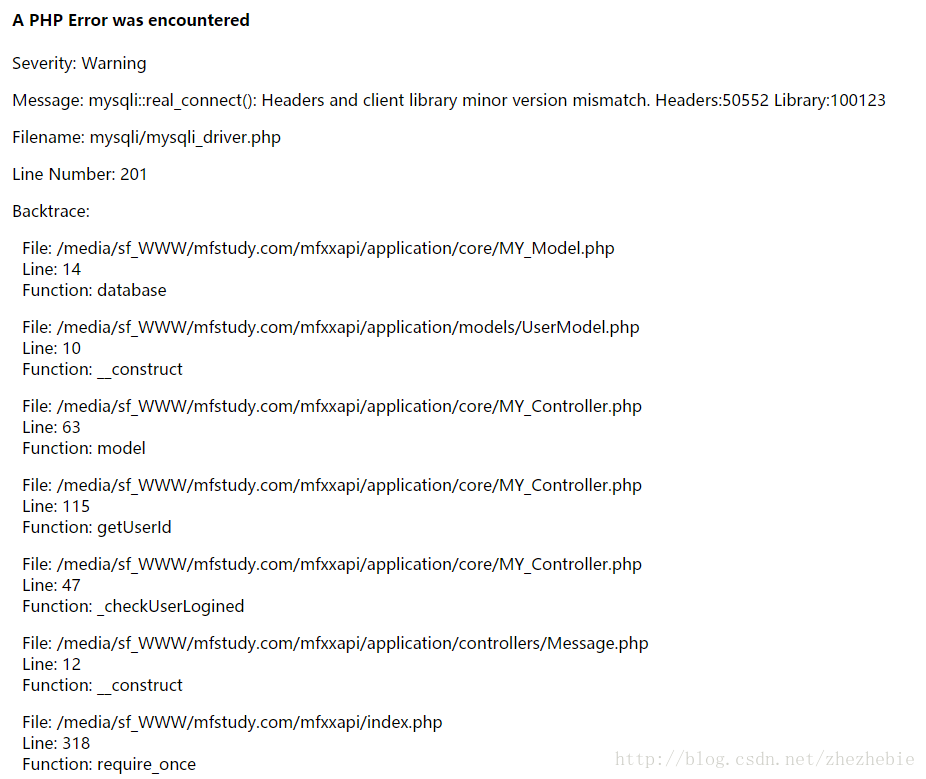
A PHP Error was encountered Severity: Warning Message: mysqli::real_connect(): Headers and client

When I upgraded MySQL, the PHP linked database reported an error. After checking the data, I found that the MySQL version was changed, which was inconsistent with the previously compiled version, so the error was reported. The solution was to recompile mySQLND, my MySQL and PHP installed by YUM were very simple.

killall php-fpm
yum remove php70w-mysql
yum install php70w-mysqlnd

After installation, just restart PHP-FPM!

Error Code: 1055. Expression #2 of SELECT list is not in GROUP BY clause and contains nonaggregated

SQL92 and earlier versions do not allow the selection of lists, HAVING condition or ORDER BY list references unnamed non-grouped columns in the GROUP BY clause. For example, in standard SQL92, this query is illegal because columns that are not listed in the name selection list do not appear in the GROUP BY :

 
    SELECT o.custid, c.name, MAX(o.payment) FROM orders AS o, customers AS c WHERE o.custid = c.custid GROUP BY o.custid;

For the query in SQL92 to be valid, the name column must be omitted from the selection list or named in the GROUP BY clause.
SQL99 later allows for every optional function, T301, and so nonaggregates, if they are funcally dependent on GROUP BY column: if there is such a relationship between name, and custid, the query is legal. This is the case, for example, is custid the main key customers.
MySQL 5.7.5 or above function dependency detection function. If ONLY_FULL_GROUP_BY is enabled for SQL mode (BY default), MySQL rejects the list of options, HAVING conditions or the ORDER BY list references a subset that neither specifies the GROUP BY non-collection column, nor is it functionally dependent on them. (prior to 5.7.5, MySQL did not detect functional dependency, ONLY_FULL_GROUP_BY is not enabled by default). For a description of the behavior prior to 5.7.5, see the MySQL 5.6 Reference Manual.)
If ONLY_FULL_GROUP_BY is disabled, then the MySQL extension used BY standard SQL GROUP BY allows the selection of lists, HAVING conditions, or ORDER BY lists reference non-collection columns, even though the columns do not functionally depend on the GROUP BY columns. This causes MySQL to accept the previous query. In this case, the server is free to select any value in each group, so unless they are the same, the selected value is uncertain, which may not be what you want. In addition, the choice of the value for each group cannot be influenced BY adding a ORDER BY clause. The result set sorting occurs after the selected value, ORDER BY does not affect which value in each group the server selects. Disabling ONLY_FULL_GROUP_BY is useful primarily if you know that due to some attribute of the data each unnamed GROUP BY has the same value for each GROUP in each non-grouping column.
You can achieve the same effect without ONLY_FULL_GROUP_BY by referring to a non-grouped column using ANY_VALUE().
The following discussion illustrates functional dependencies, error messages when MySQL’s functions are not dependent, and the methods that cause MySQL to accept queries without functional dependencies.
This query may be ONLY_FULL_GROUP_BY is disabled because the column not listed in the address select list is not named in the GROUP BY clause:

SELECT name, address, MAX(age) FROM t GROUP BY name;

This query is valid if name is the primary key t or the only NOT NULL column. In this case, MySQL recognizes that the selected column is functionally dependent on the grouping column. For example, if name is the primary key, then the value is determined, address because each group has only one value of the primary key, so there is only one row. Therefore, there is no randomness in the selection of values in the address group, and there is no need to reject the query.
If name is NOT the primary key t or the only NOT NULL column, the query is invalid. In this case, functional relevance cannot be inferred and an error occurs:

 
    mysql> SELECT name, address, MAX(age) FROM t GROUP BY name; ERROR 1055 (42000): Expression #2 of SELECT list is not in GROUP BY clause and contains nonaggregated column 'mydb.t.address' which is not functionally dependent on columns in GROUP BY clause; this is incompatible with sql_mode=only_full_group_by

If you know, for a given data set, every name value actually uniquely identifies this address value, this address is functionally dependent name. To tell MySQL to accept a query, use the following ANY_VALUE() function:

SELECT name, ANY_VALUE(address), MAX(age) FROM t GROUP BY name;

Or, disable ONLY_FULL_GROUP_BY.
However, the above example is simple. In particular, you cannot group on a single primary key column because each group contains only one row. For additional examples of functional dependencies in more complex queries, see Section 12.19.4, “Functional dependency Detection.”
If the query has an aggregation function and no GROUP BY clause, it cannot have a non-collection column in the select list, HAVING condition, or the ORDER BY list ONLY_FULL_GROUP_BY :

 
    mysql> SELECT name, MAX(age) FROM t; ERROR 1140 (42000): In aggregated query without GROUP BY, expression #1 of SELECT list contains nonaggregated column 'mydb.t.name'; this is incompatible with sql_mode=only_full_group_by

There is no GROUP BY, there is a separate GROUP, and it is uncertain which name value is selected for the GROUP. Here also ANY_VALUE() can be used, if it is irrelevant, nameMySQL selects which value:

SELECT ANY_VALUE(name), MAX(age) FROM t;

ONLY_FULL_GROUP_BY also affects the handling of ORDER BY using a DISTINCT and queries in MySQL 5.7.5 or later. In the case of the table, t has three columns c1, c2 and c3 contain these rows:

c1 c2 c3
1  2  A
3  4  B
1  2  C

Suppose we execute the following query and expect the results to be sorted in the following order c3 :

SELECT DISTINCT c1, c2 FROM t ORDER BY c3;

To order results, you must first repeat. But to do that, should we keep the first row or the third row?This arbitrary choice affects the reserved value c3, which in turn affects the sorting and makes it arbitrary. To prevent this problem, if any expression does not meet at least one of the following criteria, the query with DISTINCT and ORDER BY is rejected is invalid ORDER BY :
The expression equals that all columns of the selected table referenced by an expression in the selection list and belonging to the query are elements of the selection list
Another MySQL extension of standard SQL allows alias expressions to be referenced in the HAVING clause in the select list. For example, the following query returns name values that occur only once in the table orders :

 
    SELECT name, COUNT(name) FROM orders GROUP BY name HAVING COUNT(name) = 1;

MySQL extension allows HAVING to use aliases in clauses of aggregated columns:

 
    SELECT name, COUNT(name) AS c FROM orders GROUP BY name HAVING c = 1;

Pay attention to
Prior to MySQL 5.7.5, enabling ONLY_FULL_GROUP_BY disables this extension, so you need HAVING to write this clause using an unused expression.

Standard SQL only allows column expressions in the GROUP BY clause, so such a statement is invalid because it FLOOR(value/100) is a non-column expression:

 
    SELECT id, FLOOR(value/100) FROM tbl_name GROUP BY id, FLOOR(value/100);

MySQL extends standard SQL to allow non-column expressions in the GROUP BY clause and treats the above statement as valid.
Standard SQL also does not allow aliases in the GROUP BY clause. MySQL extends standard SQL to allow aliases, so another way to write queries is as follows:

 
    SELECT id, FLOOR(value/100) AS val FROM tbl_name GROUP BY id, val;

The alias val in this clause is treated as the column expression GROUP BY.
When a non-column expression exists in the GROUP BY clause, MySQL recognizes the equality between that expression and the expression in the selection list. This means that when ONLY_FULL_GROUP_BY is enabled for the QL schema, the contained query GROUP BY id, FLOOR(value/100) is valid, because FLOOR() appears in the selection list with the same expression. MySQL, however, does not attempt to identify functional dependencies on non-GROUP BY column expression, so ONLY_FULL_GROUP_BY, even though the third selected expression is a simple formula for id column and FLOOR() expression in the clause, the following query is invalid GROUP BY :

 
    SELECT id, FLOOR(value/100), id+FLOOR(value/100) FROM tbl_name GROUP BY id, FLOOR(value/100);

The solution is to use derived tables:

 
    SELECT id, F, id+F FROM 0 (SELECT id, FLOOR(value/100) AS F1 2 3 4 FROM tbl_name5 6 7 8 GROUP BY id, FLOOR(value/100)) AS dt;9 0

1
Package pdftex.def Error: PDF mode expected, but DVI mode detected!_ mdpi_ Templatex compilation error in winedt

Use LaTeX to compile the following file types as follows:

\documentclass[journal,article,pdftex,10pt,a4paper]{IEEEtran}

Error as shown in the title appears:

Package pdftex.def Error: PDF mode expected, but DVI mode detected!(pdftex.def) If you are using `latex', then call `pdflatex'. }\@ehc

It is probably because of the difference between the compilation of latex and pdflatex. Using the mode of latex, the latter cannot be compiled.

The option pdftex is for use with pdfLaTeX. If eps figure are used, remove the option pdftex and use LaTeX and dvi2pdf.

In other words, eps(embedded PostScript) image documents should be used with latex mode, while pdftex will cause problems (the solution is to try to delete pdftex).
In addition, the same problem will occur when I see my net friends in the following usage:

\usepackage[pdftex]{graphicx}

The solution is to remove the [pdftex], the graphicx package will compile normally, but in the pdftex mode, it is better to convert the . Eps file into the . PDF file.
If you use commands such as \includegraphics{file} to load the display image file, the two modes mentioned above will automatically complete the extension of the filefile, and latex mode will be supplemented with file.eps. While pdftex will be completed as file.pdf (or file.png, file.jpg).

Dell server reported CPU 1 has an internal error (ierr)

Restart the server and press F2 to enter the BIOS, select the System BIOS Settings option, and select System Profiles to enter. Please disable the C1E and Cstate options here. Then shut down and completely power off. Long press the power on button for 20 seconds and then restart the server. Restart and solve the problem

Reproduced in: https://www.cnblogs.com/wanggege/p/4755120.html

Anaconda Jupiter notebook kernel error solution

1. First list the available kernel list,
2. Delete the original kernel;
3. Check if there is a kernel in ipython of Anaconda.
4. Reinstall kernel.
The specific orders are as follows:

$ jupyter kernelspec list
Available kernels:
python3 /home/miracode2033/anaconda3/share/jupyter/kernels/python3
$ rm -r /home/miracode2033/anaconda3/share/jupyter/kernels/python3
$ jupyter kernelspec list
Available kernels:
python3 /home/miracode2033/anaconda3/lib/python3.6/site-packages/ipykernel/resources
$ python -m ipykernel install --user
Installed kernelspec python3 in /home/miracode2033/.local/share/jupyter/kernels/python3
$


Windows encountered 1152 when installing software: error extracting files to the temporary location

Today met 1152: when installing the software Error extracting files to the temporary location Error. There are not too many relevant methods on Baidu. After solving the problem, I will sort out the methods to solve the problem. Hope to be of help to a friend who has the same problem.

if some “bad” temporary files are extracted from previous failed installations, the error of extracting the files to a temporary location usually occurs. Clean that folder and try again is the right way. This means that if you unzip a file into the same folder over and over again, it could cause problems, or corrupted files in the Windows temporary folder could be the problem. What you can do is :
1. Clear Windows temporary folder
2. Clear extract folder or use other location
3. Check folder permissions
4. Clear failed boot of program installation.
First, clear the Windows temporary folder

Windows provides a built-in tool to clean up temporary storage. You can use it to remove all bad or corrupted files that could have prevented the extraction of these files. Any installer can use the Windows temporary folder, so you’ll find lots of files in that location. Storage sense will clear other folders along with a temporary folder, but you can choose which one to clear last.
enter setting > System & gt; Storage & gt; Configure storage awareness or run immediately. If your storage space is low, this tool will also fix the problem.
can delete everything in the Windows temporary folder directly, but if any files are locked, they will not be deleted. Storage sense or disk cleanup tool or any other garbage file cleanup application will ensure that the problem is overridden.
Clear the extract folder or use another location
If you are unzipping the ZIP file into another folder and are receiving the same error, it is best to delete everything in it. Sometimes damage can result if the previous installation is not completed. You can also use different locations to extract the file and see if it works.
if it is possible that the temporary file location already has a bad copy from a previous installation, it is a good idea to redownload the program and try it.
Three, check the folder permissions

you will not be able to extract files into this folder when you temporarily lose access to it. If for some reason you lose access to the folder you are unzipping, it will fail. So here’s what you should do :
• right-click folder > Property
• switch to the Security TAB and check if you are listed under the user group. Select your username and check to see if you have read, write, and execute permissions.
• click the edit button, suggest removing all permissions, and then add again. It will make sure you get the right permissions in the end.
once completed, manually copy the file to the folder and delete the file to check if it is working.
Four, clear the program installation failed boot
If all else fails, the last resort is to use a clean boat. If the problem is caused by something other than storage space or a corrupted temporary file, it will be fixed here.

Mount error (22): invalid argument refer to the mount.cifs (8) manual page (

View samba version is 4:
[root@redhat_192.168.0.12 16:08:07 ~]# rpm-qa samba
samb-4.9.1-6. El7.x86_64
For a long time, baidu has been mount command plus various parameters, confirmed that the user and password are no problem, directory permission is also given, finally is to use the following method to solve.
Add the parameter SEC = NTLMSSP to the mount configuration of /etc/fstab as follows:
//hahaha.com/devops/MNT /dev/cifs username=kenji,password=123456, SEC = NTLMSSP,rw,_netdev 0 0
Then save the configuration and rerun mount -a, and the mount succeeds

If you want to open more than one program “pdc140.xxx”, the CL.EXE To write to the same. Pdb file, please use

Solution: Modify the project properties by right-clicking on the project –& GT; “Properties”
1. “C/C + +” — — & gt; “Routine” –& GT;” Debug information format set to C7 Compatible (/Z7)
2. “C/C + +” — — & gt; “Code Generation” –& GT; Enable String Pool “set to” Is (/GF)”
3. “Linker” –& GT; “Commissioning” –& GT; Set “yes (/DEBUG)”
to generate DEBUG information
And then you’re ready to compile.

ISLR reading notes (3) classification

Welcome to visit the personal homepage, the current traffic is too low, Baidu search can not say… Thank you for encouraging
reading notes. Instead of translating the full text, I plan to share the important knowledge points in the book with my own understanding, and attach the application of R language related functions at the end, as a summary of my recent learning in machine learning. If you don’t understand correctly, please correct me.

preface
ISLR, fully known as An Introduction to Statistical Learning with Applications in R, is a basic version of the Elements of Statistical Learning. The formula derivation in ISLR is not much, but mainly explains some commonly used methods in Statistical Learning and the application of relevant methods in R language. The ISLR doesn’t officially have the answers to the problem sets, but someone has created one, and you can learn from the ISLR answers
Chapter 4 Understanding
This chapter explains three methods of classification.
1. Logistic Regression(Logistic Regression)
2. Linear Discriminant Analysis
3. Quadratic Discriminant Analysis
The four categories are analyzed and compared one by one.
1.Logistic Regression
Formula:

The log (1 – p (x) p (x) = 0 + beta beta 1 x1 + beta 2 x2 +…

among them,

p(x)
Is the probability of belonging to a certain anomaly, is the final output,

Beta.
Is a parameter in Logistic Regression, and the optimal solution is generally obtained by the method of maximum likelihood. The general fitting curve is as follows:


Generally speaking, LOGICAL regression is suitable for the classification of two kinds of problems, and Discriminant Analysis is generally used for the classification of more than two kinds of problems.
2.Linear Discriminant Analysis
In fact, the discriminant method is to add the assumption that the model distribution follows the normal distribution on the basis of the original Bayesian theory. In the linear discriminant, it is assumed that the covariance of different variables is the same

The ellipse in the left figure is the normal distribution curve, and the boundary line intersected by two sides forms the classification boundary, while the real line in the right figure is the Bayesian estimation, which is the actual boundary line. It can be found that the accuracy of the linear discriminant method is still very good.
3.Quadratic Discriminant Analysis(Quadratic Discriminant)
The only difference between a quadratic discriminant and a linear discriminant is that you assume that the covariances of different variables are different, and that causes the dividing line to be curved on the graph, and you take the degrees of freedom from

p(p+1)/2
Increased to

Kp(p+1)/2
K is the number of variables. The effect of increased freedom can be seen in reading Notes (1).

The purple dotted line represents the actual boundary, the black dotted line represents the linear discriminant boundary, and the green solid line represents the quadratic discriminant boundary. It can be seen that the linear discriminant performs better when the boundary is linear; When the dividing line is nonlinear, the opposite is true.
4. To summarize
When the actual dividing line is linear, the linear discriminant performs better if the data is close to the normal distribution hypothesis, and the logistic regression performs better if the data is not close to the normal distribution hypothesis.
when the actual boundary line is nonlinear, the quadratic discriminant will be fitted. In other higher order or irregular cases, KNN performs well.
R language application
1. Import data and prepare

> library(ISLR)
> dim(Caravan)
[1] 5822   86
> attach(Caravan)
> summary(Purchase)
  No  Yes
5474  348

Since KNN is to be used later and distance is needed, the variables are normalized. The normalization program is just one sentence, and the normalization effect is shown in the following sentences.

> standardized.X = scale(Caravan[,-86])
> var(Caravan[,1])
[1] 165.0378
> var(Caravan[,2])
[1] 0.1647078
> var(standardized.X[,1])
[1] 1
> var(standardized.X[,2])
[1] 1

Establish test samples and training samples

> test = 1:1000
> train.X = standardized.X[-test,]
> test.X = standardized.X[test,]
> train.Y = Purchase[-test]
> test.Y = Purchase[test]

(c) Logistic Regression

> glm.fit = glm(Purchase~., data=Caravan, family = binomial, subset = -test)
Warning message:
glm.fit: fitted probabilities numerically 0 or 1 occurred
> glm.probs = predict(glm.fit, Caravan[test, ], type="response")
> glm.pred = rep("No", 1000)
> glm.pred[glm.probs>.5]="Yes"
> table(glm.pred, test.Y)
        test.Y
glm.pred  No Yes
     No  934  59
     Yes   7   0
> mean(glm.pred == test.Y)
[1] 0.934

3.Linear Discriminant Analysis

> library(MASS)
> lda.fit = lda(Purchase~.,data = Caravan, subset = -test)
> lda.pred = predict(lda.fit, Caravan[test,])
> lda.class = lda.pred$class
> table(lda.class, test.Y)
         test.Y
lda.class  No Yes
      No  933  55
      Yes   8   4
> mean(lda.class==test.Y)
[1] 0.937

4.Quadratic Discriminant Analysis(Quadratic Discriminant)

> qda.fit = qda(Purchase~.,data = Caravan, subset = -test)
Error in qda.default(x, grouping, ...) : rank deficiency in group Yes
> qda.fit = qda(Purchase~ABYSTAND+AINBOED,data = Caravan, subset = -test)

Found that direct training can cause errors… The two variables have been tried successfully. It seems that the dimension is too high, so far no solution has been found. Other applications are similar to LDA
5.KNN
parameter k can be selected by itself, and the input order of KNN function variables should be noted

> library(class)
> knn.pred = knn(train.X, test.X, train.Y,k=1)
> mean(test.Y==knn.pred)
[1] 0.882