Right-click on the vS2008 executable menu or shortcut property compatibility to remove the disabled Visual Theme marquee
Category Archives: How to Fix
Zip to decompress the jar package, like the add file in the jar package
1. A JAR is just a ZIP package that can be unzip, and the possible path of unzip files is exactly the same.
2. If the JAR package contains exactly the same file, the ZIP add will not be used and a zip error will be reported: zip file structure invalid
3. Add classes to a JAR package, such as classes from the compiled classes, go to the classes directory and use the command zip-r your. Jar./*
4. The FAT JAR packaged with assembly may not contain its own classes, so use the methods in 3 to ensure that the JAR contains its own classes
2. If the JAR package contains exactly the same file, the ZIP add will not be used and a zip error will be reported: zip file structure invalid
3. Add classes to a JAR package, such as classes from the compiled classes, go to the classes directory and use the command zip-r your. Jar./*
4. The FAT JAR packaged with assembly may not contain its own classes, so use the methods in 3 to ensure that the JAR contains its own classes
Solution of gitlab 502 problem I encountered
GitLab was configured on Ali Cloud today, but the error 502 error kept coming up.
502
GitLab is not responding.
Please contact your GitLab administrator if this problem persists.
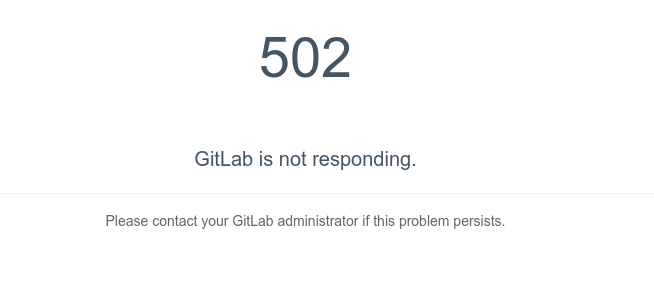
After searching for one afternoon, a mistake was finally found. It turned out that a Tomcat service was opened on the server and occupied port 8080, which made the Unicorn service of GitLab unable to be opened.
is finally modified as follows in /etc/gitlab/gitlab.rb
unicorn['port'] = 9090Then gitlab-ctl reconfigure restart the configuration so that the gitlab server is up and running.
Here, write down the general process of solving the problem, and count it as a good experience for yourself.
install GitLab, start service, 502 error found. This is the beginning of the search for solutions to various Baidu.
1. Find the /var/log/gitlab/nginx in the error log file, found the following error /var/opt/gitlab/gitlab - rails/sockets/gitlab socket failed (2: No such file or directory), and then use the nc command to create the socket file, the final permission is set to SRWXRWXRWX , users and groups are set to git:git, but found that this method does not work.
2. When I ran to the GitLab website to find a solution, https://gitlab.com/gitlab-org/omnibus-gitlab/blob/master/README.md
CTRL + f 502 find the official tutorial says 502 problems
Note that on a single-core server it may take up to a minute to restart Unicorn and Sidekiq. Your GitLab instance will give a 502 error until Unicorn is up again.
It is also possible to start, stop or restart individual components.
sudo gitlab-ctl restart sidekiq
Unicorn supports zero-downtime reloads. These can be triggered as follows:
sudo gitlab-ctl hup unicorn
Note that you cannot use a Unicorn reload to update the Ruby runtime.
Try using the above two commands and find that it doesn't work. When I got angry, I kept typing gitlab-ctl status until I found that unicorn pid was getting bigger all the time. The PID for the other services has not changed.
3. Now we've almost found the problem -- unicorn's question. For the official tutorial, you can use gitlab-ctl tail unicorn to track the unicorn's status. Unfortunately, when we discovered that port 8080 was occupied, the unicorn's status was reported to have been captured
E, [2015-02-11T17:27:57.818492 #26687] ERROR -- : adding listener failed addr=127.0.0.1:8080 (in use)
E, [2015-02-11T17:27:57.818621 #26687] ERROR -- : retrying in 0.5 seconds (4 tries left)
E, [2015-02-11T17:27:58.318902 #26687] ERROR -- : adding listener failed addr=127.0.0.1:8080 (in use)
E, [2015-02-11T17:27:58.318998 #26687] ERROR -- : retrying in 0.5 seconds (3 tries left)
E, [2015-02-11T17:27:58.819309 #26687] ERROR -- : adding listener failed addr=127.0.0.1:8080 (in use)
E, [2015-02-11T17:27:58.819423 #26687] ERROR -- : retrying in 0.5 seconds (2 tries left)
E, [2015-02-11T17:27:59.319954 #26687] ERROR -- : adding listener failed addr=127.0.0.1:8080 (in use)
E, [2015-02-11T17:27:59.320076 #26687] ERROR -- : retrying in 0.5 seconds (1 tries left)
4. Well, here's the problem. The choice then became whether to kill the original 8080 port service or to change the unicorn port. This depends on your specific needs. I've changed the unicorn port to 9090, and the method is the one described at the beginning.
Apache failed to start due to SSL library certificate has expired
1. Check the service log and see the following error from the /var/log/ HTTPD /nss_error_log file:
[Sat Aug 20 08:17:49 2016] [error] NSS_Initialize failed. Certificate database: /etc/httpd/alias.
[Sat Aug 20 08:17:49 2016] [error] SSL Library Error: -8038 SEC_ERROR_NOT_INITIALIZED
[Sat Aug 20 08:17:49 2016] [error] NSS_Initialize failed. Certificate database: /etc/httpd/alias.
[Sat Aug 20 08:17:49 2016] [error] SSL Library Error: -8038 SEC_ERROR_NOT_INITIALIZED
It says certificate problem. Check the certificate: Discovery time expired
“Certutil-d /etc/httpd/ Alia-L-n Server-CERT”
2. The default time of installation of the certificate is 4 years.
3. Treatment:
1. If you don’t need to use mod_nss module, that the/etc/HTTPD/conf. Directly to the d/NSS. The conf file renaming or deletion; 2. Do not verify certificate expiration time, add nssenforcidcerts off configuration in nss.conf;
3. Is to regenerate the new certificate; Be sure to delete the old certificate database file before generating a new certificate
CD/etc/HTTPD/alias
The rm -f *. The db
The/usr/sbin/gencert/etc/HTTPD/alias & gt; /etc/httpd/alias/install.log 2> & 1
Certutil-d /etc/httpd/ Alia-L-n Server-CERT
Chmod 750 *.db (because it operates under root, it generates permissions that are root permissions)
Restart the HTTPD
Reproduced in: https://www.cnblogs.com/Fle-x/articles/5789614.html
Typeerror in Python: ‘nonetype’ object is not Iterable
For example:
def contain():
        score = 4
        if score in num:
            return True,score;

num = [1,2,3,0]
iscontain,score = contain()
print iscontain,score
Results:
>>>

Traceback (most recent call last):
  File "D:\Program Files\python\chengxu\temp.py", line 8, in <module>
    iscontain,score = contain()
TypeError: 'NoneType' object is not iterable</span>
>>>
Note: When there is only an if condition and multiple variables are returned, an exception will occur if the if condition is not satisfied
Solution: Add an else statement
def contain():
        score = 4
        if score in num:
            return True,score;
        else:
            return False,score;
num = [1,2,3,0]
iscontain,score = contain()
print iscontain,score
Results:
>>>
False 4
Reference article:
http://blog.csdn.net/dataspark/article/details/9953225
IIS “Bad Request – Request Too Long. HTTP Error 400. The size of the request headers is too long.”
The size of The Request Headers is Too Long. If The length of The Request headers received in IIS7/7.5 exceeds 16K (The default value), an Error is raised.
I wrote a blog post about this problem (Bad Request-Request Too Long caused by statistics code of CNZZ). The reason for the problem is that the statistics code of third-party statistics service CNZZ writes a large number of cookies, which are carried when requested, resulting in the Request header length exceeding the limit.
I thought this was a problem only for Chrome, but then I got feedback from friends that it was also a problem for Firefox. So, to solve this problem, you have to start at the server end, and this article shares how to start at the server end.
where
According to The IIS forum post (HTTP 400. The size of The Request Headers is Too long), The 16K request header/request length limit is determined by two Parameters in the registry (HKEY_LOCAL_MACHINE\System\ Services\HTTP\Parameters) MaxFieldLength (request header) and MaxRequestBytes (request header and request body). So, you start with these two parameters.
Know your target
Through the Microsoft official documentation (http://support.microsoft.com/kb/820129) to learn more about MaxRequestBytes and MaxFieldLength:
MaxFieldLength – Sets an upper limit for each header.
Used to set the maximum number of bytes per request header (default 16K).
MaxRequestBytes – Determines the upper limit for the total size of the Request line and the headers.
Used to set the maximum total number of bytes between the request line (the body of the request) and the request header (16K by default).
How to start
Start by adjusting the values of MaxFieldLength and MaxRequestBytes (assuming 32K) to take effect.
Run regedit, go to HKEY_LOCAL_MACHINE\System\ Services\HTTP\Parameters,
1. Add an item of type DWORD(32-bit) with the name MaxFieldLength and the value decimal 32768;
2. Add items of type DWORD(32-bit), named MaxRequestBytes, value decimal 32768.
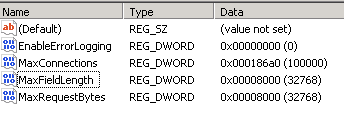
Ok, so how do we get them to work?The easiest thing to do is reboot, but the last thing you want to do with a server is reboot.
Fortunately, the solution to this problem is mentioned in the Official Microsoft documentation. You need to run four commands:
I wrote a blog post about this problem (Bad Request-Request Too Long caused by statistics code of CNZZ). The reason for the problem is that the statistics code of third-party statistics service CNZZ writes a large number of cookies, which are carried when requested, resulting in the Request header length exceeding the limit.
I thought this was a problem only for Chrome, but then I got feedback from friends that it was also a problem for Firefox. So, to solve this problem, you have to start at the server end, and this article shares how to start at the server end.
where
According to The IIS forum post (HTTP 400. The size of The Request Headers is Too long), The 16K request header/request length limit is determined by two Parameters in the registry (HKEY_LOCAL_MACHINE\System\ Services\HTTP\Parameters) MaxFieldLength (request header) and MaxRequestBytes (request header and request body). So, you start with these two parameters.
Know your target
Through the Microsoft official documentation (http://support.microsoft.com/kb/820129) to learn more about MaxRequestBytes and MaxFieldLength:
MaxFieldLength – Sets an upper limit for each header.
Used to set the maximum number of bytes per request header (default 16K).
MaxRequestBytes – Determines the upper limit for the total size of the Request line and the headers.
Used to set the maximum total number of bytes between the request line (the body of the request) and the request header (16K by default).
How to start
Start by adjusting the values of MaxFieldLength and MaxRequestBytes (assuming 32K) to take effect.
Run regedit, go to HKEY_LOCAL_MACHINE\System\ Services\HTTP\Parameters,
1. Add an item of type DWORD(32-bit) with the name MaxFieldLength and the value decimal 32768;
2. Add items of type DWORD(32-bit), named MaxRequestBytes, value decimal 32768.
Ok, so how do we get them to work?The easiest thing to do is reboot, but the last thing you want to do with a server is reboot.
Fortunately, the solution to this problem is mentioned in the Official Microsoft documentation. You need to run four commands:
Net stop HTTP
net start HTTP
net stop iisadmin /y
net start servicename
But the third command, NET Stop iISadmin, will disable all services related to IIS, and the fourth command will start all services related to IIS one by one.
Although there is no need to restart the server, I don’t like the solution of these four commands… I couldn’t find a better solution on the Internet…
Then, by trial and error, I found an even simpler method that required only three commands:
net stop http
net start http
iisreset
This method has been validated in practice on the server.
SSIS Error Code DTS_E_OLEDB_EXCEL_NOT_SUPPORTED
The following errors occurred when importing data from the database to Excel using SSIS:
SSIS Error Code DTS_E_OLEDB_EXCEL_NOT_SUPPORTED: The Excel Connection Manager is not supported in the 64-bit version of SSIS, as no OLE DB provider is available.
This is because the machine is 64-bit and there is no 64-bit OLE DB Provider.
Solution: Select Properties from the Project menu and Degugging on the left to set the Run64BitRuntime property to False. Then Execute Package, succeed.
Reference link: http://wenku.it168.com/d_000602554.shtml
SSIS Error Code DTS_E_OLEDB_EXCEL_NOT_SUPPORTED: The Excel Connection Manager is not supported in the 64-bit version of SSIS, as no OLE DB provider is available.
This is because the machine is 64-bit and there is no 64-bit OLE DB Provider.
Solution: Select Properties from the Project menu and Degugging on the left to set the Run64BitRuntime property to False. Then Execute Package, succeed.
Reference link: http://wenku.it168.com/d_000602554.shtml
Excel VBA: cell error value
The cell error value can be inserted into the cell, or the CVErr function can be used to test whether the cell value is an error value. The cell error value can be one of the following XlCVError constants.
| constant | error number | cell error values |
|---|---|---|
| xlErrDiv0 | 2007 | 0 # DIV /! |
| xlErrNA | 2042 | #N/A |
| xlErrName | 2029 | #NAME? |
| xlErrNull | 2000 | #NULL! |
| xlErrNum | 2036 | #NUM! |
| xlErrRef | 2023 | #REF! |
| xlErrValue | 2015 | #VALUE! |
Excel VBA tutorial: Cell error values · Examples
This example inserts seven cell error values into the A1:A7 cell area of Sheet1.
myArray = Array(xlErrDiv0, xlErrNA, xlErrName, xlErrNull, _
    xlErrNum, xlErrRef, xlErrValue)
For i = 1 To 7
    Worksheets("Sheet1").Cells(i, 1).Value = CVErr(myArray(i - 1))
Next i
This example checks whether the active cell in Sheet1 contains a cell error value and, if so, displays a message. This example serves as a model structure for error handlers for cell error values.
Worksheets("Sheet1").Activate
If IsError(ActiveCell.Value) Then
    errval = ActiveCell.Value
    Select Case errval
        Case CVErr(xlErrDiv0)
            MsgBox "#DIV/0! error"
        Case CVErr(xlErrNA)
            MsgBox "#N/A error"
        Case CVErr(xlErrName)
            MsgBox "#NAME?error"
        Case CVErr(xlErrNull)
            MsgBox "#NULL! error"
        Case CVErr(xlErrNum)
            MsgBox "#NUM! error"
        Case CVErr(xlErrRef)
            MsgBox "#REF! error"
        Case CVErr(xlErrValue)
            MsgBox "#VALUE! error"
        Case Else
            MsgBox "This should never happen!!"
    End Select
End IfMySQL failed to add foreign key error 1452
MySQL failed to add foreign keys, error 1452
For example:
Two tables user table: User class table: Grade
Each user in the user table corresponds to a class ID, namely gradeId
Namely: The primary key of the User table gradeId is the Id in the Grade table
The user table is called the primary table and the Grade table is called the slave table
[SQL]
For example:
Two tables user table: User class table: Grade
Each user in the user table corresponds to a class ID, namely gradeId
Namely: The primary key of the User table gradeId is the Id in the Grade table
The user table is called the primary table and the Grade table is called the slave table
[SQL]
alter table user
Add Foreign Key (gradeId) References Grade (Id);
[error]
ERROR 1452 : Cannot add or update a child row: a foreign key constraint fails
“Why”
Some gradeId in the User table do not belong to the ID in the Grade table
【 Solution 】
Modify the data so that all gradeId in the User table belong to ids in the Grade table
Pxe-e51 “no DHCP or DHCP proxy offers received” error appears when PXE windows img under Linux client starts
1. Check whether the DHCP service is started
2. The MAC address and fixed IP of the client can be written into the file of /etc/dhcpd.conf similar to:
2. The MAC address and fixed IP of the client can be written into the file of /etc/dhcpd.conf similar to:
allow booting;
allow bootp;

option routers                  10.10.10.1;
option subnet-mask              255.255.255.0;
option domain-name              "company.com";
option domain-name-servers      10.10.10.1;

ddns-update-style ad-hoc;

subnet 10.10.10.0 netmask 255.255.255.0 {
        range dynamic-bootp 10.10.10.2 10.10.10.6;
        default-lease-time 21600;
        max-lease-time 43200;
	 filename "/pxelinux.0";
        next-server 10.10.10.1;

host client7 {
        ### NOTE: CHANGE THIS TO THE MALWARE CLIENT'S MAC ADDR
        hardware ethernet 00:0C:29:34:8A:4E;
        fixed-address 10.10.10.7;
}


# please don't delete this last squirrely brace.
}
Solve the make: * * [install recursive] error 1 problem
If you type make install, you may encounter a problem. How do you solve it?
Type Sudo make install to solve the problem.
(Let’s run the terminal directly under root in the future…)
Type Sudo make install to solve the problem.
(Let’s run the terminal directly under root in the future…)
Windows Visual C + + 2005 redistributable error 1935 solution
The reason: in the control panel, the wrong operation has deleted the vcredist_x86 2005
phenomenon: QQ2010 cannot be used, Nero 10 cannot be used, installation Arcgis10 failed!
solution, downloaded the vcredist_x86 sp1 installation on the Internet, the problem then appeared, the installation process is also very slow ~~~ finally appeared “Error 1935. PublicKeytoken =”1fc8b3b9a1e18e3b”,processirArchitecture=”x86″
phenomenon: QQ2010 cannot be used, Nero 10 cannot be used, installation Arcgis10 failed!
solution, downloaded the vcredist_x86 sp1 installation on the Internet, the problem then appeared, the installation process is also very slow ~~~ finally appeared “Error 1935. PublicKeytoken =”1fc8b3b9a1e18e3b”,processirArchitecture=”x86″
, it turned out that the Windows service “Windows Installer service” did not start properly.
solve “Windows Installer service” launch exception, “error 1450: system resources insufficient, unable to complete the requested service”,
After analysis and search, it was found that it was caused by the residual installation of Arcgis9.3. The main reason was that the registration space was limited
error modification method after installation of Arcgis9.3:
1, in the run enter regedit to open registry editor
2, find HKEY_LOCAL_MACHINE\System\CurrentControlSet\Control
3, change the RegistrySizeLimit (REG_DWORD type) value to FFFFFFFF (base 10 is 4294967295)
4, restart the computer
Start the “Windows Installer Service” again, OK
Run vcredist_x86 2005 SP1 as administrator again (be careful not to put it in the Chinese directory and clear the contents of the TEMP folder), OK
QQ, Nero, Arcgis and other software, due to the VCR caused by abnormal start, need to delete clean (use makeup removal software to clear the cache), and then install it is OK