Category Archives: How to Fix

Invalid DN syntax (34)

The following error message is prompted when checking that the LDAP service is working
ekanet@ESB-02:/tmp$ ldapsearch -x -LLL -b dc=esb,dc=com
Invalid DN syntax (34)
Additional information: invalid DN
Check the original Dapsearch-x-ll-b dc= ESB, DC = COM statement after an extra space

Command line inside more than a space, delete the space, query normal
ekanet@ESB-02:/tmp$ ldapsearch -x -LLL -b dc=esb,dc=com
dn: dc=esb,dc=com
objectClass: top
objectClass: dcObject
objectClass: organization
o: china
dc: esb

dn: cn=admin,dc=esb,dc=com
objectClass: simpleSecurityObject
objectClass: organizationalRole
cn: admin
description: LDAP administrator

dn: ou=Groups,dc=esb,dc=com
objectClass: organizationalUnit
ou: Groups
description: Container for Groups entries

dn: ou=Users,dc=esb,dc=com
objectClass: organizationalUnit
ou: Users
description: Container for Users entries

dn: uid=Michael,ou=Groups,dc=esb,dc=com
uid: Michael
objectClass: inetOrgPerson
mail: [email protected]
labeledURI: http://www.esb.com
sn: Sun
cn: Michael Sun

dn: uid=Test,ou=Users,dc=esb,dc=com
uid: Test
objectClass: inetOrgPerson
labeledURI: http://www.esb.com
sn: ESB
cn: Test ESB

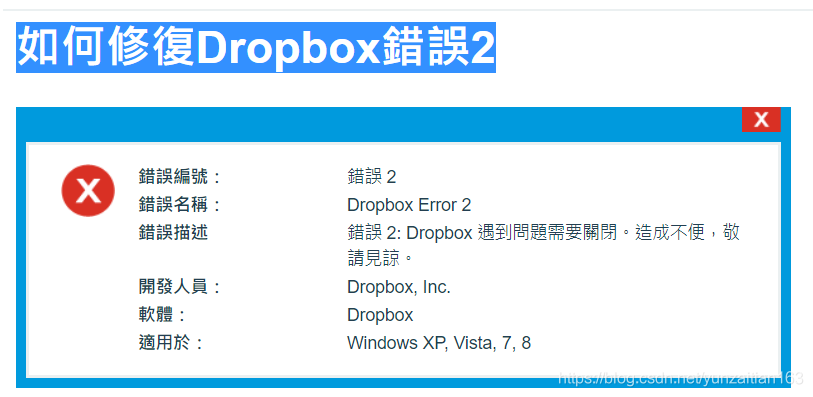
Error box (2)


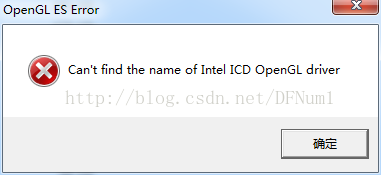
I have been searching for a long time for my newly bought laptop, dropbox has not been installed, and I have tried many methods, but all of them are not successful!
One way to try it is to download the offline dropbox installer, and it doesn’t work!
Alternatively, install an earlier version of the Dropbox installer, which some say might work!
 
Finally, the problem I found was the system driver. After I reinstalled various drivers with the master 360 driver, after a restart,
Amazingly, Dropbox is finally installed!

React Error: Minified React error #119

Error: Minified React error #119; visit http://facebook.github.io/react/docs/error-decoder.html?invariant=119 for the full message or use the non-minified dev environment for full errors and additional helpful warnings.

According to the console print, we can visit
http://facebook.github.io/react/docs/error-decoder.html?The page invariant=119 gets the following message:

The full text of the error you just encountered is:
addComponentAsRefTo(...): Only a ReactOwner can have refs. You might be adding a ref to a component that was not created inside a component's `render` method, or you have multiple copies of React loaded (details: https://fb.me/react-refs-must-have-owner).

Then check to see if the component in question USES the ref attribute outside of the render method. The problem I’m reporting here is the unexpected use of the ref attribute outside of the render method in the body center component of the create dialog.
debugging is hard, I have to say.
I hope I can help you.

MySQL error 1205 (HY000): lock wait timeout exceeded; try restarting transaction


after querying the current thread, it was found that multiple threads were running at the same time…

to view all currently running transactions:

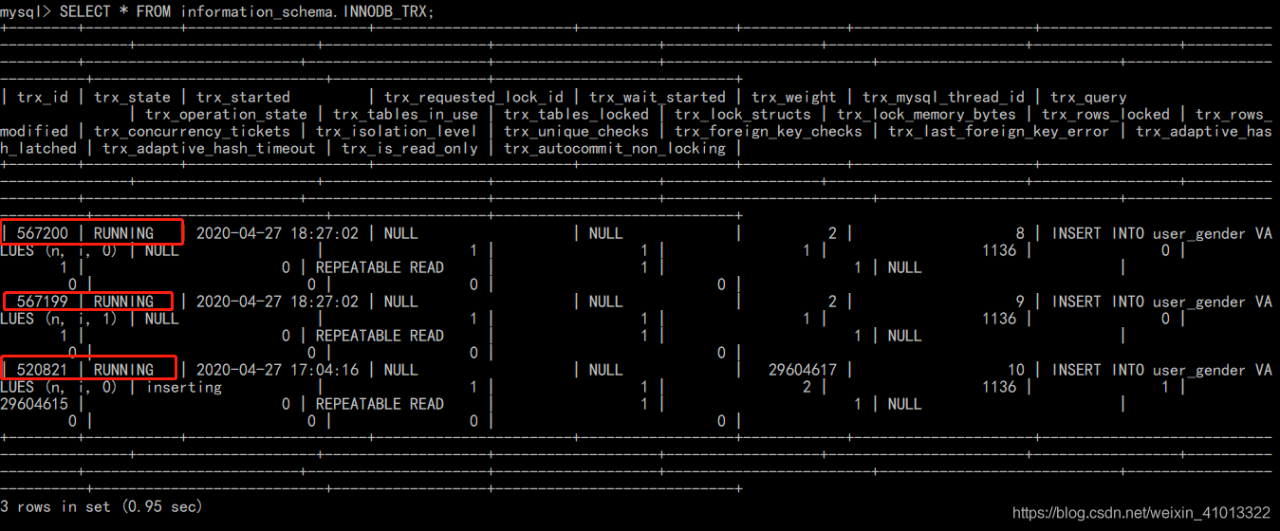
SELECT * FROM information_schema.INNODB_TRX;


you can find three transactions all running at the same time… So you can find the direct cause of the error reported by the shopkeeper here is:
before the stored procedure (which opened the transaction) ran for half a day, MySQL was manually closed without any response… Didn’t make it commit… And the subsequent deletion of data in the same transaction creates a transaction lock…
The fundamental reason is that MySQL USES the Innodb engine by default, and the default parameter of Innodb: innodb_lock_wait_timeout, which sets the maximum time for transactions to wait for acquiring resources (default 50s). Once the maximum time is exceeded, it will report errors such as questions without obtaining resources.
Well, now that the cause of the error has been identified, there are three solutions:
Find the thread of the current transaction, kill the thread; Enlarge this parameter: innodb_lock_wait_TIMEOUT wait time; Optimize stored procedures.
Here the shopkeeper takes the first approach, killing the redundant threads and then checking all the currently running transactions again:

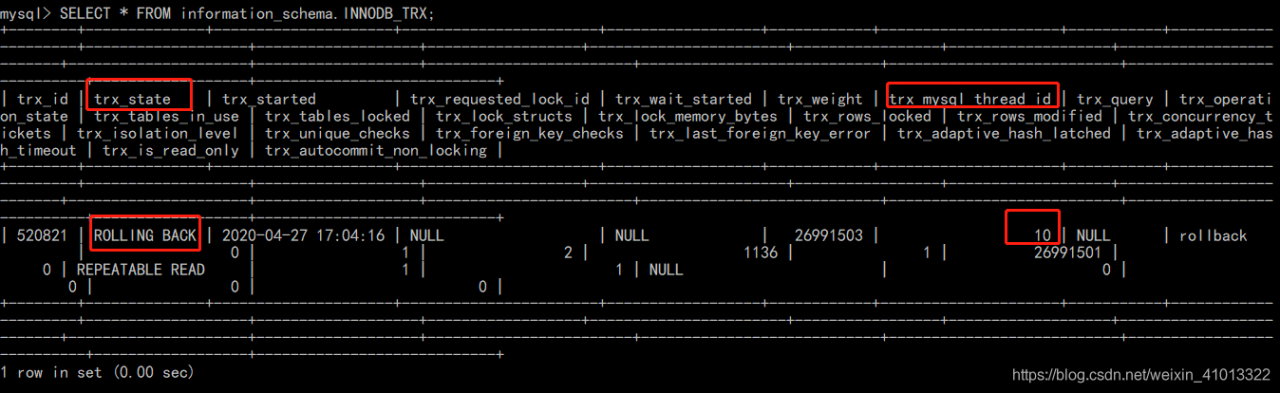
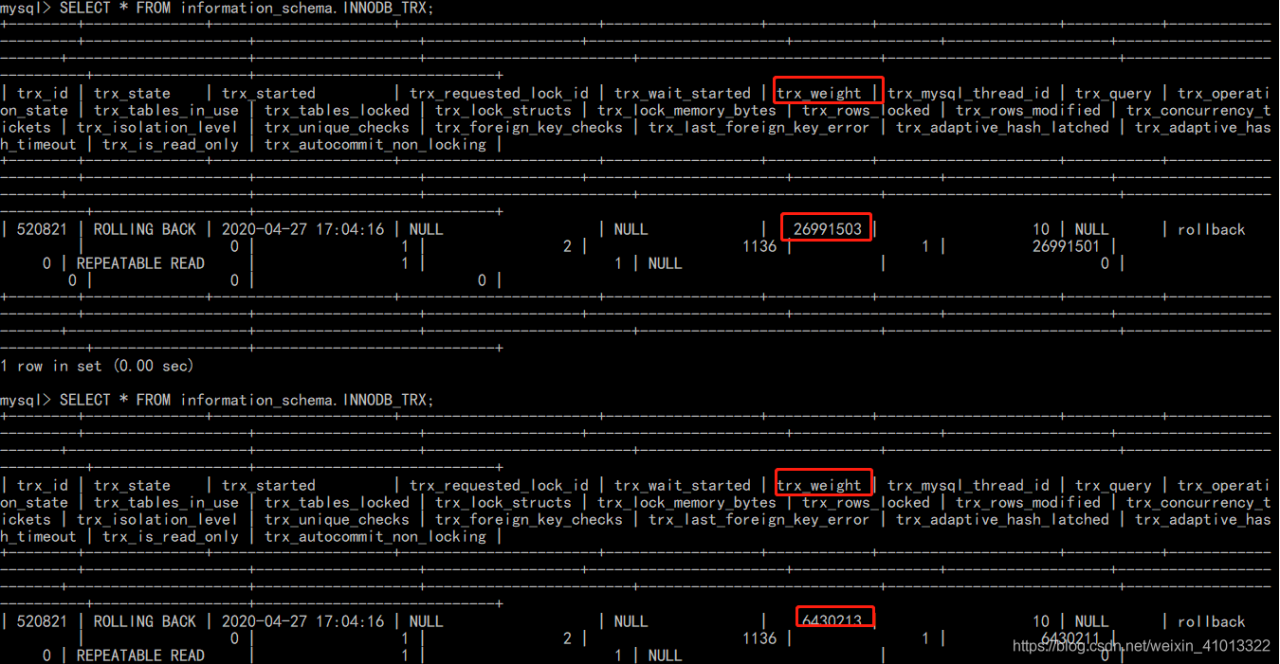
find something strange?The killed thread Number 10 is still working??Its current state is “ROLLING BACK,” which means that the transaction that was killed a while ago has been in a rollback state. So the shopkeeper continued to look up materials and found that such a situation occurred because although the kill command was triggered, it took a long time to terminate the kill logic, and it was also affected by IO resources. Therefore, rollback occurred even though the kill was executed.
Solutions:
One is to wait for it to roll back; Another is to restart the MySQL, but restart MySQL, the transaction will roll back, so in general is actually etc. It can be rolled back end 😂!

waited for about seven or eight minutes before everything was cleared, and all transactions were over:

and then delete again:

Origin — draw the curve with error bar

The article directories
1. Import data; 2. Set error column; 3

+====================================================================================================================================+

1. Import data
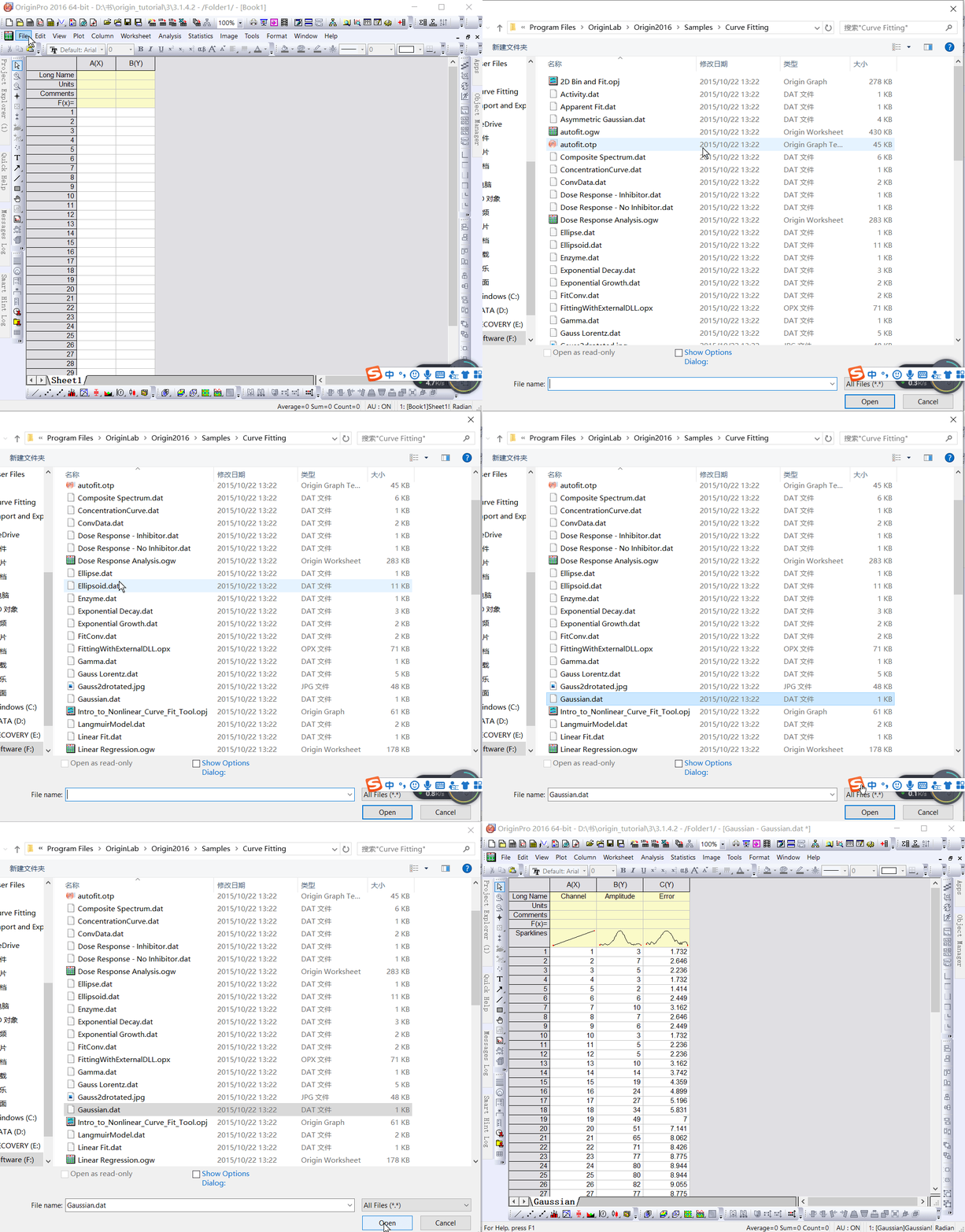
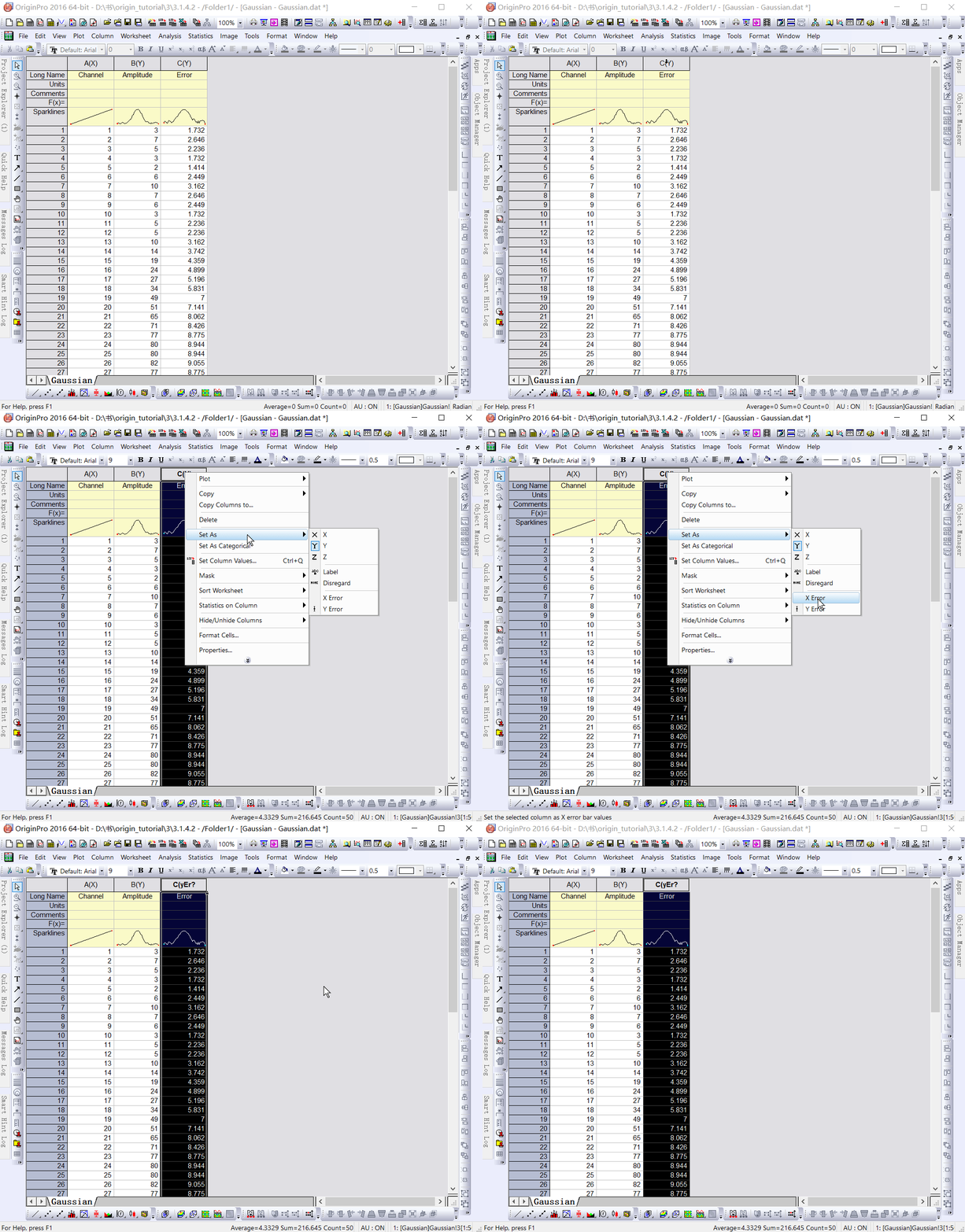
Select “File: Import: Single ASCII” to Open the “Open” dialog box. Browse \Samples\Curve Fitting subfolder. Highlight the file Gauss.dat and click the “Open” button to import the data into the original worksheet.

2. Set the error column
When imported, Sparklines automatically draws, allowing you to quickly see the shape of the data; The worksheet name will become the name of the file; Add a column to the worksheet as needed. As you can see from the Long Name, column 3 represents the data error. To Set this column to an Error column, click the column header to highlight it, right-click to bring up the pop-up menu, and then select “Set As: Y Error.

3. Draw images
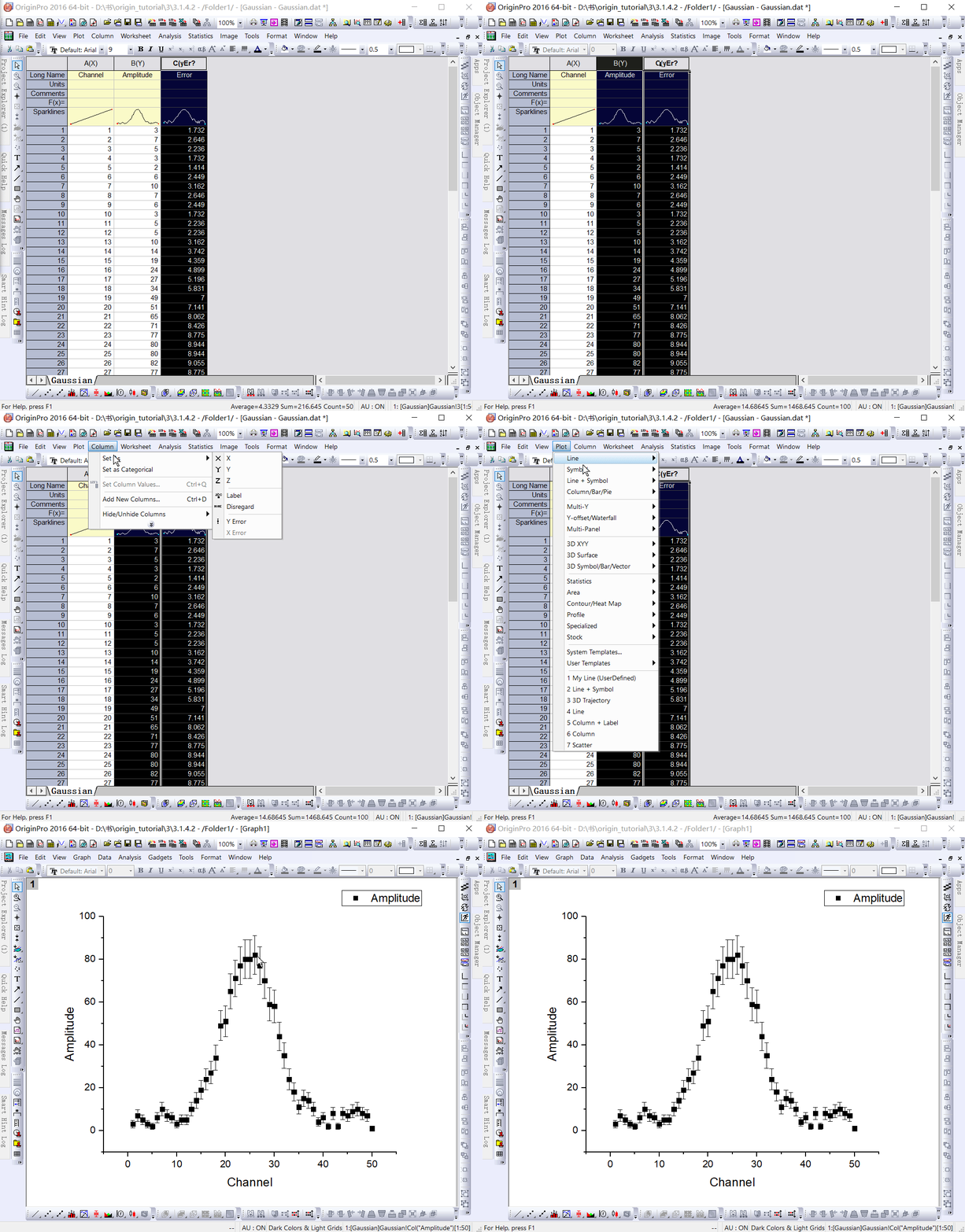
Mapping data in Origin is now easy; Highlight columns B and C (Y and Y errors), then select “Plot: Symbol: Scatter” from the menu to create a Scatter Plot with an error bar.

reference :Origin_Tutorial_2019_E

Ror deployed to heroku has application error and code = H10 desc = “app crashed” problems

1. Preparation before problem discovery
When I was reading Learn Python In Hard Way, I saw that there is a wonderful thing the author talks about. There is a boring thing she does before doing something funny, called Yak shaving. Things like setup, configuration and so on before you learn a language or technology.

I heard a fellow student say that if you do the Web, you can learn ROR. I looked it up and found Ruby on Rails as its author —

David Heinemeier Hansson is also a rather amazing programmer. Then I wanted to learn Ruby systematically this time, but I found a lot of details, so I wanted to change another way of learning and directly learn ROR.

About this kind of study way, I searched some experience to answer again. One senior summed it up very well. Three books later.

1. HeadFirst HTML AND CSS

2. The Linux Command Line

3. Pro Git

From the basic front end, Linux as a whole and basic shell, as well as Git tools. Skip the first according to individual knowledge, pick the knowledge point that does not understand to read, the latter two read more carefully. I found myself using Git, not knowing that snapshot is the same thing, and how the control flow of Git is different from SVN. For the first time, I found that double-click in Linux can be copied, and middle mouse button can be pasted directly.

2. Identify problems

I’ll watch Ruby on Rails Tutorial later, and the first chapter is Yak Shaving.

Configure the ROR environment yourself, and then formally deploy to Heroku. And then there’s the problem. Application Error and code=H10 desc=”App Chinese “problem.

Heroku itself can see the error by clicking View Logs

at=error code=H10 desc="App crashed" method=GET path=/ host=xxx.herokuapp.com fwd= dyno= queue= wait= connect= service= status=503 bytes=

3. Problem solving
This doesn’t tell you what the problem is. Keep checking. http://stackoverflow.com/questions/13496827/heroku-deployment-error-h10-app-crashed

As in the first answer, type Heroku Run Rails Console. You can fix the trouble.

2016-02-29T05:18:58.740439+00:00 app[web.1]: /app/vendor/bundle/ruby/2.2.0/gems/sass-rails-5.0.1/lib/sass/rails/helpers.rb:11:in `<top (required)>': uninitialized constant Sass::Script (NameError)
2016-02-29T05:18:58.740461+00:00 app[web.1]:    from /app/vendor/bundle/ruby/2.2.0/gems/sass-rails-5.0.1/lib/sass/rails.rb:8:in `require'
2016-02-29T05:18:58.740463+00:00 app[web.1]:    from /app/vendor/bundle/ruby/2.2.0/gems/sass-rails-5.0.1/lib/sass/rails.rb:8:in `<top (required)>'
2016-02-29T05:18:58.740463+00:00 app[web.1]:    from /app/vendor/bundle/ruby/2.2.0/gems/sass-rails-5.0.1/lib/sass-rails.rb:1:in `require'
2016-02-29T05:18:58.740464+00:00 app[web.1]:    from /app/vendor/bundle/ruby/2.2.0/gems/sass-rails-5.0.1/lib/sass-rails.rb:1:in `<top (required)>'
2016-02-29T05:18:58.740465+00:00 app[web.1]:    from /app/vendor/bundle/ruby/2.2.0/gems/bundler-1.9.7/lib/bundler/runtime.rb:76:in `require'
2016-02-29T05:18:58.740466+00:00 app[web.1]:    from /app/vendor/bundle/ruby/2.2.0/gems/bundler-1.9.7/lib/bundler/runtime.rb:76:in `block (2 levels) in require'
2016-02-29T05:18:58.740466+00:00 app[web.1]:    from /app/vendor/bundle/ruby/2.2.0/gems/bundler-1.9.7/lib/bundler/runtime.rb:72:in `each'
2016-02-29T05:18:58.740469+00:00 app[web.1]:    from /app/vendor/bundle/ruby/2.2.0/gems/bundler-1.9.7/lib/bundler/runtime.rb:72:in `block in require'
2016-02-29T05:18:58.740470+00:00 app[web.1]:    from /app/vendor/bundle/ruby/2.2.0/gems/bundler-1.9.7/lib/bundler/runtime.rb:61:in `each'
2016-02-29T05:18:58.740470+00:00 app[web.1]:    from /app/vendor/bundle/ruby/2.2.0/gems/bundler-1.9.7/lib/bundler/runtime.rb:61:in `require'
2016-02-29T05:18:58.740471+00:00 app[web.1]:    from /app/vendor/bundle/ruby/2.2.0/gems/bundler-1.9.7/lib/bundler.rb:134:in `require'
2016-02-29T05:18:58.740472+00:00 app[web.1]:    from /app/config/application.rb:7:in `<top (required)>'
2016-02-29T05:18:58.740473+00:00 app[web.1]:    from /app/vendor/bundle/ruby/2.2.0/gems/railties-4.2.0/lib/rails/commands/commands_tasks.rb:78:in `require'
2016-02-29T05:18:58.740473+00:00 app[web.1]:    from /app/vendor/bundle/ruby/2.2.0/gems/railties-4.2.0/lib/rails/commands/commands_tasks.rb:78:in `block in server'
2016-02-29T05:18:58.740474+00:00 app[web.1]:    from /app/vendor/bundle/ruby/2.2.0/gems/railties-4.2.0/lib/rails/commands/commands_tasks.rb:75:in `tap'
2016-02-29T05:18:58.740475+00:00 app[web.1]:    from /app/vendor/bundle/ruby/2.2.0/gems/railties-4.2.0/lib/rails/commands/commands_tasks.rb:75:in `server'
2016-02-29T05:18:58.740475+00:00 app[web.1]:    from /app/vendor/bundle/ruby/2.2.0/gems/railties-4.2.0/lib/rails/commands/commands_tasks.rb:39:in `run_command!'
2016-02-29T05:18:58.740476+00:00 app[web.1]:    from /app/vendor/bundle/ruby/2.2.0/gems/railties-4.2.0/lib/rails/commands.rb:17:in `<top (required)>'
2016-02-29T05:18:58.740477+00:00 app[web.1]:    from bin/rails:9:in `require'
2016-02-29T05:18:58.740477+00:00 app[web.1]:    from bin/rails:9:in `<main>'
2016-02-29T05:18:59.458586+00:00 heroku[web.1]: State changed from starting to crashed
2016-02-29T05:18:59.444429+00:00 heroku[web.1]: Process exited with status 1

according to

/app/vendor/bundle/ruby/2.2.0/gems/sass-rails-5.0.1/lib/sass/rails/helpers.rb:11:in `<top (required)>': uninitialized constant Sass::Script (NameError)

You can guess that it’s the version of SASS-Rails in the gem file. I suddenly remembered this detail.

In fact, according to the third edition of the book’s Gemfile configuration, the book configuration is gem ‘sass-Rails ‘,’5.0.0.beta1’, this step when executing the bundle install will report an error. I’m just going to get rid of beta1.

Because of this error, I changed it to version 5.0.1. But it’s still wrong. I had no idea last week. After you reorganize your thoughts today, check this mistake again.

Found the answer: http://stackoverflow.com/questions/29594420/rails-tutorial-error-with-cloud-9

It should be configured as gem ‘sass-Rails ‘,’5.0.2’.

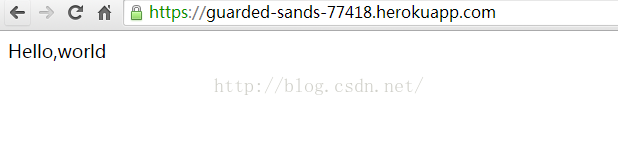
Successful official deployment of Hello World.
Recently I watched The Secret of Music, a behind-the-scenes work on a song, and as a programmer I should be able to see the same respect for my profession.

Recently, it seems that he suddenly has a soft rib, and suddenly he has armor. Become more determined.

Error 945 Database cannot be opened due to inaccessible files or insufficient memory or disk space

I encountered the following error when Connecting db today:
SQL SERVER — FIX: Error 945 Database cannot be opened to capacity files or disk space. See the SQL SERVER Error log for details

The first intuition is the DBF permission issue, a check sure enough…
Due to lack of space
Also moved the DBF file below
and attached the
SQL template as follows:
CREATE DATABASE [ALS_LFE] ON PRIMARY
( NAME = N’DXXXXXXXXXXXXXXXXX’, FILENAME = N’DXXXXXXXXXXXXXXXXX.mdf’ , MAXSIZE = XXXXKB, FILEGROWTH = XXXXKB )
LOG ON
( NAME = N’DXXXXXXXXXXXXXXXXX_log’, FILENAME = N’DXXXXXXXXXXXXXXXXX.ldf’ ,MAXSIZE = UNLIMITED , FILEGROWTH = 10%)
FOR ATTACH
GO[@more@]

From “ITPUB blog” link: http://blog.itpub.net/8337095/viewspace-1033527/, if you want to reprint, please indicate the source, otherwise will be investigated for legal responsibility.

Reproduced in: http://blog.itpub.net/8337095/viewspace-1033527/

mape( mean absolute percent error)

Forum to see others reply, feel useful, reproduced.

looking at the size of mape alone is meaningless because mape is relative rather than absolute.

I personally feel that the size of the mape depends on three factors:
1, depends on the variability of data, for example, if you have two normal distribution, the mean is zero, then two variance of a big, a small, you can try the two distribution to generate some random number, your forecast is 0, but you will find that the variance of mape. 2. Mape depends on your model or prediction. Assuming that you now have only one distribution with a mean of 0, if your prediction is 0 it should be smaller than the mape with a prediction of 1. 3. Mape depends on the size of the number in the data. For example, if you have two data, one is 100 and one is 1, your prediction is 101 and 2 respectively, the error is 1, but the mape is large and small. Therefore, I think mape can only be used to evaluate the same set of data from different models. For example, for the same set of data, the mape given by model a is smaller than that given by model b, so the conclusion is that model a will be better. But if I just say Mape =10%, I can’t tell if the model is good or bad.

mysql ERROR 1050 (42S01): Table already exists

At the time of database startup, I accidentally deleted the data file, and then I kept working on this table and kept reporting errors. The query report did not exist, but a new table with the same name already existed. The solution is to create a table with the same name in another database and copy its data files.
mysql> show databases;
+ — — — — — — — — — — — — — — — — — — — — +
| Database |
+ — — — — — — — — — — — — — — — — — — — — +
| information_schema |
| mysql |
| performance_schema |
| test |
+——————–+
mysql> use test
mysql> create table t1(id int);
ERROR 1813 (HY000): Tablespace for table ‘`test`.`t1`’ exists. Please DISCARD the tablespace before IMPORT.
mysql> alter table t1 DISCARD tablespace;
ERROR 1146 (42S02): Table ‘test.t1’ doesn’t exist

mysql> create database gg;
mysql> show databases;
+ — — — — — — — — — — — — — — — — — — — — +
| Database |
+ — — — — — — — — — — — — — — — — — — — — +
| information_schema |
| gg |
| mysql |
| performance_schema |
| test
| + — — — — — — — — — — — — — — — — — — — — +
mysql> use gg
Database changed
mysql> create table t1(id int);

go to the database gg
cp-a t1.frm.. /test/t1.frm

mysql> select * from t1;
ERROR 1146 (42S02): Table ‘test.t1’ doesn’t exist
mysql> Alter TABLE T1, TABLESPACE;
Query OK, 0 rows affected, 2 warnings (0.01 SEC)

goes to database gg
cp -a t1.ibd .. /test/t1.ibd
mysql> use test
mysql> select * from t1;
ERROR 1814 (HY000): Tablespace has been discarded for table ‘t1’
mysql> Alter TABLE T1 Import TABLESpace;
Query OK, 0 rows affected, 1 warning (0.04 SEC)
mysql> select * from t1;
Empty set (0.00 SEC)

Drupal Internal Server Error 500

After the completion of the local test site, I uploaded it to the space and found an Internal Server Error 500. In this way, I had to close the Clean URL before. Htaccess could work and the 301 jump could be realized. But when I open clean URL, if you’re using drupal’s default.htaccess, you won’t find the page. Now I’ve simply rewritten.htaccess, because All I need is a 301 jump.
The original source: http://suyou.info/node/32

    < IfModule mod_rewrite.c>

    RewriteEngine on

    RewriteBase /

    RewriteCond %{HTTP_HOST} ^www.(.+)$ [NC]

    RewriteRule ^ http://%1%{REQUEST_URI} [L,R=301]

    RewriteCond %{REQUEST_FILENAME} ! -f

    RewriteCond %{REQUEST_FILENAME} ! -d

    RewriteRule ^(.*)$ index.php?q=$1 [L,QSA]

    < /IfModule>