Category Archives: How to Fix

Installing opencv Python in docker container

PIP opencv-python directly into docker:

pip install opencv-python

When importing cv2 again, an error will be returned:

ImportError: libgthread-2.0.so.0: cannot open shared object file: No such file or directory

>
>
>
>
>
>
>
>

pip uninstall opencv-python

To install it, use the following command:

pip install opencv-python-headless

【 reference 】

https://blog.csdn.net/Max_ZhangJF/article/details/108920050 https://github.com/Korea-Health-Datathon/KHD2020/issues/78

Jenkins series installation and deployment in docker mode

Jenkins install
1. Search for mirror

docker search jenkins

2. Pull the mirror image

docker pull jenkinsci/blueocean

3. Run

docker run -u root -d -p 8080:8080 -p 50000:50000 -v /var/jenkins-data:/var/jenkins_home -v /var/run/docker.sock:/var/run/docker.sock jenkinsci/blueocean

Browser access

http://ip:8080/

5. The initial password – this file
/var/Jenkins – data/secrets/initialAdminPassword

CONDA install torch error

If you can’t find the corresponding version, you need to add another PyTorch source

conda config --add channels https://mirrors.tuna.tsinghua.edu.cn/anaconda/cloud/pytorch/

Conda toggle Tsinghua source complete command:

conda config --add channels https://mirrors.tuna.tsinghua.edu.cn/anaconda/pkgs/free/
conda config --add channels https://mirrors.tuna.tsinghua.edu.cn/anaconda/cloud/conda-forge 
conda config --add channels https://mirrors.tuna.tsinghua.edu.cn/anaconda/cloud/msys2/
conda config --add channels https://mirrors.tuna.tsinghua.edu.cn/anaconda/cloud/pytorch/
conda config --set show_channel_urls yes

Maven’s jar package conflict; Maven’s introduction

How to resolve JAR package conflicts in Maven?Because of Maven’s implicit dependency on JARs, it can cause JAR package version conflicts in projects.
Maven comes with two ways:
Path Proximity Principle: Dependency on the path passed to the near priority.
Preference Declare Principle: Dependencies are defined in the POM file. The dependencies declared first prevail.
Manual configuration in two ways:
Method: by excluding rely on exclusion tag
lock version: through dependencyManagement lock version directly.
What is Maven and its life cycle?Maven is a project management tool that manages the entire life cycle of a project and manages the dependent JARs of a project. The life cycle of Maven includes: clean up, compile, test, package, install, and deploy with the following commands: MVN compile Java files into class files and output them to target directory. MVN test runs unit test classes. MVN package deploys include install. MVN deploy include install. And upload the project to the remote repository

Solution of MySQL data garbled problem

MySQL data garbled to solve the problem
Note for INSERT
The size of the data should be within the specified range of the column. For example, a string with master 80 cannot be inserted into a column with master 40. The data position listed in VALUES must correspond to the permutation position of the column to be added. You can use value in MySQL, but it is not recommended. It has the same function as values. Character and date data should be enclosed in single quotes. Double quotation marks can also be used as delimiters in MySQL. No column is specified or NULL is used to insert a null value.
View the encoding of MySQL’s internal Settings

show variables like 'character%';

The solution
Change the code of Client, Connection and Results to GBK to ensure that it is consistent with DOS command line code

tr> <>> set cha>er_set_connection = GBK; Set character_set_results= GBKtr> <>> set cha>er_set_results = GBK;

set

description

set GBK character_set_client =; Set character_set_connection= GBK
modify the results of the query character set GBK
Set all three at once

 set names gbk; 

Note: Exit DOS command line is invalid, need to configure each time

Spoop export hive to MySQL

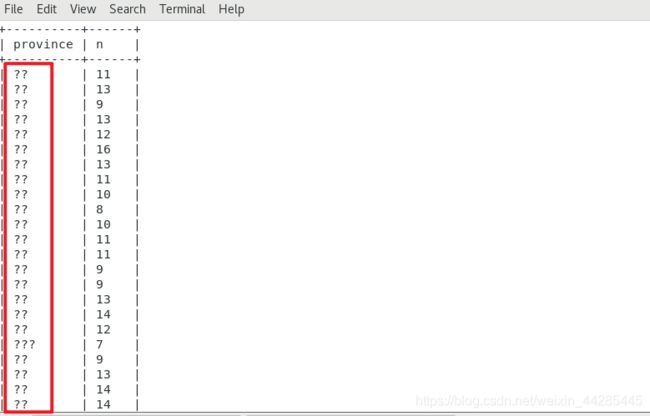
SQOOP Export: mysql> create a Hive table (????)
Like this:

 
I have modified it once before, and the method works together. However, when the server is changed and the MySQL library is newly created, method one fails to work, and method two takes effect.
 
Method one:
Create a new query window, or use the command to enter mysql> , the input

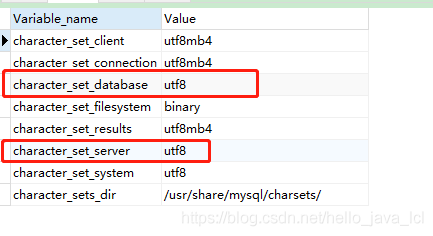
set character_set_database=utf8;
set character_set_server=utf8;

Show variables like ‘character%’; View the results:

SQOOP script with:?useUnicode=true& characterEncoding=utf-8
Import the data again without scrambling.
 
Method 2:
Modify the system file: /etc/my.cnf

vim /etc/my.cnf


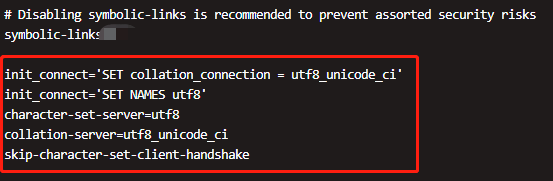
Text:

init_connect=’SET collation_connection = utf8_unicode_ci’
init_connect=’SET NAMES utf8′
character-set-server=utf8
collation-server=utf8_unicode_ci
skip-character-set-client-handshake


Directing to /bin/systemctl Restart mysqld. Service (1) : Directing to /bin/systemctl Restart mysqld.
Sqoop plus?useUnicode=true& CharacterEncoding = UTF-8, Chinese garbled code problem resolved.
 
In the first method, the set modifies the configuration and restarts MySQL. This is probably the first reason why the configuration change does not work.


What are the web front end technologies? What are the differences between cookie and session

What are the Web front-end technologies?What’s the difference between a Cookie and a Session?Cookies and Sessions are common techniques in Web applications that can be used to track a user’s entire Session. But what’s the difference between them?Next thousand front Xiaobian will give you a brief introduction.



The main purpose
Cookie is born to solve the problem that HTTP stateless characteristics can not meet the interactive Web, mainly used for session state management (such as user login status, shopping cart, game scores or other information to record); Personalization Settings (such as user-defined Settings, themes, etc.); Browser behavior tracking (e.g., tracking and analyzing user behavior).
Session is a mechanism used by the server to record the state of the client. It is simpler to use than Cookie, and it also increases the storage pressure of the server accordingly.
If the Cookie mechanism confirms the identity of the customer by checking the “pass” on the customer, then the Session mechanism confirms the identity of the customer by checking the “customer list” on the server. Session is equivalent to a client profile created by the program on the server. When the client visits, it only needs to query the client profile table.
Usage scenarios
Cookie technology can store information in different browsers, and can achieve multiple requests for data sharing, divided into temporary cookies and long-term cookies. If a Cookie has no expiry date set, the browser will delete the Cookie when it is closed. This Cookie is called a temporary Cookie. If a Cookie has an expiration date, then the browser will keep the Cookie until the expiration date. This Cookie is called a persistent Cookie.
Session is a communication state retention mechanism based on Cookie, which can store some information of a user on the server side. After creating a Session, the server returns the Session ID to the browser in the form of Cookie. If the browser is closed, it will carry the Session ID when visiting the server again. When the server finds that the browser brings the Session ID, it will use the corresponding Session in memory to serve it.
What is the relationship between a Cookie and a Session
If a Web front-end programmer is asked “What is the relationship between Cookie and Session?” during an interview, the answer is that both are produced for client-server interaction. Cookie writes the user’s data to the user’s browser, while Session technology writes the user’s data to the user’s own Session. A Session is an object, and its properties can be of any type (cookies can only be set as strings). Cookie is stored in the client side, the disadvantage is easy to forge, not secure, Session is stored in the server side, will consume server resources, Session implementation has two ways: Cookie and URL rewriting.
If you want to know more about cookies and sessions, or want to quickly advance to the front end of the Web, you can choose a major to learn, so that you can learn efficiently and quickly get employed.

 

Firewall CMD command in CentOS 7

 
In CentOS 7
Temporarily open FTP service
# is firewall – CMD – add – service = FTP
 
Open the FTP service permanently
# is firewall – CMD – add – service = FTP – permanent
Permanent ban
# is firewall – CMD – remove – service = FTP – permanent
success
 
Enabling Settings
# systemctl restart firewalld
 
Check if the Settings are in effect
# iptables – L – n | grep 21
 
ACCEPT the TCP – 0.0.0.0/0 0.0.0.0/0 TCP DPT: 21 ctstate NEW
Check firewall status
# is firewall – CMD – state
 
running
 
# systemctl stop firewalld
 
# is firewall – CMD – state
 
not running
 
 
# is firewall – CMD – list – all
Public (default) interfaces: sources: services: dhcpv6-client FTP SSH ports: masquerade: no forward-ports: ICMP-blocks: rich rules:
 
The name of the service in FirewallD
# firewall-cmd –get-service amanda-client bacula DHCP dhcpv6 dhcpv6-client DNS FTP high-availability HTTP HTTPS iMAP ipp ipp ip-client ipsec kerberos kpasswd ldap ldaps libvirt libvirt-tls mdns mountd ms-wbt mysql nfs ntp openvpn pmcd pmproxy pmwebapi pmwebapis pop3s postgresql proxy-dhcp radius rpc-bind samba samba-client smtp ssh telnet tftp tftp-client transmission-client vnc-server wbem-https
 
Query the enabling status of the service
# firewall-cmd –query-service FTP yes # firewall-cmd –query-service SSH yes # firewall-cmd –query-service samba no # firewall-cmd –query-service HTTP no
Join the Port you want to open
# firewall-cmd –add-port=3128/ TCP # firewall-cmd –list-all public (default) interfaces: sources: services: dhcpv6-client FTP SSH ports: 3128/ TCP masquerade: no forward-ports: firewall-cmd –add-port=3128/ TCP # firewall-cmd –list-all public (default) interfaces: sources: services: dhcpv6-client FTP SSH ports: 3128/ TCP masquerade: no forward-ports: The icmp – blocks: rich rules: