Category Archives: How to Fix

How to save big data in Oracle to CLOB

If the data is too large to be assigned directly to a CLOB variable, then we can read and write to the CLOB variable in stages using the DBMS_LOB.read and DBMS_LOB.write methods. But at this point we should cache CLOB variables, as shown in the first sentence below. Here is an example program that can not only write big data but also read it by switching the order DBMS_LOB.read and DBMS_LOB.write.

dbms_lob.createtemporary(lob_loc => x_clob,
                             cache   => TRUE);
PROCEDURE load_clob(p_clob_in IN CLOB,
                      x_clob    IN OUT NOCOPY CLOB) IS
    
    l_clob_len NUMBER := dbms_lob.getlength(p_clob_in);
    l_data VARCHAR2(32756);
    l_buf_len_std NUMBER := 4000;
    l_buf_len_cur NUMBER;
    l_seg_count   NUMBER;
    l_write_offset NUMBER;
  BEGIN
    IF p_clob_in IS NOT NULL THEN
      l_seg_count := floor(l_clob_len/l_buf_len_std);
      FOR i IN 0 .. l_seg_count
      LOOP
        
        IF i = l_seg_count THEN
          l_buf_len_cur := l_clob_len - i * l_buf_len_std;
        ELSE
          l_buf_len_cur := l_buf_len_std;
        END IF;
        
        IF l_buf_len_cur > 0 THEN
          dbms_lob.read(lob_loc => p_clob_in,
                        amount  => l_buf_len_cur,
                        offset  => i * l_buf_len_std + 1,
                        buffer  => l_data);
          l_write_offset := nvl(dbms_lob.getlength(lob_loc => x_clob),
                                0) + 1;
          dbms_lob.write(lob_loc => x_clob,
                         amount  => l_buf_len_cur,
                         offset  => l_write_offset,
                         buffer  => l_data);
        END IF;
      END LOOP;
    END IF;
  END load_clob;

Reproduced in: https://blog.51cto.com/snans/1353672
Wechat applet animate animation does not implement animation effect for the first time

The main problem is that your.wxss file does not set the appropriate properties; For example, if use Animation. Left (number | string value) element to the left, the Animation is a specific execution of Animation from the time of the elements of the left value to the left you new set value; So if you don’t have an attribute in your original element style you’re not going to get the initial value, you’re not going to be able to animate it, so you’re going to do a left assignment and you’re not going to animate it.

Vscode cnpm: unable to load file, but open console with CMD without error

Question:
Install CNPM on the new computer. When running CNPM-V in VSCODE terminal, the following error will be reported:

CNPM: Unable to load file
C:\Users\Administrator\AppData\ NPM \cnpm.ps1 because script is not allowed to run on this system. For more information, please refer to the
https:/go.microsoft.com/fwlink/?
about_Execution_Policies in LinkID=135170. Position line :1 character :1
cnpm -v

  + CategoryInfo          : SecurityError: (:) [],PSSecurityException
  + FullyQualifiedErrorId : UnauthorizedAccess

Solution:
(1) Run VS Code as an administrator and open a terminal in VS Code
(2) Execute Get-ExecutionPolicy at the terminal, displaying Restricted
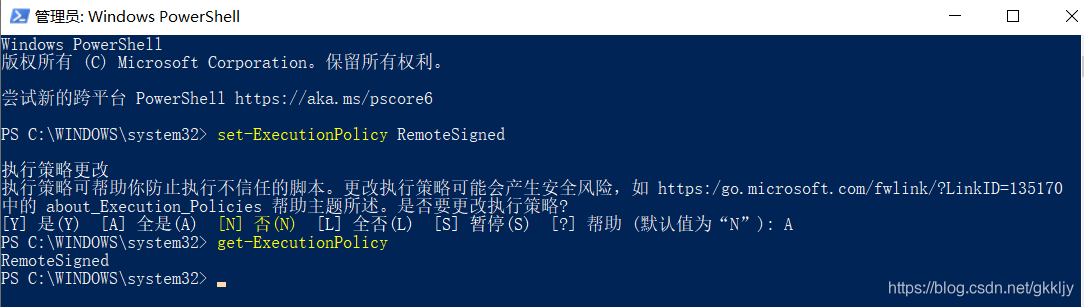
(3) Update the PowerShell policy and execute it on the terminal: set-executionpolicy RemoteSigned
(4) Examine the status of the policy again and execute: GET-EXECUTIONPOLICY at the terminal to show the RemoteSigned igned
(5) Re-input CNPM-V problem successfully solved
Just taking notes.

Cnpm: unable to load file

System search for PowerShell, right-click PowerShell to run as an administrator, and then enter the following command to execute,

set-ExecutionPolicy RemoteSigned

Then, select Y to complete the setup

Idea error: Java: compilation failed: internal java compiler error

Specific include:
View the JDK of the project (Ctrl+Alt+ Shift +S)
File -> Project Structure-> Project Settings -> Project
View the project’s JDK (Ctrl+Alt+ Shift +S)
File -> Project Structure-> Project Settings -> Modules -> (Name of project to be modified) ->; Sources
See the Java configuration in IDEA
File -> Setting -> Build,Execution,Deployment -> Compiler -> Java Compiler
Modify heap size
File -> Setting –> Build,Execution,Deployment–> Build Process Heap Size (mBytes):700 changed to 1024 or 8192

1143 Lowest Common Ancestor

Two points timeout, there is no choice to build the tree first, may lead to too much recursion, so timeout, code:

#include<iostream>
#include<set>
#include<vector>
using namespace std;
set<int> se;
int a[10010];
int b[10010];
int n1,n2;
set<int> father;
vector<int> v;
bool f1=false,f2=false;
void func1(int l1,int r1,int l2,int r2,int aim,int t2){
    int t=l2;
    for(t;t<=r2&&b[t]!=a[l1];t++);
    if(aim<b[t]){
        if(b[t]==t2){f1=true;return;}
        father.insert(b[t]);
        func1(l1+1,t-l2+l1,l2,t-1,aim,t2);
    }
    else if(aim>b[t]){
        if(b[t]==t2){f1=true;return;}
        father.insert(b[t]);
        func1(l1+t-l2+1,r1,t+1,r2,aim,t2);
    }
    return;
}
void func2(int l1,int r1,int l2,int r2,int aim,int t1){
    int t=l2;
    for(t;t<=r2&&b[t]!=a[l1];t++);
    if(aim<b[t]){
        if(b[t]==t1){f2=true;return;}
        v.push_back(b[t]);
        func2(l1+1,t-l2+l1,l2,t-1,aim,t1);
    }
    else if(aim>b[t]){
        if(b[t]==t1){f2=true;return;}
        v.push_back(b[t]);
        func2(l1+t-l2+1,r1,t+1,r2,aim,t1);
    }
    return;
}
int main(){
    cin>>n1>>n2;
    for(int i=0;i<n2;i++){
        cin>>a[i];
        se.insert(a[i]);
    }
    auto it=se.begin();
    for(int i=0;i<n2;i++){
        b[i]=*it;
        it++;
    }
    for(int i=0;i<n1;i++){
        f1=false;f2=false;
        int t1,t2;
        cin>>t1>>t2;
        
        if(se.find(t1)==se.end()&&se.find(t2)==se.end()){
            cout<<"ERROR: "<<t1<<" and "<<t2<<" are not found."<<endl;
            continue;
        }
        else if(se.find(t1)==se.end()&&se.find(t2)!=se.end()){
            cout<<"ERROR: "<<t1<<" is not found."<<endl;
            continue;
        }
        else if(se.find(t1)!=se.end()&&se.find(t2)==se.end()){
            cout<<"ERROR: "<<t2<<" is not found."<<endl;
            continue;
        }
        if(t1==t2){
            cout<<t1<<" is an ancestor of "<<t1<<"."<<endl;
            continue;
        }
        father.clear();
        v.clear();
        father.insert(a[0]);
        v.push_back(a[0]);
        func1(0,n2-1,0,n2-1,t1,t2);
        if(f1){
            cout<<t2<<" is an ancestor of "<<t1<<"."<<endl;
            continue;
        }
        func2(0,n2-1,0,n2-1,t2,t1);
        if(f2){
            cout<<t1<<" is an ancestor of "<<t2<<"."<<endl;
            continue;
        }
        for(int i=v.size()-1;i>=0;i--){
            if(father.find(v[i])!=father.end()){
                cout<<"LCA of "<<t1<<" and "<<t2<<" is "<<v[i]<<"."<<endl;
                break;
            }
        }
    }
    return 0;
}

Vs configure tensorrt environment to use

Install the Nvidia driver (same as before)
2. Install the CUDA10 version, do not select Compact, select Custom and then select All.
>
>
>
>
>
>
>
>
>
>
>
>
>
>
>
> Make sure you have CUDA installed and don’t continue without it.
②. Create a new project – select nvidia-cuda xx, select your name and define your path.
③. Remove the kernel.cu file and add your own CPP, CU, H files.
④. Configuration header file
Conventional – character set for double-byte character or not
c/c + + – general – additional include directories
E: \ opencv300 \ opencv \ build \ include \ opencv2
E: \ opencv300 \ opencv, build, include, opencv
E: \ opencv300, opencv, build, include the
D: \ tensorRTIntegrate \ TensorRT – master \ third_party \ cub
D: \ tensorRTIntegrate \ TensorRT – master \ include
C: \ Program Files \ NVIDIA GPU Computing Toolkit \ CUDA \ v10.0 \ include
D:\ TensorrtIntegrate \ Tensorrt-master \ Plugin
C/C ++ – Secure_No_Warnings
/ C ++ – Preprocessor – Warnings
D:\ TensorrtIntegrate \ Tensorrt-master \ Plugin
C/C ++ – Preprocessor – Warnings

C/C ++ – Precompiled header – Precompiled header – Do not use the precompiled header
CUDA C/C ++ -Common-Additional Include Directories
C: ProgramData\NVIDIA Corporation\CUDA Samples\ V10.0 \ Common \ Inc
DA C/C ++ -Device – Code Generation
te_75, SM_75 Note: Here the numbers are changed based on the graphics card power, the GPU2080/2080TI power is 75.
linker
– general – additional libraries directory E: \ opencv300 \ opencv, build, x64, vc12 \ lib
D: \ tensorRTIntegrate \ lean \ cuda10.0 \ lib
C: \ Program Files \ NVIDIA GPU Computing Toolkit \ CUDA \ v10.0 \ lib \ x64
D:\tensorRTIntegrate\lean\ tensorrt-6.0.1.5 \lib
Linker
dadevrt.lib
c>t.lib
cudart_>ic.lib
cudnn.libb7 cufft.lib
>ftw.lib
c>t.lib curand.lib
cusolver.lib
cusparse.lib
nppc.lib
nppial.lib
nppicc.lib
nppicom.lib
nppidei.lib
nppif.lib
nppig.lib
nppim.lib
nppist.lib
nppisu.lib
nppitc.lib
npps.lib
nvblas.lib
nvgraph.lib
nvml.lib
nvrtc.lib
OpenCL.lib
nvinfer.lib
nvinfer_plugin.lib
nvonnxparser.lib
nvparsers.lib
opencv_ts300.lib
Opencv_ts300d. lib
opencv_world300.lib
encv_world300d. lib
P> the DLL files of Tnesorrt and the DLL files of OpenCV in the project directory.
Tnesorrt DLL path: D: \ tensorRTIntegrate \ lean \ TensorRT – 6.0.1.5 \ lib DLL file:

nvinfer. DLL
nvinfer_plugin. DLL
nvonnxparser. DLL
nvparsers. DLL
nvserialize. DLL
OPENCV DLL path: E: \ opencv300 \ opencv, build, x64, vc12 \ bin DLL file:

opencv_ffmpeg300_64. DLL
opencv_world300. DLL
opencv_world300d. DLL
configured above, you can compile.

spring security There was an unexpected error (type=Forbidden, status=403).


The reason is that the defined role names do not match
Path permission rule matching configuration is :ADMIN here program can not configure ROLE_ role or directly report the BUG
The user’s permissions are configured in custom permission validation :ROLE_ADMIN needs to be preceded by ROLE_
This pit stepped on twice This design is very wanted to make fun of


Installation of k8s Helm

Do this after mv linux-amd64/tiller /usr/local/bin/tiller
order
lm init
Kubeadm init
– apiserver – advertise – address = 10.0.2.130
– image – repository registry.cn-hangzhou.aliyuncs.com/google_containers
– kubernetes – version v1.17.3
– service – cidr = 10.96.0.0/16
– pod – network – cidr = 10.244.0.0/16
consider cidr IP

Solve the oserror: [errno 22] invalid argument: ‘u202ad’ in Python

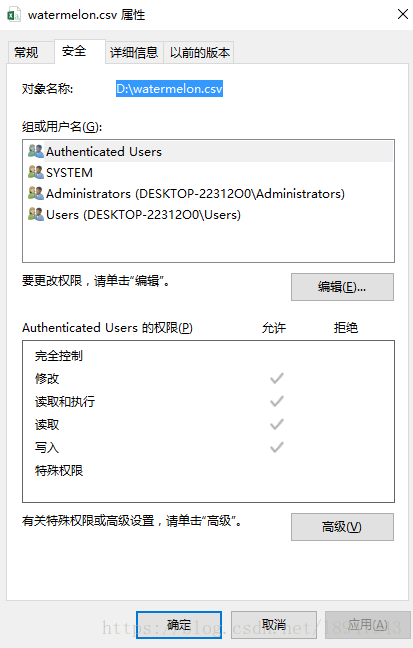
. OERROR: [Errno 22] Invalid argument: ‘\u202aD

The following code

file1 = open('‪D:\watermelon.csv','r')

If you directly copy the path as shown below,


If there is an error, please manually type the path. Modify D–>; d:

file1 = open('d:\watermelon.csv','r')

And then it worked out…