Category Archives: How to Fix

Linux Installation Error Handling

The Repository WandiscoSVN is listed more than once in the configuration
http://opensource.wandisco.com/centos/6/svn-1.7/RPMS/x86_64/repodata/repomd.xml: [Errno 14] PYCURL ERROR 6 – “Cant’t resolve host ‘openSource.wandisco.com ‘”

Error: Cannot retrieve repository metadata (repomd.xml) for repository: wandiscosvn. Please verify its path and try again
Error: Cannot retrieve repository metadata (repomd.xml) for repository: WandiscoSVN

In the domain name server configuration. Add an 8.8.8.8 and you’ll be fine:

# vi /etc/resolv.conf

# Generated by NetworkManager
nameserver 8.8.8.8

Mac realizes file interaction (upload and download) between terminal and server

The Mac comes with SSH, as explained in the last post.
This article mainly introduces the use of SCP command to achieve the file upload and download
1. Download files from the server
SCP username @ servername:/path/filename/Users/MAC/Desktop (local directory)
For example: SCP [email protected]:/root/test. TXT/Users/MAC/Desktop
Download /root/test.txt from the server to the local /Users/ MAC /Desktop directory.
Notice the space between the two addresses!
2. Upload files locally to the server
scp /path/filename username@servername:/path ;
For example: SCP/Users/MAC/Desktop/test. TXT [email protected]:/root /
3. Download the entire directory from the server
Scp-r username@servername:/root/ (remote directory) /Users/ MAC /Desktop (local directory)
For example: scp-r [email protected]:/root/ /Users/ MAC /Desktop/
4. Upload the directory to the server
scp -r local_dir username@servername:remote_dir
For example, scp-r test [email protected]:/root/ Upload the test directory in the current directory to the server’s /root/ directory
5. Finally, it introduces a software that can also easily realize the file interaction between local and server. FinalShell

solve selenium.common.exceptions .ElementNotInteractableException: Message: element not interactable

Without further ado, go straight to the method:
The original part of the code is:

username=self.wait.until(EC.presence_of_element_located((By.ID,'loginName')))
password=self.wait.until(EC.presence_of_element_located((By.ID,'loginPassword')))
submit=self.wait.until(EC.presence_of_element_located((By.ID,'loginAction')))
username.send_keys(self.username)
password.send_keys(self.password)
submit.click()

After the operation error: selenium.com mon. Exceptions. ElementNotInteractableException: Message: element not interactable.
Solution: 1. Overwrite other elements temporarily to ensure your own element
We can change the waiting conditions By self.wait. Until (expected_conditions.invisiblity_of_element_located((by.id,’id_of_the_element_to_be_invisiblity’)))).
The other is self.wait. Until (expected_conditions.element_to_be_clickable((by.id,’id_of_the_element_to_be_clickable’))). Here I use the second method.

 submit=self.wait.until(EC.element_to_be_clickable((By.ID,'loginAction')))

2. Permanently overwrite elements to secure your own.
The method is the following code:

WebElement ele = driver.findElement(By.xpath("element_xpath"));
JavascriptExecutor executor = (JavascriptExecutor)driver;
executor.executeScript("arguments[0].click();", ele);

The second method has not been well understood for the time being, and those who have understood can communicate with each other.

Python + selenium drop-down list error message: element not interactive

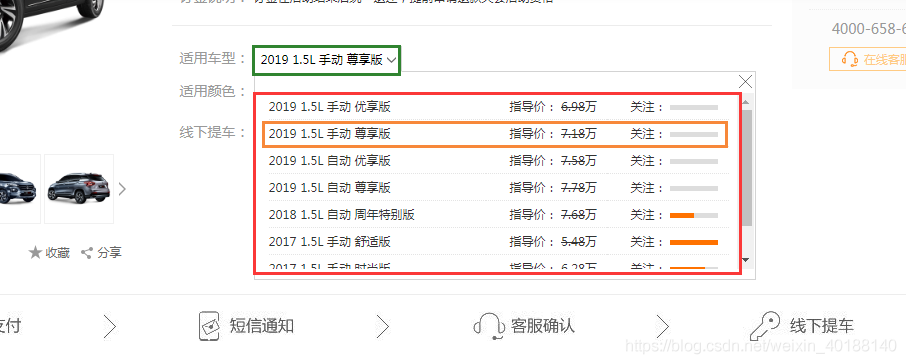
Today is going to make a whole page automation, wrote a drop-down list, run the script to throw the exception: selenium.com mon. Exceptions. ElementNotVisibleException: Message: element not interactable
As shown in the figure below, the script failed to run after using the select_by_index() method. It was found that the code ~~ was not carefully examined. The code was not select-option, but table.
The script is as follows:

driver.find_element_by_xpath("//*[@id=\"style_box\"]/div[1]").click()
#Select(s).select_by_index(3)
driver.find_element_by_xpath("//*[@id=\"style_box\"]/div[2]/div[1]/table/tbody/tr[2]").click()

Very simple two clicks, run after an error selenium.com mon. Exceptions. ElementNotVisibleException: Message: element not interactable
After debugging for several times, it was found that there was no waiting time added. Add time.sleep(3), debug again, and it was successful.
On the one hand, we must analyze the front-end code, on the other hand, when the foot is wrong, especially when it comes to switching, it is better to add a wait time to try ~~


There is a problem of DLL when executing G + + compile command in sublime text editor

Sublime Text sets GCC and g++ (g++ is a superset of GCC, so just g++), most commonly the Mingw folder in dev-cpp.
The problem is as follows:
contains the source file for the input function, which can be compiled in Devc, and a popup window in the sublime text environment shows that the file entry cannot be found and the program input point __gxx_personality_v0 cannot be located in the dynamic link library.

Dynamic Link Library problem caused by DLL files.
Return to the Mingw file where the environment variable was imported and copy the libstdc++6.dll from the lib file.

br>

(Suggestions)
② Paste into the directory where the source file is located.
If there are mistakes, please correct them.

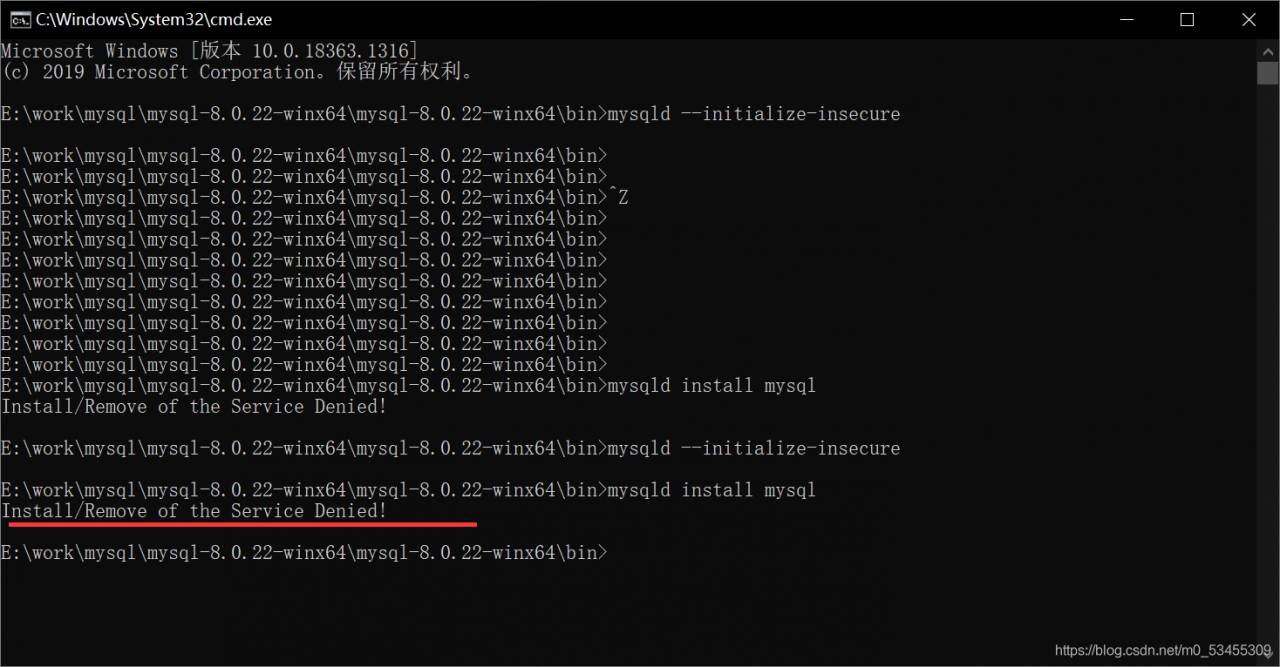
Install / Remove of the Service denied! Error occurred when installing MySQL service

Mysqld –install /Remove of the Service Denied: install /Remove of the Service Denied: mysqld –install /Remove of the Service Denied: install /Remove of the Service Denied: Wrong. Strange.
 
This time, you need to right-click “Run as Administrator”, and then type mysqld –install
 
OK, the service is installed successfully!

The togglerowexpansion method of the table of element UI expands the specified row

First of all:
The ToggleRowExpansion method in the document, I used it without success.
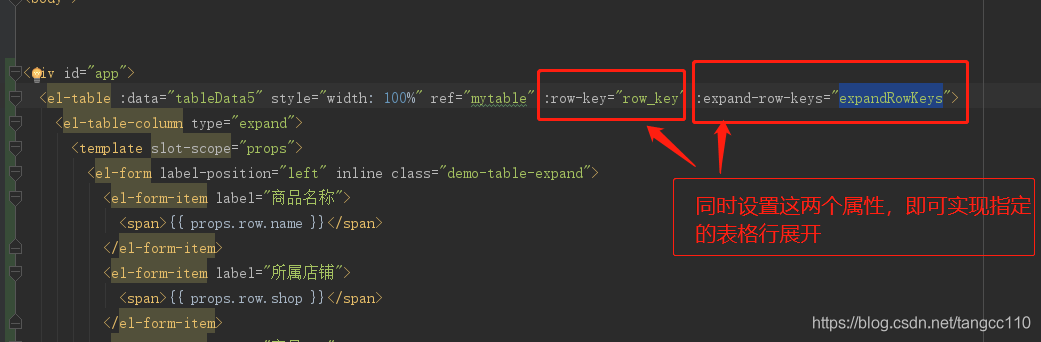
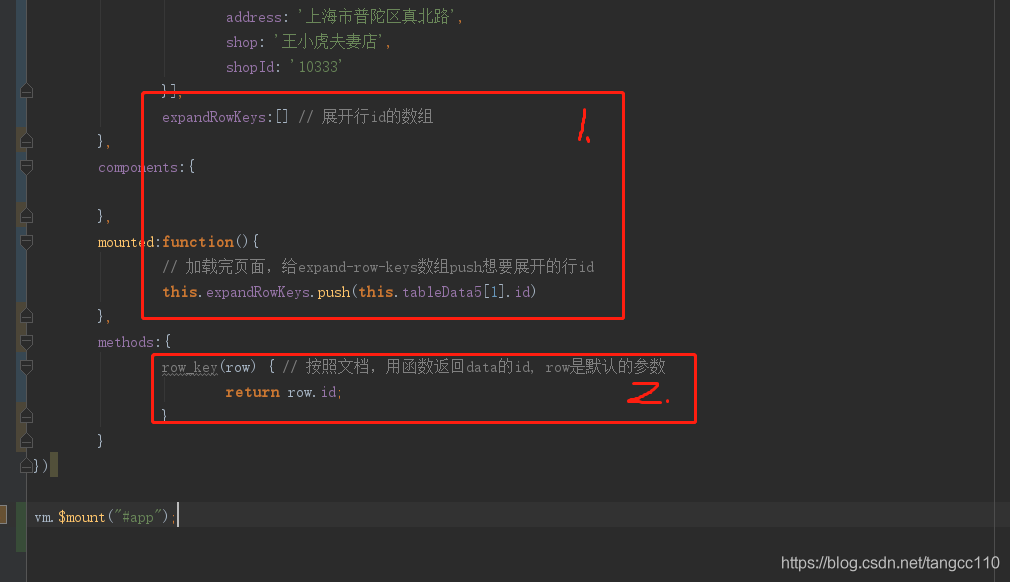
Another approach was tried, along with the expansion table of the original document. Two main points were noted:
1. Set table properties:

 
2. Processing data:

Brief summary:
Both row-key and expand-row-keys need to be used together for this to work!

Default interface methods are only supported starting with Android N (–min-api 24): com.XXXX

Recently, AndroidStudio has encountered this problem for the first time running a project. I don’t know the specific reason, but the solution is as follows.
Add the following to your app’s build.gradle file under the Android TAB.

compileOptions {
        sourceCompatibility JavaVersion.VERSION_1_8
        targetCompatibility JavaVersion.VERSION_1_8
    }

Spring MVC 406 status code / could not find acceptable representation

 
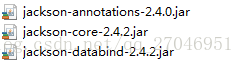
Jackson-core-asl-1.9.12.jar Jackson-mapper-asl-1.9.12.jar
The test is not for this error and does not have to rely on the two JARs.
The following configuration returns data normally
 
pom.xml
 

        <!-- Jackson JSON Processor -->

        <dependency>
            <groupId>com.fasterxml.jackson.core</groupId>
            <artifactId>jackson-core</artifactId>
            <version>${jackson.version}</version>
        </dependency>
        <dependency>
            <groupId>com.fasterxml.jackson.core</groupId>
            <artifactId>jackson-databind</artifactId>
            <version>${jackson.version}</version>
        </dependency>
        <dependency>
            <groupId>com.fasterxml.jackson.core</groupId>
            <artifactId>jackson-annotations</artifactId>
            <version>${jackson.version}</version>
        </dependency>


For springMvc. In the XML


    <mvc:annotation-driven>
        <mvc:message-converters register-defaults="false">
            <bean class="org.springframework.http.converter.StringHttpMessageConverter">
                <property name="supportedMediaTypes">
                    <list>
                        <value>text/html;charset=utf-8</value>
                        <value>text/xml;charset=utf-8</value>
                        <value>text/plain;</value>
                        <value>text/json;charset=utf-8</value>
                        <value>application/json;charset=UTF-8</value>
                    </list>
                </property>
            </bean>
            <bean class="org.springframework.http.converter.json.MappingJackson2HttpMessageConverter"/>
        </mvc:message-converters>
    </mvc:annotation-driven>


In the Controller
 

  @RequestMapping(value = "checkLogin", method = RequestMethod.POST)
    @ResponseBody
    public ResultDto checkLogin(String name, String password, int role) {

        return loginService.checkLogin(name, password, role);
    }


——————————————————————————-
The ResultDTO object is missing some of the GET methods, causing an error in formatting the JSON object.
Remove the above two JARs and test with the GET method of the returned object, reporting 406 error code.
The debug code in ServletInvocableHandlerMethod. Catch exceptions in the class “Could not find acceptable representation.” ”
After adding the get method, the test returns the JSON character of the object normally


public class ResultDto {

    private boolean succeed;
    private Object data;

    public ResultDto(boolean succeed) {
        this.succeed = succeed;
    }

    public ResultDto(boolean succeed, Object data) {
        this.succeed = succeed;
        this.data = data;
    }

/*
    public boolean isSucceed() {
        return succeed;
    }

    public Object getData() {
        return data;
    }
*/

    public void setSucceed(boolean succeed) {
        this.succeed = succeed;
    }

    public void setData(Object data) {
        this.data = data;
    }
}