Category Archives: How to Fix

fatal: refusing to merge unrelated histories

Git: fatal: refusing to merge unrelated nothing to solve the
today creates a local warehouse (README), the local warehouse, and making the association, found that the Git pull, Git feach remind fatal: refusing to merge unrelated nothing
the reason was that the two branches are two different versions, with a different history

git pull origin master --allow-unrelated-histories

window.open () several ways to open windows

    opens Baidu in the current window and makes the URL appear in the search bar.
window.open("http://www.baidu.com/", "_self");
    Open Baidu
a new window

window.open("http://www.baidu.com/", "_blank");
    Open a new window and name it “hello”
window.open("", "hello");
    > In addition, there are several options for the second argument of the open function :
_top: If there are framesets on the page, the URL replaces the top layer of framesets. That is, if there are no framesets, the effect is equivalent to _self._parent: the page pointed to by the URL is loaded into the parent of the current frame. If there are no framesets, the effect is equivalent to _self._media: the page pointed to by the URL is loaded into the HTML code area contained in the Media Bar. If there is no Media Bar, add it to itself.

    If you want to add something else to the new window, you need a third parameter :
Channelmode: yes | no | 1 | 0 (window display for theater mode [full screen displays the current web page, including the toolbar], or channel mode [general show]). Directories: yes | no | 1 | 0 (whether to add directory buttons, such as under the IE there could be a “link” button on the top) fullscreen: yes | no | 1 | 0 (the browser handle full screen mode, and hide the title bar and menu, etc.) the menubar: Yes | no | 1 | 0 (whether to display the menu bar of the browser by default) resizeable: yes | no | 1 | 0 (window can resize) scrollbars: yes | no | 1 | 0) (whether to allow a horizontal or vertical scroll bar titlebar: yes | no | 1 | 0 (whether to add a title bar) toolbar: yes | no | 1 | 0 (whether to add the default browser toolbar) status: Yes | no | 1 | 0 (whether to display the status bar) location: yes | no | 1 | 0 (whether to display the search bar) copyhistory: yes | no | 1 | 0 (seems to have been abandoned, if as long as the toolbars, according to the history button will be displayed) height: the height of the window, the minimum value of 100 pixels width: the width of the window, the minimum value of 100 pixels left: the window of the distance relative to the screen on the left

window.open("http://www.baidu.com/", "_self","height=400,width=400,top=10,left=10,resizable=yes");

There is one last argument to the open function, which is about history, whether the window being opened has the same history URL as the window being opened, or whether it is a separate memory.

Three solutions to the appearance of notice: undefined index in PHP

This WARNING is a NOTICE or WARNING for a different version of PHP. It is not an ERROR. PHP works fine when variables are used undeclared in PHP, but in a PHP5 environment, the above warning or prompt will appear. After the search query, we conclude the following three methods to solve Notice: Undefined Index.

the first method: modify the PHP configuration file, to block such warnings and tips to modify the PHP. Ini configuration file, modify the error_reporting for error_reporting = E_ALL & amp; ~ E_NOTICE. Notice and WARNING in the program will be ignored, of course, this is not suitable for beginners, not only inconvenient to debug the program, and is not conducive to the formation of good code habits.

the second method: initialized for each variable assigned a null or any value, does not affect the operation. $blank = “; $blank = “; $blank = “; $price = “15” :$car = “Truck” :

price = “15” :$car = “Truck” :


modifier disallows warnings caused by function calls, but this modifier does not disallow the display of errors.

Git centenary export package file command

Git exports a commit record:
git diff-tree -r –no-commit-id –name-only –diff-filter=ACMRT 630367c03957082cae20aa72411307f4370a96b2 | xargs tar -rf www.zip
Git lists the difference files:
git diff 39147a10305f452bb286c97ac24a1aae90ecfc3e 72800ec95fdab3e4243d6a4d2db91739e487955b –name-only
Git exports the difference between two commitid packages:
git diff 39147a10305f452bb286c97ac24a1aae90ecfc3e 72800ec95fdab3e4243d6a4d2db91739e487955b –name-only | xargs tar -rf update.zip

MVN error: @ param not found

The code is fine, it handles the comments (which is why I always advocate that you don’t write the comments). How to do?Add a parameter:
Option 1 (invalid) :

mvn \
    -Xdoclint:none

Complains.
Method 2 (effective) :
Search for maven-javadoc-plugin in pom.xml and change it to something like this:
After 3.0.0:


  <plugin>
    <groupId>org.apache.maven.plugins</groupId>
    <artifactId>maven-javadoc-plugin</artifactId>
    <configuration>
      <doclint>none</doclint>
    </configuration>
  </plugin>

3.0.0 before:

<plugin>
    <groupId>org.apache.maven.plugins</groupId>
    <artifactId>maven-javadoc-plugin</artifactId>
    <configuration>
      <additionalparam>-Xdoclint:none</additionalparam>
    </configuration>
  </plugin>


Wechat third party authorization to generate QR code API

$api = "https://mp.weixin.qq.com/cgi-bin/componentloginpage?component_appid=xxx&pre_auth_code=xxx&redirect_uri=xxx&auth_type=xxx";


is not allowed to directly access the API generated above, it must be the source URL, and the source URL must be the same as the one set in the third party platform.

About Using SSH connection for Linux server

About using SSH to connect to the LIUNX server

Step 1

Generate the key on the server side

ssh-keygen -t rsa
Step 2

Add the public key to the server authorization file

id_rsa.pub >> authorized_keys
Step 3
cat id_rsa

Copy the private key to window, create a new text document and paste it. Use putty-gen to generate the private key *.ppk for putty

Step 4

Connection -> when using PuTTY Connection; SSH -> Auth Click Browse to select the generated *.ppk and then click Open

Using pip to install tensorflow: tensorflow — is not a supported wheel on this platform

Install TensorFlow using VirtualEnv:
From https://pypi.python.org/pypi/tensorflow to download the corresponding version of the tensorflow: tensorflow 1.3.0 – cp27 – cp27mu – manylinux1_x86_64. WHL;
PIP install –upgrade tensorflow-1.3.0-cp27-cp27mu-manylinux1_x86_64.whl;

Tensorflow-1.3.0-CP27-CP27mu-manylinux1_x86_64. WHL is not a supported wheel on this platform.


The reference blog: http://blog.csdn.net/qing101hua/article/details/52504403
After changing the file name to tensorflow-1.3.0-cp27-none-linux_x86_64.whl, execute the command:
PIP install --upgrade
to continue...


Pychar console error: xmlrpc.client.Fault : Fault 0: ‘ java.lang.NullPointerException

I just opened the PyCharm console and received an error:

/usr/bin/python3.5 /mnt/hgfs/vm_share/pycharm-2018.2.4/helpers/pydev/pydevconsole.py 37963 43001
import sys; print('Python %s on %s' % (sys.version, sys.platform))
sys.path.extend(['/home/wangjinyu/work1/work_practice'])
PyDev console: starting.
Python 3.5.2 (default, Nov 12 2018, 13:43:14) 
[GCC 5.4.0 20160609] on linux
Process (4857) start...
I (4857) just created a child process (4875).
I am child process (4875) and my parent is 4857.
Traceback (most recent call last):
  File "/usr/lib/python3.5/socketserver.py", line 681, in __init__
    self.handle()
  File "/usr/lib/python3.5/http/server.py", line 422, in handle
    self.handle_one_request()
  File "/usr/lib/python3.5/http/server.py", line 411, in handle_one_request
    self.wfile.flush() #actually send the response if not already done.
  File "/usr/lib/python3.5/socket.py", line 593, in write
    return self._sock.send(b)
BrokenPipeError: [Errno 32] Broken pipe
During handling of the above exception, another exception occurred:
Traceback (most recent call last):
  File "/usr/lib/python3.5/socketserver.py", line 313, in _handle_request_noblock
    self.process_request(request, client_address)
  File "/usr/lib/python3.5/socketserver.py", line 341, in process_request
    self.finish_request(request, client_address)
  File "/usr/lib/python3.5/socketserver.py", line 354, in finish_request
    self.RequestHandlerClass(request, client_address, self)
  File "/usr/lib/python3.5/socketserver.py", line 683, in __init__
    self.finish()
  File "/usr/lib/python3.5/socketserver.py", line 742, in finish
    self.wfile.close()
  File "/usr/lib/python3.5/socket.py", line 593, in write
    return self._sock.send(b)
BrokenPipeError: [Errno 32] Broken pipe
----------------------------------------
Exception happened during processing of request from ('127.0.0.1', 55852)
----------------------------------------
Traceback (most recent call last):
  File "/mnt/hgfs/vm_share/pycharm-2018.2.4/helpers/pydev/_pydevd_bundle/pydevd_comm.py", line 309, in run
    self._on_run()
  File "/mnt/hgfs/vm_share/pycharm-2018.2.4/helpers/pydev/_pydevd_bundle/pydevd_comm.py", line 1526, in _on_run
    self.send_result(xml)
  File "/mnt/hgfs/vm_share/pycharm-2018.2.4/helpers/pydev/_pydevd_bundle/pydevd_comm.py", line 1548, in send_result
    self.frame_accessor.ReturnFullValue(self.seq, xml.getvalue())
  File "/usr/lib/python3.5/xmlrpc/client.py", line 1092, in __call__
    return self.__send(self.__name, args)
  File "/usr/lib/python3.5/xmlrpc/client.py", line 1432, in __request
    verbose=self.__verbose
  File "/usr/lib/python3.5/xmlrpc/client.py", line 1134, in request
    return self.single_request(host, handler, request_body, verbose)
  File "/usr/lib/python3.5/xmlrpc/client.py", line 1150, in single_request
    return self.parse_response(resp)
  File "/usr/lib/python3.5/xmlrpc/client.py", line 1322, in parse_response
    return u.close()
  File "/usr/lib/python3.5/xmlrpc/client.py", line 655, in close
    raise Fault(**self._stack[0])
xmlrpc.client.Fault: <Fault 0: 'java.lang.NullPointerException'>

Thread. py is the name of the module that I created. The name of Thread. py is in conflict with the name of the system.


Linux c running error killed

A program running on the server found the kill. /var/log/messages: /var/log/messages:

Aug 11 16:28:11 kernel: Out of memory: Kill process 3080 (forward) score 559 or sacrifice child
Aug 11 16:28:11 kernel: Killed process 3080, UID 0, (forward) total-vm:1429064kB, anon-rss:1130444kB, file-rss:136kB

Linux also has a memory OOM processing, unlike Android to kill the OOM process, Linux is the most memory use process.
when Linux to OOM, means that the memory of the whole system is insufficient, if you don’t kill the process, will lead to the collapse of the system. Each process has an oom_score parameter, such as an output of the oom_score with a PID of 988:

cat /proc/988/oom_score

OOM Killer kills the process with the highest current score when the system reports OOM Killer.

>
One is to increase the system memory,
The second is to optimize the process, so that it occupies less memory.
The oom_score_adj parameter can be used. This parameter will be counted into the oom_score and will prevent the process from being killed (not recommended).

Solution to Linux error loading mirror speeds from cached hostfile

Then the following operation was carried out
Still be the simplest above all, the network that sees you first has access
ping www.baidu.com
If not, set this blog at https://www.cnblogs.com/xuzhaoyang/p/11239145.html
Modify the YUM source to get the desired speed when installing the updated RPM package. Domestic relatively fast 163 sources, SOHU source. Take 163 sources as an example.

cd /etc/yum.repos.d
mv CentOS-Base.repo CentOS-Base.repo.backup
wget http://mirrors.163.com/.help/CentOS6-Base-163.repo
mv CentOS6-Base-163.repo CentOS-Base.repo
yum clean all

Finally, you can use yum.

Linux update Python method and error handling

ModulenotsError: No module named ‘_ctypes’ make: *** [inst3all] error 1
Install the libffi-devel dependency, then recompile and install python3.7.1.

yum -y install libffi-devel 

Execute the command to install again.
2. After installing Python, execute the version commands separately

$python -V
$Python3 -V


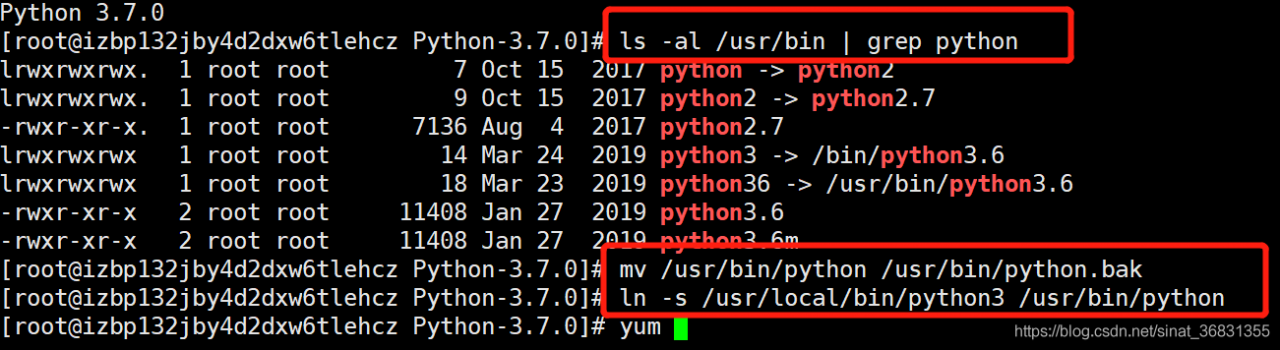
To use the new version, you need to link to the new version of Python (see the Python path, under /usr/bin. You can see the Python link is Python 2.7.

$ls -al /usr/bin | grep python

Rename the original Python soft link:

 $mv /usr/bin/python /usr/bin/python.bak

Link Python to Python 3:

$ln -s /usr/local/bin/python3 /usr/bin/python


3. YUM cannot be used after changing the version
The terminal input yum list and report an error

$yum list
File "/usr/bin/yum", line 30
    except KeyboardInterrupt, e:

SyntaxError: invalid syntax

Modify /usr/bin/yum and /usr/libexec/urlgrabber-ext-down to #! The/usr/bin/python to #! /usr/bin/python2.7 = /usr/bin/python2.7 = /usr/bin/python2.7

$vi /usr/bin/yum
$vi /usr/libexec/urlgrabber-ext-down

 
4. If you do not have root access, you will need to update the PIP after you update Python. Installation steps are as follows:
Download address: https://pypi.org/project/pip/#files
Install command: pip3 install – install – option = “– prefix =/GPFS/home/chengqy/soft/path” PIP – 20.1.1 – py2. Py3 – none – any. WHL