Category Archives: How to Fix

Error in pushing git code to gitee by vscode:! [remote rejected] Master – > Master (pre receive hook declined)

Error reporting environment: vscode + git 2.28.0. Windows. 1 + gitee code management

Error content:

When using vscode to push code to gitee, use git push origin develop:develop After , the following error occurred.

// An highlighted block
remote: This repository(including wiki) size 1418.54 MB, exceeds 1024.00 MB.
remote: Push rejected for repository size exceeds limit.
remote: HelpLink:           https://gitee.com/help/······
remote: Repository GC:      https://gitee.com/······
remote: Enterprise Edition: https://gitee.com/······
To gitee.com:filename.git
 ! [remote rejected] develop -> develop (pre-receive hook declined)
error: failed to push some refs to 'gitee.com:filename.git'

resolvent:

The total number of warehouse files in gitee is too large, which exceeds the upper limit of gitee storage. After streamlining the warehouse files, successfully push .

The nvidia-smi has failed because it could’t communicate with the NVIDIA driver

I installed the driver successfully before. After a period of time, NVIDIA SMI found that the problem was still that one. Some blogs explained that the driver couldn’t work properly because of the kernel update of Ubuntu. The following method is effective without reloading NVIDIA driver.

    check drive

     nvcc -V 
    

    If the driver exists, the next step will be taken.
    2.

    sudo apt-get install dkms
    sudo dkms install -m nvidia -v 418.56
    

    418.56 is the version number of NVIDIA. When you don’t know, you can see the NVIDIA folder in the / usr / SRC directory, and the suffix is the version number.

    After success, NVIDIA SMI finds that the driver of the graphics card is normal.

    Reference: unable to connect NVIDIA driver: nvidia-smi has failed because it could’t communicate with the NVIDIA driver

urlopen error unknown url type:httpë/HTTP Error 400:Bad Request

DevTools listening on ws://127.0.0.1:18388/devtools/browser/166d68b9-5bd6-4eaf-9c9c-90b26921a7ae
Traceback (most recent call last):
  File "C:\Users\yanghang\Desktop\comic.py", line 39, in <module>
    urllib.request.urlretrieve(**thisurl2**,filename=localpath)
  File "F:\Python\lib\urllib\request.py", line 248, in urlretrieve
    with contextlib.closing(urlopen(url, data)) as fp:
  File "F:\Python\lib\urllib\request.py", line 223, in urlopen
    return opener.open(url, data, timeout)
  File "F:\Python\lib\urllib\request.py", line 526, in open
    response = self._open(req, data)
  File "F:\Python\lib\urllib\request.py", line 549, in _open
    'unknown_open', req)
  File "F:\Python\lib\urllib\request.py", line 504, in _call_chain
    result = func(*args)
  File "F:\Python\lib\urllib\request.py", line 1388, in unknown_open
    raise URLError('unknown url type: %s' % type)
urllib.error.URLError:  urlopen error unknown url type: "http

To solve this problem, I have tried many methods on the Internet. But I found that there is no error when I change thisurl2 to a certain URL, so the easiest way is to put all the URLs in a list first, and then call it

Python: crawler handles strings of XML and HTML

When crawling a web page, sometimes the data returned by the web page is XML or HTML fragments, which needs to be processed and analyzed by yourself. After searching the processing methods on the Internet, here is a summary.
First, let’s give a simple “Crawler”:

import urllib2
def get_html(url,response_handler):
    response=urllib2.urlopen(url)
    return response_handler(response.read())

#crawl the page
get_html("www.zhihu.com/topics",html_parser)

The above is to get a single page of the “Crawler”, it is indeed very simple, but also describes the core process of crawler: grab the web page and analyze the web page.
The process of crawling web pages is basically solidified, and our focus is on response_ In the handler, this parameter is the method of analyzing web pages. In some popular crawler frameworks, we mainly need to complete the process of analyzing web pages. The example above uses XML_ The parser function, do not think that there is a default implementation (in fact, there is no), let’s complete this function:

#Use lxml library to analyze web pages, the detailed use of this library can be Google
import lxml.etree
def html_parser(response):
    page=lxml.etree.HTML(response)
    #XPATH is used here to fetch the elements, XPATH usage on your own Google
    for elem in page.xpath('//ul[@class="zm-topic-cat-main"]/li'):
        print elem.xpath('a/text()')[0]

We used it lxml.etree.HTML () load the content of the web page. The returned object can use XPath to retrieve the elements of the web page. It seems that it also supports CSS syntax to retrieve elements. For details, please refer to the relevant documents. The above analysis function completes printing the names of all categories.

For the method of parsing XML strings, it is similar to the above, with the following examples:

import lxml.etree
def xml_parser(response):
    page=lxml.etree.fromstring(response)
    #do what you want
    pass

That’s all for now

Wechat payment API V3 payment notice asynchronous signature verification failed

WeChat payment V3 asynchronous check failed
Here we receive parameters (message body) generally through the framework of the built-in request.
TP6: $this-> request-> param();
if you use the receive mode in here to convert the json attestation will fail.
We need to use the native receive method: file_get_contents(‘ PHP ://input ‘);
directly take the data after receiving the signature verification.

public function verifySign()
    {
        $timestamp = "Timestamp in header header";
        $nonce = "random string in header header";
        $signature = "signature in header header";
        $certZs = "Platform certificate";//        $data = $this->request->param();
        $data = file_get_contents('php://input');

        $message = "$timestamp\n$nonce\n$data\n";

        //Verify signature

        if (!$this->verify($message, $signature, $certZs)) {
            throw new \Exception('Failed visa check', 123456);
        }
    }123456789101112131415161718

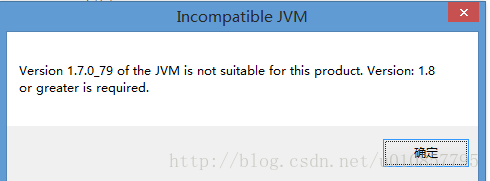
Eclipse specifies JDK version to start, and resolves version XXXX of the JVM is not suitable

How to Fix Version XXXX of the JVM is not suitable for this product.Version:XXXXXX or greater is required。

Verson1.7.0_79 of the JVM is not suitable for this product Version:1.8 or greater is required

Configure the eclipse.ini file under the Eclipse folder.
add the following fields:

D: vm/jdk1.8.0 _40/bin/and \
it’s complete configuration:

-vm
D:/jdk1.8.0_40/bin
-startup
plugins/org.eclipse.equinox.launcher_1.3.201.v20161025-1711.jar
--launcher.library
plugins/org.eclipse.equinox.launcher.win32.win32.x86_64_1.1.401.v20161122-1740
-product
org.eclipse.epp.package.jee.product
--launcher.defaultAction
openFile
-showsplash
org.eclipse.platform
--launcher.defaultAction
openFile
--launcher.appendVmargs
-vmargs
-Dosgi.requiredJavaVersion=1.8
-XX:+UseG1GC
-XX:+UseStringDeduplication
-Dosgi.requiredJavaVersion=1.8
-Xms256m
-Xmx1024m

Nvidia-smi has failed because it could’t communicate with the NVIDIA driver

NVIDIA-SMI error:
NVIDIA-SMI has failed because it couldn’t communicate with the NVIDIA driver. Make sure that the latest NVIDIA driver is installed and running
This is a common problem that often occurs in Ubuntu systems, mainly because the kernel has been upgraded and the new kernel does not match the old graphics driver
Solution 1:
Just execute two commands:
Sudo apt-get install DKMS

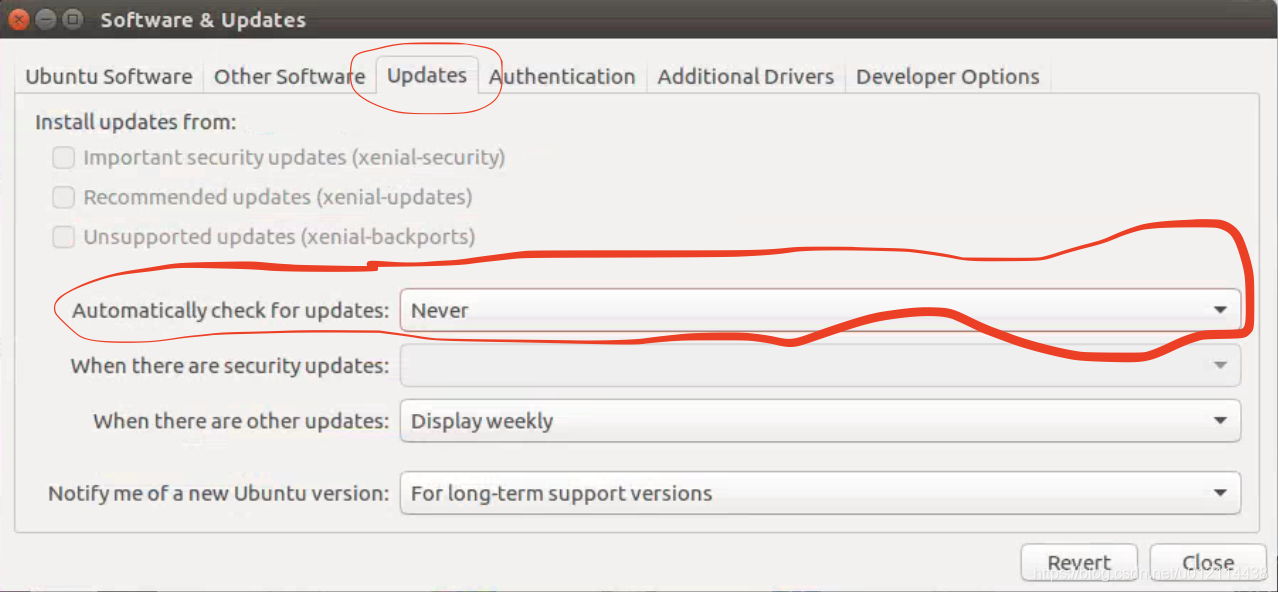
Set all the “1” in the double quotation marks to “0”, and save after modification.
To turn off auto-update using a graphical interface, go to System Settings –>; Software Update (Software & Updates)

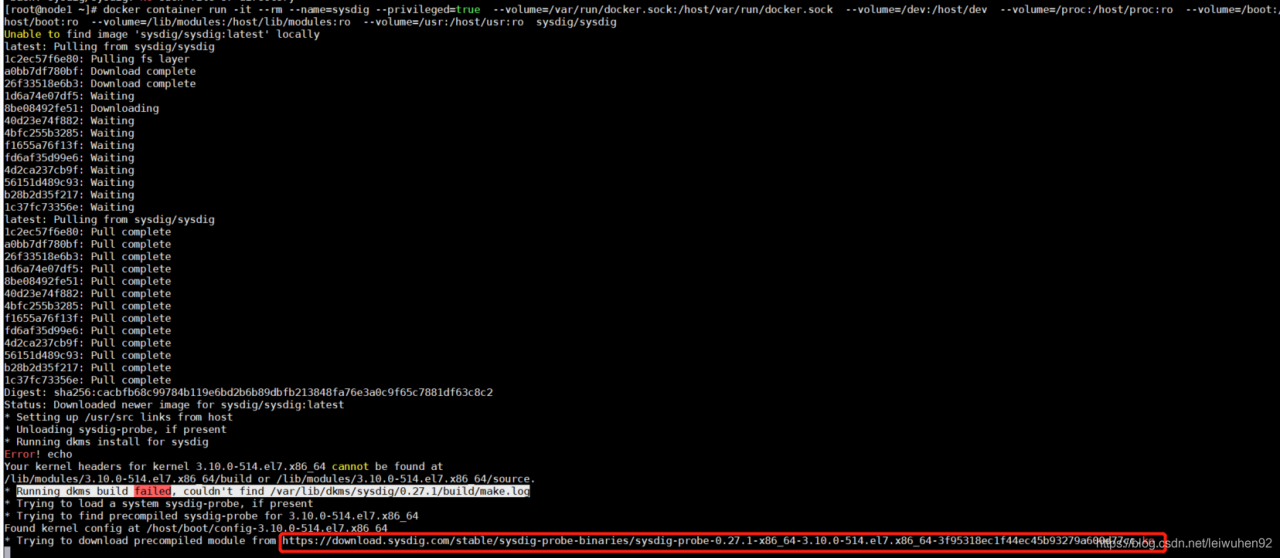
Docker installation sysdig error: running DKMS build failed, could’t find / var / lib / DKMS / sysdig / 0.27.1/build/ make.log

Docker sysdig installation error:

According to the online https://www.cnblogs.com/lkun/p/7898900.html centos7 install docker monitoring – sysdig (solve installation errors) did not successfully solved
 
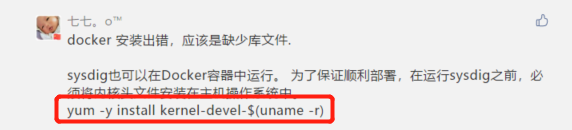
Then I saw this reply under Cloudman’s message:

 
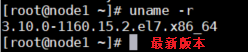
1, his host host kernel upgrade, upgrade instructions: yum update – y kernel, using the uname -r see if upgrade success

2. Install yum -y kernel-devel-$(uname -r) to install the kernel header file in the host operating system
Sysdig command: sysdig command

docker container run -it --rm --name=sysdig --privileged=true  --volume=/var/run/docker.sock:/host/var/run/docker.sock  --volume=/dev:/host/dev  --volume=/proc:/host/proc:ro  --volume=/boot:/host/boot:ro  --volume=/lib/modules:/host/lib/modules:ro  --volume=/usr:/host/usr:ro  sysdig/sysdig

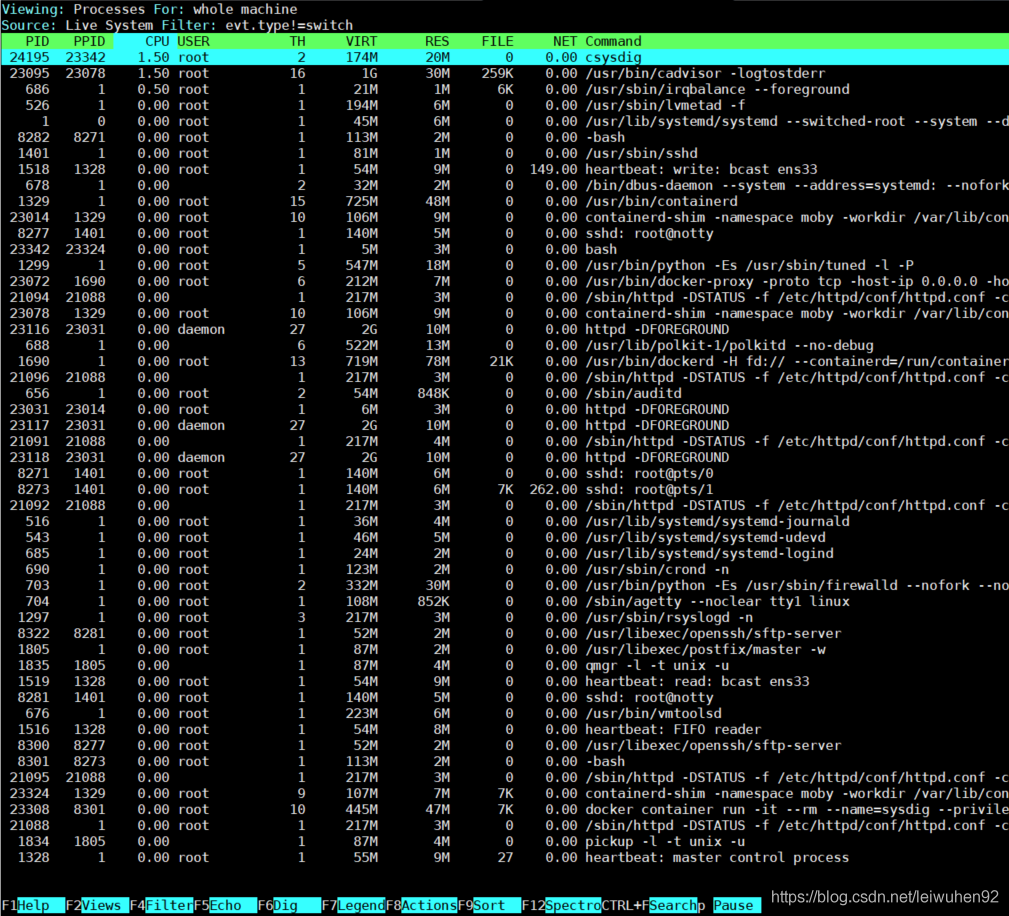
Input csysdig:


Implementation of HTTPS file server based on nginx in win2012

Nginx and openssl: http://nginx.org/en/download.html

http://slproweb.com/products/Win32OpenSSL.html
Environment variable:
c:\ openssl-win64 \bin
th variable add %OPENSSL_HOME%

openssl genrsa -des3 -out xxx.key 1024
openssl req -new -key xxx.key -out xxx.csr
cp xxx.key xxx.key.org
openssl rsa -in xxx.key.org -out xxx.key
openssl x509 -req -days 365 -in xxx.csr -signkey xxx.key -out xxx.crt

Start nginx after modifying nginx.conf

server {
        listen       443 ssl;
        server_name  localhost;
		ssl_certificate      C://nginx-1.18.0//ssl//xxx.crt;
	    ssl_certificate_key  C://nginx-1.18.0//ssl//xxx.key;
        
		#charset koi8-r;

        #access_log  logs/host.access.log  main;

	    ssl_session_cache    shared:SSL:1m;
	    ssl_session_timeout  5m;
	
	    ssl_ciphers  HIGH:!aNULL:!MD5;
	    ssl_prefer_server_ciphers  on;

     location /update {
	        alias C:/hy-8000;
			allow all;
			autoindex on;

	        proxy_set_header   X-Real-IP            $remote_addr;
	        proxy_set_header   X-Forwarded-For  $proxy_add_x_forwarded_for;
	        proxy_set_header   Host                   $http_host;
	        proxy_set_header   X-NginX-Proxy    true;
	        proxy_set_header   Connection "";
	        proxy_http_version 1.1;
     }

Analysis of JDBC connection to MySQL

JDBC connection to MySQL problem resolution
Recently, a series of problems occurred while configuring JDBC to connect to MySQL. Fortunately, it all worked out in the end. Here is a summary of the problems, hoping to help others with the same problems.
BlueStragglers shares the joy of technology growth

directory
A JDBC connection to MySQL analytical error: com.mysql.jdbc.exceptions.jdbc4.Com municationsException: Communications link failure2. Unknown initial character set index ‘255’ received from server.Initial client character3. Error: references to the entity ‘characterEncoding’ must begin with ‘; ‘End of delimiter 4. Reference content

1. An error: com.mysql.jdbc.exceptions.jdbc4.Com municationsException: Communications link failure
This problem is most likely due to a problem with the mysql-connector-java version of the pom.xml file. I started with version 5.1.44 and found that I kept reporting this error. This issue can be resolved by returning 5.1.6.
Of course, there is another case where this error is reported: MySQL Server will automatically disconnect and report an error if the connection takes more than 8 hours. The solution is usually to modify the configuration file.
Unknown initial character set index ‘255’ received from server.Initial client character
This problem is generally caused by the occurrence of Chinese in MySQL, which can not be properly resolved. The solution is to put a UTF8 encoding requirement at the end of the URL to avoid errors. For example, the source statement is:

<property name="url" value="jdbc:mysql://10.201.0.27:3307/mybatis"/>

This can be modified to the following statement:

<property name="url" value="jdbc:mysql://10.201.0.27:3307/mybatis?useUnicode=true&amp;characterEncoding=utf8"/>

3. Error: references to the entity ‘CharacterEncoding’ must begin with ‘; ‘End of the delimiter
Encounter this problem, I am quite surprised, actually is Chinese report error. It was later discovered that MySQL had a problem with characterEncoding= UTF8, so it may have been for this reason that the error was reported in Chinese.
& & instead. For example, the following statement:

<property name="url" value="jdbc:mysql://localhost:3306/mybatis?useSSL=true&characterEncoding=utf8" />

The above statement will report an error. If you need to modify it to the following statement, it will not report an error:

<property name="url" value="jdbc:mysql://localhost:3306/mybatis?useSSL=true&amp;characterEncoding=utf8" />

4. References

    JDBC connection to MySQL references to the entity 'CharacterEncoding' must begin with '; 'End of delimiter
Detecting memory consumption by Python program

First install the memory_profiler and psutil (psutil is mainly used to improve the performance of memory_profile, recommended) (you can use PIP directly)
PIP install memory_profiler
p install psutil
Mprof run test. Py generates a
results. Dat file, such as “mprofile_20160716170529. Dat”, which records the memory along with the change of time
mprof plot
using the commands in the form of pictures showing
the original:
https://blog.csdn.net/baidu_33122327/article/details/79195176