Category Archives: How to Fix

Solution to the problem that the camera can’t display when ROS running

report errors:

Unable to open camera calibration file [/home/hri/.ros/camera_ info/head_ camera.yaml ]

reference resources:

https://github.com/ros-drivers/usb_ cam/issues/53
https://answers.ros.org/question/217806/rospack-error-package-image_ view-not-found/

reason:

The main reason is that image is not installed_ View
ahaaha

terms of settlement:

sudo apt-get install ros-indigo-image-view

ROS package ROS_ astra_ Camera cannot open RGB lens

ROS package ROS_ astra_ Camera cannot open RGB lens

https://github.com/orbbec/ros_ astra_ Camera
the official document mentions opening depth and RGB lens with the following command:
roslaunch Astra_ camera stereo_ s.launch

After executing the above command, use rqt_ image_ View can see the depth image, but not the RGB image, and an error is reported:
[camera / stereo]_ s-2] process has died [pid 8255, exit code 255, cmd /home/riki/gxb_ workspace/devel/lib/astra_ camera/camera_ node /camera/image_ raw:=/camera/rgb/image_ raw __ name:=stereo_ s __ log:=/home/riki/.ros/log/071dba06-7bcb-11eb-a85a-000c293dff09/camera-stereo_ s-2.log].
log file: /home/riki/.ros/log/071dba06-7bcb-11eb-a85a-000c293dff09/camera-stereo_ s-2*.log

The solution: open stereo_ s. In the launch file, change the value in this line to your device’s camera number. For example, my device’s camera number is 0x0502, so you can open the RGB lens.

The camera number can be viewed through lsusb command:
gxb_ workspace/src/ros_ astra_ camera/launch$ lsusb
Bus 001 Device 004: ID 2bc5:0403
Bus 001 Device 003: ID 2bc5:0502
Bus 001 Device 002: ID 04f2:b64f Chicony Electronics Co., Ltd
Bus 001 Device 001: ID 1d6b:0002 Linux Foundation 2.0 root hub
Bus 002 Device 004: ID 0e0f:0008 VMware, Inc.
Bus 002 Device 003: ID 0e0f:0002 VMware, Inc. Virtual USB Hub
Bus 002 Device 002: ID 0e0f:0003 VMware, Inc. Virtual Mouse
Bus 002 Device 001: ID 1d6b:0001 Linux Foundation 1.1 root hub

Springboot startup error: java.lang.IllegalArgumentException : Property ‘sqlSessionFactory’ or ‘sqlSessionTempla

Refer to this blog: https://www.cnblogs.com/dbaxyx/p/10663485.html

Error information:

Caused by: java.lang.IllegalArgumentException : Property ‘sqlSessionFactory’ or ‘sqlSessionTemplate’ are required
    at org.springframework.util . Assert.notNull ( Assert.java:198 )
    at org.mybatis.spring . support.SqlSessionDaoSupport.checkDaoConfig ( SqlSessionDaoSupport.java:74 )
    at org.mybatis.spring . mapper.MapperFactoryBean.checkDaoConfig ( MapperFactoryBean.java:90 )
    at org.springframework.dao . support.DaoSupport.afterPropertiesSet ( DaoSupport.java:44 )
    at org.springframework.beans . factory.support.AbstractAutowireCapableBeanFactory .invokeInitMethods(AbstractAutowi reCapableBeanFactory.java:1837 )
    at org.springframework.beans . factory.support.AbstractAutowireCapableBeanFactory .initializeBean(AbstractAutowi reCapableBeanFactory.java:1774 )
    … 56 common frames omitted

This is because there is no package introduced:

<dependency>
    <groupId>org.mybatis.spring.boot</groupId>
    <artifactId>mybatis-spring-boot-starter</artifactId>
    <version>1.3.2</version>
</dependency>

Just import (pay attention to jar package conflicts)

SSH appears warning: remote host identification has changed!

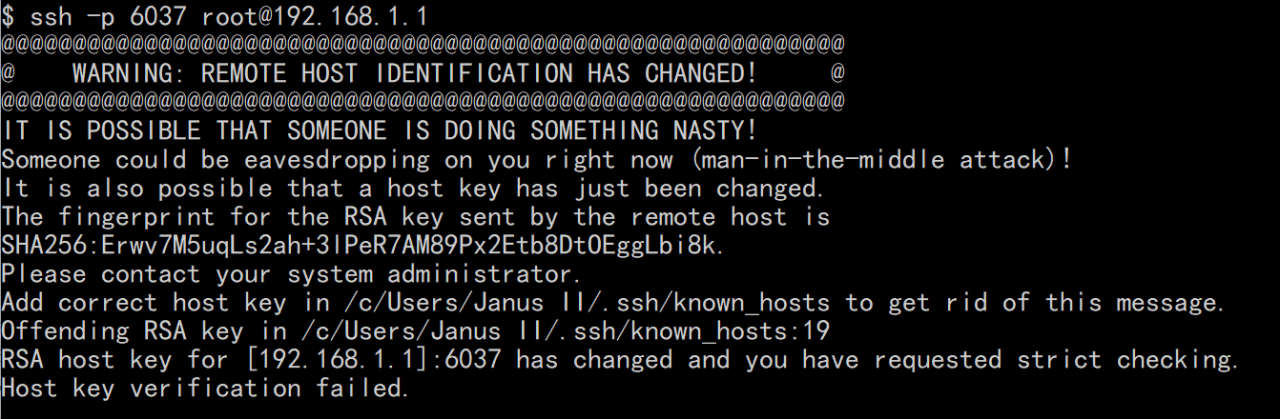
WARNING: REMOTE HOST IDENTIFICATION HAS CHANGED!

When SSH is used to connect remote address: port for the first time, the remote public key will be saved to known_ In hosts , form a record

If the same remote address is detected during the second connection: the public key of the port is the same as known_ When the records in hosts are different, this warning will be generated

This means that the remote device has been changed

In the local environment, because the device pointed to by the remote address is replaced, the public key is different, and the remote device is still secure

So the solution here is:

    Notepad + + Open know_ Host delete the record of the corresponding remote address

After that, you can get the new public key by re SSH connection

The principle of deformable convolution

The concept of     deformable convolution was proposed in the paper: deformable convolutional networks
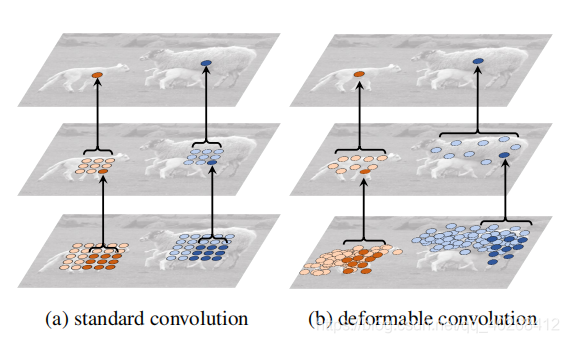
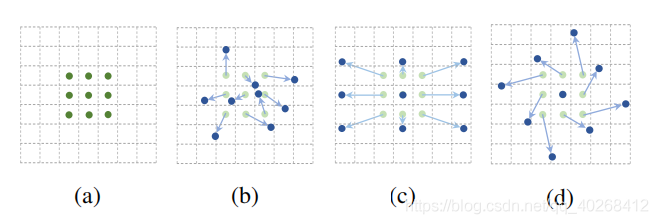
in this paper    as the name suggests, deformable convolution is derived from the concept of standard convolution. In standard convolution operation, the convolution core’s action area is always in the rectangular area of the size of the standard convolution core around the center point (as shown in figure a below), while deformable convolution can be an irregular area (as shown in Figure B, C, D below, where the offset of B is random; C, D are special cases).

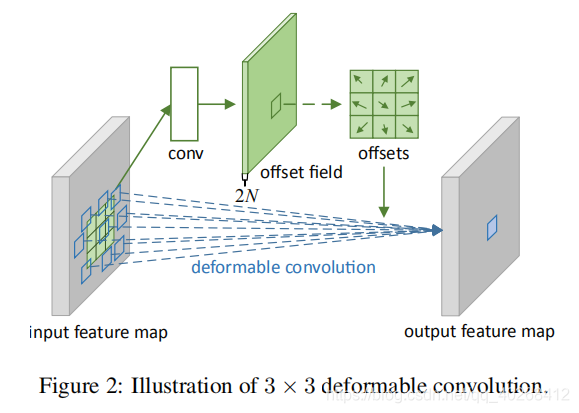
The implementation method of     deformation convolution is shown in the following figure:

The dimension information of each part is as follows:
     input feature map: (batch, h, W, c)
    output feature map: (batch, h, W, n)
    offset field: (batch, h, W, 2n)
     offset field is obtained by standard convolution operation on the original graph, and the number of channels is 2n, which means n 2-dimensional offsets

x

y

(△x,△y)

(△ x, △ y), n is the number of convolution kernels, that is, the number of channels of output characteristic layer. The process of deformation convolution can be described as follows: firstly, standard convolution is performed on the input feature map to obtain n 2-dimensional offsets

x

y

(△x,△y)

(△ x, △ y), and then modify the values of each point on the input feature map (let feature map be

P

P

P. Namely

P

x

y

=

P

x

+

x

y

+

y

P(x,y)=P(x+△x,y+△y)

P (x, y) = P (x + △ x, y + △ y), when

x

+

x

x+△x

When x + △ x is a fraction, bilinear interpolation is used

P

x

+

x

y

+

y

P(x+△x,y+△y)

P(x+△x,y+△y))。 Form n feature maps, and then use n convolution kernels to convolute one by one to get the output.
The calculation results of   standard convolution and deformation convolution are shown in the following figure:

Solve the problem of unable to start under zookeeper Linux

When installing zookeeper under Linux, the following error occurs:

[ hadoop@hadoop-master bin]$ ./ zkServer.sh start

JMX disabled by user request

Using config: /opt/zookeeper-3.3.3/bin/../conf/ zoo.cfg

Starting zookeeper …

STARTED

[ hadoop@hadoop-master bin]$ 2011-07-05 10:33:57,587 – INFO [ main:QuorumPeerConfig@90 ] – Reading configuration from: /opt/zookeeper-3.3.3/bin/../conf/ zoo.cfg

2011-07-05 10:33:57,596 – WARN [ main:QuorumPeerMain@105 ] – Either no config or no quorum defined in config, running in standalone mode

Exception in thread “main” java.lang.NoSuchMethodError : method java.lang.management . ManagementFactory.getPlatformMBeanServer with signature () Ljavax.management.MBeanServer ; was not found.

at org.apache.zookeeper . jmx.ManagedUtil.registerLog4jMBeans ( ManagedUtil.java:48 )

at org.apache.zookeeper . server.ZooKeeperServerMain.initializeAndRun ( ZooKeeperServerMain.java:73 )

at org.apache.zookeeper . server.ZooKeeperServerMain.main ( ZooKeeperServerMain.java:51 )

at org.apache.zookeeper . server.quorum.QuorumPeerMain .initializeAndRun( QuorumPeerMain.java:108 )

at org.apache.zookeeper . server.quorum.QuorumPeerMain .main( QuorumPeerMain.java:76 )

Found, not found java.lang.management The next way. If you are using the standard JDK, such an error should not occur. So check it out zkServer.sh Script. It is found that the script to start the Java program is as follows:

Bash code

java “- Dzookeeper.log.dir= ${ZOO_ LOG_ DIR}” “- Dzookeeper.root.logger= ${ZOO_ LOG4J_ PROP}” \

-cp “$CLASSPATH” $JVMFLAGS $ZOOMAIN “$ZOOCFG” &

Executing Java command directly under Linux, the output is as follows:

Bash code

[ hadoop@hadoop-master bin]$ java

Usage: gij [OPTION] … CLASS [ARGS] …

to invoke CLASS.main , or

gij -jar [OPTION] … JARFILE [ARGS] …

to execute a jar file

Try `gij –help’ for more information.

Obviously, zkServer.sh Incorrect java used. Use the Java of Gij. To solve this problem, simply change the script to:

Bash code

$JAVA_ HOME/bin/java “- Dzookeeper.log.dir= ${ZOO_ LOG_ DIR}” “- Dzookeeper.root.logger= ${ZOO_ LOG4J_ PROP}” \

-cp “$CLASSPATH” $JVMFLAGS $ZOOMAIN “$ZOOCFG” &

After this modification, it can run normally.

It is mainly to replace the system’s own Java path, so that he can identify his own installed Java (it’s better to delete the system’s own JDK before installing software)
Starting zookeeper to report an error already running as process

An error was reported when starting zookeeper today:

[ root@hadoop-one zookeeper-3.4.5]# bin/ zkServer.sh start
JMX enabled by default
Using config: /root/zookeeper/zookeeper-3.4.5/bin/../conf/ zoo.cfg
Starting zookeeper … already running as process 947..

Looking at the next 947 process, it is found that it is a Linux system process and should not conflict. I also checked several port numbers that zookeeper will use, and none of them is occupied.

Then open bin/ zkServer.sh Start the script and search the place where the above sentence will be thrown:

    echo  -n "Starting zookeeper ... "
    if [ -f $ZOOPIDFILE ]; then
      if kill -0 `cat $ZOOPIDFILE` > /dev/null 2>&1; then
         echo $command already running as process `cat $ZOOPIDFILE`.
         exit 0
      fi
    fi

When you see $zoopidfile, you think that the process ID file already exists, causing it to fail to start.

Go to dataDir and have a look. Sure enough, there is a zookeeper_ server.pid The last revision was a few days ago. Because the machine was shut down due to abnormal power failure last time, it probably caused the residue of this PID file.

Delete, restart, OK.

Starting zookeeper… Already running as process 1949

For example, zookeeper was not started repeatedly, but was started for the first time. The reason may be that zookeeper cluster is not shut down normally, such as abnormal shutdown, power failure, etc. Zookeeper saves the last started process number in zookeeper_ server.pid In this file, this file is in zookeeper_ HOME/conf/ zoo.cfg In the directory specified by the dataDir configuration item in, delete the file directly, and then restart zookeeper.

Friendly tips: do not shut down the virtual machine directly, but use the script to shut down the cluster first, otherwise some unexpected exceptions may appear next time.

@Value sets the default value

When using @ value annotation to automatically inject variables, a common problem is that we may forget to set the parameter in the configuration parameter, resulting in an error in the whole project. In fact, we can set a default value when injecting the @ value annotated variable. If the configuration parameter is not found, it is equivalent to a way to get the bottom of the story Case No

Usage without default value:

@Value("${spring.port}")
private String port;

To increase the default value:

@Value("${spring.port:8080}")
private String port;

Here we need to pay attention to:

Even if the value of your configuration parameter is string type, you don’t need to add double quotation marks. Static modified variables will fail to be injected through @ value

If it is necessary to set the value of @ value to the static variable due to specific requirements, the following method can be used

Use @ value to set the value of static variable

public static String port;

@Value("${spring.port:8080}")
public void setPort(String port){
	Class.port = port;
}

Array of PHP_ diff,array_ intersect,array_ merge, in_ Is there a limit on the number of arrays in array?

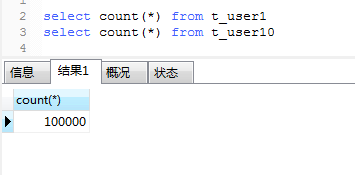
1. First of all, I build a table of 10W data.

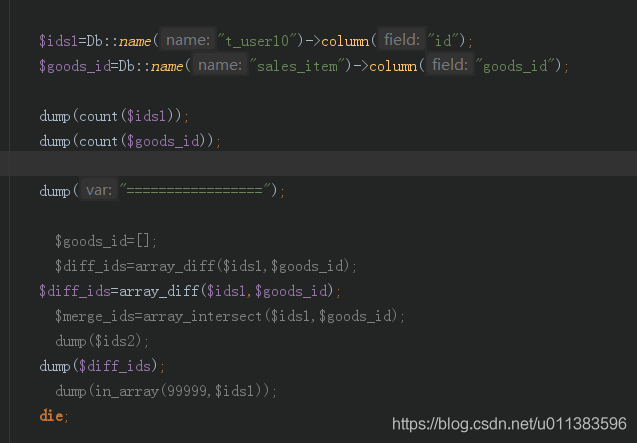
2. Use the method in TP to take out the column for array_ diff,array_ intersect,array_ Merge can calculate the normal output, and the response is millisecond.

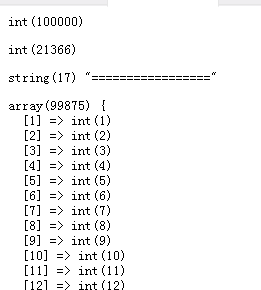
(the figure below is the result of normal calculation)

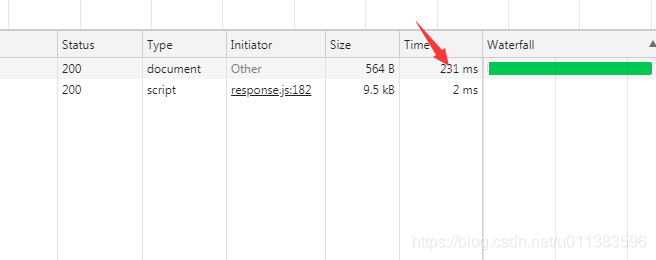
(the following figure shows the response in seconds. Of course, you can also measure the time-consuming of this code. If I have less time, I will not measure it.)